Products
Tested using Methodology v2.0.1
Updated Apr 17, 2026 03:34 PM
SEE PRICE
Amazon
Tested using Methodology v2.1.2
Updated Jun 26, 2026 04:50 PM
SEE PRICE
LG.com


Size
27"
Panel Type
IPS
Native Resolution
3840 x 2160
Max Refresh Rate
160 Hz
Size
27"
Panel Type
LCD
Native Resolution
3840 x 2160
Max Refresh Rate
160 Hz
Sub-Type
IPS
Our Verdict
INNOCN 27M2V
LG 27GR95UM-B
The LG 27GR95UM-B and the INNOCN 27M2V are 4k gaming monitors with Mini LED backlighting and similar features. However, there are a few differences in performance, as the INNOCN has a better local dimming feature, more accurate colors, and better motion handling. However, the LG has a lower input lag at 60Hz, making it the better choice for gaming at that refresh rate.
Variants
- 27M2V (27")
- 27GR95UM-B (27")
Check Price
27"
27M2V
SEE PRICE
Amazon
27"
27GR95UM-B
SEE PRICE
LG.com
27"
27M2V
SEARCH
B&H
27"
27GR95UM-B
SEARCH
Amazon
27"
27M2V
SEARCH
BestBuy.com
27"
27GR95UM-B
SEARCH
B&H
27"
27M2V
SEARCH
INNOCN
27"
27GR95UM-B
SEARCH
BestBuy.com
27"
27M2V
SEARCH
Walmart.com
27"
27GR95UM-B
SEARCH
Walmart.com
Main Differences for
PC Gaming
PC Gaming
Threshold
PC Gaming
Full Comparison
Design
Style
Design Picture

Curved
Curve Radius
Accelerated Longevity Test
Uniformity Pictures
Longevity Graph
Build Quality
Build Quality Picture

Ergonomics
Ergonomics Picture

Back Picture

Height Adjustment
Min Height To Top Of Panel
Tilt Range
Rotate Portrait/Landscape
Swivel Range
Wall Mount
Stand
Stand Picture

Thickness Picture

Base Width
Base Depth
Thickness (With Display)
Weight (With Display)
Display
Display Picture

Size
Housing Width
Housing Height
Thickness (Without Stand)
Weight (Without Stand)
Borders Size (Bezels)
Controls
Controls Picture

In The Box
In The Box Picture

Power Supply
Picture Quality
Contrast
Checkerboard Picture

Native Contrast
Contrast With Local Dimming
Local Dimming
Local Dimming Video

Local Dimming
Backlight
SDR Brightness
Real Scene
Peak 2% Window
Peak 10% Window
Peak 25% Window
Peak 50% Window
Peak 100% Window
Sustained 2% Window
Sustained 10% Window
Sustained 25% Window
Sustained 50% Window
Sustained 100% Window
Automatic Brightness Limiting (ABL)
Minimum Brightness
HDR Brightness
EOTF

VESA DisplayHDR Certification
Real Scene
Peak 2% Window
Peak 10% Window
Peak 25% Window
Peak 50% Window
Peak 100% Window
Sustained 2% Window
Sustained 10% Window
Sustained 25% Window
Sustained 50% Window
Sustained 100% Window
Automatic Brightness Limiting (ABL)
Gray Uniformity
50% Uniformity Picture

50% Std. Dev.
50% DSE
Black Uniformity
Native Black Uniformity Picture

Native Std. Dev.
Black Uniformity Picture With Local Dimming

Std. Dev. w/ L.D.
Vertical Viewing Angle
Vertical Viewing Angle Video


Vertical Chroma Graph

Color Washout From Below
Color Washout From Above
Vertical Hue Graph

Color Shift From Below
Color Shift From Above
Vertical Lightness Graph

Brightness Loss From Below
Brightness Loss From Above
Black Level Raise From Below
Black Level Raise From Above
Gamma Shift From Below
Gamma Shift From Above
Color Accuracy (Pre-Calibration)
Pre Calibration Picture

Pre Gamma Curve Picture

Pre Color Picture

Picture Mode
sRGB Gamut Area xy
White Balance dE (Avg.)
Color Temperature (Avg.)
Gamma (Avg.)
Color dE (Avg.)
Contrast Setting
RGB Settings
Gamma Setting
Brightness Setting
Measured Brightness
Brightness Locked
Color Accuracy (Post-Calibration)
Post Calibration Picture

Post Gamma Curve Picture

Post Color Picture

Picture Mode
sRGB Gamut Area xy
White Balance dE (Avg.)
Color Temperature (Avg.)
Gamma (Avg.)
Color dE (Avg.)
Contrast Setting
RGB Settings
Gamma Setting
Brightness Setting
Measured Brightness
ICC Profile
SDR Color Gamut
sRGB Color Gamut Picture

sRGB Coverage xy
sRGB Picture Mode
Adobe RGB Color Gamut Picture

Adobe RGB Coverage xy
Adobe RGB Picture Mode
HDR Color Gamut
Wide Color Gamut
DCI-P3 Color Gamut Picture

DCI-P3 Coverage xy
DCI-P3 Picture Mode
Rec. 2020 Color Gamut Picture

Rec. 2020 Coverage xy
Rec. 2020 Picture Mode
HDR Color Volume
DCI-P3 Color Volume ITP Picture

1,000 cd/m² DCI-P3 Coverage ICtCp
DCI-P3 Picture Mode
Rec. 2020 Color Volume ITP Picture

10,000 cd/m² Rec. 2020 Coverage ICtCp
Rec. 2020 Picture Mode
Viewing Angle
Viewing Angle Video

Chroma Graph

Color Washout From Left
Color Washout From Right
Hue Graph

Color Shift From Left
Color Shift From Right
Lightness Graph

Brightness Loss From Left
Brightness Loss From Right
Black Level Raise From Left
Black Level Raise From Right
Gamma Shift From Left
Gamma Shift From Right
Text Clarity
ClearType On

ClearType Off

Pixel Type
Pixels

Subpixel Layout
Panel Technology
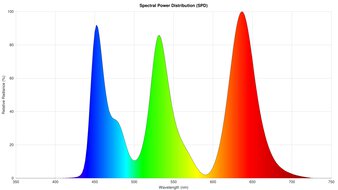
Spectral Power Distribution
Pixels
Panel Type
Sub-Type
Subpixel Layout
Reflections
Average Room

Average Room Off Picture

Bright Room Off Picture

Screen Finish
Total Reflections
Indirect Reflections
Calculated Direct Reflections
Direct Reflections
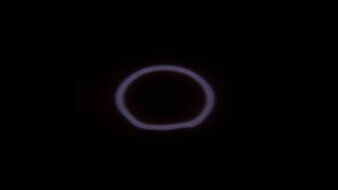
Ring Light Picture
Direct Reflections Graph
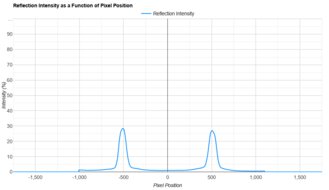
Peak Direct Reflection Intensity
Screen Finish
Ambient Black Level Raise
Black Level Raise Picture

Ambient Black Level Raise Graph
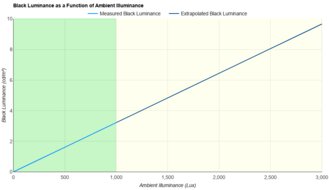
Black Luminance @ 0 lx
Black Luminance @ 1000 lx
Total Reflected Light
Bright Room Off Picture
Total Reflection Ring Light Picture
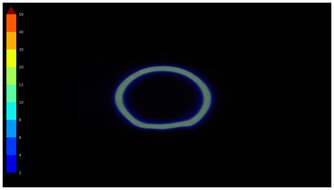
Total Reflected Light Intensity
Diffraction Artifacts
Gradient
Gradient Picture

Color Depth
Motion
Refresh Rate
Dual Mode Setting
Native Refresh Rate
Max Refresh Rate
Max Refresh Rate Over DP
Max Refresh Rate Over HDMI
Max Refresh Rate Over DP @ 10-bit
Max Refresh Rate Over HDMI @ 10-Bit
DSC Toggle
DSC Off Max Refresh Rate Over DP
DSC Off Max Refresh Rate Over HDMI
Variable Refresh Rate (VRR)
Variable Refresh Rate
FreeSync
G-SYNC
VRR Maximum
VRR Minimum
VRR Supported Connectors
VRR Motion Performance
Pursuit Photo VRR

OD Mode CAD Comparison

Recommended VRR OD Setting
Variable Overdrive Advertised
Avg. CAD
Best CAD
Worst CAD
Refresh Rate Compliance
Fast GTG Sequence

VRR Compliance

Compliance @ Max Hz
Compliance @ 120 FPS
Compliance @ 60 FPS
CAD @ Max Refresh Rate
Pursuit Photo At Max Refresh

CAD Heatmap At Max Refresh

OD Transition Max Refresh Rate
Recommended Overdrive Setting
Avg. CAD
Best 10% CAD
Worst 10% CAD
Response Time @ Max Refresh Rate
First Response Time
Total Response Time
Recommended Overdrive Setting
RGB Overshoot
Worst 10% RGB Overshoot
Worst 10% First Response Time
Worst 10% Total Response Time
Heatmap First Response

Heatmap Total Response

Heatmap RGB Overshoot

CAD @ 120Hz
Pursuit Photo 120Hz

CAD Heatmap 120Hz

OD Transition 120Hz
Recommended Overdrive Setting
Avg. CAD
Best 10% CAD
Worst 10% CAD
Response Time @ 120Hz
Worst 10% First Response Time
RGB Overshoot
Total Response Time
First Response Time
Recommended Overdrive Setting
Worst 10% Total Response Time
Worst 10% RGB Overshoot
120Hz First Response Heatmap

120Hz Total Response Heatmap

120Hz Heatmap RGB Overshoot

CAD @ 60Hz
Pursuit Photo 60Hz

CAD Heatmap 60Hz

OD Transition 60Hz
Recommended Overdrive Setting
Avg. CAD
Best 10% CAD
Worst 10% CAD
Response Time @ 60Hz
Recommended Overdrive Setting
First Response Time
Total Response Time
RGB Overshoot
Worst 10% Total Response Time
Worst 10% First Response Time
Worst 10% RGB Overshoot
60Hz First Response Heatmap

60Hz Total Response Heatmap

60Hz RGB Overshoot Heatmap

Backlight Strobing (BFI)
Backlight Strobing Picture
Backlight Strobing Frequency Picture
Backlight Strobing (BFI)
Maximum Frequency
Minimum Frequency
Longest Pulse Width Brightness
Shortest Pulse Width Brightness
Pulse Width Control
Pulse Phase Control
Pulse Amplitude Control
VRR At The Same Time
VRR Flicker
VRR Flicker Video

VRR Flicker Graph

Dark Gray Flicker
Middle Gray Flicker
Light Gray Flicker
VRR Flicker Control Setting
Image Flicker
Backlight Picture

Flicker-Free
PWM Dimming Frequency
Inputs
Input Lag
Native Resolution @ Max Hz
Native Resolution @ 120Hz
Native Resolution @ 60Hz
Backlight Strobing (BFI)
Resolution
Native Resolution
Aspect Ratio
Megapixels
Pixel Density
PS5 Compatibility
PS5 Compatibility Photo

PS5 Compatibility Table

4k @ 120Hz
4k @ 60Hz
1440p @ 120Hz
1440p @ 60Hz
1080p @ 120Hz
1080p @ 60Hz
Xbox Series X|S Compatibility
XSX Compatibility Photo

XSX Compatibility Table

4k @ 120Hz
4k @ 60Hz
1440p @ 120Hz
1440p @ 60Hz
1080p @ 120Hz
1080p @ 60Hz
Inputs Photos
Inputs 1

Inputs 2

Inputs
Inputs 1
Inputs 2
DisplayPort
DisplayPort Transmission Bandwidth
Mini DisplayPort
DVI
HDMI
VGA
HDMI 2.1 Bandwidth
Daisy Chaining
3.5mm Audio Out
3.5mm Audio In
3.5mm Microphone In
Ethernet
HDR10
Dolby Vision
USB
USB-A Ports
USB-A Rated Speed
USB-B Upstream Port
USB-C Ports
USB-C Upstream
USB-C Rated Speed
USB-C Power Delivery
USB-C DisplayPort Alt Mode
Thunderbolt
macOS Compatibility
macOS Screenshot

Features
Additional Features
Speakers
HDR10
RGB Illumination
Multiple Input Display
KVM Switch
Smart OS
On-Screen Display (OSD)
OSD Picture

Check Price
27"
27M2V
SEE PRICE
Amazon
27"
27GR95UM-B
SEE PRICE
LG.com
27"
27M2V
SEARCH
B&H
27"
27GR95UM-B
SEARCH
Amazon
27"
27M2V
SEARCH
BestBuy.com
27"
27GR95UM-B
SEARCH
B&H
27"
27M2V
SEARCH
INNOCN
27"
27GR95UM-B
SEARCH
BestBuy.com
27"
27M2V
SEARCH
Walmart.com
27"
27GR95UM-B
SEARCH
Walmart.com
INNOCN 27M2V
LG 27GR95UM-B
Comments
INNOCN 27M2V vs LG 27GR95UM-B: Main Discussion
What do you think of these products? Let us know below.
Looking for a personalized buying advice from the RTINGS.com experts? Members have direct access to buying advice on our member forum.
I have both of these monitors. I’m still amazed at how off the review for the LG monitor is. I’ve had it for over a year and updated the firmware when it was released. Rtings review reads like the monitor’s performance BEFORE the firmware update. I have had no issues with blooming or black crush(you can use the black equalizer in the two “gamer” HDR profiles to adjust any black crush. * The thing that initially ruined the 27gr95um for me and other owners of it that I have corresponded with on reddit was the constant full-screen dimming in HDR any time heavy contrast images or scenes were displayed in gaming. It was (and still is on consoles) BAD and so distracting that it’s unusable for me in HDR for many console games. I guess LG’s “fix” for the initial bad blooming was to apply an aggressive inverse ABL. I reduces the ENTIRE image by 100-200 nits! That’s just an estimation using my eyes. I could be way off, but it certainly feels like the monitor going in low power mode off and on constantly (in contrasty games). * On P.C., however, I used my graphics card settings along with RTX HDR to pretty much stop the dimming. I had to raise the brightness more than I normally would on a monitor, but also adjusting the contrast and gama helps (while not perfect, it is better than the inverse ABL dimming the screen constantly). I have not found a way to prevent the ABL dimming on consoles though. I find if I use the “FPS” preset(unfortunately, the presets: FPS, RTS, and Vivid, come with their own issues such as raised blacks, disabling black equalizer, raised blues, etc. ), it doesn’t happen quite as much, but games with lots of contrast such as Elden Ring dim every other second. Luckily local dimming with SDR looks great to me. * Also, when I can use RTX HDR to further adjust mid tones and contrast per game, it really helps and has saved the monitor for me(don’t get me wrong, it’s still broken). It’s my daily driver and, after spending hours of subtle adjustments and jumping through hoops, I prefer it over the Innocn overall(my 27m2v started randomly covering the screen with an obnoxiously bright magenta in HDR after about a year). I think the LG has a less aggressive matte finish, so everything pops more. It’s finish is somewhere in between the LG 27GP950(was my main monitor for a long time) and the Innocn. It’s close to “semi-gloss”, but not quite (I wish). *I mean no disrespect to rtings, but the 27gr95um they reviewed didn’t seem to update properly as far as firmware goes. Peace.