ASUS ROG Strix OLED XG27AQDMG  Monitor Review

Reviewed Aug 02, 2024 at 09:57am
Test bench update Nov 07, 2025 at 08:59am
Tested using Methodology v2.1.1 
ASUS ROG Strix OLED XG27AQDMG
9.0
PC Gaming 
8.3
Console Gaming 
7.1
Office 
8.6
Editing 
7.5
Brightness 
9.9
Response Time 
9.0
HDR Picture 
9.9
SDR Picture 
 344

The ASUS ROG Strix OLED XG27AQDMG is a 27-inch, 1440p gaming monitor with a 240Hz refresh rate. It has a variant sold at Best Buy called the XG27AQDMGZ. It uses Micro Lens Array+ (MLA+) technology that allows it to get bright, similar to other monitors in the Republic of Gamers (ROG) lineup, like the ASUS ROG Swift OLED PG27AQDP. It competes with other 27-inch OLED monitors, like the LG 27GS95QE-B. The XG27AQDMG includes a VRR flicker reduction feature, additional gaming features like Dynamic Shadow Boost, and an optional black frame insertion feature.

How We Test Monitors

We buy and test more than 30 monitors each year, with units that we buy completely on our own, without any cherry-picked units or samples. We put a lot into each unbiased, straight-to-the-point review, and there's a whole process from purchasing to publishing, involving multiple teams and people. We do more than just use the monitor for a week; we use specialized and custom tools to measure various aspects with objective data-based results. We also consider multiple factors before making any recommendations, including the monitor's cost, its performance against the competition, and whether or not it's easy to find.

Our Verdict

9.0
PC Gaming 

The ASUS ROG Strix OLED XG27AQDMG is fantastic for PC gaming. It has a fast 240Hz refresh rate and low input lag for a responsive feel. It delivers outstanding picture quality with deep, inky blacks, no blooming, and vivid colors. It supports all common VRR formats, and while it has noticeable VRR flicker with changing frame rates, this flicker is minimal if you're using its VRR flicker reduction feature. However, this can introduce some stuttering.

Pros
  • Deep and inky blacks.
  • 240Hz refresh rate and VRR support.
  • Near-instantaneous response time.
  • OLED Anti-Flicker setting eliminates most VRR flicker.
  • Low input lag.
  • Displays bright and vivid colors.
Cons
  • No HDMI 2.1 bandwidth.
  • OLED Anti-Flicker setting adds stuttering.
8.3
Console Gaming 

The ASUS ROG Strix OLED XG27AQDMG is great for console gaming, and it works well with the PS5. However, with the Xbox Series X|S, you have to choose between having a 60Hz refresh rate with HDR and a downscaled image or a 120Hz refresh rate without HDR. With either console it provides high-end gaming performance as it has a near-instantaneous response time, so fast-moving objects are sharp, and it has low input lag for a responsive feel. It also has exceptional picture quality with perfect blacks and no blooming around bright objects.

Pros
  • Deep and inky blacks.
  • Near-instantaneous response time.
  • OLED Anti-Flicker setting eliminates most VRR flicker.
  • Low input lag.
  • Displays bright and vivid colors.
Cons
  • No HDMI 2.1 bandwidth.
  • Can't take full advantage of gaming consoles.
7.1
Office 

The ASUS ROG Strix OLED XG27AQDMG is good for office use in certain circumstances. It has good brightness and fights glare in most well-lit rooms, but reflections look distracting. It also has great ergonomics and wide viewing angles that help you share the screen with someone else. However, it has only adequate text clarity, and text is less sharp than many other 1440p displays. Finally, OLEDs like this one are prone to burn-in with constant exposure to the same static elements over time.

Pros
  • Wide viewing angles.
  • Excellent ergonomics.
Cons
  • Disappointing reflection handling.

  • Worse text clarity than other 27-inch, 1440p monitors.
  • Risk of burn-in.
8.6
Editing 

The ASUS ROG Strix OLED XG27AQDMG is excellent for media creation but has some limitations. It has an accurate sRGB mode, though you need to calibrate it for the most accurate image. Additionally, its vivid colors and wide HDR gamut range allow you to edit videos in HDR effectively. However, text is less sharp than other 27-inch 1440p monitors. Also, OLEDs like this one are prone to burn-in with constant exposure to the same static elements over time.

Pros
  • Wide viewing angles.
  • Good accuracy before calibration.
  • Excellent ergonomics.
Cons
  • Disappointing reflection handling.

  • Worse text clarity than other 27-inch, 1440p monitors.
  • Risk of burn-in.
7.5
Brightness 

The ASUS ROG Strix OLED XG27AQDMG has good brightness. It has very good SDR brightness and is bright enough to overcome glare in most situations, though it isn't bright enough to fight very intense glare. It gets quite bright in HDR, and smaller highlights really pop, but the screen gets dimmer with larger highlights.

Pros
  • Smaller highlights pop against the rest of the image.
Cons
  • Not bright enough to fight very intense glare.
9.9
Response Time 

The ASUS ROG Strix OLED XG27AQDMG has a near-instantaneous response time, resulting in exceptionally sharp motion.

Pros
  • Near-instantaneous response time.
  • Outstanding refresh rate compliance.
Cons
None
9.0
HDR Picture 

The ASUS ROG Strix OLED XG27AQDMG is outstanding for HDR. It displays deep and inky blacks without any blooming around bright objects thanks to its near-infinite contrast ratio and perfect black uniformity. It also displays a wide range of colors and makes them look vivid. However, it has notable banding in dark content at low brightness and low refresh rates.

Pros
  • Deep and inky blacks.
  • Displays bright and vivid colors.
Cons
  • Notable banding in dark content with low brightness and low refresh rates.

9.9
SDR Picture 

The ASUS ROG Strix OLED XG27AQDMG has outstanding SDR picture quality, displaying deep and inky blacks and a wide range of colors. However, dark content has notable banding at low refresh rates when the monitor's brightness is low.

Pros
  • Deep and inky blacks.
  • No blooming around bright objects.
Cons
  • Notable banding in dark content with low brightness and low refresh rates.

8.3
Color Accuracy 

The ASUS ROG Strix OLED XG27AQDMG has great color accuracy. While it has an accurate sRGB mode, you still need to calibrate it for the best accuracy.

Pros
  • Good accuracy before calibration.
  • Excellent gray uniformity.
Cons
None
  • 9.0
    PC Gaming
  • 8.3
    Console Gaming
  • 7.1
    Office
  • 8.6
    Editing

  • Performance Usages

  • 7.5
    Brightness
  • 9.9
    Response Time
  • 9.0
    HDR Picture
  • 9.9
    SDR Picture
  • 8.3
    Color Accuracy
  • Changelog

    1.  Updated Nov 10, 2025: We've converted this review to Test Bench 2.1.1. We removed the Vertical Viewing Angle test.
    2.  Updated Oct 30, 2025: 

      Added that images and text aren't as clear as on WOLEDs with a TrueBlack Glossy coating.

    3.  Updated Jul 25, 2025: 

      Added to HDR Picture and SDR Picture in Our Verdict that there's notable banding in dark content at low brightness and low refresh rates.

    4.  Updated Jun 13, 2025: 

      We updated text throughout to match the new and updated tests with Test Bench 2.1, including in the Verdict section.

    Check Price

    27"ROG Strix OLED XG27AQDMG
    SEE PRICE
    Amazon.com
    27"ROG Strix OLED XG27AQDMGZ
    SEE PRICE
    BestBuy.com

    Differences Between Sizes And Variants

    We tested the 27-inch ASUS ROG Strix OLED XG27AQDMG, which is the only size available. It's also sold at Best Buy as the XG27AQDMGZ, and because it's the same monitor, the review is also valid for it.

    Model Size Resolution Refresh Rate Notes
    XG27AQDMG 27" 1440p 240Hz -
    XG27AQDMGZ 27" 1440p 240Hz Best Buy exclusive

    Our unit was manufactured in May 2024; you can see the label here.

    Popular Monitor Comparisons

    The ASUS ROG Strix OLED XG27AQDMG is a 27-inch gaming monitor with a 1440p resolution and 240Hz refresh rate. It's a newer monitor than the ASUS ROG Swift OLED PG27AQDM, competing against OLED monitors with the same specs. However, it's different from the competition in a few ways because it has a glossy screen, so images appear clearer than on those with a matte coating, but it has distracting reflections instead. At least it also gets much brighter than most other WOLEDs thanks to its MLA+ layer, and small highlights really pop in HDR, so in many ways, its picture quality is more in line with higher-end QD-OLED displays. That said, it doesn't have the same vivid colors as a QD-OLED.

    See our recommendations for the best 1440p monitors, the best 27-inch gaming monitors, and the best OLED monitors.

    ASUS ROG Swift OLED PG27AQDM

    The ASUS ROG Strix OLED XG27AQDMG is a newer generation of 27-inch OLED monitor than the ASUS ROG Swift OLED PG27AQDM. Some of the changes with the XG27AQDMG include a much brighter screen in SDR, a glossy finish, and the ability to display a wider range of colors in HDR, making it the better choice for most gamers. However, if you prefer a matte display and don't mind the reduced brightness, you won't be disappointed by the older PG27AQDM.

    Dell Alienware AW2725DF

    The Dell Alienware AW2725DF and the ASUS ROG Strix OLED XG27AQDMG are 27-inch OLED gaming monitors. The ASUS is a better option if you're gaming in a bright room, as it gets much brighter, and deep blacks don't appear slightly purple when there's a lot of ambient light on the screen. However, the Dell is a better choice if you play a lot of competitive games, as it has a higher refresh rate and a more responsive feel. It also displays more vivid colors in HDR, and the text looks slightly sharper.

    MSI MPG 271QRX QD-OLED

    The MSI MPG 271QRX QD-OLED and the ASUS ROG Strix OLED XG27AQDMG are 27-inch OLED gaming monitors. The ASUS is a better option if you're gaming in a bright room, as deep blacks don't appear slightly purple when there's a lot of ambient light on the screen, and it gets much brighter. However, if you like to play competitive games, the MSI is a better choice, as it has lower input lag and a higher refresh rate.

    LG 27GS95QE-B

    The LG 27GS95QE-B and the ASUS ROG Strix OLED XG27AQDMG are very similar 27-inch OLED gaming monitors. The ASUS is a better option if you prefer the vividness of a glossy screen. The ASUS is also a better choice if you find VRR flicker distracting, as it has a setting to reduce this, though it causes some stutter. However, the LG is better if you prefer a more consistent display in different lighting conditions with its matte screen. It's also a better choice if you plan to use the Xbox Series X|S with your monitor, as it's more compatible with that console.

    Show more 

    Video

    Test Results

    perceptual testing image
    Sort:
    RATINGS
    Category:
    All
    Design
    Style
    Curved
    No
    Curve Radius
    Not Curved

    The ASUS ROG Strix OLED XG27AQDMG has a gamer-oriented aesthetic that also wouldn't look out of place at an office. It features some RGB lighting on the back of the monitor.

    8.5
    Build Quality

    The build quality is excellent. It's well-made, and there aren't any significant construction issues, though there is a small amount of plastic creak in the monitor's housing. The stand is plastic but solid. There isn't any noticeable fan noise or coil whine either, even after long periods of use.

    8.7
    Ergonomics
    Min Height To Top Of Panel
    15.1" (38.4 cm)
    Height Adjustment
    4.5" (11.4 cm)
    Tilt Range
    -15° to 5°
    Rotate Portrait/Landscape
    Yes, Both Ways
    Swivel Range
    -45° to 45°
    Wall Mount
    VESA 100x100

    The ergonomics are excellent. It has amazing height adjustment, so it's easy to place in your preferred position for a long gaming session. It also has an excellent swivel range, so it's easy to share your screen with someone else. Additionally, you can route your cables through the stand for cable management.

    Stand
    Base Width
    10.6" (26.8 cm)
    Base Depth
    8.6" (21.8 cm)
    Thickness (With Display)
    6.6" (16.8 cm)
    Weight (With Display)
    14.6 lbs (6.6 kg)

    The flat stand holds the screen well, and you can place objects on top of it. There's also a groove in the stand to hold smartphones. The monitor has minimal wobble when bumped and recovers quickly.

    Display
    Size
    27"
    Housing Width
    23.9" (60.6 cm)
    Housing Height
    14.5" (36.9 cm)
    Thickness (Without Stand)
    2.2" (5.6 cm)
    Weight (Without Stand)
    9.2 lbs (4.2 kg)
    Borders Size (Bezels)
    0.4" (1.0 cm)
    Controls

    This monitor has a joystick and two buttons to control the on-screen display and power the display on and off, and they feel good to use.

    In The Box
    Power Supply
    External Brick

    • HDMI cable
    • DisplayPort cable
    • USB-B cable
    • Power cable
    • Power brick
    • Documentation
    • VESA mounting bracket
    • Cleaning cloth
    • Accessory bag
    • Stickers
    Picture Quality
    10
    Contrast
    Native Contrast
    Inf : 1
    Contrast With Local Dimming
    Inf : 1

    The ASUS ROG Strix OLED XG27AQDMG has a near-infinite contrast ratio, as its OLED panel can turn individual pixels on and off. This means it displays deep blacks next to bright highlights in dark rooms.

    10
    Local Dimming
    Local Dimming
    No
    Backlight
    No Backlight

    The ASUS ROG Strix OLED XG27AQDMG doesn't have a backlight, so it doesn't require a local dimming feature. However, with a near-infinite contrast ratio, there isn't any blooming around bright objects, and it's the equivalent of a perfect local dimming feature. We still film these videos on the monitor so you can see how the screen performs and compare it with a monitor that has local dimming.

    7.9
    SDR Brightness
    Real Scene
    334 cd/m²
    Peak 2% Window
    452 cd/m²
    Peak 10% Window
    448 cd/m²
    Peak 25% Window
    452 cd/m²
    Peak 50% Window
    336 cd/m²
    Peak 100% Window
    274 cd/m²
    Sustained 2% Window
    447 cd/m²
    Sustained 10% Window
    445 cd/m²
    Sustained 25% Window
    448 cd/m²
    Sustained 50% Window
    335 cd/m²
    Sustained 100% Window
    273 cd/m²
    Automatic Brightness Limiting (ABL)
    0.034
    Minimum Brightness
    30 cd/m²

    Settings

    • Game Visual: User Mode
    • Uniform Brightness: Off
    • Brightness: 100
    • Auto Logo Detection: Off
    • Power Setting: Standard

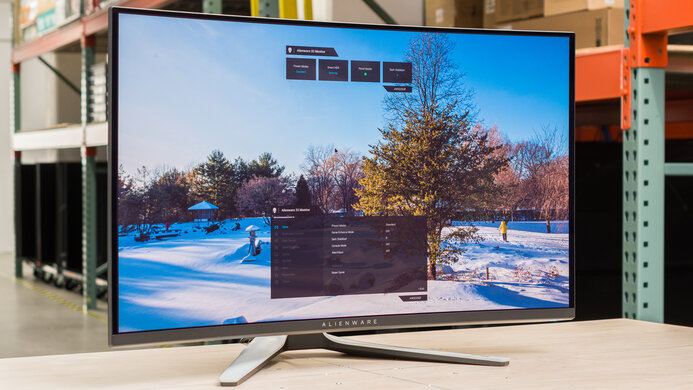
    The SDR brightness is good. It gets bright enough to fight glare in most well-lit rooms. However, with Uniform Brightness 'Off,' the screen's brightness varies depending on how much of your screen has very bright content, which could be distracting. Turning it 'On' ensures the screen's brightness doesn't vary, and you can see the results below:
    • Real Scene: 288 cd/m²
    Percent Window Peak Sustained
    2% Window 267 cd/m² 265 cd/m²
    10% Window 267 cd/m² 266 cd/m²
    25% Window 269 cd/m² 268 cd/m²
    50% Window 269 cd/m² 268 cd/m²
    100% Window 271 cd/m² 270 cd/m²
    7.3
    HDR Brightness
    VESA DisplayHDR Certification
    DisplayHDR TRUE BLACK 400
    Real Scene
    504 cd/m²
    Peak 2% Window
    1,151 cd/m²
    Peak 10% Window
    760 cd/m²
    Peak 25% Window
    445 cd/m²
    Peak 50% Window
    329 cd/m²
    Peak 100% Window
    264 cd/m²
    Sustained 2% Window
    1,115 cd/m²
    Sustained 10% Window
    747 cd/m²
    Sustained 25% Window
    440 cd/m²
    Sustained 50% Window
    328 cd/m²
    Sustained 100% Window
    264 cd/m²
    Automatic Brightness Limiting (ABL)
    0.084

    Settings

    • HDR Setting: Console HDR
    • Brightness Adjustable: On
    • Uniform Brightness: Off
    • Color Temp.: Default
    • Brightness: 100

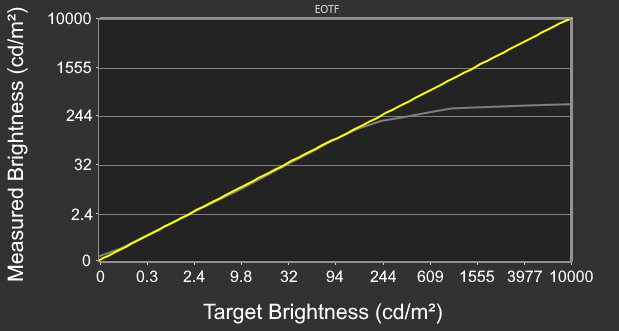
    The HDR brightness is decent. It gets bright enough to make smaller highlights pop, but it can't sustain this brightness with larger highlights, so they don't stand out as much. It follows the PQ EOTF curve fairly well until there's a very sharp roll-off at peak brightness, letting highlights get the brightest they can.

    While this monitor doesn't have a dedicated peak brightness setting, it gets much brighter with small highlights when you enable Brightness Adjustable, which is off by default, and set Brightness to '100'. Together, these settings significantly increase the maximum brightness of very small highlights, but not larger ones.

    Starting with firmware MCM104, you can turn Uniform Brightness 'On' in HDR. When you do this, the brightness is reduced but more consistent, as you can see below:

    Window Size Peak Sustained
    2% 676 cd/m² 662 cd/m²
    10% 446 cd/m² 440 cd/m²
    25% 271 cd/m² 271 cd/m²
    50% 271 cd/m² 270 cd/m²
    100% 272 cd/m² 271 cd/m²

    Firmware MCM104 also fixes any black crush, as there isn't any like on previous firmware.

    8.9
    Gray Uniformity
    50% Std. Dev.
    1.322%
    50% DSE
    0.115%

    This monitor has excellent gray uniformity, and there aren't any noticeable issues. However, like any OLED, there are thin gray vertical lines in dark scenes, but you won't notice them unless you look for them.

    10
    Black Uniformity
    Native Std. Dev.
    0.159%
    Std. Dev. w/ L.D.
    N/A

    The black uniformity is fantastic, with a uniform black level across the entire screen.

    7.9
    Color Accuracy (Pre-Calibration)
    Picture Mode
    sRGB Cal Mode
    sRGB Gamut Area xy
    106.8%
    White Balance dE (Avg.)
    3.44
    Color Temperature (Avg.)
    6,160 K
    Gamma (Avg.)
    2.44
    Color dE (Avg.)
    2.57
    Contrast Setting
    N/A
    RGB Settings
    Default
    Gamma Setting
    Default
    Brightness Setting
    40
    Measured Brightness
    120 cd/m²
    Brightness Locked
    No

    The accuracy before calibration is very good. It clamps colors to the sRGB color space well, and though it slightly oversaturates most colors it has good color accuracy. However, the color temperature is a bit warm, and the white balance is just decent. However, the gamma is off, as all parts of scenes are too dark.

    Locked-Out Settings

    • Shadow boost
    • Uniform brightness
    • Contrast
    • Blue light filter
    • All color category settings

    If you want to access these settings which are locked out in the 'sRGB Cal Mode' you need to use another mode with worse color accuracy, like User.

    9.1
    Color Accuracy (Post-Calibration)
    Picture Mode
    User Mode
    sRGB Gamut Area xy
    105.9%
    White Balance dE (Avg.)
    0.61
    Color Temperature (Avg.)
    6,568 K
    Gamma (Avg.)
    2.19
    Color dE (Avg.)
    1.03
    Contrast Setting
    80
    RGB Settings
    100-100-100
    Gamma Setting
    2.2
    Brightness Setting
    31
    Measured Brightness
    100 cd/m²
    ICC Profile
    Download

    The accuracy after calibration is fantastic, and any inaccuracies are almost unnoticeable. These results are with Uniform Brightness 'On'. At maximum brightness, the monitor is less accurate, as you can see with Uniform Brightness 'On' and 'Off'.
    9.6
    SDR Color Gamut
    sRGB Coverage xy
    100.0%
    sRGB Picture Mode
    User Mode
    Adobe RGB Coverage xy
    87.9%
    Adobe RGB Picture Mode
    User Mode

    The SDR color gamut is remarkable. It displays all colors in the common sRGB color space and a wide range of colors in the Adobe RGB color space. That said, green and red are quite inaccurate in Adobe RGB.

    9.0
    HDR Color Gamut
    Wide Color Gamut
    Yes
    DCI-P3 Coverage xy
    96.3%
    DCI-P3 Picture Mode
    Console HDR (100)
    Rec. 2020 Coverage xy
    69.4%
    Rec. 2020 Picture Mode
    Console HDR (100)

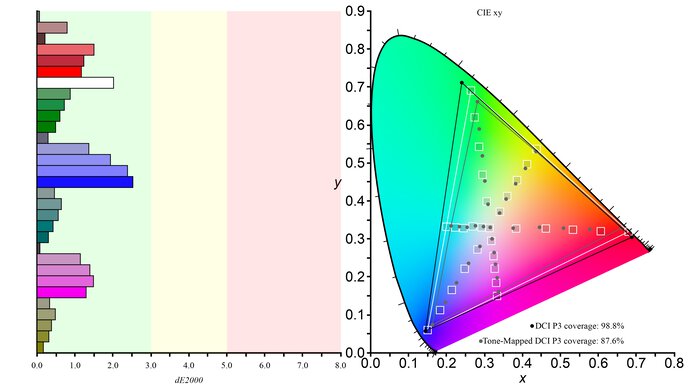
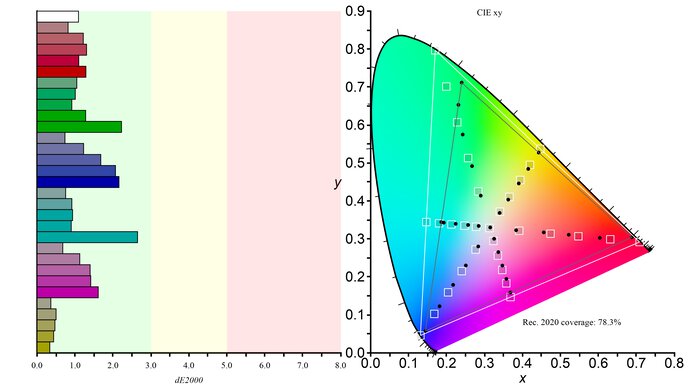
    The HDR color gamut is fantastic. It displays nearly all colors in the common DCI-P3 color space and a wide range in the Rec. 2020 color space. However, not all colors are accurate, and white is particularly inaccurate in DCI-P3. As of firmware MCM104, there are calibration settings you can use in HDR, though these results are uncalibrated.

    However, with firmware MCM104, there are some reported tone mapping issues with colors with Brightness at '100' compared to it at '90.' Increasing the setting to its max makes it the brightest possible, but the trade-off is that some colors are oversaturated. That said, it doesn't happen with all content. You can see example photos of this below:

    8.0
    HDR Color Volume
    1,000 cd/m² DCI-P3 Coverage ICtCp
    82.0%
    DCI-P3 Picture Mode
    Console HDR (100)
    10,000 cd/m² Rec. 2020 Coverage ICtCp
    34.8%
    Rec. 2020 Picture Mode
    Console HDR (100)

    • Red Luminance: 107 cd/m²
    • Green Luminance: 323 cd/m²
    • Blue Luminance: 35 cd/m²

    The monitor has great HDR color volume. Colors look vivid, and the monitor displays dark and bright colors well.

    9.8
    Viewing Angle
    Color Washout From Left
    70°
    Color Washout From Right
    70°
    Color Shift From Left
    48°
    Color Shift From Right
    63°
    Brightness Loss From Left
    70°
    Brightness Loss From Right
    70°
    Black Level Raise From Left
    70°
    Black Level Raise From Right
    70°
    Gamma Shift From Left
    70°
    Gamma Shift From Right
    70°

    The horizontal viewing angle is fantastic. Although it technically isn't perfect, you visually won't see any inconsistencies when viewing from the sides or if you sit close to the screen.

    6.5
    Text Clarity
    Pixel Type
    OLED
    Subpixel Layout
    RWBG

    The text clarity is okay, though it's not as good as some other 27-inch 1440p monitors because of its RWBG subpixel layout. This results in some color fringing around text if ClearType is enabled. While it has a glossy screen coating, images aren't as clear as WOLEDs with a TrueBlack Glossy coating, like the ASUS ROG Strix OLED XG32UCWMG.
    Though Pixel Edge is supposed to reduce fringing, it's still present when ClearType is enabled, and text looks less bold. You can see how enabling ClearType and Pixel Edge in both Windows 10 and Windows 11 affects text clarity below:
    Pixel Edge ClearType On ClearType Off
    On Windows 10 Windows 10

    On Windows 11 Windows 11
    Off Windows 10 Windows 10
    Off Windows 11 Windows 11
    5.4
    Direct Reflections
    See details on graph tool
    Peak Direct Reflection Intensity
    46.7%
    Screen Finish
    Glossy

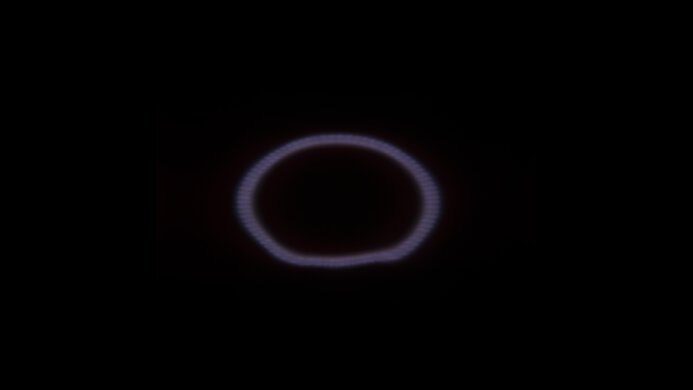
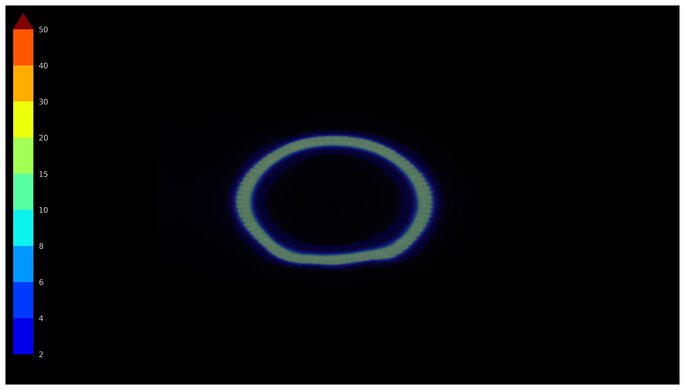
    The direct reflection handling is poor. The glossy coating reflects a lot of mirror-like light, which can be distracting in a bright room. You can see what it looks like next to the LG 27GS95QE-B, which has a matte coating and much better reflection handling.

    8.2
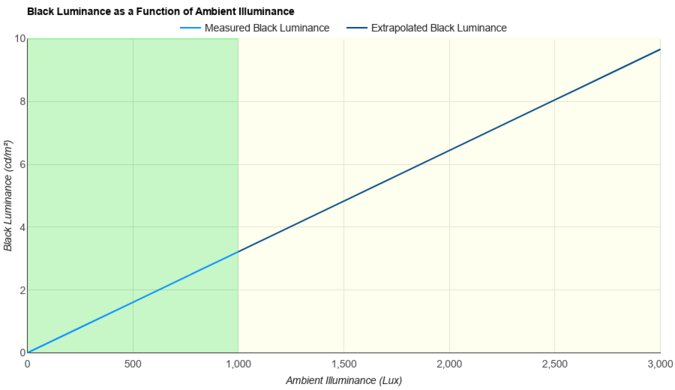
    Ambient Black Level Raise
    See details on graph tool
    Black Luminance @ 0 lx
    0.00 cd/m²
    Black Luminance @ 1000 lx
    0.81 cd/m²

    Although not perfect, this monitor maintains low black levels in bright rooms.

    8.4
    Total Reflected Light
    Total Reflected Light Intensity
    12,184% ⋅ pixel
    Diffraction Artifacts
    No

    Although this monitor doesn't spread light out, glare can be distracting in really bright rooms, as light bounces off the screen like a mirror.

    8.5
    Gradient
    Color Depth
    10 Bit

    This monitor has excellent gradient handling. There's minimal banding with most shades of similar colors, but there are still some issues. At low brightness and low refresh rates, there's more banding in shades of gray. You can see an example of that with 5% gray at 50 cd/m2, and this happens with 30Hz and 60Hz signals. You can also see it compared to the ASUS ROG Strix OLED XG27ACDNG, and although this is a common issue with OLEDs, it's worse on the XG27AQDMG. That said, it isn't as noticeable at high brightness and higher refresh rates.

    The issue gets worse when sending a limited chroma 4:4:4 signal compared to a full RGB signal, as there's noticeable black crush. You can see examples of that with a gradient circle and with a gradient pattern.

    Motion
    8.0
    Refresh Rate
    Native Refresh Rate
    240 Hz
    Max Refresh Rate
    240 Hz
    Max Refresh Rate Over DP
    240 Hz
    Max Refresh Rate Over HDMI
    144 Hz
    Max Refresh Rate Over DP @ 10-bit
    240 Hz
    Max Refresh Rate Over HDMI @ 10-Bit
    60 Hz
    DSC Toggle
    Yes
    DSC Off Max Refresh Rate Over DP
    240 Hz
    DSC Off Max Refresh Rate Over HDMI
    144 Hz

    You can reach the monitor's max refresh rate over DisplayPort, but your graphics card needs to support Display Stream Compression (DSC) to reach the max refresh rate with 10-bit signals over DisplayPort. It also has a DSC Support setting to disable DSC if you prefer not to use it altogether. Because this monitor only has HDMI 2.0 bandwidth, the maximum refresh rate with HDMI is significantly slower.

    Variable Refresh Rate (VRR)
    Variable Refresh Rate
    Yes
    FreeSync
    Yes
    G-SYNC
    Compatible (NVIDIA Certified)
    VRR Maximum
    240 Hz
    VRR Minimum
    < 20 Hz
    VRR Supported Connectors
    DisplayPort, HDMI

    NVIDIA VRR Min VRR Max
    DisplayPort <20Hz 240Hz
    HDMI <20Hz 144Hz
    AMD VRR Min VRR Max
    DisplayPort <20Hz 240Hz
    HDMI <20Hz 144Hz

    On top of supporting FreeSync and G-SYNC compatibility, this monitor also supports HDMI Forum VRR.

    9.9
    VRR Motion Performance
    See details on graph tool
    Recommended VRR OD Setting
    No OD Mode
    Variable Overdrive Advertised
    No
    Avg. CAD
    13
    Best CAD
    13
    Worst CAD
    13

    Frame Rate CAD Heatmap RT Chart Pursuit Photo
    239 Heatmap Chart Photo
    165 Heatmap Chart Photo
    144 Heatmap Chart Photo
    120 Heatmap Chart Photo
    100 Heatmap Chart Photo
    80 Heatmap Chart Photo
    60 Heatmap Chart Photo

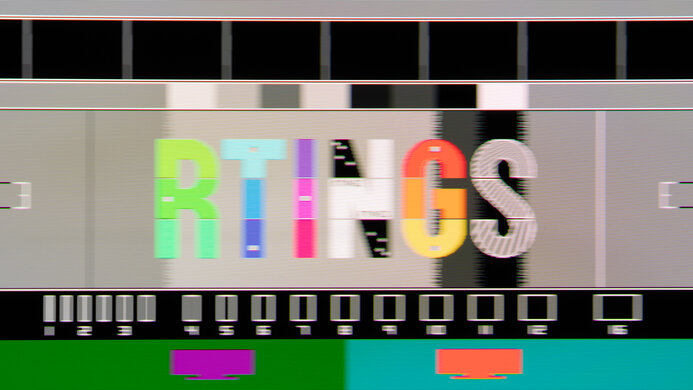
    The ASUS ROG Strix OLED XG27AQDMG has outstanding motion handling across its entire refresh rate range with VRR enabled. CAD remains low throughout, and there's minimal blur with fast-moving objects.

    9.8
    Refresh Rate Compliance
    See details on graph tool
    See details on graph tool
    Compliance @ Max Hz
    93%
    Compliance @ 120 FPS
    96%
    Compliance @ 60 FPS
    97%

    The refresh rate compliance is outstanding. With a near-instantaneous response time, it makes full-color transitions before drawing the next frame.

    9.9
    CAD @ Max Refresh Rate
    OD Transition Max Refresh Rate
    od-transition-max-refresh-rate-noodmode-0-31
    OD noodmode
    0 to 31
    Recommended Overdrive Setting
    No OD Mode
    Avg. CAD
    13
    Best 10% CAD
    7
    Worst 10% CAD
    19

    Overdrive Mode CAD Heatmap RT Chart Pursuit Photo
    No Overdrive Heatmap Chart Photo

    The CAD at the maximum refresh rate is outstanding. It displays fast-moving objects as intended, and motion is extremely sharp.

    Response Time @ Max Refresh Rate
    Recommended Overdrive Setting
    No OD Mode
    First Response Time
    0.3 ms
    Total Response Time
    0.3 ms
    RGB Overshoot
    0 RGB
    Worst 10% First Response Time
    0.4 ms
    Worst 10% Total Response Time
    0.4 ms
    Worst 10% RGB Overshoot
    0 RGB

    Overdrive Mode First Response Heatmap Total Response Heatmap RGB Overshoot Heatmap
    No Overdrive Heatmap Heatmap Heatmap

    9.9
    CAD @ 120Hz
    OD Transition 120Hz
    od-transition-120-noodmode-0-31
    OD noodmode
    0 to 31
    Recommended Overdrive Setting
    No OD Mode
    Avg. CAD
    13
    Best 10% CAD
    6
    Worst 10% CAD
    19

    Overdrive Mode CAD Heatmap RT Chart Pursuit Photo
    No Overdrive Heatmap Chart Photo

    The CAD at 120Hz is outstanding. Pixels transition to their target RGB level almost instantly, so there isn't any blur trail or noticeable inverse ghosting.

    Response Time @ 120Hz
    Recommended Overdrive Setting
    No OD Mode
    First Response Time
    0.3 ms
    Total Response Time
    0.3 ms
    RGB Overshoot
    0 RGB
    Worst 10% First Response Time
    0.4 ms
    Worst 10% Total Response Time
    0.4 ms
    Worst 10% RGB Overshoot
    0 RGB

    Overdrive Mode First Response Heatmap Total Response Heatmap RGB Overshoot Heatmap
    No Overdrive Heatmap Heatmap Heatmap

    9.9
    CAD @ 60Hz
    OD Transition 60Hz
    od-transition-60-noodmode-0-31
    OD noodmode
    0 to 31
    Recommended Overdrive Setting
    No OD Mode
    Avg. CAD
    13
    Best 10% CAD
    6
    Worst 10% CAD
    19

    Overdrive Mode CAD Heatmap RT Chart Pursuit Photo
    No Overdrive Heatmap Chart Photo

    The CAD at 60Hz is outstanding. Pixels transition colors almost perfectly, and any noticeable blur is persistence.

    Response Time @ 60Hz
    Recommended Overdrive Setting
    No OD Mode
    First Response Time
    0.3 ms
    Total Response Time
    0.3 ms
    RGB Overshoot
    0 RGB
    Worst 10% First Response Time
    0.4 ms
    Worst 10% Total Response Time
    0.4 ms
    Worst 10% RGB Overshoot
    0 RGB

    Overdrive Mode First Response Heatmap Total Response Heatmap RGB Overshoot Heatmap
    No Overdrive Heatmap Heatmap Heatmap

    Backlight Strobing (BFI)
    Backlight Strobing (BFI)
    Yes
    Maximum Frequency
    120 Hz
    Minimum Frequency
    120 Hz
    Longest Pulse Width Brightness
    132 cd/m²
    Shortest Pulse Width Brightness
    132 cd/m²
    Pulse Width Control
    No
    Pulse Phase Control
    No
    Pulse Amplitude Control
    Yes
    VRR At The Same Time
    No

    This monitor has an optional black frame insertion feature to reduce persistence blur, but it only works with fixed 120Hz signals. When it's on, you can adjust the brightness between 15.28 cd/m² and 131.5 cd/m². The following settings are locked out when it's enabled:

    • Blue Light Filter
    • Variable Refresh Rate
    • HDR
    4.7
    VRR Flicker
    Dark Gray Flicker
    6.3 RGB
    Middle Gray Flicker
    2.4 RGB
    Light Gray Flicker
    1.6 RGB

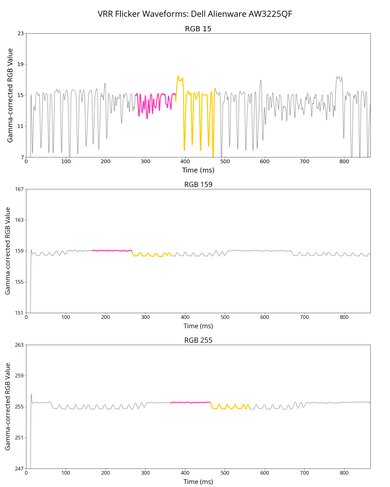
    The ASUS ROG Strix OLED XG27AQDMG has quite distracting VRR flicker with changing frame rates if OLED Anti-Flicker is off. It can be particularly distracting if the frame rate changes a lot, especially in darker parts of scenes. That said, this doesn't happen if your PC can maintain consistent frame rates.

    OLED Anti-Flicker Setting

    OLED Anti-Flicker minimizes VRR flicker by reducing the refresh rate range VRR operates at, as you can see below:

    OLED Anti-Flicker Setting Minimum Refresh Rate Maximum Refresh Rate
    Off 40Hz 240Hz
    Medium 160Hz 240Hz
    Strong 200Hz 240Hz

    While this introduces some stuttering, it significantly reduces VRR flicker. While flicker is reduced significantly with 'Medium', and even more with 'Strong', random VRR flicker is still present. You can see this below, though random VRR flicker is slightly worse than the video indicates:

    Flicker Levels Medium Strong
    Dark Gray Flicker 2.4 RGB 1.0 RGB
    Middle Gray Flicker 1.4 RGB 0.4 RGB
    Light Gray Flicker 0.7 RGB 0.2 RGB
    Flicker Graph Medium Graph Strong Graph
    Flicker Video Medium Video Strong Video
    10
    Image Flicker
    Flicker-Free
    No
    PWM Dimming Frequency
    0 Hz

    The backlight isn't technically flicker-free because it has a slight dip in brightness that corresponds to the 240Hz refresh rate.

    Inputs
    8.9
    Input Lag
    Native Resolution @ Max Hz
    2.6 ms
    Native Resolution @ 120Hz
    6.3 ms
    Native Resolution @ 60Hz
    14.1 ms
    Backlight Strobing (BFI)
    14.6 ms

    The ASUS ROG Strix OLED XG27AQDMG has low input lag, especially at its max refresh rate. While its input lag is a bit higher than some other monitors with 120Hz and 60Hz sources, it's still low enough for a responsive feel.

    7.5
    Resolution
    Native Resolution
    2560 x 1440
    Aspect Ratio
    16:9
    Megapixels
    3.7 MP
    Pixel Density
    111 PPI
    7.1
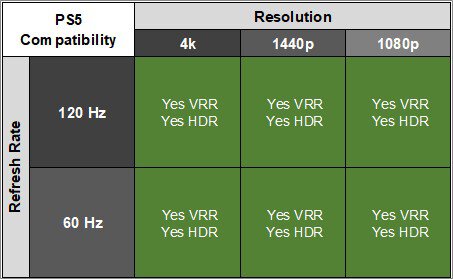
    PS5 Compatibility
    4k @ 120Hz
    No
    4k @ 60Hz
    Yes
    1440p @ 120Hz
    Yes
    1440p @ 60Hz
    Yes
    1080p @ 120Hz
    Yes
    1080p @ 60Hz
    Yes
    7.1
    Xbox Series X|S Compatibility
    4k @ 120Hz
    No
    4k @ 60Hz
    Yes
    1440p @ 120Hz
    Yes
    1440p @ 60Hz
    Yes
    1080p @ 120Hz
    Yes
    1080p @ 60Hz
    Yes

    The Xbox doesn't support HDR with 1440p or 1080p signals, so this isn't a limitation of the monitor.

    Inputs
    DisplayPort
    1 (DP 1.4)
    DisplayPort Transmission Bandwidth
    No DisplayPort 2.1
    Mini DisplayPort
    No
    HDMI
    2 (HDMI 2.0)
    HDMI 2.1 Bandwidth
    No HDMI 2.1
    Daisy Chaining
    No
    3.5mm Audio Out
    Yes
    Ethernet
    No
    HDR10
    Yes
    Dolby Vision
    No
    USB
    USB-A Ports
    2
    USB-A Rated Speed
    5Gbps (USB 3.2 Gen 1)
    USB-B Upstream Port
    Yes
    USB-C Ports
    0
    USB-C Upstream
    No USB-C Ports
    USB-C Rated Speed
    No USB-C Ports
    USB-C Power Delivery
    No USB-C Ports
    USB-C DisplayPort Alt Mode
    No USB-C Ports
    Thunderbolt
    No
    macOS Compatibility

    Connection HDMI 2.0 HDMI 2.1 USB-C to DP
    Max Refresh Rate 144Hz 144Hz 240Hz
    VRR Range N/A 40-144Hz 40-240Hz
    HDR Yes Yes Yes

    The ASUS ROG Strix OLED XG27AQDMG doesn't have any compatibility issues with macOS. If you're using a MacBook windows move to the monitor's screen when you close the laptop's lid, and they return to their original position when you reopen it again over any type of connection. VRR works well, and colors in HDR look good.

    Features
    Additional Features
    Speakers
    No
    RGB Illumination
    Controllable
    Multiple Input Display
    No
    KVM Switch
    No
    Smart OS
    No

    The ASUS ROG Strix OLED XG27AQDMG has several additional features, including:

    • Dynamic Shadow Boost: Adjusts gamma so that you can see opponents better in dark scenes.
    • GamePlus: Includes different gaming features like an FPS counter, crosshairs, sniper mode, stopwatch, and timer.
    • Lighting Effect: Controls the RGB lighting on the back of the monitor and on the stand.
    • Low Blue Light Filter: Reduces blue light to help with eye strain.

    Like most OLED displays, there are also a few settings to help reduce the risk of burn-in, which you can find in the Screen Protection section of the OSD.

    • Auto Logo Brightness: Dims static logos that are on the screen, like if you're watching TV.
    • Pixel Cleaning: This feature calibrates any burn-in issues that may occur. It happens after you turn off the screen and takes about six minutes to finish. There's also a setting to remind you to turn off the monitor so it can perform the cycle.
    • Screen Move: Moves the image by a few pixels to one side to help reduce the risk of burn-in.
    • Screen Saver: Automatically dims the screen when there's inactivity.
    On-Screen Display (OSD)