
If you're a competitive gamer, getting a high refresh rate monitor can help you compete against lesser-equipped opponents. Faster refresh rates lead to a smoother gaming experience with the potential for lower input lag and a more responsive feel. However, it's not always the case, so it's still important to consider the monitor's input lag if you play reaction-based games. You also want to make sure the monitor has a quick response time for minimal motion blur. VRR support is important to reduce screen tearing, and almost every modern gaming monitor works with common VRR formats. Some monitors even offer dual-mode features to boost the refresh rate with a lower resolution.
In addition to a responsive gaming experience, having good picture quality also helps provide good overall performance. Luckily, high-refresh-rate OLED monitors combine the best motion handling with their premium picture quality in HDR, displaying deep blacks, bright highlights, and vivid colors. Flagship models with high-end picture quality tend to cost a lot, though. You may want to get a lower-end option for cheaper at the cost of worse picture quality.
Monitors are coming out with refresh rates as high as 1040Hz, although we haven't bought and tested all high-refresh-rate monitors. You can follow along with which monitors we buy and test. If there's a specific model you want to see tested, you can vote for it.
We've bought and tested more than 405 monitors, and below are our recommendations for the best monitors with a high refresh rate. Also, check out our recommendations for the best 240Hz monitors, the best G-SYNC monitors, and the best 1440p 144Hz monitors.

We buy and test more than 30 monitors each year, all of which we purchase ourselves, without cherry-picked units or samples. We put a lot into each unbiased, straight-to-the-point review, and there's a whole process from purchasing to publishing, involving multiple teams and people. We do more than just use the monitor for a week; we use specialized, custom tools to measure various aspects and deliver objective, data-driven results. We also consider multiple factors before making any recommendations, including the monitor's cost, its performance compared to the competition, and whether it's easy to find.
-
Best High Refresh Rate Monitor
 PC GamingResponse TimeHDR PictureSDR PictureRefresh Rate ComplianceSize27"Panel TypeOLEDSub-TypeWOLEDNative Resolution2560 x 1440Native Refresh RateHzMax Refresh Rate720 HzSee all our test resultsDual Mode Setting
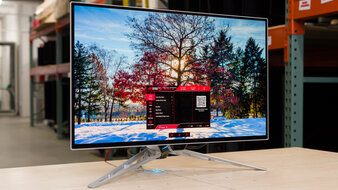
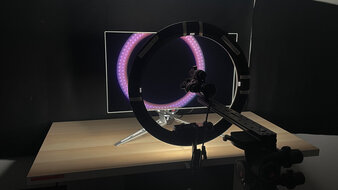
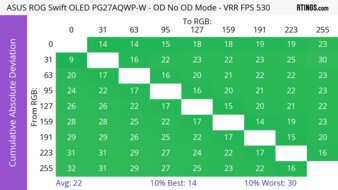
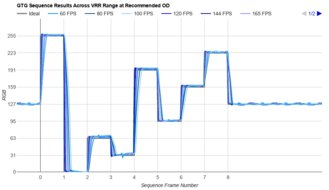
The best high refresh rate monitor we've tested is the ASUS ROG Swift OLED PG27AQWP-W. It's a premium OLED that's versatile for a wide range of gamers. This is because it has a dual-mode feature that switches its native 1440p resolution and 540Hz refresh rate to 720p @ 720Hz. It allows you to play detailed games in one mode and action games that need the highest frame rates in another. Its refresh rate is also the highest you can get on any OLED monitor right now. It supports all common VRR formats to reduce screen tearing, and it has a near-instantaneous response time at any refresh rate, leading to sharp motion. Plus, it has low input lag across both dual modes, so gaming feels responsive. It also has high-bandwidth HDMI and DisplayPort 2.1 ports to take advantage of the latest graphics cards.
Besides its remarkable gaming performance, it delivers outstanding picture quality. It delivers deep, inky blacks alongside bright highlights, with no haloing around bright objects. Its Tandem OLED panel is very bright, so it fights glare well. It also has a glossy coating that makes images look clear, but it has distracting mirror-like reflections. You may prefer the LG 27GX790B-B if you want something with a matte coating. It has fewer reflections than the ASUS, but the coating introduces haze instead, so images aren't as clear.
-
Best Upper Mid-Range High Refresh Rate Monitor
PC GamingResponse TimeHDR PictureSDR PictureRefresh Rate ComplianceSize27"Panel TypeOLEDSub-TypeWOLEDNative Resolution2560 x 1440Native Refresh RateHzMax Refresh Rate480 HzSee all our test resultsDual Mode SettingIf you don't need the versatility of the dual mode of the ASUS ROG Swift OLED PG27AQWP-W and you want to save some money, the LG 27GX790A-B is a good alternative. It's a lower-end, older model than the ASUS, which you can get cheaper when it's on sale. The main difference versus the higher-end ASUS is that it has a lower 480Hz refresh rate and lacks a dual-mode feature to boost it even further. It performs similarly to the ASUS otherwise, as it supports the same VRR formats, has low input lag for a responsive feel, and motion looks sharp thanks to its quick response time. Like the higher-end model, it has the same HDMI and DisplayPort 2.1 ports, which is great if you have a modern graphics card.
It also has similar picture quality to the ASUS because it's another OLED with the same deep blacks, impactful HDR highlights, and no haloing around bright objects against dark backgrounds. One difference versus the ASUS, though, is that it doesn't have a Tandem OLED panel. This means it isn't as bright, and colors aren't vivid, so it's a step down in overall picture quality. Plus, it has a matte coating that has hazier images than the glossy coating of the ASUS, but it has fewer mirror-like reflections.
-
Best Mid-Range High Refresh Rate Monitor
PC GamingResponse TimeHDR PictureSDR PictureRefresh Rate ComplianceSize27"Panel TypeOLEDSub-TypeQD-OLEDNative Resolution2560 x 1440Native Refresh RateHzMax Refresh Rate360 HzSee all our test resultsDual Mode SettingIf you don't need such a high refresh rate, there are plenty of options you can get for cheaper with lower refresh rates. If that interests you, check out the Dell Alienware AW2725DF. With a lower 360Hz refresh rate than the LG 27GX790A-B, it's still fast enough to provide a smooth and responsive gaming experience. Like the LG, it's another OLED with the same near-instantaneous response time, resulting in sharp motion, and it has low input lag for a responsive feel. A downside is that its HDMI and DisplayPort inputs support less bandwidth. You can only reach its max refresh rate with a DisplayPort connection, and your graphics card needs to use compression to do so.
This monitor actually has an advantage over the LG when it comes to picture quality. This is because it uses a QD-OLED panel with brighter and more vivid colors for improved overall picture quality, especially in HDR games. One downside to this panel is that blacks look purple in bright rooms, so you need to use it in a dark room to get the best performance. If you can't find this monitor available in your region, there are other 360Hz QD-OLEDs you can consider that perform similarly, like the ASUS ROG Strix OLED XG27ACDNG. You can't go wrong with either of these, but the Dell is usually cheaper.
-
Best Lower Mid-Range High Refresh Rate Monitor
PC GamingResponse TimeHDR PictureSDR PictureRefresh Rate ComplianceSize27"Panel TypeOLEDSub-TypeQD-OLEDNative Resolution2560 x 1440Native Refresh RateHzMax Refresh Rate240 HzSee all our test resultsDual Mode SettingIf the Dell Alienware AW2725DF is still too expensive for your needs, a cheaper alternative you can consider is the HyperX OMEN OLED 27q. The biggest downside is the fact that it has a lower 240Hz refresh rate, which is expected for a lower-cost option. This means while it doesn't offer the same smooth, high-end feel as the Dell, it's still fast enough for many PC gamers. At least this lower refresh rate is less demanding on your graphics card, so it's easier to maintain high frame rates, especially if you have more of an entry-level PC. Unlike the Dell, this monitor even has HDMI 2.1 bandwidth, so you can reach its max refresh rate over HDMI, provided you also have an HDMI 2.1 graphics card.
It has a QD-OLED panel like the Dell, so it has the same incredibly sharp motion handling, making it a fantastic choice for fast-paced gaming. It's also excellent for HDR gaming as it displays the same deep blacks with bright highlights and no haloing in dark scenes. However, it isn't as bright as the Dell, and because its blacks look purple in bright rooms, you have to use it in a dark room to get the best out of it. You may want to consider the LG 27GX704A-B if you want something brighter, but it sometimes costs more than the HyperX.
-
Best Budget High Refresh Rate Monitor
PC GamingResponse TimeHDR PictureSDR PictureRefresh Rate ComplianceSize27"Panel TypeLCDSub-TypeIPSNative Resolution2560 x 1440Native Refresh RateHzMax Refresh Rate240 HzSee all our test resultsDual Mode SettingIf an OLED like the HyperX OMEN OLED 27q is still too expensive for you, you can look into some non-OLED monitors in the budget category. If that interests you, check out the LG 27GR83Q-B. It's a 27-inch, 1440p monitor like the HyperX, and it has the same 240Hz refresh rate for a smooth feel. However, there are some differences in performance for gaming, as it doesn't have a near-instantaneous response time, so there's more motion blur in action games. Regardless, it offers good value, with a consistently fast response time at any refresh rate and low input lag that helps with reaction-based games. It even has HDMI 2.1 bandwidth to take advantage of the latest graphics cards.
The biggest trade-off with this monitor, though, is with its picture quality. It fails to deliver an impactful HDR gaming experience, as blacks look gray, highlights don't pop, and it lacks local dimming to improve picture quality in dark scenes. This means you shouldn't get this monitor if you care about having the best picture quality. You may want to consider the KOORUI S2721PM if you want better picture quality at a low cost. It uses Mini LED backlighting, resulting in deep blacks and bright highlights, but it has a lower 200Hz refresh rate than the LG.
-
Best Cheap High Refresh Rate Monitor
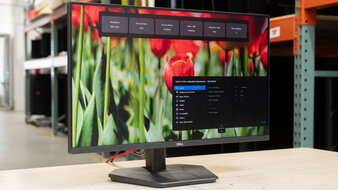
PC GamingResponse TimeHDR PictureSDR PictureRefresh Rate ComplianceSize24"Panel TypeLCDSub-TypeIPSNative Resolution1920 x 1080Native Refresh RateHzMax Refresh Rate240 HzSee all our test resultsDual Mode SettingShould you be on a tight budget and still want a high-refresh-rate display, the Dell SE2426HGS is a solid choice as a cheap, entry-level option. The main trade-off of getting this instead of the LG 27GR83Q-B is that it has a lower 1080p resolution and a smaller screen, so it offers a less immersive gaming experience. It's not as bright as the LG either, which is something to consider if your gaming space is well-lit, as it struggles fighting glare.
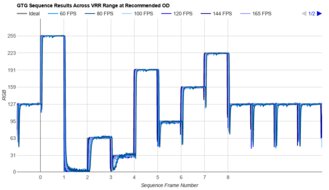
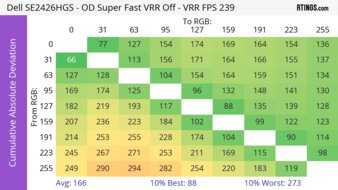
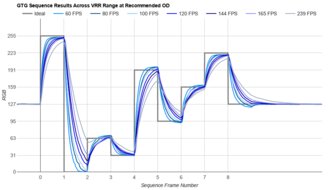
Regardless, it's a solid option as a basic gaming monitor because it has the same 240Hz refresh rate as the LG. It has similar motion handling to the LG, with a fast response time that results in minimal motion blur. It even has consistent motion handling across its VRR range, as it doesn't add too much inverse ghosting as the refresh rate drops. Plus, you should know that it supports all common VRR formats, including FreeSync VRR, G-SYNC compatibility, and HDMI Forum VRR, so it works with all sources.








Notable Mentions
-
ASUS ROG Strix OLED XG32UCWMG:
The ASUS ROG Strix OLED XG32UCWMG is a high-end OLED. It has a native 4k resolution and a 240Hz refresh rate that you can switch to 1080p, 480Hz in its dual mode. It's something to consider over the ASUS ROG Swift OLED PG27AQWP-W if you want a higher resolution, but its max refresh rate is still lower.
See our review -
ASUS ROG Swift OLED PG34WCDN:
The ASUS ROG Swift OLED PG34WCDN is a premium ultrawide gaming monitor with more vivid colors than the ASUS ROG Swift OLED PG27AQWP-W. It's a great choice if you want an immersive gaming experience, but it has a lower 360Hz refresh rate compared to the PG27AQWP-W.
See our review -
BenQ ZOWIE XQ2566X:
The BenQ ZOWIE XQ2566X is an esports gaming monitor with a 1440p resolution and 360Hz refresh rate. It uses a TN panel, so it's a solid choice if you don't want an OLED or if you don't need good picture quality. That said, it's expensive as it's in the same price range as the LG 27GX790A-B, and it has a lower refresh rate than the LG.
See our review -
LG 27GX700A-B:
The LG 27GX700A-B is a mid-range option that's a brighter alternative to the Dell Alienware AW2725DF as it uses a newer Tandem OLED panel. However, the 27GX700A-B has a lower 280Hz refresh rate.
See our review -
LG 27G850A-B:
The LG 27G850A-B is a mid-level option that's usually in the same price range as the Dell Alienware AW2725DF. It's a bit more versatile because it has a native 4k resolution and 240Hz refresh rate with a dual-mode 1080p @ 480Hz feature. However, it has worse picture quality than the Dell because it doesn't have an OLED panel.
See our review -
Dell Alienware AW2726DM:
The Dell Alienware AW2726DM is an entry-level OLED gaming monitor that has a 1440p resolution and 240Hz refresh rate, like the HyperX OMEN OLED 27q. The Dell is worth getting if you can find it for less, but it's dimmer than the HyperX, and it lacks HDMI 2.1 bandwidth.
See our review
Recent Updates
Sep 01, 2026:
We added the BenQ ZOWIE XQ2566X as a Notable Mention to give a high-refresh-rate option that isn't an OLED.
Jul 24, 2026:
We added the HyperX OMEN OLED 27q as the 'Best Lower Mid-Range High Refresh Rate Monitor' to give another option and better represent the market.
Jun 17, 2026:
In the Notable Mentions, we replaced the hard-to-find ASUS ROG Strix Pulsar XG27AQNGV with the premium ASUS ROG Swift OLED PG34WCDN.
May 21, 2026:
We replaced the ViewSonic XG2431, which is hard to find, with the Dell SE2426HGS in the budget category. In the Notable Mentions, we replaced the Dell Alienware AW2523HF with the Dell Alienware AW2726DM.
Apr 22, 2026:
We replaced the Dell Alienware AW2723DF with the Dell Alienware AW2523HF in the Notable Mentions.
All Reviews
Our recommendations are based on what we think are the best high refresh rate displays currently available in the United States. They're adapted to be valid for most people in each price range. The rating is based on our review, feedback from visitors, and price. For example, two monitors may perform the same, but the cheaper one will be recommended. We also consider availability, as we don't recommend a monitor that's hard to find.
If you would prefer to make your own decision, here's the list of our highest refresh rate monitors. Be careful not to get too caught up in the details. Most monitors are good enough to please most people, and the things we fault monitors on are often not noticeable unless you really look for them.