The Xiaomi G Pro 27i is a budget-friendly 27-inch, 1440p gaming monitor with an IPS panel. It's the first Xiaomi monitor available in the United States to have Mini LED backlighting, as it consists of 1,152 dimming zones. It competes against other entry-level Mini LED displays, like the AOC Q27G3XMN, the Acer Nitro XV275U P3biipx, and the Cooler Master Tempest GP2711. It has typical gaming features, like a 180Hz refresh rate and VRR support, and it has DisplayPort 1.4 and HDMI 2.0 bandwidth ports. It's limited in many extra features otherwise, but it comes with an ergonomic stand that allows for any common adjustment.
Our Verdict
The Xiaomi G Pro 27i is very good for PC gaming. It has typical gaming features like a 180Hz max refresh rate and VRR support. Gaming feels responsive thanks to its low input lag, and it has a consistent response time, but there's still blur with fast-moving objects. On the plus side, it delivers good picture quality in any environment as it gets bright enough to fight glare in well-lit rooms, and blacks look deep and inky in dark rooms thanks to its good local dimming feature.
Bright enough to fight glare.
Consistent response time across refresh rate range.
Good local dimming improves picture quality.
180Hz refresh rate and VRR support.
Low input lag at any refresh rate.
Some blur with fast-moving objects.
Low contrast without local dimming.
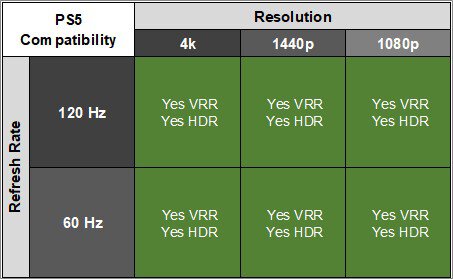
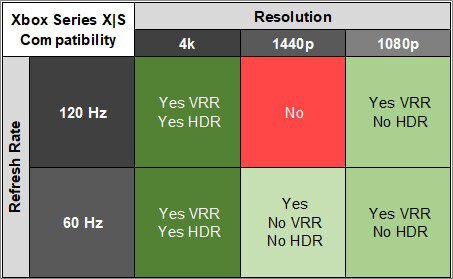
The Xiaomi G Pro 27i is okay for console gaming. While gaming feels responsive thanks to its low input lag, and motion looks fairly sharp, it can't take full advantage of the PS5, PS5 Pro, or Xbox Series X|S. This is because it can't downscale 4k signals, which means you can't get HDR with an Xbox, but it still supports 1440p signals up to 120Hz and supports VRR with either console. Luckily, it delivers good picture quality with deep blacks thanks to its local dimming feature, and it also makes highlights pop and fights glare well.
Bright enough to fight glare.
Consistent response time across refresh rate range.
Good local dimming improves picture quality.
Low input lag at any refresh rate.
Some blur with fast-moving objects.
Low contrast without local dimming.
Can't downscale 4k signals.
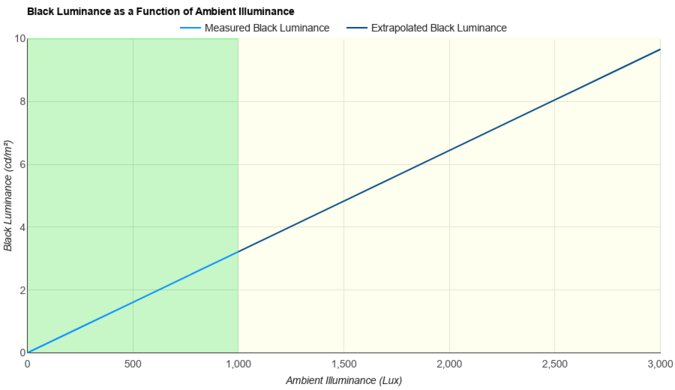
The Xiaomi G Pro 27i is very good for office use. Its main advantage is that it's a fantastic choice for using it in a bright room, as it gets bright enough to fight glare and has decent reflection handling. Its versatile ergonomics also make it easy to adjust, and it has decent viewing angles that keep the image consistent when viewing from the sides. Lastly, it has a 1440p screen with good text clarity.
Bright enough to fight glare.
Excellent ergonomics.
Good text clarity.
Decent reflection handling.
No extra features, like a USB hub.
The Xiaomi G Pro 27i is good for editing. Text and images look fairly sharp, and it has excellent ergonomics that make it easy to adjust, whether for yourself or for someone next to you. It also delivers good picture quality with deep blacks thanks to its Mini LED local dimming and the wide range of colors that it displays. While it's accurate before any sort of calibration, there are still some white balance issues, and you need to calibrate it for the best accuracy.
Bright enough to fight glare.
Displays wide range of vivid colors.
Good local dimming improves picture quality.
Accurate sRGB mode.
Low contrast without local dimming.
Some white balance issues before calibration.
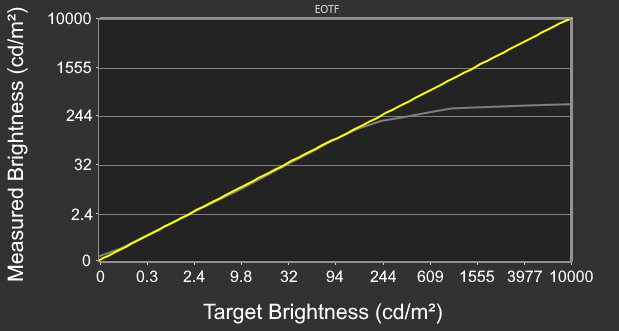
The Xiaomi G Pro 27 has fantastic brightness. It easily gets bright enough to fight glare, and highlights pop in HDR.
Bright enough to fight glare.
Highlights pop in HDR.
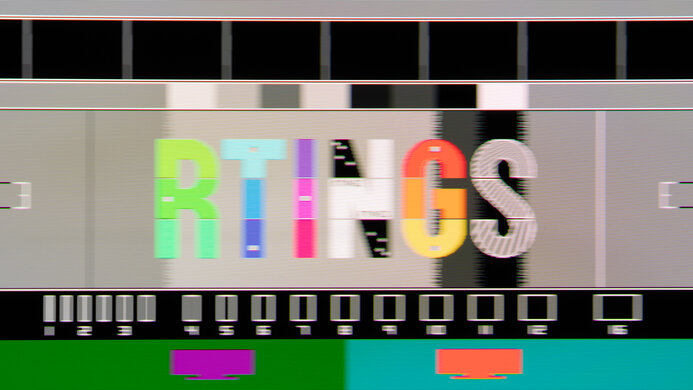
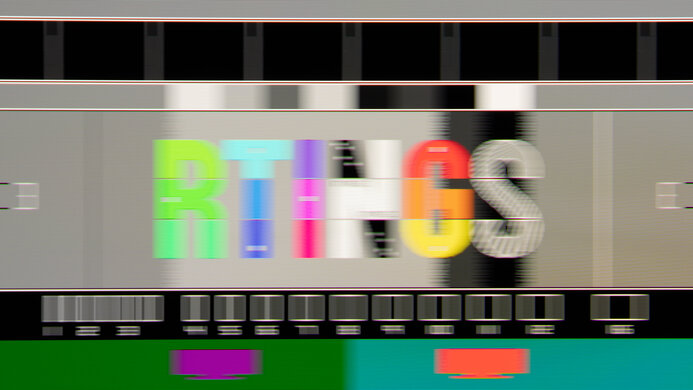
The Xiaomi G Pro 27i has a good response time. It's consistent across its refresh rate range, so it doesn't introduce inverse ghosting at low refresh rates. That said, there's still blur with fast-moving objects at any refresh rate.
Consistent response time across refresh rate range.
Some blur with fast-moving objects.
The Xiaomi G Pro 27i has great HDR picture quality as long as you use the local dimming feature. This is because it greatly improves the contrast ratio, as it displays deep blacks against bright highlights. There isn't much blooming either, and it displays a wide range of vivid colors.
Displays wide range of vivid colors.
Good local dimming improves picture quality.
Low contrast without local dimming.
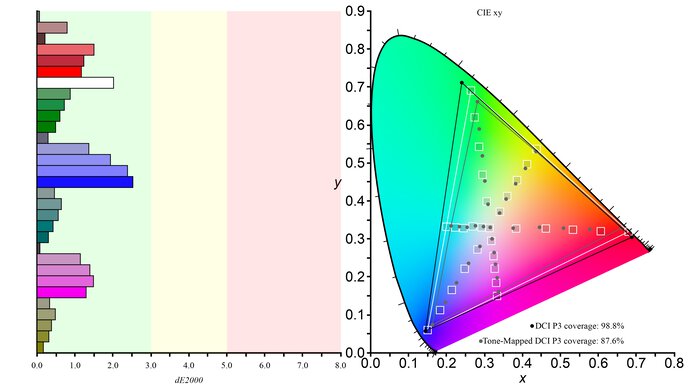
The Xiaomi G Pro 27 has decent SDR picture quality. It displays a wide range of colors and deep blacks with its local dimming feature. However, without local dimming, it has a low contrast ratio, so blacks look gray.
Displays wide range of vivid colors.
Good local dimming improves picture quality.
Low contrast without local dimming.
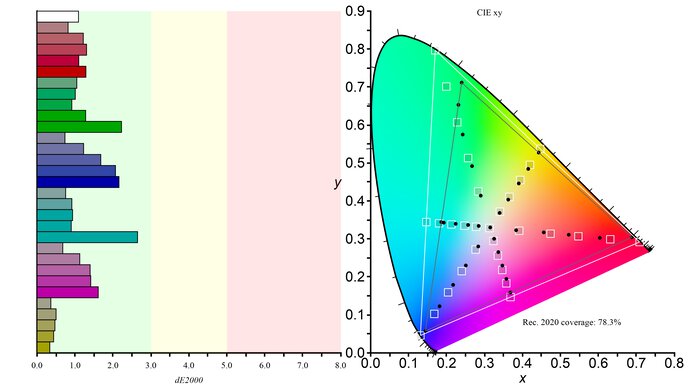
The Xiaomi G Pro 27i has impressive color accuracy. The sRGB mode delivers accurate colors before calibration, but there are white balance issues and you still need to calibrate it for the best accuracy.
Accurate sRGB mode.
Some white balance issues before calibration.
Performance Usages
Changelog
-
Updated Aug 13, 2026:
We bought and tested the KOORUI S2721PM, and added a comparison in the SDR Brightness section of the review.
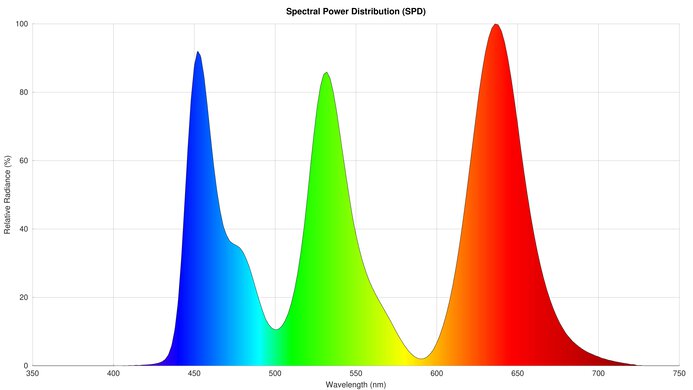
- Updated Mar 30, 2026: We've converted this review to Test Bench 2.1.2. We added a new Panel Technology box, including the Spectral Power Distribution (SPD) graph.
- Updated Nov 10, 2025: We've converted this review to Test Bench 2.1.1. We removed the Vertical Viewing Angle test.
-
Updated Jun 13, 2025:
We updated text throughout to match the new and updated tests with Test Bench 2.1, including in the Verdict section.
Check Price
Differences Between Sizes And Variants
We tested the 27-inch Xiaomi G Pro 27i (model code P27QBA-RGPGL), which is the only size available. Although there are other 27-inch models in the American Xiaomi lineup, like the G27Qi and the G27i, they're different monitors that lack Mini LED backlighting, and the results are only valid for the G Pro 27i.
| Model | Size | Resolution | Max Refresh Rate | Features |
|---|---|---|---|---|
| G Pro 27i | 27" | 1440p | 180Hz |
1,152 Mini LED Zones Ergonomic Stand TÜV Low Blue Light Certification |
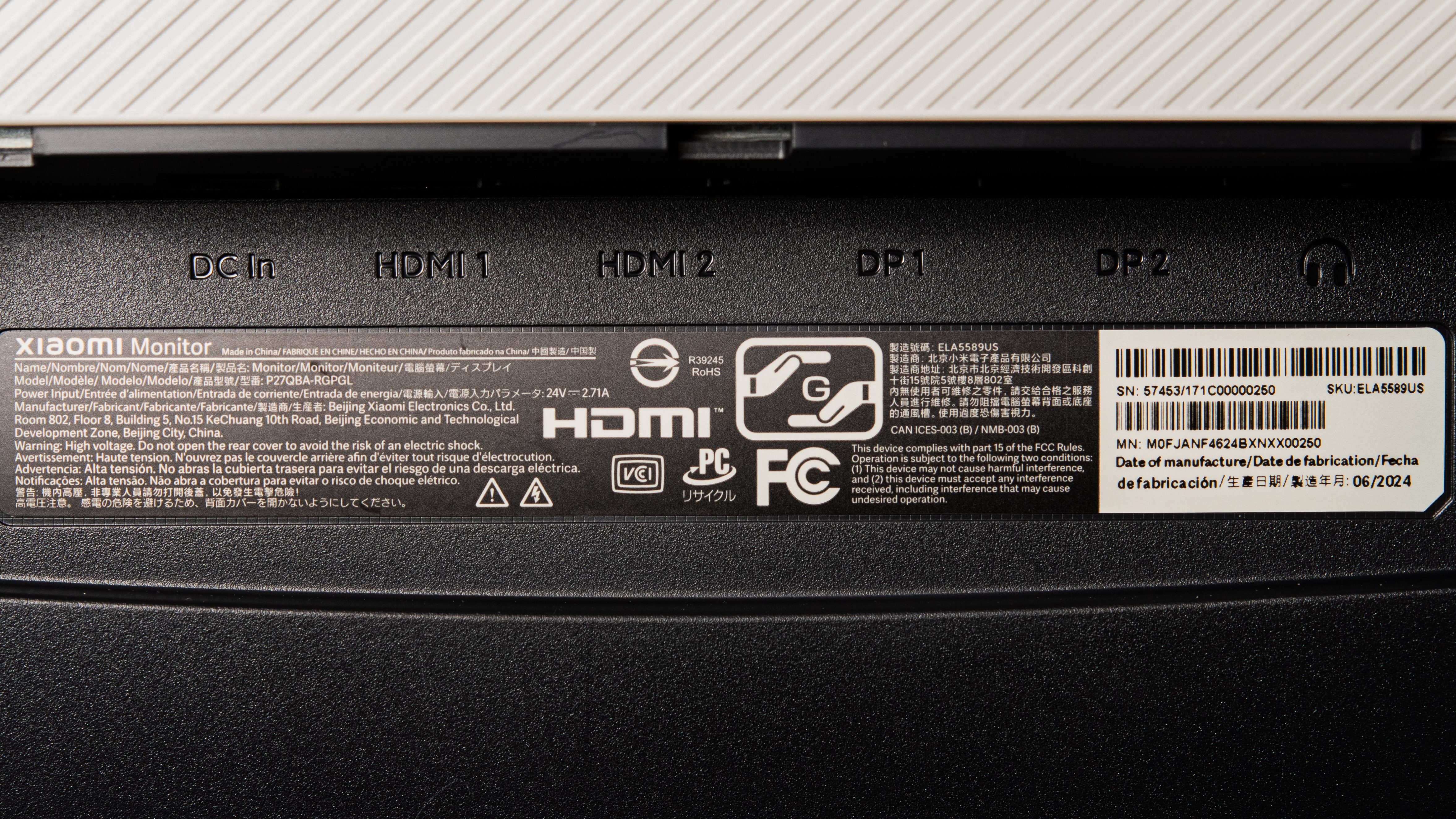
Our monitor's label indicates it was manufactured in June 2024. We tested it with firmware 1.0.07. We received our unit with this firmware and understand that there are reports of issues with firmware 1.0.06. If you have that firmware and experience problems, let us know in the comments.
Popular Monitor Comparisons
The Xiaomi G Pro 27i is a great budget-friendly 1440p gaming monitor with Mini LED backlighting. It delivers better picture quality than other entry-level gaming monitors thanks to a good local dimming feature that helps it display deep blacks alongside bright highlights. Its high brightness also makes it a fantastic choice for a well-lit gaming room. It isn't the only low-cost monitor with Mini LED backlighting, though, as it competes with the AOC Q27G3XMN and KOORUI S2721PM. While it has some advantages over its direct competition, such as its vivid colors, choosing one over the other can come down to personal preference. That said, it's still worth getting, as it has consistently sharp motion handling, low input lag, and good picture quality.
Also, see our recommendations for the best Mini LED monitors, the best gaming monitors under $300, and the best 1440p 144Hz monitors.
The AOC Q27G3XMN and the Xiaomi G Pro 27i are competing budget-friendly 1440p monitors. They each have Mini LED backlighting, with the Xiaomi having 1,152 zones and the AOC having 336 zones, but both of their local dimming features are good. The main advantage of the Xiaomi is that it gets much brighter, especially in SDR, so it's the better choice for use in well-lit rooms. The Xiaomi also displays a wider range of more vivid colors, leading to images that pop. While they both have a fast response time and some motion blur, the AOC has more black smearing. That said, the AOC has an advantage when it comes to console gaming because it can downscale 4k signals.
The AOC Q27G40XMN and the Xiaomi G Pro 27i are both 1440p gaming monitors with Mini LED backlighting. They each have 1,152 dimming zones and get very bright, but the local dimming feature on the AOC results in less blooming. Plus, the AOC has a VA panel with a higher native contrast ratio if you aren't going to use local dimming. The Xiaomi has advantages in other ways, though, as it has wider viewing angles and better ergonomics, making it easier to share the screen with others. The Xiaomi also has less smearing and inverse ghosting with fast-moving objects.
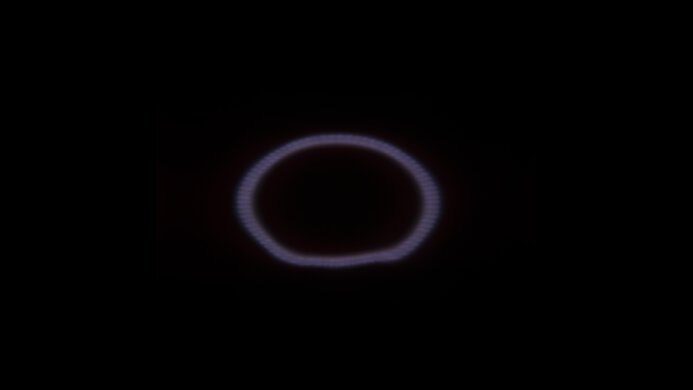
The Xiaomi G Pro 27i and KOORUI S2721PM are extremely similar overall, with only a few minor differences between them. The KOORUI has a slightly higher refresh rate, but its response time is also better tuned, so motion is slightly smoother with less blur behind fast-moving objects when gaming at the max refresh rate. The KOORUI is also completely flicker-free, whereas the Xiaomi flickers at a very high frequency at all backlight levels, which may cause eye strain in people sensitive to flicker.
The Xiaomi G Pro 27i and the ASUS ROG Strix XG27ACS are both entry-level 1440p gaming monitors. There are a few differences between them, though, as the Xiaomi delivers much better picture quality. The Xiaomi uses Mini LED local dimming that helps improve the contrast ratio for deeper blacks with brighter highlights, whereas blacks look gray on the ASUS. The Xiaomi also displays a wider range of colors in HDR, making it the better choice for HDR gaming. The ASUS has a few extra features, though, like a USB-C port with DisplayPort Alt Mode, which allows you to easily connect a laptop to the monitor.

We buy and test more than 30 monitors each year, all of which we purchase ourselves, without cherry-picked units or samples. We put a lot into each unbiased, straight-to-the-point review, and there's a whole process from purchasing to publishing, involving multiple teams and people. We do more than just use the monitor for a week; we use specialized, custom tools to measure various aspects and deliver objective, data-driven results. We also consider multiple factors before making any recommendations, including the monitor's cost, its performance compared to the competition, and whether it's easy to find.
Test Results







for pictures & test results





for pictures & test results


for pictures & test results

for pictures & test results

for pictures & test results

for pictures & test results

for pictures & test results

for pictures & test results





for videos & test results

for pictures & test results

for pictures & test results

for pictures & test results

























for pictures & test results