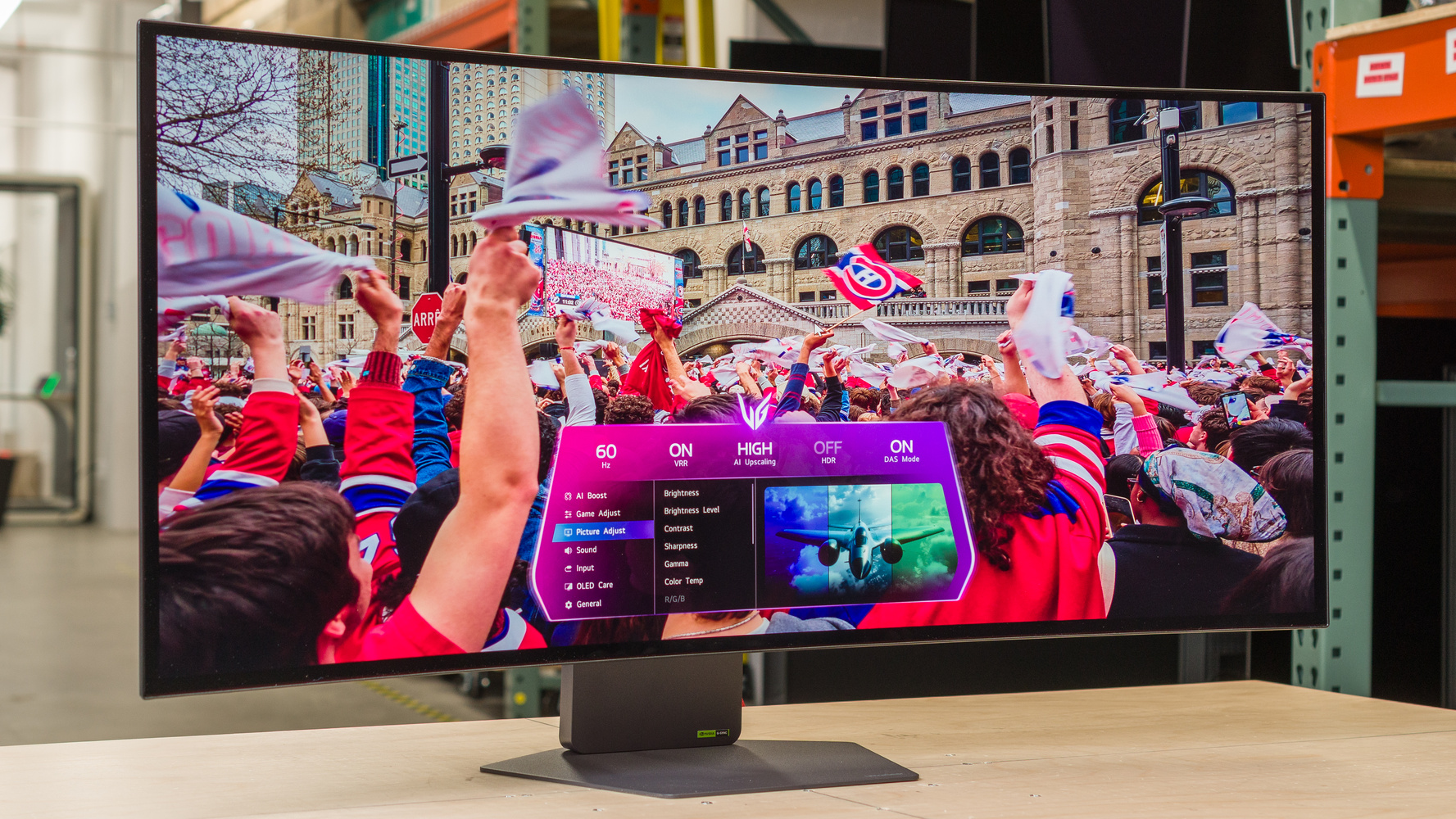
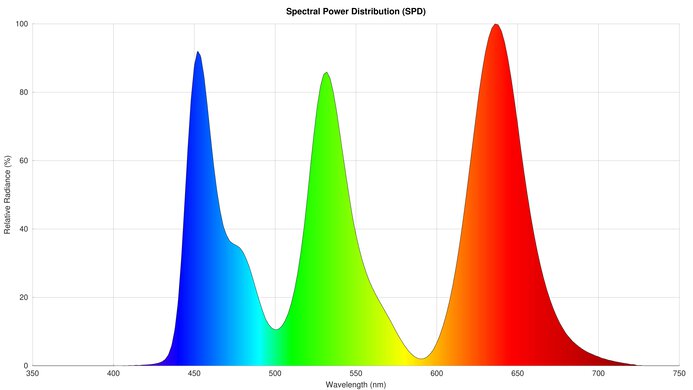
The LG 39GX950B-B is a premium ultrawide OLED gaming monitor. As a smaller and newer model to the LG 45GX950A-B, it's the first 39-inch OLED gaming monitor with a 5k2k resolution. It comes with a higher pixel density compared to the 45-inch model for improved text clarity. It also has a new fourth-gen Tandem OLED panel, bringing higher brightness and better color purity compared to older WOLED displays. With a native 165Hz refresh rate, it includes a dual-mode to boost it to a 330Hz refresh rate with a lower 2560x1080 resolution. Plus, it supports FreeSync Premium Pro and G-SYNC Compatibility to reduce screen tearing, and has high-bandwidth DisplayPort and HDMI 2.1 ports. It includes some AI-focused features, like upscaling, picture settings, and sound modes, and it has a few perks to prevent OLED burn-in, along with an advertised two-year warranty for the panel.
Our Verdict
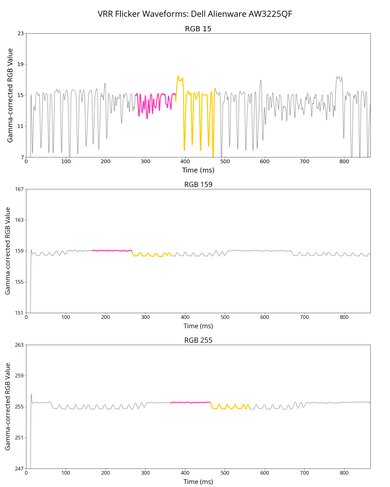
The LG 39GX950B is fantastic for PC gaming. Its large 39-inch, ultrawide screen provides an immersive gaming experience, ideal for sim racing or atmospheric games. Motion looks sharp thanks to its fast response time, and it has low input lag for a responsive feel. Plus, you can boost its native 165Hz refresh rate to 330Hz with a lower 1080p resolution, and it supports all common VRR formats. Unfortunately, though, it has noticeable VRR flicker with changing frame rates. On the plus side, it delivers incredible picture quality thanks to its deep blacks, no haloing, and bright highlights that pop against the rest of the image. It also displays a wide range of colors in HDR.
165Hz and 330Hz dual modes.
Sharp motion at any refresh rate.
Low input lag.
Ultrawide 39-inch screen.
Sharp text and image clarity.
High-bandwidth ports.
Distracting VRR flicker.
Slightly inaccurate brightness in HDR.
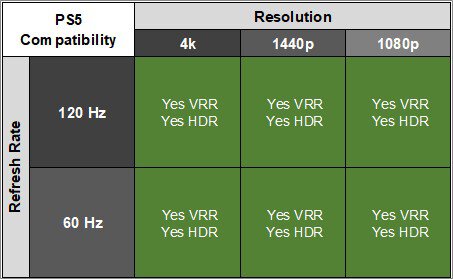
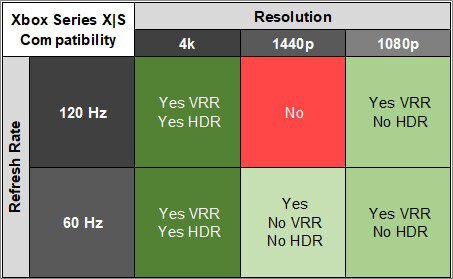
The LG 39GX950B is superb for console gaming. It supports most common signals from modern gaming consoles, including 4k up to 120Hz. That said, you'll see black bars on the sides because consoles don't support ultrawide gaming. Motion looks sharp thanks to its near-instantaneous response time, and gaming is responsive as it has low input lag. Plus, its deep blacks, bright highlights, and wide range of vivid colors help provide incredible picture quality, particularly for gaming in HDR.
Sharp motion at any refresh rate.
Low input lag.
Sharp text and image clarity.
High-bandwidth ports.
Supports most signals from consoles.
Slightly inaccurate brightness in HDR.
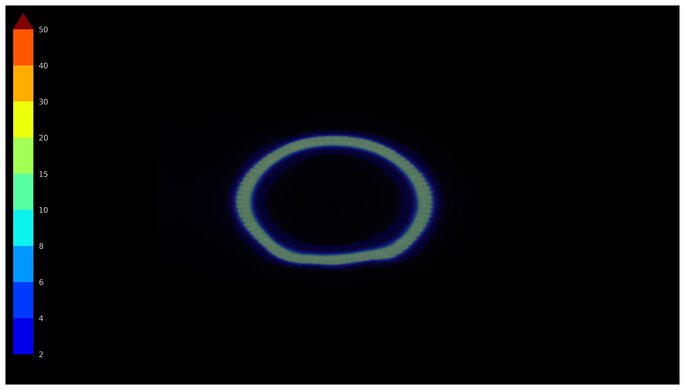
The LG 39GX950B is great for work. It has high pixel density, resulting in sharp text clarity, and its 39-inch screen is big enough to open various windows for multitasking. It also handles glare well in most bright rooms, but visibility is limited in sunny environments. It even comes with an ergonomic stand and a wide viewing angle that's helpful if you view the screen from an off-center position. That said, its curve is less than ideal if someone is sitting next to you and viewing the screen from the sides. The biggest downside is the risk of burn-in from constant exposure to the same static elements over time, which could be problematic if you always use it for work.
Ultrawide 39-inch screen.
Sharp text and image clarity.
Fairly ergonomic stand.
USB hub with DisplayPort Alt Mode, 90W of power.
Gets bright for the most part.
Risk of burn-in.
Reflections are distracting in a sunny room.
The LG 39GX950B is incredible for content creation. It comes with a very accurate sRGB mode, but you'll need to calibrate it if you want it to get bright while maintaining accuracy. It at least fights some glare well, but reflections can be distracting in a sunny room. Its ultrawide, 39-inch screen is helpful if you work with a long video timeline, and it delivers sharp text with a ton of detail thanks to its high resolution and pixel density. It's even fantastic for editing HDR content as it displays a wide range of colors, has no haloing around bright objects, and displays deep blacks in dark rooms. That said, it risks burn-in with constant exposure to the same static elements over time, like if you only use it for editing with the same program.
Ultrawide 39-inch screen.
Sharp text and image clarity.
Fairly ergonomic stand.
USB hub with DisplayPort Alt Mode, 90W of power.
Gets bright for the most part.
Very accurate sRGB mode.
Deep, inky blacks.
Slightly inaccurate brightness in HDR.
Risk of burn-in.
Reflections are distracting in a sunny room.
Needs calibration for accurate & bright screen.
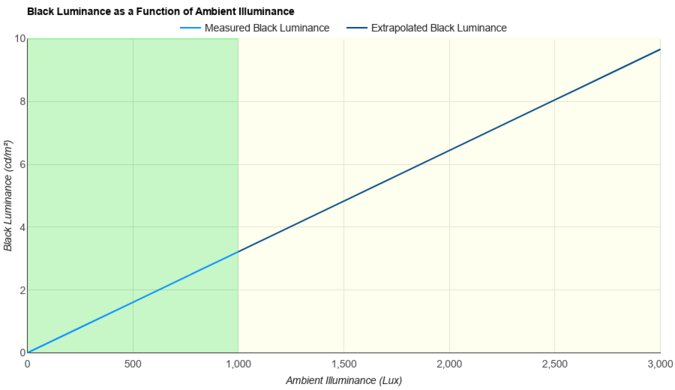
The LG 39GX950B has good brightness. It fights glare well and makes highlights pop. That said, visibility is still an issue in sunny rooms.
Gets bright for the most part.
Highlights pop in HDR.
Reflections are distracting in a sunny room.
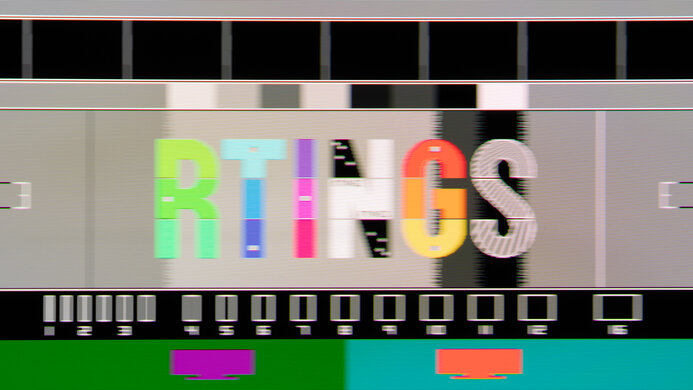
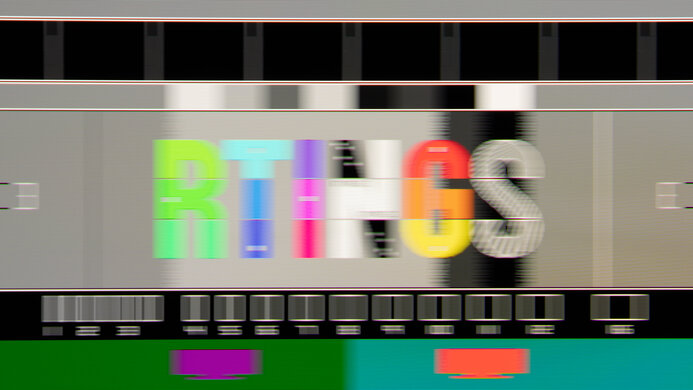
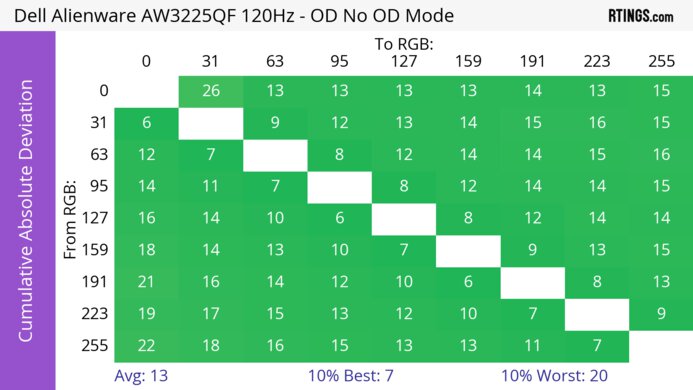
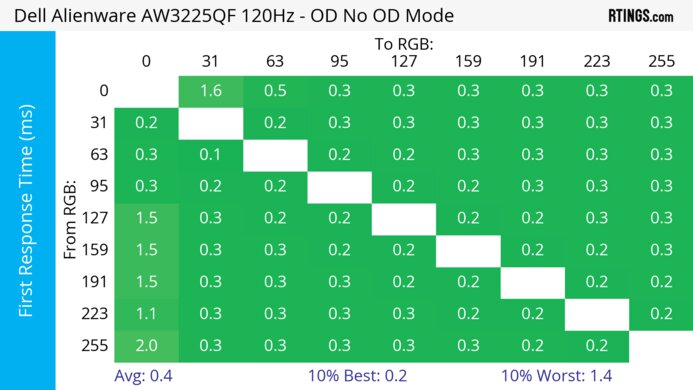
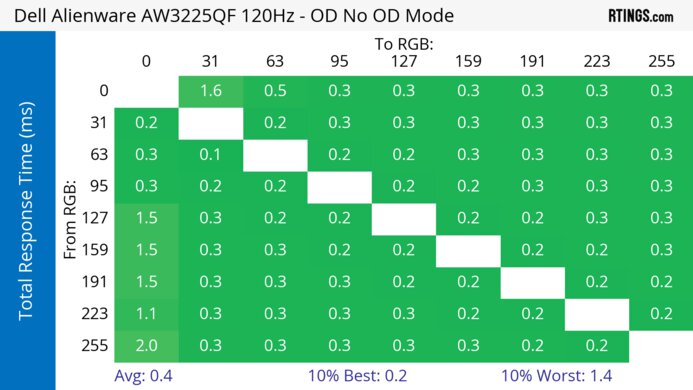
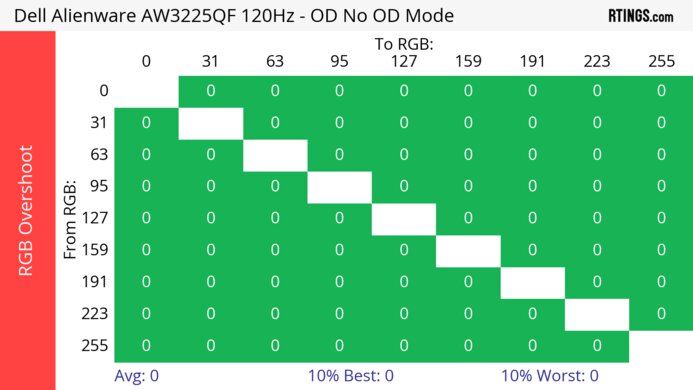
The LG 39GX950B has a near-instantaneous response time for very sharp motion.
Sharp motion at any refresh rate.
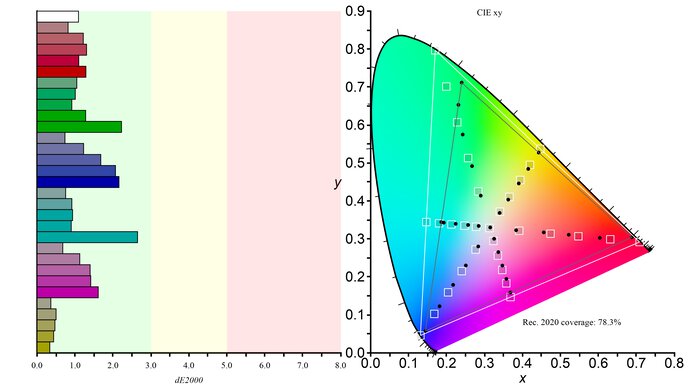
The LG 39GX950B has amazing HDR picture quality. It displays deep blacks alongside bright highlights without haloing. It also displays a wide range of colors, but colors aren't as bright and vivid as pure white.
Deep, inky blacks.
No haloing around bright objects.
Colors not as bright as pure white.
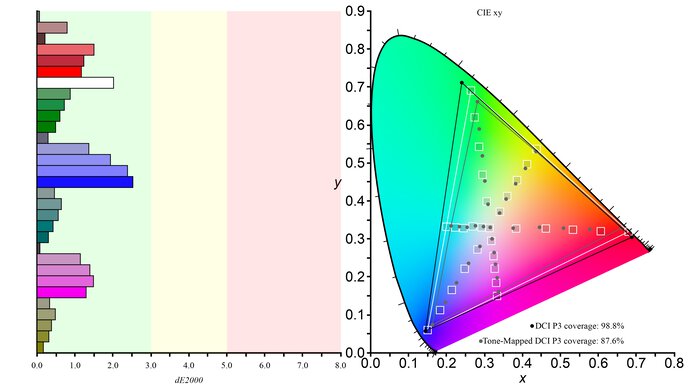
The LG 39GX950B has remarkable SDR picture quality. Blacks are deep and inky, and the monitor displays a wide range of colors.
Displays wide range of colors.
Deep, inky blacks.
The LG 39GX950B has incredible color accuracy. Its sRGB mode locks colors well to the sRGB color space with minimal inaccuracies. That said, you need to calibrate the monitor if you want it to get bright while being accurate.
Very accurate sRGB mode.
Needs calibration for accurate & bright screen.
Performance Usages
Changelog
- Updated Oct 07, 2026: We converted this review to Test Bench 2.2. With this update, we've added a new test box for the Longevity 3.0 test.
-
Updated Sep 29, 2026:
We added that the Dell Alienware AW3926QW has better color volume.
-
Updated Sep 28, 2026:
We updated the Text Clarity score to better reflect its performance compared to other monitors with the same size and resolution.
-
Updated Jun 08, 2026:
We updated the results to correct that it doesn't have a VRR Flicker Control Setting.
Check Price
Differences Between Sizes And Variants
We bought and tested the 39-inch LG 39GX950B, which is the only size available. It's different from the larger LG 45GX950A-B in a few ways, which you can see below, but the two monitors have the same 5k2k resolution and 330Hz dual mode. The results are only valid for this model.
| Model | Size | Curve | Panel | DisplayPort Bandwidth |
|---|---|---|---|---|
| 39GX950B-B | 39" | 1500R |
Fourth-gen WOLED (Tandem OLED) |
UHBR20 (80 Gbps) |
| 45GX950A-B | 45" | 800R | Third-gen WOLED | UHBR10 (40 Gbps) |
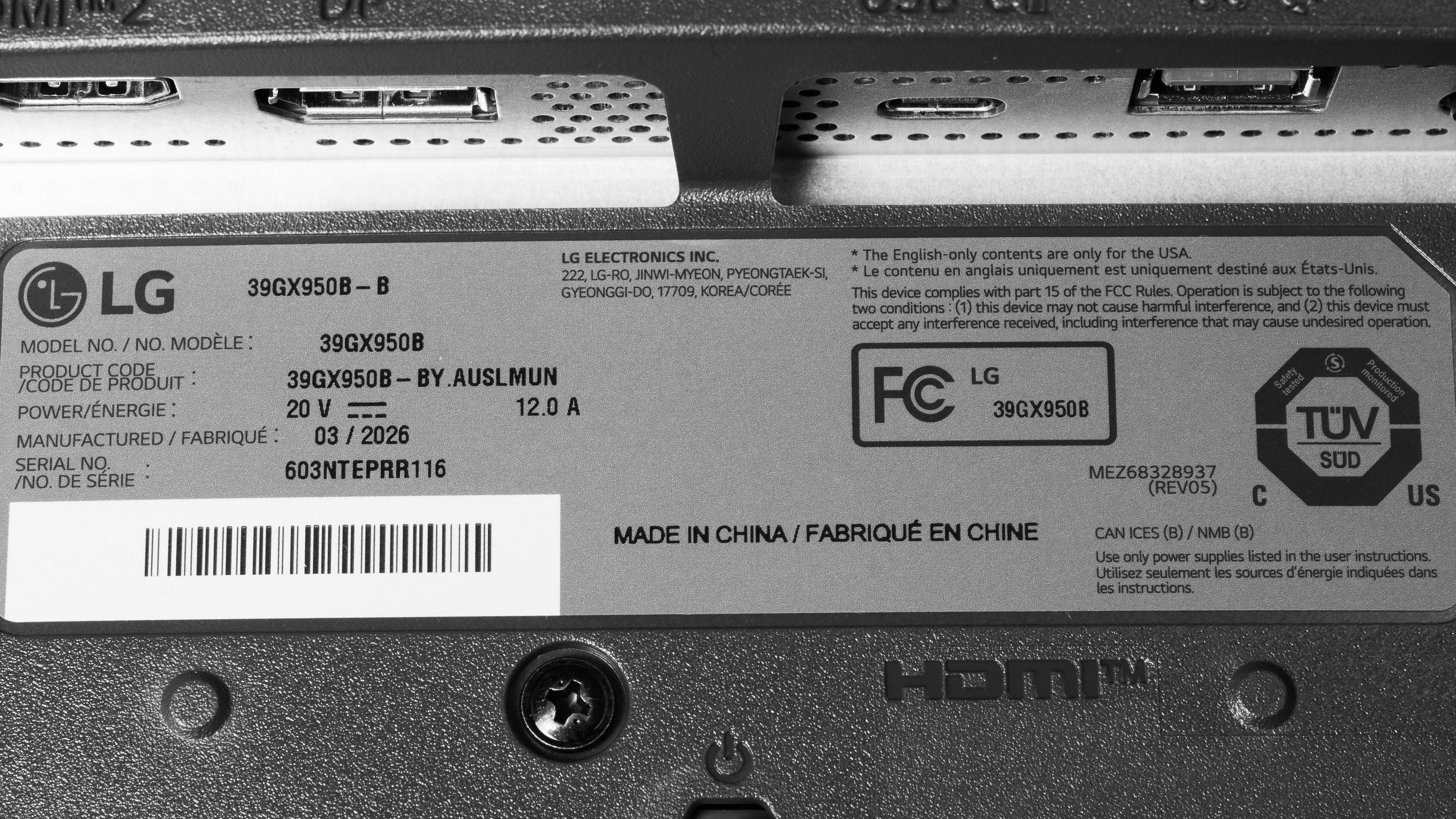
A photo of our unit's label indicates it was manufactured in March 2026 in China. We tested it with firmware (3.09, 4.23.16, 1.11).
Popular Monitor Comparisons
The LG 39GX950B-B is a premium ultrawide OLED gaming monitor. Its 39-inch, 5k2k screen offers a sweet spot between 34-inch ultrawide and 4k gaming monitors. It delivers sharp, detailed images, and its large screen provides an immersive gaming experience, which is ideal for playing atmospheric or sim racing games. This makes it an alternative to smaller options, like the ASUS ROG Swift OLED PG34WCDN, and to larger displays, like the LG C5 42 OLED.
Plus, it has high-end gaming features, like DisplayPort and HDMI 2.1 bandwidth, support for all common VRR formats, and a dual mode to boost its native 165Hz refresh rate to 330Hz. It also has a Tandem OLED panel that allows it to get brighter than the older LG 45GX950A-B. All things considered, it's one of the best ultrawide gaming monitors you can get. While it's an expensive monitor, it's worth getting if you want the best performance and you're looking for a 39-inch monitor with a high resolution.
Also see our recommendations for the best 34-49 inch monitors, the best ultrawide gaming monitors, and the best curved gaming monitors.
The Dell Alienware AW3926QW and the LG 39GX950B-B are competing 39-inch ultrawide OLED gaming monitors. The Dell comes with a newer panel that doesn't use a white subpixel like on the LG, so the Dell has better text clarity with less fringing around letters. The Dell also has an improvement in color volume, as it's better at displaying bright colors. Lastly, they have different coatings, as the matte coating of the LG is better at reducing glare, while the Dell's glossy coating has clearer images.
The LG 39GX950B-B is a newer and smaller monitor compared to the LG 45GX950A-B. They share many similarities, including their 5k2k resolutions and dual modes to boost the refresh rates to 330Hz. That said, the 39GX950B-B has a few advantages, like the fact that it has higher pixel density for improved text clarity. The 39GX950B-B also has a newer Tandem OLED panel that gets brighter and delivers better color purity. Plus, the 39GX950B-B supports higher bandwidth over DisplayPort, which is something to consider if you want to connect your gaming PC over DisplayPort.
The LG 39GX950B-B and the ASUS ROG Swift OLED PG34WCDN are both premium ultrawide gaming monitors. The LG is the better choice if you want a larger screen for an immersive gaming experience. The LG is also better to use in well-lit rooms because it maintains low black levels better. The LG even delivers sharper text as it has higher pixel density. That said, the ASUS delivers more vivid colors thanks to its QD-OLED panel, and its glossy coating means images look clearer. Plus, the ASUS has a higher 360Hz refresh rate, leading to a smoother feel than on the LG, even in its dual mode.
The MSI MPG 341CQR QD-OLED X36 and the LG 39GX950B-B are both premium ultrawide gaming monitors. There are a few differences, as the LG has a bigger screen with a higher resolution, delivering a more immersive gaming experience. They also have different OLED panel types, as the WOLED panel of the LG maintains lower black levels in bright rooms, while the QD-OLED panel of the MSI displays more vivid colors. Besides that, the MSI has a higher 360Hz refresh rate compared to the max 330Hz refresh rate of the LG that you can only achieve in its lower-resolution dual mode. They also have different coatings, as the glossy coating of the MSI delivers a clearer image, while the matte finish of the ASUS has fewer mirror-like reflections.

We buy and test more than 30 monitors each year, all of which we purchase ourselves, without cherry-picked units or samples. We put a lot into each unbiased, straight-to-the-point review, and there's a whole process from purchasing to publishing, involving multiple teams and people. We do more than just use the monitor for a week; we use specialized, custom tools to measure various aspects and deliver objective, data-driven results. We also consider multiple factors before making any recommendations, including the monitor's cost, its performance compared to the competition, and whether it's easy to find.
Test Results






for pictures & test results





for pictures & test results


for pictures & test results

for pictures & test results

for pictures & test results

for pictures & test results

for pictures & test results

for pictures & test results





for videos & test results

for pictures & test results

for pictures & test results

for pictures & test results

























for pictures & test results