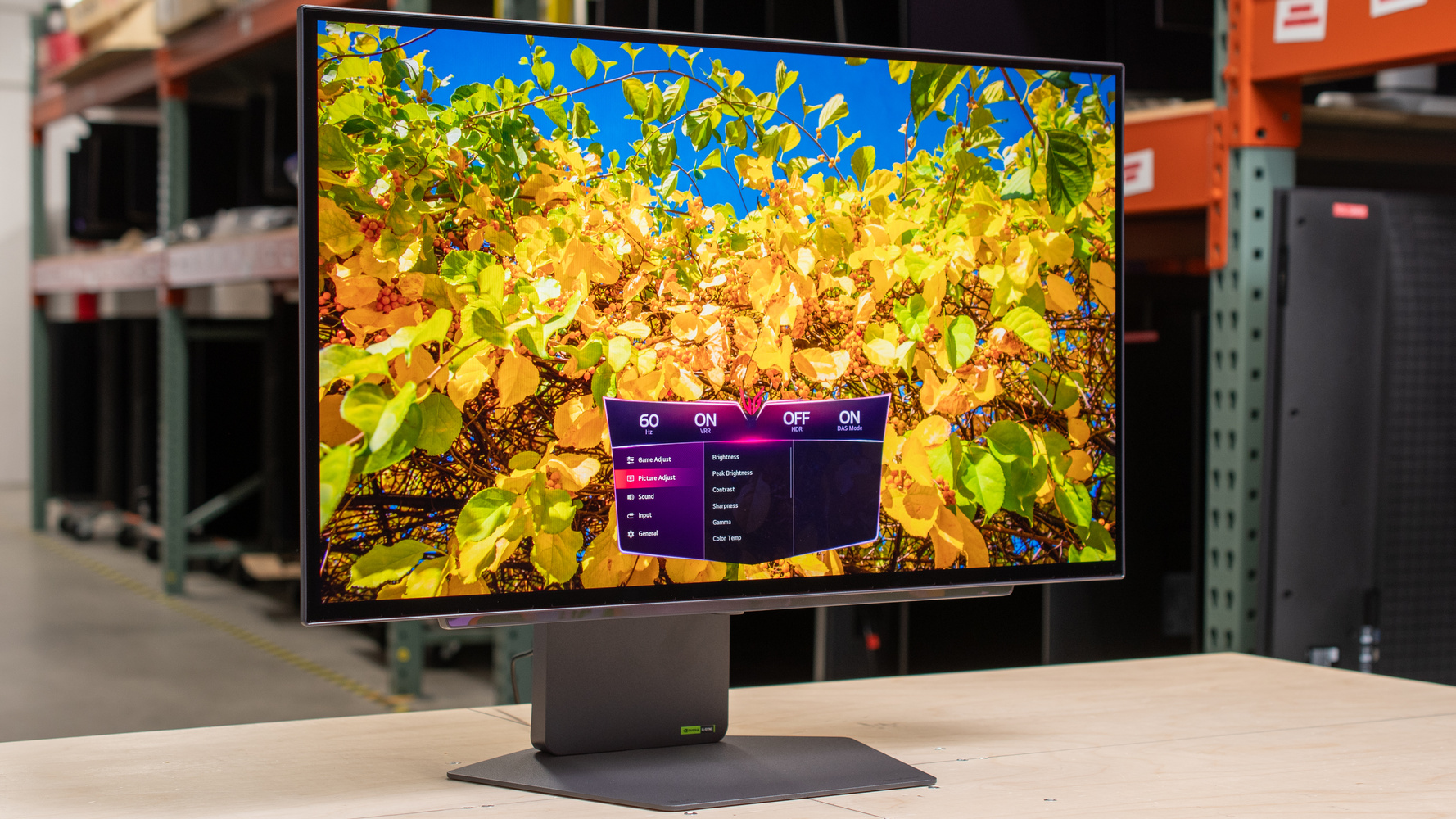
LG 27GX700A-B  Monitor Review

Reviewed Nov 19, 2025 at 03:07pm
Tested using Methodology v2.1.1 
LG 27GX700A-B
9.1
PC Gaming 
9.2
Console Gaming 
7.6
Office 
8.7
Editing 
7.8
Brightness 
9.8
Response Time 
9.2
HDR Picture 
9.9
SDR Picture 
 35
  1. Recommended in:
  2. 1440p
  3. 240Hz

The LG 27GX700A-B is a 1440p, 280Hz OLED gaming monitor. It's LG's first model to use the fourth-gen RGB Tandem OLED panel, which is meant to offers brighter highlights and more vivid colors compared to monitors with previous-generation WOLED panels, like the LG 27GX790A-B. It competes with other models that use the same panel, such as the Gigabyte MO27Q28G and the ASUS XG27AQWMG, which feature a TrueBlack Glossy coating, unlike this monitor's matte coating. It has typical gaming features, like HDMI 2.1 bandwidth, G-SYNC Compatibility, and FreeSync Premium Pro, but unlike some other premium OLEDs, it lacks DisplayPort 2.1 bandwidth. It also includes a small USB hub, and its audio jack supports DTS Headphone:X to simulate surround sound audio.

How We Test Monitors

We buy and test more than 30 monitors each year, with units that we buy completely on our own, without any cherry-picked units or samples. We put a lot into each unbiased, straight-to-the-point review, and there's a whole process from purchasing to publishing, involving multiple teams and people. We do more than just use the monitor for a week; we use specialized and custom tools to measure various aspects with objective data-based results. We also consider multiple factors before making any recommendations, including the monitor's cost, its performance against the competition, and whether or not it's easy to find.

Our Verdict

9.1
PC Gaming 

The LG 27GX700A-B is incredible for PC gaming. Its 280Hz refresh rate and VRR support offer a smooth feel, it has a near-instantaneous response time for sharp motion, and input lag is low for a responsive feel. It also has incredible picture quality thanks to its deep blacks and no haloing around bright objects. It's very bright, especially for an OLED, so highlights pop, but it prioritizes this high brightness over image accuracy. There are some other downsides for gaming, like the fact that it has distracting VRR flicker with changing frame rates. It also features visible banding that can be distracting in dark game scenes.

Pros
  • Near-instantaneous response time for sharp motion.

  • Low input lag at any refresh rate.

  • Very bright for an OLED; highlights pop.

  • 280Hz refresh rate and VRR support.

  • Deep and inky blacks.

Cons
  • Vertical banding in dark content.

  • Prioritizes brightness over accuracy.

  • Distracting VRR flicker.

9.2
Console Gaming 

The LG 27GX700A-B is fantastic for console gaming. It supports signals up to 4k @ 120Hz with a modern gaming console, but it has to downscale 4k signals to 1440p. Motion looks sharp thanks to its near-instantaneous response time, and it has low input lag for a responsive feel. It also delivers incredible picture quality, particularly in HDR, thanks to its near-infinite contrast ratio that results in deep blacks. It's very bright for an OLED as small highlights pop, but it does this by prioritizing brightness over accuracy, so games look overbrightened. Unfortunately, it exhibits noticeable banding in dark scenes, which can be distracting.

Pros
  • Near-instantaneous response time for sharp motion.

  • Low input lag at any refresh rate.

  • Very bright for an OLED; highlights pop.

  • Deep and inky blacks.

  • HDMI 2.1 bandwidth supports most signals from consoles.

Cons
  • Vertical banding in dark content.

  • Prioritizes brightness over accuracy.

  • No Dolby Vision support from an Xbox.

7.6
Office 

The LG 27GX700A is good for office use, with some limitations. It's fine if you want to use it in an office with a few lights around, as it gets bright and its matte coating reduces glare well. It also comes with an ergonomic stand and features a wide viewing angle, making it a good choice if you want to share the screen with someone next to you. However, there's fringing around text, so it doesn't look as sharp as other monitors with the same pixel density. It also risks burn-in with constant exposure to the same static elements over time, which can be problematic if you use the monitor only for work.

Pros
  • Ergonomic stand.

  • Coating reduces glare well.

  • Wide viewing angle.

Cons
  • Limited to 1440p resolution.

  • Fringing around text.

  • Risk of burn-in.

8.7
Editing 

The LG 27GX700A-B is excellent for editing. It has an accurate sRGB mode that limits colors to the sRGB color space, but a full calibration still improves its gamma tracking. It also delivers incredible picture quality thanks to its deep blacks, no haloing around bright objects, and wide range of colors that it displays. It even gets bright, which helps if you edit content in a well-lit room, but it does so by overbrightening all content. Unfortunately, it has vertical banding in dark scenes, which can get distracting if you use your program's dark mode. It also risks burn-in, a problem that occurs when your editing program remains on-screen without changing content.

Pros
  • Very bright for an OLED; highlights pop.

  • Deep and inky blacks.

  • Coating reduces glare well.

  • Accurate sRGB mode before calibration.

  • Wide viewing angle.

Cons
  • Vertical banding in dark content.

  • Fringing around text.

  • Risk of burn-in.

  • Gamma is too bright; needs a full calibration to fix.

  • Prioritizes brightness over accuracy.

7.8
Brightness 

The LG 27GX700A-B has good brightness. It gets bright, especially for an OLED, so it fights glare well and makes highlights pop. However, it prioritizes brightness over accuracy, so it overbrightens content.

Pros
  • Very bright for an OLED; highlights pop.

Cons
  • Prioritizes brightness over accuracy.

9.8
Response Time 

The LG 27GX700A has a near-instantaneous response time for incredibly sharp motion.

Pros
  • Near-instantaneous response time for sharp motion.

Cons
None
9.2
HDR Picture 

The LG 27GX700A-B has incredible HDR picture quality. It covers most of the DCI-P3 and Rec. 2020 color spaces, and makes most vivid colors look bright. It also has a near-infinite contrast ratio for deep blacks in dark rooms, without any haloing.

Pros
  • Deep and inky blacks.

  • Covers most of common color spaces.

Cons
  • Vertical banding in dark content.

9.9
SDR Picture 

The LG 27GX700A-B has remarkable SDR picture quality. It displays deep blacks without any haloing around bright objects, and it displays a wide range of colors.

Pros
  • Deep and inky blacks.

  • Covers most of common color spaces.

Cons
None
9.1
Color Accuracy 

The LG 27GX700A has fantastic color accuracy. Its sRGB mode is accurate before any sort of calibration, as it limits colors well to the sRGB color space. However, there are inaccuracies with gamma tracking that you need to fix with a full calibration.

Pros
  • Accurate sRGB mode before calibration.

Cons
  • Gamma is too bright; needs a full calibration to fix.

  • Prioritizes brightness over accuracy.

  • 9.1
    PC Gaming
  • 9.2
    Console Gaming
  • 7.6
    Office
  • 8.7
    Editing

  • Performance Usages

  • 7.8
    Brightness
  • 9.8
    Response Time
  • 9.2
    HDR Picture
  • 9.9
    SDR Picture
  • 9.1
    Color Accuracy
  • Changelog

    1.  Updated Nov 19, 2025: Review published.
    2.  Updated Nov 18, 2025: Early access published.
    3.  Updated Nov 10, 2025: Our testers have started testing this product.
    4.  Updated Nov 07, 2025: The product has arrived in our lab, and our testers will start evaluating it soon.

    Check Price

    27"27GX700A-B
    SEE PRICE
    Amazon.com
    27"27GX700A-B
    SEE PRICE
    BestBuy.com
    27"27GX700A-B
    SEE PRICE
    Walmart.com
    27"27GX700A-B
    SEE PRICE
    B&H
    27"27GX700A-B
    LG.com

    Differences Between Sizes And Variants

    We bought and tested the 27-inch LG 27GX700A, which is the only size available. It's LG's only model to have the fourth-gen WOLED RGB Tandem panel. You can see the differences between other 27-inch, 1440p OLEDs in the UltraGear lineup:

    Model Panel Max Refresh Rate Coating
    27GX700A-B 4th-gen WOLED
    (RGB Tandem OLED)
    280Hz Matte
    27GX790A-B 3rd-gen WOLED 480Hz Matte
    27GX704A-B 3rd-gen WOLED 240Hz Glossy

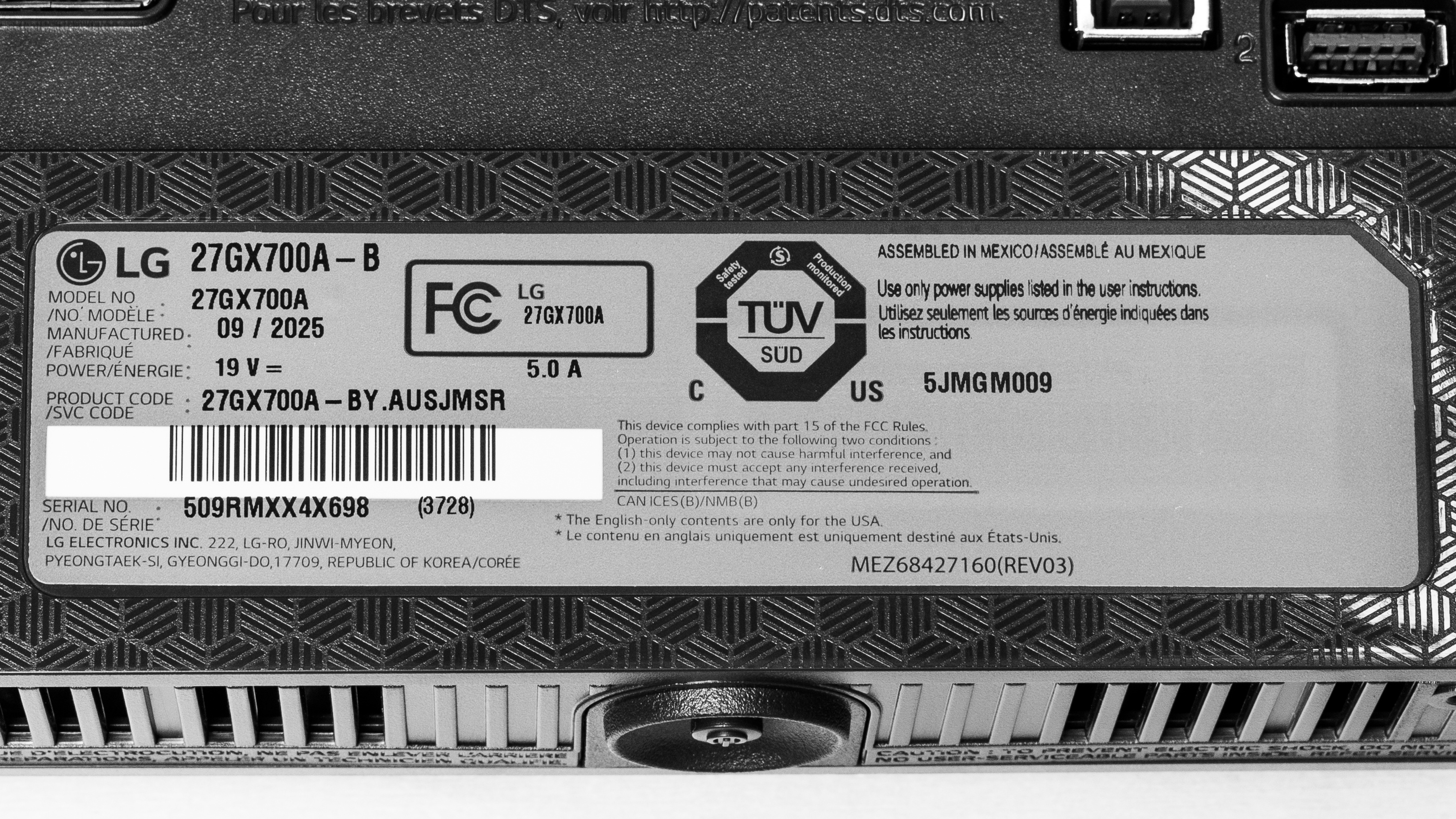
    Our unit's label indicates it was manufactured in September 2025 in Mexico. We tested it with firmware version 3.02, 2.04.

    Popular Monitor Comparisons

    The LG 27GX700A-B is a 27-inch, 1440p OLED gaming monitor with a 280Hz refresh rate. It's part of the first group of models that feature the new fourth-gen RGB Tandem OLED panel, competing with the Gigabyte MO27Q28G and the ASUS XG27AQWMG. This new panel allows the monitor to get brighter than previous-generation OLED panels. It also has better color purity than other WOLEDs, like the LG 27GX790A-B, but colors still aren't as vivid as on a QD-OLED, like the MSI MPG 271QRX QD-OLED. However, it overbrightens content, so it prioritizes brightness over accuracy in HDR. It also has some other issues, such as vertical banding in dark scenes and the lack of premium features, including DisplayPort 2.1 bandwidth. While it's far from the perfect monitor, it's still a fantastic gaming OLED that offers a fast refresh rate and smooth feel, and it costs less than higher-end 4k OLEDs.

    Also see our recommendations for the best 240Hz monitors, the best 1440p gaming monitors, and the best 27-inch gaming monitors.

    ASUS ROG Strix OLED XG27AQDMG

    The LG 27GX700A-B and the ASUS ROG Strix OLED XG27AQDMG are both 1440p OLED gaming monitors. The LG uses a newer RGB Tandem OLED panel, which gets brighter and displays more vivid colors than the WOLED panel of the ASUS. However, the LG is inaccurate with its brightest settings, so the ASUS is more accurate while still getting fairly bright. The LG is a bit more well-rounded in terms of features, as it supports HDMI 2.1 bandwidth, so it supports more signals with consoles than the ASUS.

    LG 27GX790A-B

    The LG 27GX700A-B is a newer OLED gaming monitor than the LG 27GX790A-B. They have many of the same features, but have WOLED panels from different generations. The 27GX700A-B utilizes the newer RGB Tandem OLED panel, which offers brighter performance and improved color purity compared to the 27GX790A-B. However, the 27GX700A-B is less accurate in HDR because it overbrightens content. The 27GX790A-B is more well-rounded for gaming because it has a higher refresh rate for a smoother feel, and it comes with DisplayPort 2.1 bandwidth to take advantage of modern graphics cards, which the 27GX700A-B doesn't have.

    MSI MPG 271QRX QD-OLED

    The LG 27GX700A-B and the MSI MPG 271QRX QD-OLED are 1440p gaming monitors with different types of OLED panels. The RGB Tandem OLED panel of the LG gets brighter, but it does this by overbrightening content, so it's less accurate than the MSI. On the other hand, the MSI does a better job at displaying the brightest colors. The MSI also has an advantage for gaming, as it features a higher 360Hz refresh rate for a smoother experience. The MSI even has a few extra features, such as a USB-C port and a KVM switch, that make it more versatile for connecting various devices. Lastly, they have different coatings; the matte coating of the LG does a better job of reducing direct reflections, while the glossy coating of the MSI makes images look clearer.

    LG 32GS95UE-B

    The LG 32GS95UE-B and the LG 27GX700A-B are both OLED gaming monitors, with a few differences. The 32GS95UE-B is more versatile for playing different types of games because it has a native 4k resolution and 240Hz refresh rate that you can change to 1080p, 480Hz for a smoother feel. The higher resolution also results in sharper text. On the other hand, the 27GX700A-B features a newer RGB Tandem OLED panel, enabling it to display brighter and more vivid colors than the 32GS95UE-B. That said, the 27GX700A-B achieves this by prioritizing brightness over accuracy, so it's less accurate than the 32GS95UE-B.

    Test Results

    perceptual testing image
    Sort:
    RATINGS
    Category:
    All
    Design
    Style
    Curved
    No
    Curve Radius
    Not Curved

    The LG 27GX700A-B has a gaming-oriented design that's similar to other UltraGear monitors. It's mainly made of plastic, with the base of the stand and panel housing being metal. There's also some branding and RGB lighting on the back.

    8.5
    Build Quality

    The build quality is excellent. It's made of high-quality materials that don't bend easily, feel premium, and aren't easily susceptible to fingerprint smudges. Overall, it feels very well-made and there aren't any obvious issues.

    8.2
    Ergonomics
    Min Height To Top Of Panel
    18.0" (45.7 cm)
    Height Adjustment
    4.3" (11.0 cm)
    Tilt Range
    -15° to 5°
    Rotate Portrait/Landscape
    Yes, Counter Clockwise
    Swivel Range
    -30° to 30°
    Wall Mount
    VESA 100x100

    The ergonomics are great. You can adjust it how you like, and the adjustments feel smooth on the stand. The stand also features a cutout for cable management.

    Stand
    Base Width
    12.1" (30.7 cm)
    Base Depth
    9.8" (25.0 cm)
    Thickness (With Display)
    7.3" (18.5 cm)
    Weight (With Display)
    19.2 lbs (8.7 kg)

    The stand has a metal base and a plastic pillar. It holds the screen well with minimal wobble, and it quickly stabilizes if it does wobble.

    Display
    Size
    27"
    Housing Width
    23.9" (60.6 cm)
    Housing Height
    14.1" (35.9 cm)
    Thickness (Without Stand)
    1.8" (4.5 cm)
    Weight (Without Stand)
    10.3 lbs (4.7 kg)
    Borders Size (Bezels)
    0.4" (1.0 cm)

    The housing height measurement includes the reflective plastic bar below the bottom bezel. The bezel measurement includes 2 mm of extra space on either side that the monitor uses to shift the image with the OLED Screen Move setting.

    Controls

    There's a joystick to control the on-screen display and turn the monitor on/off. It feels stiff, but it's still easy to navigate the OSD.

    In The Box
    Power Supply
    External Brick

    • HDMI cable
    • DisplayPort cable
    • USB-A to USB-B cable
    • Power brick and cable
    • User guides
    Picture Quality
    10
    Contrast
    Native Contrast
    Inf : 1
    Contrast With Local Dimming
    Inf : 1

    LG 27GX700A-B has a near-infinite contrast ratio for perfect blacks against bright highlights.

    Like other WOLEDs, the black levels change depending on the refresh rate. The gamma rises at low refresh rates, worsening the black levels, and in turn the contrast ratio, as you can see at 280Hz, 120Hz, and 60Hz.

    10
    Local Dimming
    Local Dimming
    No
    Backlight
    No Backlight

    This monitor doesn't have a backlight, so it doesn't require a local dimming feature. However, with a near-infinite contrast ratio, there isn't any haloing around bright objects, and it's the equivalent of a perfect local dimming feature. We still film these videos on the monitor so you can see how the screen performs and compare it with a monitor that has local dimming.

    8.1
    SDR Brightness
    Real Scene
    338 cd/m²
    Peak 2% Window
    589 cd/m²
    Peak 10% Window
    587 cd/m²
    Peak 25% Window
    463 cd/m²
    Peak 50% Window
    393 cd/m²
    Peak 100% Window
    358 cd/m²
    Sustained 2% Window
    581 cd/m²
    Sustained 10% Window
    580 cd/m²
    Sustained 25% Window
    460 cd/m²
    Sustained 50% Window
    392 cd/m²
    Sustained 100% Window
    357 cd/m²
    Automatic Brightness Limiting (ABL)
    0.016
    Minimum Brightness
    19 cd/m²

    Settings

    • Game Mode: Gamer 1 (after calibration)
    • Brightness: 100
    • Peak Brightness: High

    The LG 27GX700A has great SDR brightness. Its RGB Tandem OLED panel offers a significant improvement in brightness over other OLEDs. It fights glare in bright rooms well, but it doesn't maintain consistent brightness across different content. You may notice that the brightness changes when minimizing and maximizing windows.

    The monitor gets the brightest with Peak Brightness set to 'High.' However, if you want the dimmest screen possible, you need to turn it off; otherwise, the minimum brightness with it on 'High' is 26 cd/m². You can see the results with the other Peak Brightness settings below:
    Window Size Peak Brightness: Off Peak Brightness: Low
    Real Scene 336 cd/m² 334 cd/m²
    Peak 2% Window 346 cd/m² 453 cd/m²
    Peak 10% Window 346 cd/m² 453 cd/m²
    Peak 25% Window 352 cd/m² 457 cd/m²
    Peak 50% Window 358 cd/m² 392 cd/m²
    Peak 100% Window 356 cd/m² 357 cd/m²
    Sustained 2% Window 343 cd/m² 448 cd/m²
    Sustained 10% Window 344 cd/m² 449 cd/m²
    Sustained 25% Window 350 cd/m² 454 cd/m²
    Sustained 50% Window 356 cd/m² 390 cd/m²
    Sustained 100% Window 354 cd/m² 356 cd/m²
    Minimum Brightness 19 cd/m² 26 cd/m²
    7.6
    HDR Brightness
    VESA DisplayHDR Certification
    DisplayHDR TRUE BLACK 500
    Real Scene
    561 cd/m²
    Peak 2% Window
    1,427 cd/m²
    Peak 10% Window
    818 cd/m²
    Peak 25% Window
    451 cd/m²
    Peak 50% Window
    382 cd/m²
    Peak 100% Window
    353 cd/m²
    Sustained 2% Window
    1,363 cd/m²
    Sustained 10% Window
    800 cd/m²
    Sustained 25% Window
    448 cd/m²
    Sustained 50% Window
    380 cd/m²
    Sustained 100% Window
    352 cd/m²
    Automatic Brightness Limiting (ABL)
    0.081

    Settings:

    • Game Mode: Gamer 1
    • Brightness: 100
    • Peak Brightness: High
    • Smart Energy Saving: Off
    • All OLED care settings disabled

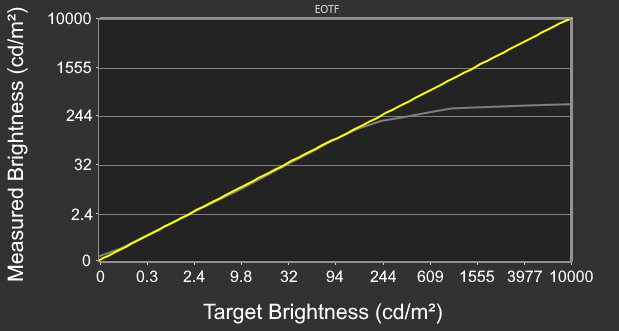
    The HDR brightness is good. The RGB Tandem OLED panel allows small highlights to get much brighter than other OLEDs, so they really pop against dark backgrounds. While it can't maintain this high brightness with larger highlights covering more of the screen, it's still bright enough for an impactful HDR experience.

    Although it gets the brightest with Peak Brightness on 'High,' it's also inaccurate with this setting. It crushes blacks and overbrightens most content. Peak Brightness set to 'Low' is much more accurate, but it's dimmer, so you have to choose between high brightness or accurate images. Disabling Peak Brightness is also inaccurate as content is darker than intended. You can see the full results with 'Low' and 'Off' below:

    Window Size Peak Brightness: Off Peak Brightness: Low
    Real Scene 324 cd/m² 557 cd/m²
    Peak 2% Window 344 cd/m² 631 cd/m²
    Peak 10% Window 346 cd/m² 629 cd/m²
    Peak 25% Window 348 cd/m² 451 cd/m²
    Peak 50% Window 352 cd/m² 382 cd/m²
    Peak 100% Window 353 cd/m² 354 cd/m²
    Sustained 2% Window 342 cd/m² 623 cd/m²
    Sustained 10% Window 340 cd/m² 616 cd/m²
    Sustained 25% Window 344 cd/m² 442 cd/m²
    Sustained 50% Window 350 cd/m² 381 cd/m²
    Sustained 100% Window 351 cd/m² 353 cd/m²
    PQ EOTF Graph Graph
    8.8
    Gray Uniformity
    50% Std. Dev.
    2.013%
    50% DSE
    0.109%

    The gray uniformity with mid and bright grays is excellent. The screen is uniform throughout, but the uniformity is worse with dark grays, as others have reported online. There's visible vertical banding that you'll notice even with regular content that has dark areas. Running OLED Image Cleaning cycles reduces the banding, but doesn't improve it, as you can see with 15% gray:

    You don't see this issue with bright grays.

    10
    Black Uniformity
    Native Std. Dev.
    0.318%
    Std. Dev. w/ L.D.
    N/A

    The black uniformity is perfect as it maintains a uniform black level across the screen.

    9.0
    Color Accuracy (Pre-Calibration)
    Picture Mode
    sRGB
    sRGB Gamut Area xy
    100.4%
    White Balance dE (Avg.)
    2.32
    Color Temperature (Avg.)
    6,521 K
    Gamma (Avg.)
    2.10
    Color dE (Avg.)
    1.80
    Contrast Setting
    70
    RGB Settings
    50-50-50
    Gamma Setting
    Default
    Brightness Setting
    23
    Measured Brightness
    102 cd/m²
    Brightness Locked
    No

    The accuracy before calibration is fantastic. It has a dedicated 'sRGB' Game Mode that locks colors well to the sRGB color space, so they aren't oversaturated. It also has minimal white balance and color inaccuracies, and the color temperature is almost spot-on with the 6500K target.

    These results are with Peak Brightness off. Even though its gamma tracking is a bit off, with most content being brighter than intended, it's still more accurate than setting Peak Brightness to 'Low' or 'High.' Gamma is way too bright with these settings, as you can see below:


    Using the 'sRGB' Game Mode locks most picture settings, including Color Temp and Gamma. You'd have to use another mode with oversaturated colors if you want access to those settings.

    9.6
    Color Accuracy (Post-Calibration)
    Picture Mode
    Gamer 1
    sRGB Gamut Area xy
    101.0%
    White Balance dE (Avg.)
    0.65
    Color Temperature (Avg.)
    6,493 K
    Gamma (Avg.)
    2.18
    Color dE (Avg.)
    0.83
    Contrast Setting
    70
    RGB Settings
    49-49-46
    Gamma Setting
    Mode 2
    Brightness Setting
    23
    Measured Brightness
    100 cd/m²
    ICC Profile
    Download

    The accuracy after calibration is fantastic. A full calibration fixes gamma issues, while improving colors and the white balance. You also have access to settings that are locked out in the sRGB mode.

    Although the monitor has customizable RGB color and two-point white balance settings, you can achieve the best accuracy with a proper calibration using external software.

    9.7
    SDR Color Gamut
    sRGB Coverage xy
    99.7%
    sRGB Picture Mode
    Gamer 1
    Adobe RGB Coverage xy
    94.3%
    Adobe RGB Picture Mode
    Gamer 1

    The LG 27GX700A-B has a superb SDR color gamut. It has perfect coverage of the common sRGB color space. It also covers most of the wider Adobe RGB color space, but it oversaturates colors in the process.

    9.6
    HDR Color Gamut
    Wide Color Gamut
    Yes
    DCI-P3 Coverage xy
    99.7%
    DCI-P3 Picture Mode
    Gamer 1
    Rec. 2020 Coverage xy
    79.5%
    Rec. 2020 Picture Mode
    Gamer 1

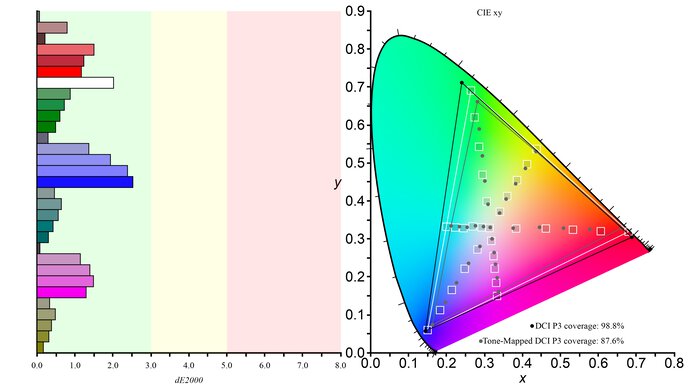
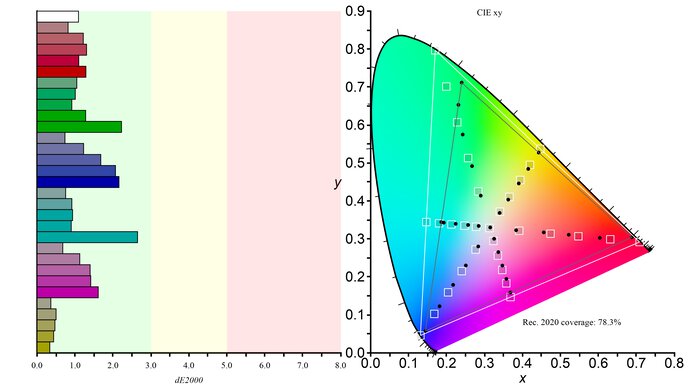
    The HDR color gamut is remarkable. It covers most of the DCI-P3 color space, and while it's more limited in the Rec. 2020 color space, it has minimal inaccuracies in either.

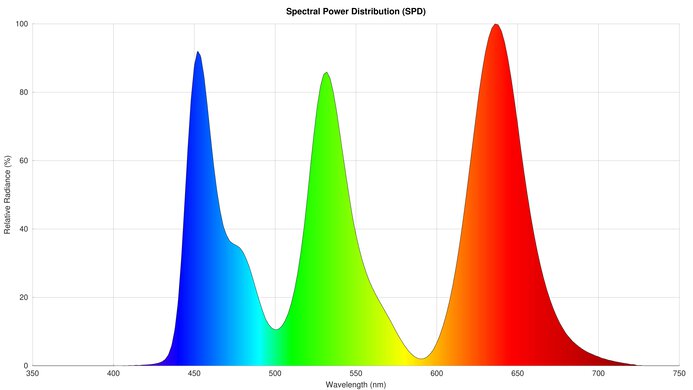
    The RGB Tandem OLED panel allows for better color purity compared to previous-generation WOLED panels. You can see this with its spectral power distribution (SPD) graph compared to the SPD of the LG 27GX790A-B, which uses a third-gen WOLED panel.

    8.6
    HDR Color Volume
    1,000 cd/m² DCI-P3 Coverage ICtCp
    84.8%
    DCI-P3 Picture Mode
    Gamer 1
    10,000 cd/m² Rec. 2020 Coverage ICtCp
    43.2%
    Rec. 2020 Picture Mode
    Gamer 1

    The HDR color volume is excellent. Like previous-generation WOLED panels, it still relies on a white subpixel, so pure white is brighter than other colors. Vivid colors are also brighter than older WOLEDs, but it still doesn't have the same remarkable color volume as a QD-OLED monitor, like the MSI MPG 271QRX QD-OLED.

    8.4
    Viewing Angle
    Color Washout From Left
    49°
    Color Washout From Right
    53°
    Color Shift From Left
    35°
    Color Shift From Right
    33°
    Brightness Loss From Left
    55°
    Brightness Loss From Right
    56°
    Black Level Raise From Left
    70°
    Black Level Raise From Right
    70°
    Gamma Shift From Left
    59°
    Gamma Shift From Right
    56°

    The viewing angle is impressive. Although there's more color shift and washout than other OLEDs, this difference is hard to tell, and the image remains accurate even from wide angles.

    6.5
    Text Clarity
    Pixel Type
    OLED
    Subpixel Layout
    RGWB

    The text clarity is okay. Programs don't properly render text with its RGWB subpixel layout, so there's fringing around letters, and text looks worse than LCD monitors with the same pixel density. How much this bothers you changes from person to person.

    These photos are in Windows 10, and you can also see them in Windows 11 with ClearType on and with ClearType off.

    8.3
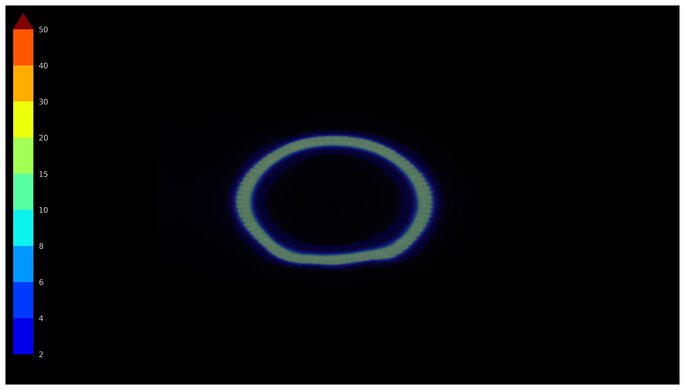
    Direct Reflections
    See details on graph tool
    Peak Direct Reflection Intensity
    14.7%
    Screen Finish
    Matte

    The direct reflection handling is great. The matte coating absorbs light well, but it still spreads remaining light out towards the top and bottom edges.

    9.2
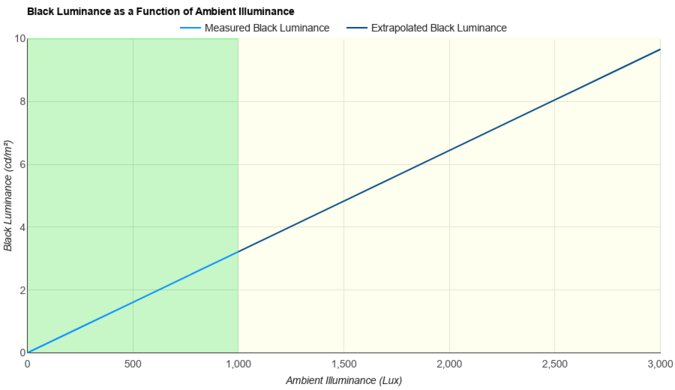
    Ambient Black Level Raise
    See details on graph tool
    Black Luminance @ 0 lx
    0.00 cd/m²
    Black Luminance @ 1000 lx
    0.31 cd/m²

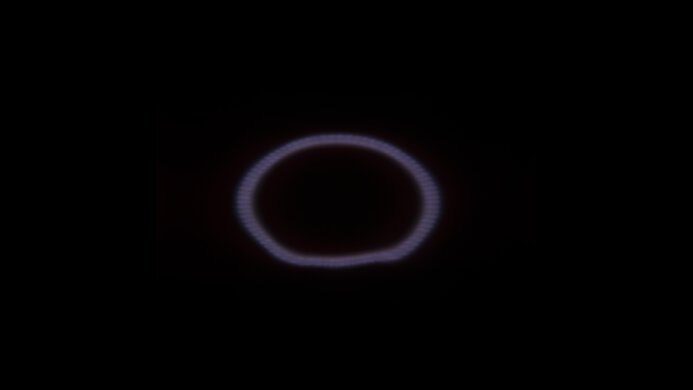
    The LG 27GX700A-B retains low black levels in a bright room, so you get its deep and inky blacks in any environment. However, there's still a purple tint if you have a bright light pointing directly to the screen, which you can see in this video, so it's best to avoid placing it opposite a sunny window.

    8.3
    Total Reflected Light
    Total Reflected Light Intensity
    13,406% ⋅ pixel
    Diffraction Artifacts
    No

    There aren't many distracting reflections on the LG 27GX700A. It absorbs light well, but it stretches reflections towards the top and bottom edges of the screen, which can get distracting if you have it in a sunny room.

    9.5
    Gradient
    Color Depth
    10 Bit

    The LG 27GX700A has fantastic gradient handling. There's minimal banding between shades of different colors, but as explained in Gray Uniformity, there are visible vertical bars with dark colors. You can see this effect with darker colors in the gradient test image.

    Motion
    8.2
    Refresh Rate
    Native Refresh Rate
    280 Hz
    Max Refresh Rate
    280 Hz
    Max Refresh Rate Over DP
    280 Hz
    Max Refresh Rate Over HDMI
    280 Hz
    Max Refresh Rate Over DP @ 10-bit
    280 Hz
    Max Refresh Rate Over HDMI @ 10-Bit
    280 Hz
    DSC Toggle
    Yes
    DSC Off Max Refresh Rate Over DP
    240 Hz
    DSC Off Max Refresh Rate Over HDMI
    120 Hz

    To reach the monitor's max refresh rate over HDMI, you need to set Input Compatibility Version to '2.1 (PC)', and your graphics card won't need to use Display Stream Compression (DSC). However, setting it to '2.1 (AV)' limits the refresh rate to 120Hz, even if it's still using HDMI 2.1 bandwidth.

    When connecting over DisplayPort, your graphics card needs to use DSC with 8 and 10-bit signals. There's a setting to turn off DSC if you prefer, but strangely, we were still able to get the max refresh rate with the setting disabled and by using a custom resolution, so we're not sure if DSC is actively working.

    Variable Refresh Rate (VRR)
    Variable Refresh Rate
    Yes
    FreeSync
    Compatible (Tested)
    G-SYNC
    Compatible (NVIDIA Certified)
    VRR Maximum
    280 Hz
    VRR Minimum
    < 20 Hz
    VRR Supported Connectors
    DisplayPort, HDMI

    NVIDIA - G-SYNC Compatibility
    Connection VRR Min VRR Max
    DisplayPort <20Hz 280Hz
    HDMI <20Hz 280Hz
    AMD - FreeSync
    Connection VRR Min VRR Max
    DisplayPort <20Hz 280Hz
    HDMI <20Hz 280Hz

    The LG UltraGear 27GX700A also supports HDMI Forum VRR.

    9.8
    VRR Motion Performance
    See details on graph tool
    Recommended VRR OD Setting
    No OD Mode
    Variable Overdrive Advertised
    No
    Avg. CAD
    15
    Best CAD
    15
    Worst CAD
    16

    Frame Rate CAD Heatmap RT Chart Pursuit Photo
    278 Heatmap Chart Photo
    240 Heatmap Chart Photo
    165 Heatmap Chart Photo
    144 Heatmap Chart Photo
    120 Heatmap Chart Photo
    100 Heatmap Chart Photo
    80 Heatmap Chart Photo
    60 Heatmap Chart Photo

    The LG 27GX700A-B has superb motion handling across its VRR range. Motion is incredibly sharp, and any blur at low refresh rates is persistence blur.

    9.7
    Refresh Rate Compliance
    See details on graph tool
    See details on graph tool
    Compliance @ Max Hz
    89%
    Compliance @ 120 FPS
    94%
    Compliance @ 60 FPS
    95%

    The refresh rate compliance is remarkable. Thanks to its near-instantaneous response time, it makes full-color transitions before the monitor draws the next frame at most frame rates.

    9.9
    CAD @ Max Refresh Rate
    OD Transition Max Refresh Rate
    od-transition-max-refresh-rate-noodmode-0-31
    OD noodmode
    0 to 31
    Recommended Overdrive Setting
    No OD Mode
    Avg. CAD
    16
    Best 10% CAD
    8
    Worst 10% CAD
    22

    Overdrive Mode CAD Heatmap RT Chart Pursuit Photo
    No Overdrive Heatmap Chart Photo

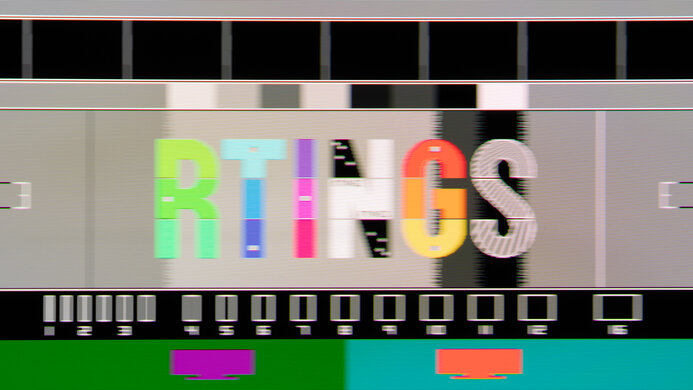
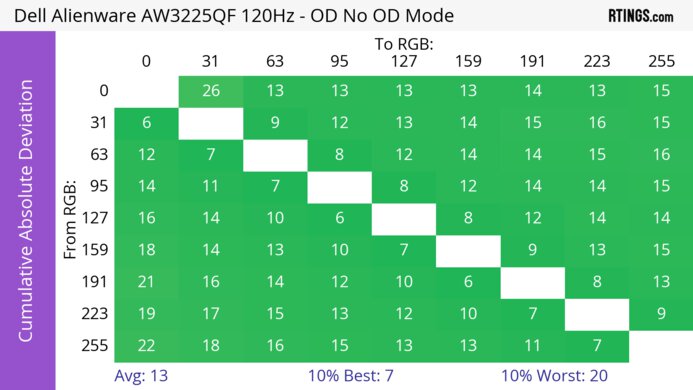
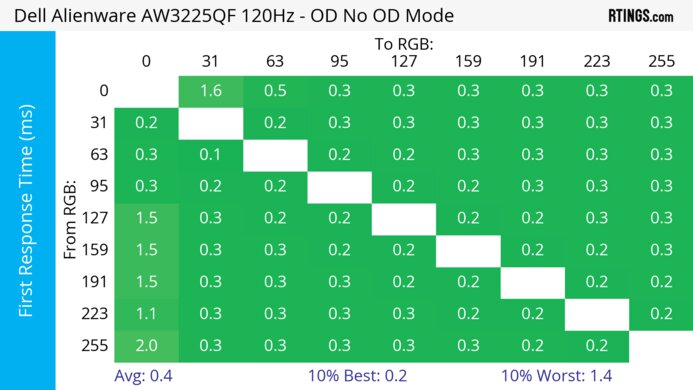
    The CAD at the max refresh rate of 280Hz is incredible. Motion looks incredibly sharp without any noticeable inverse ghosting.

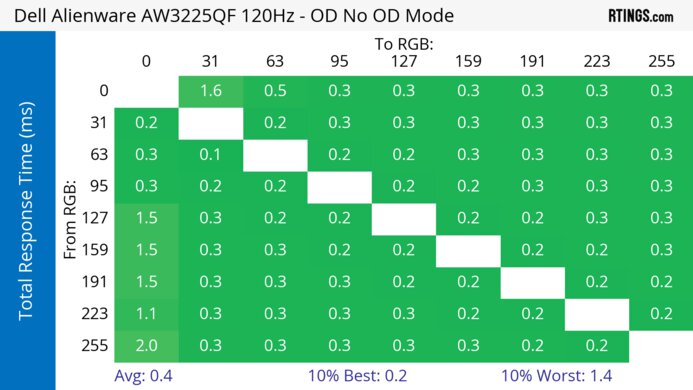
    Response Time @ Max Refresh Rate
    Recommended Overdrive Setting
    No OD Mode
    First Response Time
    0.3 ms
    Total Response Time
    0.4 ms
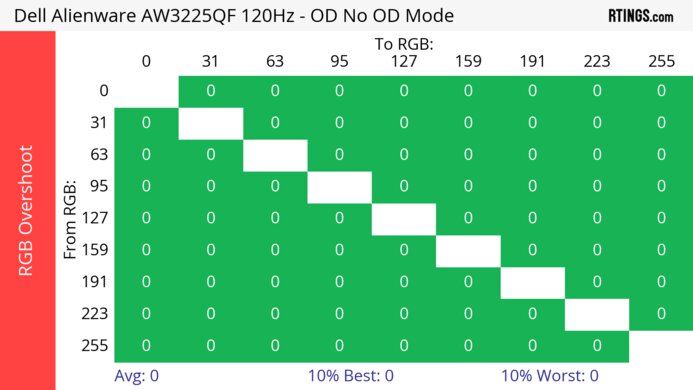
    RGB Overshoot
    0 RGB
    Worst 10% First Response Time
    0.5 ms
    Worst 10% Total Response Time
    1.1 ms
    Worst 10% RGB Overshoot
    2 RGB

    Overdrive Mode First Response Heatmap Total Response Heatmap RGB Overshoot Heatmap
    No Overdrive Heatmap Heatmap Heatmap

    9.9
    CAD @ 120Hz
    OD Transition 120Hz
    od-transition-120-noodmode-0-31
    OD noodmode
    0 to 31
    Recommended Overdrive Setting
    No OD Mode
    Avg. CAD
    15
    Best 10% CAD
    8
    Worst 10% CAD
    22

    Overdrive Mode CAD Heatmap RT Chart Pursuit Photo
    No Overdrive Heatmap Chart Photo

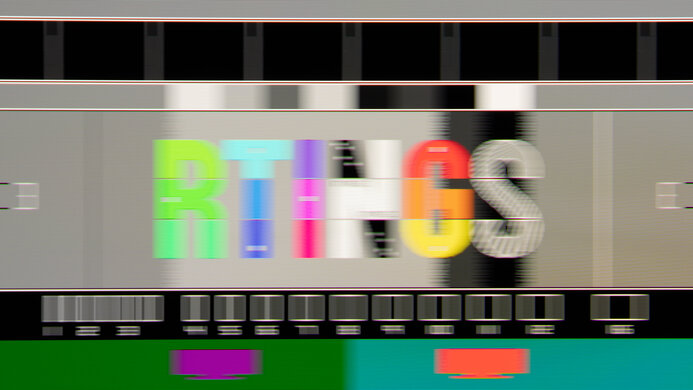
    The CAD at 120Hz is superb. It has a near-instant response time with almost any transition, leading to minimal blur, but there's more persistence blur than at its max refresh rate.

    Response Time @ 120Hz
    Recommended Overdrive Setting
    No OD Mode
    First Response Time
    0.3 ms
    Total Response Time
    0.6 ms
    RGB Overshoot
    0 RGB
    Worst 10% First Response Time
    0.4 ms
    Worst 10% Total Response Time
    2.8 ms
    Worst 10% RGB Overshoot
    3 RGB

    Overdrive Mode First Response Heatmap Total Response Heatmap RGB Overshoot Heatmap
    No Overdrive Heatmap Heatmap Heatmap

    9.8
    CAD @ 60Hz
    OD Transition 60Hz
    od-transition-60-noodmode-0-31
    OD noodmode
    0 to 31
    Recommended Overdrive Setting
    No OD Mode
    Avg. CAD
    21
    Best 10% CAD
    11
    Worst 10% CAD
    30

    Overdrive Mode CAD Heatmap RT Chart Pursuit Photo
    No Overdrive Heatmap Chart Photo

    The CAD at 60Hz is fantastic. Any blur you see is persistence blur, and not caused by a slow response time.

    Response Time @ 60Hz
    Recommended Overdrive Setting
    No OD Mode
    First Response Time
    0.5 ms
    Total Response Time
    0.5 ms
    RGB Overshoot
    0 RGB
    Worst 10% First Response Time
    0.8 ms
    Worst 10% Total Response Time
    0.8 ms
    Worst 10% RGB Overshoot
    0 RGB

    Overdrive Mode First Response Heatmap Total Response Heatmap RGB Overshoot Heatmap
    No Overdrive Heatmap Heatmap Heatmap

    Backlight Strobing (BFI)
    Backlight Strobing (BFI)
    No BFI
    Maximum Frequency
    N/A
    Minimum Frequency
    N/A
    Longest Pulse Width Brightness
    N/A
    Shortest Pulse Width Brightness
    N/A
    Pulse Width Control
    No BFI
    Pulse Phase Control
    No BFI
    Pulse Amplitude Control
    No BFI
    VRR At The Same Time
    No BFI

    The LG 27GX700A doesn't have an optional black frame insertion feature to reduce persistence blur. 

    5.7
    VRR Flicker
    Dark Gray Flicker
    5.0 RGB
    Middle Gray Flicker
    1.0 RGB
    Light Gray Flicker
    1.0 RGB

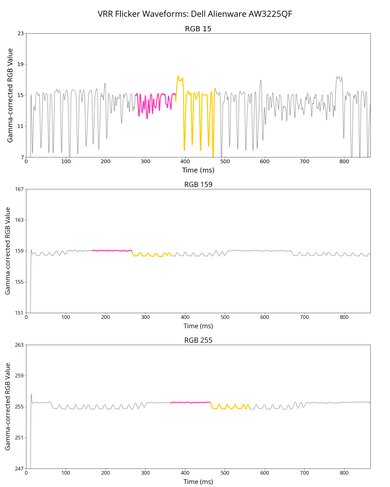
    This monitor has noticeable VRR flicker with changing frame rates. Although it looks worse in the video than in person, the flicker is still distracting, particularly in dark scenes.

    10
    Image Flicker
    Flicker-Free
    No
    PWM Dimming Frequency
    0 Hz

    While not the same as pulse-width modulation (PWM), there's a slight dip in brightness that corresponds to the monitor's refresh rate. There's also an additional dip or jump halfway through the cycle.

    Inputs
    9.1
    Input Lag
    Native Resolution @ Max Hz
    2.6 ms
    Native Resolution @ 120Hz
    6.5 ms
    Native Resolution @ 60Hz
    9.7 ms
    Backlight Strobing (BFI)
    N/A

    The LG 27GX700A-B has low input lag for a responsive feel at any refresh rate. 

    7.5
    Resolution
    Native Resolution
    2560 x 1440
    Aspect Ratio
    16:9
    Megapixels
    3.7 MP
    Pixel Density
    111 PPI
    9.3
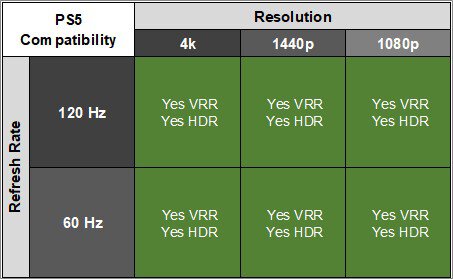
    PS5 Compatibility
    4k @ 120Hz
    Yes
    4k @ 60Hz
    Yes
    1440p @ 120Hz
    Yes
    1440p @ 60Hz
    Yes
    1080p @ 120Hz
    Yes
    1080p @ 60Hz
    Yes

    As the monitor supports HDMI 2.1 bandwidth, it supports all signals with a PS5. However, it needs to downscale 4k signals, which are more detailed than native 1440p signals.

    9.3
    Xbox Series X|S Compatibility
    4k @ 120Hz
    Yes
    4k @ 60Hz
    Yes
    1440p @ 120Hz
    Yes
    1440p @ 60Hz
    Yes
    1080p @ 120Hz
    Yes
    1080p @ 60Hz
    Yes

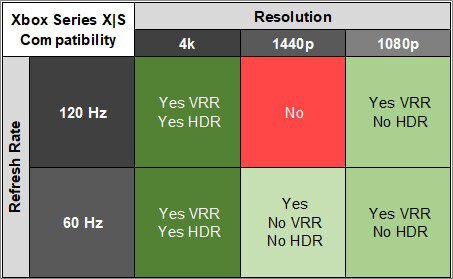
    As the monitor supports HDMI 2.1 bandwidth, it supports almost all signals with an Xbox Series X|S, but it doesn't support Dolby Vision. However, it needs to downscale 4k signals, which are more detailed than native 1440p signals. This is the only way to get HDR, as the Xbox doesn't support HDR with 1080p and 1440p signals.

    Inputs
    DisplayPort
    1 (DP 1.4)
    DisplayPort Transmission Bandwidth
    No DisplayPort 2.1
    Mini DisplayPort
    No
    HDMI
    2 (HDMI 2.1)
    HDMI 2.1 Bandwidth
    48Gbps (FRL 12x4)
    Daisy Chaining
    No
    3.5mm Audio Out
    Yes
    Ethernet
    No
    HDR10
    Yes
    Dolby Vision
    No

    The audio jack serves as a combo jack for both audio out and mic in. It supports DTS Headphone:X to simulate surround sound audio.

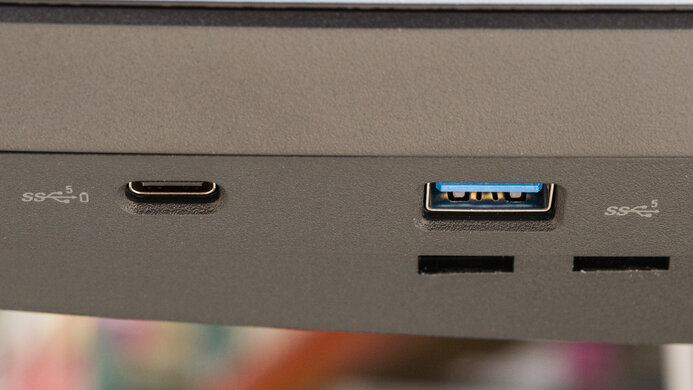
    USB
    USB-A Ports
    2
    USB-A Rated Speed
    5Gbps (USB 3.2 Gen 1)
    USB-B Upstream Port
    Yes
    USB-C Ports
    0
    USB-C Upstream
    No USB-C Ports
    USB-C Rated Speed
    No USB-C Ports
    USB-C Power Delivery
    No USB-C Ports
    USB-C DisplayPort Alt Mode
    No USB-C Ports
    Thunderbolt
    No
    macOS Compatibility

    Tested with: M2 MacBook Pro (Sequoia 15.6.1)

    Connection HDMI 2.1 USB-C to DP
    Max Refresh Rate 240Hz 280Hz
    VRR Range 48-240Hz 48-280Hz
    HDR Yes Yes

    This monitor works well with macOS. There aren't any obvious issues, except for the fact that you can't get the max 280Hz refresh rate over HDMI.

    If you're using a MacBook, the 'Gamer 2' Game Mode looks the most accurate compared to the laptop's screen in HDR, but HDR appears dim compared to SDR. 

    If you close the MacBook's lid while being plugged into power, you can continue working on the monitor. However, if the MacBook isn't plugged into power and you close the lid, the monitor goes to sleep. Windows return to their original positions when reopening the lid, or waking the laptop up from sleep.

    Features
    Additional Features
    Speakers
    No
    RGB Illumination
    Presets
    Multiple Input Display
    No
    KVM Switch
    No
    Smart OS
    No

    The LG 27GX700A-B has a few features, including:

    • Aspect Ratio: Changes the aspect ratio of the image.
    • Black Stabilizer: Adjusts the black level so that it's easier to see opponents in dark scenes.
    • Crosshair: Adds a virtual crosshair that your system's anti-cheat tool won't detect.
    • DTS Headphone:X: Simulates surround sound audio with headphones. It offers three different sound modes.
    • FPS Counter: Shows the current frame rate from your source.
    • Hexagon Lighting: Allows you to customize the RGB lighting on the back of the monitor.
    • OLED Screen Move: This is a pixel shift feature that slightly moves the image so that the pixels aren't always displaying the same thing.
    • OLED Screen Saver: Turns the screen off after a period of inactivity.
    • OLED Image Cleaning: Runs a 10-minute pixel refresh cycle to help reduce the risk of burn-in.
    On-Screen Display (OSD)