Epson EcoTank ET-4800  Printer Review

Review updated Mar 25, 2024 at 02:47pm
Writing modified Apr 02, 2025 at 09:51am
Tested using Methodology v1.2 
Epson EcoTank ET-4800
8.1
Family 
7.4
Small/Home Office 
8.2
Student 
7.3
Black & White 
8.0
Photo 
7.1
Color Quality 
8.0
Document Quality 
7.0
Scanner 
 2

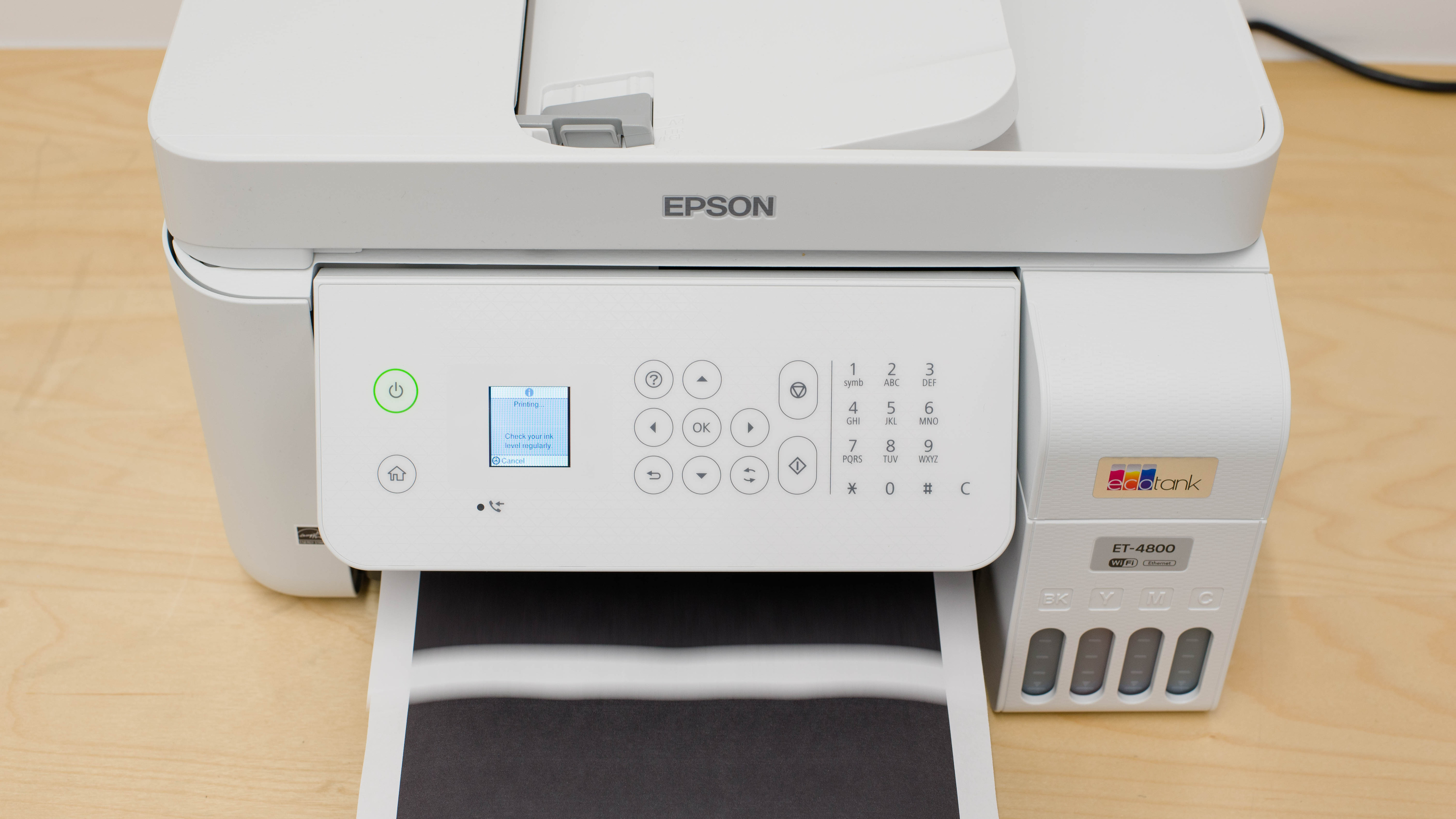
The Epson EcoTank ET-4800 is an all-in-one printer designed for home offices. It replaces the older Epson EcoTank ET-4700 and is almost identical in design. As a supertank printer, it features large reservoirs that you can refill with Epson T522 ink. It has a flatbed scanner with fax functionality and an automatic document feeder; however, it doesn't support duplex scanning. Connectivity options include USB, Wi-Fi, and Ethernet, and there's support for Apple AirPrint and Mopria Print Service.

Our Verdict

8.1
Family 

The Epson ET-4800 is great for family use. Its four large ink tanks yield thousands of pages, so you don't have to buy new ink refills often. Refills are pretty cheap, helping keep cost-per-print very low. Photos are sharp and detailed, and color accuracy is okay enough for casual use, like printing stickers, homemade cards, or food photos. Unfortunately, it can't automatically print on both sides of your sheets, so you need to manually flip over the stack. Since it's an inkjet printer, you need to print regularly to prevent the printheads from clogging; it isn't a good choice if you only print once or twice every month.

Pros
  • Incredibly low cost-per-print.
  • Can print thousands of pages before needing refills.
  • Good photo quality.
  • Okay color accuracy.
Cons
  • Can't print double-sided automatically.
  • ADF can't automatically duplex scan.
  • Prone to printhead clogging and misalignment.
7.4
Small/Home Office 

The Epson ET-4800 is decent for small or home offices. You can print thousands of pages before the black and color tanks run empty, so even if you print a hundred pages a week, you won't have to buy refill bottles too often. It has a flatbed scanner, an automatic document feeder, and built-in fax, so you'll be set for most office tasks. Unfortunately, it can't scan or print double-sided sheets automatically, so you'll have to flip the sheets over yourself when the printer prompts you. Also, it prints slowly, so you'll wait a while for your document to print, especially if your office has multiple people using the printer.

Pros
  • Incredibly low cost-per-print.
  • Can print thousands of pages before needing refills.
  • Many wireless printing options.
Cons
  • Can't print double-sided automatically.
  • ADF can't automatically duplex scan.
  • Prone to printhead clogging and misalignment.
8.2
Student 

The Epson ET-4800 is great for students. It yields thousands of black and color pages before the ink tanks start running low, so you won't have to worry about refilling the tanks often, even if you print long assignments frequently. Ink refills are inexpensive, helping even further in keeping the cost-per-print low. It has a flatbed scanner and an automatic document feeder if you need to copy textbook pages or digitize your notes, and there's a wide range of wireless connectivity options. Unfortunately, it prints slowly, which isn't great if you have a multi-page report to print out right before class.

Pros
  • Incredibly low cost-per-print.
  • Can print thousands of pages before needing refills.
  • Many wireless printing options.
Cons
  • Can't print double-sided automatically.
  • Prone to printhead clogging and misalignment.
7.3
Black & White 

The Epson ET-4800 is a satisfactory choice for high-volume black-and-white printing. It prints thousands of pages before the ink starts running low, meaning you won't have to spend money on refills often, even if you print many multi-page documents weekly. Unfortunately, it prints slowly, so it can take several minutes to print out long documents. Also, it can't automatically print double-sided sheets, so you need to flip over the sheets yourself when the printer prompts you.

Pros
  • Incredibly low cost-per-print.
  • Can print thousands of pages before needing refills.
  • Many wireless printing options.
Cons
  • Can't print double-sided automatically.
  • Prone to printhead clogging and misalignment.
8.0
Photo 

The Epson ET-4800 is decent for photos. Pictures look sharp and detailed, but color accuracy is a little off. It's fine for casual photo prints for art projects or home decor, but it's far from the best choice if you use photo prints for semi-professional or professional purposes. Unfortunately, the printhead has clogging and misalignment issues, which can cause banding.

Pros
  • Incredibly low cost-per-print.
  • Good photo quality.
  • Wide color gamut.
Cons
  • Prone to printhead clogging and misalignment.
  • Borderless printing is only supported for some sizes.
7.1
Color Quality 

Pros
  • Incredibly low cost-per-print.
Cons
  • Prone to printhead clogging and misalignment.
8.0
Document Quality 

Pros
  • Incredibly low cost-per-print.
Cons
  • Prone to printhead clogging and misalignment.
7.0
Scanner 

Pros
  • Incredibly low cost-per-print.
Cons
  • Prone to printhead clogging and misalignment.
4.9
Speed 

Pros
  • Incredibly low cost-per-print.
Cons
  • Prone to printhead clogging and misalignment.
10
Recurring Costs 

Pros
  • Incredibly low cost-per-print.
Cons
  • Prone to printhead clogging and misalignment.
  • 8.1
    Family
  • 7.4
    Small/Home Office
  • 8.2
    Student
  • 7.3
    Black & White
  • 8.0
    Photo

  • Performance Usages

  • 7.1
    Color Quality
  • 8.0
    Document Quality
  • 7.0
    Scanner
  • 4.9
    Speed
  • 10
    Recurring Costs
  • Changelog

    1.  Updated Apr 02, 2025: 

      We've removed mention of the Epson EcoTank ET-4810 from this review as it isn't a variant of the Epson EcoTank ET-4800 as we had previously claimed.

    2.  Updated May 09, 2024: Added mention of the Canon MegaTank MAXIFY GX2020/GX1020 as a supertank alternative with automatic double-sided printing in the Printing Speed section.
    3.  Updated Mar 25, 2024: We've updated the review for clarity and readability.
    4.  Updated Aug 21, 2023: We've changed the product name to Epson EcoTank ET-4800/ET-4810 to account for all product variants. We've also added additional information to the 'Differences Between Variants' to outline the differences between the ET-4800 and ET-4810 models.

    Check Price

    Differences Between Sizes And Variants

    We tested the Epson EcoTank ET-4800 in white. It's also available in black. 

    See our unit's label here.

    Popular Printer Comparisons

    The Epson EcoTank ET-4800 is an all-in-one supertank printer that replaces the Epson EcoTank ET-4700. Like other Epson supertank printers, it has a very high page yield and low cost-per-print. It can also process large amounts of single-sided documents without intervention, thanks to its automatic document feeder. However, it might not be the best option for office work due to the lack of automatic double-sided printing and scanning capability.

    If you're looking for alternatives, see our recommendations for the best all-in-one printers, the best home printers, and the best printers with cheap ink.

    Epson EcoTank ET-3850

    The Epson EcoTank ET-3850 and the Epson EcoTank ET-4800 are very similar supertank printers, with a few differences. The ET-3850 has a larger display, much higher page yields, and faster printing speeds. Also, the ET-3850 can print double-sided automatically, whereas you need to flip over the sheets manually with the ET-4800. On the other hand, the ET-4800 has built-in fax and prints photos with better detail and color accuracy.

    Epson EcoTank ET-4850

    The Epson EcoTank ET-4850 is better than the Epson EcoTank ET-4800 for most uses. The ET-4850's build feels sturdier, and its design is more user-friendly, as it allows for easier access to the sheet rollers. It also produces higher-quality black-and-white documents, prints faster, and yields significantly more pages. The ET-4850 has a slightly wider color range; however, the ET-4800 reproduces colors more accurately, and it brings out more details in photos.

    Epson EcoTank ET-2800/ET-2803

    The Epson EcoTank ET-2800/ET-2803 and the Epson EcoTank ET-4800 are very similar printers. If you scan many documents for work, the ET-4800 has an automatic document feeder, so it's more convenient since you don't need to scan each page individually. Also, it has an Ethernet port if you want to plug it directly into your router for a faster connection. Otherwise, both perform very similarly.

    Epson EcoTank ET-2850

    The Epson EcoTank ET-2850 and the Epson EcoTank ET-4800 are both supertank printers in the same price range but have different strengths. The ET-2850 is a better choice if you print in black a lot since it can print thousands more pages. Also, it prints double-sided automatically, while on the ET-4800, you need to flip over the sheets yourself. The ET-4800 has an Ethernet port, an automatic document feeder, and built-in fax capabilities, meaning it's a better choice if you need these features for your office work.

    Epson EcoTank ET-3760

    The Epson EcoTank ET-3760 and the Epson EcoTank ET-4800 are similar supertank printers. The ET-3760 has a larger display screen with no numpad, and its ADF scans faster. Also, it prints documents faster than the ET-4800, and it can also print double-sided pages automatically. Its black page yield is much higher, so it's a better choice if you print many monochrome pages. On the other hand, the ET-4800 can fax, and it has better photo printing quality with more accurate colors.

    HP Smart Tank 7301 [6001, 7001]

    The HP Smart Tank 7301 is better than the Epson EcoTank ET-4800. The HP feels better built, is easier to maintain, has a greater overall page yield, and scans and prints documents faster. Meanwhile, the Epson does better to resolve fine details in photos and has a wider color gamut, though color accuracy is pretty poor.

    Epson EcoTank ET-4760

    The Epson EcoTank ET-4760 and the Epson EcoTank ET-4800 are similar supertank printers, but the ET-4760 is better for home office use overall. The ET-4760 has a larger display screen with no keypad, and it prints more pages before its tank starts running low. It scans and prints faster, and it can print double-sided sheets automatically. On the other hand, the ET-4800 is a better choice if you print a lot of photos for crafts or home decor since its photo printing quality and color accuracy are much better.

    Canon PIXMA G3260/G3262

    The Canon PIXMA G3260/G3262 and the Epson EcoTank ET-4800 are both inkjets with supertanks, but the Epson has more features that may be useful for your work. The Epson has an automatic document feeder, built-in fax, and an Ethernet port. On the other hand, the Canon is a better choice if you only need a flatbed scanner to scan. Additionally, it can print many more pages than the Epson, and its color cost-per-print for color documents is cheaper. Unfortunately, neither printer can print double-sided sheets automatically, so you need to flip over the sheets yourself when prompted.

    Epson EcoTank ET-2760

    The Epson EcoTank ET-2760 and the Epson EcoTank ET-4800 are both supertank printers that perform similarly. The ET-4800 has an automatic document feeder, an Ethernet port, and built-in fax. On the other hand, the ET-2760 yields significantly more pages, and it can print double-sided automatically, so you won't have to worry about flipping over your sheets to scan the other side.

    Epson EcoTank ET-2720

    The Epson EcoTank ET-2720 and the Epson EcoTank ET-4800 are both supertank printers. The ET-4800 has an automatic document feeder, meaning it's a better choice if you scan often since you don't have to scan each sheet individually. Also, it can fax, and it supports heavier paper. While neither model can duplex print, the ET-4800 prompts you to turn over the sheets, while the ET-2760 doesn't.

    Canon MAXIFY GX6020

    The Canon MAXIFY GX6020 and the Epson EcoTank ET-4800 are both supertank models. The Canon has a larger touchscreen display screen, a faster printing speed, and automatic duplex printing. It also yields more pages, and it comes with three black ink bottles, so it'll be a while before you need to buy new ones yourself. However, the Canon was discontinued. The Epson was released more recently, so it's easier to find in stock.

    Epson EcoTank Pro ET-5180

    The Epson EcoTank Pro ET-5180 is better than the Epson EcoTank ET-4800 for most uses. The ET-5180 is a more premium model with significantly better page yields and faster printing speed. The ET-5180 can perform duplex scanning, albeit only manually through software. The ET-4800 doesn't support duplex scanning at all.

    HP Smart Tank Plus 551

    The HP Smart Tank Plus 551 and the Epson EcoTank ET-4800 are both supertank printers, but the Epson has more features that are helpful for home offices. The Epson has an ADF, built-in fax, and an Ethernet port. On the other hand, the HP yields significantly more pages, but it's an older model that might be hard to find in stock.

    Epson EcoTank Pro ET-5850

    The Epson EcoTank Pro ET-5850 and the Epson EcoTank ET-4800 are both supertank printers. The ET-5850 is better suited for a small office. It's bulkier since it holds almost five times the number of pages thanks to its two input trays. It yields significantly more black ink pages, so you won't have to refill the tank as often if you print many monochrome sheets, but its cost-per-print is more expensive since its ink bottles cost more. On the other hand, the ET-4800 is a better option for your home office if you don't scan or print double-sided sheets often since it can't do either automatically. It also yields more color pages, so it's a better option for photos or colorful stickers.

    Canon PIXMA G7020

    The Canon PIXMA G7020 and the Epson EcoTank ET-4800 are both supertank printers, but the Canon is better overall. It prints significantly more pages and a lower cost-per-print (meaning you'll save more money in the long run). Also, it can duplex print automatically and prints much nicer-looking photos.

    Epson EcoTank ET-4700

    The Epson EcoTank ET-4800 is the updated version of the Epson EcoTank ET-4700. They look and perform nearly identical, but the ET-4800 has higher page yields and prints nicer-looking photos. Neither can print double-sided sheets automatically.

    Test Results

    perceptual testing image
    Sort:
    RATINGS
    Category:
    All
    Design
    6.0
    Build Quality
    TypeAll-In-One

    The build quality is mediocre. The plastic used in its construction feels a bit cheap but still reasonably sturdy, especially the input and output trays. Unlike other models, you can't fully lift the entire scanner to access the sheet rollers. While the top does rise a little, it isn't by much, and you can only access the sheet rollers by pulling down the panel at the front. When removing paper jams, you need to be careful not to touch the tubes inside the printer, which is hard since there isn't much space to move around. On the bright side, the ink cartridges are easy to access by pulling up the cover on the right side, but you need to lift the scanner first.

    Dimensions
    Height9.2" (23.4 cm)
    Width14.7" (37.4 cm)
    Depth13.6" (34.6 cm)
    Height When In Use
    9.6" (24.3 cm)
    Width When In Use
    14.7" (37.4 cm)
    Depth When In Use
    23.3" (59.1 cm)
    Weight
    11.5 lbs (5.2 kg)

    The weight includes the ink, as we took the measurements after filling the ink tanks.

    6.0
    Expected Maintenance
    Ink Related Maintenance
    Expected
    Drum Unit
    No Drum Unit

    Like all inkjet printers, the Epson EcoTank ET-4800's printheads can clog and become misaligned if you don't use it regularly. There are some built-in maintenance routines, like nozzle check, printhead cleaning, power cleaning, printhead alignment, and paper guide cleaning. Refilling the tanks is an easy process. You simply need to lift the scanner, then pull up the ink tank cover. Each bottle's nozzle is slightly different and corresponds with its ink tank; this means you don't need to worry about accidentally filling up the wrong tank. The refilling process can be messy if you're not careful, but at least you don't need to do it very often since the printer can print thousands of pages before the tanks run low. Since the printer doesn't have an ink sensor, it can't measure exactly how much ink you have left, so you need to reset the ink level counter each time you refill the tanks.

    Unfortunately, the paper tray can only hold 100 pages, meaning you have to add paper often if you regularly print long multi-page documents. To access the sheet rollers, you need to lift the display panel, lift the scanner, and pull down the black cover. From there, you can reach the rollers to pull out paper jams, but the space is very narrow, and you need to be careful not to touch any of the tubes.

    See the user guide here.

    6.0
    Display Screen
    Display ScreenYes
    Display Screen Size
    1.5" (3.7 cm)
    TouchscreenNo

    The display is tiny, making it hard to read any text on the screen. It's easy to navigate with the buttons, though it doesn't register some inputs at times. It has good viewing angles, and you can also tilt the display panel vertically to help you see the screen better.

    10
    Cartridge
    TechnologyInkjet
    SuperTank
    Yes
    Photo Cartridge
    No
    ColorYes
    Number Of Color Cartridges
    3
    Black Cartridge Model
    T522 BK
    Tested Black Page Yield
    176 prints
    Estimated Black Page Yield
    3,344 prints
    Color Cartridge Model
    T522 C/M/Y
    Tested Color Page Yield
    198 prints
    Estimated Color Page Yield
    4,213 prints
    Third Party Cartridge
    No Cartridges
    Ink Type
    Dye
    High Yield Cartridge
    No Cartridge

    This is a supertank printer, meaning that it has four refillable ink tanks instead of traditional cartridges. It has a very high page yield, so you don't need to refill the tanks too often, though if you're looking for a supertank printer with an even higher page yield, the HP Smart Tank 7301 is worth a look. There are no built-in ink-level sensors. Instead, the printer monitors ink usage internally (via a page counter) to estimate when the ink levels run low. You'll have to keep an eye on the ink levels and manually reset the printer settings when you refill them. Make sure you don't let the ink levels run too low, as this could introduce air bubbles into the print tubes and damage the printheads.

    Unfortunately, the printer is prone to printhead clogging and misalignment, which happened every so often during the page yield test. Running a printhead cleaning and alignment helps solve the issue, but you might use considerable ink during these tasks. Let us know in the discussions if you have this printer and have experienced the same issue.

    6.9
    Scanner Features
    Scanner
    ADF + Flatbed
    ADF Capacity
    30 pages
    Scan Speed
    1 PPM
    Duplex Scanning
    No
    Max Flatbed Scan Size
    8.5" x 11"
    Max ADF Scan Size
    8.5" x 14"
    Flatbed Hinge Adjustability
    0.43" (11 mm)
    Fax
    Yes
    Copy
    Yes
    OCR Included
    Software

    The optical character recognition (OCR) feature is software-based, meaning you need to install the Epson Scan 2 application to use it. The app lets you scan documents as a searchable PDF or as a TIFF file.

    7.0
    Scan Quality
    Max Scan Resolution
    1,200 DPI
    Max Scan Color Depth
    24Bit

    The scan quality is decent. The text is clear, but the image processing removes a lot of the finer details, like the lines in the graph and watermarks. The image processing also boosts the contrast and color saturation, which you may or may not like.

    In The Box

    • Start here guide
    • Power cable
    • Setup CD-ROM
    • Epson T522 bottles
      • 1x cyan
      • 1x magenta
      • 1x yellow
      • 1x black
    Battery
    Advertised Battery Life
    N/A
    Tested Charging Time
    N/A
    Document
    8.0
    Black & White Documents
    Color Ink Needed For Black & White
    Yes

    The print quality of black-and-white documents is great. Printed text looks sharp, and fine details are present and easily visible. However, white text, especially thinner fonts, within a gray background looks blurry and can be hard to see properly.

    7.5
    Color Documents

    The print quality of color documents is good. The text looks clear, and the colors are vibrant. However, fine details, thin lines, and white text within a colored background can be a little hard to see.

    10
    Cost-Per-Print
    See details on graph tool
    Black Cartridge Price
    13.99 US$
    Color Cartridge Price
    41.95 US$
    Black-Only Printing Cost
    0.004 US$/print
    Color Printing Cost
    0.010 US$/print
    Photo Printing Cost
    0.026 US$/print
    Ink Subscription
    No

    Like most supertank printers, the cost-per-print is incredibly low due to its high page yields and inexpensive ink bottle cost.

    4.9
    Printing Speed
    Black Only Text Document
    8 PPM
    Color Document
    4 PPM
    Photo Printing Time
    93.4 s
    Single Page Out Time (Black Only)
    13.8 s
    Duplex Printing
    Manual
    Input Tray Capacity
    100 pages

    This printer has slow printing speeds, falling slightly short of its advertised ten black and five color pages per minute. It can't automatically print double-sided sheets, so you'll have to flip the pages when prompted. A message pops up when it has finished printing the even pages and shows you how to reinsert the stack back in the input tray. If you want a supertank printer that automatically prints double-sided sheets, consider the Canon MegaTank MAXIFY GX2020/GX1020.

    Document Printing Sizes
    Letter (8.5" x 11")Yes
    Legal (8.5" x 14")Yes
    Tabloid (11" x 17")No
    A6 (105mm x 148mm)Yes
    A5 (148mm x 210mm)Yes
    A4 (210mm x 297mm)Yes
    Max Paper Weight
    297 g/m²

    This printer supports most standard paper sizes. You can set custom sizes between 2.13” (5.4 cm) and 8.5” (21.6 cm) in width and between 3.39” (8.6 cm) and 47.24” (120 cm) in length.

    Photo
    7.5
    Color Gamut

    The Epson EcoTank ET-4800 has a good color gamut. There's not a lot of distinction between highly saturated yellow, orange, and red, and it struggles with darker shades of green. There's some noticeable graining when transitioning from lighter shades of blue to green.

    6.7
    Color Accuracy
    Average Color dE
    6.63

    This printer's color accuracy is okay. Some colors are visibly off, but the pictures still look relatively natural, albeit a tad too warm.

    9.0
    Small Details
    Max Print Resolution (DPI)
    5760 x 1440

    This printer reproduces small details remarkably well. While there's a slight loss of fine details due to halftones, it isn't noticeable overall, even when looking at faraway objects.

    9.5
    Photo Printing Sizes
    Glossy Paper (4" x 6")Yes
    Glossy Paper (5" x 7")Yes
    Glossy Paper (8" x 10")Yes
    Glossy Paper (8.5" x 11")Yes
    Glossy Paper (13" x 19")No
    Borderless Printing
    Yes

    The Epson ET-4800 supports various glossy paper sizes up to 8.5x11. It supports borderless printing, but there might be a slight loss in print quality. Also, you can only print borderless photos on 3.5x5 or 4x6 photo paper.

    Mobile App And Connectivity
    8.0
    Connectivity
    Ethernet
    Yes
    USB Input To Computer
    Yes
    Wireless
    Yes
    Bluetooth
    No
    Wi-Fi via Router
    Yes
    Wi-Fi Direct
    Yes
    External Storage Support
    No
    Apple AirPrint
    Yes
    Mopria Print Service
    Yes
    10
    Mobile App
    Mobile AppYes
    App NameEpson Smart Panel
    iOSYes
    AndroidYes
    Photo (JPEG, PNG)
    Android and iOS
    PDF
    Android and iOS
    Microsoft Office Files
    Android Only
    Text Files (TXT)
    Android Only
    Webpages (HTML)
    Android and iOS

    The Epson Smart Panel app allows you to print, scan, and copy documents, and you can also check ink levels and start a printhead cleaning. It also has some extra features, like Access to Class, which lets you print assignments and documents from Google Classroom. Also, there's the Creative Print and Epson Gallery website for artistic prints or printing on different media formats. Guest Connection creates a QR code that lets your friends easily connect to your printer. Some file types don't work properly on the iOS version, as the app alters the formatting, so you'll have to print these files from whichever app you use to view them.

    OS Compatibility
    WindowsFully
    macOSFully
    Chrome OSFully

    You need to manually install drivers on Windows devices to print with the Epson ET-4800. Get the drivers here. While there's no printing software, there's a Maintenance tab in the Printing Preferences that lets you access printhead cleanings, alignments, and other maintenance tasks. There's no need to manually install drivers on macOS and Chrome OS devices.