See the previous 1.2 changelog.
Printer Test Bench 1.3 features several updates to align with user feedback we have received over time:
- We updated the top of our reviews to focus more on what users look for when searching for a new printer.
- We reworked the performance usages that are visible directly at the top of the review and created a new Set-And-Forget usage aimed at individuals who want a printer that requires minimal maintenance and is ready to print, even when used sporadically.
- We added new 'Risk of Clogging' and 'Ease of Unclogging' test boxes in the design section to help users better understand how a printer handles this issue.
Top Of The Review Rework
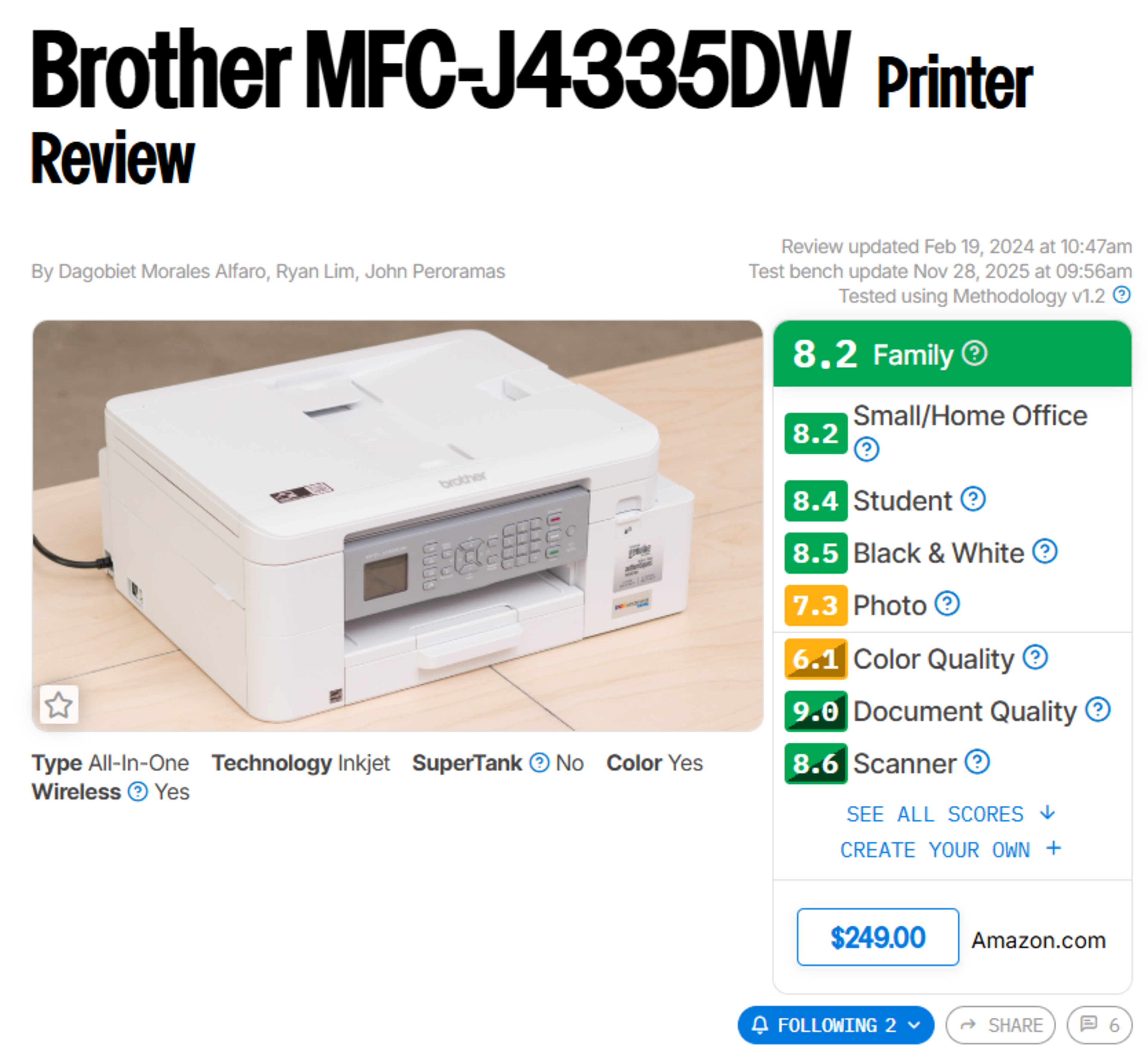
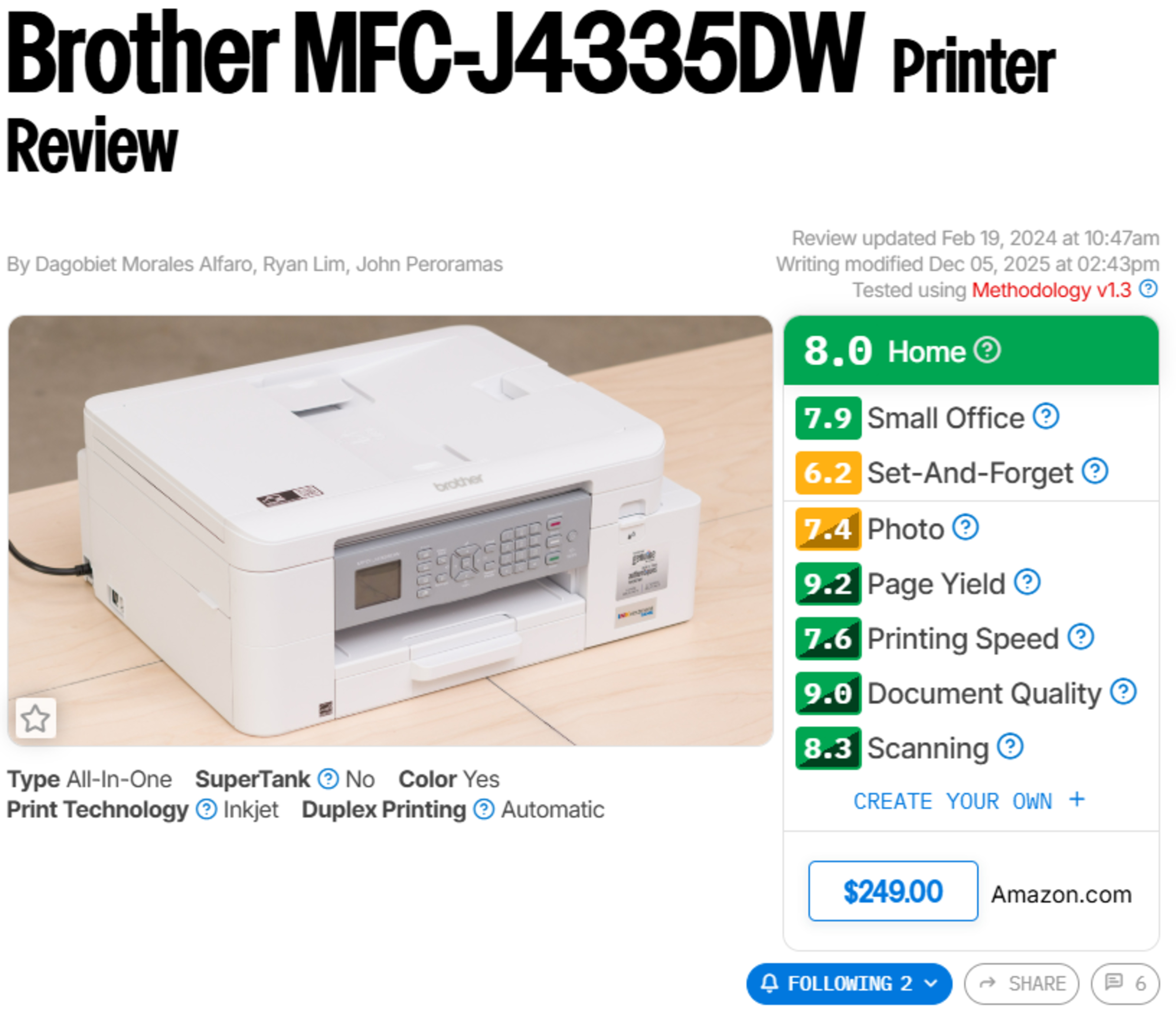
We reworked the top of the reviews with updated usages. Here are some of the changes:
- Removed Student, Black & White, and Color Quality usages.
- Renamed the Family usage box to Home.
- Added a new Set-And-Forget usage aimed at users who want a printer that'll work reliably even if you don't use it regularly.
- Bring more important information to the top of the review with new performance usages:
- Page Yield.
- Printing Speed is now higher up on the review.
- Replaced the Wireless checkbox with Duplex Printing in the features ribbon.
- Modern printers all include a wireless function; whether a printer features an automatic duplex printing function provides more useful information for the users.
The idea behind these changes to the top of the review is to provide the reader with a snapshot view that offers a good overview of what they can expect from the printer. We selected performance usages that are more in line with the needs and requirements of users.
 |
 |
One of the main additions in this testbench update is the Set-And-Forget usage. This usage is targeted at individuals who simply want a printer that works reliably when needed. These printers are a good option for users who only occasionally need to print. They emphasize low maintenance and high page yields. You can see the components involved in scoring this new usage below:
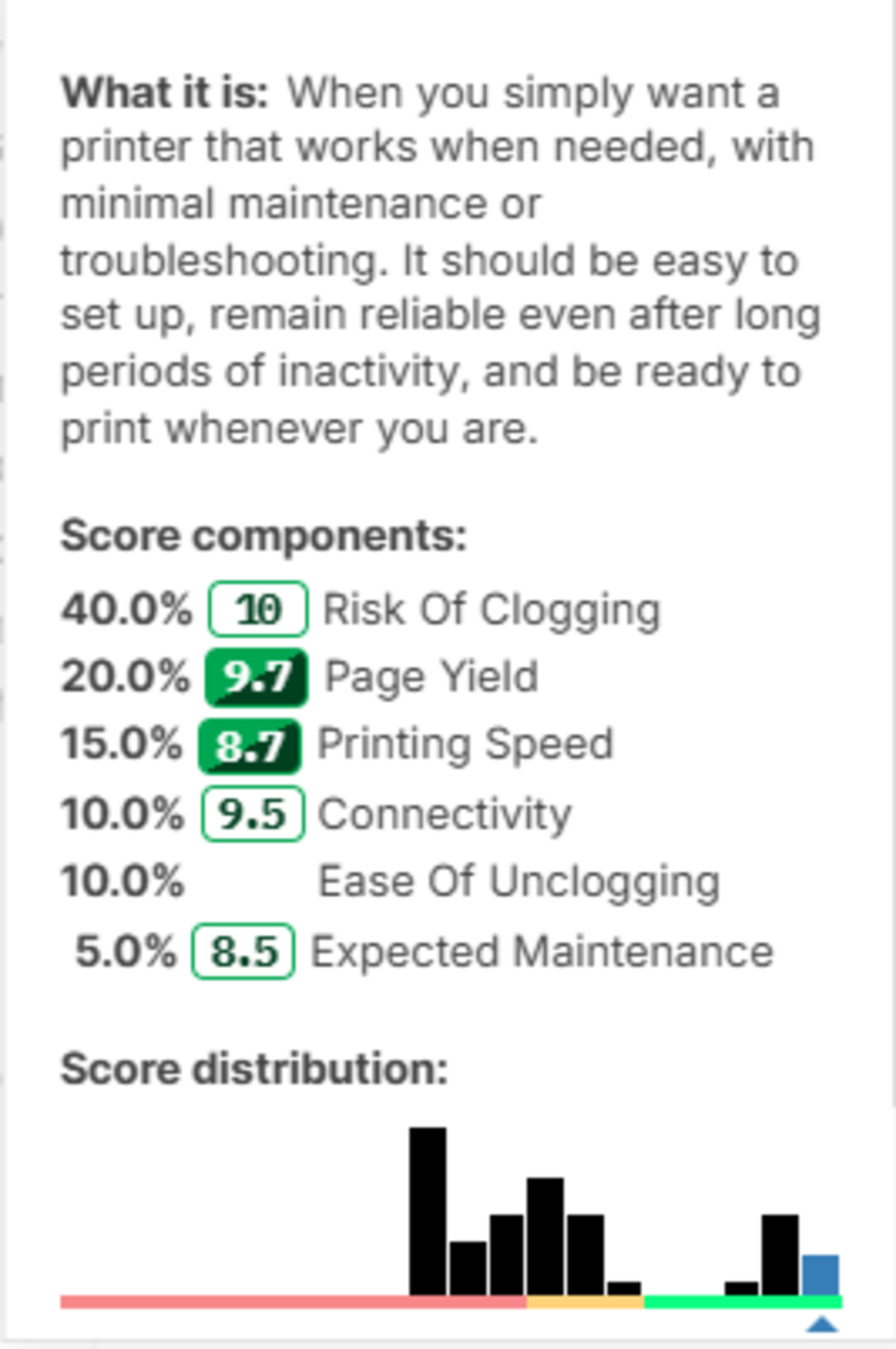 |
We also reworked components across the usages to better align users' expectations. For example, score components linked to the Cost-Per-Print box were removed from the usage. The page yield that is scored in the Cartridge box is used instead. We still include the Cost-Per-Print test box and the calculations that use the MSRP of the cartridges when the printer is first tested. However, since the prices of the cartridges change over time and vary by region, we decided to revise the reviews to use the more reliable Page Yield component instead.
We also added a Dimensions component to the Home usage. The size of the printer is usually an important factor when purchasing a printer for the household. While everyone's household is different, having a huge laser printer is unwieldy for most people. Typically, a smaller printer would be a better fit for home use, and we wanted that to be reflected in the score.
New Risk Of Clogging And Ease Of Unclogging Test Boxes
To complement the addition of the Set-And-Forget usage, we added new test boxes in the design section of the review. The low-maintenance aspect is one area where these printers need to excel. We decided to add the Risk Of Clogging and Ease of Unclogging boxes to supplement our testing. Clogging occurs only with inkjet printers. It happens when dried ink or bubbles block the tiny print nozzles, preventing smooth ink flow. It's one of the main issues that plagues these printers, especially when they're used sporadically. Although we can't provide precise printer-by-printer real-world performance data, we aim to offer some guidance in this regard.
It's challenging to determine exactly how long clogging takes to occur because many factors influence the process. Therefore, we employ a two-step system that provides a simple yes-or-no rating for clogging likelihood. Inkjet printers receive a 'yes', or a 4.0 score, while all other types of printers receive a 'no', which translates to a perfect 10 score in this box. We then evaluate the printer's ease of unclogging using three aspects: printhead location, the amount of available ink per cartridge or refill, and whether the printheads are user-replaceable. This system is not a definitive answer, but it provides users with helpful information when making a purchase decision, especially if they do not print regularly.
Let Us Know What You Think!
Your feedback is instrumental in helping us improve our testing. If you have comments, questions, or suggestions about this or any future updates, reach out to us in the comments or at feedback@rtings.com.
59 Printers Updated
We have retested popular models. The test results for the following models have been converted to the new testing methodology. However, the text might be inconsistent with the new results.
- Brother HL-L2325DW
- Brother HL-L2460DW
- Brother HL-L3280CDW
- Brother MFC-J1010DW
- Brother MFC-J1205W/MFC-J1215W
- Brother MFC-J4335DW
- Brother MFC-L2820DW
- Brother MFC-L3780CDW/MFC-L3720CDW
- Brother MFC-L8905CDW [MFC-L8895CDW, MFC-L8900CDW]
- Canon Color imageCLASS MF656Cdw/MF654Cdw
- Canon Color imageCLASS MF665Cdw
- Canon Color imageCLASS MF753Cdw/MF751Cdw
- Canon imagePROGRAF PRO-300
- Canon imagePROGRAF PRO-310
- Canon PIXMA G3270
- Canon PIXMA G7020
- Canon PIXMA MG3620
- Canon PIXMA PRO-200
- Canon PIXMA PRO-200S
- Canon PIXMA TR160
- Canon PIXMA TR4720/TR4722
- Canon PIXMA TR7820/TS7720
- Canon PIXMA TR8620a
- Canon PIXMA TS3720
- Canon PIXMA TS6420a
- Canon SELPHY QX20
- Epson EcoTank ET-2400
- Epson EcoTank ET-2800/ET-2803
- Epson EcoTank ET-2850
- Epson EcoTank ET-2980
- Epson EcoTank ET-3850
- Epson EcoTank ET-3950
- Epson EcoTank ET-4800
- Epson EcoTank ET-4850
- Epson EcoTank ET-4950
- Epson EcoTank Photo ET-8550
- Epson EcoTank Pro ET-5850
- Epson Expression Home XP-4200
- Epson Expression Home XP-5200
- Epson SureColor P700
- Epson WorkForce Pro WF-4830
- Fujifilm instax mini Link 3
- HP Color LaserJet Pro MFP 3301fdw
- HP DeskJet 2855e
- HP DeskJet 4255e
- HP ENVY 6155e
- HP ENVY 6165e
- HP ENVY 6555e
- HP LaserJet Tank MFP 2604sdw
- HP OfficeJet 200
- HP OfficeJet 250
- HP OfficeJet 8015e
- HP OfficeJet Pro 8025e [8022e, 8028e, 8035e]
- HP OfficeJet Pro 8135e
- HP OfficeJet Pro 9125e
- HP OfficeJet Pro 9135e
- HP OfficeJet Pro 9730e
- HP Smart Tank 7301 [6001, 7001]
- Polaroid Hi-Print Generation 2