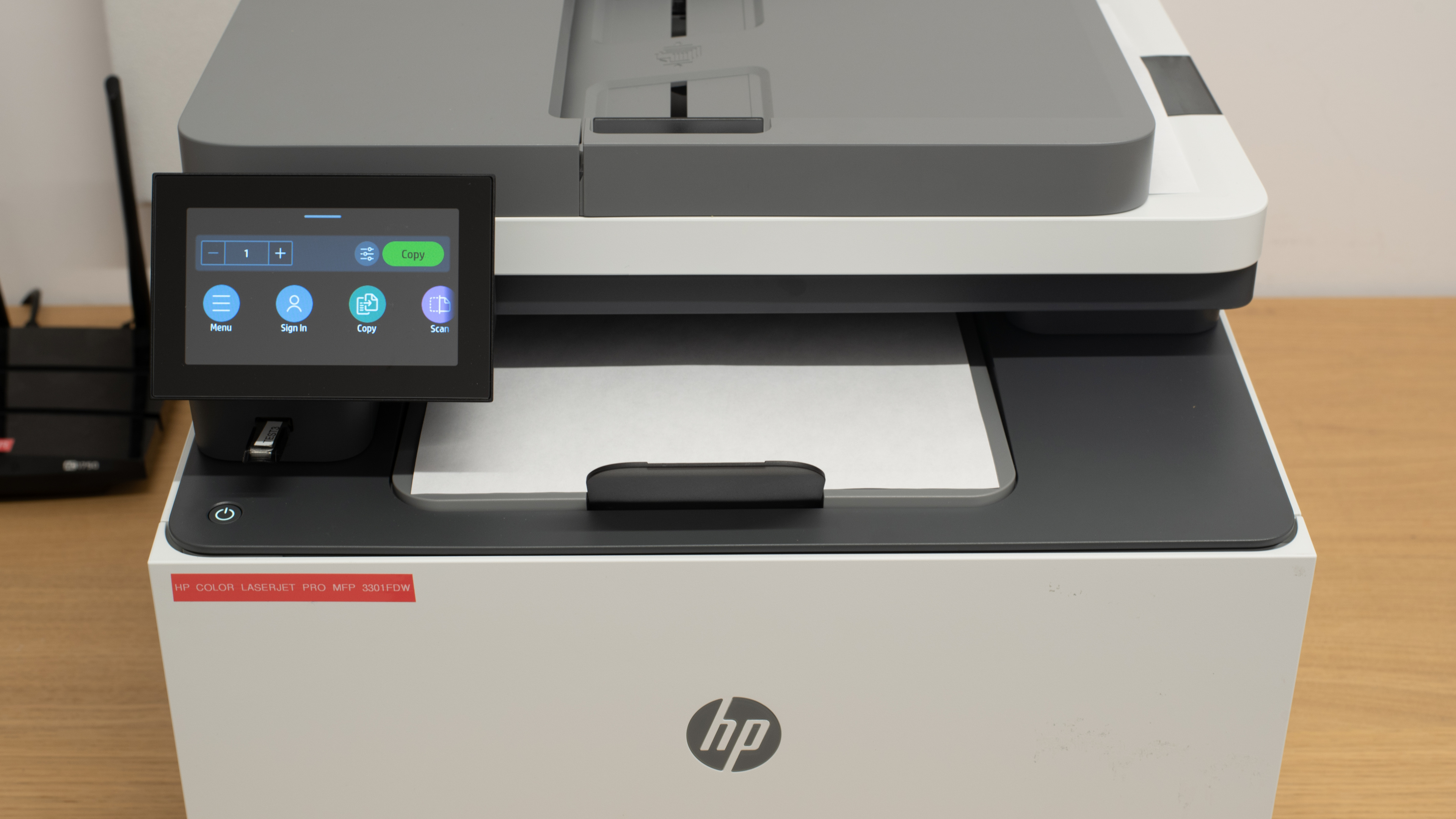
HP Color LaserJet Pro MFP 3301fdw  Printer Review

Reviewed Dec 17, 2024 at 09:09am
Writing modified Dec 05, 2025 at 01:22pm
Tested using Methodology v1.2 
HP Color LaserJet Pro MFP 3301fdw
7.8
Family 
8.8
Small/Home Office 
8.3
Student 
8.7
Black & White 
6.1
Photo 
5.3
Color Quality 
9.5
Document Quality 
8.2
Scanner 
 0
  1. Recommended in:
  2. HP
  3. Brands

The HP Color LaserJet Pro MFP 3301fdw is an all-in-one laser printer. It uses four toner cartridges and is compatible with HP 208A Black, Cyan, Magenta, and Yellow toner cartridges, as well as the HP 208X high-yield cartridges. Its ADF-equipped scanner is capable of single-pass duplex scanning. Connectivity options include Ethernet, USB, Wi-Fi, and Wi-Fi Direct, as well as support for Apple AirPrint and Mopria Print Service. You can also print directly from USB flash drives. It's also compatible with the HP Smart app, which lets you perform various tasks and adds more functionality, like mobile fax and optical character recognition.

There are many variants; while some are simply regional or retailer-specific variants, others offer different functionality and performance. See the Differences Between Variants section for more information.

Our Verdict

7.8
Family 

The HP Color LaserJet Pro MFP 3301fdw is very good for a family printer if you don't need to print photos. It offers a low cost-per-print thanks to its toner cartridges' high page yields and infrequent maintenance requirements. Its scanner is feature-rich, sporting an ADF capable of single-pass duplex scanning. Unfortunately, the ADF tends to produce crooked scans, and the scan quality is just satisfactory. That said, both black-and-white and color documents look outstanding from this printer. If you tend to print photos often, you should look elsewhere; photos from this printer lack detail and appear dull thanks to its narrow color gamut, and the poor color accuracy means that photos look noticeably different from their originals. On the bright side, there are plenty of wired and wireless connectivity options, making it convenient for the whole household to access the printer.

Pros
  • Documents look sharp and crisp.

  • ADF can perform single-pass duplex scanning.

  • Low recurring costs.

  • Infrequent maintenance requirements.

  • Many connectivity options.

Cons
  • Scanner's default image processing removes fine details and background elements.

  • Photos look dull and lack detail.

8.8
Small/Home Office 

The HP Color LaserJet Pro MFP 3301fdw is an excellent small or home office printer. It's ideal for offices with large print or scan loads, as it prints quickly, pushing up to 26 black or color pages per minute, and also processes up to 19 pages per minute through its ADF using the grayscale setting. Unfortunately, the ADF tends to produce crooked scans, and the scan quality is just decent, as the image processing removes many fine details and background elements. The print quality is excellent for black-and-white and color documents alike; text is sharp, and graphics are generally clear. Finally, with many different connectivity options, the printer is easy to access for everyone in the office.

Pros
  • Documents look sharp and crisp.

  • ADF can perform single-pass duplex scanning.

  • Fast print speed.

  • Infrequent maintenance requirements.

  • Many connectivity options.

Cons
  • ADF produces crooked scans.

  • Scanner's default image processing removes fine details and background elements.

8.3
Student 

The HP Color LaserJet Pro MFP 3301fdw is a great printer for student use. It prints very quickly, pushing 26 black or color pages per minute, and black-and-white and color documents alike look outstanding. Otherwise, this printer has low recurring costs and maintenance requirements as its toner cartridges yield over a thousand prints before running out of toner, so you won't need to replace them often unless you have a very high print load. Plenty of wired and wireless connectivity options make this printer easy to access, and the HP Smart app adds additional functionality.

Pros
  • Documents look sharp and crisp.

  • ADF can perform single-pass duplex scanning.

  • Fast print speed.

  • Low recurring costs.

  • Infrequent maintenance requirements.

  • Many connectivity options.

Cons
  • ADF produces crooked scans.

  • Scanner's default image processing removes fine details and background elements.

  • Terrible at resolving fine details.

8.7
Black & White 

The HP Color LaserJet Pro MFP 3301fdw is excellent for black-and-white document printing. The print quality is outstanding, as text is clear and fine details are present. Owing to the toner cartridges' high page yields, the cost-per-print is low, and there are infrequent maintenance requirements. There are also high-yield cartridges that are good for thousands of prints each.

Pros
  • Documents look sharp and crisp.

Cons
None
6.1
Photo 

The HP Color LaserJet Pro MFP 3301fdw isn't ideal for photo printing. Its very narrow color gamut results in photos that appear dull and lacking in detail, and its sub-par color accuracy makes photos look noticeably different from their originals. This level of color quality is fine for adding color to a chart but insufficient for photo printing, which is also expensive. That said, it's compatible with glossy laser photo printers and can perform borderless printing on a wide variety of sheet sizes.

Pros
  • Compatible with a wide variety of photo printing sizes.

Cons
  • Photos look dull and lack detail.

  • Narrow color gamut and middling color accuracy.

5.3
Color Quality 

The HP Color LaserJet Pro MFP 3301fdw has poor color quality. Its very narrow color gamut results in the loss of small details and dull-looking photos, and its color accuracy is sub-par, so photos look noticeably different from their originals. This level of color quality is fine for adding color to a chart but insufficient for photo printing.

Pros
None
Cons
  • Photos look dull and lack detail.

  • Narrow color gamut and middling color accuracy.

9.5
Document Quality 

The HP Color LaserJet Pro MFP 3301fdw produces outstanding black-and-white documents. Text is sharp and clear, and fine details are all present.

Pros
  • Documents look sharp and crisp.

Cons
None
8.2
Scanner 

The HP Color LaserJet Pro MFP 3301fdw's scanner is great. It's feature-rich, with an ADF that supports single-pass duplex scanning up to Legal-size documents. Unfortunately, the scan quality doesn't live up to the feature set, as scans just look decent. While the text is clear and legible and colors are rather neutral looking, the default image processing using the Document preset is very aggressive in removing artifacts. It also removes all fine details like lines on a graph and watermarks. Changing the preset doesn't help. The ADF also produces crooked scans.

Pros
  • ADF can perform single-pass duplex scanning.

Cons
  • ADF produces crooked scans.

  • Scanner's default image processing removes fine details and background elements.

8.5
Speed 

The HP Color LaserJet Pro MFP 3301fdw is very fast at printing documents. It can print 26 black or color pages per minute. Photo printing is also very fast, taking just 21 seconds to print a 4" x 6" photo. It does take a while to warm up and get its first page out, though.

Pros
  • Fast print speed.

Cons
None
8.0
Recurring Costs 

The HP Color LaserJet Pro MFP 3301fdw has low recurring costs. Its toner cartridges yield many prints, so you won't need to replace them often unless you print in high volume. There are also high-yield XL toner cartridges available.

Pros
  • Low recurring costs.

Cons
None
  • 7.8
    Family
  • 8.8
    Small/Home Office
  • 8.3
    Student
  • 8.7
    Black & White
  • 6.1
    Photo

  • Performance Usages

  • 5.3
    Color Quality
  • 9.5
    Document Quality
  • 8.2
    Scanner
  • 8.5
    Speed
  • 8.0
    Recurring Costs
  • Changelog

    1.  Updated Nov 05, 2025: 

      Added a reference to the Canon Color imageCLASS MF665Cdw in the Cost-Per-Print test box as an alternative with lower cost-per-print.

    2.  Updated Dec 17, 2024: Review published.
    3.  Updated Dec 11, 2024: Early access published.
    4.  Updated Dec 09, 2024: Our testers have started testing this product.

    Check Price

    White/BlueColor LaserJet Pro MFP 3302sdw
    Amazon.com
    White/BlueColor LaserJet Pro MFP 3302fdw
    Amazon.com
    White/GrayColor LaserJet Pro MFP 3301fdw
    SEE PRICE
    Amazon.com
    White/GrayColor LaserJet Pro MFP 3301sdw
    SEE PRICE
    Amazon.com
    White/GrayColor LaserJet Pro 3201dw
    SEE PRICE
    Amazon.com
    White/GrayColor LaserJet Pro MFP 3301cdw
    Amazon.com

    Differences Between Sizes And Variants

    We tested the HP Color LaserJet Pro MFP 3301fdw. There are a few variants with different features, as well as some regional and retailer variants; you can see them in the table below.

    Model Color Region Feature Differences and Notes
    HP Color LaserJet Pro 3201dw White/Gray (499Q5F) North America Print-only, no built-in fax line, 2" MGD non-touchscreen display with four buttons and a directional pad.
    HP Color LaserJet Pro MFP 3301sdw White/Gray (499Q3F) North America No built-in fax line.
    HP Color LaserJet Pro MFP 3301cdw  White/Gray (74T92F) North America Available from Costco and Sam's Club exclusively.
    HP Color LaserJet Pro MFP 3301fdw White/Gray (499Q5F) North America N/A
    HP Color LaserJet Pro MFP 3302sdw White/Blue (499Q6F) Europe, Asia No built-in fax line.
    HP Color LaserJet Pro MFP 3302fdw White/Blue (499Q8F) Europe, Asia N/A
    HP Color LaserJet Pro MFP 3303fdn White/Blue (499M7A) Europe, Asia No wireless connectivity.
    HP Color LaserJet Pro MFP 3303fdw White/Blue (499M8A) Asia, Europe, Middle East N/A
    HP Color LaserJet Pro MFP 3388fdw White/Gray (74P28A) Asia, Europe, Middle East N/A

    See our unit's label.

    Popular Printer Comparisons

    The HP Color LaserJet Pro MFP 3301fdw is an all-in-one color laser printer for small or home offices. It's a great fit for this use; its toner cartridges yield thousands of prints, and it can print and scan quickly, pushing out up to 26 black or color pages per minute and processing up to 19 pages per minute through its ADF using the grayscale preset. Its document print quality is outstanding, with only minor issues. Its scan quality doesn't quite live up to the rest of its performance, as its image processing is overly aggressive in culling artifacts and also removes fine details and background elements. Photos look terrible from this printer, though that's true of color laser printers generally. Finally, with plenty of wired and wireless connectivity options, it's easy for anyone in the office to access this printer.

    See our recommendations for the best all-in-one printers, the best small business printers, and the best laser printers.

    Brother MFC-L3780CDW/MFC-L3720CDW

    The HP Color LaserJet Pro MFP 3301fdw and the Brother MFC-L3780CDW/MFC-L3720CDW are feature-rich, all-in-one laser printers. Both produce sharp documents and yield thousands of prints per cartridge. If you need to scan many documents, the Brother is a better choice; it offers significantly better scan quality, and its ADF can process sheets faster and offers built-in OCR. If you primarily print black-and-white documents, the HP is a better bet, as it can push 26 pages per minute to the Brother's 20. 

    HP Color LaserJet Pro MFP 4301fdw

    The HP Color LaserJet Pro MFP 3301fdw and the HP Color LaserJet Pro MFP 4301fdw are excellent, feature-rich, all-in-one laser printers from HP. The 4301fdw is the better choice if you have an exceptionally large print load. It can push up to 35 black or color pages per minute, and it has multiple input trays capable of holding 550 sheets of plain paper in total. The 4301fdw also produces more detailed scans, as the image processing on the 3301fdw tends to cull fine details and background elements. On the other hand, the 3301fdw is the better choice for those trying to keep costs down, as it incurs lower recurring costs and tends to be cheaper upfront. It also offers fantastic performance, pushing a respectable 26 pages per minute.

    Canon Color imageCLASS MF656Cdw/MF654Cdw

    The HP Color LaserJet Pro MFP 3301fdw and the Canon Color imageCLASS MF656Cdw/MF654Cdw are all-in-one color laser printers ideal for small or home offices with large print loads. While they trade blows, the HP is slightly better if you have a large print load and need to push many pages. It prints faster wirelessly, pushing 26 black or color pages to the Canon's 22 pages per minute. However, the Canon offers a much lower cost-per-print as its toner cartridges yield significantly more prints, so it can be the better option if you're fine with trading print speed for lower recurring costs.  

    Brother MFC-L8905CDW [MFC-L8895CDW, MFC-L8900CDW]

    The Brother MFC-L8905CDW is a better printer than the HP Color LaserJet Pro MFP 3301fdw for every use. It prints and scans faster, yields more prints per cartridge, has lower recurring costs, and offers much better scan quality. Its scanner also has adjustable hinges to accommodate thicker items and hardware OCR, so you don't need to worry about using different apps and utilities to produce searchable PDFs. 

    Test Results

    perceptual testing image
    Sort:
    RATINGS
    Category:
    All
    Design
    8.5
    Build Quality
    TypeAll-In-One

    The HP Color LaserJet Pro MFP 3301sdw feels very well-built. The body uses good quality plastic, and most pieces feel solid, including the hinge, paper tray, and rail system, which houses the toner cartridges. The power cord is removable, making it easy to replace in case of damage. Not everything is perfect, though. The toner access door feels notably cheaper than the rest of the printer, as it has loose-feeling hinges. There are also some small gaps between the toner access door and the main body; given the printer class, this is disappointing. Similarly, the backing of the flatbed scanner feels cheap, as it's a thin sheet, and the flatbed scanner hinges aren't extendable. If you set the paper tray size for Legal sheets, the tray extends beyond the printer's body, exposing the sheets. Finally, it's difficult to see if a sheet gets stuck in the ADF.

    Dimensions
    Height13.4" (34.0 cm)
    Width16.5" (42.0 cm)
    Depth16.5" (42.0 cm)
    Height When In Use
    17.9" (45.5 cm)
    Width When In Use
    16.9" (43.0 cm)
    Depth When In Use
    18.5" (47.0 cm)
    Weight
    38.2 lbs (17.3 kg)
    8.0
    Expected Maintenance
    Ink Related Maintenance
    Not Needed
    Drum Unit
    In The Cartridge

    The HP Color LaserJet Pro MFP 3301sdw has low maintenance requirements. Unlike inkjet printers, there's no risk of printhead clogging. There are still a few maintenance functions built-in if you experience print quality issues, like Adjust Alignment, Cleaning Page, and Color Calibration. There's also a general troubleshooting function to resolve fax and network connection issues. The toner cartridges last a long time, so you won't need to replace them often unless you print a lot. The toner cartridges include the drum, meaning you don't need to replace the drum separately. To replace the toner cartridge, simply open the front cover and pull the cartridge drawer towards you. You can access the sheet rollers by removing the panel on the back of the printer. As for the input tray capacity, it can hold up to 250 sheets; you will only have to refill it occasionally unless you print in high volume.

    You can access the user manual on HP's website.

    9.0
    Display Screen
    Display ScreenYes
    Display Screen Size
    4.3" (11.0 cm)
    TouchscreenYes

    The HP Color LaserJet Pro MFP 3301fdw has a fantastic display. It uses a large, bright touchscreen; besides a large power button, there are no physical inputs. The display generally feels responsive, although you can outpace it. The user interface is easy to use thanks to big, easy-to-see icons and fonts, and the on-screen keyboard is large enough for people with large hands to use comfortably without making too many mistakes. Visibility is good when looking directly down at the display, but you can see the digitizer from certain angles, slightly distorting the image.

    The HP Color LaserJet Pro 3201dw variant uses a much smaller, monochrome, non-touch display. It has physical buttons for actions like back and home and directional pads for navigating through menus.

    8.9
    Cartridge
    TechnologyLaser
    SuperTank
    No
    Photo Cartridge
    No
    ColorYes
    Number Of Color Cartridges
    3
    Black Cartridge Model
    HP 218A Black
    Tested Black Page Yield
    90.47 prints
    Estimated Black Page Yield
    1,719 prints
    Color Cartridge Model
    HP 218A C/M/Y
    Tested Color Page Yield
    60.96 prints
    Estimated Color Page Yield
    1,297 prints
    Third Party Cartridge
    Not Found At Time Of The Review
    Ink Type
    Toner
    High Yield Cartridge
    Yes

    This printer yields a large number of black and color prints, meaning you won't need to replace the toner cartridges regularly. It's compatible with HP 218X High Yield toner cartridges; the XL Black cartridge has an advertised yield of 3500 pages, while the XL color cartridges have an advertised yield of 2500 pages. The HP Smart app warns you when the toner is low, but the printer doesn't stop printing, even if the quality degrades from insufficient toner.

    The name of the toner changes depending on the regional variant, but they're all identical in yield.

    9.4
    Scanner Features
    Scanner
    ADF + Flatbed
    ADF Capacity
    50 pages
    Scan Speed
    10 PPM
    Duplex Scanning
    Automatic (Single-Pass)
    Max Flatbed Scan Size
    8.5" x 11"
    Max ADF Scan Size
    8.5" x 14"
    Flatbed Hinge Adjustability
    0.00" (0 mm)
    Fax
    Yes
    Copy
    Yes
    OCR Included
    Software

    The ADF can scan 19 PPM if you use the Grayscale preset. You can perform single-pass duplex scanning by selecting the setting directly on the printer or using the HP Universal Scan software. The HP Smart app doesn't allow you to enable duplex scanning.

    There are three software-based OCR options. The HP Smart App allows you to save scans as searchable PDFs. The app also has a Text Extract function, which produces a new text document with just the text; you can save this document as a PDF. It works well but can occasionally make mistakes, particularly with special characters. Alternatively, if you elect not to install the HP Smart App, you can also use the HP Scan app to initiate OCR scans directly from your desktop. This software requires you to install the HP Universal Scan driver and software. You can learn how to properly set up the HP Scan app using the HP Universal Scan Solution User Guide on HP's website.

    7.0
    Scan Quality
    Max Scan Resolution
    1,200 DPI
    Max Scan Color Depth
    24Bit

    The scan quality is decent. Text is clear and legible, and colors are rather neutral in appearance. However, the default image processing using the Document preset is very aggressive in removing artifacts and also removes all fine details like lines on a graph and watermarks. Unfortunately, using the Photo preset doesn't help. Another issue is that the ADF produces crooked scans, regardless of how you insert the paper in the feeder.

    In The Box

    • User documentation
    • Power cord
    • HP 218 starter toner cartridges:
      • 1x Black
      • 1x Cyan
      • 1x Magenta
      • 1x Yellow
    Battery
    Advertised Battery Life
    N/A
    Tested Charging Time
    N/A
    Document
    9.5
    Black & White Documents
    Color Ink Needed For Black & White
    No

    The print quality of black-and-white documents is exceptional. Text and charts are sharp and clear, although the print pattern is visible in larger blocks of gray, like charts. Printing with the Premium (High Quality) mode doesn't reduce the visibility of the printing pattern; it only slightly deepens the contrast. Printing using the Windows Grayscale setting narrows the contrast.

    9.5
    Color Documents

    The print quality of color documents is outstanding. Text looks clear, colors look vibrant, and fine elements are visible. However, the printing pattern is visible in most colored areas, and small white text on colored backgrounds can be quite blurry and difficult to read. Printing using the Premium (High Quality) deepens the color saturation and improves the text clarity.

    8.0
    Cost-Per-Print
    See details on graph tool
    Black Cartridge Price
    67.99 US$
    Color Cartridge Price
    242.97 US$
    Black-Only Printing Cost
    0.040 US$/print
    Color Printing Cost
    0.187 US$/print
    Photo Printing Cost
    0.498 US$/print
    Ink Subscription
    No

    This printer has very good cost-per-print, but if you're looking for a printer that's even cheaper to use over time, consider the Canon Color imageCLASS MF665Cdw.

    8.5
    Printing Speed
    Black Only Text Document
    27 PPM
    Color Document
    27 PPM
    Photo Printing Time
    21.0 s
    Single Page Out Time (Black Only)
    18.0 s
    Duplex Printing
    Automatic
    Input Tray Capacity
    250 pages

    There are two input trays. The top tray is a single-sheet priority feed slot, while the bottom tray can hold up to 250 sheets of plain paper or up to 10 envelopes. The output tray can hold up to 100 sheets of paper.

    Document Printing Sizes
    Letter (8.5" x 11")Yes
    Legal (8.5" x 14")Yes
    Tabloid (11" x 17")No
    A6 (105mm x 148mm)Yes
    A5 (148mm x 210mm)Yes
    A4 (210mm x 297mm)Yes
    Max Paper Weight
    200 g/m²

    You can set custom print sizes from 3" x 5" (76.2 mm x 127 mm) to 8.5" x 14" (215.9 mm x 335.6 mm).

    Photo
    5.0
    Color Gamut

    This printer has a very narrow color gamut. There's a lot of graininess and banding in color transitions, and colors appear undersaturated and dull, resulting in photos that lack detail and appear flat.

    5.6
    Color Accuracy
    Average Color dE
    9.07

    The color accuracy is sub-par. Most colors, particularly blues and purples, look very different from the original. The color temperature is also noticeably cool in photos. While this is fine for printing reports with color charts, photos look bad.

    3.5
    Small Details
    Max Print Resolution (DPI)
    600 x 600

    This printer is bad at reproducing small details. The printing pattern is very apparent, and the lack of contrast obscures most fine details. As a result, it's difficult to differentiate between many background elements.

    9.5
    Photo Printing Sizes
    Glossy Paper (4" x 6")Yes
    Glossy Paper (5" x 7")Yes
    Glossy Paper (8" x 10")Yes
    Glossy Paper (8.5" x 11")Yes
    Glossy Paper (13" x 19")No
    Borderless Printing
    Yes

    While the HP Color LaserJet Pro MFP 3301fdw is compatible with glossy laser photo paper, all print quality results were printed on Letter-size plain sheets.

    Mobile App And Connectivity
    9.0
    Connectivity
    Ethernet
    Yes
    USB Input To Computer
    Yes
    Wireless
    Yes
    Bluetooth
    No
    Wi-Fi via Router
    Yes
    Wi-Fi Direct
    Yes
    External Storage Support
    Yes
    Apple AirPrint
    Yes
    Mopria Print Service
    Yes

    You can print or scan directly to a USB flash drive using the USB-A port on the front of the printer under the screen. The HP Color LaserJet Pro MFP 3303fdn variant doesn't have wireless connectivity options.

    10
    Mobile App
    Mobile AppYes
    App NameHP Smart
    iOSYes
    AndroidYes
    Photo (JPEG, PNG)
    Android and iOS
    PDF
    Android and iOS
    Microsoft Office Files
    iOS Only
    Text Files (TXT)
    iOS Only
    Webpages (HTML)
    iOS Only

    The HP Color LaserJet Pro MFP 3301fdw is compatible with the HP Smart app. You can use this app to order supplies, monitor your ink levels, and perform tasks like printing, scanning, copying, and sending mobile faxes. It also allows you to send print jobs remotely with the Print Anywhere function and create one-touch shortcuts for repetitive tasks with the Smart Tasks function. Finally, it offers cloud integration to access files from services like Google Drive or Dropbox.

    OS Compatibility
    WindowsFully
    macOSFully
    Chrome OSFully

    You need to install drivers to use this printer on Windows devices. You can either install the HP Smart app, which will automatically install the correct drivers, or you can manually install the driver package from HP's website. The driver package includes the HP Scan app for scanning.

    Neither Chrome OS nor macOS devices require drivers, although the HP Smart app provides extra functionality on Chrome OS devices. You can get the app through the Google Play store.