Fujifilm instax mini Link 3  Printer Review

Reviewed Feb 28, 2025 at 12:14pm
Writing modified Dec 09, 2025 at 12:28pm
Tested using Methodology v1.3 
Fujifilm instax mini Link 3
4.9
Home 
2.8
Small Office 
6.7
Set-And-Forget 
3.5
Photo 
4.3
Page Yield 
0.0
Printing Speed 
0.0
Document Quality 
0.0
Scanning 
 0

The Fujifilm instax mini Link 3 is a compact, instant-film printer. It replaces the Fujifilm instax mini Link 2 and produces 2.4" x 1.8" photos. You can purchase color or monochrome film; while the color film is available with borders in a variety of colors and patterns, the monochrome film is only available with a white border. This model only prints photos and is designed to work exclusively with a smartphone via Bluetooth. It works with the Fujifilm instax mini mobile app, which lets you print and access additional functionality, like the ability to create collages, add effects like bubbles and glitter, or insert a QR code with an embedded video into your photos.

Our Verdict

4.9
Home 

The Fujifilm mini Link 3 is bad for family use, as it's a portable instant-film printer that can only print photos. It prints pictures that look decently vibrant, but it doesn't have a scanner and can only connect to compatible devices via Bluetooth. On the bright side, the Fujifilm instax mini mobile app is more feature-rich than the Polaroid or Canon's app offerings.

Pros
  • Expresses photos quickly.

  • Extremely compact and easy to carry around.

  • Prints decent-looking photos.

  • Feature-rich companion app.

  • Requires virtually no maintenance.

Cons
  • High recurring costs.

  • No scanner.

  • Can't print documents.

  • Minimal connectivity options.

  • Resolves small details poorly.

  • Narrow color gamut.

2.8
Small Office 

The Fujifilm mini Link 3 isn't designed for office use as it's an instant-film portable printer that can only print photos.

Pros
None
Cons
  • High recurring costs.

  • No scanner.

  • Can't print documents.

  • Minimal connectivity options.

6.7
Set-And-Forget 

The Fujifilm mini Link 3 doesn't print documents, so it doesn't quite fit this use case. That said, it will be ready to print a picture whenever you need it to, as long as it's charged and you have paper. It requires virtually no maintenance.

Pros
  • Requires virtually no maintenance.

Cons
  • Can't print documents.

  • Minimal connectivity options.

3.5
Photo 

The Fujifilm mini Link 3 is a niche instant-film photo printer. It produces decently vibrant photos with a retro aesthetic and has similar levels of detail to other instant photo printers. However, its prints lack detail compared to those of portable inkjet printers, and its cost per print is high. The Fujifilm instax mini mobile app offers a wider suite of options compared to other competitors, like Polaroid or Canon.

Pros
  • Expresses photos quickly.

  • Extremely compact and easy to carry around.

  • Prints decent-looking photos.

Cons
  • High recurring costs.

  • Only one printing size.

  • Resolves small details poorly.

  • Narrow color gamut.

4.3
Page Yield 

The Fujifilm mini Link 3 utilizes instant film, where each sheet contains the necessary chemicals for developing the image. Since each print is an individual film sheet rather than being tied to an ink supply, it doesn't have a conventional page yield.

0.0
Printing Speed 

The Fujifilm mini Link 3 expresses film quickly, but, like other instant film printers and cameras, you'll need to wait a bit for all the colors to fully form.

Pros
  • Expresses photos quickly.

Cons
  • Can't print documents.

0.0
Document Quality 

The Fujifilm mini Link 3 doesn't print documents.

Pros
None
Cons
  • Can't print documents.

0.0
Scanning 

The Fujifilm mini Link 3 is a print-only unit.

Pros
None
Cons
  • No scanner.

  • 4.9
    Home
  • 2.8
    Small Office
  • 6.7
    Set-And-Forget

  • Performance Usages

  • 3.5
    Photo
  • 4.3
    Page Yield
  • 0.0
    Printing Speed
  • 0.0
    Document Quality
  • 0.0
    Scanning
  • Changelog

    1.  Updated Dec 16, 2025: 

      We've updated text throughout the review after converting to Test Bench 1.3.

    2.  Updated Dec 16, 2025: We've updated the review to Test Bench 1.3, which adds a number of test boxes including Risk of Clogging and Ease of Unclogging. We also updated the Usage and Performance boxes at the top of the review to better integrate the new aspects covered. See the changelog.
    3.  Updated Feb 28, 2025: Review published.
    4.  Updated Feb 25, 2025: Early access published.

    Check Price

    Differences Between Sizes And Variants

    We tested the Fujifilm instax mini Link 3 in Clay White. It's also available in Rose Pink and Sage Green. There are no other variants.

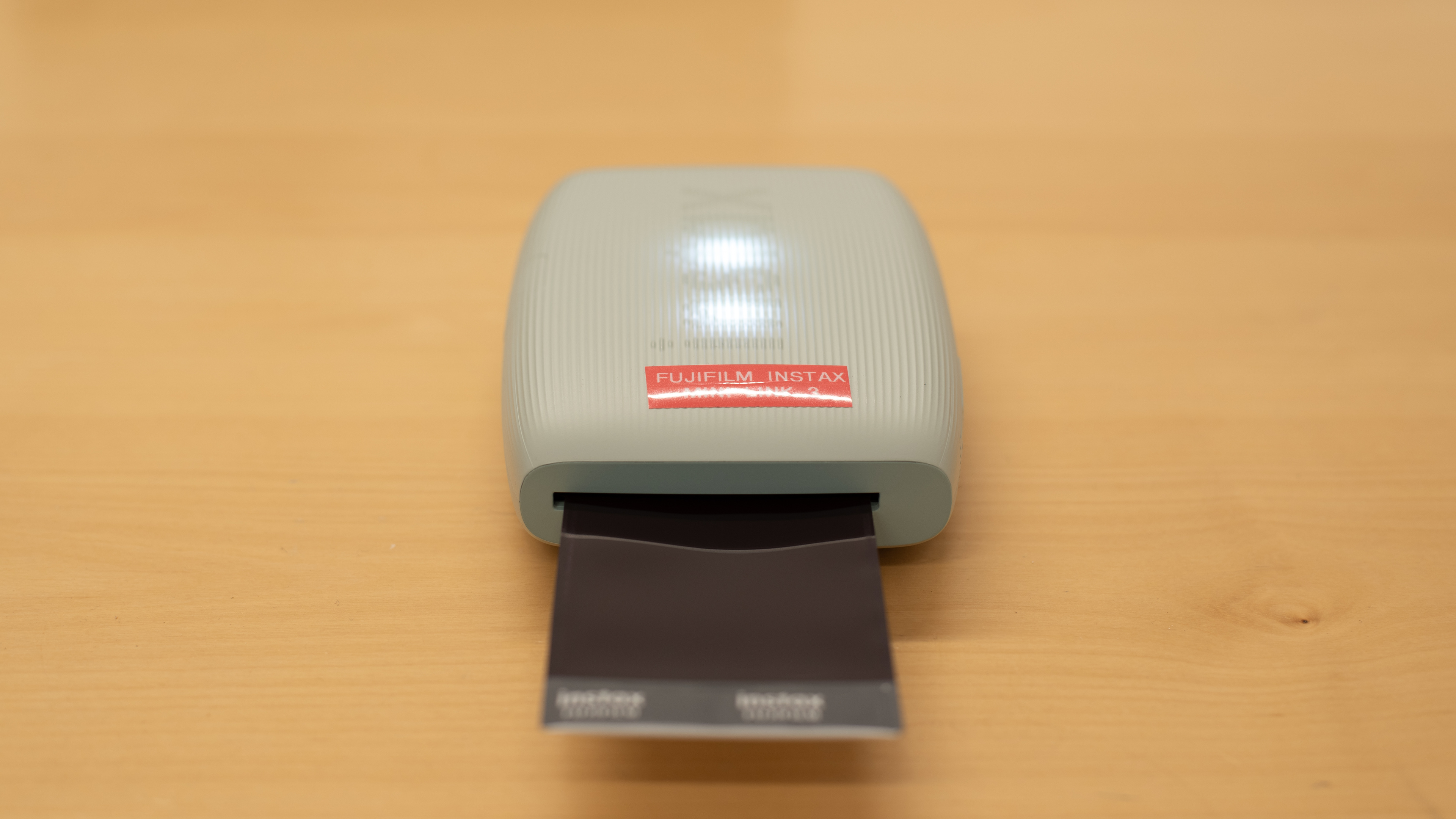
    Here's our unit's label.

    Popular Printer Comparisons

    The Fujifilm mini Link 3 performs well overall for an instant-film photo printer. It's a notable improvement over its older sibling, the Fujifilm instax mini Link 2, as it produces more vibrant-looking prints and has better color accuracy, bringing it closer to the photo quality of other compact photo printers like the Polaroid Hi-Print Generation 2. However, it lags behind the Fujifilm instax Link WIDE, as its photos aren't nearly as detailed. On the bright side, the Fujifilm instax mini mobile app offers more features than most competitors, like Canon or Polaroid. Like most instant-film printers, this printer incurs high recurring costs if you print a lot, as its film is expensive.

    For other options, see our recommendations for the best portable printers, the best photo printers, and the best small printers.

    Polaroid Hi-Print Generation 2

    While the Fujifilm instax mini Link 3 and the Polaroid Hi-Print Generation 2 are both portable photo printers, they produce very different photos. The Fujifilm produces slightly smaller prints that lean heavily into a retro aesthetic with soft edges, while the Polaroid produces prints that preserve significantly more fine details. Neither printer is particularly color-accurate, and both incur high recurring costs; therefore, the choice comes down to personal preference. Depending on your tastes, Fujifilm offers a wide variety of colors and patterns for its film, allowing you to personalize your prints.

    Fujifilm instax Link WIDE

    The Fujifilm instax mini Link 3 and the Fujifilm instax Link WIDE are both instant-film printers. Get the WIDE if you want the best photo quality. It has a significantly wider color gamut using its Rich photo mode, producing detailed, vivid, and overall pleasant-looking photos. By contrast, if you're a fan of small prints, the Link 3 is the better choice as it produces 2.4" x 1.8" photos. Each printer has an app that allows you to edit and customize your photos, among other functions.

    Canon SELPHY QX20

    The Canon SELPHY QX20 and the Fujifilm instax mini Link 3 are both portable photo printers; however, the former uses dye-sublimation, requiring a dye cartridge and photo paper, while the latter uses instant film. The Canon is a better choice if you want the best print quality: it produces more colorful and detailed pictures. The Fujifilm camera's built-in battery lasts longer, allowing you to print significantly more photos on a full charge, but it also takes much longer to charge to full.

    Fujifilm instax mini Link 2

    The Fujifilm instax mini Link 3 is a better instant-film printer than its older sibling, the Fujifilm instax mini Link 2. There are a few minor design changes, but the core functionality remains the same across the models. The biggest difference is that the new model produces better-looking photos, which appear more vibrant, have greater detail, and exhibit improved color accuracy. One potential drawback is that the Link 3 no longer connects to Fujifilm X series cameras; instead, you need to upload your photos to an app on your smartphone to print them. Beyond this, both devices use the same film and thus incur the same cost per print.

    Test Results

    perceptual testing image
    Sort:
    RATINGS
    Category:
    All
    Design
    7.5
    Build Quality
    TypePhoto Only

    This printer feels well-built. Despite being entirely plastic, the body feels sturdy, and the door for the film compartment feels solid with a secure lock switch. The buttons also provide nice tactile feedback. It's easy to access the film compartment and load new film packs, but be sure to only open the compartment when your current film pack is empty; light exposure ruins the film, and there's no external warning about this. One nice upgrade over the previous-generation Fujifilm instax mini Link 2 is the USB-C charging port instead of a Micro-USB port.

    The biggest weakness of this printer is the ejection slot located at the top of the device. It lacks a protective covering, allowing dust and debris to enter. Thankfully, there's an internal flap to guard against light exposure.

    10
    Dimensions
    Height4.9" (12.5 cm)
    Width3.5" (9.0 cm)
    Depth1.5" (3.7 cm)
    Max Height
    4.9" (12.5 cm)
    Max Width
    3.5" (9.0 cm)
    Max Depth
    1.5" (3.7 cm)
    Weight
    0.5 lbs (0.2 kg)
    0.0
    Display Screen
    Display ScreenNo
    Display Screen Size
    N/A
    TouchscreenNo

    While this printer doesn't have a display screen, three LED lights in the printer's body illuminate to display different printer states. The lights flash blue during firmware updates, magenta when a photo is being reprinted, cyan as data transfers to the printer, and yellow if an error occurs during film ejection. If the lights are yellow and static, this indicates that the battery is low or that it cannot charge. The LEDs glow green while using the instaxAiR function, which lets you use the printer as a pointer to add different effects to photos in the companion app.

    You can also check the battery status by pressing the Function button, located on the bottom half of the power button. Three white lights indicate a high battery level, two indicate a medium battery charge, and one indicates a low battery level.

    4.3
    Cartridge
    SuperTank
    No
    Photo Cartridge
    No
    ColorYes
    Number Of Color Cartridges
    N/A
    Black Cartridge Model
    No Cartridges
    Tested Black Page Yield
    N/A
    Estimated Black Page Yield
    N/A
    Color Cartridge Model
    No Cartridges
    Tested Color Page Yield
    20 prints
    Estimated Color Page Yield
    20 prints
    Third-Party Cartridge
    No Cartridges
    Ink Type
    No Ink
    High Yield Cartridge
    No Cartridge

    You can purchase color or monochrome film. The monochrome film is only available with a white border, but the color film is available in a wide variety of colors and patterns. See Fujifilm's website for the different options.

    Each film pack contains 10 sheets. You can purchase packages with multiple film packs included, ranging from 10 to 50 sheets, depending on your chosen options.

    8.0
    Expected Maintenance
    Ink Related Maintenance
    Not Needed
    Drum Unit
    No Drum Unit

    The Fujifilm mini Link 3 requires little maintenance. The film pack is easy to load, although it's best to wait until the printer is empty to load a new pack; exposing the film to light ruins the film. There's a reset button in a small hole next to the USB charging port in case the printer malfunctions.

    See the full manual on Fujifilm's website.

    10
    Risk Of Clogging
    Print Technology
    Film

    This isn't an inkjet printer. As such, it poses no risk of clogging.

    Ease Of Unclogging
    Printhead Location
    No Printhead
    Printhead Serviceability
    No Printhead
    High Flushing Volume
    No
    In The Box

    • User Documentation
    • USB-C to USB-A charging cable

    Note: The printer doesn't come with any film.

    Battery
    Advertised Battery Life
    ~100 prints
    Tested Charging Time
    147 min

    The printer's advertised charging time is 90 to 120 minutes, but this may vary depending on the ambient temperature, the charger adapter used, and the remaining battery level.

    Efficiency
    0.0
    Cost-Per-Print
    See details on graph tool
    Black Cartridge Price
    0 US$
    Color Cartridge Price
    0 US$
    Black-Only Printing Cost
    N/A
    Color Printing Cost
    N/A
    Photo Printing Cost
    0.738 US$/print
    Ink Subscription
    No

    The cost per print is high because the film is expensive. The graph represents the cost for a pack of 20 sheets. Purchasing larger packs of film will likely reduce the recurring costs.

    0.0
    Printing Speed
    Black Only Text Document
    N/A
    Color Document
    N/A
    Photo Printing Time
    20.0 s
    Single Page Out Time (Black Only)
    N/A
    Duplex Printing
    No
    Input Tray Capacity
    10 pages

    This printer produces photos very quickly; however, it doesn't print documents and lacks the capability for double-sided printing.

    Document
    0.0
    Black & White Documents
    Color Ink Needed For Black & White
    No

    This printer can't print documents.

    0.0
    Color Documents

    This printer can't print documents.

    Document Printing Sizes
    Letter (8.5" x 11")No
    Legal (8.5" x 14")No
    Tabloid (11" x 17")No
    A6 (105mm x 148mm)No
    A5 (148mm x 210mm)No
    A4 (210mm x 297mm)No
    Max Paper Weight
    N/A
    Scanner
    0.0
    Scanner Features
    Scanner
    No Scanner
    ADF Capacity
    N/A
    Scan Speed
    N/A
    Duplex Scanning
    No Scanner
    Max Flatbed Scan Size
    No Scanner
    Max ADF Scan Size
    No Scanner
    Flatbed Hinge Adjustability
    N/A
    Fax
    No
    Copy
    No
    OCR Included
    No Scanner

    This is a print-only unit.

    0.0
    Scan Quality
    Max Scan Resolution
    N/A
    Max Scan Color Depth
    N/A

    This is a print-only unit.

    Photo
    4.0
    Color Gamut

    This printer has a poor color gamut. Fujifilm advertises the printer as having an RGB gradation of 256 colors. While it can reproduce markedly more vivid and saturated colors than its older sibling, the Fujifilm instax mini Link 2, photos still lack fine detail, like the parrot's white face and red feathers.

    7.0
    Color Accuracy
    Average Color dE
    6.05

    The color accuracy is decent. While some greens, blues, and grays are noticeably inaccurate, most colors look fairly natural and close to the originals. It's an improvement over the previous model, the Fujifilm instax mini Link 2.

    3.0
    Small Details
    Max Print Resolution (DPI)
    800 x 600

    It performs poorly with small details. The image appears soft, with blurred edges, and due to the printer's narrow color range, many details in lighter areas aren't visible.

    0.0
    Photo Printing Sizes
    Glossy Paper (4" x 6")No
    Glossy Paper (5" x 7")No
    Glossy Paper (8" x 10")No
    Glossy Paper (8.5" x 11")No
    Glossy Paper (13" x 19")No
    Borderless Printing
    No

    This printer is only compatible with Fujifilm instax mini film that produces 2.4" x 1.8" (62 mm x 46 mm) photos.

    Mobile App And Connectivity
    0.5
    Connectivity
    Wireless
    Yes
    Wi-Fi via Router
    No
    Wi-Fi Direct
    No
    Bluetooth
    Yes
    Ethernet
    No
    USB Input To Computer
    No
    External Storage Support
    No
    Apple AirPrint
    No
    Mopria Print Service
    No

    This printer only connects via Bluetooth. Unlike the Fujifilm instax mini Link 2, this printer no longer connects directly to Fujifilm X series cameras. Instead, you have to use the FUJIFILM Camera Remote app to access your photos and then use the instax mini Link app to print them. The USB-C port is for charging only.

    4.7
    Mobile App
    Mobile AppYes
    App NameInstax Mini Link
    iOSYes
    AndroidYes
    Photo (JPEG, PNG)
    Android and iOS
    PDF
    No
    Microsoft Office Files
    No
    Text Files (TXT)
    No
    Webpages (HTML)
    No

    This printer is compatible with the FUJIFILM instax mini Link app. You can use the app to access basic information about the printer, like the remaining film count and the current battery level, and to print photos or frames from videos.

    There are also several additional features, like using the printer as a remote shutter and zoom control for your smartphone camera. The Collage Print function combines multiple images in an old-school photo booth style, while the Match Print function lets you combine photos with others. You can also edit photos by adding decorative borders or using the instaxAiR function to add effects like bubbles, glitter, glowing lines, petals, or spray by using the printer as a pointer if you hold the Function button (located under the power button) or with your finger on the screen. Finally, you can embed a video into the image; the printer will create a QR code that shows the footage when scanned.

    OS Compatibility
    WindowsNo
    macOSNo
    Chrome OSNo

    The Fujifilm mini Link 3 can only connect to smartphones and is therefore not compatible with desktop operating systems.