HP LaserJet Enterprise M507dn  Printer Review

Reviewed Jul 07, 2020 at 08:44am
Retest May 11, 2021 at 08:33am
Tested using Methodology v0.8.1 
HP LaserJet Enterprise M507dn
2.3
Family 
5.9
Small/Home Office 
5.5
Student 
9.0
Black & White 
2.7
Casual Photo 
 0

The HP LaserJet Enterprise M507dn, as the name suggests, is an enterprise-grade monochrome printer that's intended for small businesses. It's well-built, it has a large input tray, and like most laser printers, it churns out pages at an exceptional speed. Its cartridge can yield an astounding number of pages, which leads to fewer cartridge replacements over time. Unfortunately, it's somewhat of a one-trick pony as it can only print in black and its photo printing quality is just terrible. Additionally, it doesn't have a scanner, it has poor connectivity options, and its mobile app is difficult to use, to say the least. That said, if you only need a monochrome printer that can handle big print jobs, this printer is an excellent choice.

Our Verdict

2.3
Family 

The HP LaserJet Enterprise M507dn is a terrible printer for family use. It can only print in black and it doesn't print photos very well. It may be a good option if you only need to print black and white documents, but the lack of any wireless connectivity makes it difficult to recommend for a household with multiple people sharing the printer. Furthermore, it doesn't have a scanner, and the mobile app is difficult to use, as it's intended for small businesses with complex network setups.

Pros
  • High black page yield.
  • Support for USB thumb drives.
Cons
  • No scanner.
  • No wireless connectivity options.
  • Terrible photo printing quality.
  • Can't print in color.
5.9
Small/Home Office 

The HP LaserJet Enterprise M507dn is a sub-par printer for small or home offices. If you only print in black, then this printer performs extremely well in that regard, as it can print quickly and it can yield an incredible number of pages on a single black toner cartridge. However, the lack of color printing is quite limiting, and it doesn't have a scanner at all.

Pros
  • High black page yield.
  • Fast printing speed.
Cons
  • No scanner.
  • No wireless connectivity options.
  • Can't print in color.
5.5
Student 

The HP LaserJet Enterprise M507dn is a sub-par printer for students. It may be a good option if you only print in black, as it can print very quickly and it's cost-effective, but the lack of color printing is still very limiting if ever you want to use a bit of color on a document. It doesn't have any type of wireless connectivity options and doesn't have a scanner either. Also, the mobile app isn't particularly user-friendly.

Pros
  • High black page yield.
  • Fast printing speed.
  • Support for USB thumb drives.
Cons
  • No scanner.
  • No wireless connectivity options.
  • Can't print in color.
  • Difficult-to-use mobile app.
9.0
Black & White 

The HP LaserJet Enterprise M507dn is an outstanding printer for printing black and white documents. It's well-suited for big print jobs, as it has exceptional printing speed and it can yield a sizable number of pages on a single toner cartridge. Also, it has a large input tray that can hold a lot of paper, so you can just leave the print job running while you work on other things.

Pros
  • High black page yield.
  • Fast printing speed.
Cons
None
2.7
Casual Photo 

The HP LaserJet Enterprise M507dn is a bad printer for printing photos. Like most laser printers, it isn't meant for printing photos. It can only print in black and the quality of the photos are terrible. Although it supports photo paper formats, it can't print on glossy photo paper.

Pros
None
Cons
  • Terrible photo printing quality.
  • Can't print in color.
  • 2.3
    Family
  • 5.9
    Small/Home Office
  • 5.5
    Student
  • 9.0
    Black & White
  • 2.7
    Casual Photo
  • Changelog

    1.  Updated May 11, 2021: Changed Photo Printing value in Cost-Per-Print box from $0.125 to N/A.
    2.  Updated Sep 29, 2020: We've changed the mobile app availability from 'Yes' to 'No'.
    3.  Updated Jul 07, 2020: Review published.
    4.  Updated Jul 02, 2020: Early access published.

    Check Price

    WhiteLaserjet Enterprise M507dn
    SEE PRICE
    Amazon.com
    WhiteLaserJet Enterprise M507n
    SEE PRICE
    Amazon.com
    WhiteLaserJet Enterprise M507x
    SEE PRICE
    Amazon.com
    WhiteLaserJet Enterprise M507dng
    SEE PRICE
    Amazon.com

    Differences Between Sizes And Variants

    We tested the HP LaserJet Enterprise M507dn; however, there are three other variants with some minor differences in the features available, which you can see in the table below.

    Model Display Screen # of Input Trays Connectivity Duplex Printing Direct Printing
    LaserJet Enterprise M507dn 6.9cm 2 USB, Ethernet Yes No direct printing
    LaserJet Enterprise M507dng 10.9cm - Touchscreen 2 USB, Ethernet Yes No direct printing
    LaserJet Enterprise M507n 6.9cm 2 USB, Ethernet No No direct printing
    LaserJet Enterprise M507x 10.9cm - Touchscreen 3 USB, Ethernet, Wi-Fi Yes

    AirPrint, Mopria, Google Cloud Print, HP ePrint, Wi-fi-Direct

    Popular Printer Comparisons

    The HP LaserJet Enterprise M507dn is a printer that's meant for small businesses, and as such, it's a difficult printer to compare, since we mostly review printers that are at the general consumer level. It performs incredibly well for those who only need to print in black and white, but for the average user, it just isn't versatile enough. For other options, you can also check out our recommendations for the best all-in-one printers, the best home printers, and the best printers under $100.

    HP Color LaserJet Pro MFP M479fdw

    Overall, the HP Color LaserJet Pro MFP M4789fdw is a much better printer than the HP LaserJet Enterprise M507dn. The M4789fdw can print in color, it has a scanner, and it has significantly better connectivity options. However, the Enterprise M507dn is a better choice for printing black and white documents, as it has faster printing speed and its black toner cartridge can yield a lot more pages.

    Brother HL-L3270CDW Laser

    Although the HP LaserJet Enterprise M507dn and the Brother HL-L3270CDW are both laser printers, they're made for different purposes. The Brother is a lot more versatile, as it has a scanner and it can print in color. The Brother also has better connectivity options and mobile app support, but the HP is a better printer for printing black and white documents as it prints faster and its toner cartridge can yield a lot more pages.

    Epson WorkForce WF-7720

    If you only need to print black and white documents and nothing else, then the HP LaserJet Enterprise M507dn is a better choice than the Epson WorkForce WF-7720, as the HP prints a lot faster and it has a significantly higher black page yield. However, for everything else, the Epson is better. The Epson has a scanner, it has wider connectivity options, and it has mobile app support. Also, it can print in color and it prints good-looking photos.

    Epson EcoTank ET-4760

    For most uses, the Epson EcoTank ET-4760 is a better printer than the HP LaserJet Enterprise M507dn. The Epson is more versatile since it's an inkjet printer that can also print in color. It also comes with a scanner that has an automatic document feeder, and it has much wider connectivity options. Surprisingly, the Epson has a higher black page yield, but it comes nowhere near the HP when it comes to printing speed.

    Canon imageCLASS MF445dw

    The Canon imageCLASS MF445dw and the HP LaserJet Enterprise M507dn are very different printers. The Canon is meant as an all-in-one solution that includes a scanner, while the HP is a dedicated printer that only prints. The Canon has many more connectivity options, it has mobile app support, and its cost-per-print is lower. On the other hand, the HP yields a lot more pages per cartridge, and it prints significantly faster.

    HP Color LaserJet Enterprise M553dn

    The HP Color LaserJet Enterprise M553dn and the HP LaserJet Enterprise M507dn are very similar overall. The main difference is that the M553dn can print in color, while the M507dn can only print in black. The M553dn has a higher page yield, but the M507dn has a better cost-per-print due to the lower cost of its black toner cartridge.

    Canon imageCLASS MF242dw

    The HP LaserJet Enterprise M507dn and the Canon imageCLASS MF242dw are both monochrome laser printers, but the Canon is an all-in-one unit that includes a flatbed scanner, while the HP is a printer-only unit. The HP has much faster print speeds, a larger input tray capacity, and a significantly higher page yield. The Canon has a marginally lower cost-per-print and many more wireless connectivity options.

    Test Results

    perceptual testing image
    Sort:
    RATINGS
    Category:
    All
    Design
    8.5
    Build & Design Quality
    TypePrinter Only

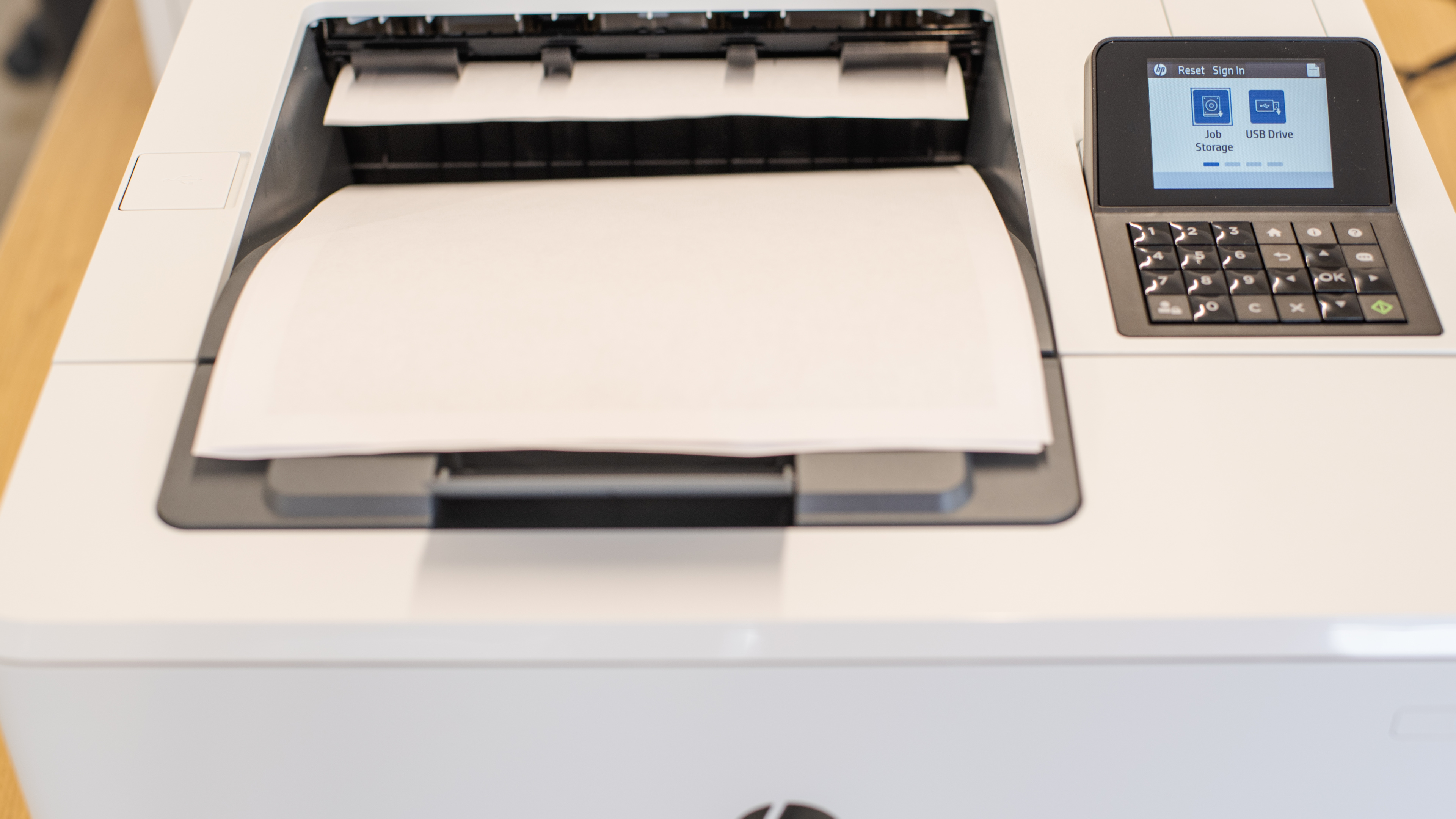
    The HP LaserJet Enterprise M507dn has an excellent build and design quality. Even though it's entirely made out of plastic, it feels very sturdy overall and there are no issues with the construction. The power cord is removable and replaceable should it get damaged. The toner cartridge is easy to get to by releasing the front panel, and paper jams can be accessed by opening a panel on the back of the printer. The main input tray has a level indicator to show how much paper is left, so you don't have to open the tray and potentially interrupt a print job. The only downsides with its design are pretty minor; the output tray is on top and exposed, and the panel to access paper jams only opens up to three-quarters of the way, so it may be a bit tight for those with large hands.

    Dimensions
    Height11.8" (30.0 cm)
    Width16.5" (41.8 cm)
    Depth14.7" (37.4 cm)
    Weight
    26.0 lbs (11.8 kg)

    The HP LaserJet Enterprise M507dn isn't particularly wide or deep, but it's quite tall due to its large-capacity input trays.

    6.5
    Display Screen
    Display ScreenYes
    Display Screen Size
    2.6" (6.7 cm)
    TouchscreenNo

    The display screen is okay. It's a small color LCD screen, but it's not touch-sensitive, so navigation is done with the buttons located below the screen. Although there's no tilt or swivel adjustment, visibility remains good whether you're standing or sitting. The interface feels responsive and the menus are easy to navigate. If you want a similar printer with a much better touch-sensitive display screen, check out the HP Color LaserJet Enterprise M555dn.

    In The Box

    • 1 x HP 89A Original LaserJet toner cartridge
    • Power cord
    • User guide
    9.0
    Cartridge
    Photo Cartridge
    No
    TechnologyLaser
    Number Of Color Cartridges
    N/A
    Black Cartridge Model
    HP 89A Black
    ColorNo
    Tested Black Page Yield
    334.9 prints
    SuperTank
    No
    Estimated Black Page Yield
    6,363 prints
    Color Cartridge Model
    No Color Cartridge
    Tested Color Page Yield
    N/A
    Estimated Color Page Yield
    N/A
    Third Party Cartridge
    No
    High Yield Cartridge
    Yes
    Drum Unit
    In The Cartridge

    The cartridge system is outstanding. It can yield an incredibly high number of pages, which leads to fewer replacements of the toner cartridge over time. If you often print in bulk, this printer accepts the 89X high-yield and the 89Y extra high-yield toner cartridges. The drum unit is built into the cartridge, so you won't have to manually replace it.

    0.0
    Scanner
    Scanner
    No
    Scan Flatbed
    No
    Scan Sheetfed
    No
    Automatic Document Feeder
    No
    Duplex Scanning
    No
    Scan Resolution
    N/A
    Scan Color Depth
    N/A
    Flatbed Scan Size
    N/A
    Fax
    No
    Copy
    No

    The HP LaserJet Enterprise M507dn doesn't have a scanner.

    Printing
    9.5
    Cost-Per-Print
    See details on graph tool
    Black Cartridge Price
    149.99 US$
    Color Cartridge Price
    N/A
    Black Only Printing
    0.024 US$/print
    Color Printing
    N/A
    Photo Printing
    N/A
    Ink Subscription
    No

    Update 05/11/2021: We initially set a value for Photo Printing, but we changed this to N/A since this printer isn't designed for photo printing.

    The HP LaserJet Enterprise M507dn's cost-per-print is exceptional due to its toner cartridge's high yield. The cost of the toner cartridge seems high, but keep in mind that it includes the drum unit as well, which saves you from having to replace the drum unit separately.

    9.4
    Printing Speed
    Black Only Text Document
    42 PPM
    Color Document
    N/A
    Photo Printing Time
    5.1 s
    First Page Out Time (Black Only)
    8.4 s
    Duplex Printing
    Automatic
    Input Tray Capacity
    650 pages

    The HP LaserJet Enterprise M507dn has an exceptional printing speed. It takes very little time to warm up, so the first page comes out very quickly, and subsequent pages are even faster. Additionally, it has two input trays that can hold up to 650 sheets of paper combined, so you can leave a big print job running without having to constantly check up on it.

    0.0
    Color Accuracy
    Average Color dE
    N/A

    The HP LaserJet Enterprise M507dn can only print in black. If you want a similar printer that can print in color, check out the HP Color LaserJet Enterprise M553dn.

    1.3
    Photo Printing Quality
    Borderless Printing
    No

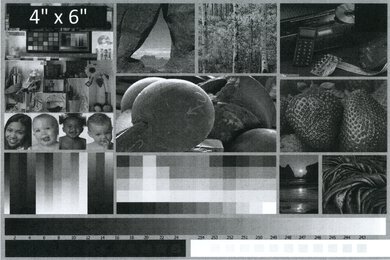
    Like most laser printers, the HP LaserJet Enterprise M507dn isn't meant for photo printing. That said, for a monochrome printer, it can produce deep blacks and there isn't too much banding either. Our test image was printed on regular paper, as it can't print on glossy photo paper.

    These results are based on the actual physical photo, not the scanned image provided for reference above, which may not be representative of the printer's photo print quality.

    Printing Size
    Letter (8.5" x 11")Yes
    Legal (8.5" x 14")Yes
    Tabloid (11" x 17")No
    A6 (105mm x 148mm)Yes
    A5 (148mm x 210mm)Yes
    A4 (210mm x 297mm)Yes
    Photo (2" x 3")No
    Photo (4" x 6")Yes
    Photo (5" x 7")Yes

    The HP LaserJet Enterprise M507dn supports most paper sizes up to the legal size. It can print most photo formats, just not on glossy photo paper.

    Mobile App And Connectivity
    3.0
    Connectivity
    Ethernet
    Yes
    USB Input To Computer
    Yes
    WirelessNo
    Bluetooth
    No
    Wi-Fi via Router
    No
    Wi-Fi Direct
    No
    External Storage Support
    Yes
    Apple AirPrint
    No
    Mopria Print Service
    No

    The HP LaserJet Enterprise M507dn has terrible connectivity options. It can only connect via ethernet or a wired USB connection, which provides a more reliable connection, and it has two USB ports that allow printing from thumb drives. There's an optional wireless adapter that you can purchase separately, and there's also a variant of this printer that has wireless connectivity, but it's more expensive.

    0.0
    Mobile App For Home Use
    Mobile AppNo
    App NameNo App
    iOSNo
    AndroidNo
    Photo (JPEG, PNG)
    No
    PDF
    No
    Microsoft Office Files
    No
    Text Files (TXT)
    No
    Webpages (HTML)
    No

    The HP M507dn is compatible with the HP ePrint Enterprise mobile app, which is available on both Android and iOS devices. The app isn't designed for home use; rather, it's meant for an office environment, and setting it up requires several complex steps and specific information about the network. As such, we consider that there isn’t any mobile app for home use, only for businesses.