Samsung HW-Q990B  Soundbar Review

Reviewed Jul 29, 2022 at 11:07am
Writing modified May 15, 2024 at 09:29am
Tested using Methodology v1.3 
Samsung HW-Q990B
8.4
Mixed Usage 
8.6
Dialogue/TV Shows 
8.4
Music 
8.3
Movies 
 6
Notice: This soundbars was replaced by Samsung HW-Q990C

The Samsung HW-Q990B is the top-of-the-line offering from the manufacturer's 2022 lineup. With its 11.1.4 setup, it's the next generation of the Samsung HW-Q950A, with a new and improved design overall. It seems more sturdy, with more rumble in the bass right out-of-the-box, and new angled rears that add lots of detail to your favorite movies. It's larger and more expensive than the 9.1.4 Samsung HW-Q930B, with two more channels and a big sub that packs a potent punch in the bass range. As with most Samsung bars, you get access to a wide range of sound enhancement features, so you can customize its sound and pair it with compatible Samsung TVs for extra tools like Q-Symphony.

Our Verdict

8.4
Mixed Usage 

The Samsung HW-Q990B is great for mixed usage. This 11.1.4 bar offers versatile performance, with a neutral sound that makes it suitable for everything from vocal-centric TV shows to music to movies. You have access to lots of customization tools, making it easy to adjust the bar's sound based on your preferences. Its rear speakers bring an immersive quality to the sound, so audio seems like it wraps all around you. There's good height, especially with Dolby Atmos content, bringing a cinematic experience right to your living room. It's a great bar, but its premium price tag may not be ideal for everyone.

Pros
  • Room correction available.
  • Graphic EQ and presets.
  • Impressive Atmos performance.
  • Bluetooth, Wi-Fi, Apple AirPlay support.
Cons
  • No Chromecast capabilities.
8.6
Dialogue/TV Shows 

The Samsung HW-Q990B is amazing for dialogue-heavy TV shows and podcasts. It's an 11.1.4 setup, so there's a discrete center channel included to improve vocal quality in the mix. With its balanced mids, voices are clear and detailed, so you don't have trouble following the action on your screen. You can even use its 'Voice Enhance' dialogue enhancement tool if you wish. When it comes to podcasts, you have lots of wireless streaming options, from Bluetooth to Wi-Fi. However, without Chromecast support, it doesn't fit as easily into your Google ecosystem.

Pros
  • Room correction available.
  • Bluetooth, Wi-Fi, Apple AirPlay support.
Cons
  • No Chromecast capabilities.
8.4
Music 

The Samsung HW-Q990B is great for music. Like most premium bars on the market, it has room correction tools to optimize the audio reproduction based on your room's unique acoustics. With it on, the frequency response is neutral, especially in the mids, where most voices and lead instruments reproduce. It's suitable for listening to many different genres, and the extra punch in the bass range brings bass-heavy genres like EDM to life. If you prefer a different sound, many customization tools are available, including a 7-band graphic EQ and bass and treble adjustments.

Pros
  • Room correction available.
  • Graphic EQ and presets.
Cons
  • No Chromecast capabilities.
8.3
Movies 

The Samsung HW-Q990B is great for movies. With its two surround speakers, you get a really immersive feel with lots of common audio formats, from 5.1 surround sound like Dolby Digital to object-based formats like Dolby Atmos. Sound effects are clear and detailed, with audio stretching all around you, so you really get the sense that you're sitting in the middle of your favorite movies. The sub provides plenty of rumble in the bass, so your chair shakes during intense scenes as if you're in a cinema.

Pros
  • Room correction available.
  • Extended low-bass.
  • Impressive Atmos performance.
Cons
  • No Chromecast capabilities.
  • 8.4
    Mixed Usage
  • 8.6
    Dialogue/TV Shows
  • 8.4
    Music
  • 8.3
    Movies
  • Changelog

    1.  Updated May 15, 2024: We've corrected a mistake in the Stereo Frequency Response With Preliminary Calibration text that said you could adjust the treble to '1' for a more balanced sound. You won't be able to change the treble EQ preset in Standard mode, so the treble setting is '0'.
    2.  Updated Apr 23, 2024: We've added a comparison between this soundbar and the Samsung HW-Q990D in Video Passthrough To TV.
    3.  Updated Feb 02, 2024: Added information to the Wireless Playback and Voice Assistant Support boxes as Chromecast and Google Assistant support is region-specific.
    4.  Updated Jan 29, 2024: Updated text in Stereo Dynamics, Audio Latency: ARC, Audio Latency: HDMI In, and Audio Latency: Optical boxes with new methodology from TBU 1.3. Some updates to the usages as well.

    Check Price

    BlackHW-Q990B
    Amazon.com
    BlackHW-Q990B
    B&H
    BlackHW-Q990B
    BestBuy.com
    BlackHW-Q990B
    Samsung.com
    BlackHW-Q990B
    Walmart.com

    Differences Between Sizes And Variants

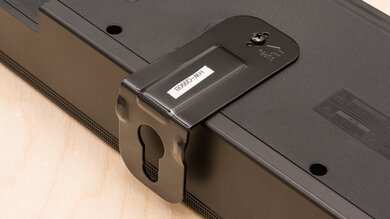
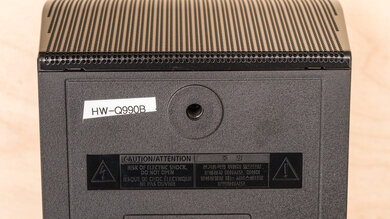
    The Samsung HW-Q990B is available in 'Black'. You can see the label for the model we tested here.

    If you come across another version of this soundbar, let us know in the discussions, and we'll update our review.

    Popular Soundbar Comparisons

    The Samsung HW-Q990B is a premium bar suitable for everything from movies to music to TV shows. It'll please most types of listeners, although it doesn't give the same immersive soundstage as other premium offerings like the Bose Smart Soundbar 900 with Speakers + Bass Module or the Sonos Arc with Sub + One SL Speakers. It's bigger than the Samsung HW-Q930B, with a little more rumble in the bass and added features like additional side-firing drivers in the satellites. If its hefty price tag isn't to your liking, the Q930B is a solid alternative at a more affordable price.

    See also our recommendations for the best soundbars, the best soundbars for movies, and the best Samsung soundbars.

    Samsung HW-Q990C

    The Samsung HW-Q990C is the next generation of the Samsung HW-Q990B, and while they're both very premium models that can please many different listeners, the next-gen model is better overall. The bars have a similar look and a similar sound, though the Q990C's bass is a bit more controlled out-of-the-box. As a result, you notice a more balanced thump and rumble in the bass.

    LG S95QR

    The Samsung HW-Q990B and the LG S95QR are both very premium setups with versatile performances. However, the Samsung soundbar is better overall. Its default sound is more neutral, which less boominess in the bass and more detail in the treble. Its surround sound and Atmos performances are better, too, so sound effects in your movies are more clearly and accurately reproduced. You can customize the LG with its bass and treble adjustments, but the Samsung is more customizable with its graphic EQ.

    Samsung HW-Q990D

    The Samsung HW-Q990D is a couple of generations newer than the Samsung HW-Q990B. Both bars may look very similar, but some features give the Q990D a leg up over its predecessor. Most importantly, it supports HDMI 2.1, so you can send 4k signals at 120Hz, making it great for gaming. It also has a couple of additional sound features like Private Listening, which limits the bar's sound to the satellites for a less intrusive listening experience, and Sound Grouping, which lets the satellites play left and right channel content for a more stereo sound.

    JBL Bar 1000

    The Samsung HW-Q990B is better than the JBL Bar 1000, though both of these premium soundbars offer different strengths. The Samsung is better-built, with built-in voice assistant support. It has more sound enhancement features and gets louder. The JBL still gets quite loud and supports third-party voice assistant devices. Plus, the JBL's smaller, detachable satellites might be better suited for your living space.

    Show more 

    Test Results

    perceptual testing image
    Sort:
    RATINGS
    Category:
    All
    Design
    Style - Bar

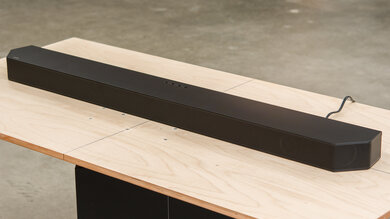
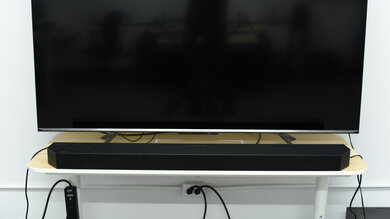
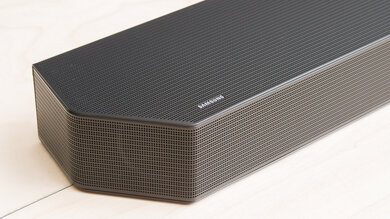
    The Samsung HW-Q990B has a premium design. It's made of plastic, with metal grilles covering the front, sides, and top of the bar. It feels more solid than the fabric sides on last year's Samsung HW-Q950A. There are also angled edges similar to the Samsung HW-Q930B.

    Style - Subwoofer
    Sub Wireless
    Yes
    Enclosure
    Ported

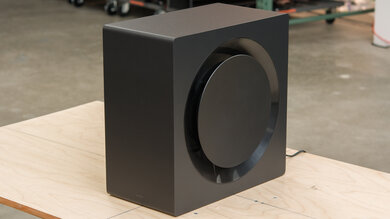
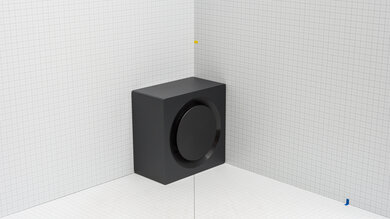
    The Samsung HW-Q990B's sub has a unique design. It's mostly made of wood, and on the side, there's a round plastic plate to protect the woofer.

    Style - Satellites
    Satellite Wireless
    Yes

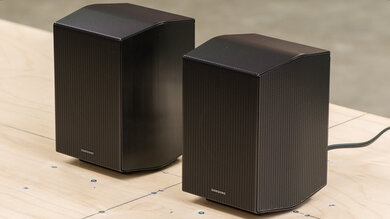
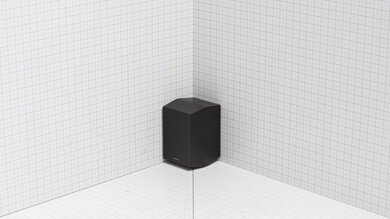
    The Samsung HW-Q990B's satellites have a similar design to those that come with the Samsung HW-Q930B. Their build resembles the bar itself, with plastic and metal grilles on the sides. The top and bottom of the satellites have an angled design that's unique compared to last year's models.

    Dimensions - Bar
    Width48.6" (123.5 cm)
    Height2.8" (7.0 cm)
    Depth5.4" (13.8 cm)

    The Samsung Q990B is quite wide, especially compared to the Samsung HW-Q930B. It likely won't fit between the legs of a 55" TV. That said, it's not very tall, so it doesn't obscure your TV screen.

    Dimensions - Subwoofer
    Width8.9" (22.6 cm)
    Height16.1" (40.8 cm)
    Depth16.2" (41.1 cm)

    The Samsung HW-Q990B's sub is larger than the version that comes with the Samsung HW-Q930B. It resembles a larger desktop computer. Since it connects to the bar wirelessly, you have more flexibility when arranging it in your room.

    Dimensions - Satellites
    Width5.1" (13.0 cm)
    Height7.9" (20.0 cm)
    Depth5.6" (14.2 cm)

    The Samsung HW-Q990B's satellites are a similar size to those that come with other top-of-the-line models. You can place them on pedestals or mount them to your wall.

    Mounting
    Mountable Bar
    Yes
    Bar Brackets Included
    Yes
    Mountable Satellites
    Yes
    Satellite Brackets Included
    No
    8.5
    Build Quality

    The Samsung Q990B has an excellent build quality. The bar and the satellites have a similar plastic build, with metal grilles to help protect the drivers inside. It feels more much premium than the fabric used in last year's Samsung HW-Q950A. The sub is quite premium-looking, too, with a wood build and a plastic plate on the back. There's plastic covering the woofer, which is more solid than the usual fabric covering.

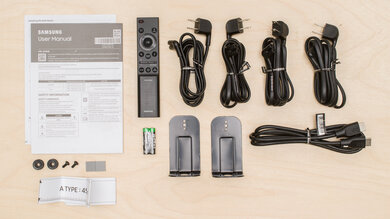
    In The Box

    • User manual
    • 4x rubber feet
    • Wall-mount template with bar brackets and screws
    • Remote with batteries (2x AA)
    • 4x power cord (4.9 ft / 1.5m)
    • HDMI cable (4.9 ft / 1.5m)
    Sound
    8.3
    Stereo Frequency Response
    See details on graph tool
    See details on graph tool
    Channels
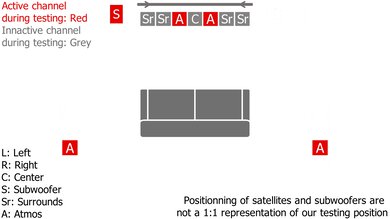
    11.1.4
    Tested Preset
    Standard
    Slope
    -0.55
    Standard Error
    3.01 dB
    Low-Frequency Extension
    27.1 Hz
    High-Frequency Extension
    19.9 kHz

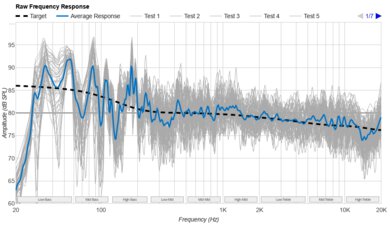
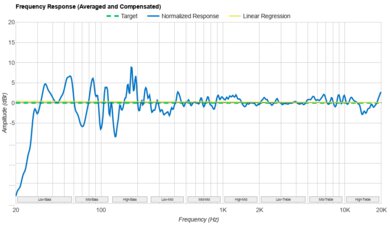
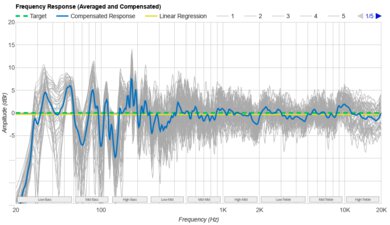
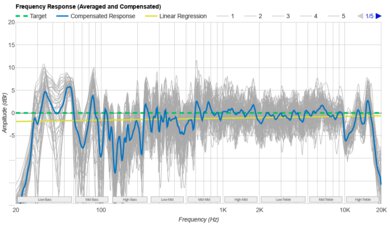
    The Samsung Q990B has an impressive stereo frequency response. Its balanced mids and treble make it suitable for listening to lots of different types of audio content, as voice and lead instruments reproduce with clarity and detail. There's plenty of rumble in the bass, especially compared to last year's Samsung HW-Q950A. You feel the thump in the bass, especially with bass-heavy genres like hip-hop and EDM, so it seems less controlled than with next generation's Samsung HW-Q990C.

    In addition to a 7-band graphic EQ, you have some EQ presets to help you customize its sound. When listening to music, audio sounds pleasant on 'Standard' mode. However, 'Adaptive Sound' makes audio seem more diffused, almost as if it's been forced through a filter. 'Adaptive' is more suitable for listening to movies, while 'Standard' is better for music and other stereo content.

    8.4
    Stereo Frequency Response With Preliminary Calibration
    See details on graph tool
    Suggested Preset
    Standard
    Suggested Bass Setting
    -3
    Suggested Treble Setting
    0
    Slope
    -0.18
    Standard Error
    2.47 dB
    Low-Frequency Extension
    27.9 Hz
    High-Frequency Extension
    19.9 kHz

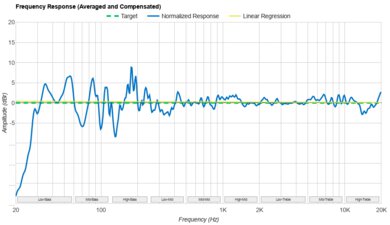
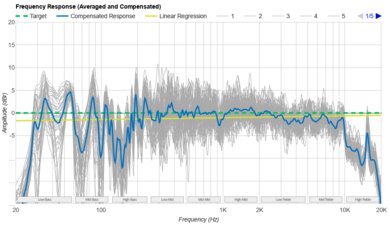
    If you prefer a more neutral sound with stereo content, you can set the Samsung Q990B's bass to '-3' and its treble to '0'. The sound is more balanced, and you notice less boom in the bass range. Voices and lead instruments remain clear and present in the mix, too.

    It's worth mentioning that if you're in 'Standard' mode, the EQ preset for treble doesn't affect the frequency response, so if you're using this setting, you'll only be able to change the bar's sound with the bass EQ. That said, you can always take advantage of the 7-band graphic EQ in the app for more robust sound customization.

    7.5
    Stereo Soundstage
    See details on graph tool
    Crosstalk Error
    1.94 dB

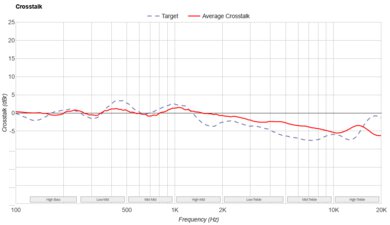
    The Samsung Q990B has a good stereo soundstage performance. It has good focus, meaning that it's easy to pinpoint sound effects to pinpoint locations around you. For example, if you listen to an orchestral recording, each instrument seems to come from a particular spot on stage. On 'Standard' mode, the soundstage is about as wide as the bar itself, but unlike the Bose Smart Soundbar 900 or the Sonos Arc, it doesn't have any tricks to make it seem wider than that. The soundstage is a little wider on 'Adaptive Sound', but it seems more diffused, and audio is forced towards the back wall. In our view, 'Standard' is the better choice for stereo content overall, but your subjective impressions may vary.

    9.1
    Stereo Dynamics
    See details on graph tool
    SPL @ Max Volume
    99.8 dB SPL
    DRC @ 90dB
    0.17 dB
    DRC @ Max Volume
    0.84 dB

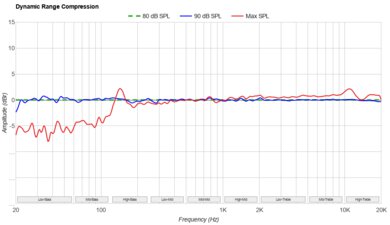
    The Samsung Q990B has an excellent stereo dynamics performance. This bar gets really loud, so you have no trouble filling larger living rooms with sound. There's not a lot of compression at louder volumes, either.

    8.6
    Center
    See details on graph tool
    Localization
    Discrete
    Slope
    -0.50
    Std. Err.
    2.82 dB
    SPL @ Max Volume
    97.3 dB SPL
    Weighted THD @ 80dB
    0.30
    Weighted THD @ Max Volume
    1.82

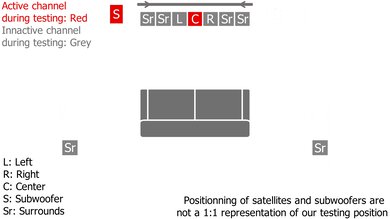
    The Samsung Q990B has an amazing center channel performance. It's an 11.1.4 setup, meaning that it comes with a discrete center channel to help improve vocal quality. Overall, dialogue is localized to more accurate locations in the soundstage. With its balanced frequency response, voices are clear and detailed in their reproduction.

    8.1
    Surround 5.1
    See details on graph tool
    Localization
    Discrete
    Slope
    -0.84
    Std. Err.
    3.61 dB
    SPL @ Max Volume
    92.4 dB SPL
    Weighted THD @ 80dB
    0.70
    Weighted THD @ Max Volume
    2.71
    7.1 Rears
    Yes

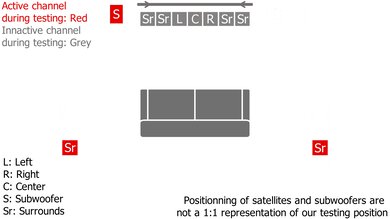
    The Samsung Q990B has a great surrounds performance. It comes with two discrete surround speakers, which offer a more clear and real representation of sound effects in the space around you. For example, if you watch a car chase scene, cars seem to race from one location to another. Audio stretches all around you, rather than sounding like it's just coming from a speaker placed in front of you.

    6.9
    Height (Atmos)
    See details on graph tool
    Localization
    Phantom (Up Firing, Bar & Satellites)
    Slope
    -0.84
    Std. Err.
    3.74 dB
    SPL @ Max Volume
    92.7 dB SPL
    Weighted THD @ 80dB
    0.42
    Weighted THD @ Max Volume
    1.23

    The Samsung Q990B has up-firing drivers built into the bar and the satellites, which bounce sound off the ceiling and back down towards you to create the impression of height. With its balanced frequency response, sound effects reproduce with detail and accuracy.

    Subjectively, the Samsung Q990B offers a similar Atmos performance to the Samsung HW-Q930B—making it one of the best bars for movies we've tested to date. On its 'Adaptive Sound' mode, details are especially crisp, and you hear dialogue with great clarity. The sub adds plenty of rumble in the bass, so you feel your chair shake with intense movie scores and action-packed scenes. The bar does a good job representing height, and sound stretches all around you. It performs well in 'Standard' mode, too, but the details aren't quite as impressive as with 'Adaptive Sound'.

    9.5
    Sound Enhancement Features
    Room Correction
    Yes
    Dialogue Enhancement
    Yes
    Auto-Volume/Night Mode
    Yes
    Subwoofer Level Adjustment
    Yes
    Bass Adjustment
    Yes
    Treble Adjustment
    Yes
    EQ
    Graphic + Presets
    Surround Level Adjustment
    Yes
    Rear Level Adjustment
    Yes
    Height Level Adjustment
    Yes
    Virtual Surround
    Yes

    The Samsung Q990B has a fantastic selection of sound enhancement features. You have a lot of tools on hand if you want to change up its sound, including bass and treble adjustments and a 7-band graphic EQ. There are many EQ presets, too, including 'Standard', 'Surround Sound', 'Game', and 'Adaptive Sound'. Like most premium offerings, there are features to optimize its audio reproduction based on your room's unique acoustics. The first is called SpaceFit Sound, and it adjusts the bar's sound. Auto EQ, meanwhile, controls the subwoofer's output.

    Like many other manufacturers, Samsung offers a feature that lets you pair the bar with a compatible Samsung TV—it's called Q-Symphony. Essentially, it synchs the bar with your TV, so your TV speakers play along with the bar itself. Unfortunately, we found that it doesn't have a real impact on the sound. Audio's a little louder, and there's a touch more height, but you have to really focus to notice it. Of course, this is a subjective opinion, and your own preferences as well as your room setup will impact how you perceive the change in sound quality.

    Connectivity
    Inputs/Outputs - Bar
    Optical Audio In
    1
    HDMI Out
    eARC
    HDMI 2.1 Class Bandwidth
    No
    Full HDMI In
    2
    Analog Audio In 3.5mm (Aux)
    No
    RCA In
    No
    USB for Files
    No
    Ethernet
    No
    Subwoofer Output
    No

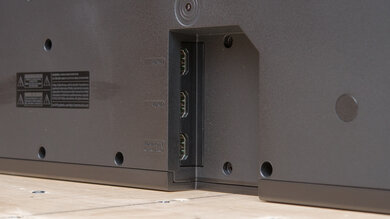
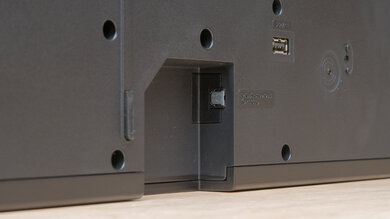
    The Samsung Q990B has lots of physical inputs. You can connect the bar to your TV over Optical or HDMI, and there's even an HDMI cable included in the box. You have an additional HDMI In port compared to the Samsung HW-Q930B, which is handy. The USB port under the bar is only for firmware updates.

    10
    Audio Format Support: ARC/eARC
    Dolby Atmos
    Supported
    Dolby Digital
    Supported
    Dolby Digital Plus
    Supported
    Dolby TrueHD
    Supported
    DTS
    Supported
    DTS:X
    Supported
    DTS-HD MA
    Supported
    PCM Channels
    Up To 7.1

    The Samsung Q990B supports lots of audio formats via ARC. It plays back common surround sound formats like Dolby Digital as well as lossless and object-based formats like Dolby Atmos. You can even press the 'i' button on the remote to confirm which format is playing. While there are some reports of Dolby Atmos issues when using the bar with LG OLED TVs, we didn't have any problems when pairing the bar with an LG C1 TV.

    10
    Audio Format Support: HDMI In
    Dolby Atmos
    Supported
    Dolby Digital
    Supported
    Dolby Digital Plus
    Supported
    Dolby TrueHD
    Supported
    DTS
    Supported
    DTS:X
    Supported
    DTS-HD MA
    Supported
    PCM Channels
    Up To 7.1

    The Samsung Q990B supports many audio formats via HDMI In, too. If you watch a lot of content on streaming platforms, you're likely to come across formats like Dolby Digital as well as Dolby Atmos.

    10
    Audio Format Support: Optical
    Dolby Digital
    Supported
    DTS
    Supported
    PCM Channels
    2.0

    Via Optical, the Samsung Q990B can playback both common surround sound formats, Dolby Digital and DTS. Dolby Digital is commonly found on streaming platforms, and you're likely to come across DTS with most Blu-rays.

    7.2
    Audio Latency: ARC
    PCM-2.0 ch
    46 ms
    PCM-5.1 ch
    46 ms
    Dolby MAT (PCM) Atmos
    87 ms
    Dolby Digital
    113 ms
    Dolby Digital Plus
    119 ms
    Dolby Digital Plus Atmos
    120 ms

    Audio latency is decent over an ARC connection. Some apps and TVs compensate for latency differently, but overall, the audio you hear is in sync with the video you see. Audio latency is a little higher with certain formats like Dolby Digital, but you can always use the bar's AV Sync feature to manually compensate for delays if needed.

    7.3
    Audio Latency: HDMI In
    PCM-2.0 ch
    49 ms
    PCM-5.1 ch
    45 ms
    Dolby MAT (PCM) Atmos
    91 ms
    Dolby Digital
    126 ms
    Dolby Digital Plus
    122 ms
    Dolby Digital Plus Atmos
    122 ms

    Audio latency is decent over HDMI In. You're more likely to notice lip-synching issues with some audio formats like Dolby Digital and Dolby Digital Plus, which are common on lots of streaming platforms. Of course, some apps and TVs will compensate for this differently, and the AV Sync feature is always on hand in the app if you need to adjust the delay manually.

    7.9
    Audio Latency: Optical
    PCM-2.0 ch
    103 ms
    Dolby Digital
    325 ms

    Audio latency is very good over an Optical connection. It falls on the higher side with formats like Dolby Digital, but you can always use the AV Sync feature in the app to adjust the delay accordingly. Some apps and TVs compensate for latency differently, too.

    8.5
    Video Passthrough To TV
    1080p Max Refresh Rate
    120Hz
    1080p @ 4:4:4 Max Refresh Rate
    120Hz
    4k Max Refresh Rate
    60Hz
    4k @ 120Hz @ 10-Bit
    Not Supported
    4k @ 4:4:4 Max Refresh Rate
    60Hz
    8k Max Refresh Rate
    30Hz
    HDR10 Passthrough
    Yes
    HDR10+ Passthrough
    Yes
    Dolby Vision Passthrough
    Yes
    HDMI Forum VRR Passthrough
    Yes
    FreeSync Passthrough
    No
    G-SYNC Passthrough
    No
    ALLM Passthrough
    Yes

    The Samsung Q990B can passthrough some of the highest-quality bandwidth signals, meaning you can connect the bar between your TV and your PC for clear and crisp text on screen. There's Dolby Vision Passthrough support, too. Unfortunately, you can't passthrough 4k @ 120Hz but the later generation of this soundbar, the Samsung HW-Q990D, supports this feature.

    9.0
    Wireless Playback
    Bluetooth
    Yes
    Wi-Fi Playback
    Yes
    Chromecast built-in
    No
    Apple AirPlay
    Yes
    Spotify Connect
    Yes

    The Samsung Q990B lets you wirelessly playback audio from your mobile devices over a Bluetooth, Wi-Fi, or Apple AirPlay 2 connection. Samsung's Tap Sound feature is another way to play audio from your phone on the bar. It works through Bluetooth, so you tap your compatible phone against the bar to get it to play audio from your phone. It's handy, but if your phone isn't compatible, you can still just stream audio wirelessly via Bluetooth. You can also check your country's product page to see if Chromecast is supported in your region.

    Additional Features
    Interface
    Display
    Yes

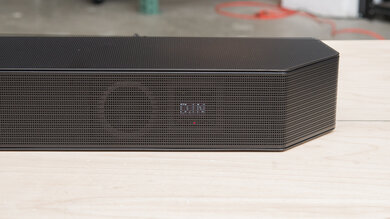
    The Samsung HW-Q990B has a small interface on the right side of the bar. It's a four-character display that shows the volume level and the input as you change these settings, and it scrolls for longer text. You can also press the 'i' button on the remote to see what format is playing.

    Bar Controls

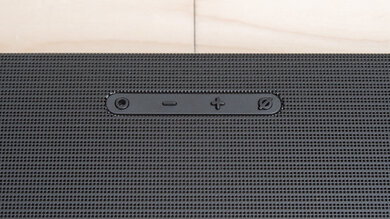
    The buttons on top of the bar can change the input, adjust the volume, and mute and unmute the microphone.

    Remote

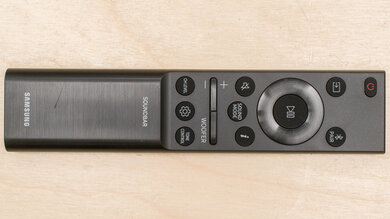
    The Samsung Q990B's remote is simple and lets you access many different features, from the sound modes to the 7-band EQ. You can also control the bar using the Samsung SmartThings app.

    Voice Assistants Support
    Amazon Alexa
    Yes (Built-in)
    Google Assistant
    No
    Apple Siri
    No
    Microphone Mute
    Yes

    With built-in Amazon Alexa, you can control the bar from your couch with your voice. Google Assistant is also available in some regions. If you want, you can also mute the microphone to turn the voice assistant feature off.