
Spending countless hours coding requires a comfortable keyboard with your frequently used inputs within easy reach. Consider whether you need dedicated arrow keys, a function row, or a numpad, or whether you're okay with accessing some inputs through shortcuts on a smaller keyboard. Robust software can also give you the ability to record complex macros and customize a keyboard's layout to your workflow, while quiet switches, clear backlighting, and multi-device pairing may also matter to you depending on where and how you work.
We've tested over 295 keyboards, and below are our top recommendations for the best programming keyboards. If you place a higher value on ergonomic designs and adjustability, see our picks for the best ergonomic keyboards instead. Alternatively, to see a broader range of options, see our picks for the best keyboards and the best wireless keyboards.
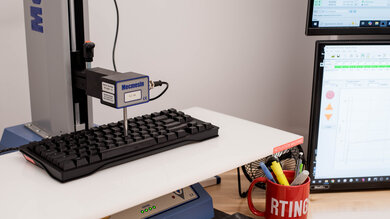
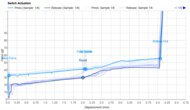
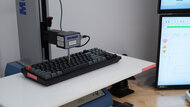
We test dozens of keyboards each year, and to maintain independence, we buy every unit ourselves. Our reviews go beyond subjective typing impressions or quick gaming sessions. Each keyboard is put through the same standardized test bench, so you can directly compare our results. We use specialized tools like a Mecmesin force tester to measure switch force curves and a Beagle 480 USB analyzer to capture input data for latency testing. Multiple teams contribute to each review in a process that can take days or even weeks from start to finish.
-
Best Keyboard For Programming
 ProgrammingSize:Full-size (100%)Hot-Swappable Switches:YesConnectivity:WirelessSwitch Type:MechanicalSee all our test resultsOutput Type:Non-Adjustable
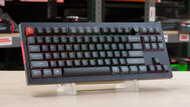
The best keyboard for programming we've tested is the Keychron Q6 Ultra 8K, a full-size model in Keychron's wider Q Ultra 8K lineup. It's the right choice if you want a premium feeling typing experience and flexible customization for your workflow. Its aluminum case feels exceptionally sturdy, and its double gasket-mounted design gives keystrokes a cushioned feel. However, its tall profile makes a wrist rest worth thinking about for longer sessions, and one isn't included. Its well-lubricated switches and stabilizers feel smooth and stable, and its long advertised battery life of up to 660 hours (with backlighting off) means you won't need to recharge often. You can connect using the included 2.4GHz receiver or pair it with up to three devices over Bluetooth. Just keep in mind this keyboard is quite heavy and meant to be used in a static desktop setup.
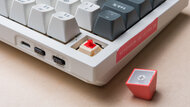
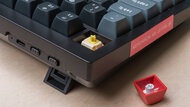
Its web-based customization software is intuitive and robust, and lets you rebind keys, create macros, and set up custom layers to keep frequently used shortcuts within easy reach. It also supports ZMK firmware if you need more advanced customization, and its hot-swappable PCB lets you replace the stock switches to tailor the typing feel. However, while it has RGB backlighting, the included keycaps lack shine-through legends, so they can be hard to read in darker rooms.
We actually recommend any size variant in the wider Q Ultra 8K lineup as they share the same high-quality construction, connectivity, and software. For example, if you don't need a numpad, you may prefer the much more compact and slightly more expensive Keychron Q1 Ultra 8K instead.
-
Best Mid-Range Keyboard For Programming
ProgrammingSize:TenKeyLess (80%)Hot-Swappable Switches:YesConnectivity:WirelessSwitch Type:MechanicalSee all our test resultsOutput Type:Non-AdjustableFor a less expensive option, you'll have difficulty finding a keyboard that offers everything the Keychron V3 Ultra 8K does. It's essentially a cheaper, less premium version of our top pick, the Keychron Q6 Ultra 8K. The main trade-off you're making is that it doesn't have a solid aluminum frame and doesn't quite offer the same refined typing experience. That said, it does have a surprisingly sturdy plastic frame. It also boasts layers of sound-dampening foam inside the board to help reduce overall noise while you type. Like the Q6 Ultra 8K, it even uses the same robust web-based software and ZMK firmware, making it highly customizable. While we tested the TKL version, it's also part of a wider lineup of V Ultra 8K series boards with larger sizes if you need a numpad.
If you prefer a low-profile keyboard, the NuPhy Air75 V3 is a good alternative within this price range. Thanks to the low-profile mechanical switches and chiclet-style keycaps, you can rest your wrists comfortably on the surface you're working on and reach the keys without straining upwards, which can make a big difference over long stretches. It's also available in a larger 96% and smaller 65% variant, and they all use similarly robust web-based software for customization. However, their low-profile design limits your replacement switch options compared to the Keychron, which supports a much wider range of standard mechanical switches.
-
Best Budget Keyboard For Programming
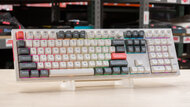
ProgrammingSize:Compact (96%)Hot-Swappable Switches:YesConnectivity:WirelessSwitch Type:MechanicalSee all our test resultsOutput Type:Non-AdjustableThe AULA F99/F75 are actually a pair of keyboards, and either one serves as our recommendation for the best budget keyboard for programming if you prefer a mechanical keyboard with a very soft typing feel. The larger F99 is a 96% keyboard with nearly all the same keys as a full-size model in a slightly more compact package. The smaller F75 uses a 75% layout that retains the function row and arrow keys but omits the numpad and several navigation keys. You can connect these keyboards wirelessly using the included 2.4GHz receiver or Bluetooth, with support for pairing up to three devices, making it easy to switch between work and personal computers.
Both offer a lot of value for their price. Compared to our mid-range pick, the Keychron V3 Ultra 8K, their main trade-offs are cheaper-feeling construction and less flexible customization software. Their software is only compatible with Windows, and its more limited keymapping options make these boards less suitable if you want extensive control over your shortcuts and layout.
Their gasket-mounted designs deliver a soft, cushioned typing feel. However, they may feel too soft if you prefer firmer feedback. The durable PBT keycaps feel great under your fingers, and while the plastic cases feel noticeably cheaper than those of our picks above, both keyboards are still well assembled. Foam inside each case helps avoid a hollow sound, though they're relatively loud and may bother people nearby in a shared workspace.
-
Best Cheap Keyboard For Programming
ProgrammingSize:Compact (60%)Hot-Swappable Switches:YesConnectivity:WirelessSwitch Type:MechanicalSee all our test resultsOutput Type:Non-AdjustableWe recommend the ROYAL KLUDGE RK61 if you need a cheap coding keyboard and can make a 60% layout work, as it's very hard to beat for the price. Granted, it lacks a dedicated numpad, function row, arrow keys, and navigation cluster, which can be a dealbreaker if your workflow relies on them. We also couldn't find a working version of its software, which would normally let you rebind keys and create custom macros. That said, there are preprogrammed shortcuts that provide access to commonly used inputs, including all function and arrow keys, plus navigation commands like Home and End. These limitations may require you to adjust your muscle memory and memorize some shortcuts, but the trade-off is that this keyboard saves a huge amount of desk space and is compact enough to toss into a bag and take on the go. It can pair with up to three devices over Bluetooth and switch between them. However, the manufacturer only advertises a battery life of 10 hours, which is quite limited compared to more expensive options on this list.
If you need a larger TenKeyLess or full-size keyboard at this price point, the Keychron B33/B36 is worth considering instead. Their deep scissor switches don't provide the same satisfying typing experience as the ROYAL KLUDGE's mechanical switches, but they're stable, extremely quiet, and comfortable during long sessions, if slightly mushy. These boards also support connections with both a 2.4GHz receiver and Bluetooth, or a wired connection. Unlike the ROYAL KLUDGE, they also use intuitive web-based software for rebinding keys and creating fairly complex macros, and have a much longer advertised battery life.
-
Best Non-Mechanical Keyboard For Programming
ProgrammingSize:Full-size (100%)Hot-Swappable Switches:NoConnectivity:WirelessSwitch Type:ScissorSee all our test resultsOutput Type:Non-AdjustableThe best non-mechanical option for coding we've tested is the Logitech MX Keys S. We recommend this keyboard if you need a quieter model for a noise-sensitive setting or prefer a tactile typing experience similar to that of a laptop. Its keycaps have small dish-shaped indents that keep your fingers centered, helping you minimize typos from glancing blows on neighboring keys. Like other picks on this list, it offers excellent wireless versatility: you can connect it via its included USB receiver or pair it with up to three devices via Bluetooth. It also has white backlighting and keycaps with shine-through legends for great visibility if you prefer working in the dark. You can also set the lighting to automatically adjust brightness based on the conditions around you.
Unlike our top two picks above, the MX Keys S doesn't offer hardware customizability. It also has much more limited software customizability, with macro assignments restricted to specific keys on the function row. While it has a very thin, low-profile design that makes it comfortable to type on without a wrist rest, it's still quite large and isn't designed to be slipped into a bag or used on the go. If portability is paramount for your workflow, we suggest looking at the smaller version of this keyboard, the Logitech MX Keys Mini, which has a much more compact (75%) layout.








Notable Mentions
-
System76 Launch:
The System76 Launch is a compact (75%) and everything from its design files to its software, is open-source. However, it's even more expensive than our top pick, the Keychron Q6 Ultra 8K, and the somewhat unconventional key layout can take some getting used to.
See our review -
MoErgo Glove80:
The MoErgo Glove80 is a great alternative to the Keychron Q6 Ultra 8K if you prefer a much more ergonomic keyboard. It has a true split design, adjustable tenting, concave key wells, and extensive layout customization. However, getting used to its columnar layout can involve a considerable learning curve.
See our review -
Dygma Raise 2:
The Dygma Raise 2 is a good alternative to the Keychron Q6 Ultra 8K if you want an ergonomic split keyboard that retains a familiar staggered layout. However, its 60% layout lacks dedicated arrow keys and a function row, requiring more shortcuts. Wireless connectivity and tenting are also optional extras that increase its price.
See our review -
NuPhy Node Series:
The NuPhy Node Series boards are a great alternative to the Logitech MX Keys S if you want mechanical switches and more flexible key remapping. They come in standard and low-profile versions, with silent switch options for shared workspaces. However, their keycaps lack shine-through legends, which makes them harder to read in dark rooms.
See our review
Recent Updates
Oct 02, 2026:
We've replaced our top two picks, the Keychron Q5 Max and Keychron V5 Max, with the newer Keychron Q6 Ultra 8K and Keychron V3 Ultra 8K. They're a bit more expensive but have improved stabilizers and much longer advertised battery life. We've also adjusted text throughout the article to clarify trade-offs between picks and added the MoErgo Glove80, Dygma Raise 2, and NuPhy Node Series to our Notable Mentions section.
Jul 23, 2026:
We've added clarification about the layout trade-offs between the AULA F99 and F75, our 'Best Budget' picks. We've also added more specific information about software availability and pre-programmed shortcuts for the ROYAL KLUDGE RK61, our 'Best Cheap' pick. Otherwise, we haven't changed our recommendations, as they remain the best options available.
May 28, 2026:
We haven't changed any of our primary recommendations with this update, but we've removed the Epomaker TH80 Pro and the Mountain Everest Max from our Notable Mentions list, as they're no longer widely available. Confirmed all other picks are still available and relevant.
Mar 10, 2026:
We added the AULA F99/F75 as our new budget pick. We made the Keychron V5 Max our new mid-range pick, with the NuPhy Air V3 as an alternative. We added the Keychron B33/B36 as a cheap alternative. We made some text adjustments throughout the list, but no other major changes were needed.
Apr 24, 2025:
We've added the AULA F99 to our Notable Mentions section. We aren't making any other recommendation changes at the moment, but we're keeping a close eye as trade conditions evolve. We'd be grateful if you let us know if you encounter any issues so we can keep this guide as accurate and helpful as possible.
All Reviews
Our recommendations above are what we think are currently the best keyboards for programming for most people. We factor in the price, feedback from our visitors, and availability.
If you would like to do the work of choosing yourself, here is the list of all our keyboard reviews. Be careful not to get too caught up in the details. While no keyboard is perfect for every use, most are good enough to please almost everyone, and the differences are often not noticeable unless you really look for them.


