- 100.0%Color Flashes Per Second
The Rainbow Effect, also known as RBE, occurs on projectors that can't display all three colors (red, green, and blue) at the same time. To get around this design limitation, these models alternate between each color many times per second. Usually, this works fine and results in a clear image that your brain perceives as a single image. To people who are sensitive to it, though, this causes rainbow artifacts that can be a deal-breaker. They're especially noticeable around bright highlights on a dark background.
To test for RBE, we use a high-contrast test pattern and record it playing on the projector with the help of a high-speed camera. We count the number of color flashes per second, which is a useful indicator of the intensity of RBE produced by a projector (higher numbers are better). We also check if the projector has an RBE reduction mode.
Test Methodology Coverage
Our Rainbow Effect test was first added as part of our 1.0 test bench update. Unfortunately, there was no equivalent test on older versions. Learn how our test benches and scoring system work.
| 0.8-0.12 | 1.0 | |
|---|---|---|
| Color Flash Sequence | ❌ | ✅ |
| RBE Reduction Mode | ❌ | ✅ |
| Color Flashes Per Second | ❌ | ✅ |
When It Matters
The good news is that not everyone is sensitive to the rainbow effect (RBE), and many people don't even see it. The bad news is that the only way to know whether you're sensitive to it is to see one in person. So if you're considering buying a projector, it's a good idea to go look at one in a showroom and see if it bothers you. If you're sensitive to it, you're most likely to notice it if you look around the screen while something is playing.
The subjective nature of RBE also makes it difficult to assign an objective score, and the results have to be interpreted relative to other projectors. If you're not sensitive to RBE at all, then even a projector that scores poorly on this test likely won't bother you. If you are sensitive to RBE, though, then even a projector that scores high might still bother you.
Our Tests
To test for the rainbow effect, we start by setting up the projector in our completely dark, light-controlled room. We set the projector to its calibrated mode, including applying the correct judder-removal settings. We connect the projector to an Apple TV and set it to match the content frame rate. Next, we use an alignment grid on the projector to properly align a Chronos high-speed camera to the screen, and set the camera to record at 4,352 frames per second.
From here, we use Plex on the Apple TV to playback a 24p test pattern and record the results with the high-speed camera. Most of our posted results are derived from this one video. On projectors with an RBE reduction mode, we run this twice, once with that setting enabled and once without it.
Color Flash Sequence
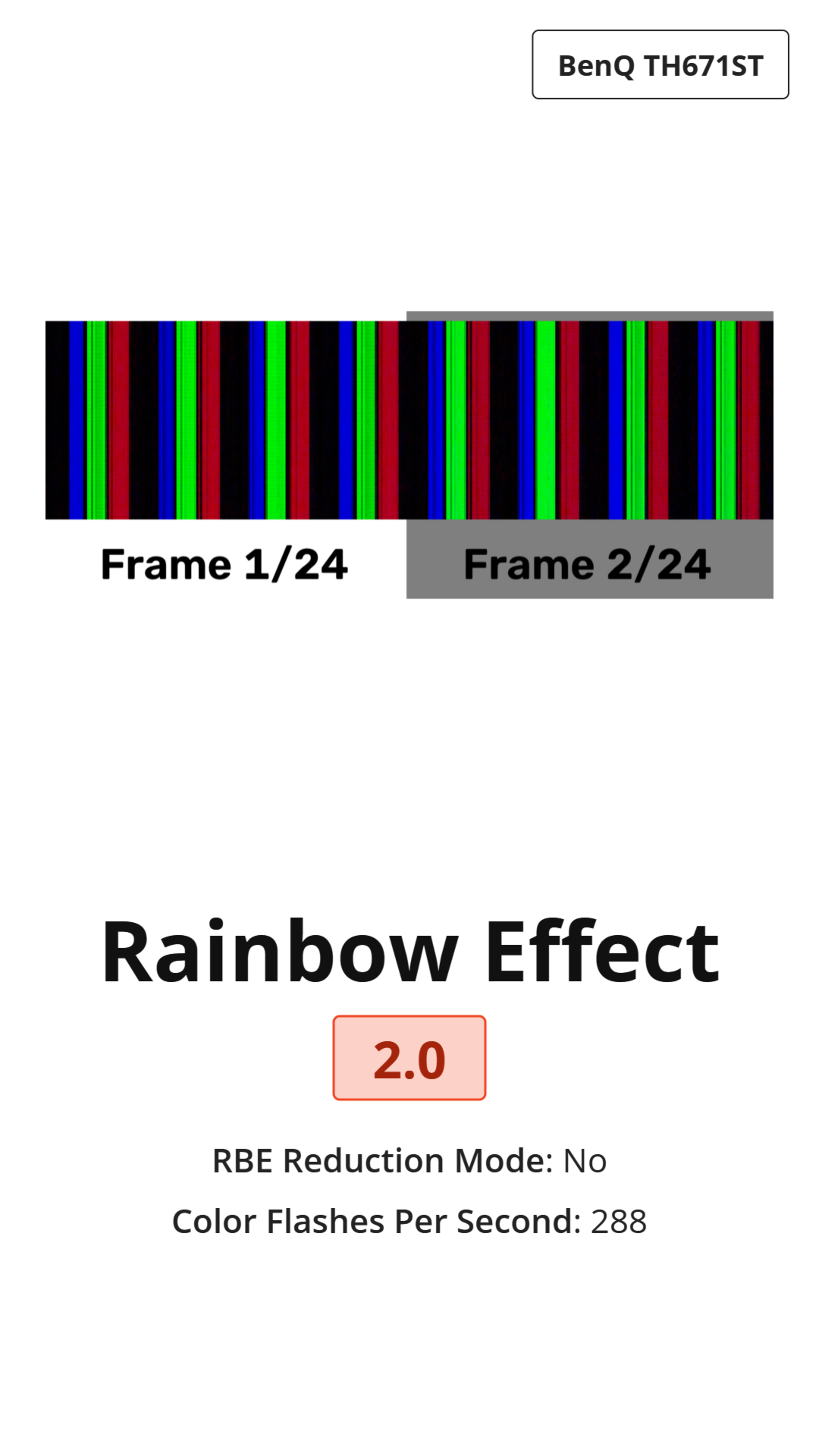
The color flash sequence test consists of a composite image that shows the sequence of colors over two frames. This image is used to determine the number of flashes per second and provides a good way to visualize what these results mean. By comparing it to another projector, you can clearly see how one projector may have less apparent RBE than another. As an added benefit, this also makes it easy to see which projectors are unable to remove judder from 24p content. If one of the frames has more bars than the other, this means the frame timing is uneven, and the projector isn't de-juddering properly.
RBE Reduction Mode
For this test, we simply check if the projector has an optional RBE reduction mode. It's not an evaluation of how well that feature performs; it's a simple yes/no check of whether that feature is present on the projector.
Color Flashes Per Second
For this test, we use the two frame composite photo taken above in the Color Flash Sequence test, and simply count the number of bars across the two frames. Since the video we're playing is made up of 24 frames per second, and we already have two frames, we simply multiply the final count by 12.
This test is responsible for the entire score for this box, as the number of color flashes per second directly influences how visible the rainbow effect is. Higher numbers are better, and we consider a count of at least 1152 (48 flashes per frame) to be a good minimum value.
What Causes The Rainbow Effect?
The rainbow effect occurs on any projector technology that can't display all three color channels (red, green, and blue) at once. Regardless of the underlying light-producing element, these projectors can only display one color at once, so to create an image on the screen, they have to cycle through each color sequentially. Even the vast majority of triple laser projectors, which are commonly marketed as 'RBE-free', still have RBE. This is because while they have three separate lasers, they still only have one DLP chip, so they can only display one color channel at a time. There are projectors on the market that use three lasers with three separate DLP chips, one for each channel, and these units are completely free of RBE, but they're extremely expensive and not commonly found in homes. LCD projectors, which use a real color LCD screen, are also free of RBE as the LCD screen displays all three colors simultaneously.
Why do Some Projectors Have More RBE?
 |
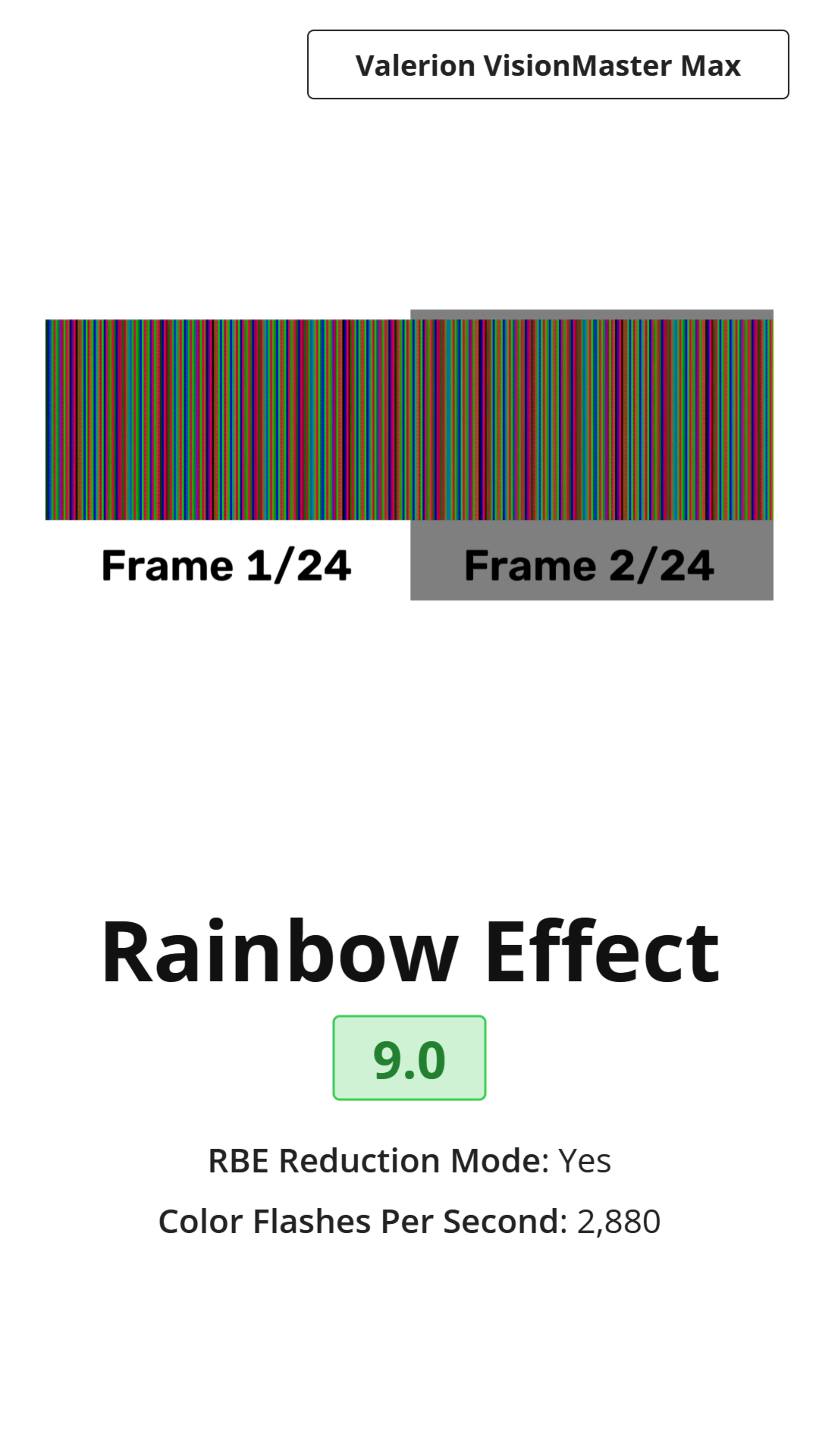 |
If all single-DLP chip projectors have the same design limitation, why are some projectors better than others at reducing RBE? It mainly comes down to how quickly those colors are pulsed by the light source. Projectors don't just fire each red, green, and blue laser once per frame. Instead, they rotate through the cycle multiple times per frame. The more times each color is displayed per frame, the less RBE you'll see. The primary metric in our tests, the number of color flashes per second, is exactly this.
How To Get The Best Results
There's usually not much you can do to reduce the rainbow effect. Some projectors have an optional rainbow effect reduction mode, so make sure that setting is enabled if RBE bothers you.
Conclusion
If you're sensitive to the rainbow effect, it can be very distracting when watching content on a projector. Since there's usually very little you can do to reduce it, it's important to know how much RBE you should expect to see on a particular model before making a buying decision. RBE is very subjective, though, so this information should only be used to compare the degree of RBE on one model relative to another; everyone responds differently to RBE, and some people may never even notice it.