See the previous 0.12 changelog.
Projector Test Bench 1.0 is a major update to how we evaluate, score, and present projector performance. It adds two new usage scores, Outdoors and Bedroom, and replaces Movies with a substantially redesigned Home Theater usage. We've also introduced three Performance Usages, namely Portability, Color, and Gaming Responsiveness, which provide more focused scores and now feed into broader usages like Gaming.
This update also adds Color Volume and Rainbow Effect testing, replaces Native Contrast with Effective Contrast, and changes Judder from a graduated measurement to clearer Yes/No results. Color Volume replaces our previous Color Gamut test.
Since these changes significantly affect how scores are calculated, results from 1.0 aren't directly comparable with scores from earlier test benches, even when the projector itself hasn't changed. As always, each review shows the methodology version used to test the projector.
NEW AND UPDATED USAGES
-
New Home Theater usage
- Replaces the previous Movies usage.
- Places much greater emphasis on contrast in a controlled viewing environment.
- Adds Judder, Rainbow Effect, Fan Noise, and the new Color Performance Usage to the score.
-
New Outdoors usage
- Evaluates how suitable a projector is for backyard or patio viewing in the evening and at night.
- Considers picture visibility alongside the practicalities of carrying, powering, positioning, and setting it up outside.
-
New Bedroom usage
- Focuses on projectors intended for casual viewing in smaller, quieter spaces.
- Accounts for portability, screen adaptation features, placement constraints, setup flexibility, and fan noise.
-
Updated Gaming usage
- Now uses the new Gaming Responsiveness and Color scores.
- Adjusts the weight given to contrast and consolidates several previously separate results.
NEW PERFORMANCE USAGES
-
New Portability Performance Usage
- Brings together the results that determine how practical a projector is to move and use away from a permanent setup.
-
New Color Performance Usage
- Accounts for both accuracy and the total range of reproducible colors.
-
New Gaming Responsiveness Performance Usage
- Evaluates input lag, motion clarity, imaging technology, and supported resolution and refresh-rate combinations.
NEW AND UPDATED TESTS
-
Updated Contrast test
- Replaces Native Contrast with Effective Contrast.
- Normalizes contrast-ratio measurements against the projector's Average White Light measurement, preventing very dim projectors from receiving disproportionately high results.
- Adjusted the scoring splines, providing greater differentiation between projectors, especially at higher APLs.
-
New Color Volume test
- Replaces Color Gamut.
- Measures the total range of colors a display can produce at different brightness levels.
-
Updated Judder test
- Replaces the previous graduated results with Yes/No measurements.
- Reports whether movies and international shows play smoothly from different types of sources.
- Identifies whether enabling a specific setting to remove judder reduces the image's resolution.
-
New Rainbow Effect test
- Measures the visibility of color artifacts produced by some projector imaging systems.
- Includes high-speed-camera footage and a color strip showing the recorded color sub-frames over time.
HOME THEATER
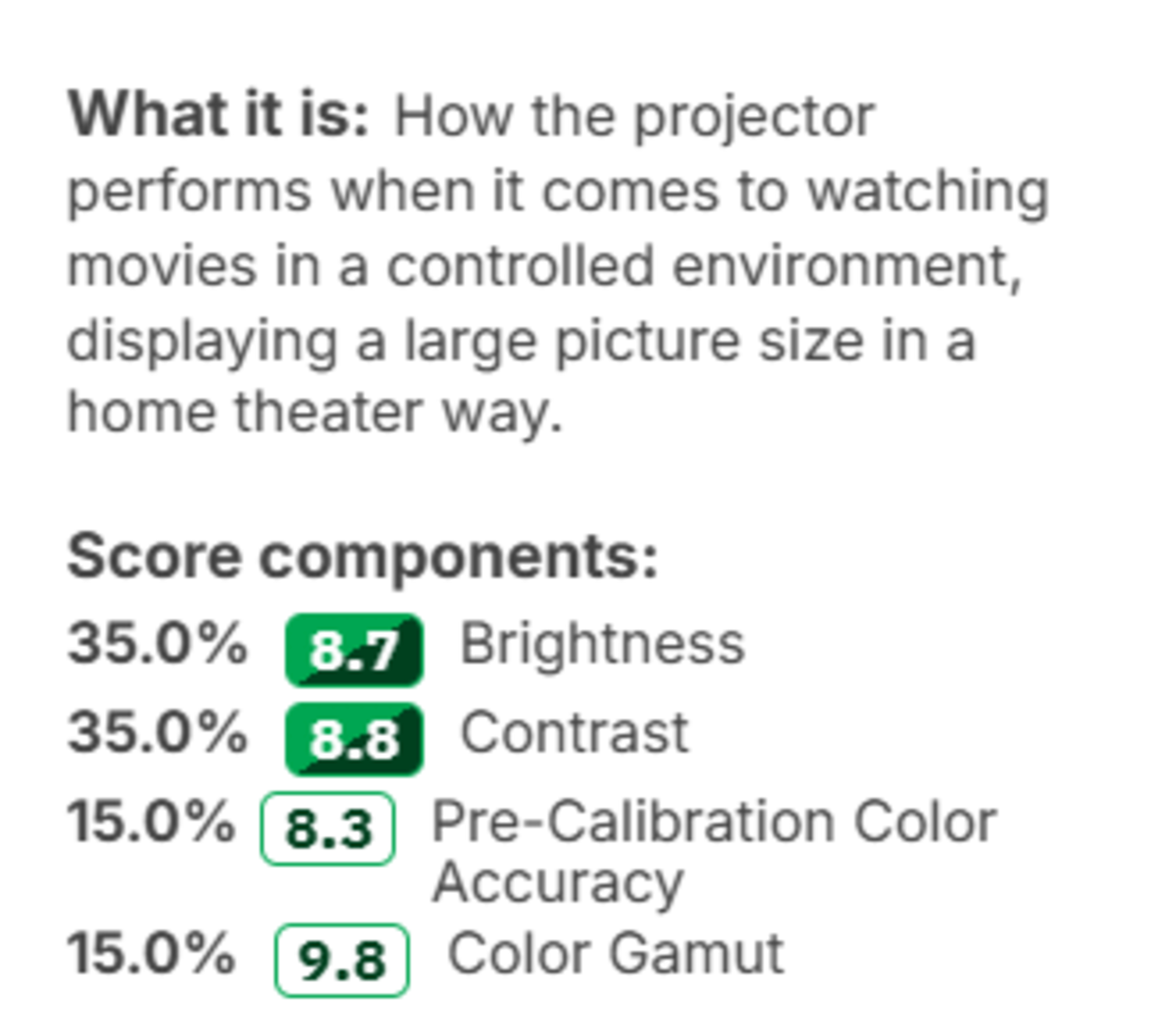
Home Theater replaces our previous Movies usage. The old Movies score placed equal 35% weights on Brightness and Contrast, with the remaining score divided between Pre-Calibration Color Accuracy and Color Gamut. This broadly equated to watching a large projected image in a light-controlled environment, but it allowed brightness to have an outsized influence on a use intended primarily for dark-room viewing.
The new Home Theater score gives Contrast a 50% weight. It also accounts for Judder, Color, Rainbow Effect, and Fan Noise, while Brightness now represents only 5% of the score. This better reflects the qualities that determine whether movies and shows look convincing and remain comfortable to watch in a dedicated or light-controlled home theater.
 |
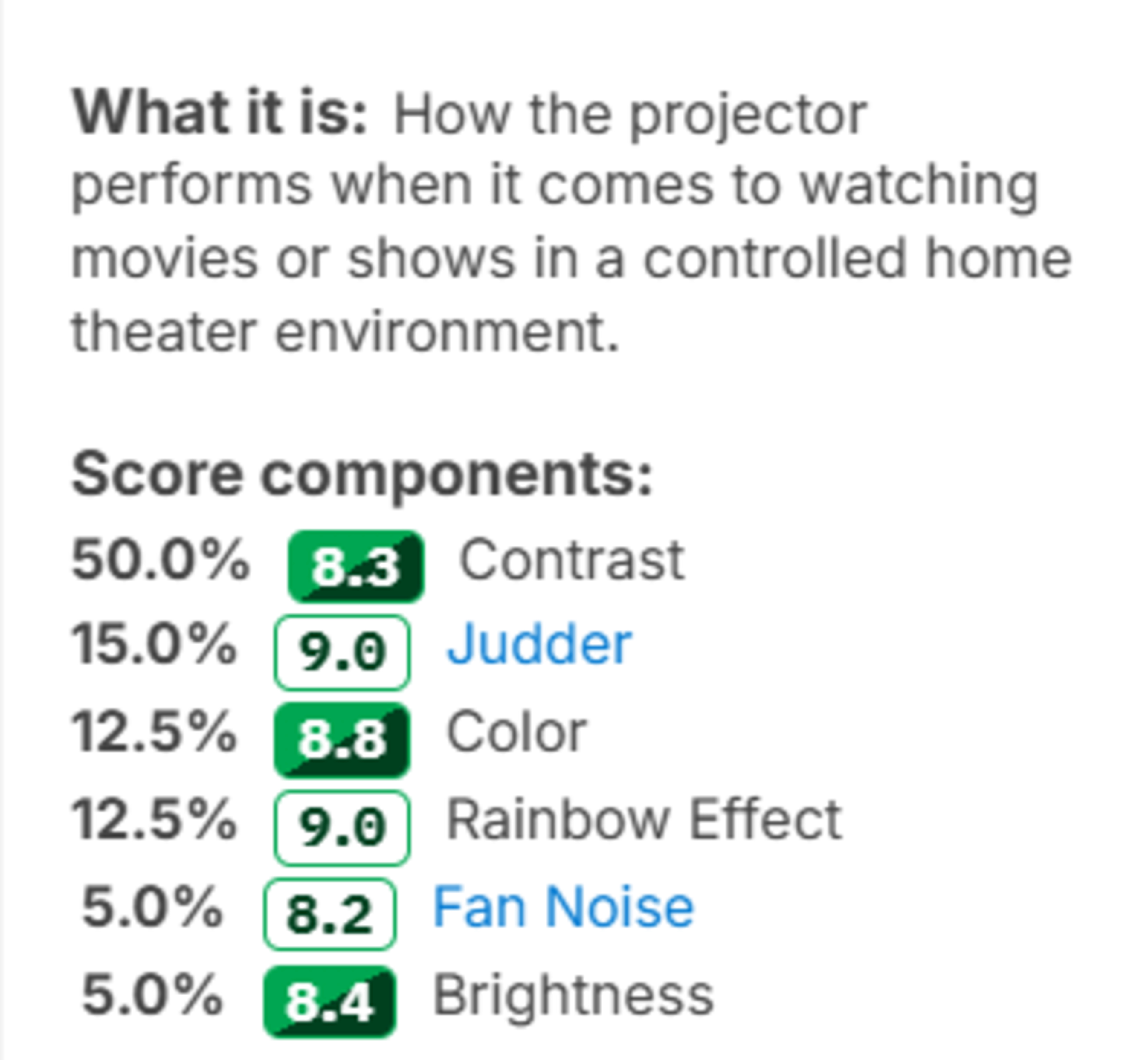 |
What it means for you: The Home Theater score now gives contrast much more importance than brightness, better reflecting what matters in a dark room. Color remains an important part of the evaluation, while Judder, Rainbow Effect, and Fan Noise provide a more complete picture of the overall home theater experience.
OUTDOORS
Outdoors is a completely new usage focused on backyard and patio viewing in the evening and at night. Brightness remains important since moonlight, patio lights, streetlights, and other nearby light sources can wash out the image. However, light output alone doesn't make a projector convenient for an outdoor movie night.
The usage also considers how easily the projector can be carried outside, whether it requires an outlet, how conveniently it can be positioned and adjusted, and whether its built-in features reduce the amount of additional equipment you need to bring. It isn't intended to evaluate camping or remote use in the woods, where ruggedness and extended off-grid operation would matter more.
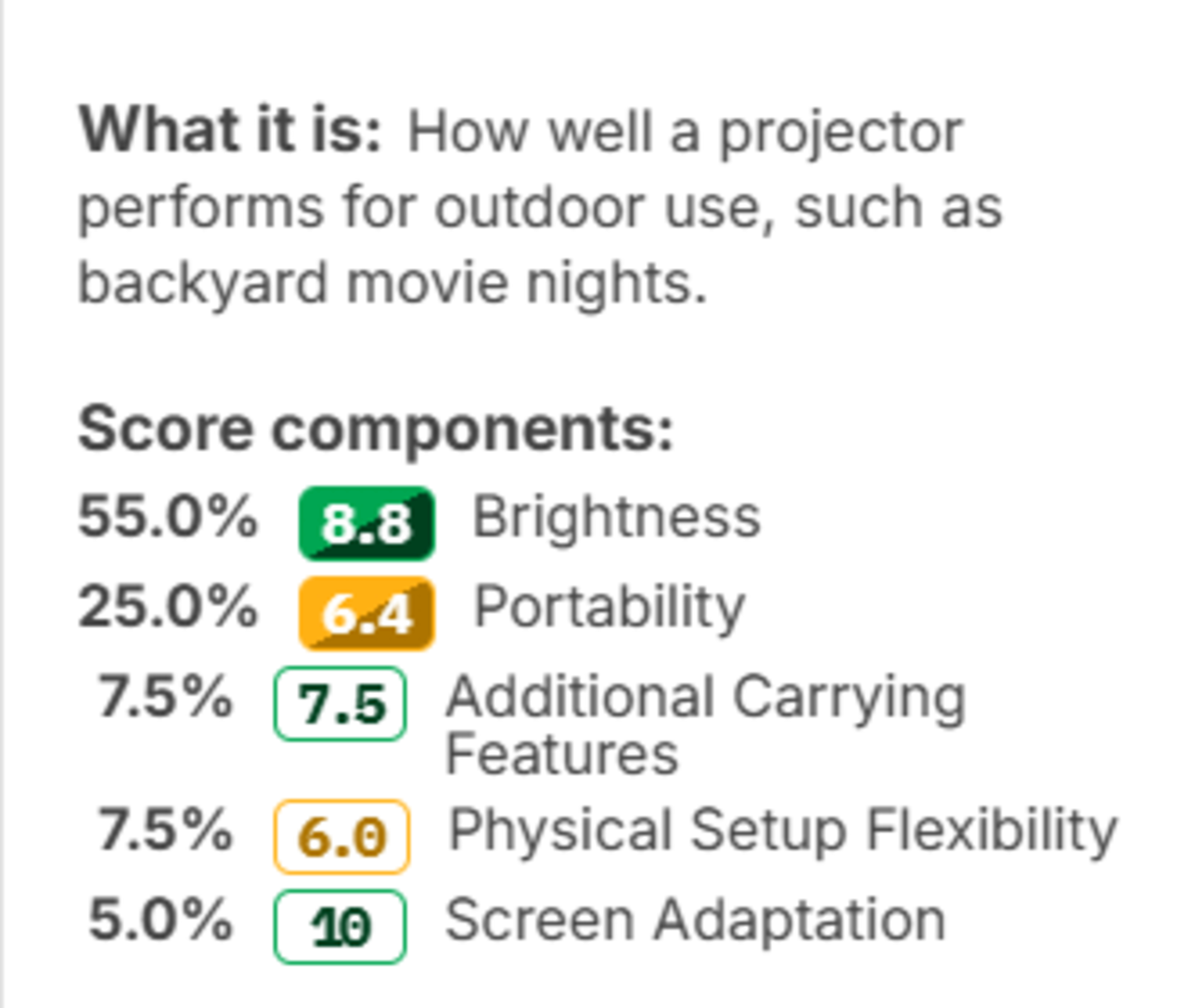
What it means for you: A very bright but heavy projector designed for permanent installation may be inconvenient to bring onto the patio, while a tiny battery-powered model can still be too dim for nearby lighting. The score identifies projectors that balance a visible image with a convenient setup for backyard movie nights.
BEDROOM
The new Bedroom usage evaluates projectors intended for casual viewing in smaller, typically quieter rooms. These setups often require a projector to fit on limited furniture, project from an unconventional position, or be taken out and put away between uses.
For that reason, the score considers portability, placement and setup flexibility, and fan noise. It also accounts for placement constraints. It distinguishes projectors that are merely small from ones that are genuinely convenient to use in a bedroom.
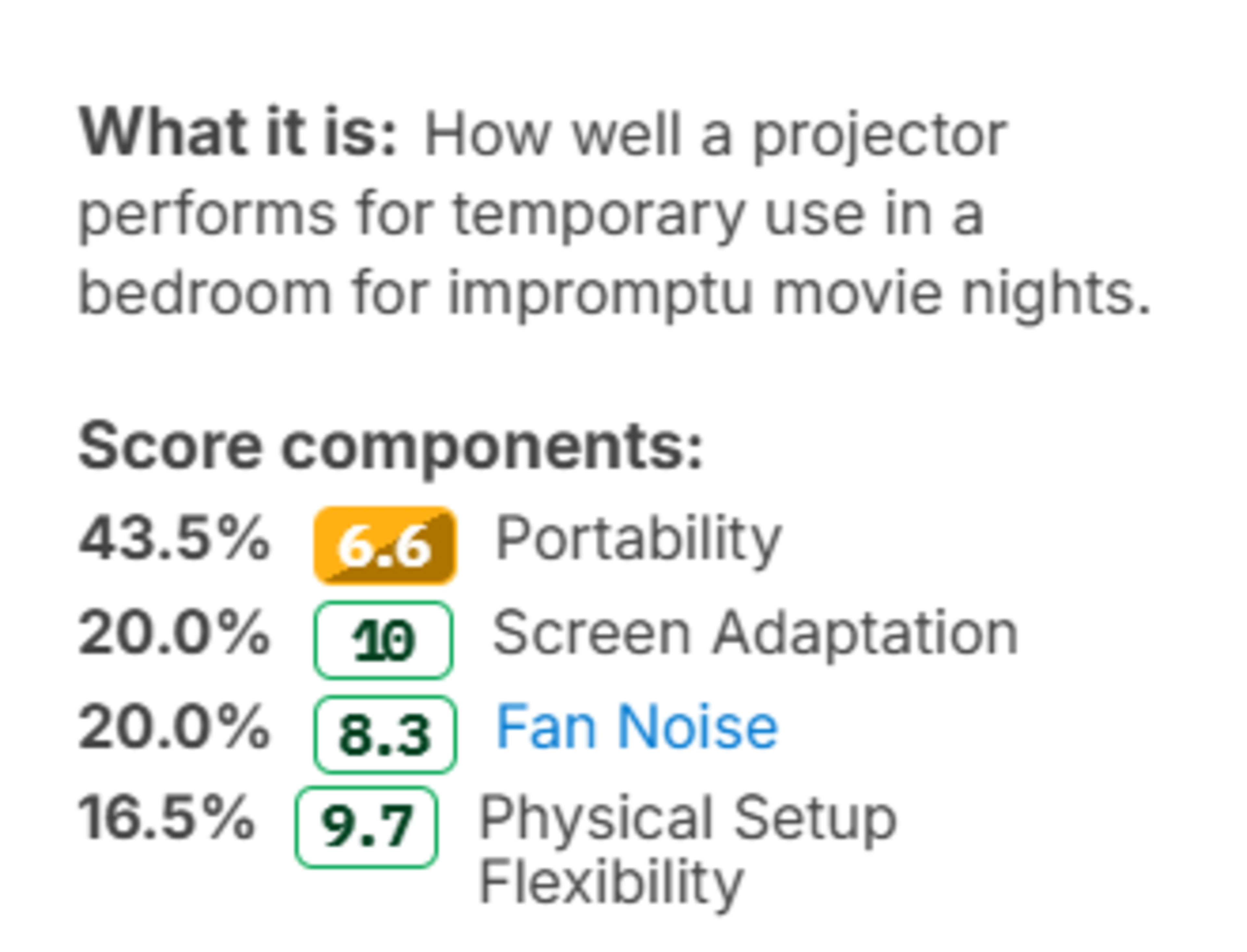
What it means for you: A projector that performs well in a living room or home theater isn't necessarily suitable beside a bed. The new score makes it easier to find models that are quiet, easy to position, and convenient to set up in a smaller space.
GAMING
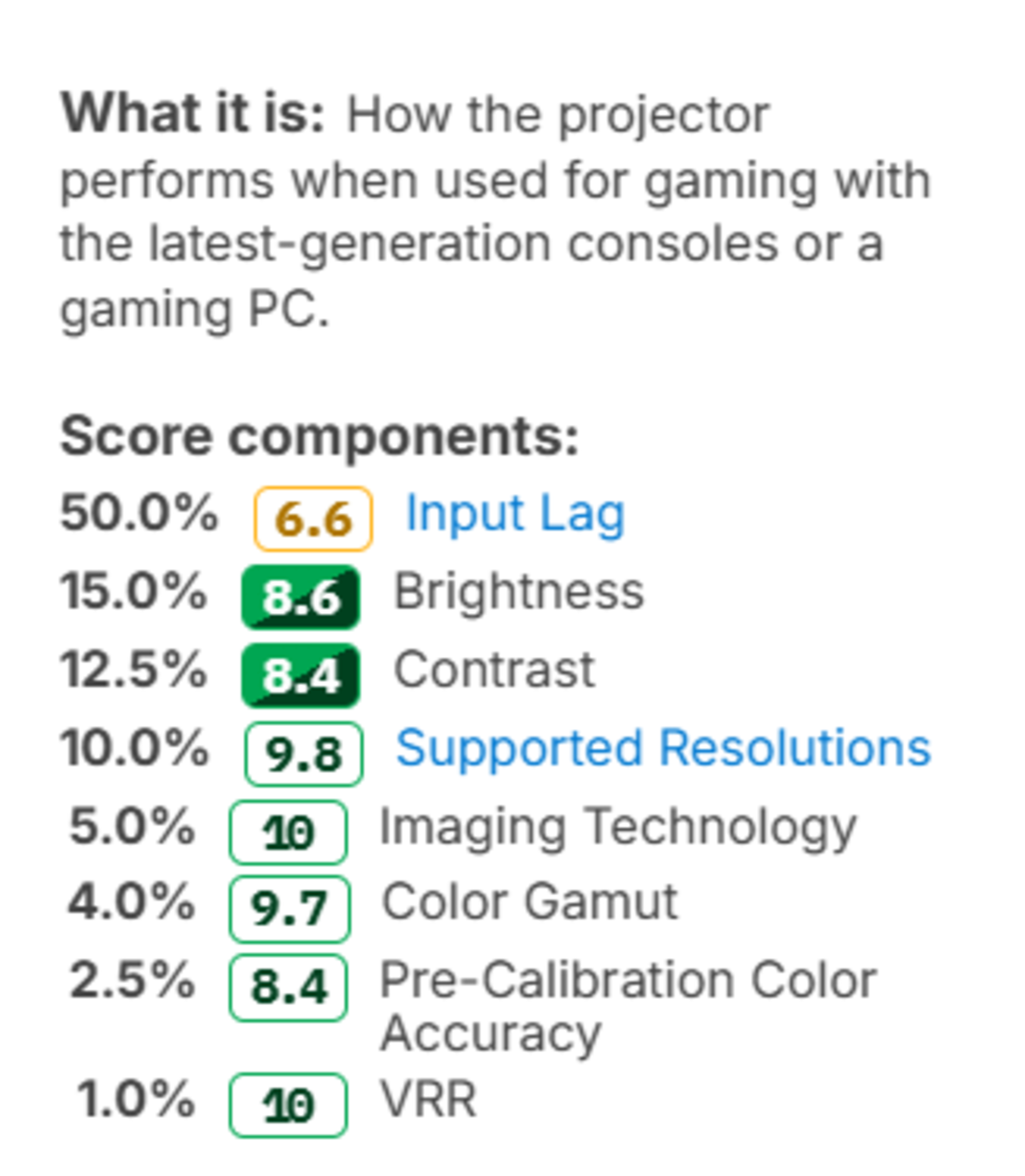
The overall Gaming usage has been rebuilt around the new performance usages. Previously, Input Lag alone represented 50% of the score, while Imaging Technology, Color Gamut, Pre-Calibration Color Accuracy, and VRR each appeared as smaller individual components.
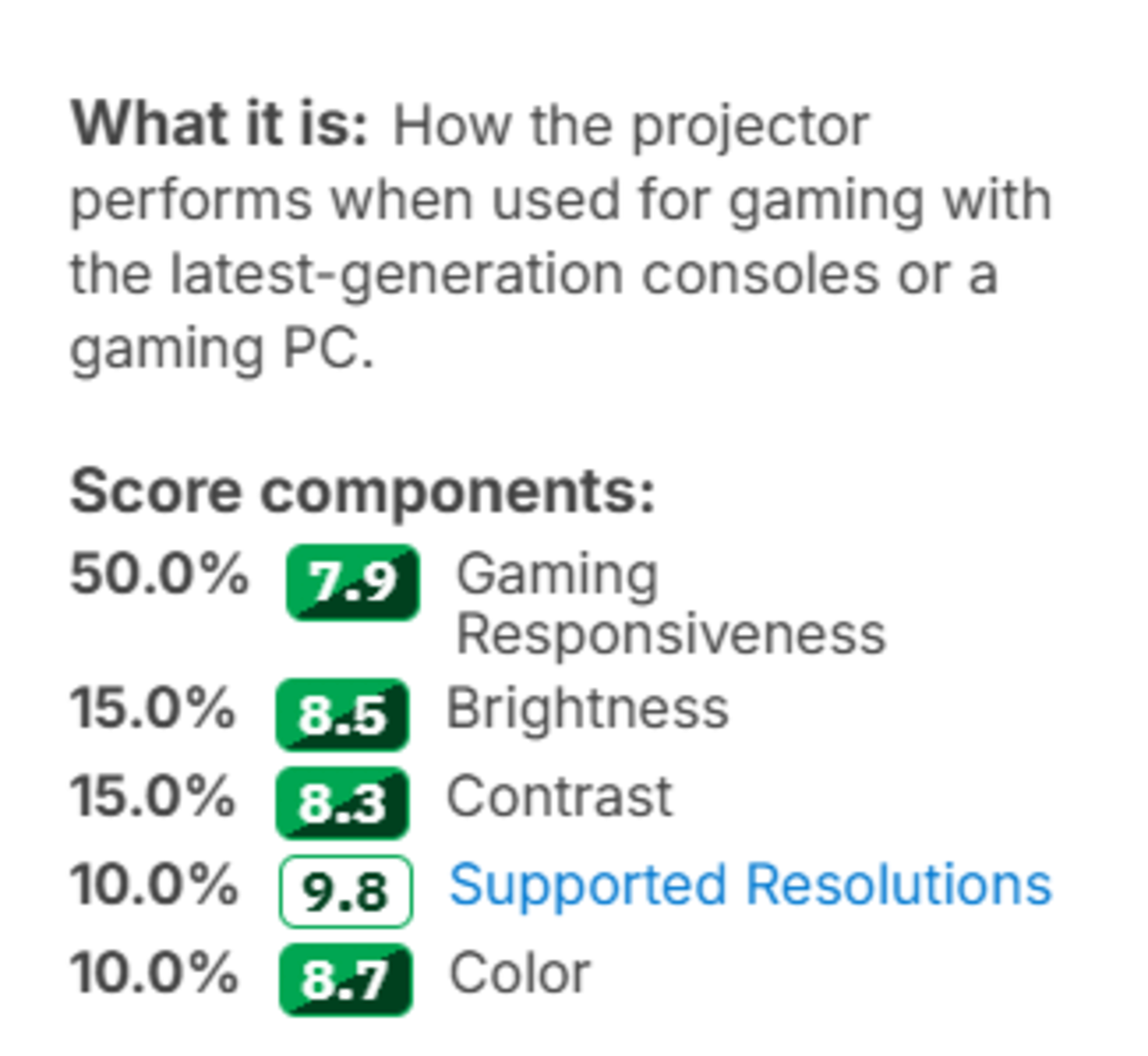
Gaming Responsiveness still accounts for 50% of the new score, keeping fast and direct gameplay as the main priority. However, it provides a more complete view of responsiveness than Input Lag alone. Color now represents 10%, combining accuracy and color volume, while Contrast increases from 12.5% to 15%. Brightness remains at 15%, and Supported Resolutions remains at 10%.
 |
 |
What it means for you: Responsiveness remains the most important part of the Gaming score, but projectors are now evaluated more cohesively. The score better reflects whether games feel direct, remain clear in motion, and deliver convincing contrast and color.
PORTABILITY
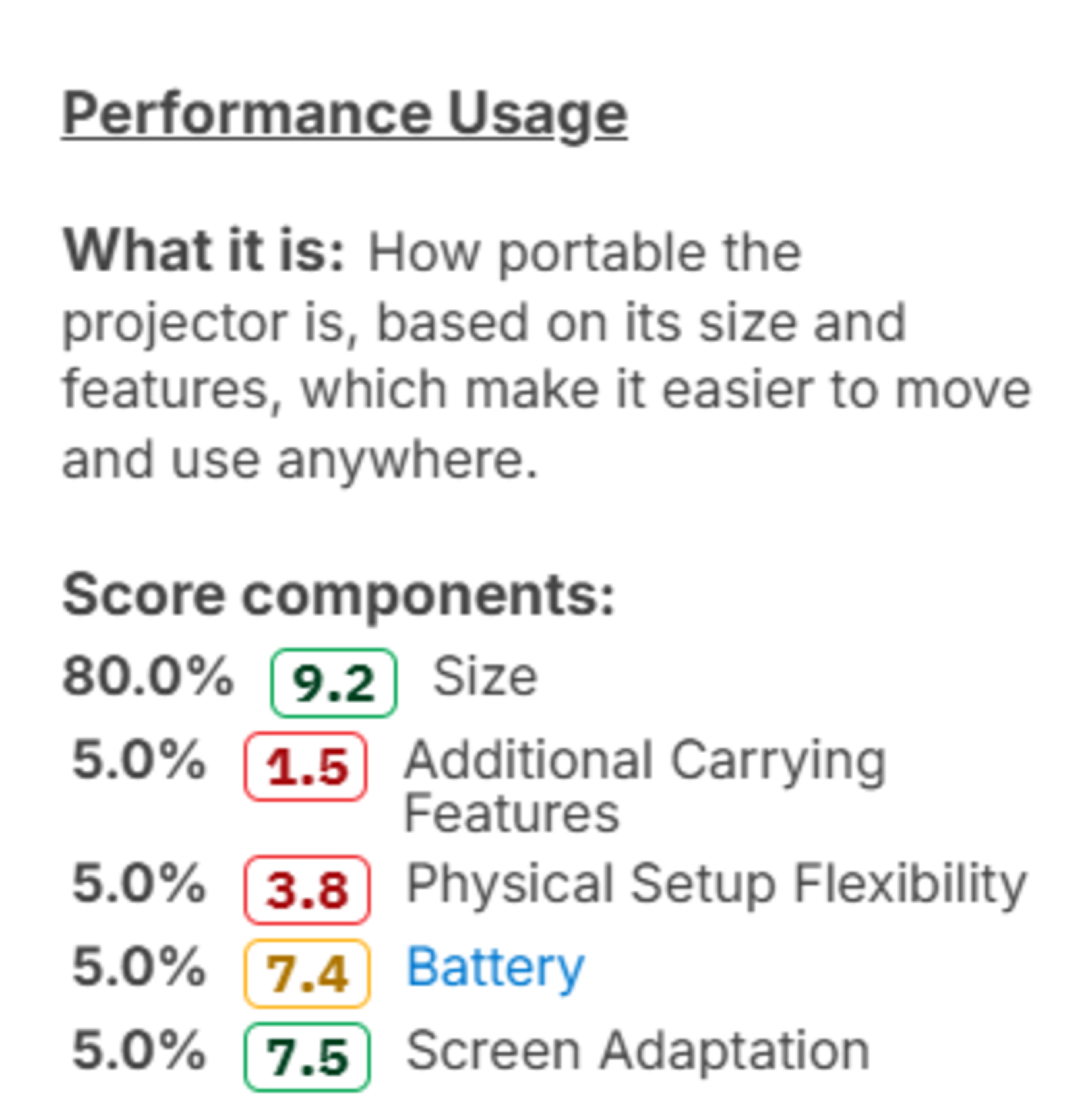
Portability is now a dedicated performance usage. Test Bench 0.12 separated physical size, carrying features, battery performance, and setup flexibility into clearer individual tests. Version 1.0 combines the most relevant results into an overall score that reflects how practical it is to move and use the projector away from its usual location.
This score looks beyond size alone. A compact projector may still be inconvenient if it needs wall power, leaves its lens exposed, or is difficult to set up again after being moved. Conversely, a somewhat larger model may be easier to transport if it includes a battery, handle, protective case, or other useful carrying features.
What it means for you: You can more easily distinguish between a projector that happens to be small and one designed for frequent movement, travel, or casual use in different locations.
COLOR
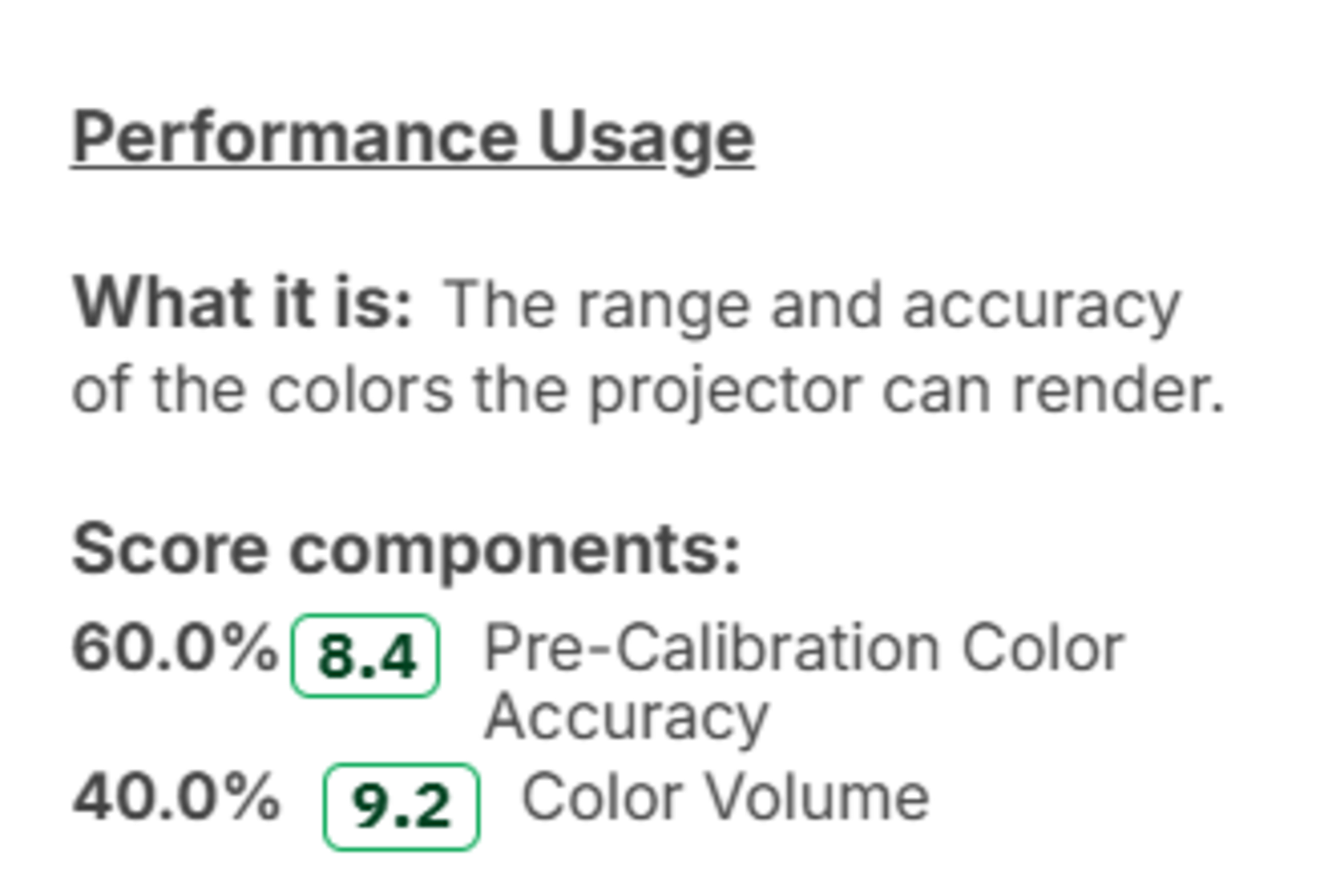
The new Color performance usage brings together two complementary parts of picture quality. Pre-Calibration Color Accuracy tells us whether familiar colors and shades appear as intended without adjustment. The new Color Volume test adds another dimension by showing the total range of colors a display can produce at different brightness levels. A projector can perform well in one area without necessarily performing well in the other.
What it means for you: The new score better reflects the overall color experience. A projector needs both a natural-looking image and the ability to keep colorful movies, shows, and games lively to earn a high score.
GAMING RESPONSIVENESS
Gaming Responsiveness is a new performance usage focused on how immediate and clear a projector feels during gameplay. It combines Input Lag, Response Time, Supported Resolutions, and Imaging Technology. Together, these results account for how quickly the projector responds, how clearly it displays motion, and which resolution and refresh rate combinations it supports.
This matters because low input lag alone doesn't guarantee the best gaming experience. A projector can react quickly but still blur fast motion or lack high-refresh-rate formats, while its imaging technology can also affect motion clarity.
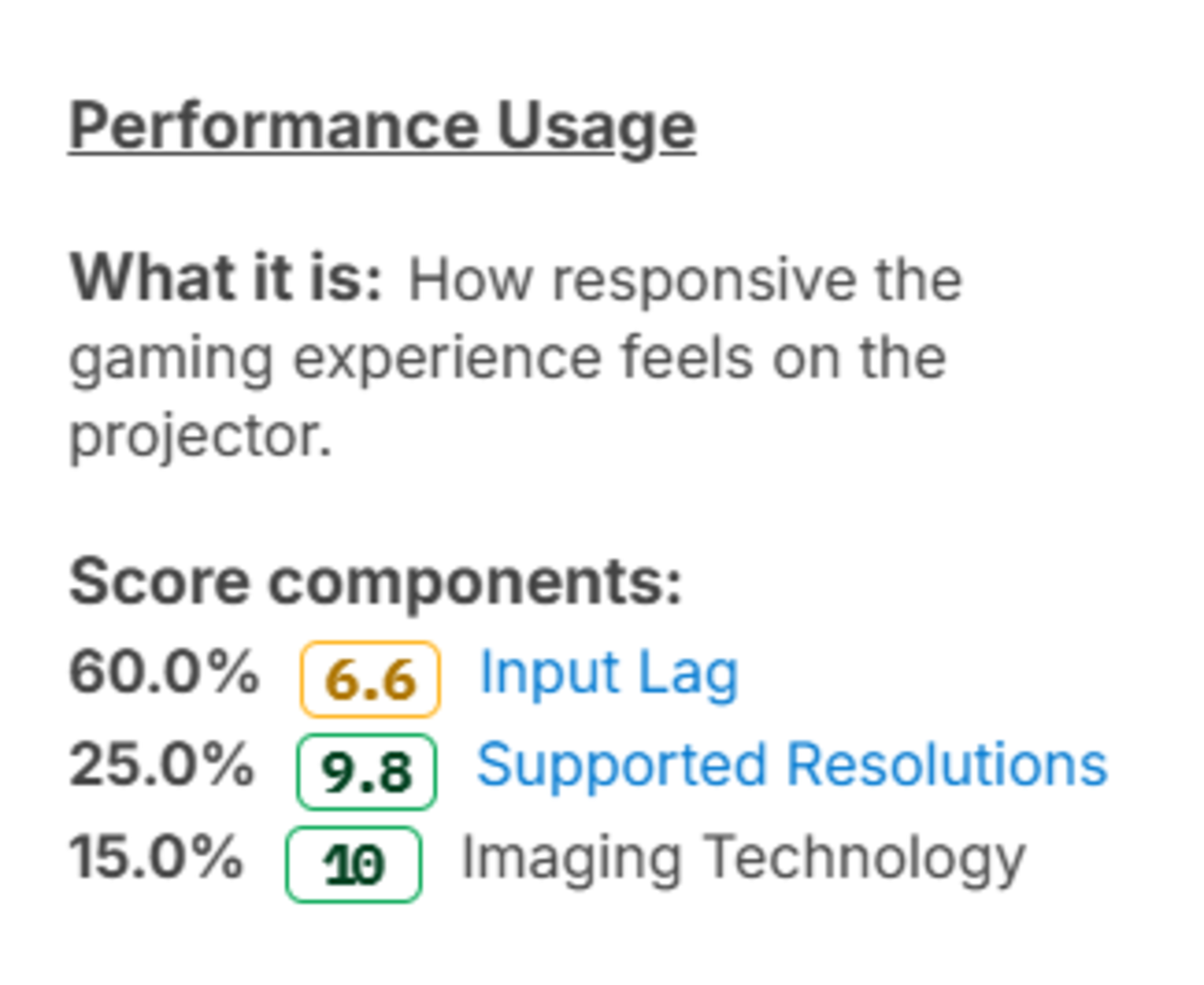
What it means for you: It's now easier to identify projectors that not only react quickly to controller inputs but also keep fast-moving gameplay clear.
Effective Contrast
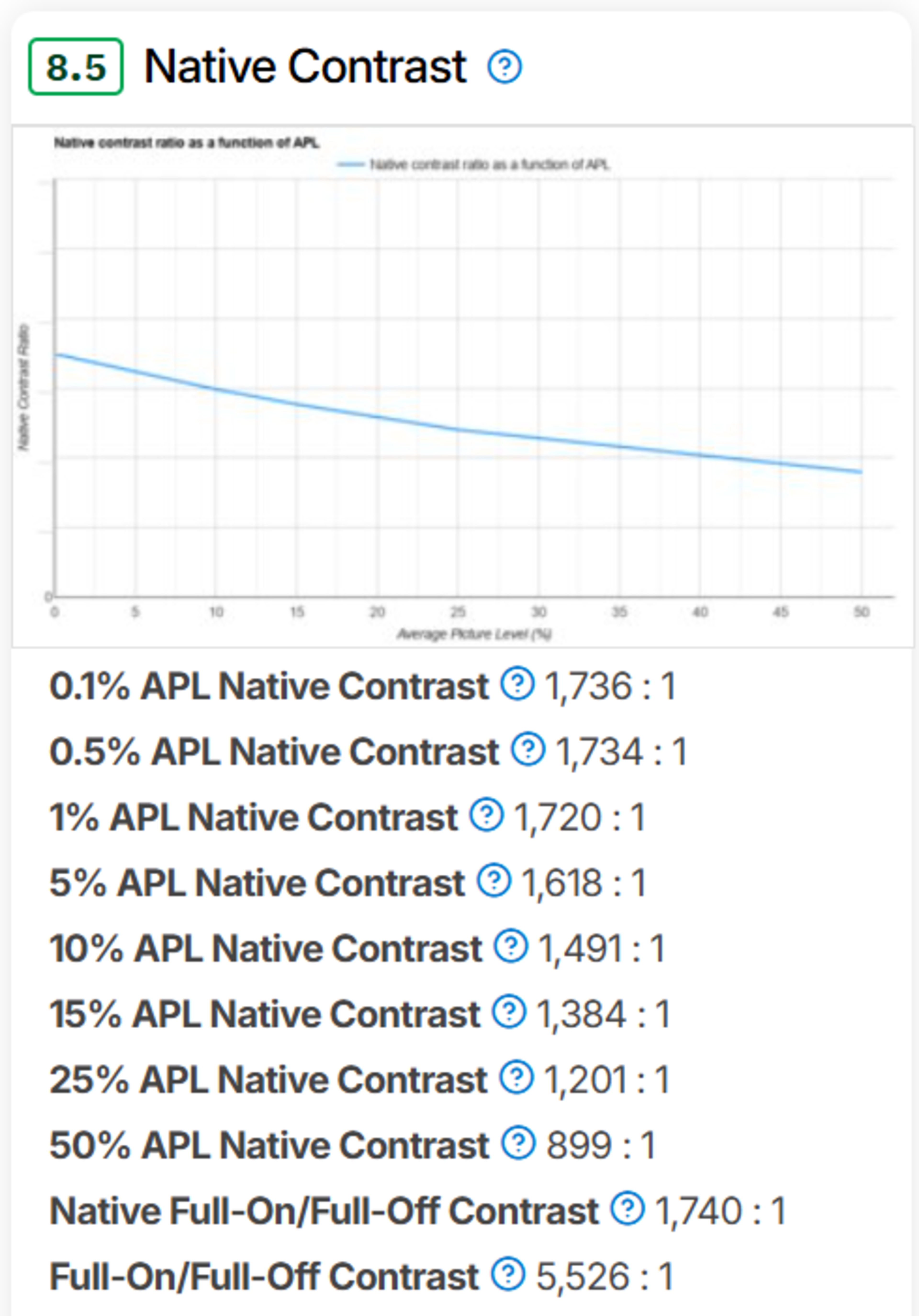
Our previous Native Contrast test measured Full On/Full Off contrast and contrast ratios at several average picture levels, showing how a projector's image depth changed between dark, mixed, and bright scenes. However, these ratios didn't account for the projector's overall light output. As a result, some extremely dim projectors could achieve deceptively strong contrast results, partly because their limited output produced a very low black level.
Effective Contrast uses the same range of contrast measurements but normalizes them against the projector's Average White Light measurement. This provides greater context for the measured ratios and better reflects how impactful the projector's contrast appears at its actual brightness. We've also adjusted the scoring splines. This provides more granularity, particularly at higher APLs.
 |
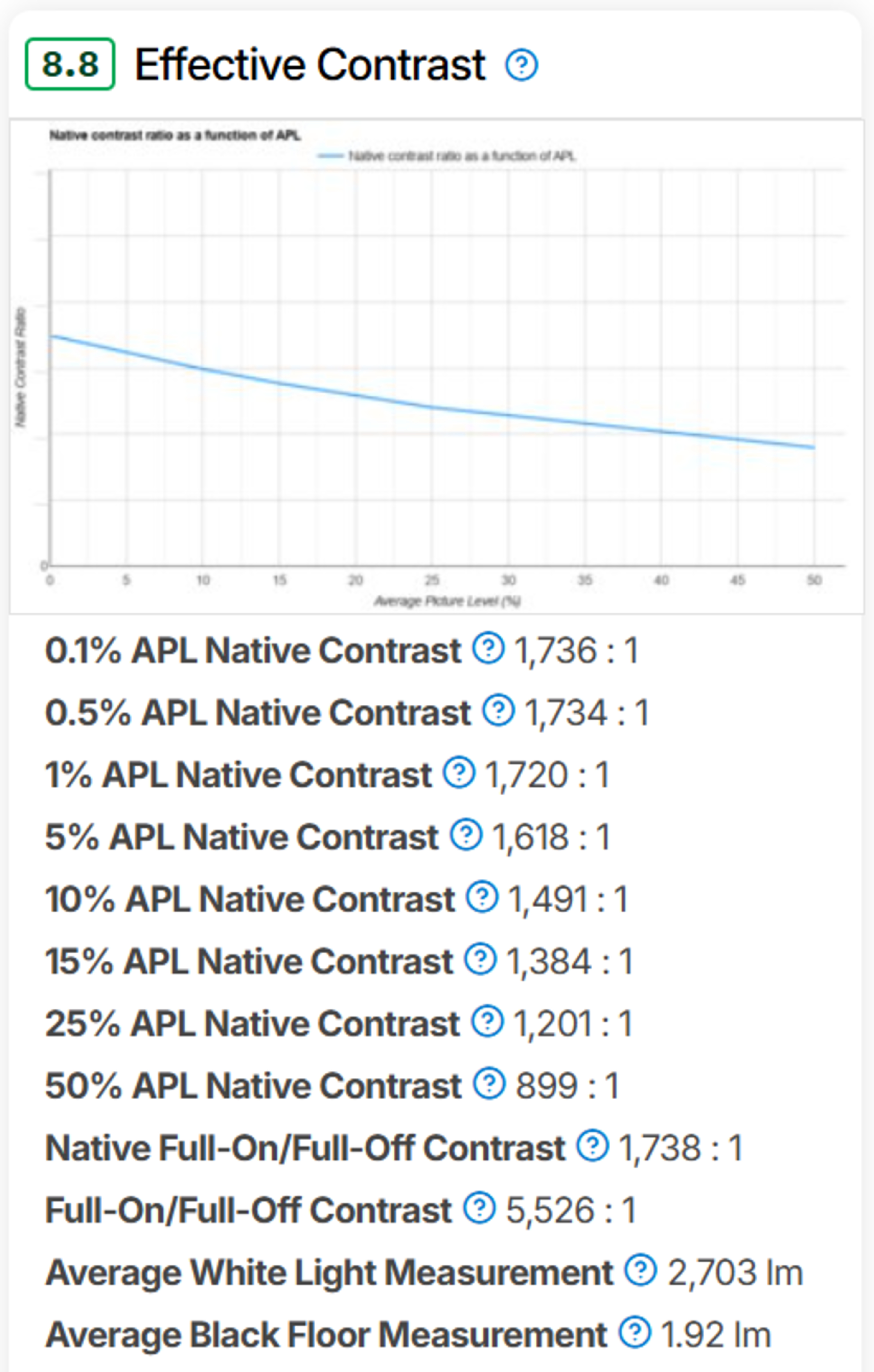 |
What it means for you: Very dim projectors no longer receive disproportionately high Contrast scores simply because they produce a very low black level. The new result better reflects whether a projector delivers a convincing image depth at a useful level of brightness.
COLOR VOLUME
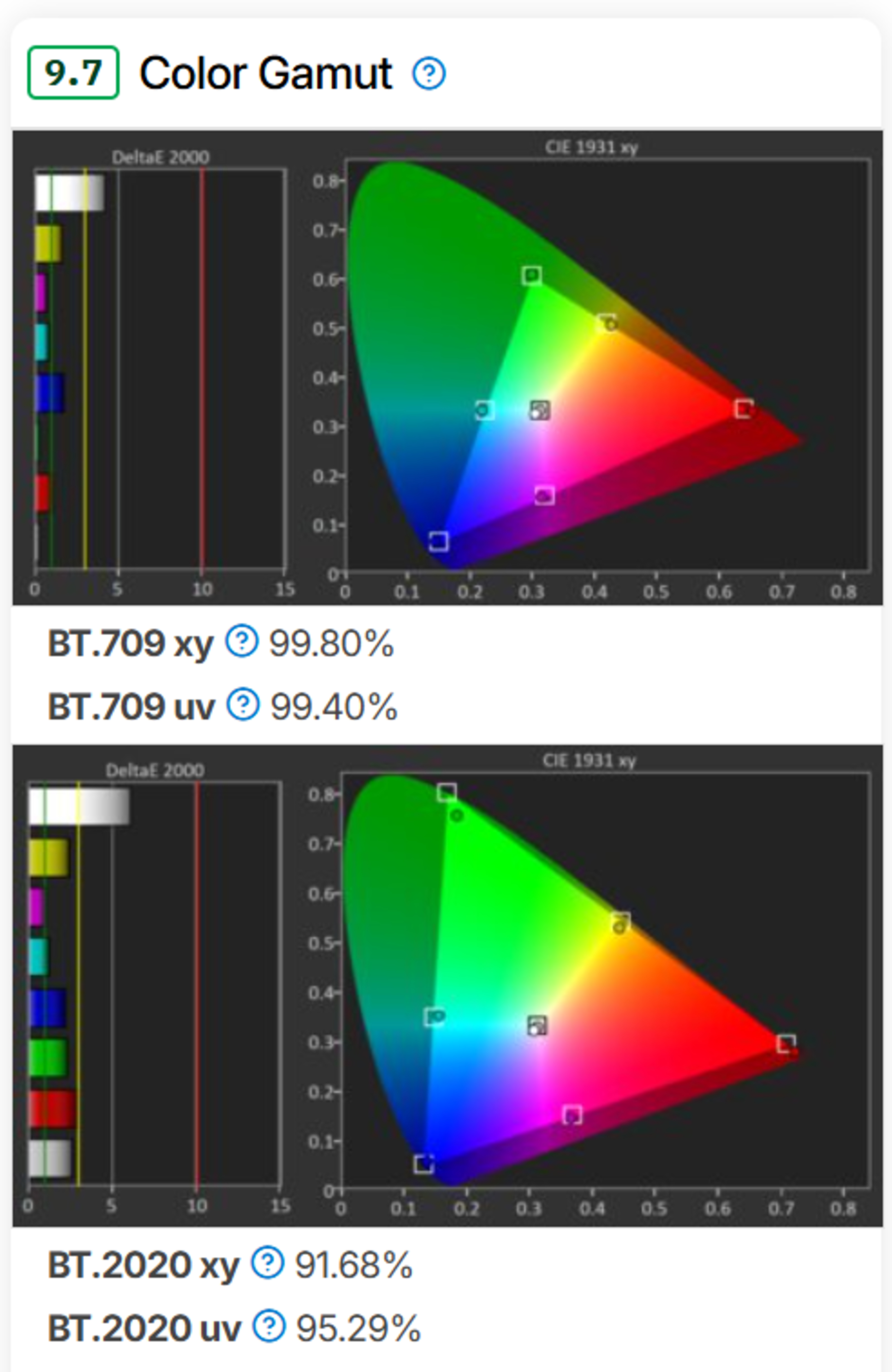
Color Gamut measured the outer boundary of the colors a projector could reproduce, but it didn't show how that range changed across different lightness levels. Color Volume measures the projector's color range across darker and lighter colors, giving a more complete picture of its performance in real content.
The new test measures color throughout that range. This identifies projectors that can reach a wide gamut but lose substantial saturation in bright colors, as well as models that maintain vibrant color across nearly the entire image.
 |
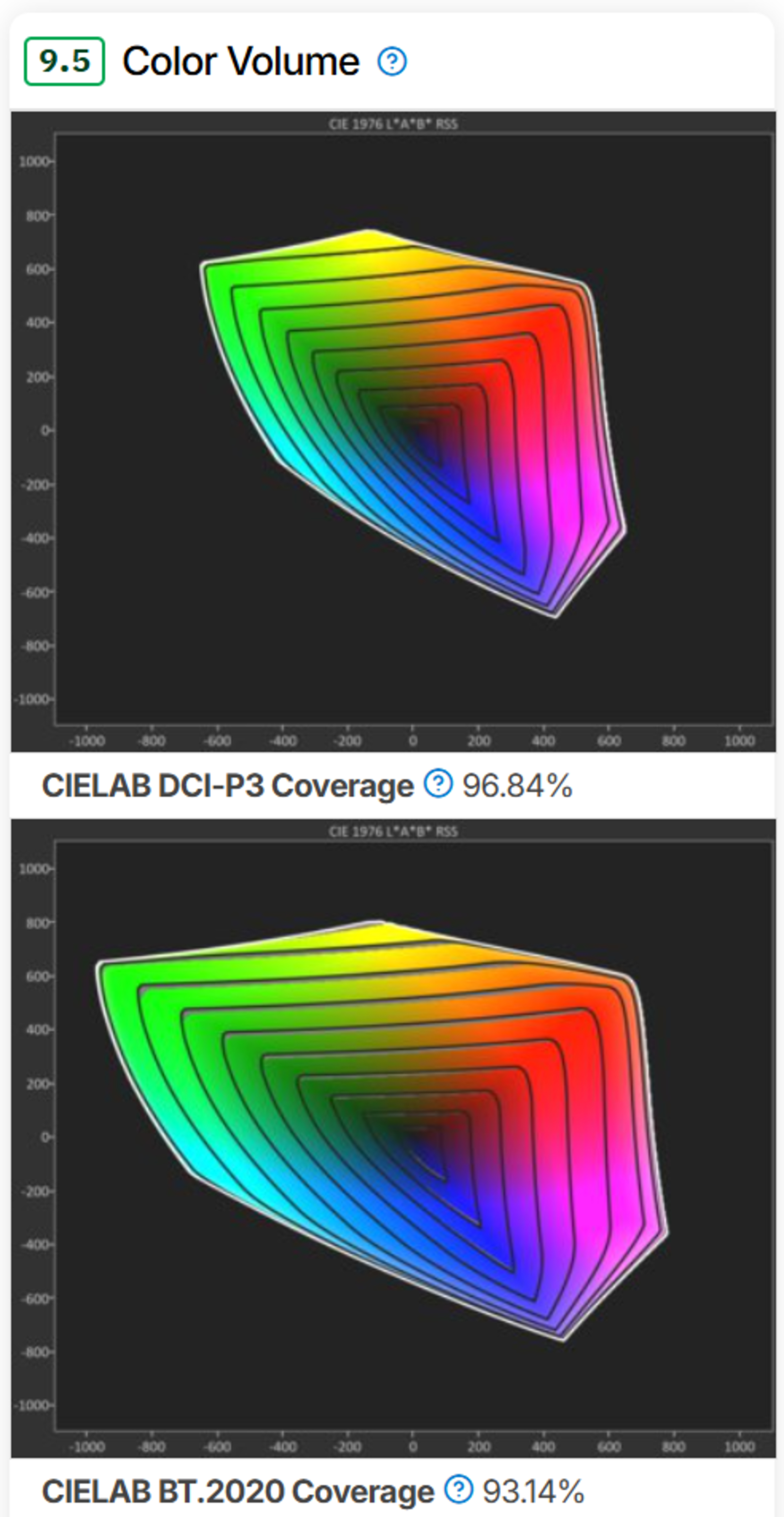 |
What it means for you: A wide gamut alone is no longer enough to earn a high result. Projectors now need to keep colors rich through dark, mid-tone, and bright shades, making the score more representative of how colorful movies, animation, sports, and games actually look.
JUDDER
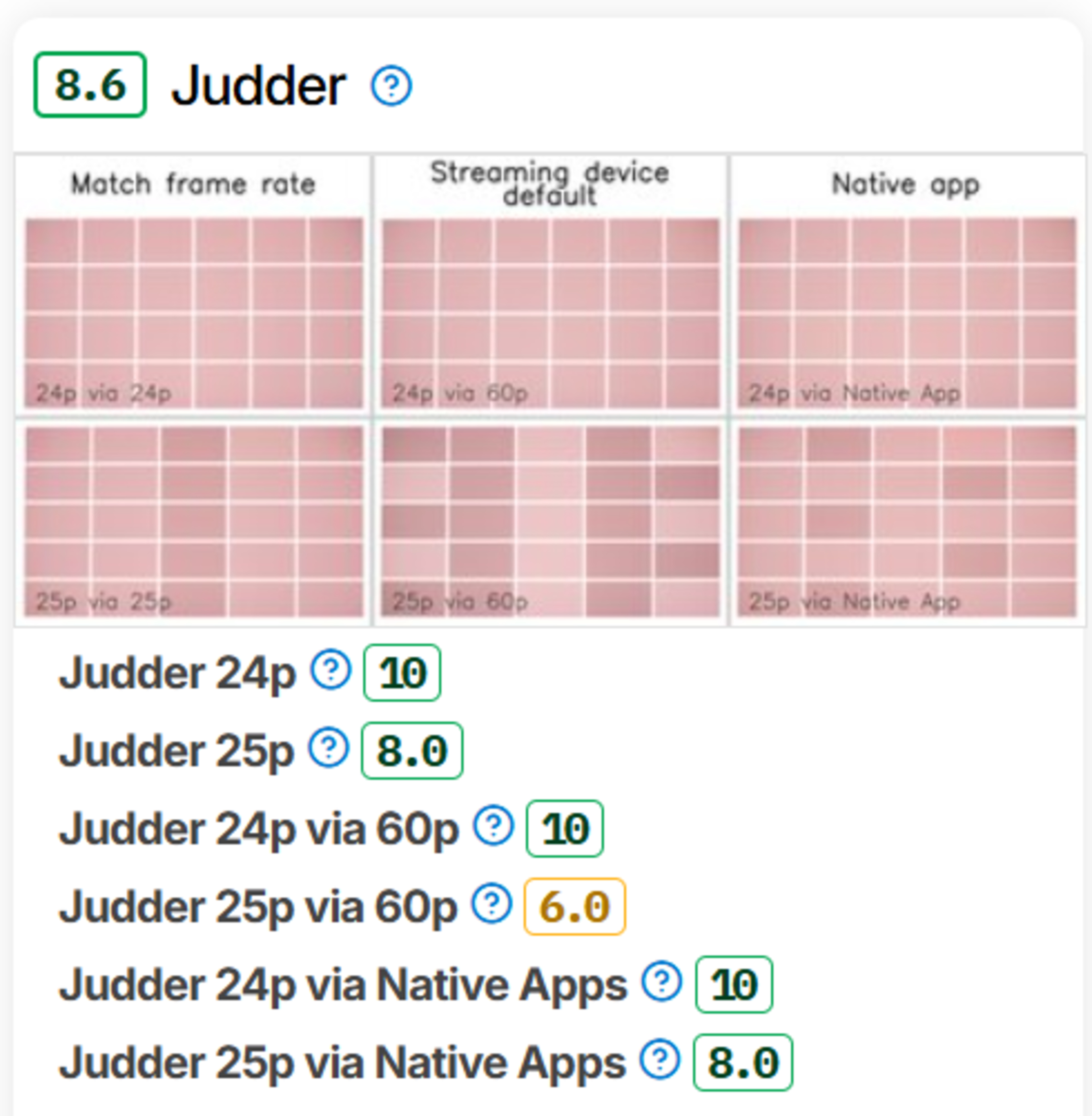
Test Bench 0.12 introduced dedicated Judder testing for movies and international shows played through frame-matched sources, regular 60Hz devices, and native apps. However, the previous numerical results implied more meaningful gradations between projectors than the test supported.
Version 1.0 now reports whether the projector can properly remove judder from each source and content combination using clearer Yes/No measurements. We also report whether enabling a specific setting to remove judder reduces the image's resolution.
 |
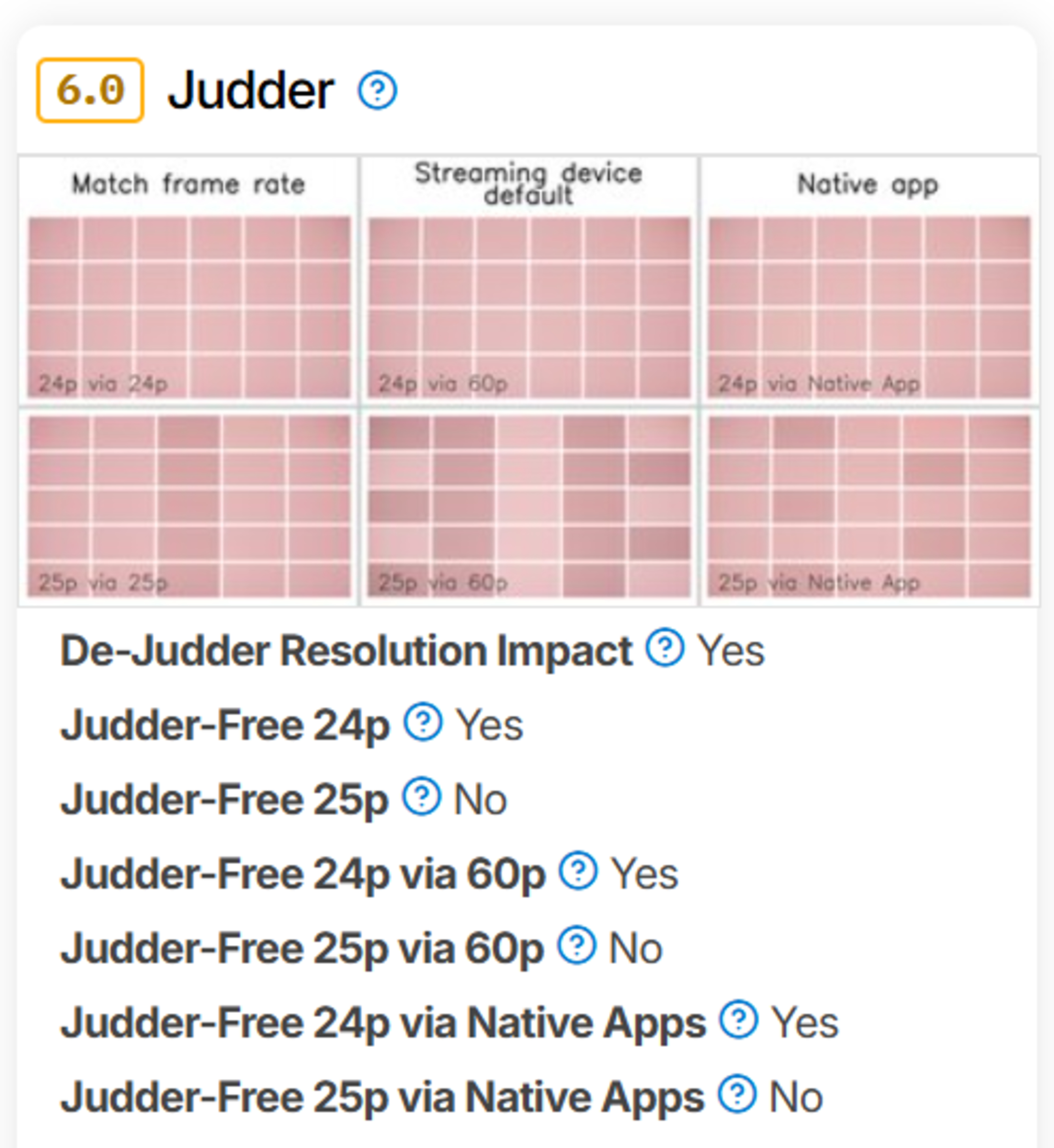 |
What it means for you: You can quickly see whether movies and international shows play smoothly through newer frame-matching devices, older streaming devices that output at 60Hz, and the projector's native apps. When smooth motion requires a trade-off in image resolution, the review now identifies that trade-off directly.
RAINBOW EFFECT
Rainbow Effect is a new test that measures the color artifacts some projectors produce around bright objects, subtitles, or highlights. These artifacts occur on single-chip DLP projectors and are often most visible when shifting your gaze across a high-contrast image.
We record the projector's color sub-frames at 4,152 fps. The video is initially played to represent footage from a regular frame-rate camera, then slowed down to reveal the color break-up. An accompanying color strip aggregates the recorded sub-frames over time. Since sensitivity to rainbow artifacts varies considerably between viewers, the recording provides context alongside the score.
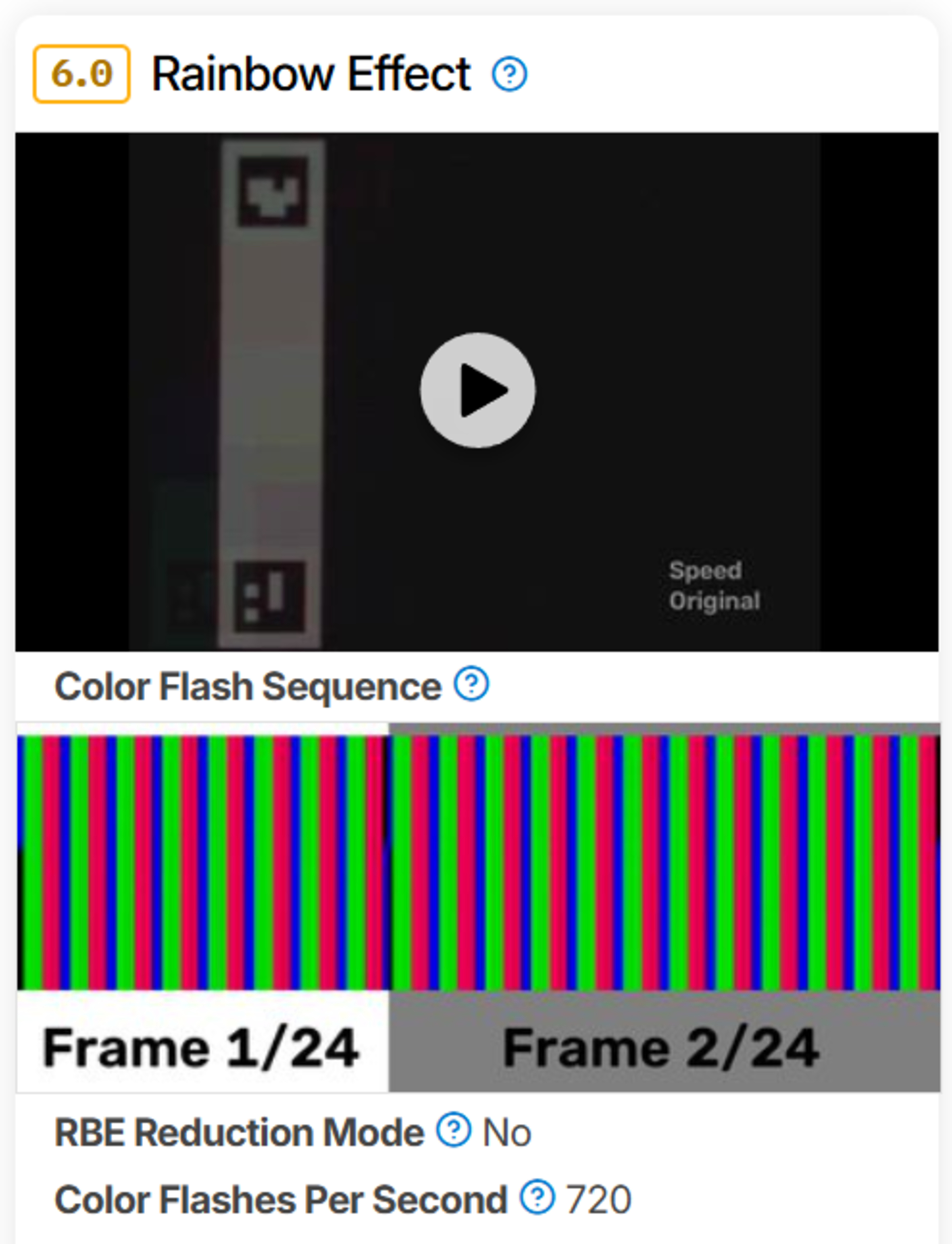
What it means for you: Viewers who are sensitive to rainbow flashes no longer need to rely entirely on subjective impressions or scattered user reports. The test provides a consistent comparison, although individual sensitivity still determines how distracting the effect will be in practice.
Let Us Know What You Think!
We'll continue to improve our projector tests over time, and we'd love to know what you'd like to see. Let us know in the comments, or email us at feedback@rtings.com.
48 Projectors Updated So Far
We are retesting popular models first. So far, the test results for the following models have been converted to the new testing methodology. However, the text might be inconsistent with the new results.
- Anker Nebula Mars 3
- Anker Nebula P1
- Anker Nebula P1i
- Anker Nebula X1
- AWOL Vision Aetherion Pro
- AWOL Vision LTV-3000 Pro
- BenQ TH575
- BenQ TH671ST
- BenQ X500i
- Dangbei Atom
- Epson EpiqVision Flex CO-FH02
- Epson EpiqVision Flex CO-W01
- Epson EpiqVision Ultra LS800
- Epson Home Cinema 1080
- Epson Home Cinema 2350
- Epson Home Cinema 3800
- Epson Home Cinema 5050UB
- Epson Lifestudio Flex Plus
- Epson Lifestudio Pop Plus
- Hisense C2 Ultra
- Hisense M2 Pro
- Hisense PT1
- Hisense PX3-PRO
- JMGO N1S Ultimate
- JMGO N3 Ultimate
- LG CineBeam Q
- LG CineBeam S
- NexiGo PJ40 (Gen 3)
- NexiGo PJ40 Pro
- NexiGo TriVision Ultra
- Optoma UHZ36
- Samsung The Freestyle 2nd Gen
- TCL C1
- Valerion VisionMaster Max
- Valerion VisionMaster Pro 2
- ViewSonic PX701-4K
- Wanbo X5 Pro
- XGIMI AURA 2
- XGIMI Halo+
- XGIMI HORIZON 20
- XGIMI HORIZON 20 Max
- XGIMI HORIZON 20 Pro
- XGIMI Horizon S Max
- XGIMI HORIZON Ultra
- XGIMI MoGo 4
- XGIMI MoGo 4 Laser
- XGIMI TITAN
- XGIMI Vibe One
10 Projectors Planned To Be Updated
We are also planning to retest the following products over the course of the next few weeks: