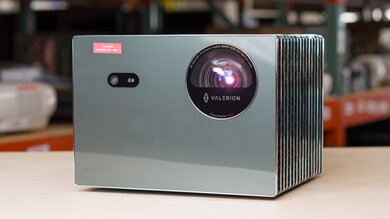
The BenQ GV50 is a portable 1080p DLP projector with a laser light source. It's designed for room-to-room use, with a built-in battery, integrated carry handle, and a two-axis gimbal stand that lets you aim the image from a table, shelf, or floor. It has Google TV built in, with casting support and remote-free operation, and uses a 2.1-channel 18W speaker system with two 4W speakers and a 10W woofer. For setup, it supports autofocus, automatic keystone correction, obstacle avoidance, auto screen fit, and post-movement auto-correction.
Our Verdict
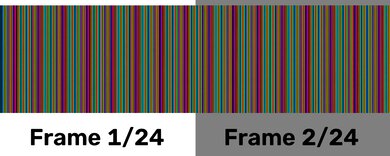
The BenQ GV50 is bad for home theater setups. With low contrast and dim brightness, it fails to make images pop, and content looks washed out. It also can't make bright colors look vivid, and it has some distracting rainbow effect (RBE) when your eyes move around the image. Unfortunately, it can't remove judder from any source, so content looks jittery. On the plus side, its fan is quiet, so even scenes with quiet dialogue won't be drowned out by the fan.
Uniform image in terms of brightness.
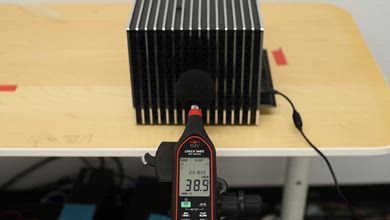
Fan is quiet.
Low contrast as images don't have much depth.
The color temperature is too cold out of the box.
Dim projector, so can't fight glare well.
Doesn't remove judder in any content.
Visible RBE.
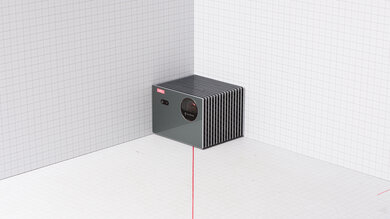
The BenQ GV50 is middling for outdoor setups. You need to use it in a completely dark space, as it doesn't get bright enough to fight glare from nearby lights. Its lightweight, compact design and carrying handle make it easy to bring it outside with you. It also has a built-in battery that lasts over 100 minutes, which is enough for many movies. It has Google TV, making it easy to stream content without extra wires or devices. It also has settings to help you quickly set it up, like auto screen fit, obstacle avoidance, and keystone adjustments. Its two-axis gimbal lets you adjust it if it's on an uneven surface, too. However, it lacks optical zoom or lens shift, so you'll need to move it to clean up the image.
Small, has a handle, and includes two-axis gimbal.
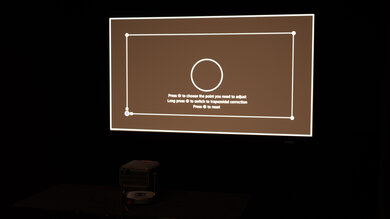
Has a full suite of screen adjustment features, alongside a smart OS.
Battery lasts over 100 minutes.
Dim projector, so can't fight glare well.
No lens shift or optical zoom.
The BenQ GV50 is great for bedroom setups. Its compact design means it won't take up much space on furniture, and it has a two-axis gimbal that helps you level it. With a built-in battery and Google TV smart platform, you won't have to worry about connecting extra wires or streaming sticks for watching a show or movie before bed. You can even adjust it to have the image projected onto a ceiling. It also has settings to help you quickly set it up, like auto screen fit and keystone adjustments. However, you need to make sure it's placed at a proper distance and centered with the wall for a clean image, as it lacks lens shift and optical zoom. Fortunately, it has a quiet fan, so you won't have to put the speakers to their max to listen to quiet scenes.
Small, has a handle, and includes two-axis gimbal.
Has a full suite of screen adjustment features, alongside a smart OS.
Battery lasts over 100 minutes.
Fan is quiet.
No lens shift or optical zoom.
The BenQ GV50 is mediocre for gaming. It supports native 1080p and downscaled 4k signals, but it's limited to a 60Hz refresh rate, so gaming doesn't feel smooth. Its input lag is on the high side, which is less than ideal for playing reaction-based games, but it's less of a concern for slow-paced games. It also has minimal motion blur thanks to its DLP imaging technology. Unfortunately, it has poor picture quality, as it's dim, with bad contrast, so images lack depth. It also can't make bright colors look vivid for an image that pops.
Almost no motion blur.
Input lag isn't quite low enough for faster titles.
Limited to 60Hz refresh rate.
Low contrast as images don't have much depth.
Dim projector, so can't fight glare well.
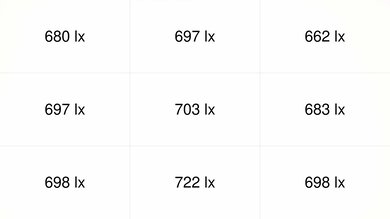
The BenQ GV50 has poor brightness. It's usable in a dark room, especially with smaller screen sizes, but it loses impact quickly if there's any ambient light. This means it's hard to see the screen properly in a bright room. It's at least uniform across the screen, as the corners don't look noticeably dimmer.
Uniform image in terms of brightness.
Dim projector, so can't fight glare well.
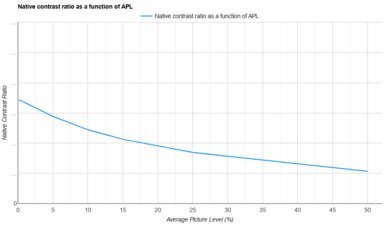
The BenQ GV50 Air has disappointing contrast. Although it has a low black level in dark scenes, its limited brightness means it can't provide depth to the image, so everything looks washed out.
Low contrast as images don't have much depth.
The BenQ GV50 has impressive portability. It's lightweight, and its carrying handle makes it easy to bring with you wherever you go. It also has a built-in battery that lasts more than 100 minutes, which is enough for medium-length movies. It includes settings to help you quickly set it up, such as auto keystone, focus, and screen-fit adjustments. It even has a gimbal built into the design, which helps if you have it on an uneven surface. However, it doesn't have optical zoom or lens shift to clean up the image if it's not in an ideal position in front of the screen. This means you may need to move it around to get a sharper image.
Small, has a handle, and includes two-axis gimbal.
Has a full suite of screen adjustment features, alongside a smart OS.
Battery lasts over 100 minutes.
No lens shift or optical zoom.
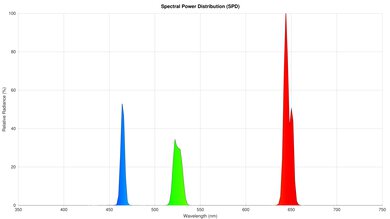
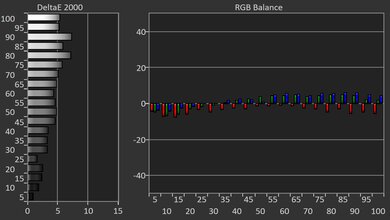
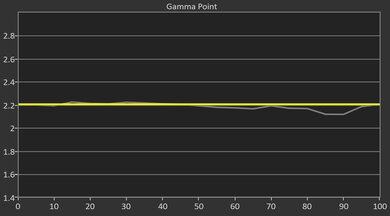
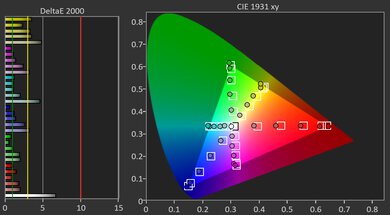
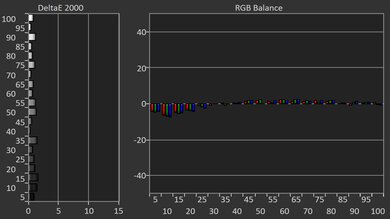
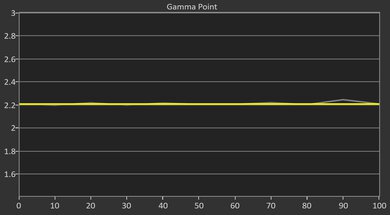
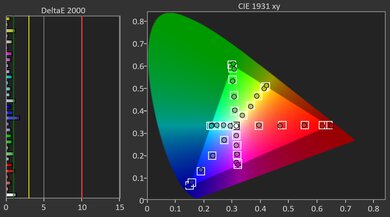
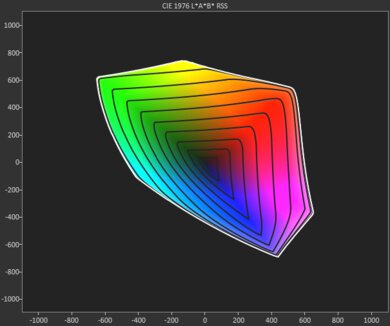
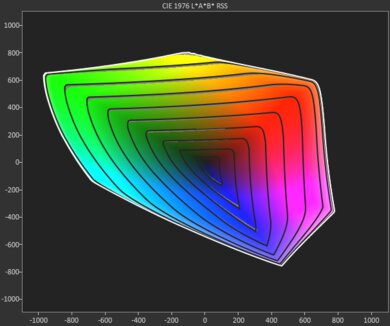
The BenQ GV50 Air has disappointing colors. It has alright out-of-the-box accuracy, but a downside is that it has a cold color temperature, resulting in a blue tint. Calibrating it fixes this, but it doesn't make the image perfect. It also can't display a wide range of vivid colors, so content doesn't pop.
The color temperature is too cold out of the box.
Colors aren't very vivid.
The BenQ GV50 has okay gaming responsiveness. It's limited to a 60Hz refresh rate with a 1080p or downscaled 4k signal, so it can't take advantage of gaming consoles that use high frame rates. While its input lag is fine for casual gaming, it's too high for responsive or competitive gaming. It at least has minimal motion blur thanks to its DLP imaging technology.
Almost no motion blur.
Input lag isn't quite low enough for faster titles.
Limited to 60Hz refresh rate.
Performance Usages
Changelog
-
Updated Oct 08, 2026:
We updated the projector's Width and Volume measurements in the Size section, since our original measurements were taken without the stand attached. We also changed the 1080p @ 60Hz @ 4:4:4 result from 'Yes' to 'No' in the Supported Resolutions section due to a data error.
- Updated Oct 07, 2026: We've converted the review to Test Bench 1.0, which replaces our Color Gamut test with Color Volume and adds a new Rainbow Effect test box. We also updated Effective Contrast (formerly Native Contrast) to account for projector brightness and reworked Judder scoring. The new bench also adds Outdoors and Bedroom usages, plus Portability, Color, and Gaming Responsiveness Performance Usages; Movies is now Home Theater, and all existing usage scores have been updated. See the 1.0 changelog.
- Updated Jul 02, 2026: Review published.
- Updated Jun 25, 2026: Early access published.
Check Price
Differences Between Sizes And Variants
We tested the BenQ GV50. There are no variants of this model, but BenQ also sells similar GV-series portable projectors, including the BenQ GV30, GV31, and GV11. The GV50 is the newest and highest-end model in the lineup, with a brighter laser light source and the most flexible projection angle adjustment. The GV31 is also a 1080p model, while the GV30 and GV11 are lower-resolution options. Our review only applies to the GV50.
Our unit was manufactured in March 2025.
Popular Projector Comparisons
The BenQ GV50 is a fine portable projector, but it's a bit expensive for the performance it offers. Its image quality is fine for casual use, and it's easy to carry around thanks to its built-in handle, integrated battery, and strong auto-setup tools, but it doesn't really stand out for movies or gaming. If you care more about movie performance, the LG CineBeam Q is generally better, with much stronger contrast and better colors, though the BenQ is more convenient since it has a built-in battery and better gaming responsiveness. The XGIMI MoGo 4 Laser is also a strong alternative for movies thanks to its improved color volume, but the BenQ is more accurate out of the box, easier to carry, and better for gaming. Conversely, if you mostly care about gaming performance and less about image quality, the Anker Nebula P1 has much lower input lag but is dimmer and has worse contrast. Overall, the GV50 is a jack-of-all-trades portable projector: not the best value for pure image quality or gaming, but a convenient all-in-one option for movies, shows, and casual play.
Check out our recommendations for the best portable projectors and the best outdoor projectors. If you'd prefer to shop for another product in the same price range, look up the best projectors under $1,000 instead.
The BenQ GV50 is better than the BenQ GV30 in most respects, as it's brighter, offers better contrast, and produces a sharper 1080p image. The BenQ GV30 is a cheaper, lower-end unit, but if you care about image quality, the GV50 is superior.
The BenQ GV50 and XGIMI MoGo 4 Laser trade blows. The XGIMI has a very small advantage for movies due to its slightly deeper contrast and far better color volume. Still, the BenQ is more accurate out of the box. If you're a gamer, though, the BenQ is far better due to its lower input lag. It's also a bit easier to carry around due to its handle and more complete set of automated features.
The BenQ GV50 is better than the Samsung The Freestyle 2nd Gen. Its better contrast and brightness produce a punchier image with more depth. It's also easier to set up thanks to its two-axis gimbal and a wider selection of screen-adaptation tools. The BenQ is more portable, too, as it has a built-in battery and can easily be mounted on a tripod. It can also downscale 4k signals, making it compatible with a wider range of sources. Its full-size HDMI port and broader selection of inputs make it easier to connect different devices, and gamers will also appreciate its lower input lag. The Samsung does display a wider range of colors, but the BenQ's other advantages outweigh this.
The LG CineBeam Q is generally better than the BenQ GV50, especially for watching movies, as its contrast is vastly better, and it has a noticeably better colors. Still, the BenQ has some advantages. It's not super responsive for gaming, but definitely much more so than the LG is, so you can use it for slow games in a pinch. It has an integrated battery, so you don't need to worry about having access to an outlet, or carrying a power bank, like you do with the LG. So if you care more about portability than image quality, the BenQ is a good alternative.
We've independently bought and tested over 100 projectors and published detailed results for each, so you can decide which one to buy. These have all been tested under the same standardized methodology, allowing you to compare them side by side. We still have all these projectors in our lab, so we can continually go back and compare them to ensure our reviews are still accurate. All our test methodologies are also public on our website, so you can validate the results yourself.
Throw Calculator
Global Controls
Test Results

for pictures & test results
for pictures & test results



for pictures & test results