Movies are usually shot at 24 frames per second (24p), and some TV shows and international videos use 25p. Projectors can usually accept these signals, but that doesn't always mean they display every frame for the same amount of time. A movie frame needs to fit evenly into the projector's refresh cycle; if it doesn't, some frames are held longer than others, and motion can look uneven or choppy. This is called judder.
Our Judder test checks whether a projector can display 24p and 25p content with even frame timing from different sources. We test matched frame-rate signals, like 24p content sent as a 24Hz signal, as well as 60Hz signals from an external streaming device, without frame matching. We also test the projector's native apps, since built-in apps don't always behave the same way as HDMI sources. Finally, we check whether the projector needs a motion setting to remove judder and whether that setting adds noticeable motion interpolation.
Test results
Test Methodology Coverage
The judder tests were first added in Test Bench 0.12. Prior to that, we had no equivalent test.
| 0.9 | 0.10 | 0.11 | 0.12 | |
|---|---|---|---|---|
| Judder (All tests) | ❌ | ❌ | ❌ | ✅ |
When It Matters
Judder mostly matters when you watch movies, scripted TV shows, and other low-frame-rate video. Judder isn't as important for sports, live TV, or most video games, since those are usually delivered at higher frame rates, often at least 50 or 60 fps, that line up cleanly with common 50Hz or 60Hz signals. When judder is present, camera pans look uneven, with motion that seems to hitch or pulse rather than move smoothly across the screen.
The most important format for movies is 24p, whether you're watching from a Blu-ray player, a streaming device, or a projector's native apps. 25p matters more for PAL-region content, European TV shows, and some international streaming content. With streaming services offering more international shows worldwide, 25p handling can still matter even if you're in North America.
Judder isn't always a major problem, and some people won't notice it. If you're wondering whether it's an issue for you, look at the video below. It uses TVs as the example, but the same basic frame-timing problem applies to projectors.
In the video above, compare the 24p playback with judder on the left to the judder-free 24p playback on the right. The slow-motion video makes the uneven frame timing easier to see, but the same effect can show up in real time as uneven motion during pans. If you don't notice the judder, or it doesn't bother you, this probably isn't something you need to worry about too much. If you do notice it, a projector that handles 24p and 25p properly can make movies and cinematic streaming content look smoother and more consistent.
Projectors can also behave differently depending on the source. A projector might handle a matched 24Hz signal properly but struggle with 24p content sent over a 60Hz signal, or it might behave differently through its native apps than through an external streaming device. That's why we test judder from multiple sources instead of relying on a single result.
Our Tests
Our projector judder testing has three main parts. First, we test whether the projector can display 24p and 25p content properly when the source sends a matching 24Hz or 25Hz signal. Then, we test whether it can remove judder when that same content is sent inside a 60Hz signal, which is common with streaming devices, game consoles, PCs, and media players that don't match the content's frame rate. Finally, we test 24p and 25p playback through the projector's native apps, since built-in apps don't always behave the same way as HDMI sources.
To run the test, we display 24p and 25p judder patterns on the projector and photograph the projected image using a long exposure. The test pattern cycles a square through a series of positions in one second. If the projector displays every frame for the same amount of time, the boxes in the captured image should all look like the same shade. If some boxes are lighter or darker than others, it means some frames were held longer than others, so the projector has judder.
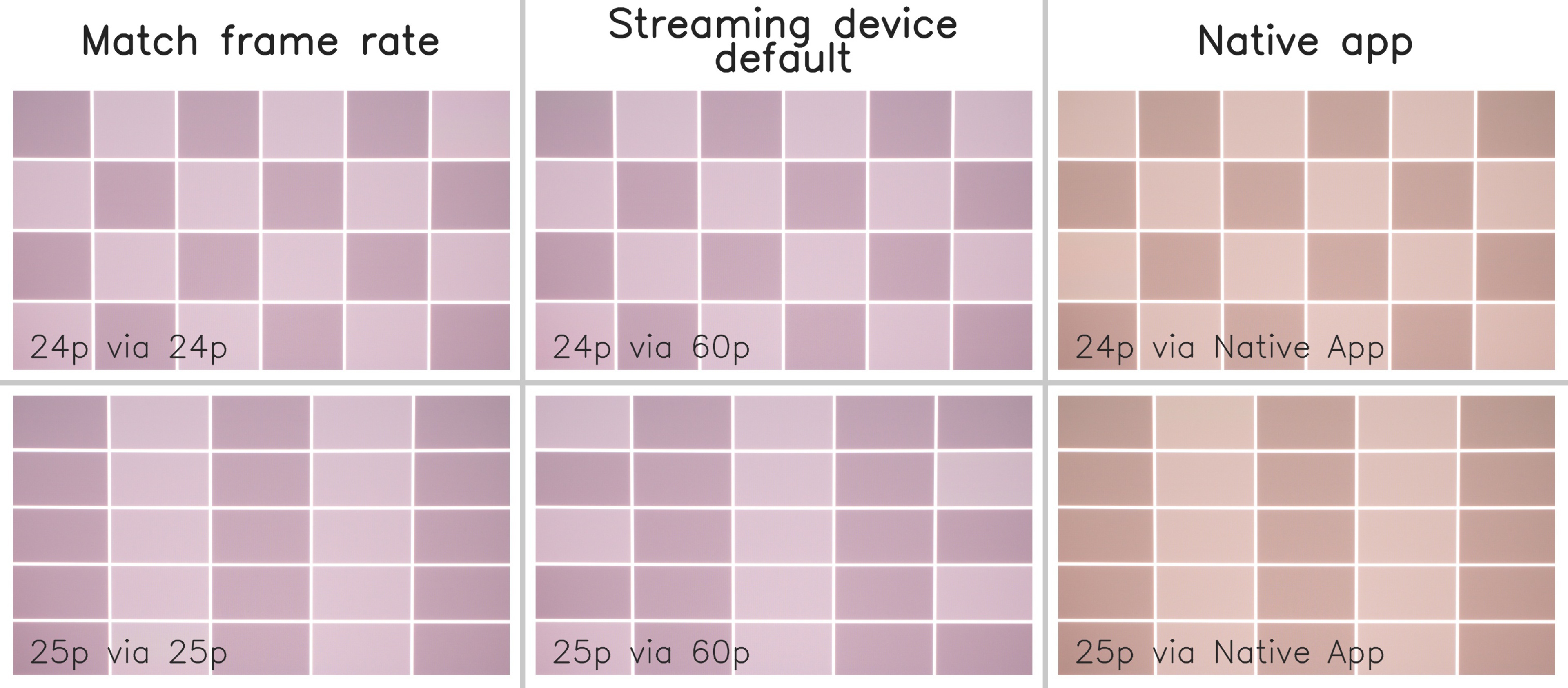 |
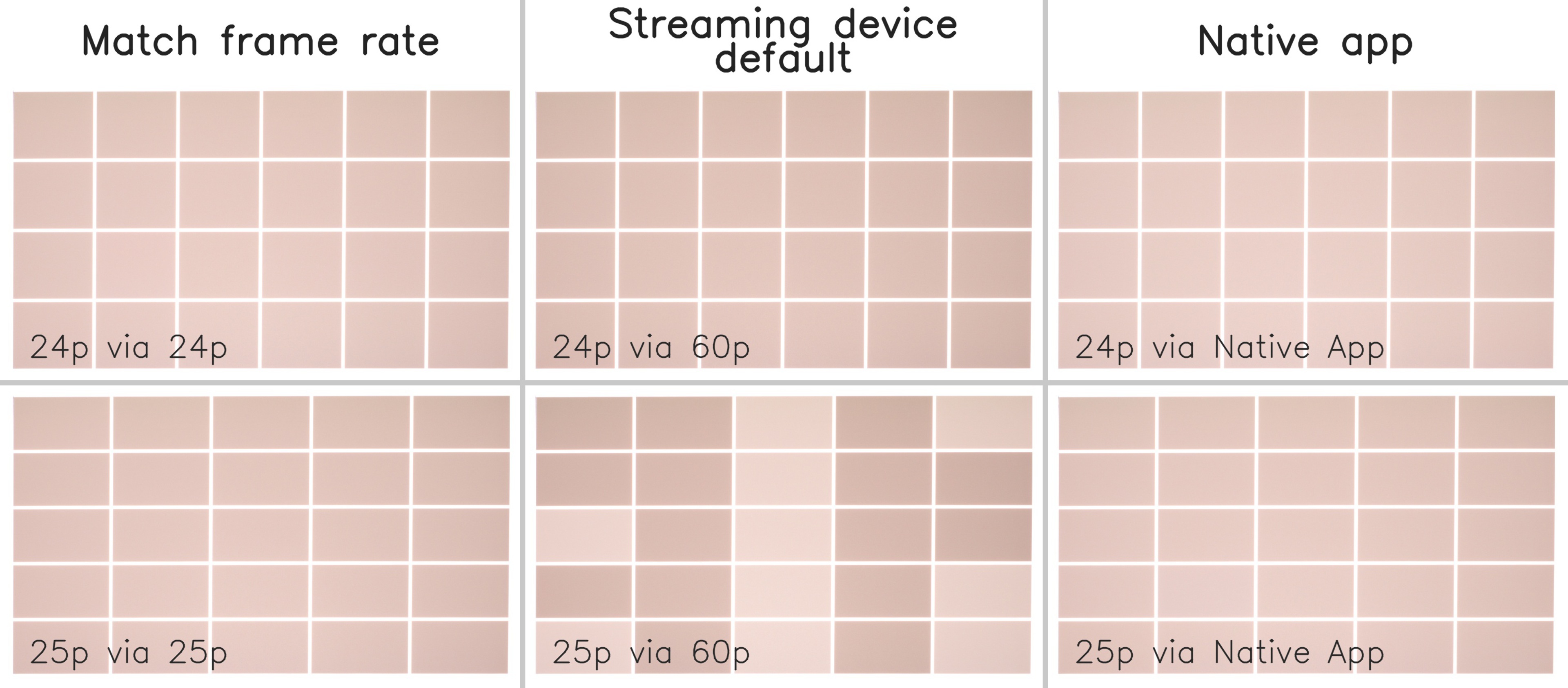 |
We run the test in SDR in the projector's most accurate picture mode. We adjust the light output so the test pattern isn't overexposed and the grid remains easy to read. If it's not possible to adjust the projector's light output to the required level, the camera settings are adjusted to avoid overexposure. We also disable automatic setup features like autofocus, auto-keystone, auto screen fit, and obstacle avoidance during testing, since those can be triggered when the source changes and can disrupt the camera alignment.
If the projector has motion settings that could affect judder, such as MEMC, Motion Compensation, Frame Interpolation, Smooth Motion, De-Judder, or a Cinema/Film mode, we check whether those settings can remove judder cleanly. A projector doesn't get full credit just because it hides judder with obvious motion smoothing. To pass, it needs to display the test pattern evenly without adding noticeable motion interpolation.
Judder 24p
This test determines whether a projector can display 24p content without judder when receiving a 24Hz signal. This is the cleanest signal for movie playback and is similar to what you'd expect from a Blu-ray player or a streaming device with frame-rate matching enabled.
We play our 24p judder video through an Apple TV using the Plex app, with frame-rate matching enabled so the Apple TV sends the projector a 24Hz signal. We then photograph the projected test pattern and check whether the boxes are all displayed evenly.
To score perfectly, the projector must display the 24p signal with even frame timing. If the boxes in the photo aren't the same shade, the projector has judder with 24p content.
Judder 25p
This test determines whether a projector can display 25p content without judder when receiving a 25Hz signal. It's most relevant for PAL-region content, European TV shows, and some international streaming content.
We use the same process as the Judder-Free 24p test, but with a 25p video and a 25Hz signal. The projector must display each frame for an even amount of time so that the captured boxes in the test photo all look the same.
To score perfectly, the projector must display the 25p signal with even frame timing. If some boxes are brighter or darker than others, the projector has judder with 25p content.
Judder 24p via 60p
This test determines whether a projector can remove judder from 24p content sent through a 60Hz progressive signal. This matters because many streaming devices, game consoles, PCs, and media players output at 60Hz by default unless frame-rate matching is enabled.
We play the same 24p judder video through the Apple TV, but this time we disable frame-rate matching and send the projector a 60Hz signal. The projector then has to detect the original 24p cadence inside that 60Hz signal and display it with even frame timing.
This is more difficult than displaying a native 24Hz signal. If the projector can't recover the original cadence properly, some frames are held longer than others, and the captured boxes won't all look the same.
Judder 25p via 60p
This test is the same as our Judder-Free 24p via 60p test, but with a 25p video instead. It matters if you watch 25p international content from a source that doesn't automatically match the content's frame rate.
We play our 25p judder video through the Apple TV while outputting a 60Hz signal. The projector must recognize the original 25p cadence inside that 60Hz signal and display the video with even frame timing.
As with 24p via 60p, this is more difficult than displaying a native matched-frame-rate signal. If the projector can't recover the original cadence properly, slow pans in 25p content can look uneven when played from a 60Hz source.
Judder 24p via Native Apps
This test determines whether 24p content can be displayed without judder through the projector's built-in smart apps. This matters because many projectors are designed as all-in-one streaming devices, and many people use their native apps instead of an external streaming box.
We play our 24p judder video through the projector's native Plex app when available. If Plex isn't available but the projector has a smart OS, we use an alternate 24p video through a supported native app. If the projector doesn't have a smart OS, this test is scored as N/A.
This result can differ from what we measure with an external HDMI source because native apps don't always use the same video playback or processing chain. To score perfectly, the projector must display 24p content through its own app system without judder.
Judder 25p via Native Apps
This test determines whether 25p content can be displayed without judder through the projector's built-in smart apps. It's especially relevant if you watch European TV shows, international streaming content, or other 25p videos directly from the projector's app platform.
We use the same process as the 24p native apps test, but with a 25p video. If Plex isn't available, we use an alternate 25p video through a supported native app when possible. If the projector doesn't have a smart OS, this test is scored as N/A.
To score perfectly, the projector must display 25p content through its native apps with even frame timing.
Additional Information
The Cause of judder
The video below uses TVs to explain judder, but the same basic frame-timing problem applies to projectors. Judder isn't caused by the projection lens, the screen, or the light source. It happens when the projector's video processing can't display low-frame-rate content, like 24p or 25p, with each frame held for the same amount of time.
Most movies are 24p, meaning each frame should appear for 1/24 of a second. If a projector receives a matching 24Hz signal and handles it properly, it can simply show each frame for an equal amount of time. The same idea applies to 25p content over a 25Hz signal. In that case, motion should look consistent, with no repeating pattern where some frames linger longer than others.
Judder becomes more complicated when 24p or 25p content is sent inside a 60Hz signal. This can happen with streaming devices, game consoles, PCs, or media players that output everything at 60Hz by default. Since 24 and 25 don't divide evenly into 60, the projector has to recognize the original film cadence and correct it. If it doesn't, it uses an uneven frame pattern. For 24p content, that usually means a 3:2 pulldown pattern, where some frames are repeated for two refreshes and others for three. This makes every other frame stay on screen longer, which creates uneven motion.
A 120Hz signal can make 24p content easier to display without judder because 24 divides evenly into 120, so each movie frame can be repeated five times. However, this only helps when the source is actually sending the movie inside a 120Hz output. That's more likely with a PC set to 120Hz, or with specific source and app combinations, than with a typical movie playback setup. Many streaming devices and built-in apps either match the content's frame rate or output video at 60Hz by default.
Projectors can also be more inconsistent than TVs because their video processing varies a lot from model to model. Some projectors handle a matched 24Hz signal correctly but struggle when 24p is sent over 60Hz. Some rely on MEMC or motion interpolation to smooth over the issue, which can remove judder but also make movies look artificially smooth. Others behave differently depending on whether you're using an HDMI source or the projector's native apps.
This is why we don't only test one signal or source. A projector might be judder-free from a Blu-ray player or streaming box with frame-rate matching enabled, but still show judder from a 60Hz source or its built-in apps. Testing 24p, 25p, and 60p sources and native apps gives a clearer picture of how the projector handles real movie and streaming playback.
Motion Interpolation And Judder
Some projectors can reduce or hide judder using motion interpolation. This creates extra frames between the original frames, which can make motion look smoother, but it also changes the look of movies. If it's too aggressive, movies can take on the "soap opera effect," where film content looks more like high-frame-rate video.
For our judder test, we don't want a projector to pass by simply smoothing everything with obvious interpolation. If a projector has a cinema or de-judder setting that removes judder without noticeable interpolation artifacts, we use it and record the setting. If that setting adds obvious smoothing or visible artifacts, we don't treat it as a clean judder-removal solution.
How To Get The Best Results
If judder bothers you, the best place to start is your source device. Many streaming devices, like an Apple TV, have a setting like Match Frame Rate or Match Content that lets movies and shows play at their original frame rate instead of forcing everything into a 60Hz output. This can help because a projector usually has an easier time displaying 24p content from a 24Hz signal than detecting and correcting that same 24p cadence inside a 60Hz signal.
You can also check the projector's motion settings. Depending on the brand, the setting may be called MEMC, Motion Compensation, Frame Interpolation, Smooth Motion, De-Judder, Real Cinema, True Cinema, or something similar. These settings can help with judder, but they can also add motion interpolation, so it's worth testing them with real movie content. Slow panning shots are the easiest place to see whether motion looks uneven or overly smooth.
If you use the projector's built-in apps, keep in mind that native app playback may behave differently from an external streaming device. If movies look uneven through the built-in apps, using an external streaming device with frame-rate matching may improve the result. If the projector itself can't handle the cadence properly, there may not be a setting that fully fixes judder without adding motion smoothing.
Conclusion
Judder happens when a projector doesn't display every frame of 24p or 25p content for an equal amount of time. It's most noticeable in slow panning shots in movies, scripted TV shows, and some international content. Not everyone notices judder, but if you do, it can make motion look uneven or distracting.
Our projector judder tests check whether a projector can display 24p and 25p content without judder from matched frame-rate signals, 60Hz signals, and native apps. We also check whether motion settings are needed and whether those settings remove judder cleanly without adding obvious motion interpolation. This gives a better idea of how the projector handles real movie and streaming playback across different sources.