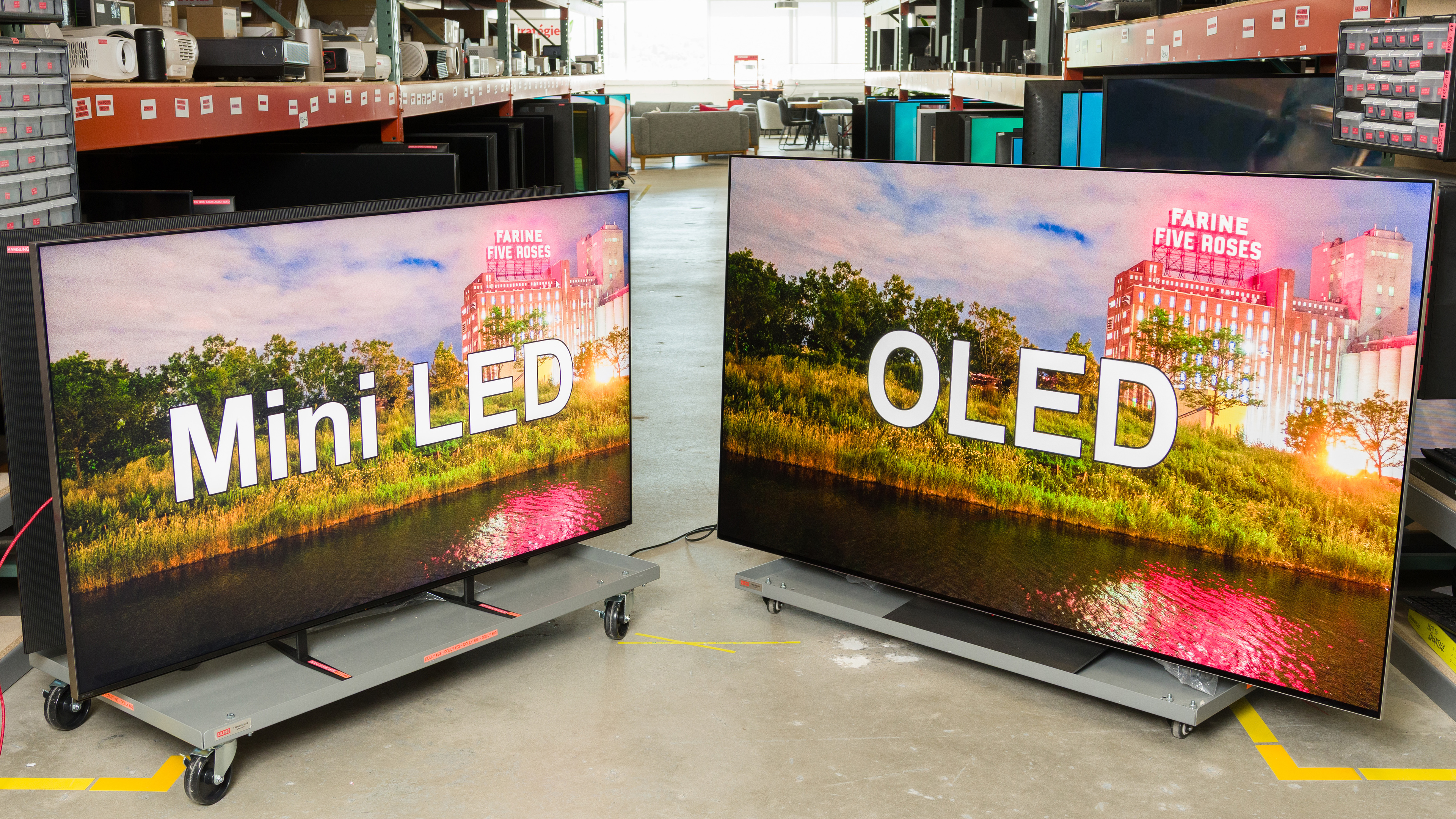
Trying to choose between Mini LED vs OLED TVs can be difficult. OLEDs have been the undisputed kings of home theater TVs since they were first introduced over 10 years ago. Over the last few years, a new technology has emerged: Mini LED. Just how good are they, though, and if you're shopping for a new TV, should you get an OLED or a Mini LED? In this article, we'll go over some of the technical differences between them and then dive right into performance metrics to help you decide which one is best for you.
This article focuses only on TVs. If you're trying to decide between a Mini LED and an OLED monitor, look at our Mini LED vs OLED monitor article instead. While monitors and TVs share similar technology, that article considers other factors like text clarity.
What Are They?
Before we get into the details of how they perform and how you should choose Mini LED vs OLED, let's start with the basics. What do each of these terms mean? This part is a bit technical, so if you just want to see who wins when it's OLED versus Mini LED, skip to the next section.
Mini LED
Let's start with a brief history lesson on LED TVs. The first few generations of LED TVs were very simple. To illuminate the screen, they used LEDs either directly behind or below the screen. The problem with these TVs was that they could only control the light output of the entire screen at once, so either the entire backlight was on or the entire backlight was off. This wasn't good for dark scenes, as blacks would rise noticeably during dark scenes when any bright highlights were on the screen. This is where local dimming came in. What if, instead of controlling the entire backlight at once, we could break the LEDs into sections, or "zones," and then control the light output of those zones independently?
The first TVs with local dimming were pretty basic. They were limited by the processing power needed to decide which zones needed to be at what brightness level, the physical size of the LEDs, and even the circuitry needed to control the electric current going to each LED. The first generation of local dimming TVs had just a handful of zones. Over the last few years, local dimming has continuously improved, and LEDs, especially, have gotten a lot smaller, to the point that some TVs released in 2025 have many thousands of dimming zones.
Enter Mini LED. Mini LED means, well, nothing really. It's just a way for manufacturers to market their TVs differently. While most TVs marketed as Mini LED in 2025 have at least decent local dimming, with a few hundred dimming zones, there's no set definition of what can be considered Mini LED or not. This is why, when you're trying to choose between an OLED and a Mini LED TV, it's extremely important to look at the actual performance of each TV you're considering. If you want to learn more about this technology, check out our What Is Mini LED guide.
OLED
OLED stands for Organic Light Emitting Diode, and it refers to how this type of TV produces light. Almost all non-OLED TVs produced over the last 10-15 years use LEDs located behind the screen to generate light. That light then passes through various filters and diffusion layers to produce the final image you see. OLEDs have one main advantage over LEDs: size. Instead of LEDs, which are relatively large and light up a relatively large area of the screen, OLEDs can be controlled individually, so you can have a single pixel at max brightness surrounded by darkness, and it'll be displayed perfectly, without the backlight bleeding into the surrounding areas, a phenomenon known as haloing.
In the TV world, there are two main sub-types of OLED: they're known as WOLED and QD-OLED. These two terms refer to how the TV produces colors. WOLED TVs use white light as a starting point, which then passes through red, green, and blue color filters to produce the primary colors needed for each pixel. There's also a fourth subpixel that passes the white light directly, with no filter. QD-OLEDs use blue light as a starting point, and then they use quantum dot color converters to convert blue into red and green. For a more in-depth explanation of OLED technology, check out our guide on what OLED is.
Mini LED vs OLED
So now that we've explained what these terms mean, let's take a closer look at how they compare so you can make a clear buying decision. To compare these two cutting-edge TV technologies, we'll look at two of the best TVs available on the market in 2025: the Sony BRAVIA 9 and the LG G5 OLED. These comparisons present the best of the best, so, like with anything, it's important to look at the results for the specific models you're considering. Especially on the Mini LED side of the equation, other TVs won't look as good as the BRAVIA 9. In this comparison, we'll focus on the panels themselves and how they impact picture quality, so we won't cover things like inputs, smart features, or audio, as these things aren't affected by the panel. So, has Mini LED really finally caught up to OLED?
Black Levels
One of the main goals of Mini LED is to approach the perfect black levels that, until now, only OLED could provide. So how do they compare in 2025? We'll start by looking at the three most important metrics for dark room performance: contrast, lighting zone precision, and black uniformity.
Contrast
 |
 |
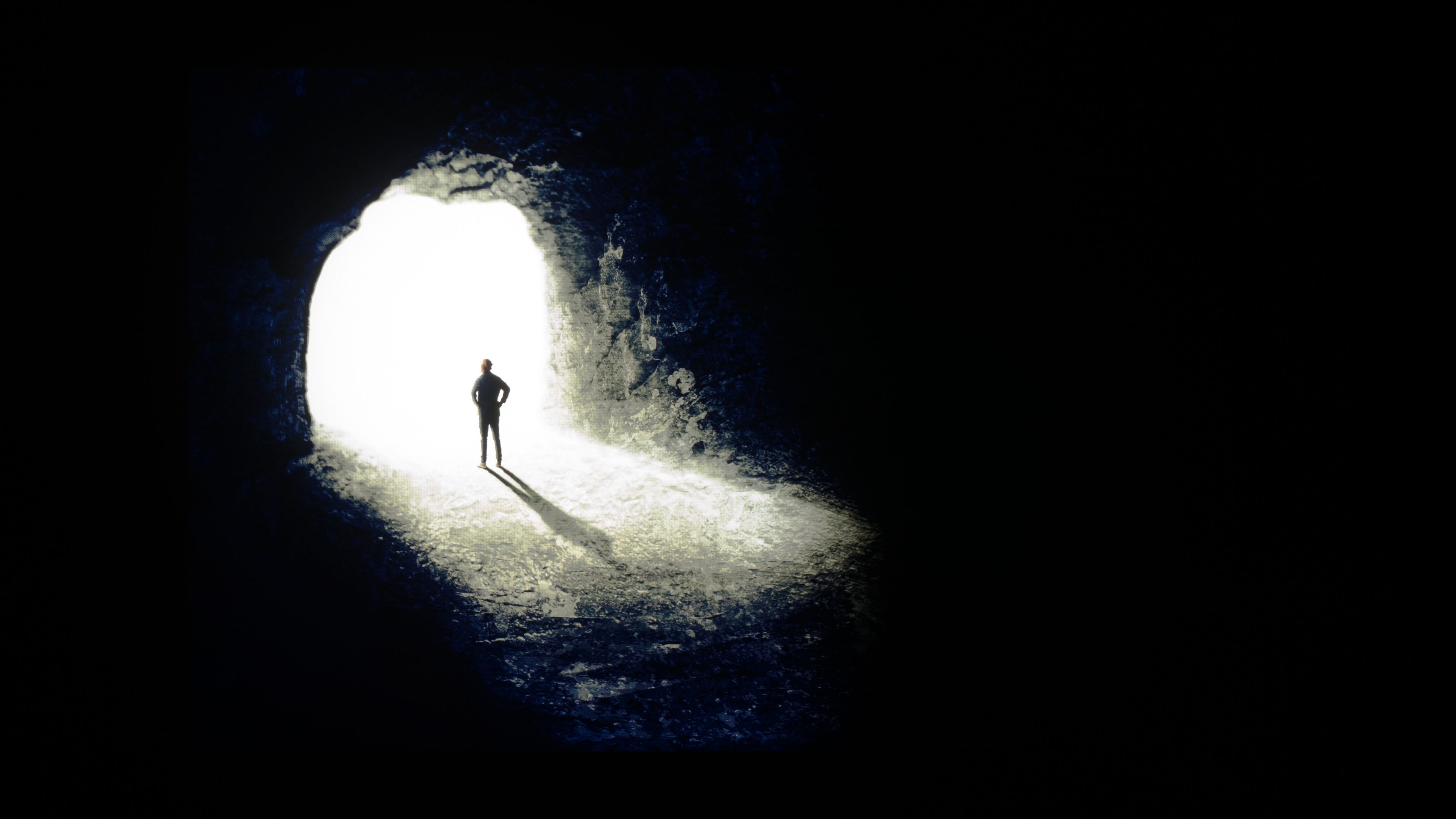
If you're comparing Mini LEDs and OLEDs, chances are you're wondering how they compare in a dark room, and what better metric to start off with than contrast? Taking the examples above of the BRAVIA 9 and the G5, you can see that it's really quite close. The area directly surrounding the cave opening is nearly identical on both TVs, but the background area around it isn't. The darkest parts of the scene on the BRAVIA 9 have a slightly bluish glow to them that isn't there on the G5. It's minor, and you have to look for it, but the difference is there.
Winner: OLED
Lighting Zone Precision
 |
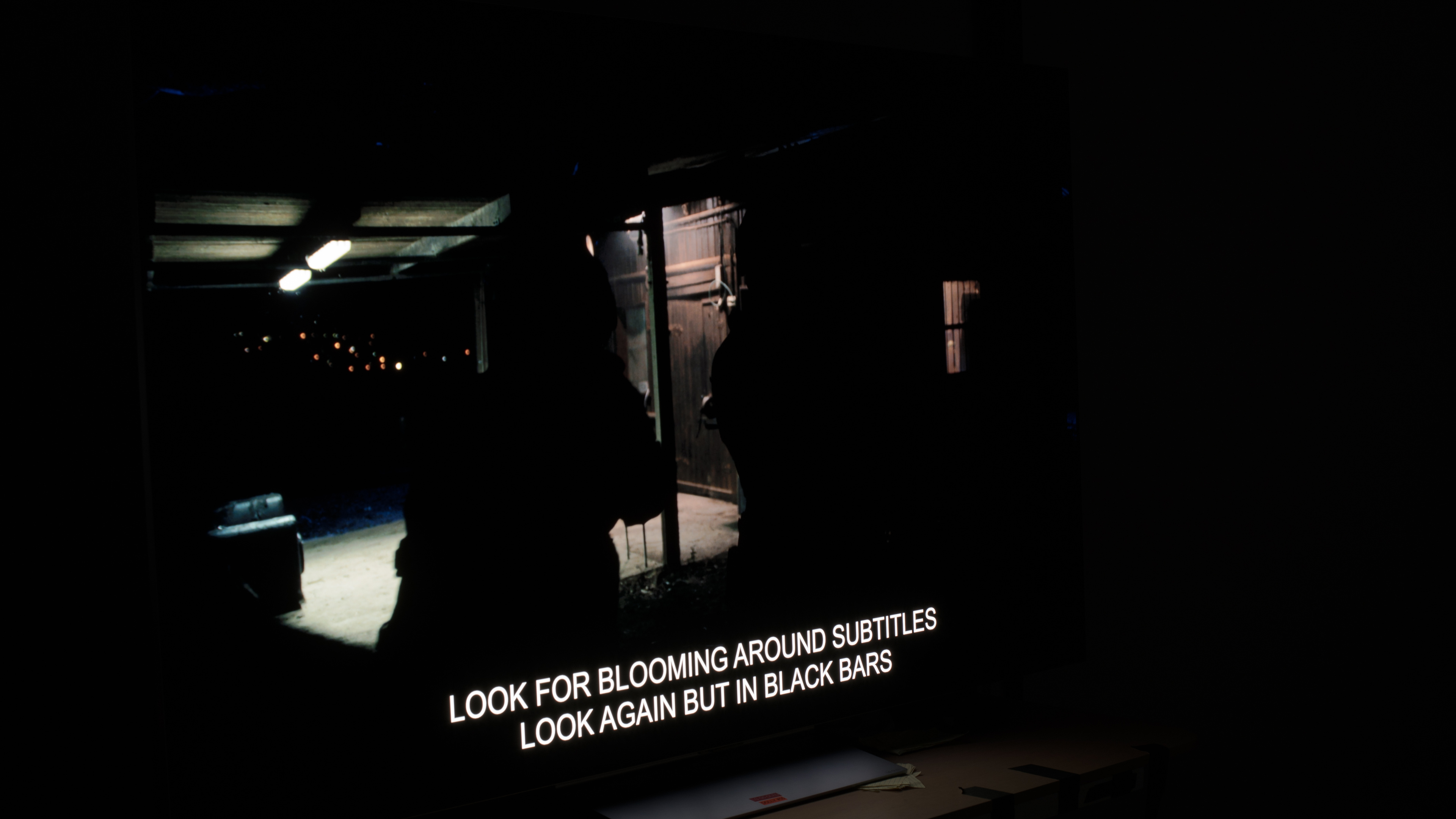 |
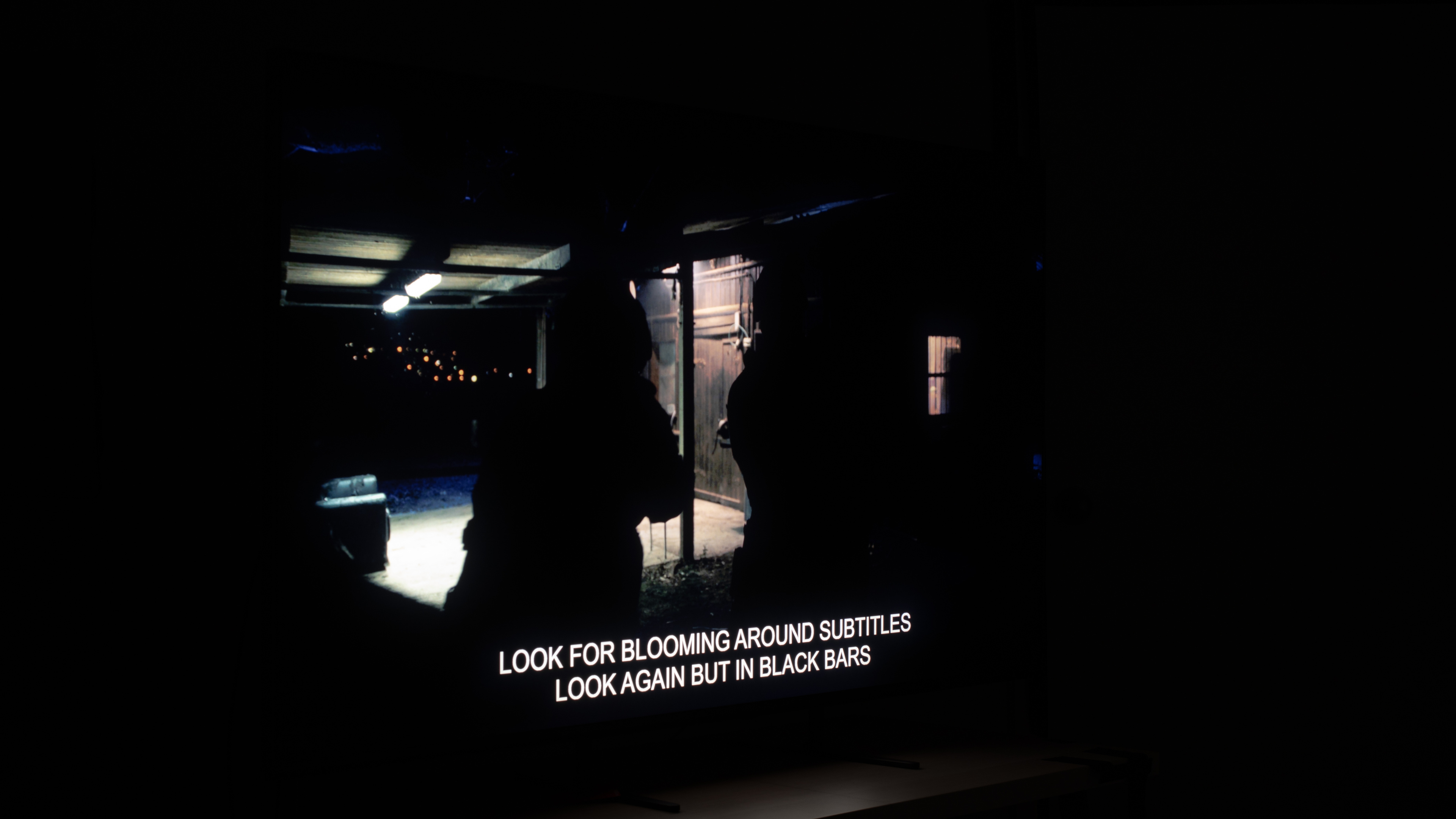
The lighting zone precision test gives us an even better look at how well a TV can dim around oddly shaped objects in a scene, especially those pesky little subtitles along the bottom. No TV has enough dimming zones to precisely dim around that text, so you can clearly see the halo effect surrounding it. Although the BRAVIA 9 is very, very good, there's no contest here; OLEDs are simply better.
Winner: OLED
Black Uniformity
 |
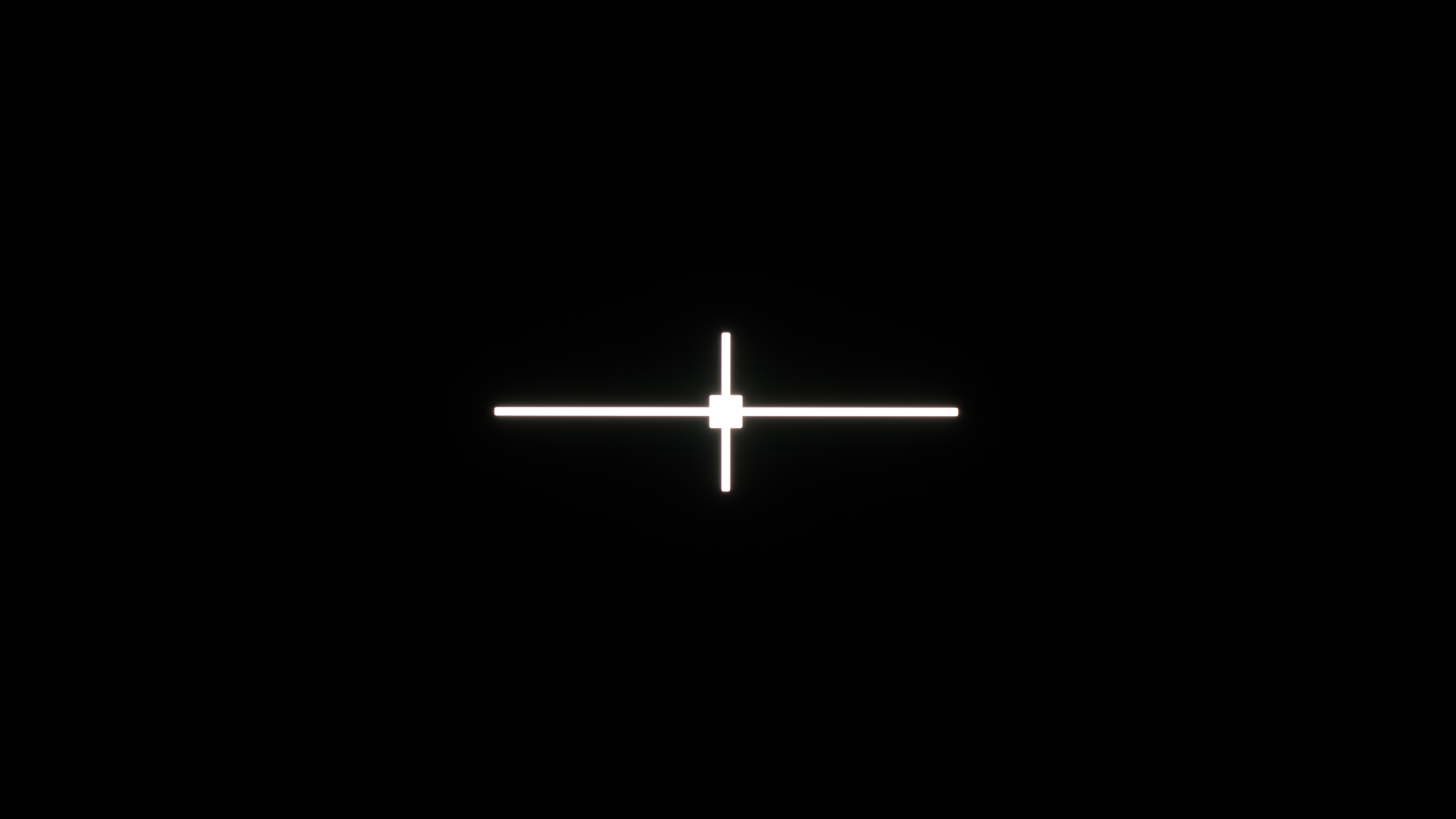 |
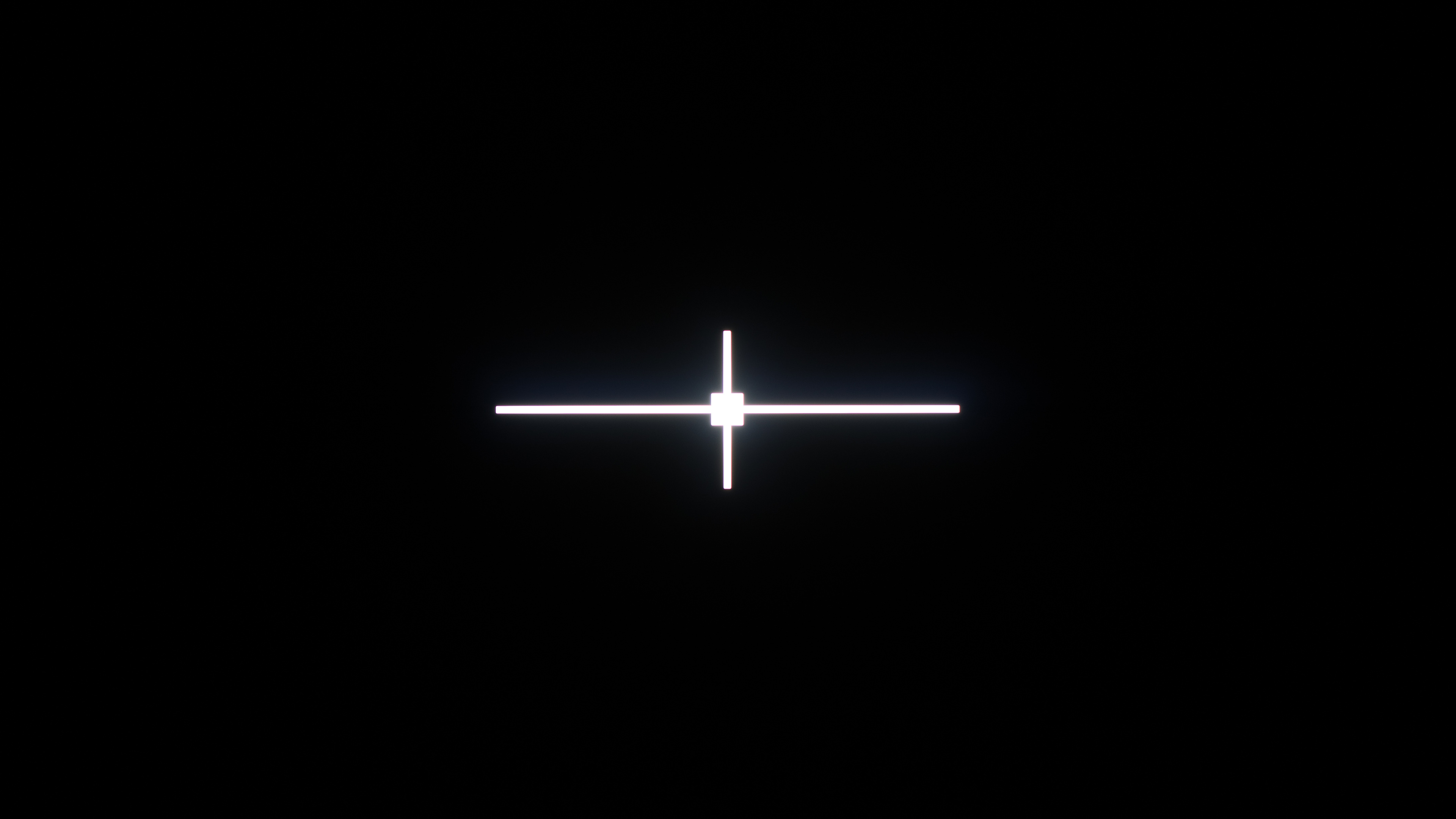
The zone precision test shows us how well the TV can limit haloing around bright spots, but what about the truly dark areas? Enter black uniformity. This test shows us how uniform the dark patches are. Most Mini LEDs do really well with this test, much better than other types of local dimming. There's still haloing around the bright cross in the center of the screen, but unlike the other black level tests, that's not the focus this time. OLEDs, on the other hand, have perfect black uniformity. Since they can turn each dark pixel off completely, there's essentially no light being emitted from the dark areas of the screen.
Winner: OLED
Black Levels - Overall
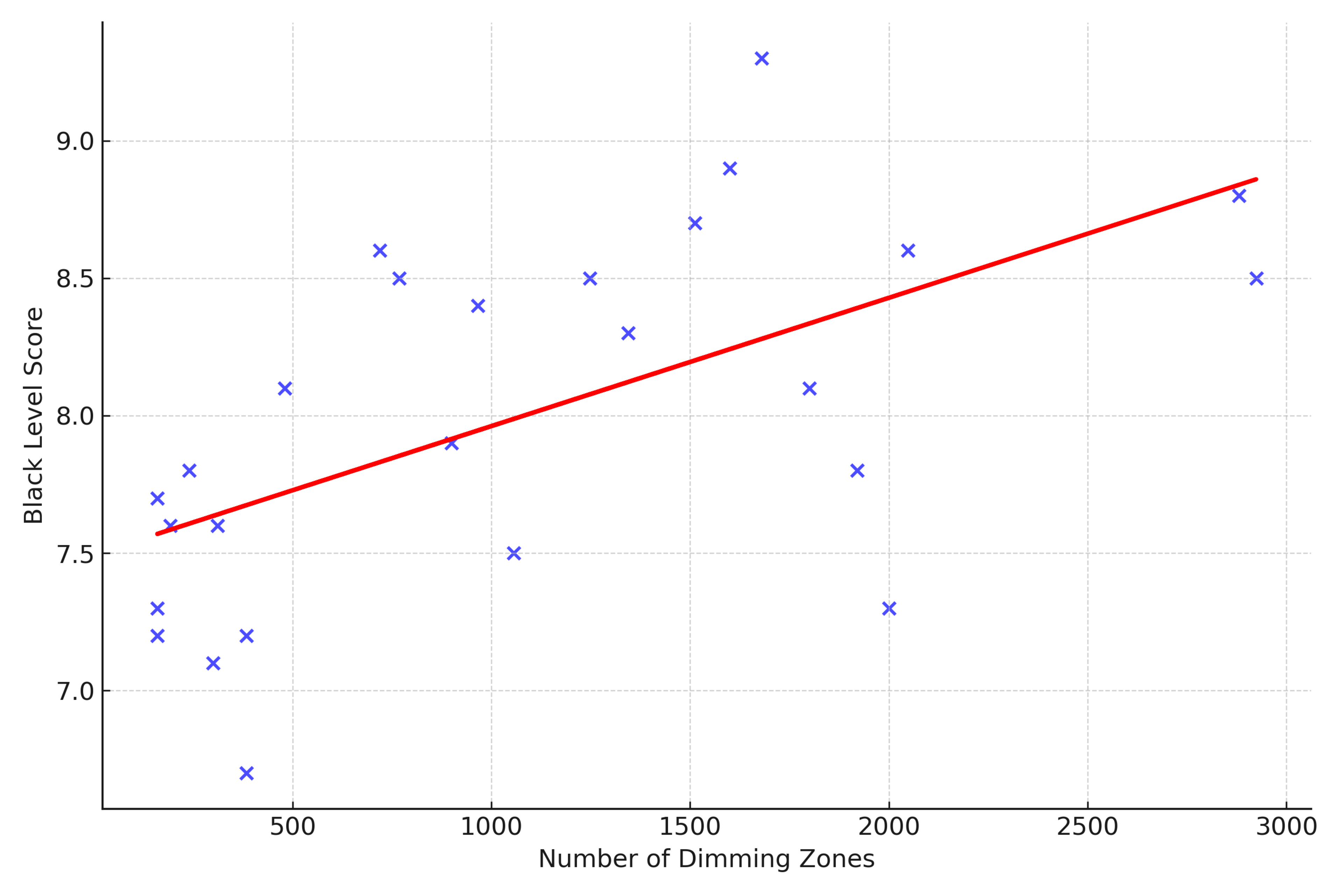
So now that we've covered the three main components of black levels, just how close to OLEDs have Mini LEDs come in terms of dark room performance? To answer that, we'll look at the relationship between the Black Level performance score and the number of dimming zones for the tested model.
The Black Level performance usage combines the three tests we've explored above into one easy-to-understand score. For comparison, all OLEDs score a perfect 10 for this test. The score is a weighted average, with the following weights:
- 50% Contrast
- 30% Black uniformity
- 20% Lighting zone precision
So what can we see in the above chart? First of all, there's definitely a clear trend; more dimming zones usually translate to a better black level score. It's very noisy, though, with very few TVs performing close to the trendline. This is further proof that you really can't look at zone count when determining how well a TV will perform in the dark. More zones help, but the algorithms that control them are far more important. Overall, although Mini LED is getting much closer to OLED in black level performance, it still has a way to go. There's still significant haloing around bright highlights or subtitles on many Mini LED models, but they are getting better.
Winner: OLED.
Performance
Most of us don't spend our time watching TV in a completely black room, so just how does everything else compare between OLED and Mini LEDs? Below we'll take a look at a few different performance metrics, including peak brightness, colors, and motion handling.
Brightness
 |
 |
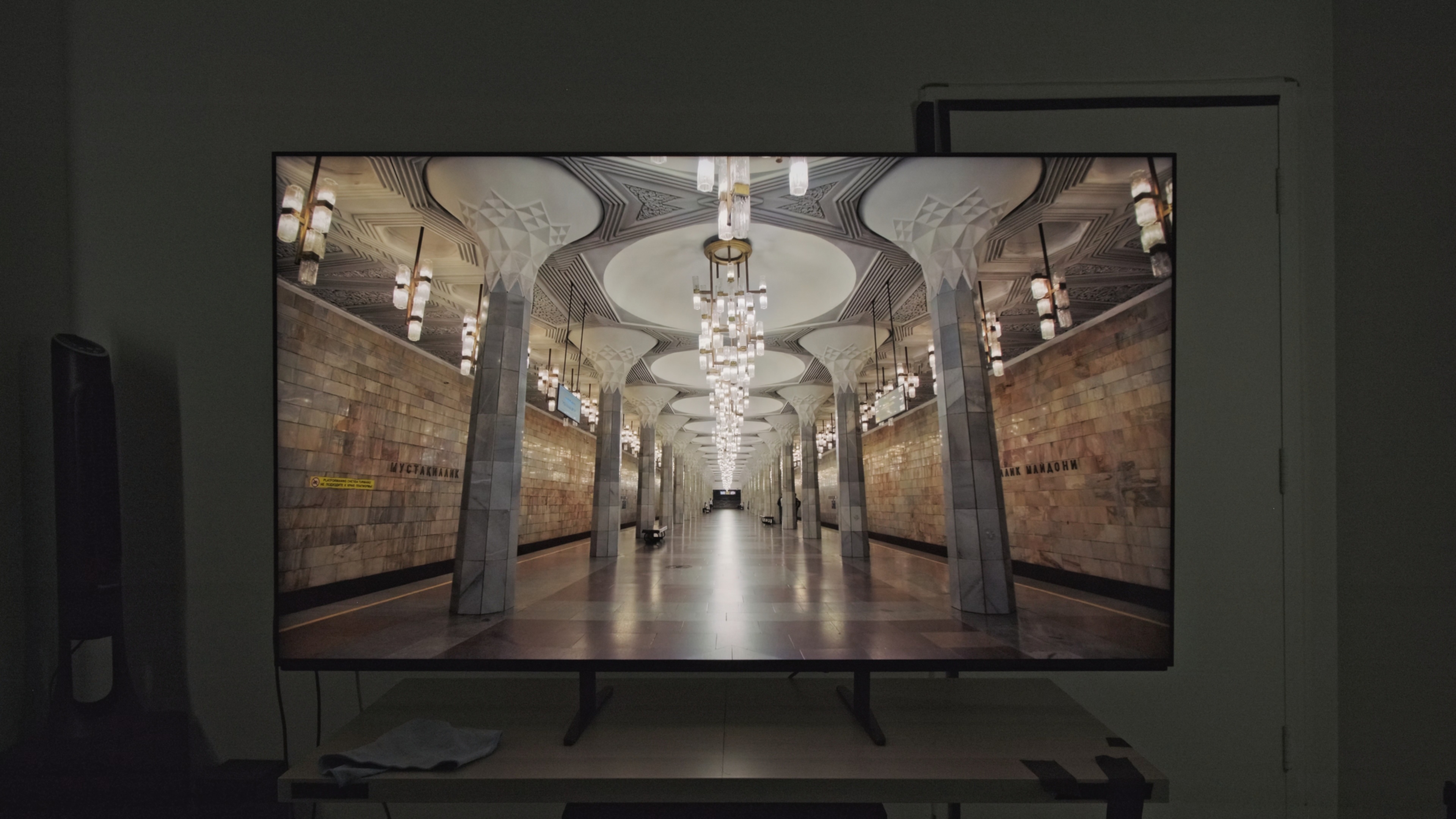
It's difficult to compare brightness between specific types of TVs, as the exact results tend to vary considerably between individual panels. Taking the hallway photo real scene test as an example, the LG is brighter than the Sony, but does this really indicate how these two TVs compare?
 |
 |
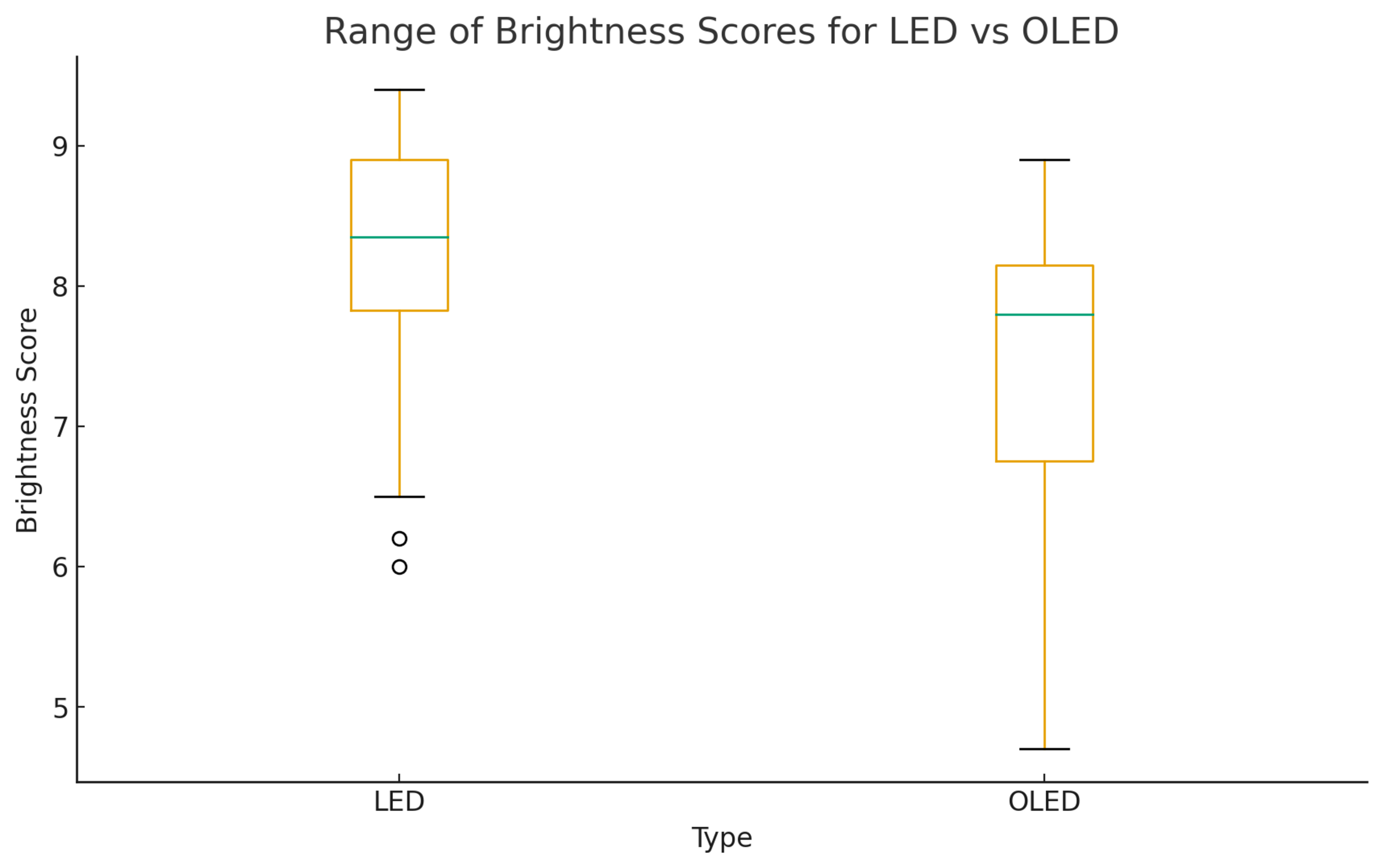
Let's take a look at a few charts to get a better idea of how these two technologies compare across the market in 2025. The first one shows the range of the overall Brightness score across the 45 Mini LEDs and OLEDs that we've tested on our latest 2.01 test methodology. This performance score takes the average score of the HDR and SDR brightness tests, so it gives a good overall view of how bright a TV can get. Looking at that chart, you can see that LEDs are, on average, brighter than the average OLED. The spread is also narrower than with OLEDs. All of this suggests that if you care about peak brightness, LED is usually the way to go.
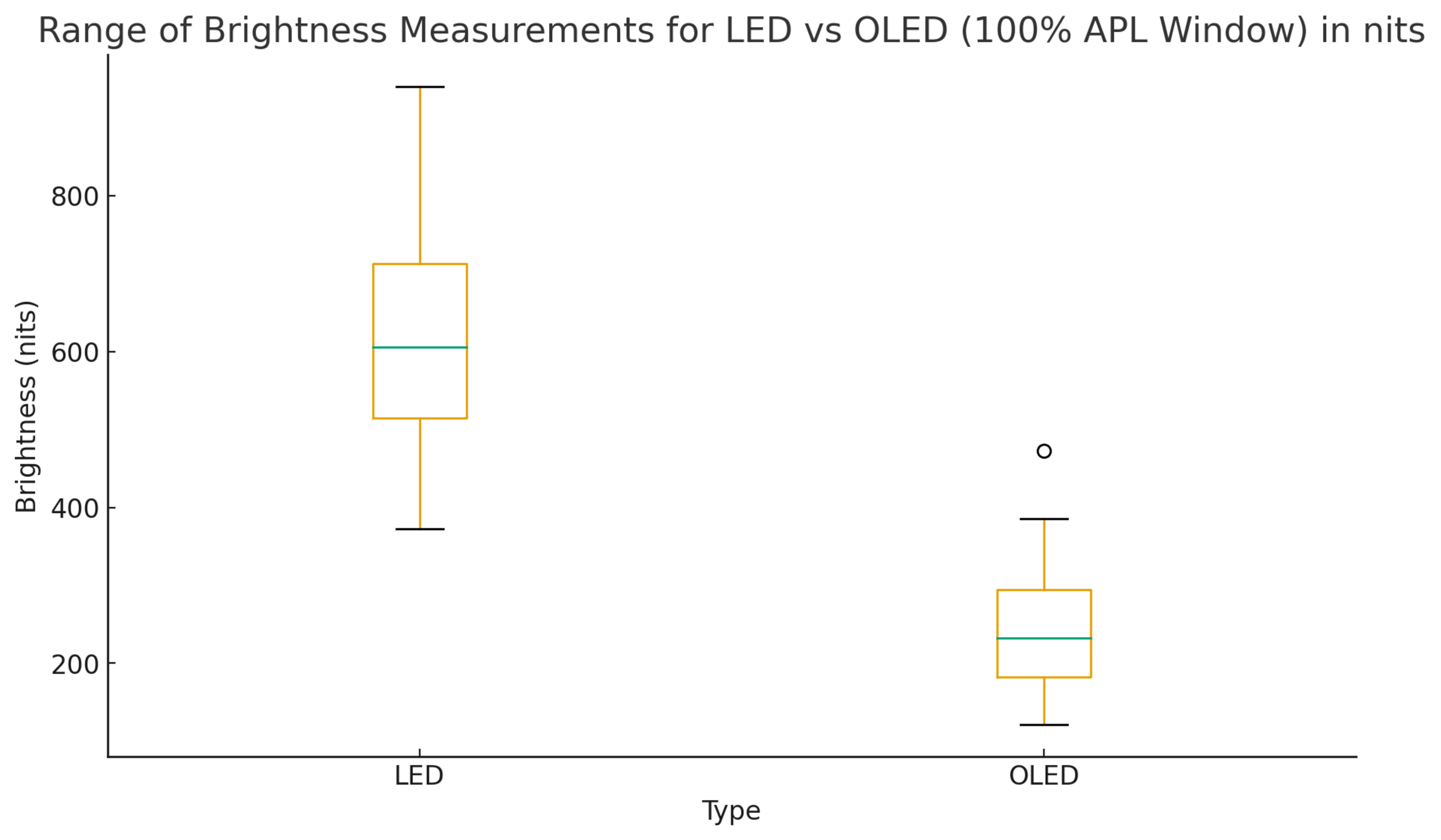
The second chart shows the range of brightness measurements for each TV tech, but this time it only looks at the peak brightness of a 100% slide. This represents the absolute brightest content you'll find, like sports, and this is one area where OLEDs have fallen short historically. As you can see, there's really no contest here, even the dimmest Mini LED we've tested is brighter than the vast majority of OLEDs out there.
Winner: LED
Colors
 |
 |
 |
 |
 |
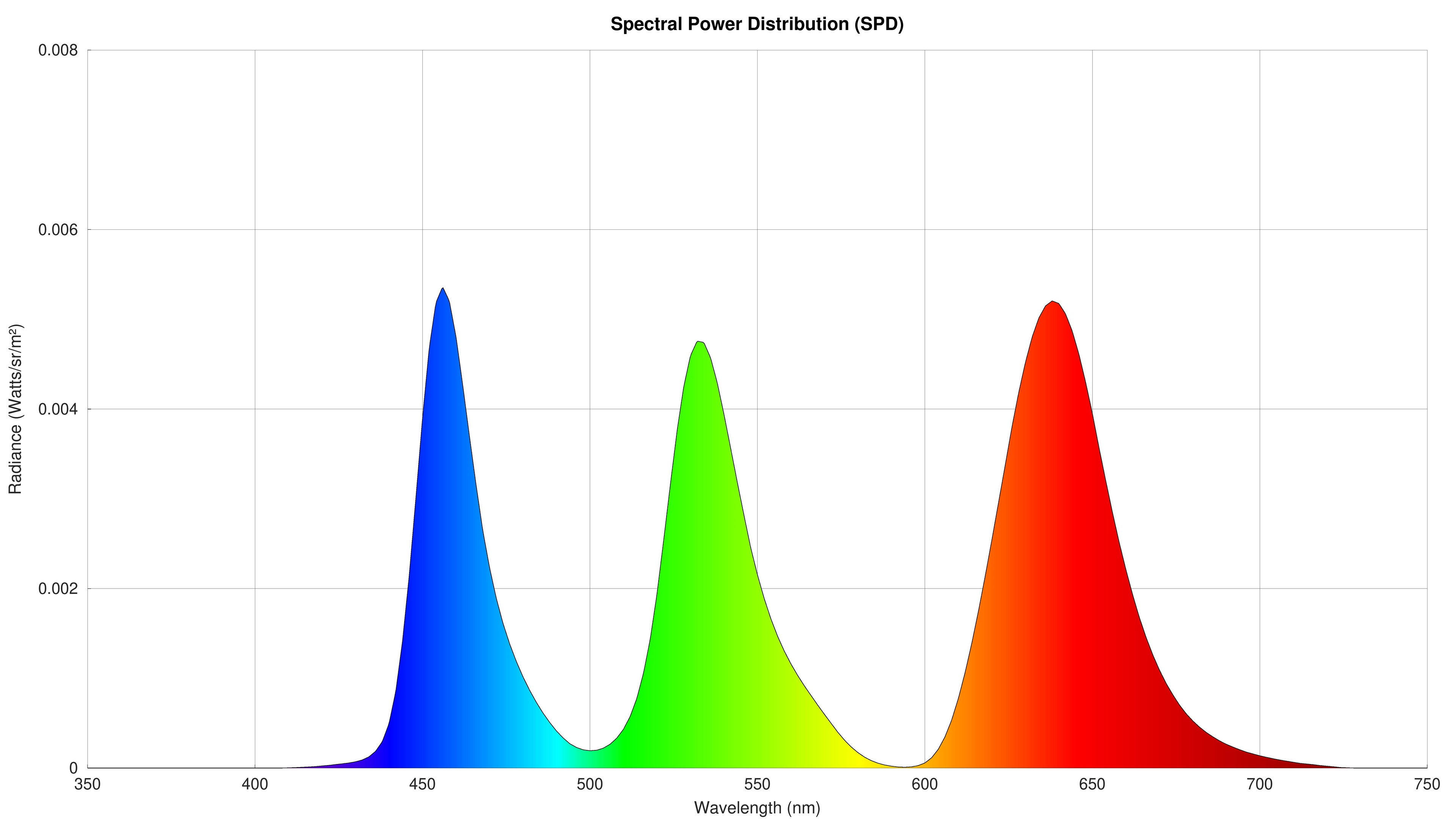 |
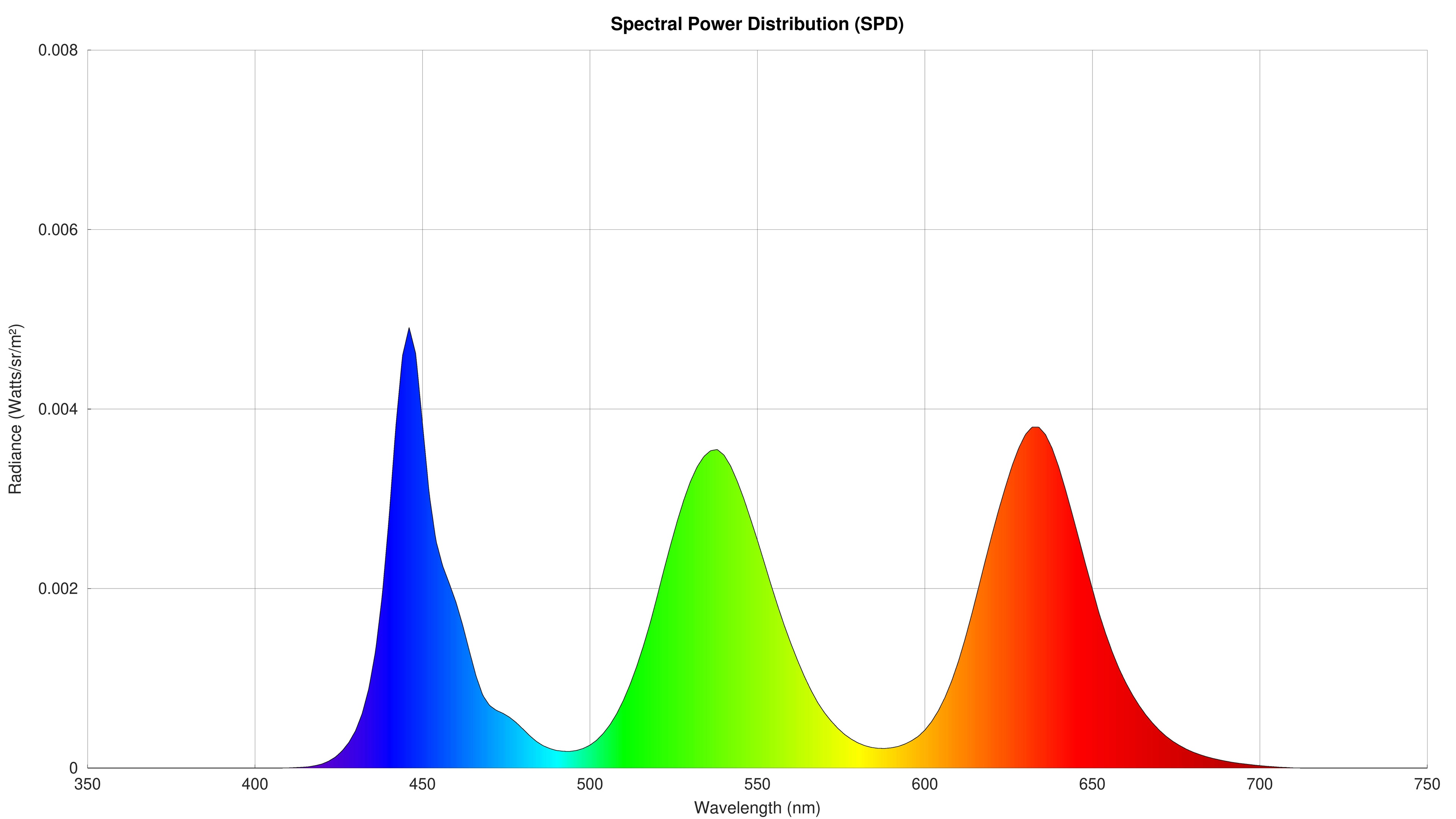
Let's take a look at colors now. Since WOLEDs and QD-OLEDs use very different methods to produce colors, we're going to make it a three-way comparison between a Mini LED (Sony BRAVIA 9), WOLED (LG G5 OLED), and QD-OLED (Samsung S95F OLED). One way we can consider color is to look at the spectral power distribution chart above. The QD-OLED and the Mini LED are very similar because they actually use very similar technology to produce colors. Most Mini LEDs use a blue backlight with quantum dot color converters to produce green and red light. QD-OLEDs work in a very similar way, but instead of using a blue backlight, they use a stack of OLED emitters that produce blue light. WOLEDs, on the other hand, start with a white emitter stack that then passes through three color filters.
As you can see, this difference in the way they produce light results in a very different spectral power distribution. Mini LEDs and QD-OLEDs produce very pure primary colors; this means that when the TV is supposed to display a very saturated green, for example, you're only seeing green. There's a lot more noise on the WOLED, so greens aren't quite pure green.
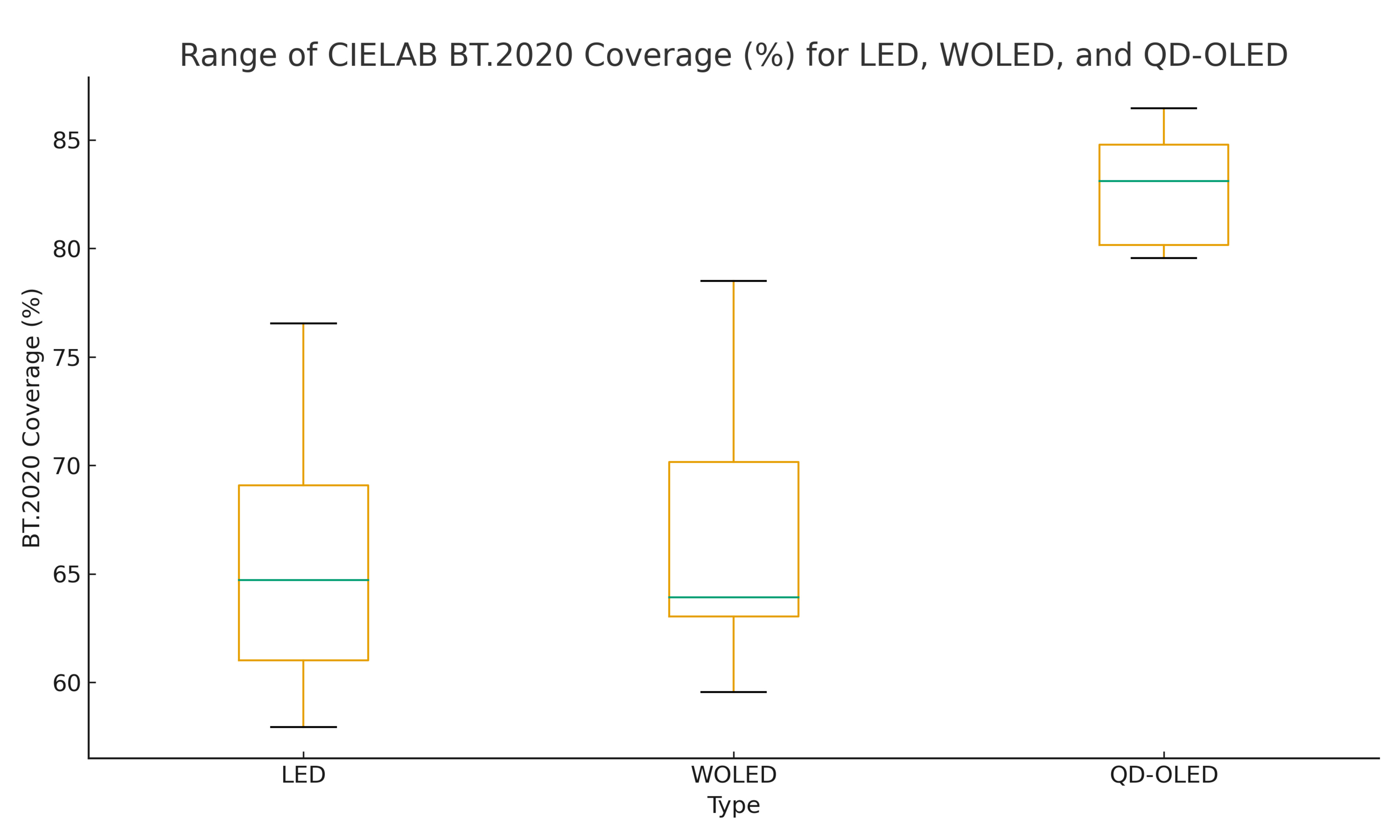
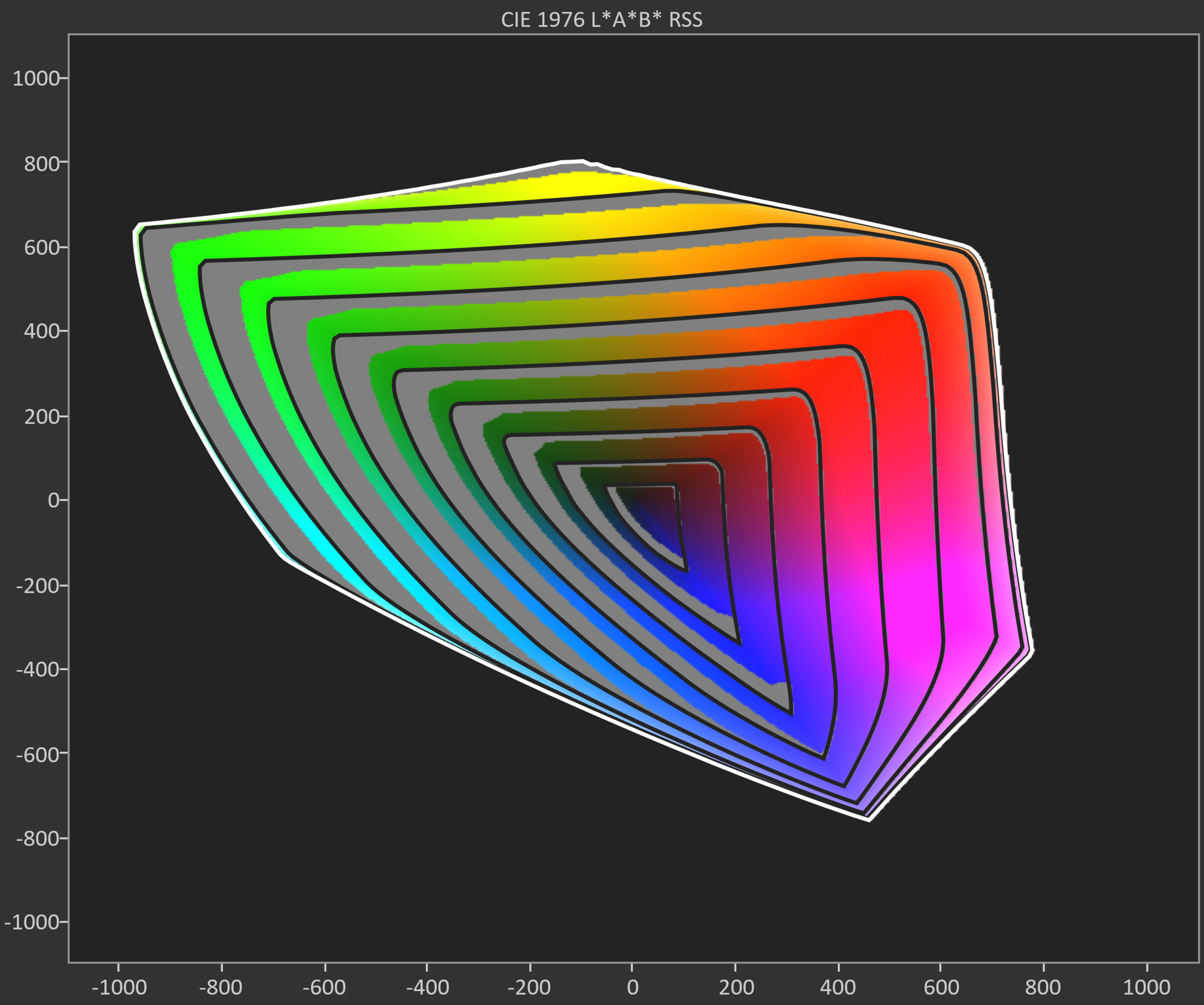
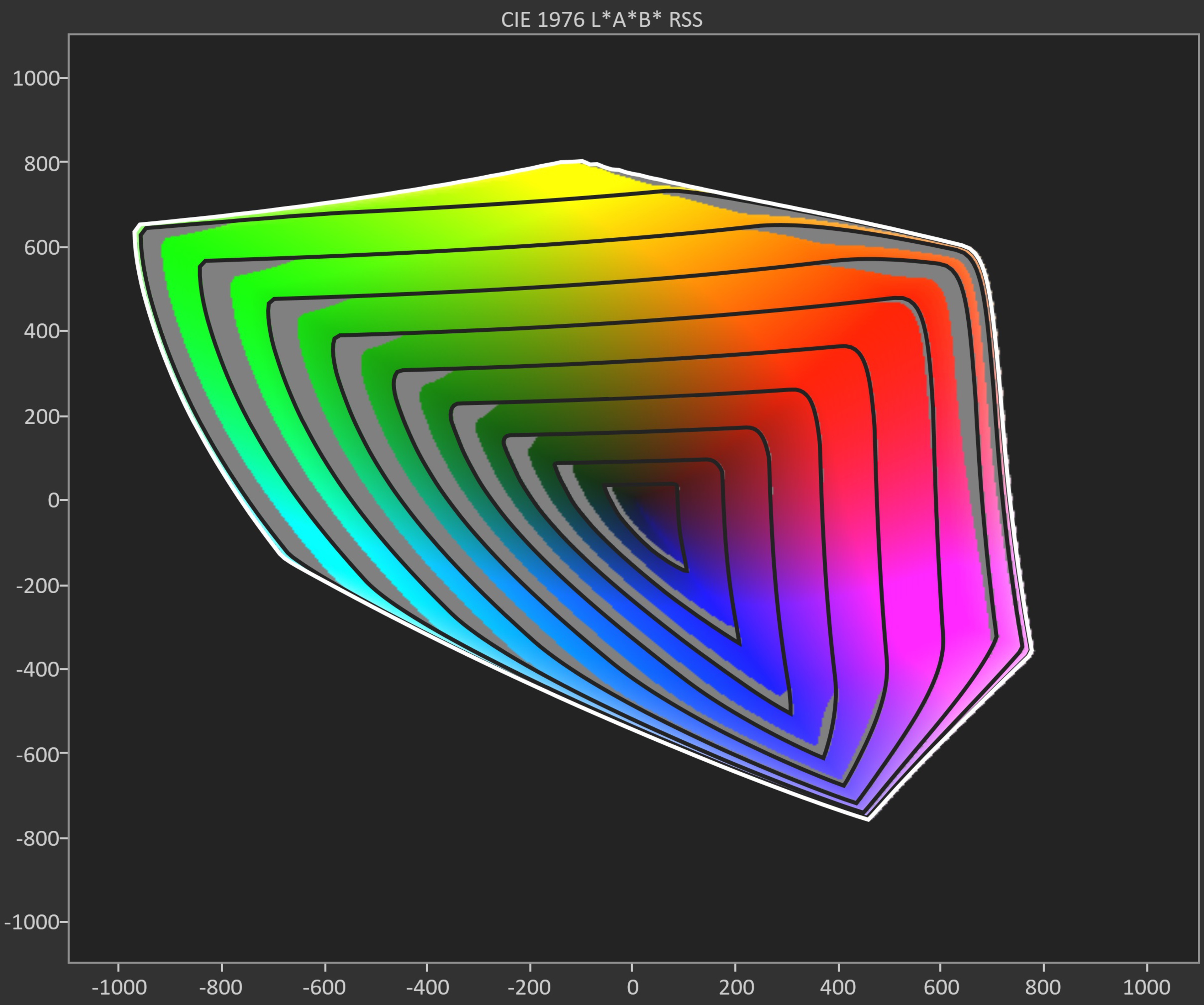
But how does this translate to real-world color coverage? To answer that, we'll look at the BT.2020 color volume coverage of all three. Looking at the spread across all three display types, it's extremely obvious that the QD-OLED is significantly better. The WOLED and LED are fairly evenly matched, with LEDs coming in slightly higher on average but also with a lower low-end. This is because there's a lot more variety in Mini LED TVs. Most of them use some form of quantum dot, but not all quantum dots are created equally. Some TVs also use a combination of quantum dot emitters to generate green light with a KSF phosphor to generate red light. This is more typical with mid-range models across all brands.
Winner: QD-OLED
Viewing Angle
 |
 |
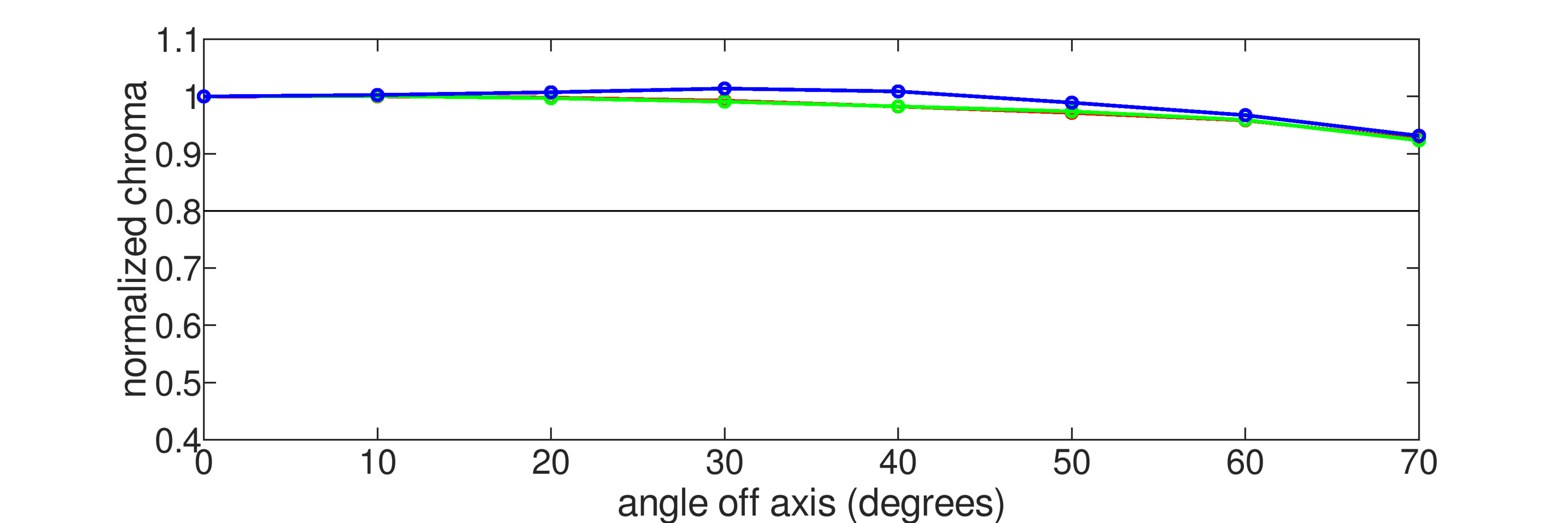 |
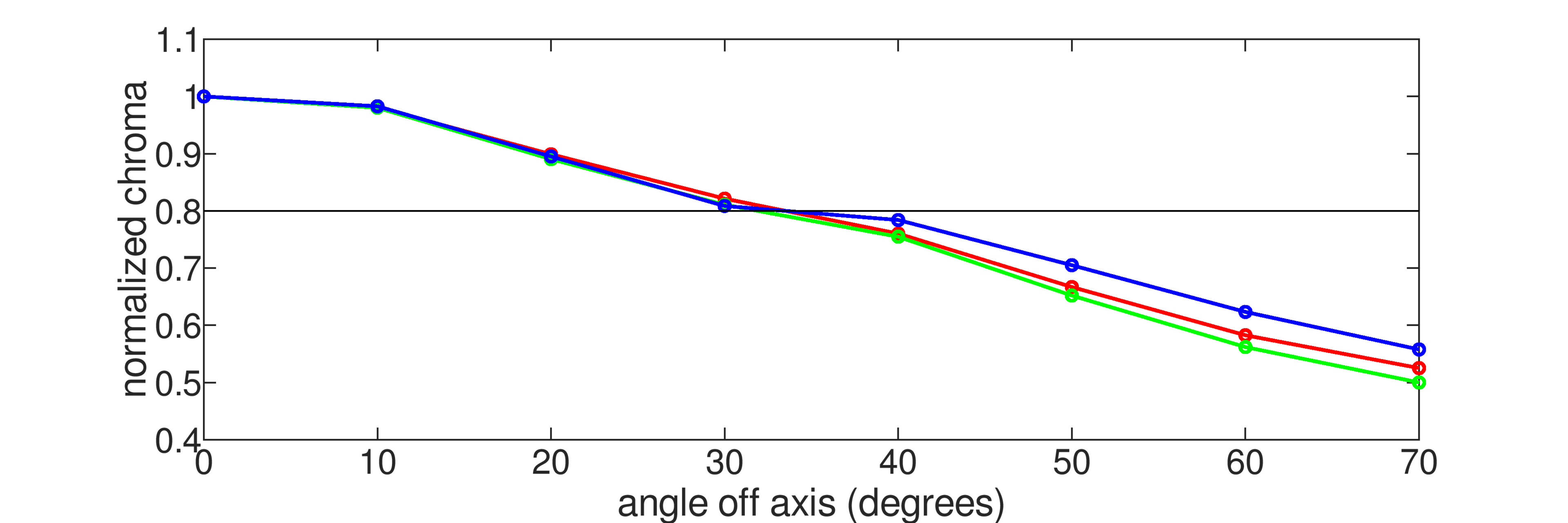
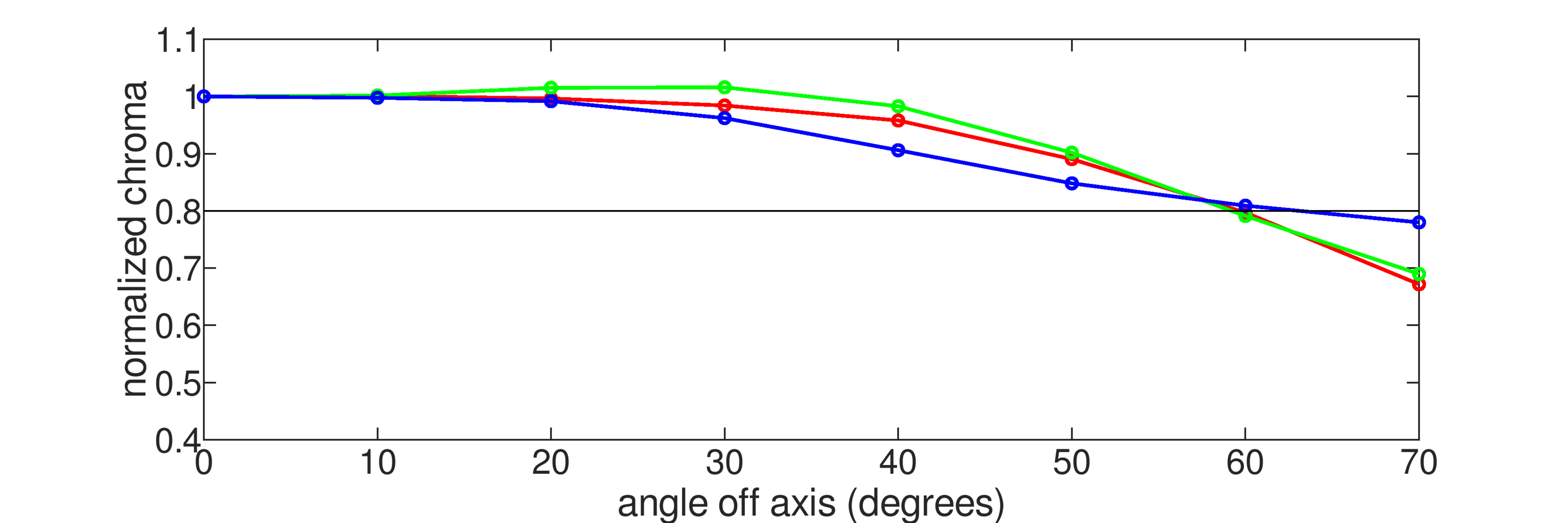
The viewing angle test shows us how well the image remains consistent when viewed at an angle, and it's important if you have a wide seating arrangement or like to move around the room while the TV is on. This is one area where OLEDs are far superior to Mini LEDs, and it's unlikely to change anytime soon. As you can see in the above chroma graph, the Sony starts to degrade at a fairly moderate angle. The LG G5 remains accurate well past that point, only appearing washed out at nearly twice the angle. Just like Colors above, though, as good as traditional WOLEDs are, QD-OLEDs are even better, and as you can see, the Samsung never even crosses the threshold. Now, even for the G5, it degrades at such a wide angle that most people would never sit that far and still try to watch the TV, so it doesn't really matter, but QD-OLEDs are technically the best.
The viewing angle of a display tech is largely due to the structure of the panel itself, so there's really not much that manufacturers can do to improve it, but that hasn't stopped them from trying. Some Mini LEDs employ wide viewing angle filters, which slightly improve the viewing angle, but this usually comes at the expense of contrast. Newer panel technologies, like TCL CSOT's WHVA panel, first seen on the TCL QM8K, aim to improve viewing angles without impacting contrast.
Winner: OLED (and especially QD-OLED)
Uniformity
 |
 |
Earlier in this comparison, we considered the black uniformity of OLED vs Mini LED, but now let's look at how well these TVs can display a uniform color that isn't black. The uniformity of any given TV tends to vary between individual units due to manufacturer tolerances, and it can even change over time, but again, OLEDs come out on top. As you can see, the BRAVIA 9 has a patchier appearance, with bright and dark spots spread randomly throughout the screen. This is mostly noticeable when watching sports, but if the uniformity is bad enough, you'll see it with any content.
Winner: OLED
Response Time
 |
 |
 |
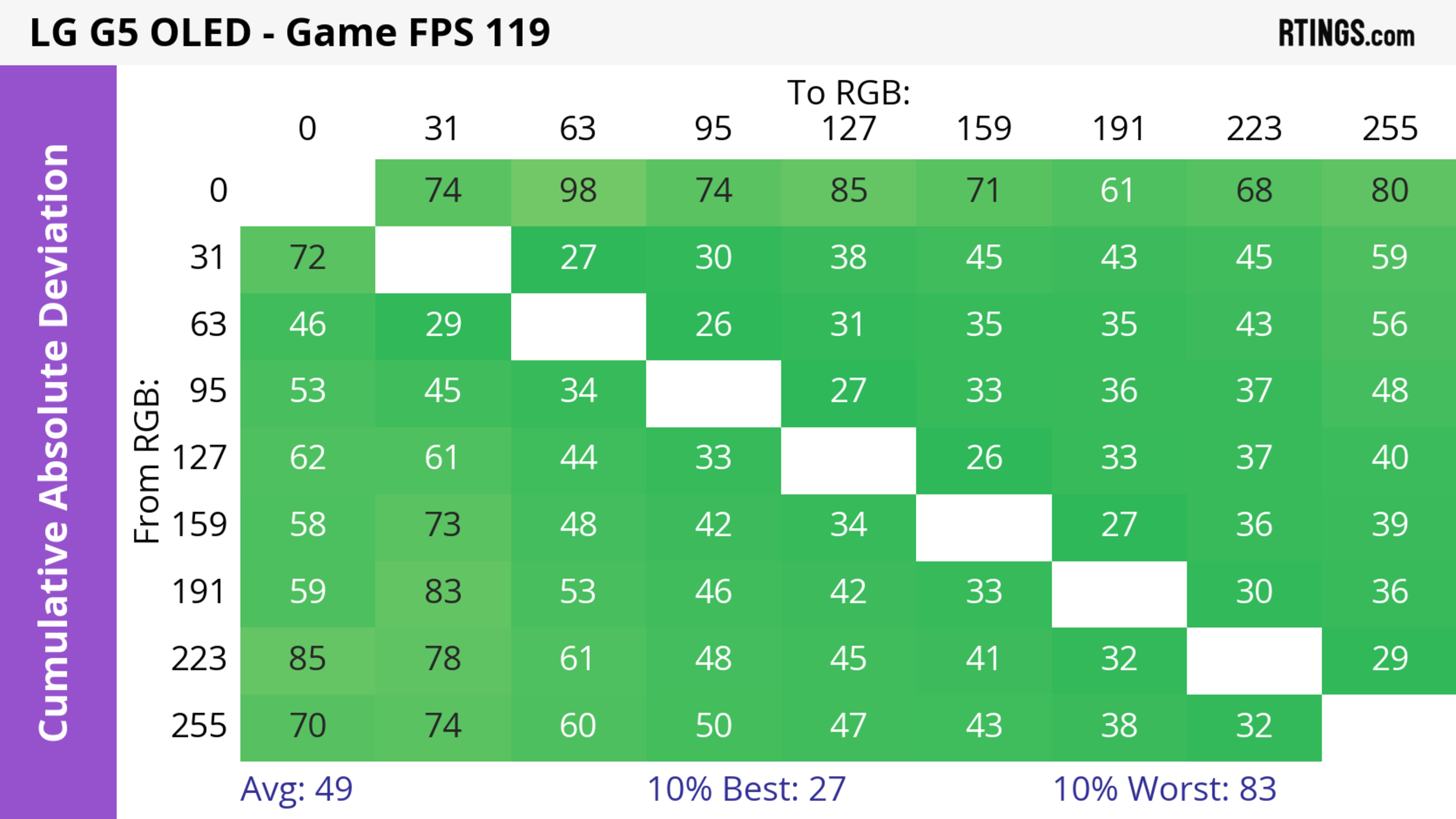 |
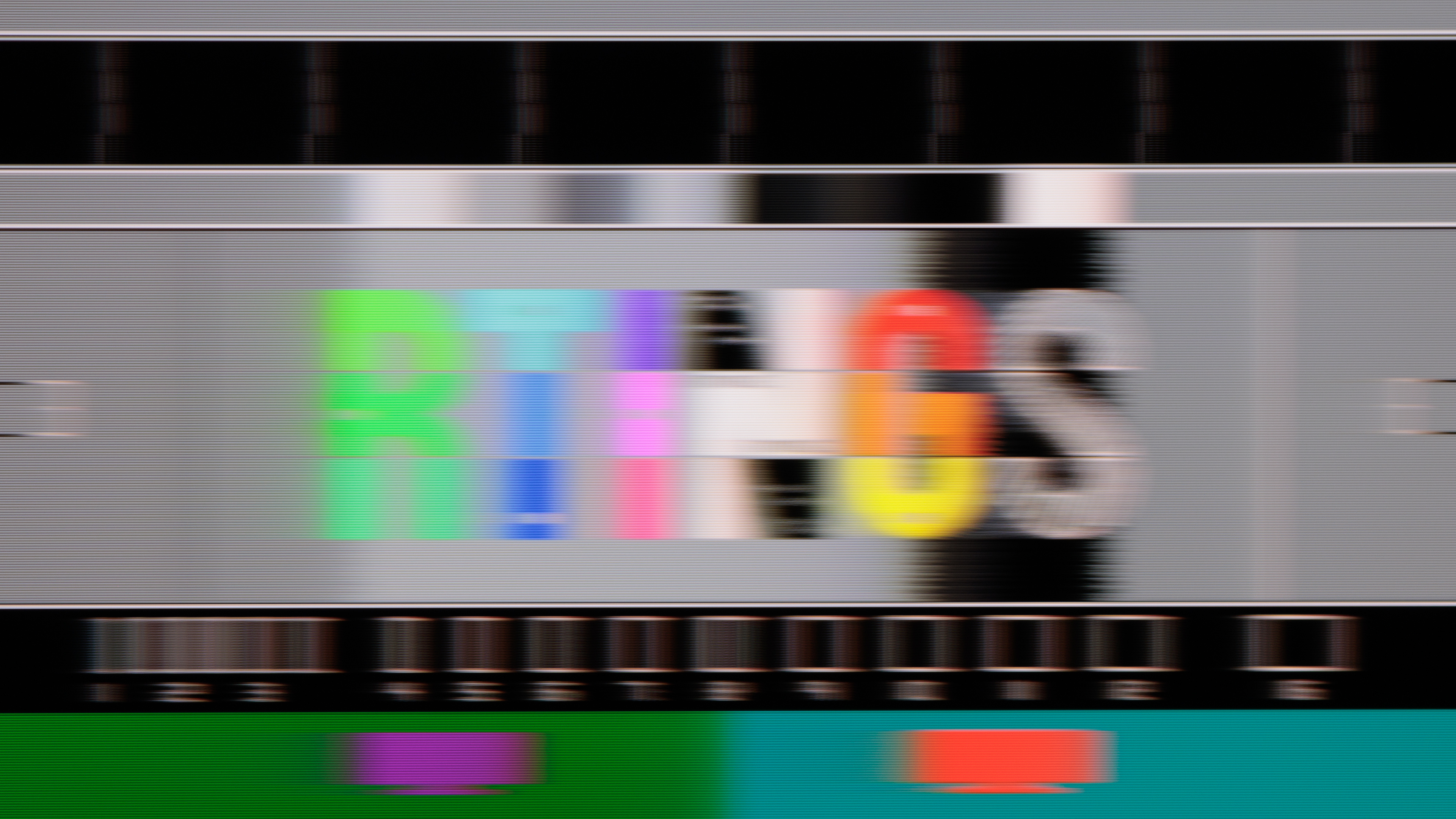
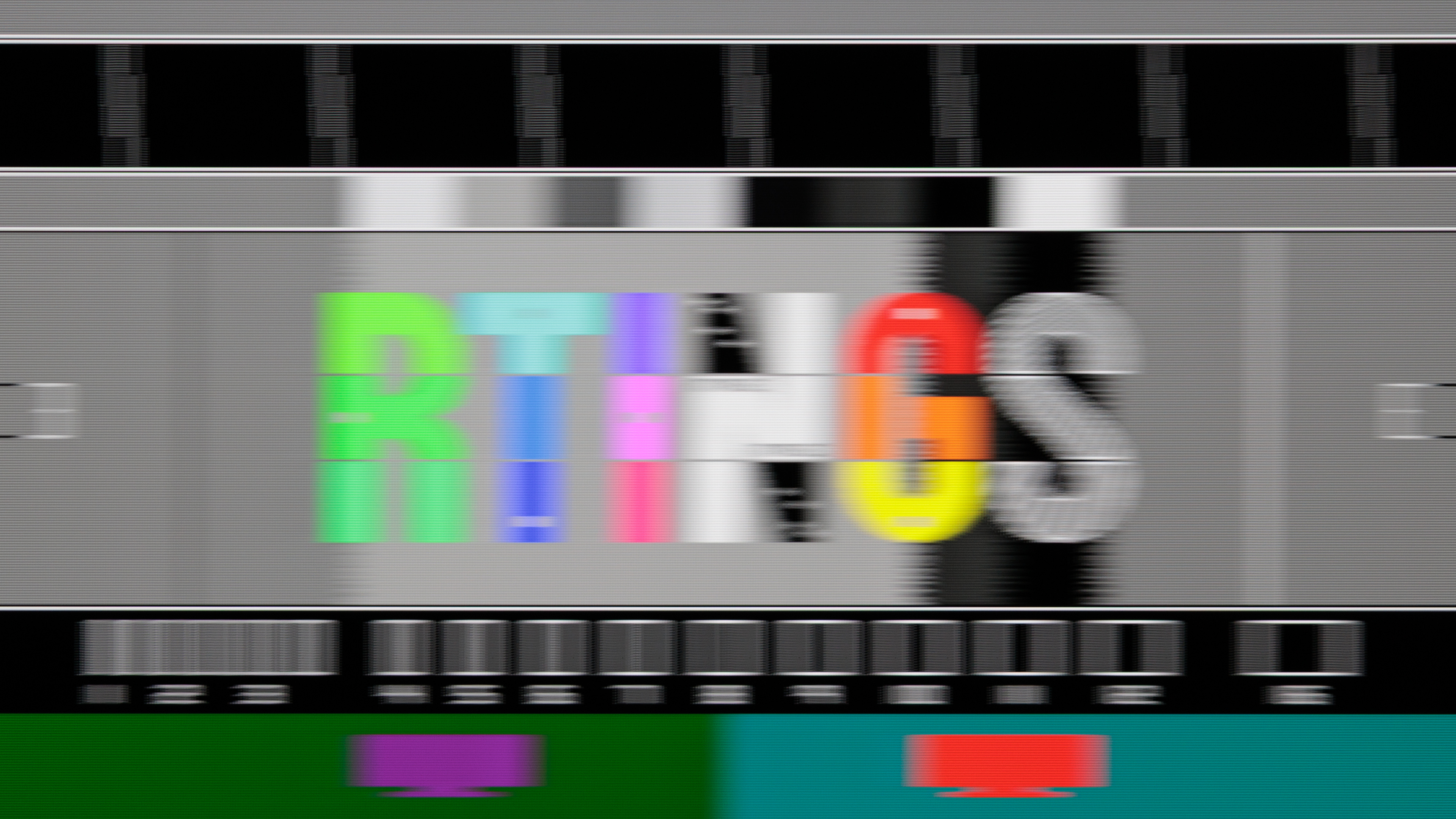
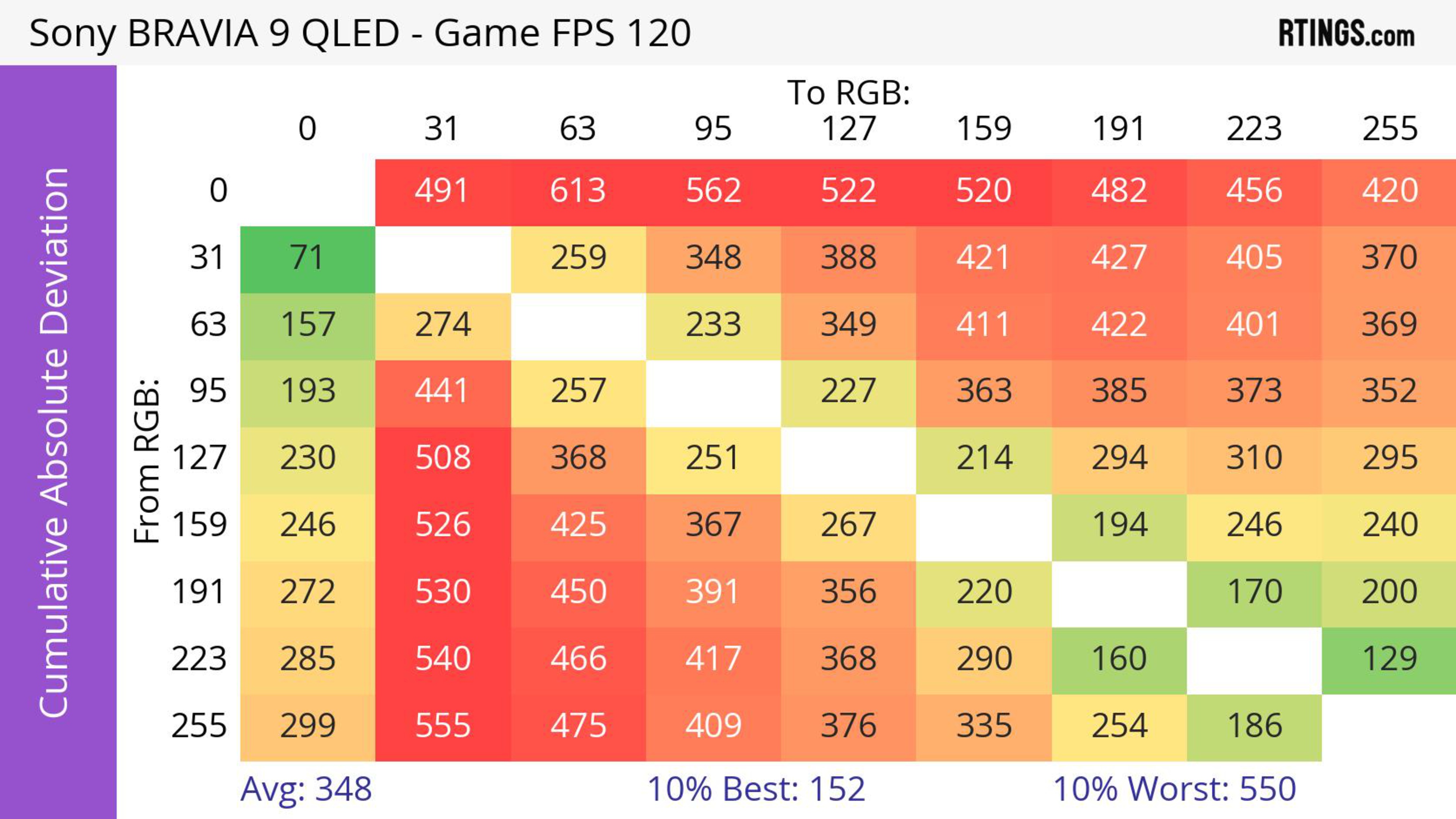
All OLEDs, regardless of type, can transition nearly instantaneously from one shade to the next. This has a direct impact on the appearance of motion, especially when gaming at 120Hz or higher. Take the examples above, you can clearly see the difference in the pursuit photo, where the Sony looks good, but it's considerably blurrier than the LG. The heatmap makes it even more obvious, and you can clearly see just how much faster OLEDs are than any Mini LED. The BRAVIA 9 is far from being the fastest Mini LED panel we've tested; in fact, it's one of the worst, but even the best one on the market falls far short of even the slowest OLED. This also goes to show that higher-end Mini LEDs don't necessarily perform better across the board.
Winner: OLED
Longevity
 |
 |
It wouldn't be an article on WOLEDs if we didn't discuss the dreaded 'B' word: burn-in. Our extensive testing with the accelerated longevity test and the real-life burn-in test has shown that when exposed to the same static elements for extended periods, all OLEDs will eventually experience burn-in, but it could take years for many users. That said, you probably won't have any issues if you watch varied content and aren't always glued to the same cable news network.
Mini LEDs aren't immune to failures, though. While they don't experience burn-in, the LEDs that make up the backlight can fade over time, resulting in a decrease in peak brightness. They can also develop uniformity issues, like the Hisense U8H above, as the panel stack can degrade over time.
Winner: Tie
Cost and Selection
One of the problems with trying to analyze the cost and availability of these two competing technologies is that there's no clear definition of what should be considered a "Mini LED." If we only look at how TVs are marketed, then there's a huge selection of Mini LED TVs available, covering an extremely wide range of price points and sizes, so there's something for everyone. Performance varies wildly, though, and you usually get what you pay for. If we set an arbitrary performance threshold, though, looking only at TVs that can compete against OLEDs in a dark room, then true Mini LED TVs tend to be on the pricier side.
OLEDs also vary in price, but they tend to start a bit higher. You won't find a sub-$500 OLED at your local big box store on a Black Friday sale. OLEDs are also a bit more limited in size. The best performing models are usually only available in 55"-83" models, and for QD-OLEDs, they stop at 77". Mini LEDs, on the other hand, are available in an incredibly wide range of sizes and price points, and you can find something for any price point and any room.
Conclusion
So which one is better? As far as dark room performance goes, OLEDs are still the undisputed kings, and this is especially true when you're comparing them with mid-range and budget Mini LEDs. Black levels aren't everything, though, and Mini LEDs still tend to be the best choice for bright room viewing most of the time.