AUKEY KM-G9  Keyboard Review

Reviewed Mar 13, 2020 at 08:16am
Tested using Methodology v1.0 
AUKEY KM-G9
6.2
Gaming 
3.8
Mobile/Tablet 
7.0
Office 
5.9
Programming 
3.0
Entertainment / HTPC 
 0
The AUKEY KM-G9 is an entry-level TKL mechanical keyboard that's surprisingly well-built for its price point. It features mechanical Outemu Blue clicky switches, which have good tactile and audible feedback, but the noise might be too much for some. It's very similar to the Redragon K552-RGB in design, but it lacks RGB backlighting. Unfortunately, the AUKEY lacks software for customization options and can't have programmed macros, but on the upside, it's a decent option if you're looking for a straightforward mechanical keyboard.

Our Verdict

6.2
Gaming 

The AUKEY KM-G9 is sub-par for gaming as it lacks the ability to create macros and doesn't have compatible software. Also, it doesn't have any backlighting, which might impact people who play games in a dark room or later at night.

Pros
  • Very well-built design.
  • Decent typing quality.
Cons
  • No software for customization.
  • No backlighting.
3.8
Mobile/Tablet 

The AUKEY KM-G9 is a wired-only keyboard that isn't designed to work with mobile devices and tablets.

7.0
Office 

The AUKEY KM-G9 is passable for the office. It's sturdy and well-built, but its ergonomics aren't the best as it lacks a wrist rest. Also, with clicky switches, it might be a bit loud to use in an open area with coworkers surrounding you.

Pros
  • Very well-built design.
  • Decent typing quality.
Cons
  • No software for customization.
  • No backlighting.
5.9
Programming 

The AUKEY KM-G9 is sub-par for programming. Its ergonomics are just okay and it might not be the most comfortable keyboard to type on for hours. Also, you can't set macros or connect it to multiple devices.

Pros
  • Very well-built design.
  • Decent typing quality.
Cons
  • No software for customization.
  • No backlighting.
3.0
Entertainment / HTPC 

Pros
  • Very well-built design.
  • Decent typing quality.
Cons
  • No software for customization.
  • No backlighting.
  • 6.2
    Gaming
  • 3.8
    Mobile/Tablet
  • 7.0
    Office
  • 5.9
    Programming
  • 3.0
    Entertainment / HTPC
  • Changelog

    1.  Updated Jan 13, 2023: We've simplified the name of this keyboard from the AUKEY KM-G9 Mechanical Keyboard to the AUKEY KM-G9.
    2.  Updated Oct 25, 2021: Converted to Test Bench 1.0.
    3.  Updated Mar 13, 2020: Review published.
    4.  Updated Mar 10, 2020: Early access published.

    Check Price

    Black KM-G9
    Amazon.com
    Black KM-G9
    B&H
    Black KM-G9
    BestBuy.com
    Black KM-G9
    Walmart.com

    Popular Keyboard Comparisons

    The AUKEY KM-G9 is very affordable for a mechanical board, but it comes at the expense of some features you would find on higher-end products. It lacks backlighting, customization software, and the ability to set macros. This TKL keyboard is better suited for people on a budget looking to see if they like the feel of mechanical switches. See our recommendations for the best mechanical keyboards, the best wireless keyboards, and the best keyboards.

    SteelSeries Apex 3

    The AUKEY KM-G9 is pretty different than the SteelSeries Apex 3. While both keyboards are very affordable, you have to choose between the mechanical clicky switches of the AUKEY or the RGB lighting and the rubber dome switches of the SteelSeries. Also, the SteelSeries is a full-size keyboard with a NumPad, and it comes with a nice wrist rest.

    Redragon K552 KUMARA RGB

    The Redragon K552 KUMARA RGB is almost identical to the AUKEY KM-G9, although it's slightly better as it features full RGB lighting, while the AUKEY doesn't have any backlight. Other than that, these two keyboards are pretty much the same.

    Ducky One 2 Mini V1

    The Ducky One 2 Mini V1 is a far better keyboard than the AUKEY KM-G9. It has full RGB lighting, all its keys are programmable, and it's better built. It also offers one of the best typing quality we've tested. On the other hand, the lack of dedicated arrow keys on the Ducky might be a deal-breaker for some, and the AUKEY has them.

    Obinslab Anne Pro 2

    The Obinslab Anne Pro 2 is a superior keyboard than the AUKEY KM-G9. It's available in a wider variety of switches, is better built, has full RGB lighting, and has customization options inside its software. The Obinslab can also be used wirelessly via Bluetooth and offers a better overall typing experience. On the other hand, people who have a need for dedicated navigation arrows might prefer the TKL layout of the AUKEY mechanical keyboard.

    Show more 

    Test Results

    perceptual testing image
    Sort:
    RATINGS
    Category:
    All
    Design
    Dimensions
    Size
    TenKeyLess (80%)
    Height
    1.3" (3.2 cm)
    Width14.1" (35.8 cm)
    Depth
    4.3" (11.0 cm)
    Depth With Wrist Rest
    N/A
    Weight
    1.76 lbs (0.800 kg)

    The AUKEY KM-G9 has a TKL design that's smaller than a typical full-sized board.

    8.0
    Build Quality
    Keycap MaterialABS

    This keyboard has a surprisingly well-built design for its price. This board is very similar to the Redragon K552-RGB. It's made from a mix of solid metal and plastic components. The board doesn't have any flex and the keys feel stable, although they're made from doubleshot ABS plastic.

    6.5
    Ergonomics
    Board Design
    Straight
    Minimum Incline
    Medium Incline
    N/A
    Maximum Incline
    Wrist RestNo

    The ergonomics of this board are pretty standard. It's a straight board that has only one incline setting. Although it's very similar to the Redragon K552-RGB in design, the feet on the AUKEY have a sharper angle, which some may prefer.

    0.0
    Backlighting
    BacklightingNo
    Color
    No Backlighting
    Individually Backlit Keys
    No
    Color Mixing
    No Backlighting
    Effects
    No
    Programmable
    No

    Unfortunately, this keyboard doesn't have any backlighting, although the keycaps are made in a way that light could shine through. If you want a keyboard with full RGB backlighting, consider the Keychron K8. If you want white backlighting, check out the Logitech K845.

    Cable & Connector
    ConnectivityWired
    Detachable
    No
    Length4.9 ft (1.5 m)
    Connector (Keyboard side)
    Not Detachable

    This keyboard is wired-only. The cable should be long enough to reach your desktop and it feels decently durable thanks to the rubberized coating.

    0.0
    Wireless Versatility
    Bluetooth
    No
    Bluetooth Multi-Device Pairing
    No
    Proprietary Receiver
    No
    Battery Type
    No Batteries

    Since this keyboard is wired-only, it can't be used wirelessly.

    Extra Features
    Media Keys
    Hot Keys
    Macro Programmable Keys
    No
    Trackpad / TrackballNo
    WheelNo
    USB Passthrough
    No
    NumpadNo
    Windows Key Lock
    Yes
    Lock IndicatorCaps & Scroll Lock

    Like most keyboards, the AUKEY KM-G9 has hotkeys for media controls and you can lock the Windows key by pressing Fn + F11. This will prevent your game from being accidentally minimized by hitting the Windows key.

    In The Box

    • AUKEY KM-G9
    • Keycap remover
    • User guide
    Typing Experience
    Keystrokes
    See details on graph tool
    Mechanical
    Yes
    Key Switches
    Outemu Blue
    Feel
    Clicky
    Operating Force
    59 gf
    Actuation Force
    44 gf
    Pre-Travel
    2.1 mm
    Total Travel
    4.0 mm

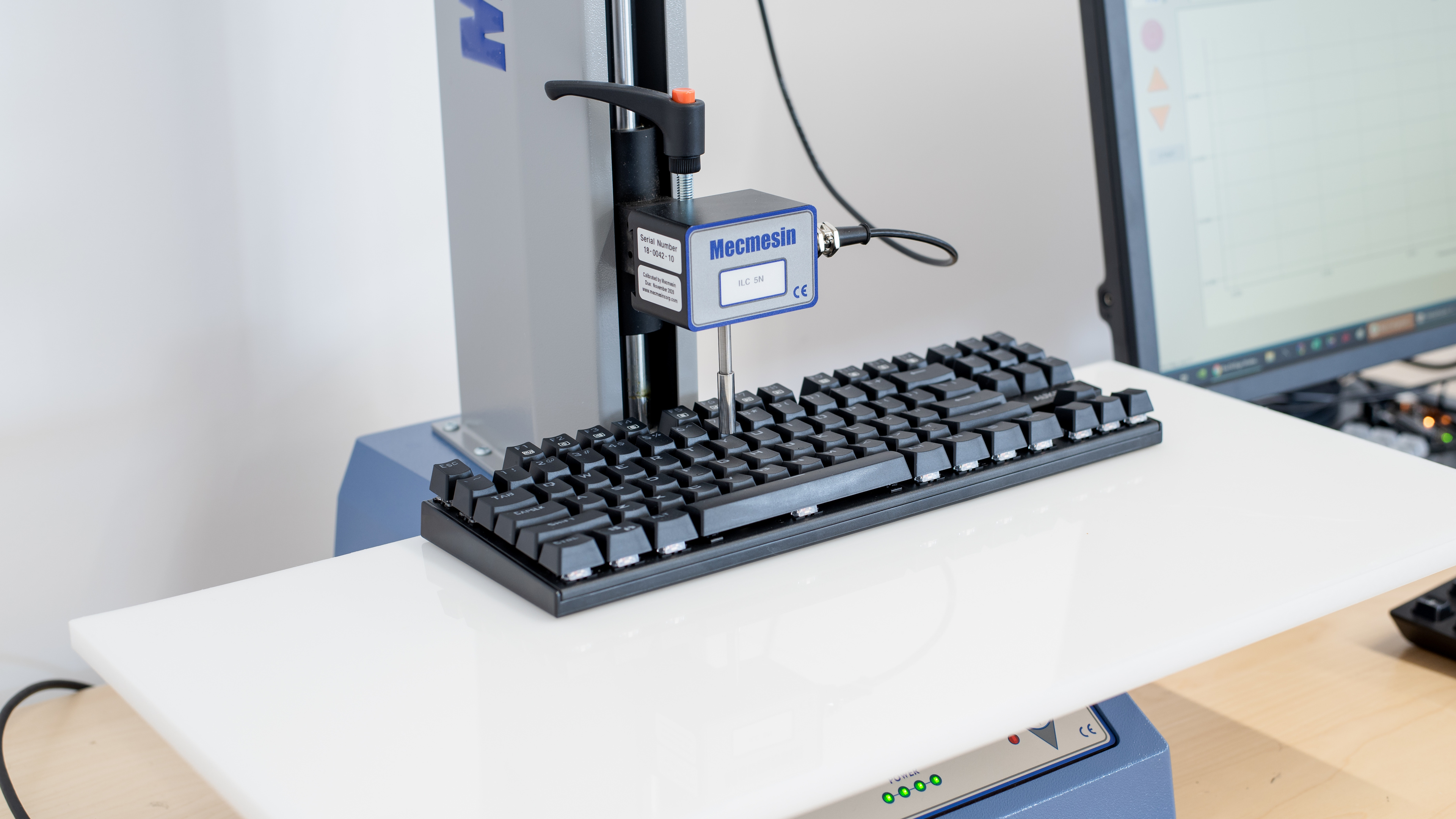
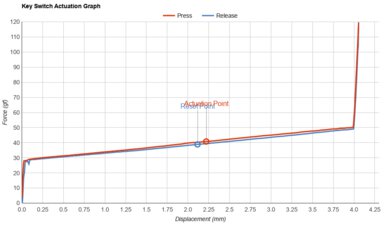
    This keyboard has Outemu Blue switches that are fairly similar to Cherry MX Blue switches. It has a very snappy feeling right before the actuation point, and just like most blue-like switches, they're very clicky and loud.

    7.0
    Typing Quality

    The typing quality offered by this board is decent. Some people may prefer the sharper angle of the keyboard feet, which might be a bit less fatiguing. The keys are fairly stable and the clickiness of the switches offer good tactile and audible feedback.

    Typing Noise
    Noise
    Loud

    Due to the clicky switches, typing on this keyboard is quite loud and won't be the best option for an open-office environment.

    7.1
    Latency
    Latency Wired
    14.0 ms
    Latency Receiver
    N/A
    Latency Bluetooth
    N/A
    Software and Operating System
    0.0
    Software & Programming
    Software NameNo Software
    Account Required
    No Software
    Profiles
    No Profile
    Onboard Memory
    No
    Cloud Sync
    No
    Macro Programming
    No
    Ease Of Use
    No Software
    Software Windows Compatible
    No
    Software macOS Compatible
    No

    This keyboard doesn't have any customization software available. If you prefer a more compact board with customization software, check out the Redragon Dragonborn K630 RGB.

    7.6
    Keyboard Compatibility
    WindowsFull
    macOSPartial
    LinuxFull
    AndroidNo
    iOSNo
    iPadOSNo

    This keyboard has great overall compatibility. All keys work on both Windows and Linux, and only the pause and scroll lock keys don't work on macOS.