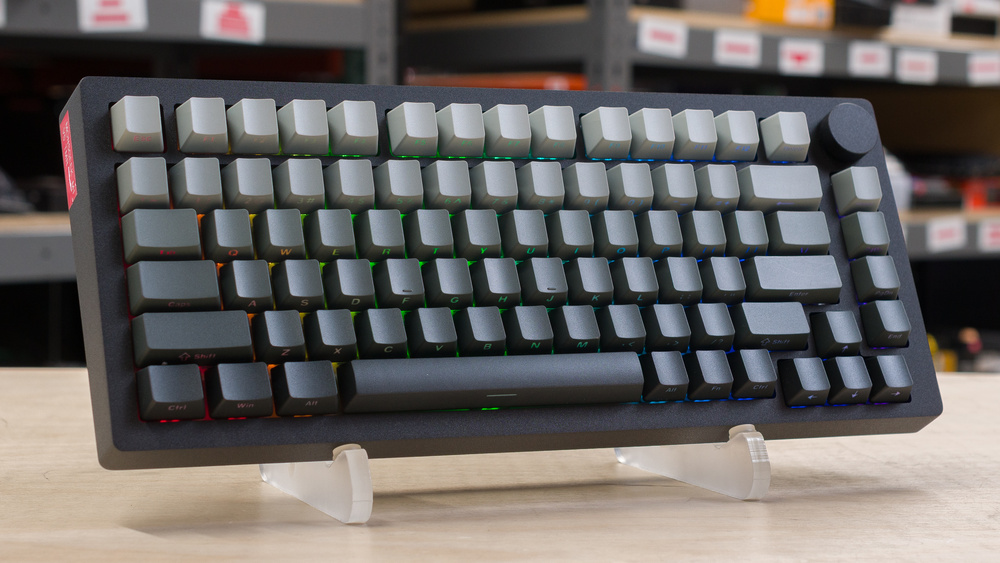
The MonsGeek M1 V5 TMR is a wireless gaming keyboard that uses magnetic switches and TMR sensors. In addition to being compatible with magnetic switches, its PCB has pinouts for 3- and 5-pin mechanical switches. It supports a 2.4GHz or Bluetooth connection, a 32kHz device-side scan rate, and an 8000Hz polling rate. The chassis is made of aluminum, and there are several layers of internal dampening and a gasket system that lends a slightly softer typing feel. The software is available as either a downloadable or web-based driver and supports advanced actuation features like Rapid Trigger and Mod Tap in addition to lighting battery settings, macros, and other customization options.
There are several variants of this keyboard available with minor differences between them. See the Differences Between Variants section for more details.
Our Verdict
The MonsGeek M1 V5 TMR is an outstanding gaming keyboard. It has exceptional raw performance, making it more than suitable for competitive gaming in any genre. It also has superb build quality, with a full aluminum case and a gasket mount that leans toward the stiffer side but still provides a bit of cushion to keystrokes. The software is a bit confusing to navigate, but very full-featured and available as either a web-based or downloadable client. In addition to per-key RGB adjustment, macros, and battery settings, it also supports expected advanced actuation options, including Rapid Trigger, SOCD, and Mod Tap.
Excellent build quality.
Outstanding raw performance.
Clunky, somewhat unintuitive software experience.
The MonsGeek M1 V5 isn't designed with office use as its main focus. That said, it has superb build quality, with a solid aluminum case, durable PBT keycaps, and pre-lubed switches and stabilizers. While the typing quality is good overall, it isn't great, especially for longer typing sessions. The gasket mount implementation is fairly stiff, and the typing noise is on the louder side, making it less appropriate for most shared or noise-sensitive workspaces. This keyboard also supports wireless connectivity via 2.4GHz or Bluetooth. Unfortunately, the three-position switch for selecting wired mode or 2.4GHz connectivity with either Windows or Mac compatibility layers is located under the Caps Lock keycap, which can make it awkward to switch between devices and connections on the fly.
Excellent build quality.
Tri-mode connectivity: wired, Bluetooth, and 2.4GHz receiver.
No advertised battery life estimates.
Clunky, somewhat unintuitive software experience.
Somewhat loud and stiff overall typing experience.
Connectivity switch is awkwardly located under the Caps Lock keycap.
The MonsGeek M1 V5 is passable for use with tablets or mobile devices, but its solid aluminum frame makes it quite heavy. It’s only a good candidate if you use your mobile devices at a fixed desktop setup rather than on the go. It also has superb build quality and flexible wireless connectivity options, though the three-position switch for selecting 2.4GHz connectivity with Windows or Mac compatibility layers is located under the Caps Lock keycap. This makes it less convenient if you frequently move between different devices or operating system environments.
Excellent build quality.
Tri-mode connectivity: wired, Bluetooth, and 2.4GHz receiver.
No advertised battery life estimates.
Very heavy.
Connectivity switch is awkwardly located under the Caps Lock keycap.
The MonsGeek M1 V5 is great for programming. It has superb build quality and a premium-feeling aluminum case. It also connects wirelessly via a 2.4GHz receiver or Bluetooth. Unfortunately, the three-position switch for selecting wired mode or 2.4GHz connectivity with either Windows or Mac compatibility layers is located under the Caps Lock keycap, making it awkward to access frequently as part of your workflow. Additionally, while the typing quality is good overall, it feels somewhat stiff despite its gasket mount and damping layers.
Excellent build quality.
Tri-mode connectivity: wired, Bluetooth, and 2.4GHz receiver.
No advertised battery life estimates.
Clunky, somewhat unintuitive software experience.
Somewhat loud and stiff overall typing experience.
Connectivity switch is awkwardly located under the Caps Lock keycap.
The MonsGeek M1 V5 is alright for an entertainment or home theater PC setup. Its main weaknesses are that its aluminum case makes it quite heavy and unwieldy to use from a couch, and it lacks dedicated media keys. That said, its keycaps have shine-through legends, making the keys easy to read in the dark.
Excellent build quality.
Tri-mode connectivity: wired, Bluetooth, and 2.4GHz receiver.
Clear shine-through legends on the front of keycaps.
No advertised battery life estimates.
Very heavy.
No dedicated media keys.
Connectivity switch is awkwardly located under the Caps Lock keycap.
The MonsGeek M1 V5 TMR delivers incredible raw performance. It has exceptionally low, consistent single-key and multi-key latency, making it ideal for competitive play. MonsGeek advertises a 32k device scan rate, meaning it checks for key state changes much more frequently than a typical 8000Hz keyboard. However, the real-world performance benefit is minimal, as the keyboard's 8000Hz polling rate still limits how often it can report those inputs to the host PC.
Exceptionally low and consistent single-key and multi-key latency.
Outstanding input granularity.
Supports a maximum polling rate of 8000Hz.
Check Price
Differences Between Sizes And Variants
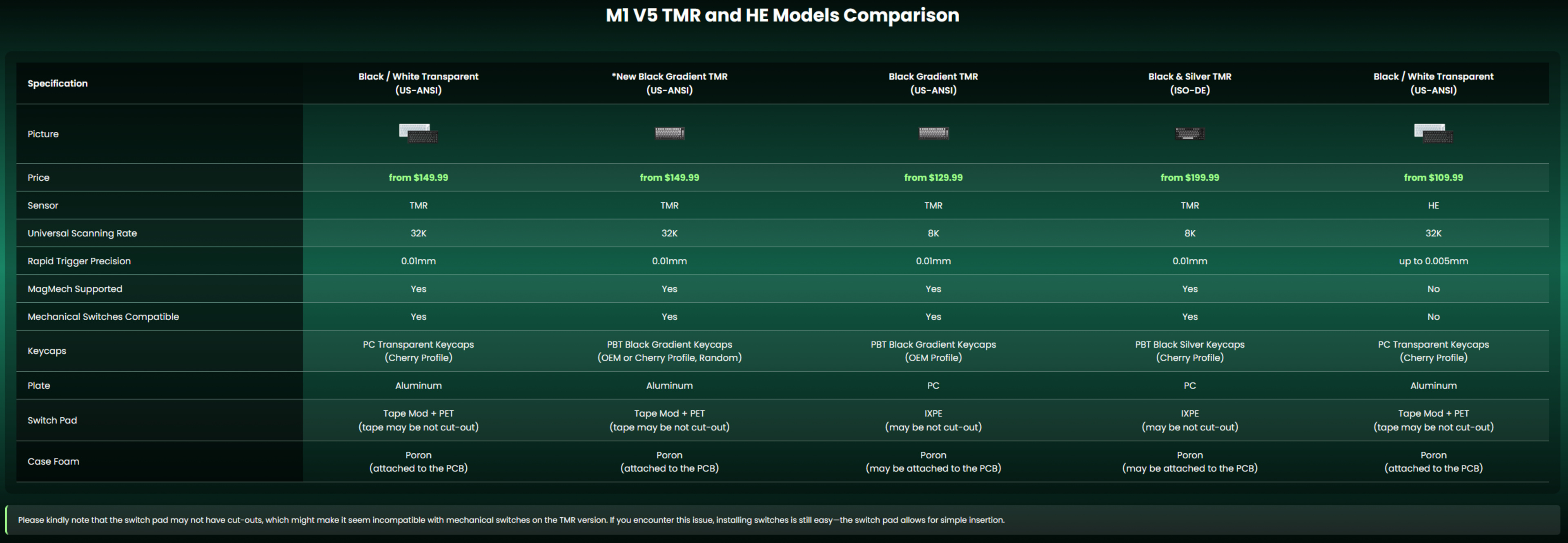
The MonsGeek M1 V5 TMR comes in several variants with minor differences, including maximum scan rate, available switch options, keycaps, plate material, and internal dampening materials. See this comparison table from MonsGeek's website with a breakdown of the differences between variants.
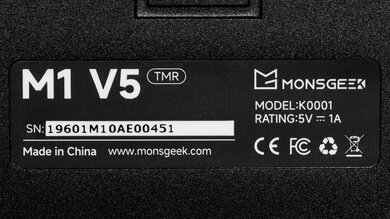
We bought the New Black Gradient TMR (US-ANSI) model, which comes with Akko AstroAim Magnetic switches. See an image of our unit's label.
We expect our review to be representative of all variants. However, models with different plate materials and dampening material combinations may have some sound profile differences, and 8k and 32k scan rate models will have very minor performance differences.
MonsGeek also sells a related MonsGeek M1 V5 HE model. The main difference is that it uses Hall effect sensors instead of TMR sensors. We expect it to perform similarly overall, with minor performance differences, though it may have worse battery performance. Its PCB also only supports magnetic switches, while the M1 V5 TMR supports both magnetic and mechanical switches.
Popular Keyboard Comparisons
The MonsGeek M1 V5 TMR is a wireless gaming keyboard with TMR sensors. Like Hall effect sensors, which have become very common in gaming keyboards, TMR sensors support adjustable actuation. Their purported advantages over Hall effect include better precision and power efficiency. Additionally, MonsGeek's "MagMech" PCB supports both magnetic and mechanical switches, giving you interesting customization options if you prefer certain keys to have mechanical switches.
This keyboard represents a very strong value for anyone looking for an extremely high-performing gaming keyboard with a selection of features typically found on higher-end options, including tri-mode wireless connectivity and a solid aluminum case. Its software is also flexible, with both downloadable and web-based versions, though it's comparatively clunkier and harder to navigate than the software ecosystems for more expensive options with similarly strong performance, like the Razer Huntsman V3 Pro 8KHz, Wooting 80HE, or NuPhy WH80. The other tradeoff is long-term support: MonsGeek has a relatively short one-year warranty and a less proven customer service record compared to more established brands like Razer and Wooting. By comparison, Razer offers a two-year warranty for keyboards, while Wooting offers a four-year warranty for the 80HE, with two years of coverage for LED components.
For more recommendations, see our picks for the best keyboards, the best gaming keyboards, and the best wireless keyboards.
The Wooting 80HE and the MonsGeek M1 V5 TMR are gaming keyboards with magnetic switches, and both deliver outstanding raw gaming performance aimed at competitive play. The Wooting is a wired-only model with a slightly larger, nonstandard TKL size. You can buy it with either a plastic or zinc case, and while both keyboards have fairly stiff gasket mount designs, the Wooting has slightly better typing quality overall, more user-friendly software, and a longer warranty period. The MonsGeek, on the other hand, is a wireless model only available with a solid aluminum case. Its most notable difference is that it uses TMR instead of Hall effect sensors, which allows its PCB to support both magnetic and mechanical switches.
The MonsGeek FUN60 Ultra and the MonsGeek M1 V5 TMR are similar wireless gaming keyboards that have magnetic switches and TMR sensors. The biggest difference is size: the FUN60 Ultra is a smaller 60% model, while the M1 V5 TMR is a larger 75% model. The M1 V5 TMR also supports a higher 32k device-side scan rate. This provides a small but measurable performance boost, but the difference isn't noticeable, and the real-world benefit is still limited by its 8000Hz USB polling rate.
The NuPhy WH80 and the MonsGeek M1 V5 TMR are high-end wireless gaming keyboards with magnetic switches and aluminum case designs. The NuPhy has a slightly larger TKL layout and better typing quality. It's also quieter. On the other hand, the MonsGeek has a slightly smaller 75% layout and uses TMR rather than Hall effect sensors, which makes its PCB compatible with both magnetic and mechanical switches. It also has slightly better overall raw performance, though not enough to be noticeable in-game.
The Razer Huntsman V3 Pro 8KHz and the MonsGeek M1 V5 TMR are gaming keyboards that perform exceptionally well and support adjustable actuation features aimed at competitive players. The Razer is a wired-only model with a slightly larger TKL layout that includes a full set of navigation keys and dedicated media keys. It uses optical analog switches and supports true analog output for emulating gradual gamepad controls. The MonsGeek is a wireless model with a slightly smaller compact 75% size and a more premium-feeling solid aluminum case. Otherwise, it's most notable for using magnetic switches with TMR sensors instead of optical analog switches, and its PCB is compatible with both magnetic and mechanical switches.
Test Results



for pictures & test results

for pictures & test results





for pictures & test results



for pictures & test results

for pictures & test results


for pictures & test results


for pictures & test results


for videos & test results
