
There are a few key considerations when looking for a music production laptop. First, you want to make sure the system can handle the workload. That means a fairly competent CPU with at least four cores and a minimum of 16GB of RAM. Memory is particularly important if you work with hundreds of tracks, plugins, or samples. A large storage drive is also crucial, as audio software and tracks take up a lot of space, and you'll also want a good number of ports for other equipment, like a production station, keyboard, or audio interface. Another thing to look out for is fan noise, as you don't want the microphone to pick up the noise while recording. Screen size is a matter of preference, as it depends on whether you use an external display, but if you plan on working on the go, you'll also want to consider the battery life.
We've tested over 180 laptops, and below you'll find our recommendations for the best laptops for music production. You can also check out our picks for the best laptops, the best business laptops, and the best budget and cheap laptops.
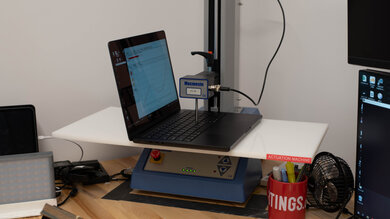
Since 2021, we've tested dozens of laptops every year. We buy our laptops to avoid bias and, following a rigorous methodology, test nearly every part of the laptop so we can deliver results you can rely on. We use a wide range of equipment to perform our tests, including a colorimeter, a Mecmesin MultiTest-i System Test Stand, and various performance benchmarking suites.
Want to know more? Check out our How We Test Laptops article, where we give you a broader overview of our review process, from the moment we purchase the product to the final review.
-
Best Laptop For Music Production
 Heavy WorkloadSchool & WorkProcessing PerformanceForm Factor:Traditional (Clamshell)Screen Size:16"Operating System:macOSTouch Screen:NoRefresh Rate:120 HzSee all our test resultsTested RAM Capacity:36 GB
The best laptop for music production we've tested is the Apple MacBook Pro 16 (M5, 2026). This well-built device is configurable with an M5 Pro or M5 Max chip, providing plenty of processing power for larger projects with demanding instruments and effects. Its large Mini LED display gives you space to see your tracks and tools, and its wide port selection, including three Thunderbolt 5 ports, lets you connect multiple peripherals, like a MIDI keyboard, audio interface, and external storage. There's also a high-output headphone jack for hard-to-drive studio headphones. However, USB-A accessories require an adapter. Our M5 Max test unit's fans get loud under heavy loads, so be mindful of microphone placement when recording, especially if your workload pushes your machine to its thermal limits.
If you want a smaller laptop that's easier to carry, consider the Apple MacBook Pro 14 (M5, 2025). Look for an M5 Pro configuration for demanding projects, as the base M5 model is less powerful. Neither model has upgradeable memory or storage, so get enough for your needs upfront.
For Windows users, consider the Lenovo ThinkPad X1 Carbon Gen 14 Aura Edition (2026), a more portable 14-inch alternative. It's well-built, with a comfortable keyboard and a wide port selection, including USB-A and three Thunderbolt 4 ports. For demanding projects, look for an H-series processor and at least 32GB of RAM; 64GB is available. The SSD is replaceable, but the RAM isn't.
-
Best Mid-Range Laptop For Music Production
Heavy WorkloadSchool & WorkProcessing PerformanceForm Factor:Traditional (Clamshell)Screen Size:13.6"Operating System:macOSTouch Screen:NoRefresh Rate:60 HzSee all our test resultsTested RAM Capacity:16 GBLooking for a laptop for DJing or music production that's cheaper than the Apple MacBook Pro 16 (M5, 2026)? Check out the Apple MacBook Air 13 (M5, 2026). It has fewer ports and can't match the sustained performance of the Pro's higher-end configurations, but it's still a capable option for music production. Plus, you don't need to worry about cooling-fan noise in your recordings, since this is a fanless device.
You get a premium aluminum build, a spacious keyboard, and a responsive haptic touchpad. The base configuration includes 16GB of RAM and a 512GB SSD; consider more memory if you use large sample libraries, as neither component is upgradeable. Its limited port selection comprises two USB-C/Thunderbolt 4 ports, a headphone jack, and a separate MagSafe charging connector, so you may need a hub for multiple accessories. If you want more screen space, consider the 15-inch M5 model, which is the same laptop but just with a larger display.
For Windows users, consider the Lenovo ThinkPad X9 15 Aura Edition (2025). This ultraportable has a 15.3-inch display, a comfortable keyboard, and a responsive haptic touchpad. You get USB-A, HDMI, and two Thunderbolt 4 ports, plus up to 32GB of RAM and a replaceable SSD. However, its low-power Intel CPU makes it better suited to light to moderately demanding projects. It also has fans, though they don't get particularly loud under load.
-
Best Budget Laptop For Music Production
WorkstationForm Factor:Size:14"Operating System:Windows 11Touch Screen:Refresh Rate:HzSee all our test resultsCapacity:GBIf you want a more affordable Windows laptop, check out the Acer Swift Go 14 (2024). Compared with the Apple MacBook Air 13 (M5, 2026) above, its keyboard and touchpad aren't as refined, and its cooling fans can introduce background noise when recording. However, it offers a much wider port selection and user-upgradeable storage.
The Core Ultra 5 125H configuration with 16GB of RAM and a 512GB SSD is a good starting point for smaller and moderately demanding projects. The RAM is soldered, so make sure you get enough for your needs upfront. As for storage, there are two M.2 SSD slots, allowing you to expand your sample library without relying entirely on external drives. Connections include two USB-A ports, two USB-C/Thunderbolt 4 ports, HDMI, a MicroSD card reader, and a headphone jack.
Display options include an FHD+ IPS panel and a sharper 2.8k OLED panel. The OLED configuration currently available provides a colorful image and smoother 90Hz refresh rate, though it may drain the battery faster.
-
Best 2-In-1 Tablet For Music Production
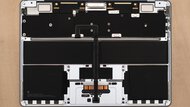
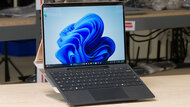
WorkstationForm Factor:Size:13"Operating System:Windows 11Touch Screen:Refresh Rate:HzSee all our test resultsCapacity:GBIf you prefer a detachable tablet to the conventional laptops above, consider the Microsoft Surface Pro 13 12th Edition (2026). Its built-in kickstand and detachable keyboard give you more flexibility when positioning the device alongside your instruments or recording equipment. However, the keyboard and stylus are separate purchases, and its Snapdragon processor requires you to check software and hardware compatibility carefully. Music production support on Windows on ARM has improved, but compatibility depends on your entire setup, including your recording software, plug-ins, licensing tools, and audio interface drivers. Check each manufacturer's support information before buying, especially if you rely on older equipment or specialized plug-ins.
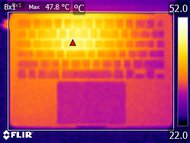
You can choose between an IPS or OLED touchscreen, both with a sharp 2880x1920 resolution and a 120Hz refresh rate. The tablet is configurable with up to 64GB of RAM, and its SSD is replaceable. Its cooling fans remain relatively quiet under load, although its connections are limited to two USB-C/USB4 ports, with no built-in headphone jack.



Notable Mentions
-
Framework Laptop 16 (2026):
The Framework Laptop 16 (2026) is a Windows alternative to the Apple MacBook Pro 16 (M5, 2026) with up to 96GB of replaceable RAM, replaceable storage, and customizable ports. However, it's bulkier, its fans get loud under load, and its display options have lower contrast.
See our review -
ASUS Zenbook S 16 UM5606 (2024):
The ASUS Zenbook S 16 UM5606 (2024) is a good alternative to the Apple MacBook Air 13 (M5, 2026), especially the 15-inch model of the Mac. Its Ryzen AI 9 configurations offer better multi-threaded performance for demanding projects. However, its keyboard and touchpad aren't as nice, and its battery life is shorter.
See our review -
Microsoft Surface Laptop 7th Edition 15 (2024):
The Microsoft Surface Laptop 7th Edition 15 (2024) is another good Windows alternative to the Apple MacBook Air 13 (M5, 2026). It has a comfortable keyboard, a responsive haptic touchpad, and quiet fans. The main caveat is compatibility with its ARM-based processor, so check that your music production software supports Windows on ARM.
See our review
Recent Updates
Oct 19, 2026:
We updated our 'Best Laptop For Music Production' pick to the Apple MacBook Pro 16 (M5, 2026). We moved the Apple MacBook Air 13 (M5, 2026) to the 'Best Mid-Range Laptop For Music Production' and the Acer Swift Go 14 (2024) to 'Best Budget Laptop For Music Production' to reflect current pricing.
Nov 18, 2025:
We replaced the Lenovo ThinkPad X9 15 Aura Edition (2025) with the ASUS Zenbook S 16 UM5606 (2024) as a Windows alternative to the Apple MacBook Air 15 (M4, 2025) because the Zenbook is cheaper, and its top-end AMD Ryzen CPU has better multi-thread performance.
Mar 27, 2025:
Minor text changes to provide information about the new M4 MacBook Air 15.
Feb 05, 2025:
Replaced the HP Spectre x360 14 (2024) with the HP OmniBook Ultra Flip 14 (2024) as an alternative to the Apple MacBook Air 15 (2024) because the OmniBook is a newer model that's easier to find.
Dec 10, 2024:
Replaced the Apple MacBook Pro 14 (M3, 2023) with the Apple MacBook Pro 14 (2024) since the M3 model was discontinued. Replaced the HP Pavilion Aero 14 (2024) with the Acer Swift Go 14 (2024) because the Acer has better performance and provides a superior user experience overall. Added the Lenovo Yoga 7 2-in-1 14 (2024) as a Notable Mention.
All Reviews
Our recommendations above are what we think are currently the best laptops for recording music and the best laptops for DJs you can get. In addition to the test results, we factor in the price, feedback from our visitors, and availability.
If you prefer to make your own decision, here's the list of our laptop reviews, sorted by price from low to high. Most laptops are available in various configurations, and the table only shows the results of the model we tested, so it's best to see the full review for information about other variants.