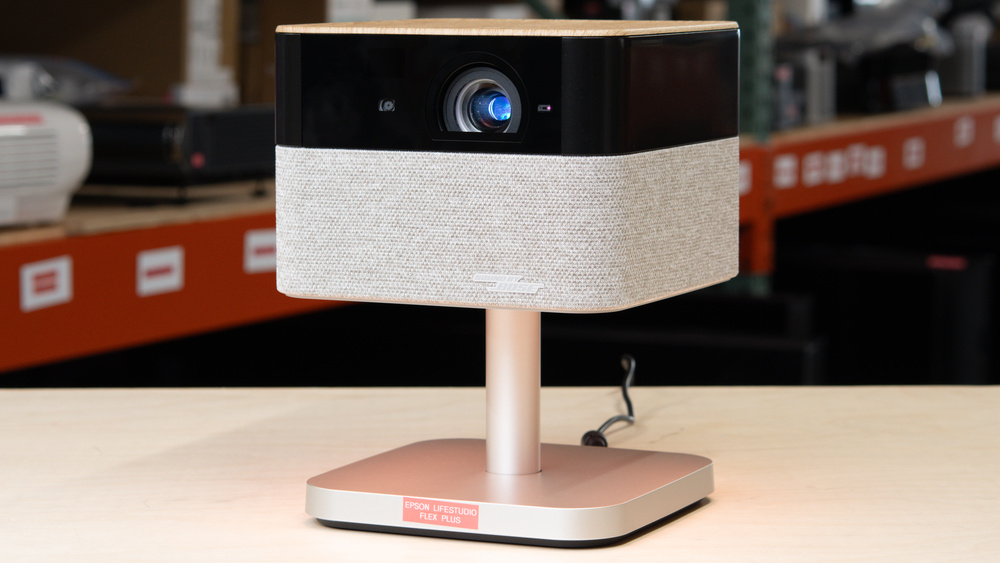
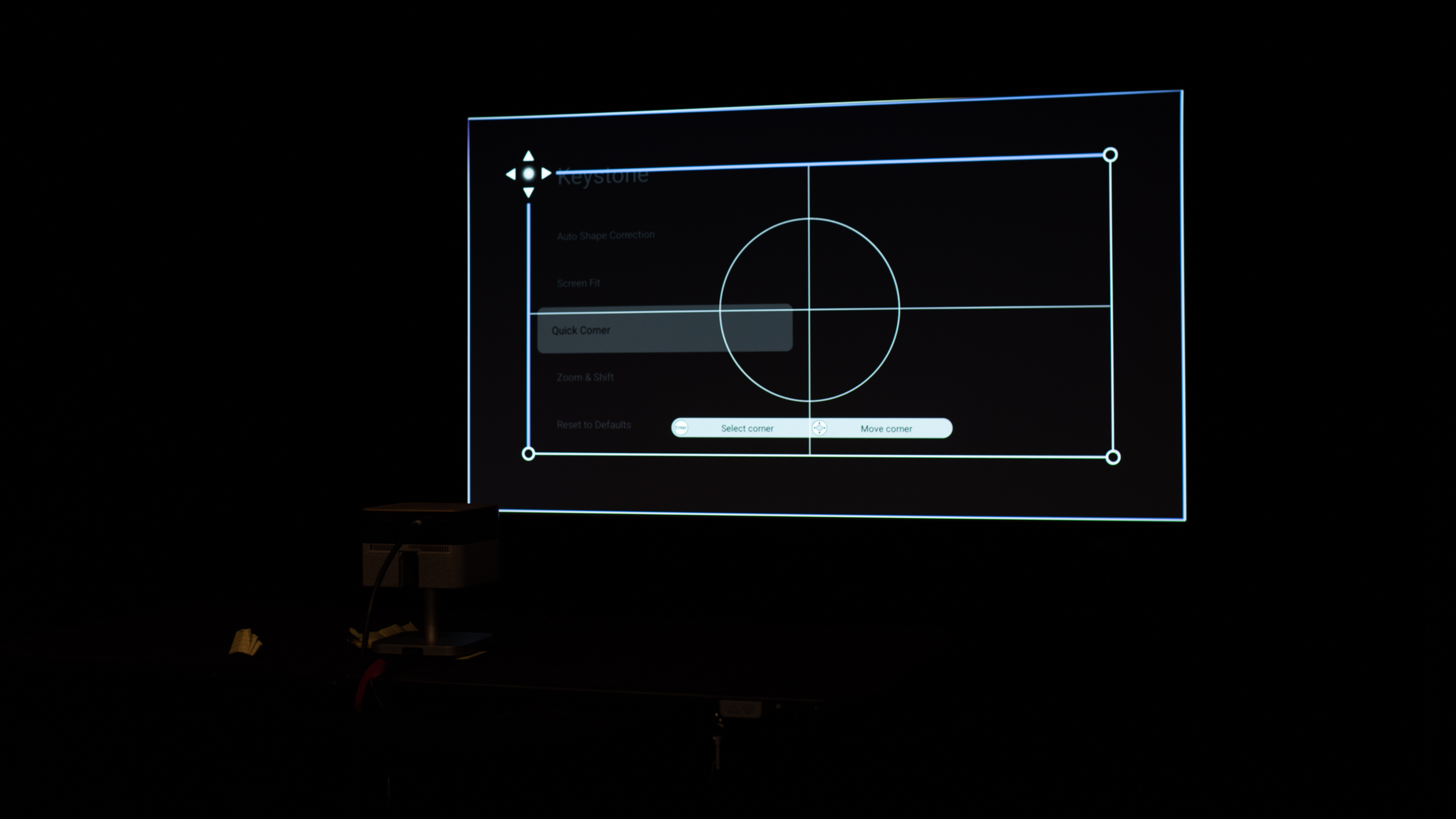
The Epson Lifestudio Flex Plus is a portable 4k projector with an RGB LED light source that's rated for up to 20,000 hours. Powered by Epson's 3-chip 3LCD Triple Core Engine technology, this projector has a 1.2 throw ratio that can project a 65-inch image from about 5.7 ft (1.73 meters) away, and up to a 150-inch image from about 13.1 ft (3.99 meters) away. It features a 180-degree horizontal swivel, it can be tilted vertically 105 degrees (90 degrees up and 15 degrees down), and it also comes with auto-focus, auto-keystone, auto-obstacle avoidance, and auto-screen fit for easy setup. The projector also has an easy-to-grab metal handle for improved portability, and it can also put out ambient lighting for some added flair. It supports HDR and HLG, includes one HDMI 2.0 port that doubles as an ARC/eARC port, and is equipped with two 5W Bose speakers.
Our Verdict
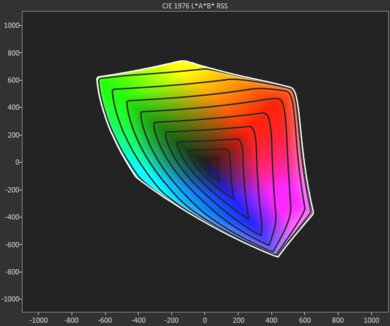
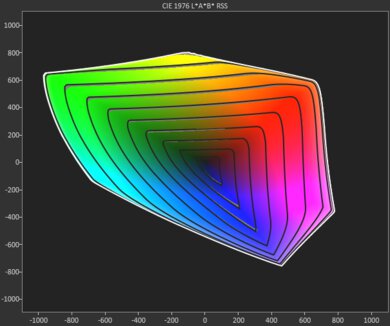
The Epson Lifestudio Flex Plus is sub-par for home theater. Its poor contrast makes blacks look gray, and shadow detail looks flat, so dark movies lack depth. It also has terrible judder handling, so camera pans look uneven from any source, including a frame-rate-matching streamer and its built-in apps. Colors are decently accurate out of the box, its LCD design avoids rainbow artifacts, and its fan generally fades into the background. However, its sub-par color volume makes lighter shades and wide-gamut scenes look muted.
Supports pixel-shifted 4k for sharper images.
LCD design is free of rainbow artifacts.
Decently accurate colors out of the box.
Uneven movie motion from any source.
Gray blacks and flat looking bright scenes.
Not bright enough to overcome much ambient light.
Lighter color shades look muted.
The Epson Lifestudio Flex Plus is a mediocre option for outdoor use. Its brightness washes out when there's any ambient lighting, so it can only really be at night. Still, its compact body, built-in grab bar, and fantastic automatic screen adaptation make it quick to set up on a patio, but it has no built-in battery, and USB-C power substantially dims the picture, so the included AC adapter is the better option. Its fixed lens, lack of mounting holes, and no lens shift also limit placement options, so you'll need to spend some time setting it up.
Fantastic automatic screen adaptation tools.
Tons of wireless features, with built-in Google TV.
Not bright enough to overcome much ambient light.
No battery or lens protection, and USB-C power dims the image.
Fixed lens has no optical zoom or lens shift, and no mounting option.
The Epson Lifestudio Flex Plus is okay for bedroom use. Its compact body, built-in grab bar, and fantastic screen adaptation tools make it easy to move and quickly set up. With the remote, it can automatically focus, correct the image, fit it to the screen, avoid obstacles, and readjust after movement. Its fan is also unlikely to distract you at normal listening levels. However, its fixed standard-throw lens, lack of lens shift, and lack of mounting holes leave little flexibility if a nightstand or shelf isn't in the right spot.
Fantastic automatic screen adaptation tools.
Tons of wireless features, with built-in Google TV.
Fixed lens has no optical zoom or lens shift, and no mounting option.
The Epson Lifestudio Flex Plus is mediocre for gaming. Its input lag is okay for casual and single-player games, and its pixel-shifted 4k image is sharp. However, it's limited to 60Hz, and its LCD imaging introduces noticeable blur in fast-moving scenes, so competitive games feel less immediate and clear than they do on a DLP projector. It also needs a dark room, as its mediocre brightness washes out with ambient light, while poor contrast leaves dark scenes gray and flat. Its LCD design avoids rainbow artifacts, but its sub-par color volume makes vivid, wide-gamut colors look muted.
Supports pixel-shifted 4k for sharper images.
ALLM switches compatible consoles into low-lag mode automatically.
Decently accurate colors out of the box.
Gray blacks and flat looking bright scenes.
Not bright enough to overcome much ambient light.
Lighter color shades look muted.
60Hz gaming with noticeable lag and motion blur.
LCD imaging introduces noticeable blur during fast motion.
The Epson Lifestudio Flex Plus's brightness is mediocre. It can't overcome much ambient light, so the image washes out once several lights are on. It can run from USB-C power, but this significantly reduces its light output; use its AC adapter for the brightest image.
Not bright enough to overcome much ambient light.
No battery or lens protection, and USB-C power dims the image.
The Epson Lifestudio Flex Plus's contrast is poor. Blacks look gray, and shadow detail is flat even in dark scenes, so the image lacks depth. Contrast remains low across the range of scene brightness and drops further in scenes with large bright areas, making the image look flatter and reducing separation between light and dark details.
Gray blacks and flat looking bright scenes.
The Epson Lifestudio Flex Plus is okay for portability. Its compact body, built-in grab bar, and integrated stand make it easy to carry from room to room, while its automatic focus and image correction make repeat setup simple. It is less practical for longer trips: it has no lens protection or carrying case and is too large to slip into a backpack. USB-C power noticeably dims the image, so you'll usually need to bring its AC adapter. Its fixed lens and lack of mounting holes also limit where you can place it.
Fantastic automatic screen adaptation tools.
Tons of wireless features, with built-in Google TV.
No battery or lens protection, and USB-C power dims the image.
Fixed lens has no optical zoom or lens shift, and no mounting option.
The Epson Lifestudio Flex Plus has okay color performance. Its colors are decently accurate out of the box, so familiar colors such as skin tones and scenery look believable. However, it lacks the rich, vivid presentation of better projectors: lighter color details lose saturation and can look muted or washed out, although darker and midtone shades fare better.
Decently accurate colors out of the box.
Lighter color shades look muted.
The Epson Lifestudio Flex Plus has mediocre gaming responsiveness. Its input lag is okay for casual and single-player titles, and it supports pixel-shifted 4k at 60Hz. However, it's limited to 60Hz, and its LCD imaging adds noticeable blur to fast-moving objects. That makes it a poor fit for fast-paced or competitive games. Its LCD design does avoid rainbow artifacts, but that doesn't offset the blur for responsiveness.
Supports pixel-shifted 4k for sharper images.
ALLM switches compatible consoles into low-lag mode automatically.
60Hz gaming with noticeable lag and motion blur.
LCD imaging introduces noticeable blur during fast motion.
Performance Usages
Changelog
-
Updated Aug 04, 2026:
We mentioned the newly reviewed XGIMI Elfin Flip 4K in the Effective Contrast section.
- Updated Jul 28, 2026: We've converted the review to Test Bench 1.0, which replaces our Color Gamut test with Color Volume and adds a new Rainbow Effect test box. We also updated Effective Contrast (formerly Native Contrast) to account for projector brightness and reworked Judder scoring. The new bench also adds Outdoors and Bedroom usages, plus Portability, Color, and Gaming Responsiveness Performance Usages; Movies is now Home Theater, and all existing usage scores have been updated. See the 1.0 changelog.
-
Updated Jun 03, 2026:
We mention the newly reviewed Epson Lifestudio Pop Plus in the Pre-Calibration Color Accuracy section of this review.
-
Updated Jun 01, 2026:
We've added text to some test boxes as a result of our latest test bench. We've also changed the photo in the Brightness test box to match our methodology more closely.
Check Price
Differences Between Sizes And Variants
We bought and tested the Epson Lifestudio Flex Plus. It's part of Epson's Lifestudio series of projectors, sitting above the Epson Lifestudio Flex as the other portable lifestyle projector in this series. The Lifestudio series also includes the Epson Lifestudio Pop Plus and the Epson Lifestudio Pop, which are positioned as personal lifestyle projectors. The table below highlights the key differences between each model:
| Model | Advertised Color Brightness (lms) | Advisertised White Brightness (lms) | Resolution | USB-C port | Horizontal Swivel | Vertical Tilt |
|---|---|---|---|---|---|---|
| Epson Lifestudio Flex Plus (Epson EF-72) | 1,000 | 1,000 | Pixel-shifted 4k | Yes (power supply) | 180 degrees | 90 degrees up + 15 degrees down |
| Epson Lifestudio Flex (EF-71) | 700 | 700 | 1080p | No | 180 degrees | 90 degrees up + 15 degrees down |
| Epson Lifestudio Pop Plus (EF-62) | 700 | 700 | Pixel-shifted 4k | No | No | 8 degrees up |
| Epson Lifestudio Pop (EF-61) | 700 | 700 | 1080p | No | No | 8 degrees up |
Popular Projector Comparisons
The Epson Lifestudio Flex Plus is an adequate projector for both movie watching and casual gaming, and is more ideal for those looking for a budget, multi-purpose projector with passable portability. It outputs pixel-shifted 4k, and its RGB LED light source helps make colors pop, though its mediocre brightness makes it better suited for use in dark or dimly lit environments. It doesn't have an integrated battery, though, so if you're looking for something a bit more portable, you can consider the XGIMI Halo+, which is a 1080p projector with lower brightness, but it has an integrated battery and is small enough to easily carry around. The Epson Lifestudio Flex Plus accepts 4k signals from gaming consoles, though the projector downscales them to 1080p. It's also capped at 60Hz, and its input lag is just okay, so if you're a more competitive gamer looking for a projector with adequate portability, consider a projector like the Hisense M2 Pro. Finally, the Epson Lifestudio Flex Plus only has one HDMI 2.0 input, so you can't plug a console and soundbar at the same time, for example, but its two 5W Bose speakers are plenty for smaller rooms.
For more options, check out our recommendations for the best portable projectors, the best 4k projectors, and the best budget and cheap projectors. If you're really looking for something to use outside, consider the best outdoor projectors as well.
The XGIMI Elfin Flip 4K is better than the Epson Lifestudio Flex Plus in almost every way. The XGIMI has better contrast and more vibrant colors, so it provides better image quality. Additionally, the XGIMI is much better for gamers since it supports 120Hz, has lower input lag, and supports VRR. The only reason to choose the Epson is if you're sensitive to the rainbow effect, since it doesn't have any color flashes like the XGIMI does.
The XGIMI Elfin Flip Laser is better than the Epson Lifestudio Flex Plus, and the only real reason to get the latter is if you're sensitive to rainbow flashes. The XGIMI has superior image quality thanks to its better contrast, higher brightness, and significantly more vibrant colors. It's also easier to set up and more portable, so you can take it on the go without much hassle.
The Epson Lifestudio Flex Plus is slightly better than the Epson Lifestudio Pop Plus overall, but the difference isn't huge. The Flex Plus gets a bit brighter and has slightly better contrast for a slight advantage for picture quality. The Flex Plus also has a built-in two-axis swivel stand, which makes it easier to aim without extra hardware. That said, the Pop Plus is more accurate out of the box, much smaller and lighter, and it has a 1/4-inch tripod mount, so it's easier to mount on a common tripod or stand.
The XGIMI Halo+ and the Epson Lifestudio Flex Plus share a lot of similarities. The Epson can put out pixel-shifted 4k while the XGIMI is 1080p. However, both are LED projectors with decent colors, but max out at 60Hz refresh rates, have similar (but unremarkable) contrast, and only one HDMI input. That said, the Epson has better brightness, more responsive input lag, and is much more accurate than the XGIMI. On the other hand, with its smaller size and integrated battery, the XGIMI is significantly more portable than the Epson.

We've independently bought and tested over 80 projectors and published detailed results for each, so you can decide which one to buy. These have all been tested under the same standardized methodology, allowing you to compare them side by side. We still have all these projects in our lab, so we can continually go back and compare them to ensure our reviews are still accurate. All our test methodologies are also public on our website, so you can validate the results yourself.
Throw Calculator
Global Controls
Test Results

for pictures & test results







for pictures & test results





for pictures & test results



