- 70.0%Color Artifacts
- 30.0%Edge Artifacts
Transition artifacts play a crucial role in how motion appears in movies and shows, since a TV can exhibit unintended intermediate colors and trails of blur around moving characters and objects if a TV's subpixels aren't changing evenly. If these artifacts are prevalent, fast-paced scenes really lack crispness and color consistency, but these artifacts can appear any time there's movement on the screen. Our transition artifacts test goes hand-in-hand with other cinematic motion tests that can paint a full picture of how well a TV handles motion in movies and TV shows. We also test how well a TV removes judder, if it's free from micro-judder, how apparent stutter is in scenes with slow camera movements, and if there's excessive motion blur caused by a TV's slow response time.
Test Methodology Coverage
We added this test as part of our 2.2 test bench update. Before that, we had no equivalent test, so TVs that haven't been tested on 2.2 or later don't have these results. Learn how our test benches and scoring system work.
| Transition Artifacts | 2.0 | 2.1 | 2.2 |
|---|---|---|---|
| Color Artifacts | ❌ | ❌ | ✅ |
| Edge Artifacts | ❌ | ❌ | ✅ |
When It Matters
Transition artifacts are most apparent when pixels have to change rapidly to keep up with moving colors, so these unintended artifacts can be noticeable in any scene with movement, but are most noticeable during fast-paced scenes. This could be an action scene, a walk-and-talk dialogue scene, or any other scene with quick movement.
Let's say you have a character driving a red car, and that car is involved in a chase scene with lots of camera movement and quick cuts. A TV with poor RGB transitions will lead to unintended intermediate colors that are mixed in and surround the red car, which affects color consistency and can lead to a visible color-ghosting-type effect. That's just an example, and these unintended intermediate colors can also affect the appearance of skin tones, a character's clothing, and anything else that's moving in a scene. There are also edge artifacts to consider, which are trails of blur around an object or character that lead to an inconsistency in clarity between the center of an object and its edges. Some people may prefer a TV with a slower response time to limit the amount of stutter they see, but it's also important to get a TV with minimal transition artifacts if you want the best possible motion overall.
Although our tests are conducted with a 24 fps video, transition artifacts can also drastically impact the way motion looks in 60 fps sports, since players and balls are constantly moving around the screen. There's typically less persistence blur at higher frame rates, and that extra blur in low frame rate movies and shows can actually help hide inconsistent RGB transitions, so unintended intermediate colors and trails of blur are potentially even more noticeable when watching sports.
Our Tests
Our transition artifacts test is broken down into two subcategories: Color Artifacts and Edge Artifacts. Both of these tests are done concurrently and are conducted using the same video of colored balls moving across the screen at 960 pixels per second.
We start by setting up a TV using our recommended settings with the brightness set to maximum to avoid flicker. We then play a video for 30 minutes to warm up the TV. After that, we center our high-speed camera using an alignment chart and get our test video ready to go. Once we have our camera settings dialed in and our focus set, we film our test video (which you can see below) at 1,000 fps. However, instead of recording one continuous video, we record each millisecond as its own TIFF image.
Once we're done recording, we end up with 42 separate TIFF images. Since the duration of one frame in 24 fps content is 41.66 ms, each image shows us every single millisecond within one single frame. We then run a script that extracts the horizontal center profile for every millisecond of each ball in a row. For our color artifacts test, we're looking at the five colored balls. For our edge artifacts test, we're looking at the line of five gray balls that are against the black background. The gray balls on the top and bottom rows aren't used for this test. Take a look at the video below to get a visualization of how we end up with our final results.
Color Artifacts
This test looks at whether or not a TV suffers from unintended intermediate colors in RGB transitions. Since pixels are changing rapidly in movies and shows, these unintended colors can negatively affect color consistency any time there's movement on the screen, but they're most apparent in fast-paced scenes. As you can see in the two comparisons below, a TV like the LG G5 OLED is completely free from these unintended artifacts, since the color bars are crisp and the colors remain pure. On the other hand is the LG UT75, which has visible unintended intermediate colors around each bar, like the blue in the red bar, or the brown in the beige bar. This is caused by the uneven subpixel transitions as colors move around the screen, which affects the appearance of motion. For example, a fast-moving car or even a character's shirt or skin tone can look off, since the subpixels aren't reacting in a consistent manner.
 |
 |
Scoring for this test is done subjectively, but there's very little room for interpretation. To the left and right of each bar is the area we call bands, so we have 10 bands total. If there are noticeable color artifacts in a band, we deduct 0.5 from the TV's score in this test. Furthermore, we deduct up to 2 points for long trails of color ghosting and up to 2 points if the artifact trail is highly saturated, since that means the artifacts will be even more noticeable in real content.
Edge Artifacts
This test looks at whether the edges of a moving object remain consistent with its center. If they don't, you might see unintended trails of blur around the edges of an object or character anytime there's movement on the screen, most notably in fast-paced scenes. Edge artifacts are evident at the junction point of a moving object and its background, and are mostly caused by a spatial limitation of a TV's processor. This limitation is exacerbated when there are inconsistencies in response time between different gray-to-gray values.
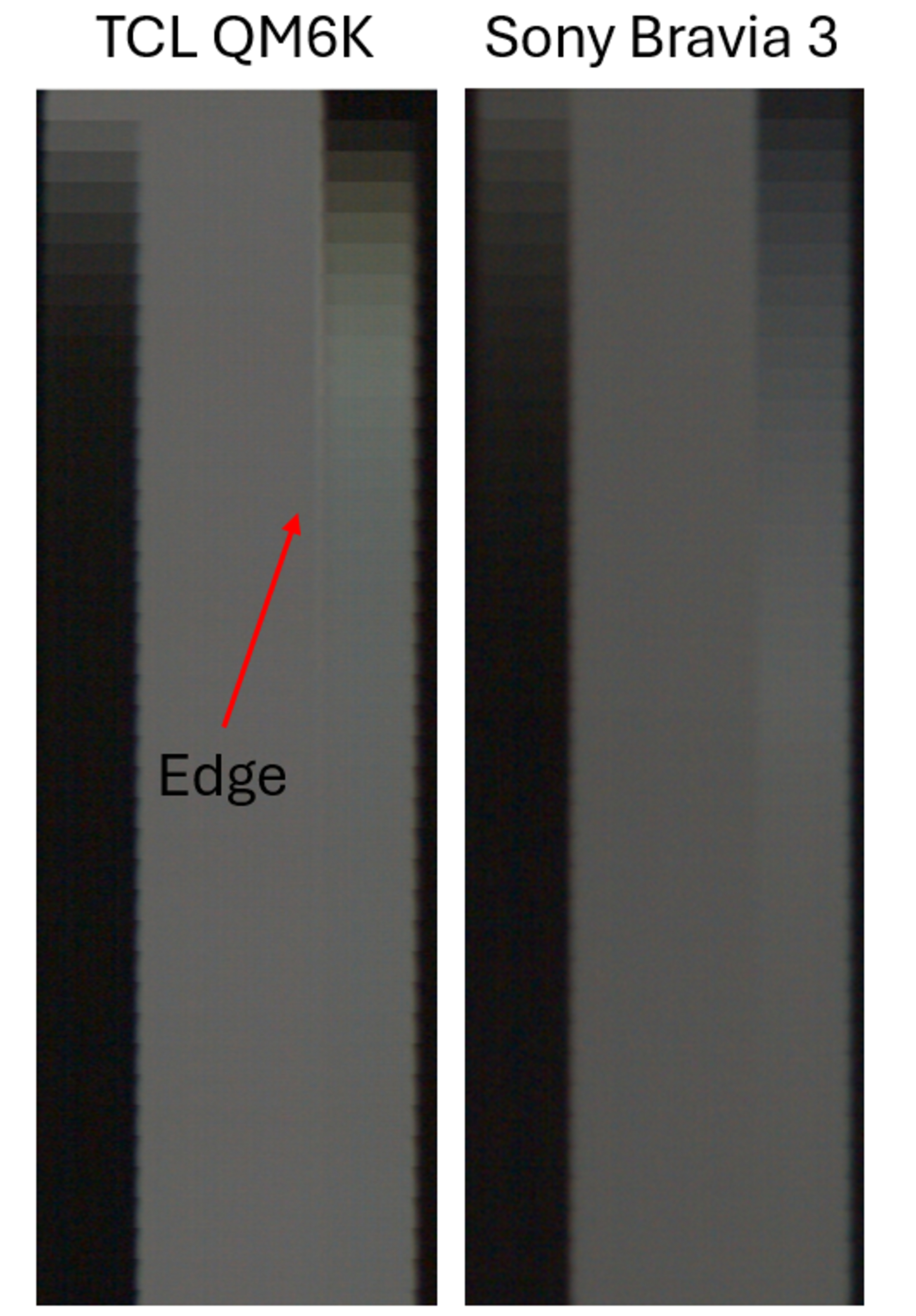
Below is a comparison of the TCL QM6K and the Sony BRAVIA 3. The TCL shows clear signs of edge artifacts, since there's obvious trails behind the edge of transitions that are caused by overshoot. On the other hand, the Sony has none at all, so transitions on that TV are clearer. The red arrows in the image below point to the blurry trails that you can see when watching real content on the TCL.

The image below comes from our test results of the two TVs and shows how you can spot edge artifacts when looking at that section of our review.
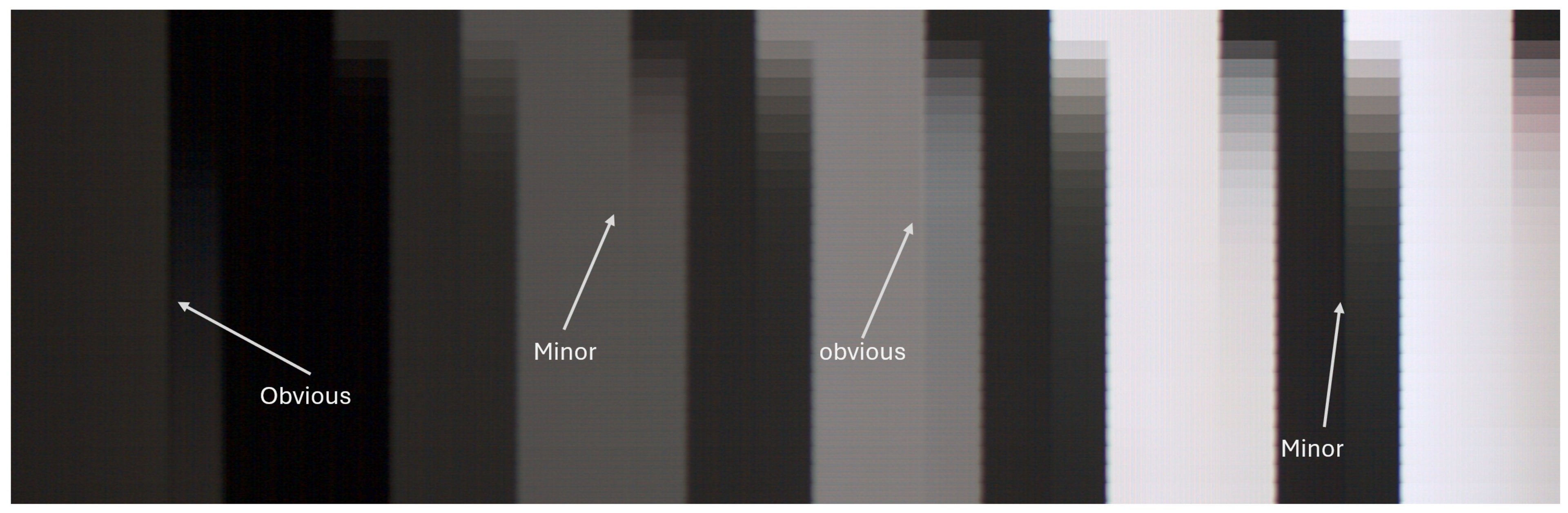
Like our Color Artifacts test, there are bands on the left and right sides of each bar, which gives us a total of 10 bands to score. Each band is worth 1/10, so we start at 10 and deduct 1 point from the score if there are apparent artifacts in a band. If the artifacts are very subtle, we only deduct 0.5.
Conclusion
Transition artifacts play a crucial role in how motion looks in movies and shows. Additionally, transition artifacts can be quite noticeable when watching 60 fps sports, since there's less persistence blur to hide these unintended artifacts at higher frame rates. Color artifacts are unintended intermediate colors that affect the consistency of colors, while edge artifacts typically appear as trails of blur behind a moving object. Both of these types of artifacts are caused by inconsistent subpixel transitions, so you want a TV that has clean RGB transitions if you're after the best motion handling possible.