The Sony BRAVIA 5 is the follow-up to the popular Sony X90L/X90CL that was released in 2023. It sits in the middle of Sony's 2025 LED TV lineup, positioned above the Sony BRAVIA 2 II and Sony BRAVIA 3, and below the Sony BRAVIA 7 and Sony BRAVIA 9 QLED models. Unlike its predecessor, which uses a standard LED panel with minimal dimming zones, the new model uses a Mini LED backlight and has up to six times the number of dimming zones, depending on the size. It uses Sony's XR processor that's found in most of their TVs and runs version 12 of the popular Google TV OS. It supports Dolby Vision, DTS audio passthrough, and you can use its built-in speakers as a center channel when paired with compatible Sony soundbars and receivers. For gamers, it has HDMI 2.1 bandwidth on two ports for up to 4k @ 120Hz with either G-SYNC or HDMI Forum VRR. We bought and tested the 65-inch model, and it's also available in 55, 75, 85, and 98-inch models.
Our Verdict
The Sony BRAVIA 5 is satisfactory for mixed usage. It looks decent in reference conditions, with fairly deep blacks and vibrant enough colors to enjoy, but its mediocre HDR brightness means HDR content lacks the impact it should have. It gets bright enough in SDR to fight glare from indirect lighting, but direct light sources are distracting. Although the TV supports most modern gaming features, its very slow pixel transitions mean motion is blurry, which holds back its gaming performance. Sadly, its narrow viewing angle means it's not great for wide seating arrangements.
Very good SDR brightness helps it overcome glare from indirect lighting.
Superb upscaling and very good low-quality content smoothing.
Colors are vibrant and lifelike.
Struggles with reflections from direct sources of light.
Very slow pixel transitions in Game Mode leads to blurry motion.
Mediocre HDR brightness means some HDR content lacks impact.
The Sony BRAVIA 5 is decent for a home theater. The TV's contrast is good enough that blacks look fairly deep during dark scenes, and the TV's local dimming keeps blooming to a minimum. However, its dimming algorithm struggles with more precise highlights, so blacks look grayish in scenes with small areas of brightness. Highlights and colors in HDR are accurate and stand out somewhat, but they do lack some impact due to the TV's mediocre HDR brightness. Fortunately, it has excellent image processing, so you get a clean image from heavily compressed streams, like YouTube. Like most TVs, there's visible stutter in shots where the camera is moving slowly, but not everyone will be bothered by it.
Superb upscaling and very good low-quality content smoothing.
Colors are vibrant and lifelike.
Fantastic PQ EOTF tracking means HDR content has mostly accurate brightness.
Very good SDR color accuracy before calibration.
Judder-free with most sources.
Mediocre HDR brightness means some HDR content lacks impact.
Unremarkable HDR color accuracy before calibration.
Sometimes falls back on its native contrast ratio, making the image look a bit washed out in dark scenes with complex highlights.
Noticeable stutter in slow panning shots.
The Sony BRAVIA 5 is good for a bright room. It has very good SDR brightness, which helps it fight glare from indirect lighting. On the other hand, direct reflections are very distracting, so it's best to avoid placing any light source opposite the screen. The TV's black levels and color saturation remain mostly unaffected by ambient lighting, so you get a pleasing image in a bright room.
Very good SDR brightness helps it overcome glare from indirect lighting.
Colors are vibrant and lifelike.
Blacks stay deep in a bright room.
Struggles with reflections from direct sources of light.
The Sony BRAVIA 5 is good for watching sports. Direct reflections from light sources opposite the TV screen are distracting, but the TV is bright enough to fight glare from overhead lights or other indirect light sources. Its excellent image processing means cable broadcasts and online streams look clean and sharp, and it displays vibrant enough colors to please you and your friends. There's some motion blur in fast-paced sports, but the edges of objects and players are clear since the TV barely suffers from transition artifacts. However, if you are watching the game with your friends, have them seated as centered to the screen as possible, since the TV's image quality degrades when viewed from the sides of the screen. Unfortunately, it has poor uniformity, so you do see the dirty screen effect during brighter sports, and the corners of the screen are noticeably darker than the center.
Very good SDR brightness helps it overcome glare from indirect lighting.
Superb upscaling and very good low-quality content smoothing.
Colors are vibrant and lifelike.
Barely any transition artifacts in fast-paced scenes and sports.
Struggles with reflections from direct sources of light.
Very noticeable dirty screen effect and the corners are dimmer than the center of the screen.
The Sony BRAVIA 5 is just alright for gaming. It has HDMI 2.1 bandwidth, 4k @ 120Hz, and VRR, so it's compatible with Sony's, Microsoft's, and Nintendo's latest consoles. It delivers gameplay with very little input lag, which is great for PVP titles. However, the TV has very slow pixel transitions, so fast motion is blurry and lacks clarity. You still get decent overall image quality, with deep enough blacks and vibrant enough colors to enjoy, but the TV's mediocre HDR brightness means the large catalog of HDR games available lacks some impact.
HDMI 2.1 bandwidth, up to 4k @ 120Hz, and VRR support.
Colors are vibrant and lifelike.
Low input lag for a responsiveness feel when gaming.
Very slow pixel transitions in Game Mode leads to blurry motion.
Only two HDMI 2.1 ports, one of which is also the eARC port.
Mediocre HDR brightness means some HDR content lacks impact.
Sometimes falls back on its native contrast ratio, making the image look a bit washed out in dark scenes with complex highlights.
The Sony BRAVIA 5 has adequate brightness overall. Its SDR brightness is very good, so the TV cuts through glare from indirect lighting. Sadly, its HDR brightness is mediocre, so even though there's not a huge difference in brightness between small highlights and entirely well-lit scenes, all HDR content lacks some of the impact it's intended to have.
Very good SDR brightness helps it overcome glare from indirect lighting.
Mediocre HDR brightness means some HDR content lacks impact.
The Sony BRAVIA 5 has adequate black levels. With local dimming enabled, the TV displays fairly deep blacks with minimal blooming. However, due to the way its dimming algorithm works, dark scenes with very small highlights are washed out. It also has disappointing black uniformity, so purely dark scenes are a bit cloudy.
Disappointing black uniformity leads to blooming and cloudiness in purely dark scenes.
The Sony BRAVIA 5 has good colors overall. Although this isn't the brightest TV, it still has good color volume in SDR and HDR, so colors are vibrant enough to please the viewer. It also has very good color accuracy in SDR out of the box, so you get a mostly accurate image. However, it has unremarkable HDR color accuracy; if you want an accurate image in HDR, you need to get it calibrated.
Colors are vibrant and lifelike.
Very good SDR color accuracy before calibration.
Unremarkable HDR color accuracy before calibration.
The Sony BRAVIA 5 has good motion handling when watching movies, shows, and sports. There are barely any artifacts around the edges of people and objects in fast-paced scenes and sports, so motion has good clarity. The TV removes judder from most sources, but there's still some subtle judder present when watching 25p content through the internal apps or an older streaming device that outputs a 60p signal. On the other hand, the TV is completely free from micro-judder regardless of the source. Stutter is quite visible on this TV during slow panning shots, but this won't bother everyone, and you can mitigate some stutter using the TV's motion interpolation.
Barely any transition artifacts in fast-paced scenes and sports.
Judder-free with most sources.
No micro-judder from any source.
Good lighting zone transitions.
Noticeable stutter in slow panning shots.
The Sony BRAVIA 5 has alright responsiveness in its dedicated gaming mode. It has modern features like HDMI 2.1 bandwidth on two ports, 4k @ 120Hz, and VRR, so you can take full advantage of the features on your current-gen console. It also has low input lag, so inputs feel responsive. Sadly, this TV's very slow pixel transitions are a major drawback for gamers, since fast motion is quite blurry at both 60Hz and 120Hz.
HDMI 2.1 bandwidth, up to 4k @ 120Hz, and VRR support.
Low input lag for a responsiveness feel when gaming.
Very slow pixel transitions in Game Mode leads to blurry motion.
Only two HDMI 2.1 ports, one of which is also the eARC port.
Note: We're in the process of improving our tests related to image processing, but this score should give you a general idea of how a TV performs overall with its image processing capabilities.
The Sony BRAVIA 5 has excellent image processing overall. It has superb upscaling capabilities for low-resolution content, and it does a great job cleaning up artifacts in heavily compressed content, like YouTube. Its gradient handling is very good overall, with only some visible banding in dark greens and blues. Finally, this TV respects the filmmaker's intent when it comes to HDR brightness due to its fantastic PQ EOTF tracking.
Superb upscaling and very good low-quality content smoothing.
Fantastic PQ EOTF tracking means HDR content has mostly accurate brightness.
Only minor banding in some color gradients.
Performance Usages
Changelog
- Updated Sep 18, 2026: We converted this review to Test Bench 2.2.1, adding a new Dumb TV test for whether or not the TV can be used offline.
-
Updated Sep 09, 2026:
We added information to the Audio Passthrough section outlining an audio delay issue. This issue affects all Sony TVs running Android 14 that use a MediaTek Pentonic 1000 chipset.
-
Updated Mar 17, 2026:
We added text to our new Cinematic Motion Handling performance usage and our new Transition Artifacts and Stutter Reduction Via Interpolation test sections after converting the review to TV 2.2.
- Updated Mar 10, 2026: This review has been updated to TV 2.2. We've added new sections for Transition Artifacts and Stutter Reduction Via Interpolation, and updated the way we test Stutter. Additionally, we removed the 'Broken' disclaimer from our Motion Handling usage.
Check Price
Differences Between Sizes And Variants
We bought and tested the 65-inch Sony BRAVIA 5, but most of our results should also be valid for the 55, 75, and 85-inch models. The 98-inch model performs differently, with better contrast and overall brightness, so these results aren't valid for that size. However, we have a separate review of the 98-inch model, so check that out if you're interested in that specific size. If you're curious to see how the 65-inch size stacks up against the 98-inch, you can take a look at our article that compares those two sizes.
Costco sells a variant of this TV with a slightly different model code that comes with an extended warranty, a backlit remote, and some additional perks, but it performs the same. Sony TVs typically perform the same in North America as in other regions, so our results should be valid for all regions.
| Size | US Model | Warehouse Model |
|---|---|---|
| 55" | K-55XR50 | - |
| 65" | K-65XR50 | K65XR50CB.U2 |
| 75" | K-75XR50 | K75XR50CB.U2 |
| 85" | K-85XR50 | K85XR50CB.U2 |
| 98" | K-98XR50 | - |
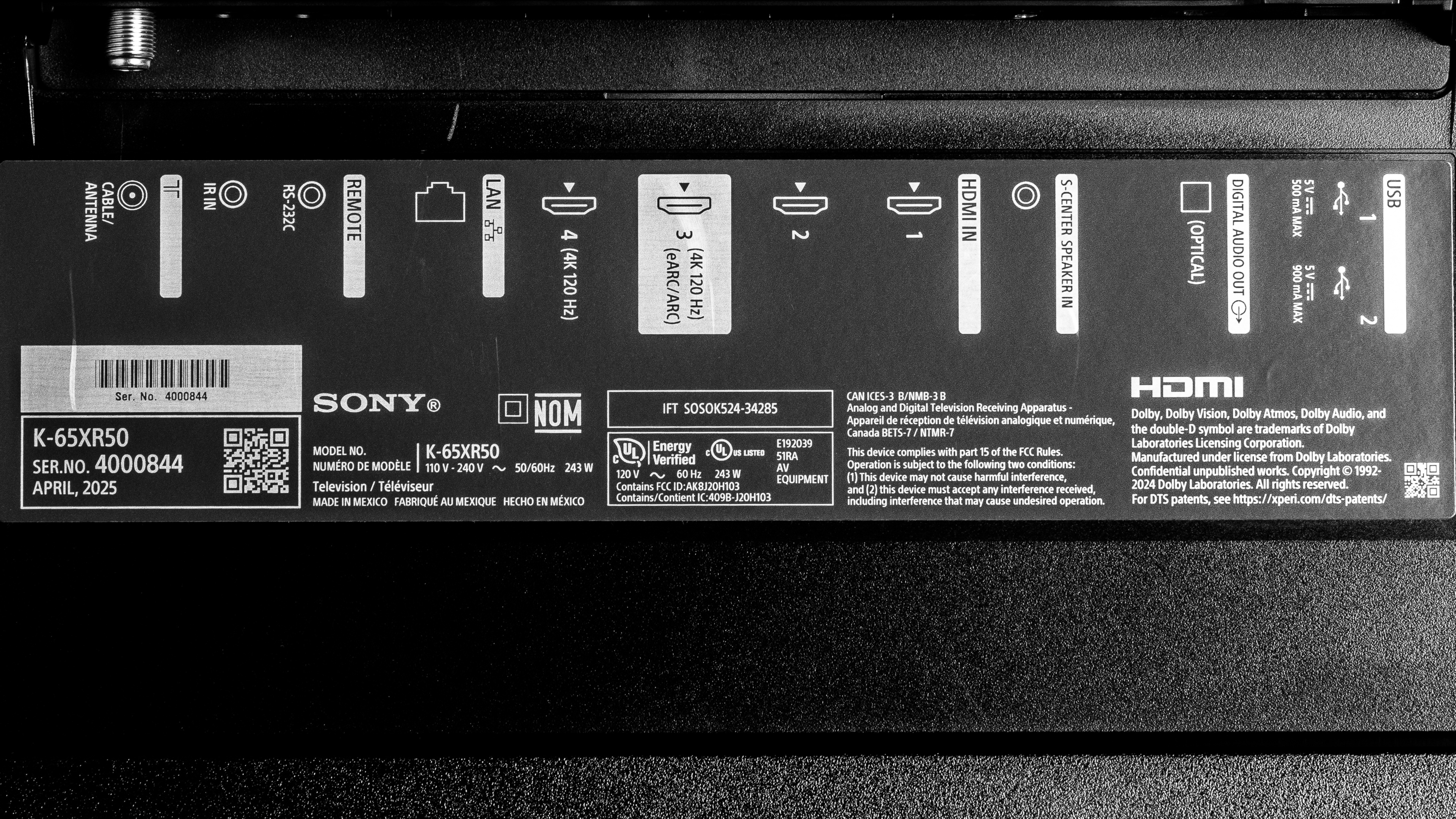
Our unit was manufactured in February 2025, as seen in the photo of the label.
Popular TV Comparisons
The Sony BRAVIA 5 is a disappointing follow-up to the Sony X90L/X90CL. Despite using a Mini LED backlight with more dimming zones, the TV's contrast is only slightly better than its predecessor. It's also noticeably dimmer overall, and its out-of-the-box color accuracy isn't nearly as good. It's still packed with a ton of modern features for both cinephiles and gamers, but its overall picture quality will leave movie fans wanting more, and its very slow pixel transitions really hold back the TV's gaming performance. Sony's industry-leading image processing can only go so far as a selling point, and outside of that, the TV doesn't do anything better than other Mini LED TVs that are significantly cheaper. You're better off buying a TCL QM7K or Hisense U75QG, as both of those TVs offer superior picture quality for much less. You can even find OLEDs for around the same cost as a BRAVIA 5, so it's a really hard TV to recommend to anyone.
For more options, check out our recommendations for the best TVs for bright rooms, the best Mini LED TVs, and the best TVs for gaming.
The Sony BRAVIA 7 offers superior picture quality over the Sony BRAVIA 5. The BRAVIA 7 has superior contrast with less blooming, is a lot brighter in SDR and HDR, and has the advantage when it comes to color vibrancy and accuracy. These attributes mean the TV has noticeably better picture quality with all content.
The Sony BRAVIA 5 is much better than the Sony BRAVIA 3 II. The BRAVIA 5 delivers much better picture quality, especially in a dark room, thanks to its much better contrast. Blacks are deeper and more uniform, and movies have more pop to them, with bright highlights that stand out better. The BRAVIA 3 II has better reflection handling on the 65- and 75-inch models, so dim scenes are a bit easier to see during the day, but the BRAVIA 5 is still the better choice overall for a bright room.
The TCL QM7K is mostly better than the Sony BRAVIA 5. The TCL is brighter in SDR and has superior reflection handling, so it's the better option for a bright room. The TCL also displays brighter highlights in HDR content thanks to its higher HDR peak brightness. Blacks are also much deeper on the TCL thanks to its better contrast. For gamers, the TCL is the better option thanks to its quicker pixel transitions, which lead to clearer motion in fast-paced games. Furthermore, the TCL supports 4k @ 144Hz and 1080p @ 288Hz, making it more versatile for PC gamers. On the other hand, the Sony has better image processing, so it has better upscaling, superior low-quality content smoothing, and less banding in color gradients.
The Sony BRAVIA 5 is a significantly better TV than its lower-end sibling, the Sony BRAVIA 3. The BRAVIA 5 delivers significantly better picture quality thanks to its higher contrast and full-array local dimming feature. This substantially improves the TV's dynamic range, so bright highlights in HDR stand out better and look more realistic. The BRAVIA 5 also boasts improved processing capabilities, which enable it to clean up low-quality and low-resolution content more effectively. Additionally, it supports more advanced gaming features like VRR and a 120Hz refresh rate.

We buy and test dozens of TVs yearly, taking an objective, data-driven approach to deliver results you can trust. Our testing process is complex, with hundreds of individual tests that take over a week to complete. Most of our tests use specially designed test patterns that mimic real content, but we also use the same sources you have at home to ensure our results match the real-world experience. We use two main tools for our testing: a Colorimetry Research CR-100 colorimeter and a CR-250 spectroradiometer.
Test Results
for pictures & test results

for pictures & test results

for pictures & test results

The Sony BRAVIA 5 has mediocre HDR brightness. It's just bright enough for some highlights to pop in dim and moderately lit scenes, so you still get a somewhat impactful HDR experience. Fortunately, entirely well-lit scenes aren't much dimmer than small highlights, so you don't notice much of a difference in brightness between different scenes.
Unfortunately, the TV is noticeably dimmer in HDR compared to its predecessor, the Sony X90L/X90CL. You can see comparison shots in the Contrast section.
Our results above are with the TV set to Professional with 'HDR Tone Mapping: Gradation Preferred' since those settings give the most accurate image. We also used the 'Auto Local Dimming: Medium' setting since the difference between the high and medium settings barely affects contrast, but you get brighter highlights with it set to medium. The TV's HDR peak brightness depends on the settings used, and you can see some additional measurements below.
| Picture Settings | Hallway Lights (cd/m2) | Yellow Skyscraper (cd/m2) | Landscape Pool (cd/m2) |
|---|---|---|---|
| Auto Local Dimming: High | 342 | 211 | 290 |
| Brightness Preferred (Local Dimming: Medium) | 517 | 319 | 278 |
for pictures & test results

for pictures & test results

for pictures & test results

There's no noticeable difference in HDR brightness when the TV is set to Game Mode. Our results are with 'HDR Tone Mapping: Gradation Preferred' and 'Auto Local Dimming: Medium'. The TV's HDR peak brightness in Game Mode depends on the settings used, and you can see some additional measurements below.
| Picture Settings | Hallway Lights (cd/m2) | Yellow Skyscraper (cd/m2) | Landscape Pool (cd/m2) |
|---|---|---|---|
| Auto Local Dimming: High | 338 | 212 | 183 |
| Brightness Preferred (Local Dimming: Medium) | 512 | 286 | 274 |
| HDR Tone Mapping: Off (Local Dimming: Medium) | 490 | 309 | 208 |
The Sony BRAVIA 5 has very good SDR brightness. Like most TVs, it's not quite as bright when watching content with large areas of brightness, like sports. However, it's fairly consistent across the board, so the TV overcomes glare in well-lit rooms. Despite being the successor to the 2023 Sony X90L/X90CL, this TV is dimmer than that model.
for pictures & test results

The Sony BRAVIA 5 has okay contrast, resulting in deep blacks during most dark scenes. However, black levels are raised when very bright highlights are on screen. There's barely a difference in black levels between the 'Medium' and 'High' local dimming settings, but you get brighter highlights with the medium setting, so that's what we used during testing. With 'Auto Local Dimming: High', the contrast ratio is 53827:1. Despite having a Mini LED backlight with more dimming zones than the Sony X90L/X90CL, the two TVs have a very similar contrast ratio.
Our testing doesn't show the whole picture, though. Although scenes with pure blacks and large bright elements look almost the same on both TVs, darker elements (near-blacks) are noticeably deeper on the BRAVIA 5 in some real scenes. This is visible in person, but we've included some comparison shots of the BRAVIA 5 positioned above the X90L so you can compare them for yourself. It's easier to spot the differences in the high ISO photos. For example, the woman's dark outfit in the 'High ISO 8' photo is noticeably deeper on the BRAVIA 5.
The regular ISO photos are a good way to see the difference in brightness between the two TVs. The 'Regular ISO 2' and 'Regular ISO 7' are very good examples.
If you're interested in the largest size this TV is available in, you actually get noticeably better contrast from the Sony BRAVIA 5 98.
for pictures & test results

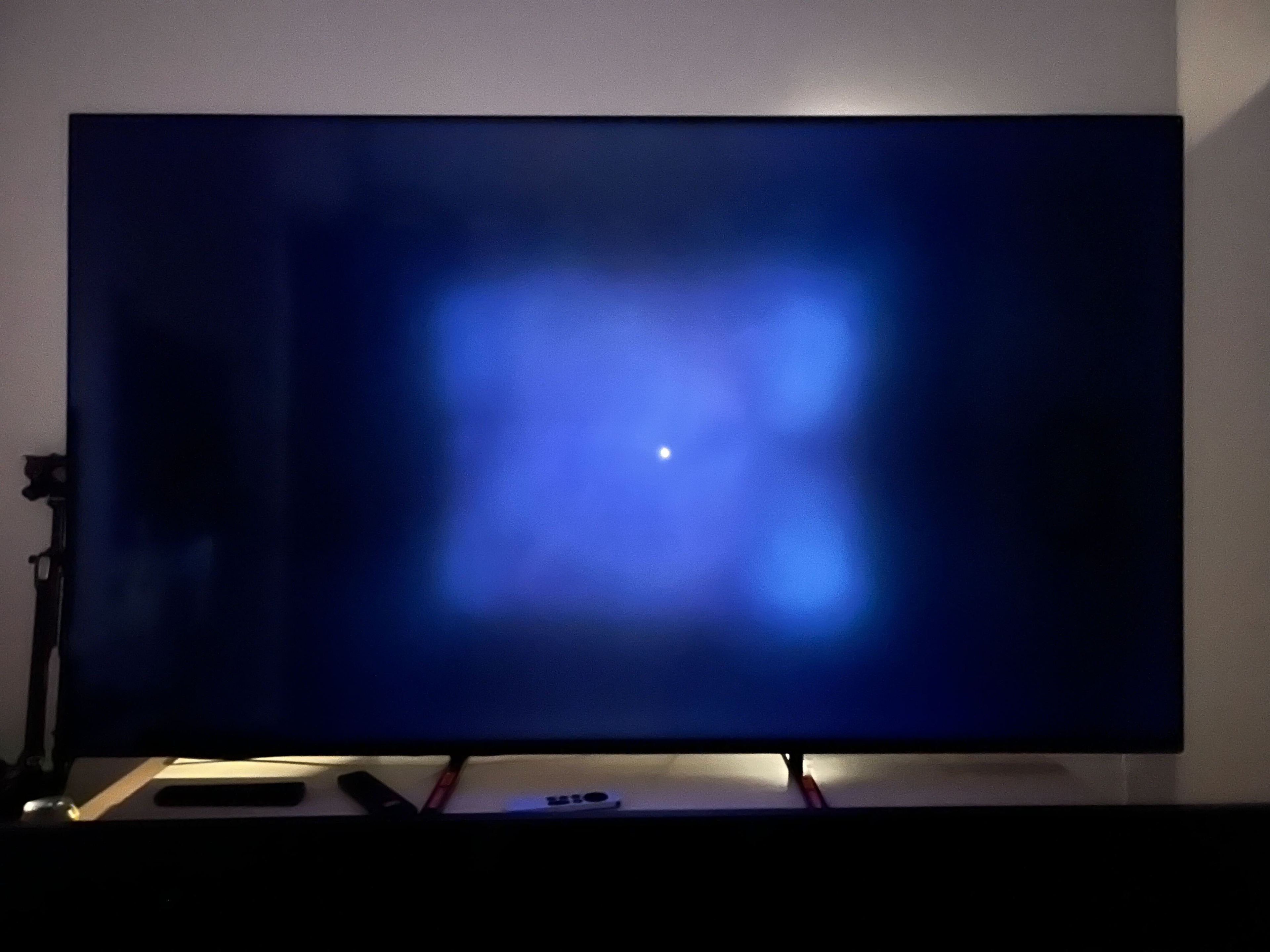
The TV has good lighting zone precision overall, but the TV takes a conservative approach to how it controls blooming. Even though it has more dimming zones than the Sony X90L/X90CL, there's a large averaging of zones, so it isn't very precise with small highlights. This means that it often falls back to its native contrast ratio, especially during more challenging scenes.
For example, if you're looking at a starfield, the stars aren't crushed like they can be on some TVs, but the black areas between stars aren't very deep. This is because it doesn't dim its zones for scenes like this, so you don't see any blooming, but the whole image looks a bit washed out.
You can see an example of this behavior in this image. The picture is overexposed to more clearly show the dimming behavior, so it doesn't look nearly as bad in person. The small bright dot in the middle of the screen is a mouse cursor, and the blueish area around it are the zones that aren't being dimmed.
for videos & test results

The TV has good lighting zone transitions overall. It does struggle a bit with fast-moving content, so there's some haloing and the leading edge of quick-moving objects is visibly dimmer.



for pictures & test results

for pictures & test results

The Sony BRAVIA 5 has disappointing black uniformity. With local dimming disabled, the TV is bluish with very apparent cloudiness across the screen. With local dimming enabled, blacks are deep, but there's noticeable blooming and cloudiness around some highlights.
for pictures & test results

for pictures & test results

The TV's SDR color volume is good overall. It has great coverage of the DCI-P3 color space, only struggling a bit with some lighter shades of color. Its coverage of the wider BT.2020 color space is noticeably worse, and it struggles a lot more with all colors.
| Volume ΔE³ | DCI-P3 Coverage |
BT.2020 Coverage |
|---|---|---|
| L10 | 89.47% | 67.04% |
| L20 | 91.05% | 68.32% |
| L30 | 91.15% | 68.48% |
| L40 | 90.94% | 70.25% |
| L50 | 90.74% | 70.52% |
| L60 | 90.19% | 69.78% |
| L70 | 90.14% | 67.03% |
| L80 | 89.81% | 63.96% |
| L90 | 89.52% | 63.72% |
| L100 | 91.31% | 84.77% |
| Total | 90.34% | 68.15% |
for pictures & test results

for pictures & test results

The Sony BRAVIA 5 has good HDR color volume. Most dark, saturated colors are displayed well, but it struggles a bit with bright whites and most bright colors. It's still good enough for a vibrant viewing experience, but very bright colors don't pop off the screen as much as they do on similar TVs such as this one's predecessor, the Sony X90L/X90CL.
for pictures & test results

for pictures & test results

for pictures & test results

The Sony BRAVIA 5 has very good SDR pre-calibration accuracy. Gamma is pretty close to 2.2, but most scenes are displayed darker than intended. Its white balance is very good overall, but reds and greens are a bit underrepresented, while blues are a bit overrepresented. This contributes to the TV's overly cool color temperature. Still, colors have great accuracy overall, with only minor errors that most people won't notice.
for pictures & test results

for pictures & test results

for pictures & test results

The Sony BRAVIA 5 has outstanding SDR accuracy after calibration, and any inaccuracies with white balance, color temperature, and gamma are gone. The greyscale is easy to calibrate, but there's no color calibration option, so color accuracy remains mostly unchanged.
See our full calibration settings.
for pictures & test results

for pictures & test results

The Sony BRAVIA 5 has unremarkable HDR color accuracy before calibration. Blues are very overrepresented in lighter shades of gray, while reds are very underrepresented, making the TV's color temperature significantly too cool. Overall, colors have okay accuracy, but there are mapping errors throughout, most notably in warmer colors.
for pictures & test results

for pictures & test results

After calibration, the TV has fantastic HDR color accuracy. Its white balance is much better now, and the color temperature is much closer to the industry standard 6,500K. Color accuracy is significantly improved, with only minor mapping errors that most people won't notice.
for pictures & test results

The Sony BRAVIA 5 has fantastic PQ EOTF tracking. Near-blacks and highlights are a bit darker than intended, but it follows the curve very closely overall. There's a sharp roll-off near the TV's peak brightness, so most details in specular highlights are lost.
for pictures & test results

The TV does a great job of smoothing out low-quality content. Compression issues like macro-blocking are smoothed out well without causing any significant loss of fine details. Unlike some other higher-end Sony models, there's no 'Smooth Gradation' setting, so you must use the 'Digital Noise Reduction' setting to clean up low-bitrate content.
for pictures & test results

The Sony BRAVIA 5 has superb sharpness processing capabilities. Low-resolution content is upscaled well, and lines are sharp enough that the image doesn't look too soft. Fine details in busy scenes are easy to make out, and hardcoded text looks great.
It's worth noting that Sony changed the 'Reality Creation' menu on this model. Unlike previous Sony TVs, it's best to set 'Sharpness' to '50,' 'Reality Creation' to 'Manual,' 'Type' to 'Detailed Preferred,' and the 'Intensity' slider to '4.'
for pictures & test results

This TV has great gradient handling in HDR. There's some noticeable banding in dark shades of blue and green, but everything else has minimal banding or none at all.
The Sony BRAVIA 5 has excellent input lag while using its dedicated gaming mode. Unlike most other Sony models, the TV's input lag is on par with what you see from competing brands, so you get a very responsive gaming experience, especially at 120Hz. Its input lag is a lot higher outside of its gaming mode, so you do feel a delay when scrolling through menus or pausing content.
The TV supports all common resolutions up to 4k @ 120Hz on two of its four HDMI ports. Chroma 4:4:4 signals are displayed properly with all supported resolutions when the TV's 'Content Type' is set to Game or PC, which is important for text clarity.
The Sony BRAVIA 5 supports variable refresh rate technology to reduce screen tearing. HDMI Forum VRR and G-SYNC compatibility work over the entire refresh rate range, but it doesn't support FreeSync. However, as long as you have an AMD Radeon card from the past four years or so, you can use HDMI Forum VRR instead of FreeSync.
for pictures & test results
for pictures & test results

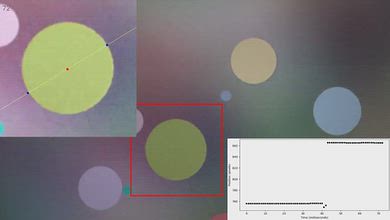
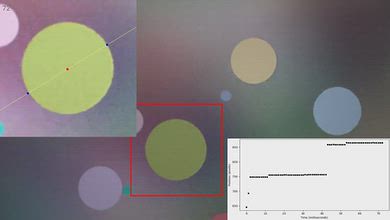
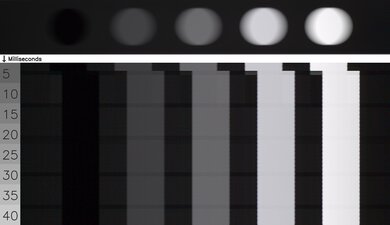
The Sony BRAVIA 5 has poor pixel transitions at its maximum refresh rate of 120Hz. Its response time in Game Mode is very slow across the board, so fast motion is blurry and lacks clarity.
for pictures & test results

for pictures & test results

The TV has poor pixel transitions at its maximum refresh rate of 120Hz. Its response time in Game Mode is very slow across the board, so fast motion is blurry and lacks clarity.
for pictures & test results

for pictures & test results

The Sony BRAVIA 5 has poor pixel transitions at 60Hz. Like at 120Hz, its response time in Game Mode is very slow across the board, and there's also more noticeable persistence blur at lower refresh rates, so fast motion is very blurry.
for pictures & test results

With the exception of 1440p, the TV is fully compatible with everything the PS5 offers, like 4k @ 120Hz, as well as HDMI Forum VRR. It also supports Auto Low Latency Mode, so you don't have to manually switch to Game Mode to get the lowest input lag.
for pictures & test results

With the exception of 1440p and FreeSync Premium Pro, the TV is fully compatible with everything the Xbox Series X|S offers, including 4k @ 120Hz, HDMI Forum VRR, and Dolby Vision gaming. It also supports Auto Low Latency Mode, so you don't have to manually switch to Game Mode to get the lowest input lag.

for videos & test results
for pictures & test results

for pictures & test results
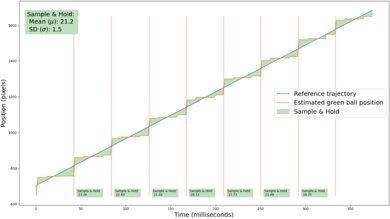
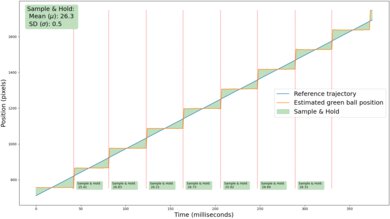
The Sony BRAVIA 5's motion interpolation feature does a very good job of reducing stutter in 24fps content. When bringing that content up to 30fps, slow camera movements have good fluidity. It also has great consistency, so the cadence of motion is very even.
for pictures & test results
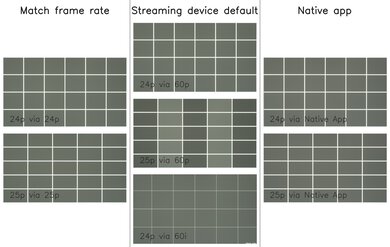
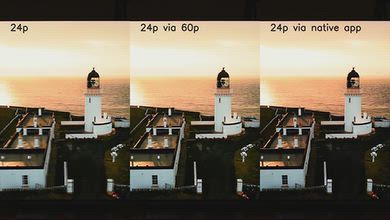
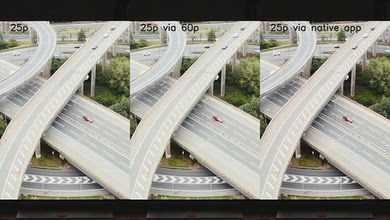
The TV removes 24p judder from any source, including those that output content in 60Hz, which helps with the appearance of motion in movies and shows. It also removes 25p judder from external sources that can send a 25Hz signal, like an Apple TV. It doesn't entirely remove 25p judder from 60p signals or from the native apps, but frame times are fairly consistent, so motion is just a bit jittery.
To remove 24p judder from 60Hz sources, Motionflow has to be enabled, with CineMotion set to 'High' and both sliders at 'Min.' This combination of settings removes judder without adding any soap opera effect.
for videos & test results
for videos & test results
The TV is completely free from micro-judder, regardless of the source.
for pictures & test results

for pictures & test results

The TV's response time is just okay. You don't notice any significant blur in movies and shows, but motion in fast paced sports is a bit blurry.
for pictures & test results
for pictures & test results
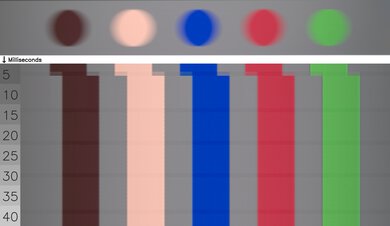
The Sony BRAVIA 5 does a fantastic job of avoiding transition artifacts in movies and shows. The TV is completely free from edge artifacts, so the edges of objects remain consistent with the center as transitions occur. There are some minor color artifacts at the beginning of transitions, like the hint of yellow that's present in blues, but this settles quickly and is hard to notice in real content.
for pictures & test results

The Sony BRAVIA 5 uses pulse width modulation (PWM) to control the backlight intensity. It flickers at 720Hz in all picture modes, which is high enough that it isn't noticeable, but it can still bother those sensitive to flicker.
With local dimming disabled, the TV is flicker-free at backlight settings between 15 and 50.
for pictures & test results

for pictures & test results

There's an optional backlight strobing feature, commonly known as black frame insertion (BFI), which you can enable to improve the appearance of motion. Unfortunately, it doesn't work very well. With the 'Clearness' slider set to '1,' the TV flickers at 120Hz, which causes image duplication with 60 fps content. With the 'Clearness' slider set to '2,' the backlight flicker pattern is very unusual, flickering at both 120Hz and an underlying 720Hz pattern, similar to the Sony X90L/X90CL.
for pictures & test results

for pictures & test results

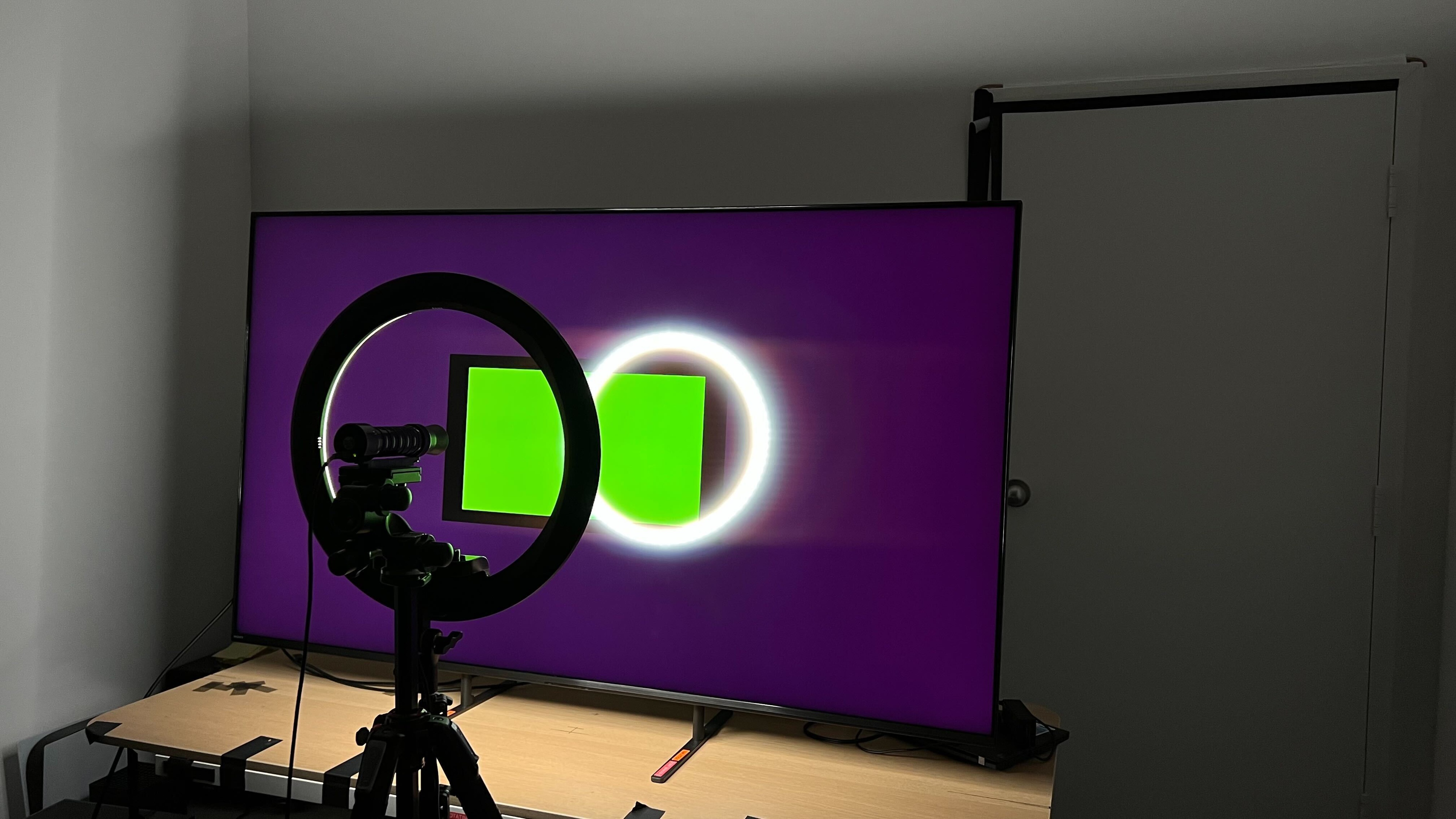
The Sony BRAVIA 5 has inadequate direct reflection handling. Direct light sources like a lamp or window opposite your screen are very noticeable since the TV barely reduces the intensity of those reflections.


for pictures & test results

for pictures & test results

The total reflected light of this TV is sub-par. You easily see reflections on your screen during dark scenes when viewed in a bright room, and there's some obvious light banding present, which is distracting.
for pictures & test results

The TV's perceived color volume in a bright room is very good. Colors barely lose any saturation when they're exposed to light, so you still get punchy colors in a well-lit room.
for videos & test results

for pictures & test results

for pictures & test results

for pictures & test results

The Sony BRAVIA 5 has an alright viewing angle. The image looks mostly consistent from a slight angle, but there's significant gamma shifting, black level raise, and color washout that worsens the further you move off-center. Since image quality is noticeably degraded at an aggressive angle, the TV isn't a very good choice for wide seating arrangements.
for pictures & test results

for pictures & test results

Unfortunately, the TV has poor gray uniformity. There's dirty screen effect towards the center, the corners are much darker than the rest of the screen, and there's vertical columns across most of the panel. All of this is most noticeable during brighter scenes and is distracting. The uniformity in darker scenes is much better, but the sides of the screen are a bit lighter than the rest of the image.
The uniformity of a panel can vary between different units of the same TV, so it's very possible that other units aren't as bad as ours.
for pictures & test results

for pictures & test results

This TV uses a BGR subpixel layout. It doesn't affect picture quality but can cause issues with text clarity in some applications when using it as a PC monitor.
It uses a KSF phosphor coating to produce red light and has high peaks on reds and blues. This model does have good separation between colors, giving it solid color purity and a wide color gamut.
for pictures & test results

for pictures & test results

HDMI ports 3 and 4 support the full 48Gbps bandwidth of HDMI 2.1, while HDMI 1 and 2 are limited to HDMI 2.0 bandwidth. HDMI 3 is also the eARC port.
This TV supports eARC, which allows you to pass high-quality, uncompressed audio to a compatible receiver through an HDMI cable. It supports all major audio formats, so you don't have to worry about compatibility with external sources.
Update 09/09/2026: Unfortunately, there's a significant audio-sync issue affecting all Sony TVs with the MediaTek Pentonic 1000 chipset running Android 14 when using LPCM audio over ARC. The issue is intermittent and tends to appear after extended gameplay, particularly after switching between different video output modes, such as 4k @ 60Hz SDR and HDR, or switching to a different refresh rate, such as 1080p @ 120Hz. These changes trigger an HDMI handshake, after which the audio delay can gradually develop over the course of 20 minutes or more. Once it occurs, audio can progressively fall out of sync by several hundred milliseconds, making games effectively unplayable. We reproduced approximately 250 ms of delay on the A95L, 438 ms on the Bravia 7 II, and over 600 ms on the Bravia 9 after updating it from Android 12 to Android 14. These measurements reflect when we happened to measure the delay, rather than a difference in severity between the TVs, as all affected models are capable of producing the same delays. The delay persists even when the soundbar is disconnected, and the TV's internal speakers are used, confirming that this is a TV-processing issue.
The audio problems aren't limited to LPCM. We were also able to reproduce audio stuttering while playing Dolby MAT content from an Apple TV on the Bravia 9 after extended playback, although this behavior was inconsistent and could not be reliably reproduced. We could not reproduce the LPCM audio-delay issue on TCL TVs using the same Pentonic 1000 chipset, including models running Android 14, which indicates that the problem is specific to Sony TVs rather than an inherent Pentonic 1000 issue.
for pictures & test results

The Sony BRAVIA 5 looks very similar to the Sony X90L/X90CL. It has a premium design with thin bezels, so it has a clean and modern look.
for pictures & test results

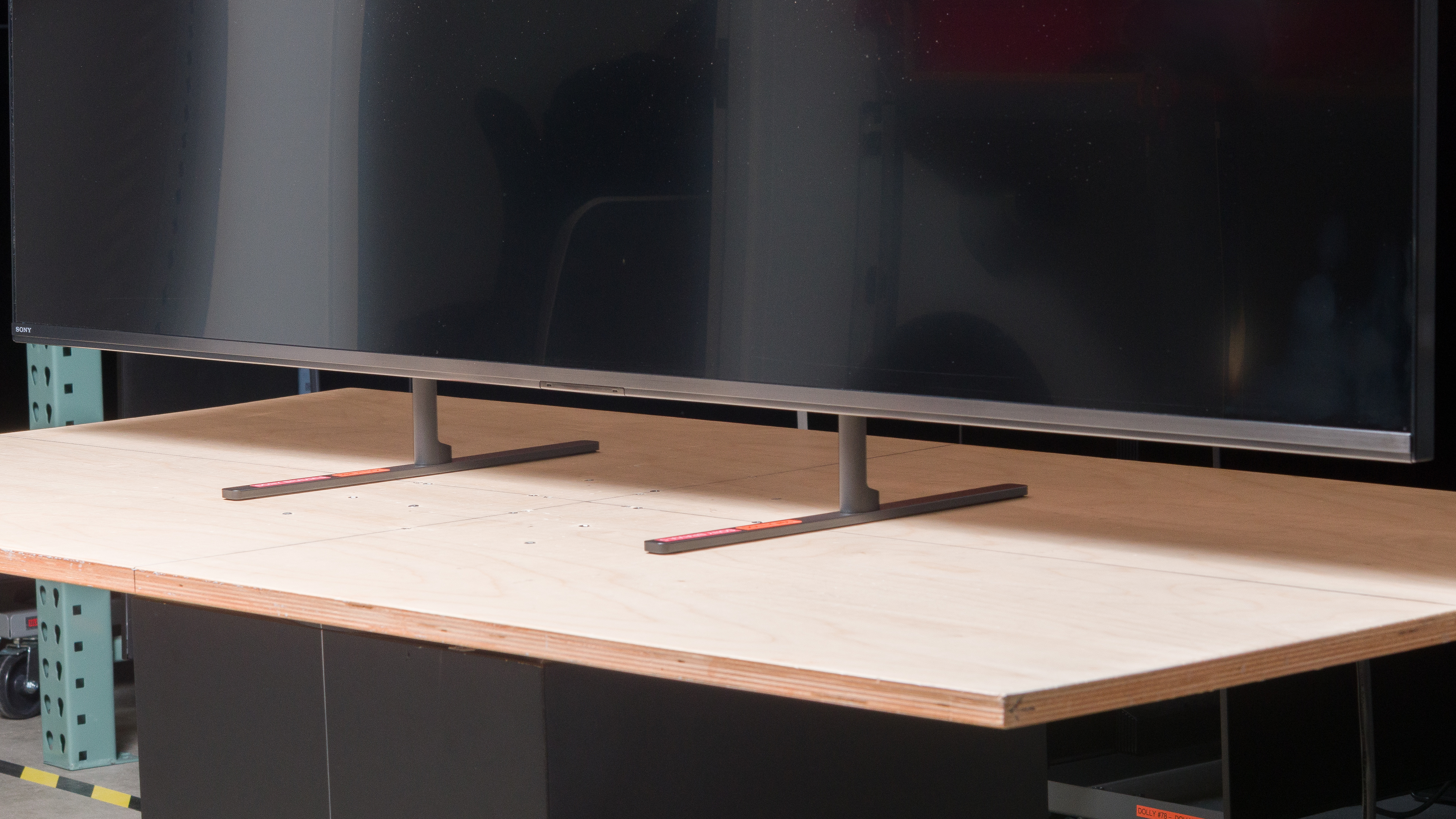
Like the Sony X90L/X90CL, the TV comes with two feet, but these ones are flat on the bottom. However, you can't widen the position of the feet like you can on the X90L and some other Sony models. You can adjust the height of the feet, though. The lower position (pictured above) gives you the best stability, but you can also raise the feet if you need to fit a soundbar underneath the TV.
for pictures & test results

Like any modern Sony TV, the back has a checkerboard pattern. The inputs are on the left side of the TV in a recessed cutout, so even though they're still reachable when you have it wall-mounted, they're a bit hard to access. Unfortunately, there are no clips or grooves to help with cable management.

for pictures & test results

The TV leans back a bit. It's not very noticeable from the front in the lower stand position, but the slant is more apparent in the raised stand position.
for pictures & test results

The Sony BRAVIA 5 has good build quality overall, but there's a concerning amount of wobble and a noticeable slant when using the high stand position. These things are so bad that we suspect that this is an issue with quality control on our unit.
for pictures & test results

The remote has voice control and the typical buttons for popular streaming services. The remote that comes with the TV isn't backlit, but if you get the Costco variant of this TV, it comes with a backlit remote.

for pictures & test results

Unfortunately, like most TVs, the interface contains ads. You can opt out of personalized ads, but this doesn't change the number of ads you'll see; they just won't be personalized to match your search and viewing history.

for pictures & test results

- Remote
- 2x AAA batteries
- Power cable
- VESA adapters/screws
- Manuals and user guides
for pictures & test results

The Sony BRAVIA 5 has a good frequency response. Like most TVs, there's not much bass, so it's best to pair it with a soundbar if you want immersive audio. Fortunately, the TV's sound profile remains mostly balanced across all volume levels, so dialogue is clear enough to understand regardless of how loud you have the speakers.