
See the previous 2.1 changelog.
Goal
TV 2.2 is our second test methodology update that focuses on motion handling when watching low frame rate content, such as movies and shows, and includes a new test applicable to sports. Our last update added a revamped judder test and a brand-new micro-judder test, but those tests weren't enough to paint a proper picture of how well a TV handles motion when watching different types of content. Our original plan was to tackle motion handling over three separate test bench updates, but we decided to go all out with our newest update, so TV 2.2 will be our final update to motion handling for the foreseeable future.
We researched this complicated topic for over a year, and we're finally at a point where we feel confident in our tests and scoring for motion handling. We've revamped our 'Stutter' test and added a new test that looks at 'Stutter Reduction Via Interpolation'. Additionally, we added a new test that looks at whether or not a TV suffers from 'Transition Artifacts,' which shows how colors look in motion. With these new tests and our existing motion tests, we feel we have a solid understanding of how well a TV handles motion while watching content. Because of this, we've completely revamped our 'Motion Handling' usage and removed the 'Broken' disclaimer. If you want to learn more about how TVs handle motion, check out our in-depth article on the topic.
What's New In 2.2
-
Revamped our Stutter test.
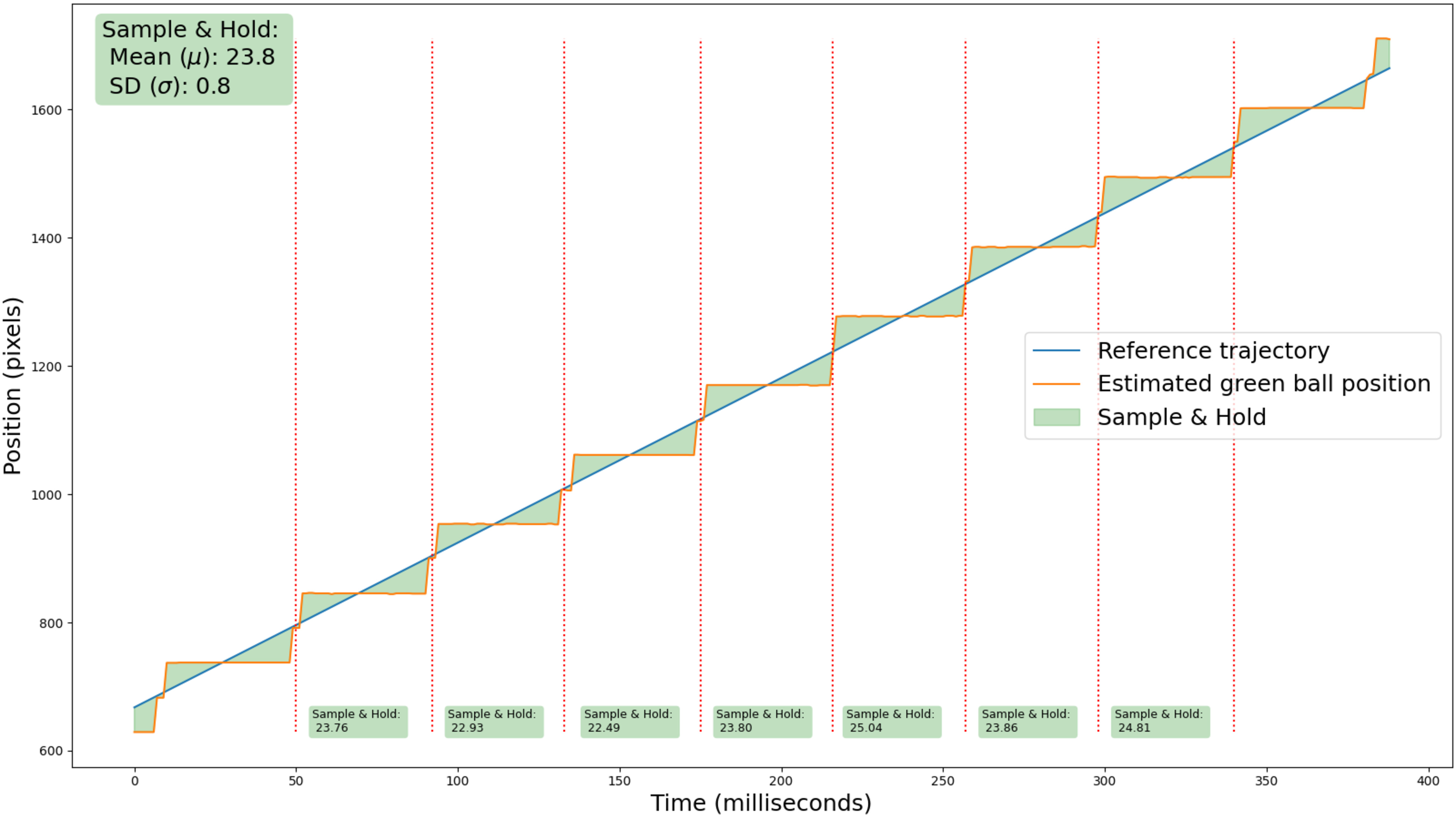
- Sample And Hold: How much motion deviates from continuous motion due to the display's sample-and-hold behaviour.
- Frame Hold Time @ 24fps: The time that a frame is static in 24fps content.
-
New Stutter Reduction Via Interpolation section.
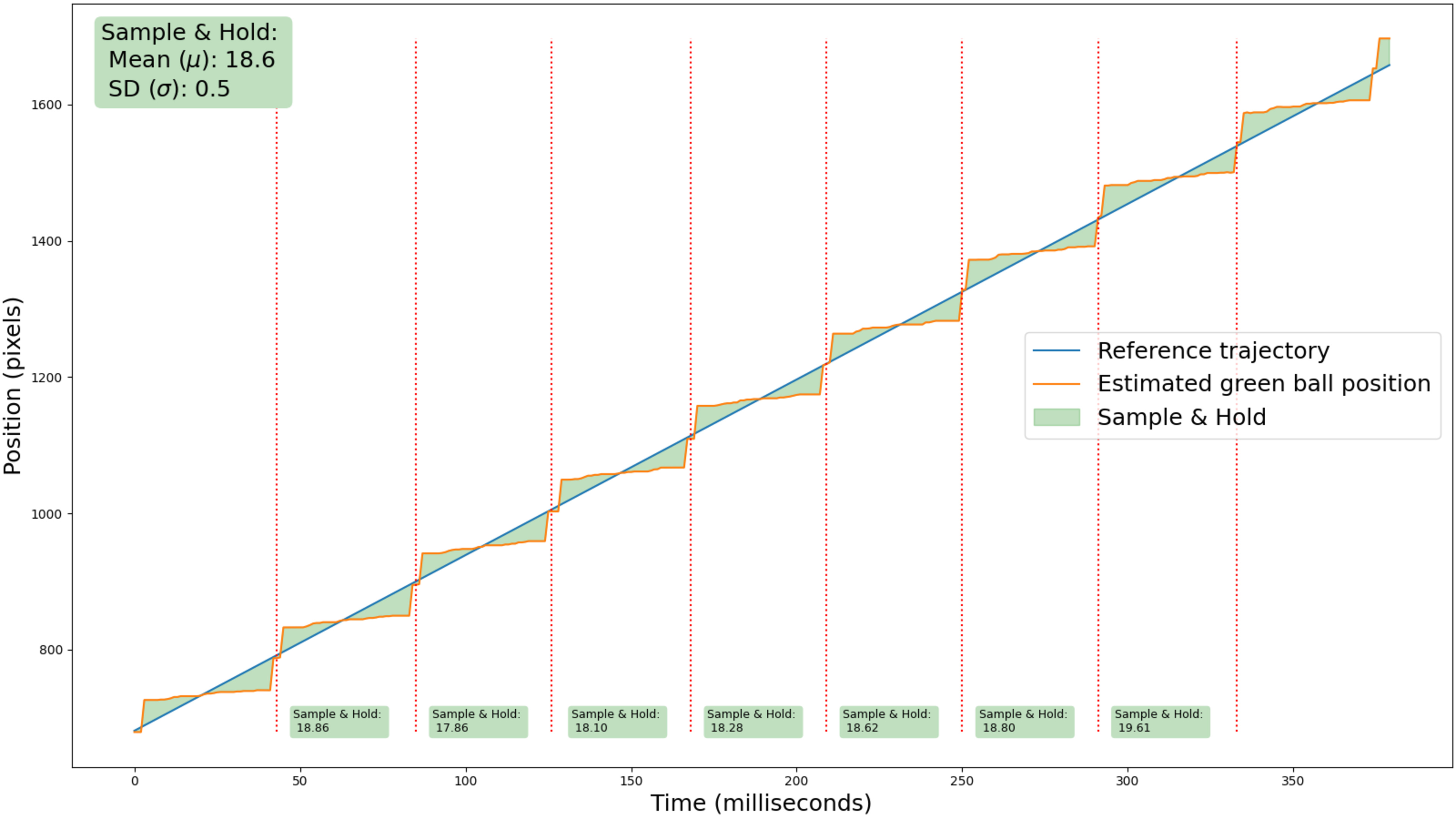
- Sample And Hold (Interpolation): How much motion deviates from continuous motion due to the display's sample-and-hold behavior with the motion interpolation setting that's equivalent to 30fps.
- Interpolation Consistency: The standard deviation of the sample-and-hold score across all interpolated segments.
-
New Transition Artifacts section.
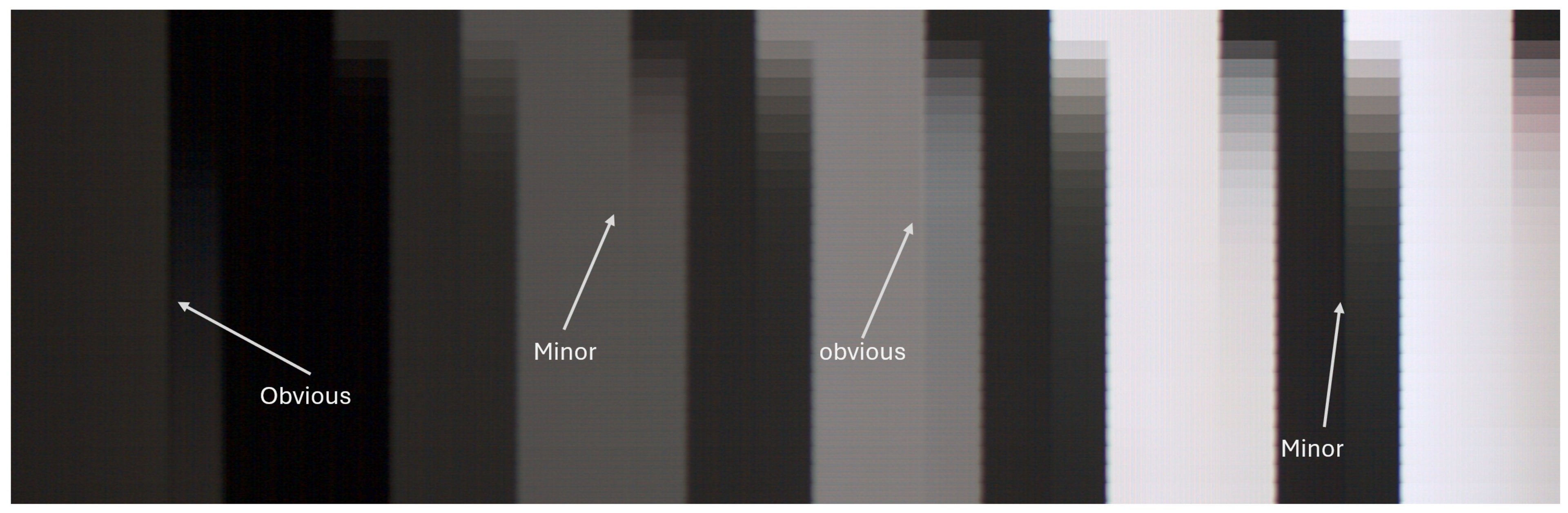
- Color Artifacts: Whether RGB transitions produce unintended intermediate colors.
- Edge Artifacts: Whether RGB transitions are consistent between the edges and the center of a moving object.
-
Revamped Motion Handling usage
- This new unbroken usage encapsulates how a TV handles motion when watching movies, shows, and sports. It does not cover motion handling when gaming.
-
Tweaks to the weighting of scores for some usages.
- Mixed Usage: Dropped our processing score from 14% to 7% and removed the 3% that Stutter contributed. We replaced that with a 10% weighting of our new Motion Handling usage.
- Home Theater: Removed the 5% weighting for Stutter, and dropped the Processing weighting from 15% to 10%. Our Motion Handling usage is now worth 10%.
- Sports: Dropped Processing from 15% to 10% and removed the 5% that Gray Uniformity was contributing. We replaced that 10% with our new Transition Artifacts test.
- Removed our old Motion Interpolation test.
Stutter
With the rise of OLEDs and LED models with fast response times, stutter has become one of the largest factors to consider if you're looking for a TV with solid motion handling. Our old stutter results were essentially just a calculation of a TV's frame hold time at 24fps and 60fps, but we decided to drop the 60fps calculation since stutter really isn't an issue at higher frame rates. We still have our measurement for 24fps frame hold time, but we now also test to see how much a TV's motion deviates from continuous motion due to the sample-and-hold behavior, since that's also a key factor for motion cadence. Check out our stutter article to learn more.
stutter reduction via interpolation
Although heavy amounts of motion interpolation can certainly lead to the dreaded soap opera effect or an image with a ton of artifacts, it's pretty common for TV owners (especially OLED owners) to use a light amount of motion interpolation to help mitigate stutter. We decided to look at how well a TV's motion interpolation feature actually reduces stutter when using settings that are equivalent to 30fps. This test goes hand in hand with our regular stutter test, since you can see how much stutter a TV has, and how consistent motion is when the motion interpolation feature is enabled or disabled. This test effectively replaces our old 'Motion Interpolation' test, which has been removed. Check out our in-depth article on stutter to learn more.
You can see how much stutter a TV has, and how consistent motion is, when the motion interpolation feature is enabled or disabled.
Transition Artifacts
Our new Transition Artifacts test looks at two different types of artifacts that can drastically affect the appearance of motion in movies, shows, and sports. The first type of artifacts are what we call Color Artifacts, which are unintended intermediate colors that can appear around objects and characters as they move around on the screen. These are caused by uneven subpixel transitions, so if you want colors to remain consistent in fast-paced scenes, clean color transitions are incredibly important.
 |
|
The second type of artifacts we test for are Edge Artifacts, which are evident at the junction point of a moving object and its background. TVs that suffer from these artifacts will have trails of blur around the edges of any fast-moving object or person, leading to an inconsistency between the center of an object and its edges. If you don't want added blur or ghosting while watching all types of content, having a TV that's free from these edge artifacts is necessary.
To learn more about transition artifacts and how we test for them, we have an article that takes a deep dive into the topic.
motion handling usage
Now that we're confident in our tests and scores related to motion handling when watching content, we've completely revamped our 'Motion Handling' usage, which was previously in a 'Broken' state. This new section covers all aspects of motion handling outside of gaming. If you want a television with solid motion performance when watching movies, shows, and sports, this new usage will give you a very good idea of a TV's overall motion handling.
| Motion Handling |
|---|
|
tweaks To Existing Usages
Now that we have a workable Motion Handling usage and our new Transition Artifacts test, we've tweaked the weighting of our scores for Mixed Usage, Home Theater, and Sports. You can see the detailed weightings for TV 2.1 and TV 2.2 below for comparison.
| TV 2.1 | TV 2.2 | |
|---|---|---|
| Mixed Usage |
|
|
| Home Theater |
|
|
| Sports |
|
|
64 TVs Updated
We have retested popular models. The test results for the following models have been converted to the new testing methodology. However, the text might be inconsistent with the new results.
- Hisense A7N
- Hisense CanvasTV 2024
- Hisense QD6QF
- Hisense QD7N
- Hisense QD7QF
- Hisense U65QF
- Hisense U6N
- Hisense U75QG
- Hisense U7N
- Hisense U8N
- Hisense U8QG
- LG B4 OLED
- LG B5 OLED
- LG C4 OLED
- LG C5 OLED
- LG G4 OLED
- LG G5 OLED
- LG QNED85A
- LG QNED92A
- LG UA77
- LG UT75
- Panasonic W70B
- Panasonic W95A
- Panasonic Z95B OLED
- Roku Pro Series 2025
- Samsung DU8000
- Samsung Q60D
- Samsung Q7F 2025
- Samsung Q80D
- Samsung Q8F 2025
- Samsung QN70F
- Samsung QN80F
- Samsung QN85D
- Samsung QN90D
- Samsung QN90F
- Samsung QN990F 8K
- Samsung S85F OLED
- Samsung S90D OLED
- Samsung S90F OLED
- Samsung S95D OLED
- Samsung S95F OLED
- Samsung The Frame 2024
- Samsung The Frame Pro 2025
- Samsung U7900F
- Samsung U8000F
- Sony A95L OLED
- Sony BRAVIA 2 II
- Sony BRAVIA 3
- Sony BRAVIA 5
- Sony BRAVIA 7
- Sony BRAVIA 8 II OLED
- Sony BRAVIA 8 OLED
- Sony BRAVIA 9
- Sony X90L/X90CL
- TCL Q651G
- TCL Q77K
- TCL QM5K
- TCL QM6K
- TCL QM751G
- TCL QM7K
- TCL QM851G
- TCL QM8K
- TCL QM9K
- TCL S551G