The Hisense CanvasTV 2024, also known as the Hisense S7N, is a mid-range 4k model in Hisense's 2024 lineup with a unique twist: it comes with a wood-like frame alongside a series of included landscapes and paintings and is meant to double as an art piece in your home when wall-mounted. It uses a KSF phosphor coating, designed to deliver more vibrant and lifelike colors than traditional LED TVs. Unlike most models on the market, it uses a matte screen coating that is meant to significantly reduce reflections in a bright room. It has four HDMI ports, two of which carry HDMI 2.1 bandwidth with support for 4k @ 144Hz and 1080p @ 240Hz gaming. The TV supports HDR10+ and Dolby Vision and passes through advanced audio formats from Dolby and DTS through its eARC port. It comes in two sizes: 55 and 65 inches. It was replaced in 2026 by the Hisense CanvasTV 2026.
Our Verdict
The Hisense Canvas TV is a middling unit for mixed usage. While it's bright enough in SDR to deliver an adequate viewing experience in well-lit rooms, its HDR brightness and contrast aren't good enough to deliver a satisfactory home theater experience. It does deliver a decent gaming experience thanks to its low input lag, and it even comes with a few nice gaming features like VRR support, 4k @ 144Hz, and 1080p @ 240Hz capabilities. Sadly, its response time performance isn't good enough for a motion-blur-free gaming experience.
- Good reflection handling with glare from direct sources of light.
- Solid image processing.
No local dimming feature to improve contrast and black uniformity.
- Smudges glare from ambient lights across the screen instead of reducing its size.
The TV is very inaccurate in SDR and HDR.
The Hisense Canvas TV is sub-par for watching movies, as its only real strengths are its solid image processing, judder removal capabilities, and low stutter when watching content with motion interpolation enabled. Otherwise, its HDR brightness is just not good enough to make highlights pop. Its contrast ratio is poor due to the lack of a local dimming feature, so blacks are always raised. Furthermore, the TV's pre-calibration accuracy is terrible in SDR and disappointing in HDR, leading to noticeably off colors; you'll need to calibrate this model if you care about image accuracy. It does have alright color volume, so at least it is somewhat colorful in SDR and HDR.
- Supports both Dolby Vision and HDR10+, and supports DTS through eARC.
- Solid image processing.
Most content is judder free.
No local dimming feature to improve contrast and black uniformity.
- Low peak brightness in HDR.
- Smudges glare from ambient lights across the screen instead of reducing its size.
The TV is very inaccurate in SDR and HDR.
The Hisense Canvas TV is adequately bright in SDR for well-lit rooms, especially with its great direct reflection handling. That said, it struggles with ambient lighting, as the TV's matte cover smudges reflections across the panel, negatively impacting the unit's perceived contrast and colors.
- Good reflection handling with glare from direct sources of light.
Bright enough in SDR for well-lit rooms.
- Smudges glare from ambient lights across the screen instead of reducing its size.
The TV is very inaccurate in SDR and HDR.
The Hisense Canvas TV is okay for watching sports in a bright room. It's bright enough in SDR to handle well-lit rooms, and its reflection handling performs well when dealing with direct light sources, like from lights and windows placed directly opposite the TV. It also upscales low-resolution content well, so your 1080p broadcasts look good. Unfortunately, its color performance is sub-par, so this isn't the model to use if you want your favorite team's jersey to pop, and there are some noticeable transition artifacts. Its viewing angle is barely mediocre; it's not the best option to use if you have people seated at extreme angles, as they won't get the best possible image quality.
- Good reflection handling with glare from direct sources of light.
Bright enough in SDR for well-lit rooms.
- Solid image processing.
The TV's response time isn't quite good enough for a motion-blur free experience.
Image noticeably shifts when viewed from extreme angles.
- Smudges glare from ambient lights across the screen instead of reducing its size.
The TV is very inaccurate in SDR and HDR.
Some noticeable edge artifacts.
The Hisense Canvas TV delivers a mediocre gaming experience. It has low input lag and supports VRR, but its response time is poor at 60Hz, so stick to faster refresh rates for the most responsive gaming experience. Unfortunately, the TV falters when it comes to image quality, as it's just not bright and colorful enough in HDR to offer an acceptable HDR gaming experience, although it does look a bit better in SDR games. Finally, its lack of local dimming really hurts its black levels, as the entire screen looks washed out in darker scenes.
- Low input lag.
Bright enough in SDR for well-lit rooms.
- 4k @ 144Hz and 1080p @ 240Hz support, although VRR doesn't work with the latter.
No local dimming feature to improve contrast and black uniformity.
- Low peak brightness in HDR.
The TV's response time isn't quite good enough for a motion-blur free experience.
The TV is very inaccurate in SDR and HDR.
The Hisense Canvas TV's brightness performance is middling, although it is adequately bright in SDR content. In HDR content, however, it's too dim to make highlights pop, leading to an inadequate HDR viewing experience.
Bright enough in SDR for well-lit rooms.
- Low peak brightness in HDR.
The Hisense Canvas TV's black level is poor. This is mostly due to its lack of local dimming, which leads to poor contrast as the entire screen looks blueish and washed out in darker scenes.
No local dimming feature to improve contrast and black uniformity.
- Smudges glare from ambient lights across the screen instead of reducing its size.
The Hisense Canvas TV has sub-par color performance overall. While it has alright color volume in HDR and SDR, leading to an adequately colorful experience no matter the content, it really struggles with its pre-calibration image accuracy, especially in SDR. Purists will definitely want to invest in a professional calibrator to get the most out of the TV.
The TV is very inaccurate in SDR and HDR.
The Hisense Canvas TV has good motion handling. It removes judder from all sources except for 25p via a 60p signal, which is a rare combination that most people won't encounter. Like most TVs, there's some noticeable stutter in slow panning shots, but its motion interpolation does a great job reducing it without adding unwanted soap opera effect. It has a good response time overall, but there are some unwanted transition artifacts in fast-moving action.
Most content is judder free.
Motion interpolation feature is great at reducing stutter.
Some noticeable edge artifacts.
The Hisense Canvas TV is decently responsive in Game Mode, as it has very low input lag, support for a variety of VRR modes, and a large number of supported resolutions. Unfortunately, its response time isn't fast enough to provide a truly motion-blur-free gaming experience, and this is especially noticeable at 60Hz. Stick to 120Hz and 144Hz for the best gaming experience out of this model. The TV also supports 1080p @ 240Hz, although without VRR support.
- Low input lag.
- 4k @ 144Hz and 1080p @ 240Hz support, although VRR doesn't work with the latter.
The TV's response time isn't quite good enough for a motion-blur free experience.
Note: We're in the process of improving our tests related to image processing, but this score will give you a general idea of how a model performs overall with its image processing capabilities.
The Hisense Canvas TV's image processing is good overall. It cleans up macro-blocking from low-bitrate content quite well and does a good job when upscaling low-resolution content, like from DVDs. Its PQ EOTF tracking is good, leading to accurate HDR, and it's hard to notice any banding in HDR content.
Performance Usages
Changelog
- Updated Sep 18, 2026: We converted this review to Test Bench 2.2.1, adding a new Dumb TV test for whether or not the TV can be used offline.
-
Updated May 25, 2026:
We bought and tested the Hisense CanvasTV 2026, and added a comparison in the HDR Brightness and Ambient Black Level Raise sections of the review.
-
Updated Mar 12, 2026:
We added text to our new Cinematic Motion Handling performance usage and our new Transition Artifacts and Stutter Reduction Via Interpolation test sections after converting the review to TV 2.2.
- Updated Mar 10, 2026: This review has been updated to TV 2.2. We've added new sections for Transition Artifacts and Stutter Reduction Via Interpolation, and updated the way we test Stutter. Additionally, we removed the 'Broken' disclaimer from our Motion Handling usage.
Check Price
Differences Between Sizes And Variants
We tested the 65-inch Hisense Canvas TV, and our results are also valid for the 55-inch, 75-inch, and 85-inch models. The 75-inch and 85-inch models weren't part of the original release, but were added in 2025. There's no difference between them other than size.
Costco sells a variant of this model with a slightly different model code. It comes with an extended warranty and some other store-specific perks, but it performs the same.
| Size | US Model | Costco Variant |
|---|---|---|
| 55" | 55S7N | 55S75N |
| 65" | 65S7N | 65S75N |
| 75" | 75S7N | N/A |
| 85" | 85S7N | N/A |
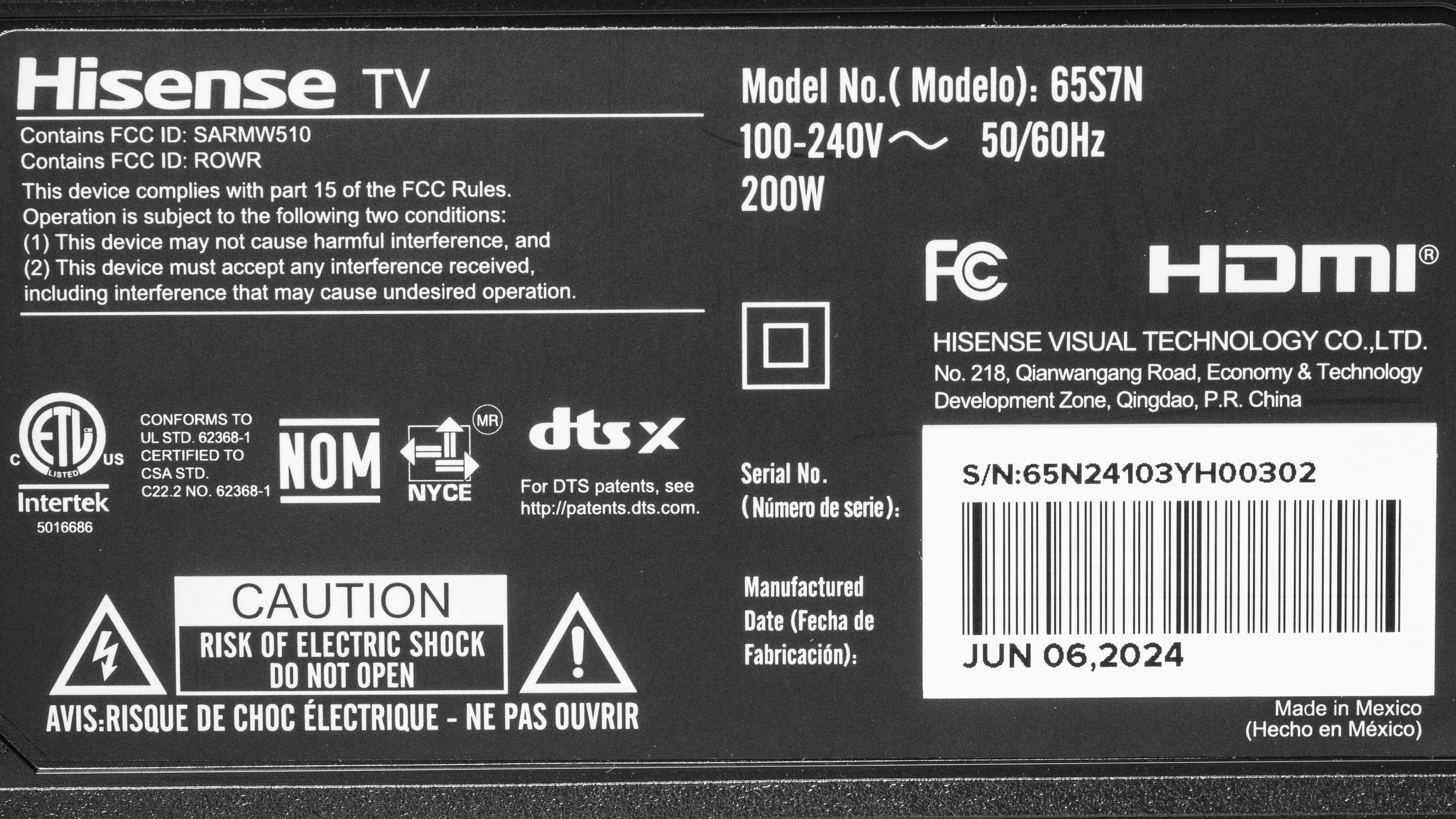
The unit we tested was manufactured in June 2024, and you can see our unit's label.
Popular TV Comparisons
The Hisense S7 is a rather unique TV, with only the Samsung The Frame 2024 QLED and TCL NXTVISION offering something similar: TVs that look more like paintings than a TV. The Hisense comes with a wood-like frame, a matte coating, and a selection of included landscapes, all to make the model look like a piece of art decor. It still offers decent performance overall and comes with a surprising array of gaming features. Still, it lacks a few core essentials, like local dimming to improve its contrast, and its pre-calibration accuracy is terrible in SDR and disappointing in HDR. Ultimately, if you're specifically looking for a TV that looks like this, your only alternatives are the aforementioned Samsung, which is better than the Hisense but more expensive, and the similarly performing TCL. If you're mostly interested in performance rather than looks, you'd be better off getting the cheaper and far better Hisense U7N or TCL QM7/QM751G QLED.
See our recommendations for the best 4k TVs, the best budget TVs, and the best 4k gaming TVs.
The Hisense CanvasTV 2024 and the TCL NXTVISION are extremely similar products, with little to differentiate them. The TCL has slightly better contrast, but in turn, the Hisense is the brighter of the two TVs, especially in SDR content. The Hisense is a bit more accurate in HDR, but its SDR accuracy is abysmal; the TCL, while not very accurate in SDR either, is still much better than the Hisense. Overall, the two TVs are similar enough that you should get the cheapest of the two, although the Hisense TV's SDR brightness advantage is noticeable.
The Hisense CanvasTV 2026 is better than its predecessor, the Hisense CanvasTV 2024. The newer model offers slightly better picture quality, with higher peak brightness that allows it to overcome slightly more glare during the day and for HDR content to stand out a bit better. The screen coating is also better on the new model, so ambient light has less of an impact on picture quality.
The Samsung The Frame Pro 2025 delivers much better picture quality than the Hisense CanvasTV 2024. The Samsung gets a lot brighter in both SDR and HDR, making it a better choice for both bright room viewing and HDR viewing under reference conditions. The Samsung is also far more accurate out of the box in SDR. The Hisense has slightly better black uniformity, though, and it doesn't have a local dimming feature, which is actually a plus in this case, as it's so bad on the Samsung.
The Hisense U7N is vastly better than the Hisense CanvasTV 2024. The Canvas has a unique look, with its wood-like frame and matte coating, making it look like an art piece in your home. But, if you're looking for image quality, the U7N outperforms it in every metric: contrast, HDR and SDR brightness, colors, and gaming performance. Plus, the U7N is typically sold for a cheaper price than the Canvas. Ultimately, these two products are not aimed at the same market, as the U7N is a traditional TV, while the Canvas is truly more for those who prefer to add to their home decor and don't care as much about value or performance.

We buy and test dozens of TVs yearly, taking an objective, data-driven approach to deliver results you can trust. Our testing process is complex, with hundreds of individual tests that take over a week to complete. Most of our tests use specially designed test patterns that mimic real content, but we also use the same sources you have at home to ensure our results match the real-world experience. We use two main tools for our testing: a Colorimetry Research CR-100 colorimeter and a CR-250 spectroradiometer.
Test Results
for pictures & test results

for pictures & test results

for pictures & test results

Unfortunately, this TV has inadequate peak brightness in HDR. HDR content looks flat and dull overall, as the unit isn't bright enough to bring out specular highlights, and with the lack of a local dimming feature, bright spots don't pop at all. If you want a TV with a similar gallery-style design but higher HDR brightness, check out the Samsung The Frame Pro 2025 instead. The new version of this TV, the Hisense CanvasTV 2026 is significantly brighter.
These measurements are after calibrating the HDR white point with the following settings:
- HDR Picture Mode: Filmmaker Mode
- Brightness: 100
- Contrast: 50
- Black Level: 0
- Dark Detail: Off
- Gamma: ST2084
- Active Contrast: Off
- Dynamic Tone Mapping: Off
- Color Temperature: Warm 1
If you prefer a brighter but less accurate image, here are the results with Dynamic Tone Mapping set to 'On':
- Hallway Lights: 341 cd/m²
- Yellow Skyscraper: 318 cd/m²
- Landscape Pool: 203 cd/m²
for pictures & test results

for pictures & test results

for pictures & test results

Switching to PC/Game Mode doesn't cause a noticeable decrease in overall peak brightness.
These measurements are after calibrating the HDR white point with the following settings:
- HDR Picture Mode: HDR Game
- Brightness: 100
- Contrast: 50
- Black Level: 0
- Dark Detail: Off
- Gamma: ST2084
- Active Contrast: Off
- Dynamic Tone Mapping: Off
- Color Temperature: Warm 1
If you prefer a brighter but less accurate image, here are the results with Dynamic Tone Mapping set to 'On':
- Hallway Lights: 339 cd/m²
- Yellow Skyscraper: 311 cd/m²
- Landscape Pool: 204 cd/m²
The Hisense Canvas TV has adequate SDR brightness and is bright enough for a well-lit room.
These measurements are after calibration with the following settings:
- Picture Mode: Theater Night
- Brightness: 100
- Gamma: 2.2
- Color Temperature: Warm 1
- Active Contrast: Off
for pictures & test results

The Hisense Canvas TV has a poor contrast ratio, mostly due to its lack of local dimming. It does have an okay native contrast ratio, but without local dimming, blacks are always raised. If you're looking for a similar 'Art' TV with slightly better contrast, consider the TCL NXTVISION instead.
for pictures & test results

This TV doesn't have a local dimming feature, so the unit can't brighten highlights without impacting the rest of the image. This means that blacks are always raised, and dark scenes end up looking washed out.
for videos & test results

This TV doesn't have a local dimming feature, so it can't adjust the backlight of individual zones to brighten up highlights without impacting the rest of the image. This means that there are no distracting flicker or brightness changes as bright highlights move between zones, as the TV doesn't have any.



for pictures & test results

The TV's black uniformity is alright, but there's no local dimming feature, so the entire screen is blueish and cloudy in darker scenes.
for pictures & test results

for pictures & test results

The Hisense Canvas has okay SDR color volume. Its coverage of the wide BT.2020 color space is inadequate, and it really struggles with displaying most colors outside of some purples and blues. Its coverage of the narrower DCI-P3 color space is decent, but here, it particularly struggles with fully displaying greens, yellows, and lighter reds.
| Volume ΔE³ | DCI-P3 Coverage |
BT.2020 Coverage |
|---|---|---|
| L10 | 87.19% | 65.33% |
| L20 | 88.42% | 65.38% |
| L30 | 87.90% | 64.99% |
| L40 | 87.07% | 66.11% |
| L50 | 86.55% | 65.86% |
| L60 | 84.68% | 62.36% |
| L70 | 81.81% | 53.01% |
| L80 | 81.67% | 50.57% |
| L90 | 81.69% | 51.12% |
| L100 | 80.29% | 61.72% |
| Total | 84.20% | 58.74% |
for pictures & test results

for pictures & test results

The Hisense S7N's color volume is okay. It displays a satisfactory range of colors at many luminance levels, but it struggles with some dark saturated colors due to its lack of local dimming and satisfactory but unexceptional native contrast. It also struggles with displaying colors at high luminance levels due to its low HDR peak brightness.
for pictures & test results

for pictures & test results

for pictures & test results

This TV's pre-calibration accuracy is terrible. It's way too cold even on its warmest setting, and blues are extremely overrepresented in almost all shades of gray. Color accuracy fares slightly better but is still poor overall, with all colors having noticeable color mapping issues, more so for cyans and whites. Gamma is pretty close to our target of 2.2, but very dark and very bright scenes are too bright.
for pictures & test results

for pictures & test results

for pictures & test results

The TV has amazing accuracy after calibration. It's not easy to calibrate, however, partly due to how inaccurate it is to start and also due to some settings being too aggressive while others, like adjusting reds, seem to have almost no effect. Still, after some time, the TV does end up looking very good, with its color temperature now close to the 6,500K target, color accuracy now only showing minor color mapping issues, and blues being only somewhat overrepresented in whites. Gamma is now even closer to our 2.2 target, with only brighter scenes still being too bright.
You can see our full calibration settings.
for pictures & test results

for pictures & test results

The Hisense S7 has disappointing pre-calibration accuracy in HDR, mostly due to its color temperature, which is extremely cold. This can also be seen in how overrepresented blues are in all shades of gray, with reds being slightly underrepresented in brighter shades. As for color accuracy, it's acceptable, although all colors are noticeably off-target.
for pictures & test results

for pictures & test results

The TV's accuracy is very good after calibration. The color temperature is vastly improved, as it's now very close to our 6,500K target. White balance is much better, although blues are still overrepresented in mid and brighter grays, while reds are still slightly underrepresented in brighter shades. Unfortunately, there is only a small improvement in the TV's color accuracy, as all colors are now closer to target, but not significantly so.
for pictures & test results

The Hisense Canvas TV has good PQ EOTF tracking. Blacks and near-blacks are raised, while shadows, mid-tones, and highlights are displayed a bit dimmer than intended, but overall, it's solid. There's a gradual roll-off near the TV's peak brightness to retain detail in highlights in all mastered content.
for pictures & test results

The TV has very good low-quality content smoothing. It does a great job of smoothing out artifacts in low-bitrate content while still preserving details.
for pictures & test results

The Hisense Canvas TV does a good job at upscaling low-resolution content like DVDs or lower-resolution streams. Details are clear enough, but finer details are hard to make out.
Sharpness processing was calibrated with no over-sharpening for low-resolution content, with the following settings:
- Sharpness: 13
- Super Resolution: On
for pictures & test results

The TV has impressive HDR gradient handling. There's noticeable banding in darker blues, but all other colors have minimal or no banding at all.
This TV has low input lag when set to PC/Game Mode, especially at 120Hz, which ensures a very responsive gaming experience with very little delay between your actions with your controller or mouse and the action on-screen. The TV's input lag is much higher at 60Hz; while still good, you'll definitely feel it if you're sensitive to it. In 1080p @ 240Hz, the input lag is 4 ms.
The TV supports all common resolutions up to 4k @ 144Hz on two of its four HDMI ports. Unfortunately, 1080p @ 240Hz only works properly with VRR disabled, as with it enabled, there is obvious frame skipping at refresh rates around 144Hz.
The Hisense Canvas TV supports all three VRR formats, so it's highly compatible regardless of the source. Unfortunately, with 1080p @ 240Hz and VRR enabled, the TV's built-in frame counter shows 72Hz, and there's bad frame skipping, desaturated colors, and chroma 4:4:4 isn't displayed properly. With VRR disabled, 1080p @ 240Hz works without issues.
for pictures & test results
for pictures & test results

The TV's CAD at its maximum refresh rate is acceptable. This model does struggle when going from very dark shades to very bright ones and vice versa, but it performs especially well in content that's consistently bright.
for pictures & test results

for pictures & test results

The TV's CAD at 120Hz is acceptable and definitely faster than at its maximum refresh rate. It still struggles most when going from very bright shades to very dark ones. Overall, there's definitely some blur in most color transitions.


for pictures & test results

The Hisense Canvas TV is fully compatible with everything the PS5 offers, like 1440p @ 120Hz and 4k @ 120Hz, as well as HDMI Forum VRR. It also supports Auto Low Latency Mode, so you don't have to worry about manually switching to PC/Game Mode to get the lowest input lag.
for pictures & test results

The Hisense Canvas TV is fully compatible with everything the Xbox Series X|S offers, including 1440p @ 120Hz, 4k @ 120Hz, HDMI Forum VRR, FreeSync Premium Pro, and Dolby Vision gaming. It also supports Auto Low Latency Mode, so you don't have to worry about manually switching to PC/Game Mode to get the lowest input lag.
for videos & test results
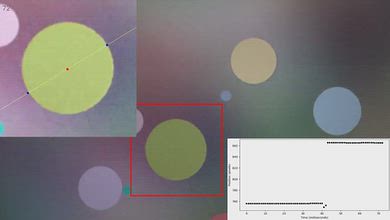
for pictures & test results

for pictures & test results
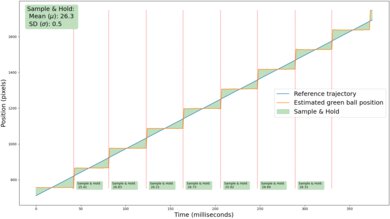
Due to the relatively quick response time, there's some minor stutter when watching movies or TV shows, and it's most apparent in slow-panning shots.
for videos & test results
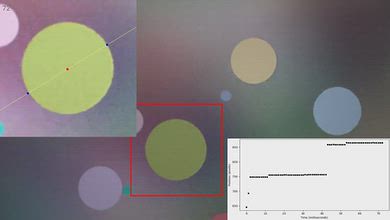
for pictures & test results

for pictures & test results
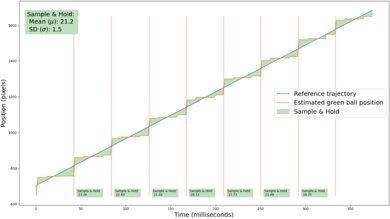
The motion interpolation feature is great at reducing stutter without adding unwanted soap opera effect. The feature is also remarkably consistent, resulting in a very even frame pacing and smooth motion overall.
for pictures & test results
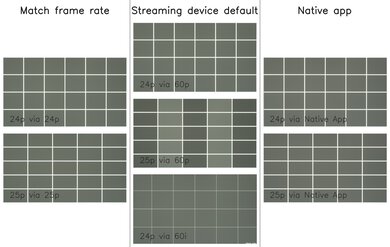
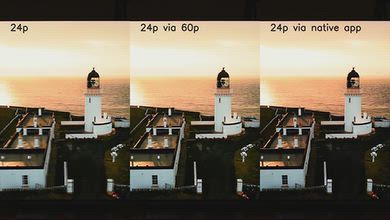
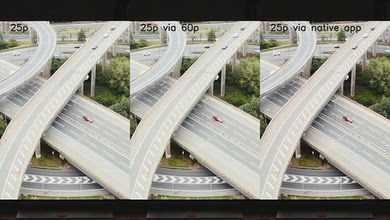
The Hisense S7 automatically removes judder from all sources when watching movies or shows that are in 24p, even if they're in a 60Hz signal. It can't remove judder from 25p content sent via a 60p signal, like an older cable box or streaming device.
for pictures & test results

for pictures & test results

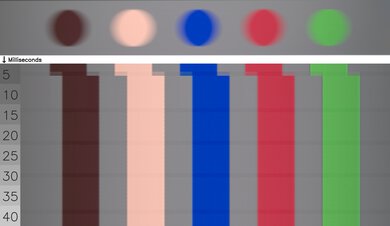
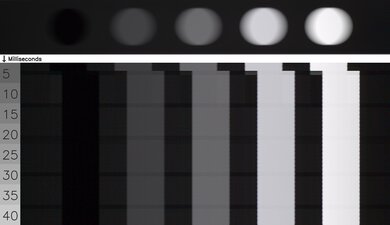
The Hisense Canvas TV has an alright response time. It performs best in transitions between similar color shades but really stumbles when transitioning from brighter shades to darker ones and vice versa. This leads to noticeable motion blur in a wide variety of content.
for pictures & test results

The TV uses pulse width modulation (PWM) to dim its backlight, which introduces flicker that can bother people who are sensitive to it. That said, this TV flickers at a blistering 19000Hz in all picture modes, which is too fast to be noticed by the human eye.
This TV doesn't have an optional backlight strobing feature, also known as BFI.
for pictures & test results

for pictures & test results

The Hisense Canvas handles direct reflections well. Due to its matte screen finish, reflections from sources of light directly facing the screen are barely visible, so you don't have obvious reflections superimposed over your content. Furthermore, the intensity of the brightness of reflections is greatly reduced, so it performs very well in a bright room.
for pictures & test results

for pictures & test results

The Hisense Canvas has disappointing black levels in a well-lit room. Blacks become elevated in a bright room, so the image looks washed out. The TV has a limited contrast ratio to begin with, so you only get deep blacks in purely dark scenes when viewed in a dark room. In a bright room, blacks look gray, even in dark scenes. The screen coating on the new version of this TV, the Hisense CanvasTV 2026, does a better job at keeping black levels low during the day.
for pictures & test results

for pictures & test results

This TV's overall reflection handling is sub-par, especially when it comes to its handling of ambient light sources. The resulting glare is smudged across the screen, which noticeably impacts the TV's perceived contrast.
for pictures & test results

The Hisense Canvas has sub-par color saturation in a bright room. Its total color volume is similar in a bright room as it is in a dark one, but low-luminance colors do become noticeably washed out as light is added to your room. The brightness of your room doesn't impact high-luminance colors much at all, but these colors are a bit washed out even in a dark room.
for videos & test results

for pictures & test results

for pictures & test results

for pictures & test results

Unfortunately, this TV has barely passable off-angle viewing. The image rapidly degrades as you move off-center, as colors fade quickly and brightness decreases, causing the image to appear washed out. This makes it a poor choice for a wide seating arrangement. If you want a Hisense TV with a matte screen coating that has a much wider viewing angle, consider the Hisense 98QD5QG.
for pictures & test results

for pictures & test results

The Hisense Canvas TV has mediocre gray uniformity. The sides of the screen are darker than the middle, and there's some noticeable dirty screen effect towards the middle of the screen. Its uniformity is better on a very dark or near-black screen, but there's some light clouding throughout, and the sides are a bit brighter than the center.
for pictures & test results

for pictures & test results

The TV uses a BGR (Blue-Green-Red) subpixel layout instead of the traditional RGB layout. This doesn't cause any issues for video or gaming content, but it can be a problem for PC monitor use as it impacts the text clarity, although not everyone will notice this.
The TV uses a KSF phosphor coating to produce red light, with high peaks on reds and blues. This model does have good separation between colors, giving it solid color purity and a wide color gamut.
for pictures & test results

for pictures & test results

The TV has HDMI 2.1 bandwidth on HDMI ports 3 and 4, with both supporting up to 4k @ 144Hz. Fortunately, the HDMI 1 port is the eARC port, so you don't lose a high-bandwidth port when you plug a soundbar into the TV. The unit supports all HDR formats.
The TV supports eARC, which lets you pass high-quality, uncompressed audio to a compatible receiver or soundbar through an HDMI cable. It supports all major audio formats, so you don't have to worry about compatibility with external sources.
for pictures & test results

The Hisense S7 is designed to look more like a framed piece of art than a traditional TV. It has a teak-colored frame by default, but you can buy other colors from Hisense.
for pictures & test results

The Hisense S7 uses two feet that support the TV well. They lift the model about 2.8 inches from the table, so most soundbars fit below the screen, although it'll be a tight fit with chunkier soundbars. It also comes with Hisense's UltraSlim Wall Mount if you prefer to mount the TV to the wall.
The footprint of the 65-inch stand is 44.8" x 14.9".
for pictures & test results

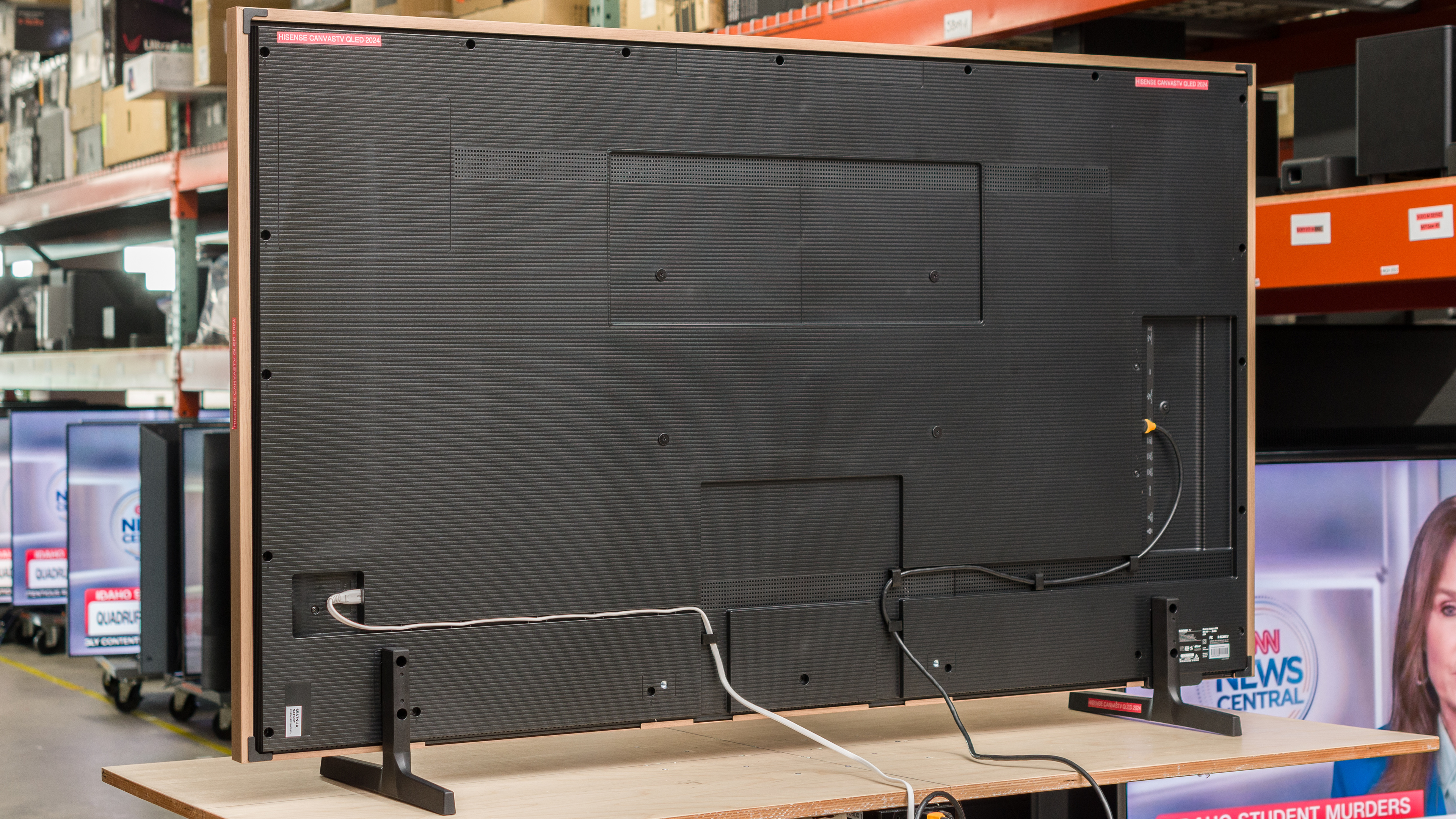
The back of the TV is plain and made entirely of plastic. Most of the inputs are side-facing and aren't too hard to access when the model is mounted flush against the wall. The TV has clips on its back to help with cable management, although the cables then dangle directly from the back as there isn't any way to hide them.


for pictures & test results

The TV has excellent build quality. It's made entirely of plastic, and its frame is made of aluminum, but made to look like wood. The frame blocks part of the first row of pixels, but it's not something you'll notice from a normal viewing distance. When using the stand, there's some wobble from front to back when the TV is pushed, but this doesn't cause any issues. It's well-built overall, and there are no issues with quality control.
for pictures & test results

The TV comes with Hisense's newly designed, backlit remote. It has buttons for popular streaming services, and you can use the built-in microphone to switch inputs, change apps, search within apps, and ask for the weather and time. Unfortunately, you can't change the TV's settings using the voice controls.
for pictures & test results

The Hisense Canvas TV uses version 12 of the popular Google TV operating system. The interface is very smooth and easy to use.
for pictures & test results

Unfortunately, like almost all TVs on the market, the smart interface contains ads, and you can't disable them.
for pictures & test results

There's a single button on the bottom center of the TV that you can use to switch inputs and power the unit on/off.
for pictures & test results

- Manuals
- Remote
- Power cable
- Wall-mount equipment (brackets, screws, and anchors)
- Frame segments, with accessories
In its default 'Art Mode,' the TV consumes about 96 watts of power. You can decrease or increase the model's brightness while in 'Art Mode,' which will impact its power consumption.
for pictures & test results

The Hisense Canvas TV has an okay frequency response. Like most models, the bass is almost non-existent, and it sounds noticeably more unbalanced at max volume than at moderate levels. The TV gets quite loud, so you could go without a soundbar if you're mostly interested in volume over sound quality.