Black frame insertion (BFI) is a feature found on most TVs. It's designed to help improve the clarity of motion by inserting black frames between each real frame. This reduces the amount of persistence blur that you'll see when watching low frame rate content like shows and movies.
Test Methodology Coverage
We added this test as part of the Image Flicker test in our 1.0 test bench update. In our 1.2 test bench update, we split the BFI test off to a separate test, limiting the Image Flicker test to only look at pulse width modulation flicker (PWM). The way we test black frame insertion has remained more or less the same across all test benches. As part of the 1.9 update, we removed the scoring from the test, and in our 2.0 update, we changed the pursuit photo to match our new response time testing, so the photos on newer reviews aren't comparable to older test benches. Learn how our test benches and scoring system work.
| Transition Artifacts | 1.0 - 1.11 | 2.0 - 2.2 |
|---|---|---|
| Pursuit Photo | ❌ | ✅ |
| Optional BFI | ✅ | ✅ |
| Min Flicker For 60 fps | ✅ | ✅ |
| 60Hz For 60 fps | ✅ | ✅ |
| 120Hz For 120 fps | ✅ | ✅ |
| Min Flicker For 60 fps In Game Mode | ✅ | ✅ |
When It Matters
 |
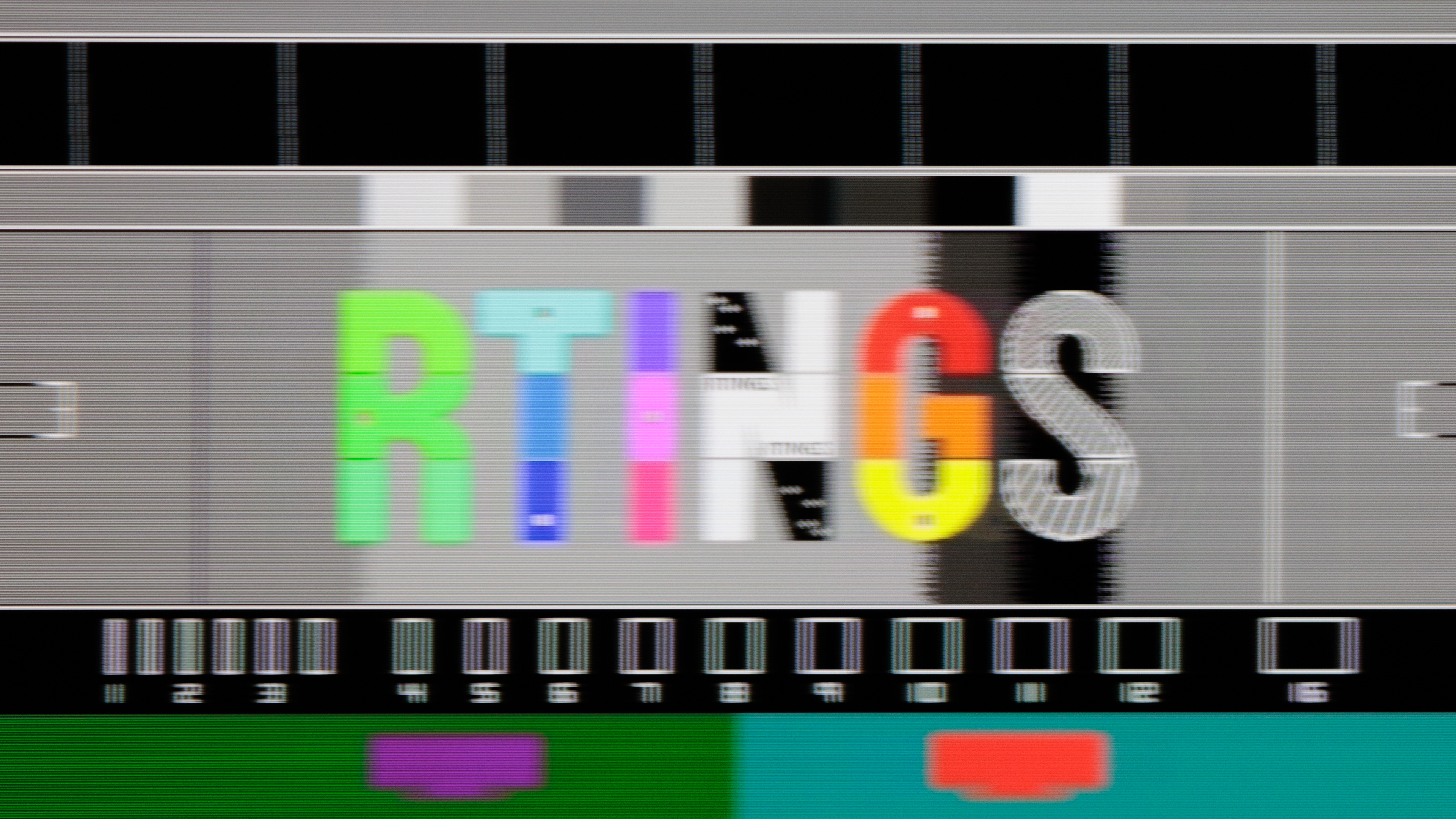 |
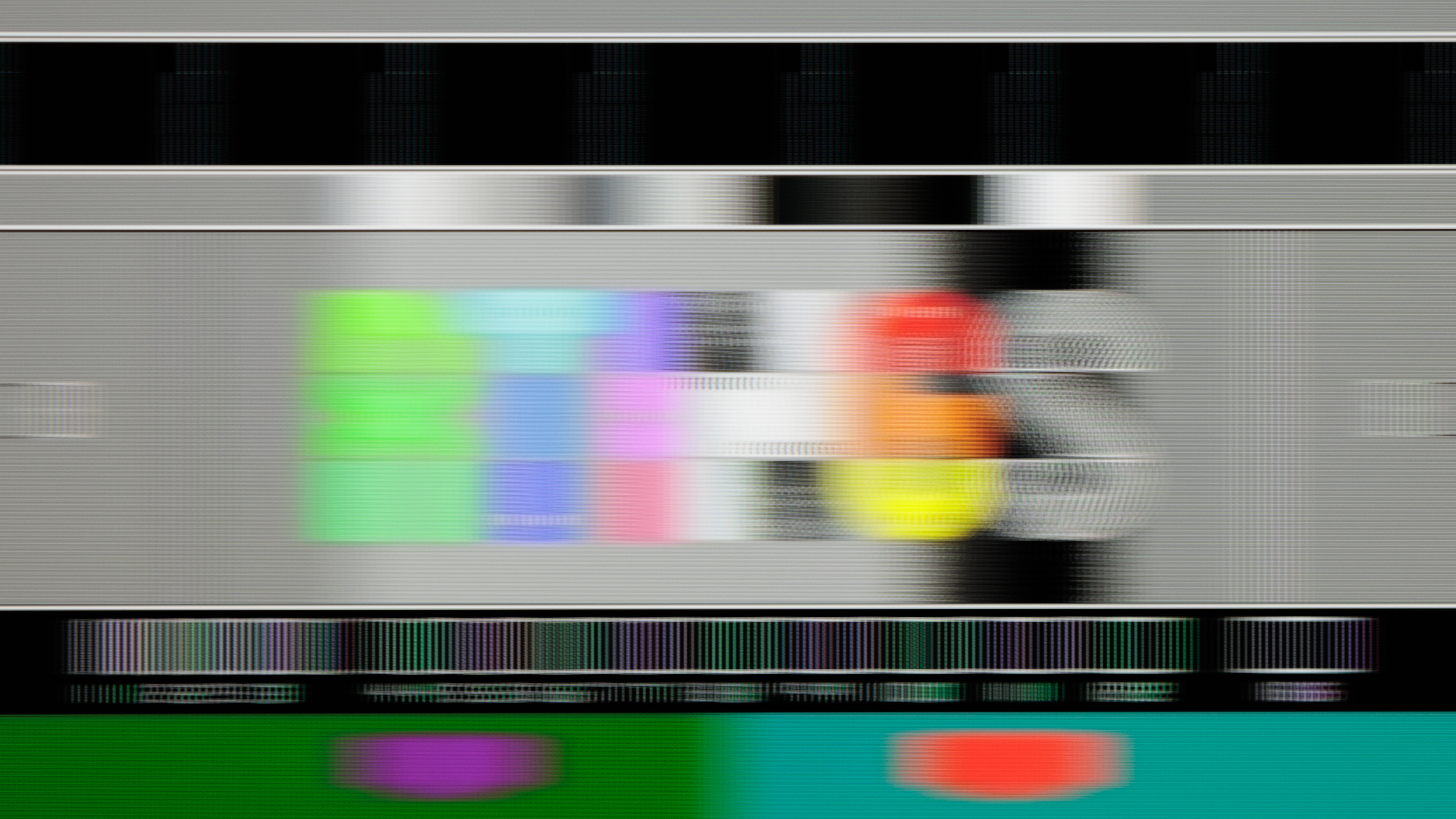
Enabling BFI can drastically increase the clarity of motion when implemented properly. Let's look at the Sony BRAVIA 9 above as an example. On the left, you can see the regular response time pursuit photo with BFI disabled. This TV has an excellent response time, so most of the blur you see in the image is persistence blur caused by sample-and-hold. On the right, you can see the same TV with BFI enabled. As you can see, there's considerably less persistence blur, resulting in much clearer motion. It's not perfect, though, as there is a faint double-image.
 |
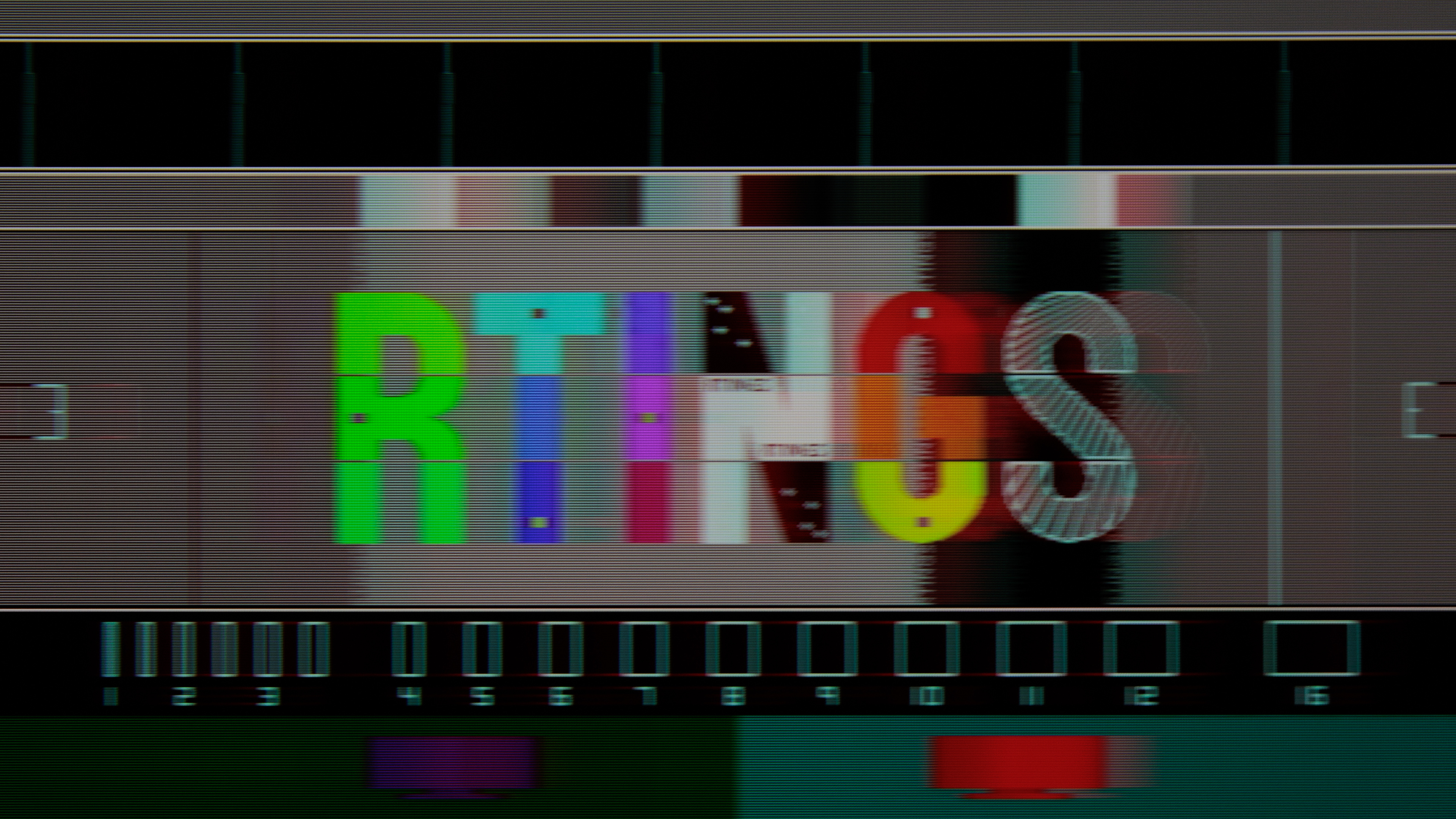 |
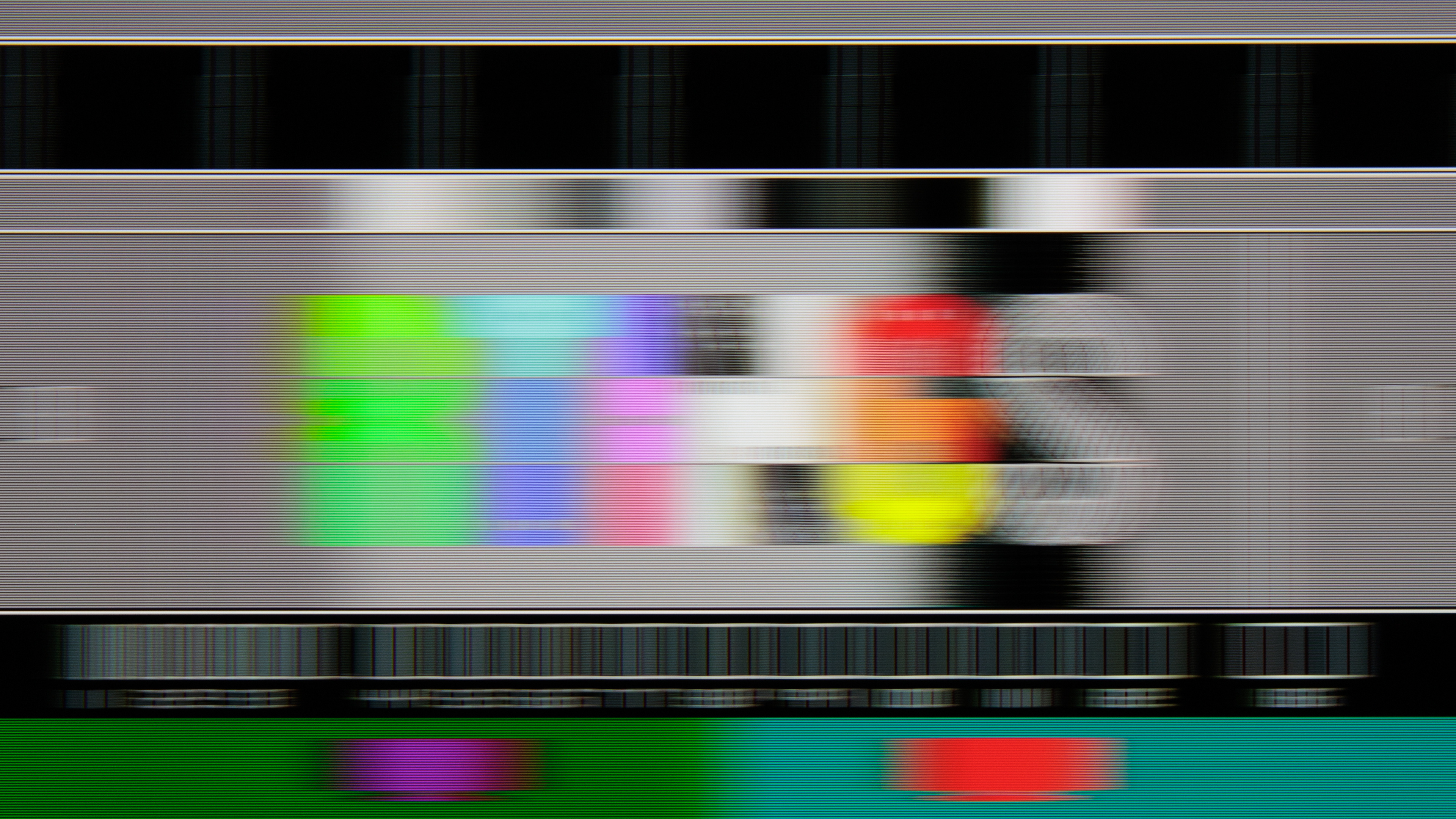
Let's look at an example of a worse BFI feature, now. As you can see in the pursuit photos above, the Samsung DU8000's BFI feature significantly improves persistence blur, but it also drastically reduces the apparent brightness of the image. Like the BRAVIA 9 above, there's also a double image, but because of the decreased brightness of the display, it's a lot easier to see.
Reduced brightness and image duplication are two of the most common complaints about BFI features. Some TVs have implemented methods to reduce the brightness decrease. Image duplication is extremely common and can vary over time, so a TV that looks great with some content might have bad duplication in other content. It all depends on the exact flicker frequency of the BFI feature as well as the incoming signal. Unlike motion interpolation features, BFI isn't an image processing technique, though, so it doesn't matter how busy the actual content is.
Black Frame Insertion vs. Backlight Strobing
You may have seen the terms black frame insertion and backlight strobing used interchangeably. These terms both describe technology used to reduce persistence blur, but there's a big difference between them, and it has to do with the TV's panel technology. Black frame insertion is the technique used by TVs with OLED panels. The name describes exactly how the technology works; it inserts a black frame between each actual content frame. Backlight strobing, on the other hand, is the technique used by TVs with LCD panels. These TVs don't actually transition each pixel to black when BFI is enabled, as that would create additional motion blur and defeat the purpose of BFI. Instead, these TVs simulate BFI by turning the backlight off and on repeatedly. This is closely related to PWM flicker, and most TVs simply adjust their flicker frequency when backlight strobing is enabled.
There's actually a third type of BFI, called backlight scanning. This technique tries to emulate old CRT screens by refreshing the image and turning off sections of the backlight in sequence from top to bottom. The idea works in theory, but it can lead to backlight leakage between sections of the screen that are turned on and off, which can interfere with blur reduction. No TVs on the market in 2026 support this technique, but Blur Busters has implemented a GPU shader that does something similar through your GPU directly, so there's no backlight leakage.
Our Tests
The goal of our BFI test is rather simple: determine if the TV has an optional BFI feature, measure the flicker frequencies it supports, and take a pursuit photo for comparison with other TVs. This test is unscored and only looks for the presence of an optional BFI feature; we don't evaluate the effectiveness of the feature at this time. The pursuit photo can be used to compare TVs, but it doesn't represent all types of motion, so it doesn't paint the full picture of how the TV's BFI feature performs.
We start by warming up the TV for 30 minutes at maximum brightness. Because we're taking a pursuit photo, we need to make sure the TV is performing at its best. A cold TV panel can have a noticeably slower response time. Once the TV has been warmed up, we put it in its most accurate picture mode and adjust the backlight to output 200 nits with a full-white screen. This is done for consistency between TVs. Using a camera mounted to a slider rail system, we take a pursuit photo with BFI enabled.
Optional BFI
To pass the Optional BFI test, the TV must have an option to introduce more black frames into a 60 fps source. For this test, we only assess the presence of BFI or adjustable backlight flickering, not its actual performance. A TV that doesn't flicker even when the backlight is dimmed requires an option to add flicker to pass this test. A TV that does flicker needs to be able to reduce its backlight flicker frequency.
Minimum Flicker For 60 fps
The minimum flicker for 60 fps is the lowest flicker frequency possible on the TV when displaying a 60 fps signal. Low flicker frequencies produce stronger, more visible flicker, helping reduce eye-tracking motion blur. The best-performing TVs can match the flicker frequency to the same rate as the source material. This test only measures the lowest flicker frequency, regardless of whether the TV has an optional BFI feature.
60Hz For 60 fps
For this test, we check if the TV can flicker at 60Hz while playing back 60 fps content, either automatically or with the BFI feature enabled. Matching the flicker frequency to the frame rate is important for the clearest motion possible, as a mismatch can create unwanted judder or distracting flicker.
120Hz For 120 fps
This test is the same as the one above, but this time we check if the TV can flicker at 120Hz while playing back 120 fps content, either automatically or with the BFI feature enabled. Matching the flicker frequency to the frame rate is important for the clearest motion possible, as a mismatch can create unwanted judder or distracting flicker. TVs that don't support 120Hz refresh rates automatically fail this test because they can't display the incoming 120 fps signal.
Minimum Flicker For 60 fps In Game Mode
Finally, we test the lowest possible flicker frequency for 60 fps content when the TV is in 'Game' mode. As with non-Game mode, a TV that can match the frequency to the frame rate will perform best.
Conclusion
TVs that use 'sample and hold' techniques hold static frames in place before switching to the next, creating the illusion of motion. Our eyes, however, are designed to track movement smoothly. This mismatch between eye-tracking and the persistence of static frames results in what we perceive as motion blur. This can be annoying for sports fans or gamers, so some TVs have an option to insert black frames or strobe the backlight to simulate black frames, which increases the motion clarity. To get an idea of how well image flicker works on each TV, we measure the illumination pattern under calibration settings and with any black frame insertion features enabled. We also take a photo to show the amount of eye tracking blur visible on different TVs.