The Canon EOS M50 Mark II is a light refresh of the Canon EOS M50. It's very similar to its predecessor but comes with minor quality-of-life upgrades, including support for clean HDMI output, eye tracking AF in video, and slightly better battery life. Like the original, it's an entry-level APS-C camera that's relatively compact and portable, and it feels comfortable to use. Canon's menu system is also very intuitive, and it includes a guide mode to walk new users through settings and features. It delivers great image quality, with good dynamic range and photos that stay relatively noise-free at higher ISO levels, making it suitable for low light. It's okay for shooting 1080p video, but its 4k video features are underwhelming, with disappointing video quality, poor autofocus performance, and an inability to record at frame rates higher than 24 fps, which also incurs a severe 1.5x crop.
Our Verdict
The Canon M50 Mark II is decent for travel photography. It's very portable for travel with its included kit lens and can fit into most small camera bags. It delivers great image quality and has a good autofocus system, which does a decent job of tracking moving subjects. Unfortunately, its battery life is disappointing, though this can vary drastically with real-world usage habits.
- Lightweight and portable.
- Good overall image quality.
- Disappointing battery life.
The Canon M50 Mark II is decent for landscape photography. It has a good RAW dynamic range to bring out more detail in high-contrast landscape shots. Its noise handling is adequate, but it can struggle with noise in low light, depending on your lens. It's quite portable, with a relatively compact design that makes it easier to take to remote shooting locations. Unfortunately, its battery life is disappointing, though this depends on settings and usage habits.
- Lightweight and portable.
- Good overall image quality.
- Disappointing battery life.
The Canon M50 Mark II is decent for sport and wildlife photography. It has great overall image quality, though its noise-handling capability in low light is just okay. It's also relatively compact. However, its continuous shooting speed is just passable. It shoots at a fairly quick max burst rate, but its buffer is very small, so you may fill it up quickly when trying to capture fleeting moments. It also lacks a silent continuous shooting mode, meaning it may scare off wildlife.
- Lightweight and portable.
- Good overall image quality.
- Mediocre shooting speed.
- No silent continuous shooting.
The Canon M50 Mark II has decent RAW photo performance. Its dynamic range is good, so it captures a fairly wide array of highlight and shadow detail. Images also look quite detailed, even when punching in. However, its noise handling is just okay in low light.
- Good dynamic range.
- Noise handling is just okay.
The Canon M50 Mark II is good for vlogging. It's portable and lightweight, making it easy to carry around while vlogging. It also has a fully articulated screen so you can easily frame yourself and monitor the recording. Unfortunately, it lacks in-body image stabilization. It does have a digital stabilization feature, although enabling it incurs a greater crop. With its kit lens, the camera does a good job of smoothing out camera shake in FHD. It also has good autofocus performance in FHD, but image stabilization and autofocus perform significantly worse in 4k. Video quality overall is mediocre in FHD and disappointing in 4k. On the upside, it has a built-in livestream function, although it comes with some limitations.
- Lightweight and portable.
- Fully articulated screen.
- Built-in livestream function.
- Good FHD video stabilization.
- Lackluster 4k video features.
- Disappointing battery life.
- Disappointing video quality.
The Canon M50 Mark II is okay for studio video. It has an array of inputs, including a microphone jack and micro HDMI port. It supports clean HDMI output, which is helpful when using an external recorder when you don't want any overlays. Its menu system is also easy to navigate, with settings and video features laid out nicely. That said, its overall video quality is disappointing, and its 4k video capability and features are especially lacking.
- Lightweight and portable.
- Supports clean HDMI output.
- Menu is very easy to use.
- Lackluster 4k video features.
- Disappointing video quality.
- Poor autofocus in 4k.
The Canon M50 Mark II isn't suitable for action video. It's portable relative to other interchangeable-lens cameras, but it's not designed for mounting on a helmet or chest rig. It isn't waterproof either. Video quality in FHD isn't bad, and it does a decent job smoothing out camera shake in that resolution. However, its 4k video quality, frame rates, and video stabilization leave a lot to be desired.
- Lightweight and portable.
- Lackluster 4k video features.
- Limited frame rate options.
- Disappointing battery life.
- Disappointing video quality.
Changelog
- Updated Jan 29, 2024: Added text to the 'Raw Photo Performance' verdict box.
- Updated Jan 29, 2024: Converted to Test Bench 0.12.1.
- Updated Jun 23, 2023: Added a link to the Canon EOS R50 in the 'Build Quality' section.
- Updated Jun 09, 2023: Added a link to the Nikon Z 30 in the '4k Video Frame Rate' section.
Check Price
Differences Between Sizes And Variants
The Canon EOS M50 Mark II comes in two color variants: Black and White. We tested the Black version with the Canon EF-M 15-45mm f/3.5-6.3 IS STM kit lens, but you can also purchase the camera without a lens.
If you come across a different variant or your Canon EOS M50 Mark II doesn't correspond to our review, let us know in the discussions, and we'll update the review.
You can see our unit's label here.
Popular Camera Comparisons
The Canon EOS M50 Mark II is the follow-up to the Canon EOS M50. Both cameras perform similarly, but the M50 Mark II has minor improvements. These include the addition of eye-tracking autofocus in video mode and AF Servo mode for stills, as well as a built-in live streaming function and better battery performance. Otherwise, the cameras are nearly identical in design and perform very similarly.
The Canon EOS R50 improves upon the Canon EOS M50 Mark II in a few ways. It has a better autofocus system, a bigger battery with better battery life, and updated video features, including 4k video recording at up to 30 fps without a crop. The M50, on the other hand, can only record 4k at 24 fps with a severe crop, though it is a bit more portable. The R50 is also a better choice if you eventually want to upgrade to a higher-end or full-frame camera body since it uses Canon's RF lens mount instead of the M50's EF-M mount, which has stopped receiving new development and support.
The Sony α6400 is better than the Canon EOS M50 Mark II, as Canon has discontinued its EF-M mount and is no longer developing new lenses for it. On top of that, the Sony also has a more effective autofocus system, quicker burst shooting, and a longer battery life.
The Canon EOS M50 Mark II and the Canon EOS R100 each have their own strengths. The M50 Mark II is a little smaller, has a fully articulated touch-sensitive display, has a faster continuous shooting speed, and exhibits a less noticeable rolling shutter when recording video. Conversely, the R100 is a better-built camera with a higher-capacity battery. Unlike the M50 Mark II, it also has a more up-to-date USB-C port, which you can't use for on-the-go charging. Unlike the M50 Mark II, which uses Canon's discontinued M mount, the R100 has the advantage of using the manufacturer's newer RF mount; while there are few dedicated APS-C lenses currently available, more are planned to be released in the future.
Test Results


- Body is made of hard plastic but feels cheap
- Dials feel good and provide great tactile feedback
- Buttons are okay but a bit loose-fitting, and some lack proper physical feedback when pressing them
- Screen hinge feels a little delicate
- Inputs are covered by rubber flaps
- If you want a similar camera that feels a bit better built, check out the Canon EOS R50


- Canon EOS M50 Mark II camera body
- Canon EF-M 15-45mm f/3.5-6.3 IS STM lens
- Lens caps
- Sensor cap
- Shoulder strap
- 1x Canon LP-E12 battery
- Battery charger
- User manual

- Touchscreen interface gives you access to most essential functions, freeing up your thumb since you don't have to rely on physical buttons
- Grip is fairly small, which may cause larger hands to cramp up during longer shooting sessions
- Wi-Fi/Bluetooth connection button is located near the natural resting point of your right palm, making it very easy to press unintentionally
- Not a lot of room on the backside of the camera, and it's easy to accidentally touch the screen


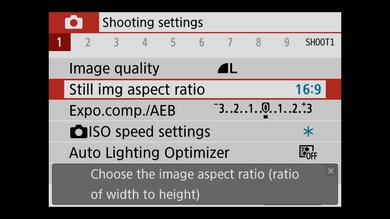
- Menu navigation is intuitive with physical and touch controls
- Functions related to autofocus, image quality, video quality, and menu customization are readily accessible
- Graphics clearly indicate the functions found in each category
- Guide mode helps walk novice users through the camera's features
Note: There's an extended high ISO setting simply labeled 'H' in the menu. Canon advertises it to be equivalent to ISO 51200.
If you're looking for a beginner camera with a better battery life and USB charging support, take a look at the Sony α6000.







Note: The mic level display doesn't show up on the screen during live feed mode. You have to press the 'Info' button to get to the regular screen to see the audio levels.
If you're looking for a camera with more frame rate options, check out the Nikon Z 30.