Nothing Ear (a)  Headphones Review

Reviewed Sep 17, 2024 at 12:58pm
Tested using Methodology v2.0 
Nothing Ear (a)
8.0
Sports And Fitness 
7.4
Travel 
6.9
Office Work 
5.7
Wireless Gaming (In Development) 
5.6
Wired Gaming (In Development) 
7.6
Audio Reproduction Accuracy 
7.2
Noise Isolation 
5.9
Microphone (In Development) 
 13

The Nothing Ear (a) are a value-driven set of buds that supply the brand's signature design and balanced frequency response with active noise cancellation (ANC) while thinning out the extras found in the top-tier Nothing Ear Truly Wireless. So, let's see if these balance most of what you need without too much additional fluff.

Our Verdict

8.0
Sports And Fitness 

The Nothing Ear (a) are great for sports and fitness use. They're very comfortable and lightweight, with a portable design. The buds are rated IP54 against dust and water splashes, and the charging case also offers some water resistance, with an IPX2 rating. Your audio is delivered with a smooth, slightly bass-forward, and warm sound that suits most genres, and the ANC does a decent job of silencing your surroundings. You can also toggle on transparency mode for greater situational awareness for outdoor exercises. Despite the lack of additional hooks or stabilizers, they're pretty stable, but if you find that a less invasive in-ear fit isn't reassuring enough, that may pose an issue.

Pros
  • Good controls that you can customize.
  • Comfortable fit.
  • IP54-rated buds and IPX2-rated case.
Cons
  • Only satisfactory noise isolation performance.

  • Lack of stabilizers.
7.4
Travel 

The Nothing Ear (a) are decent for travelling. They're very portable, easily fitting into most pockets. Their comfortable fit allows you to tune out your surroundings thanks to the satisfactory noise cancellation for long stretches. That said, the ANC isn't the most impressive, even if it helps quiet your surroundings. Their default EQ sound is warm, with a smooth bass emphasis, and their app provides ample leeway to adjust it to your preferences. However, the continuous battery life is a little short, so you may need to give them a quick charge during intercontinental flights.

Pros
  • Good controls that you can customize.
  • Comfortable fit.
  • IP54-rated buds and IPX2-rated case.
Cons
  • Poor-sounding mic.
  • Continuous battery isn't very long.
  • Only satisfactory noise isolation performance.

6.9
Office Work 

The Nothing Ear (a) are alright for office work. They feel good to wear, thanks to their lightweight design. They're also well-tuned by default to render music and voices as clear and natural. Their noise isolation is decent at cutting out background noises, but it won't totally silence your coworkers. However, their mic system sounds quite thin, limiting their usefulness for meetings. Although the mic rejects noise fairly well, if your voice sounds unnatural, it doesn't seem particularly professional. Additionally, the continuous battery life won't last through a full workday without a recharge.

Pros
  • Good controls that you can customize.
  • Comfortable fit.
  • IP54-rated buds and IPX2-rated case.
Cons
  • Poor-sounding mic.
  • Continuous battery isn't very long.
  • Only satisfactory noise isolation performance.

5.7
Wireless Gaming (In Development) 

The Nothing Ear (a) are Bluetooth-only earbuds and aren't compatible with most consoles for wireless gaming. Their latency is also high for mobile gaming purposes, even when using the low-lag mode in the app.

5.6
Wired Gaming (In Development) 

The Nothing Ear (a) are wireless and cannot establish a wired connection for gaming.

7.6
Audio Reproduction Accuracy 

The Nothing Ear (a) are good for audio reproduction accuracy. Their frequency response matches our target well, with a bit more bass and a warmer top end. The smooth frequency response results from their impressive peaks and dips performance. Additionally, the L/R earbuds exhibit tight matching with low harmonic distortion. The group delay is also tight, indicating defined bass and clear mids and treble. If you prefer a different sound, you can also use the app's EQ.

7.2
Noise Isolation 

The Nothing Ear (a) are decent for noise isolation. Their ANC is decent at filtering out background noise, though it's not the best available. It tackles the boomy and mid-rangy ambient sounds of traffic relatively well, but it won't fully isolate you from your environment.

5.9
Microphone (In Development) 

The Nothing Ear (a) are sub-par for microphone use. The mic system captures a thin and not very natural-sounding version of your voice, although it does a satisfactory job of rejecting background noise.

8.8
Frequency Response Consistency 

The Nothing Ear (a) have excellent frequency response consistency. With the correctly sized ear tip, they provide a predictable sound and fit between listening sessions. As a result, you'll hear a tuning that is more or less the same with each wear.

  • 8.0
    Sports And Fitness
  • 7.4
    Travel
  • 6.9
    Office Work
  • 5.7
    Wireless Gaming (In Development)
  • 5.6
    Wired Gaming (In Development)

  • Performance Usages

  • 7.6
    Audio Reproduction Accuracy
  • 7.2
    Noise Isolation
  • 5.9
    Microphone (In Development)
  • 8.8
    Frequency Response Consistency
  • Changelog

    1.  Updated Nov 20, 2025: 

      This review has been updated to Test Bench 2.0, which adds the following tests: Stereo Mismatch, Group Delay, Cumulative Spectral Decay, Harmonic Distortion, and Electrical Aspects. We've added new performance usages and updated the text throughout the Sound tests and side-by-sides.

    2.  Updated Nov 18, 2025: We've converted this review to Test Bench 2.0, which updates our sound tests and adds performance usages. You can read more about this in our changelog.
    3.  Updated Apr 09, 2025: 

      This review was updated to compare the CMF Buds Pro 2's Noise Isolation - Common Scenarios.

    4.  Updated Dec 16, 2024: 

      Several Sound tests have been updated following Test Bench 1.8. There have also been text changes made throughout the review, including to the usages and product comparisons to match these results.

    Differences Between Sizes And Variants

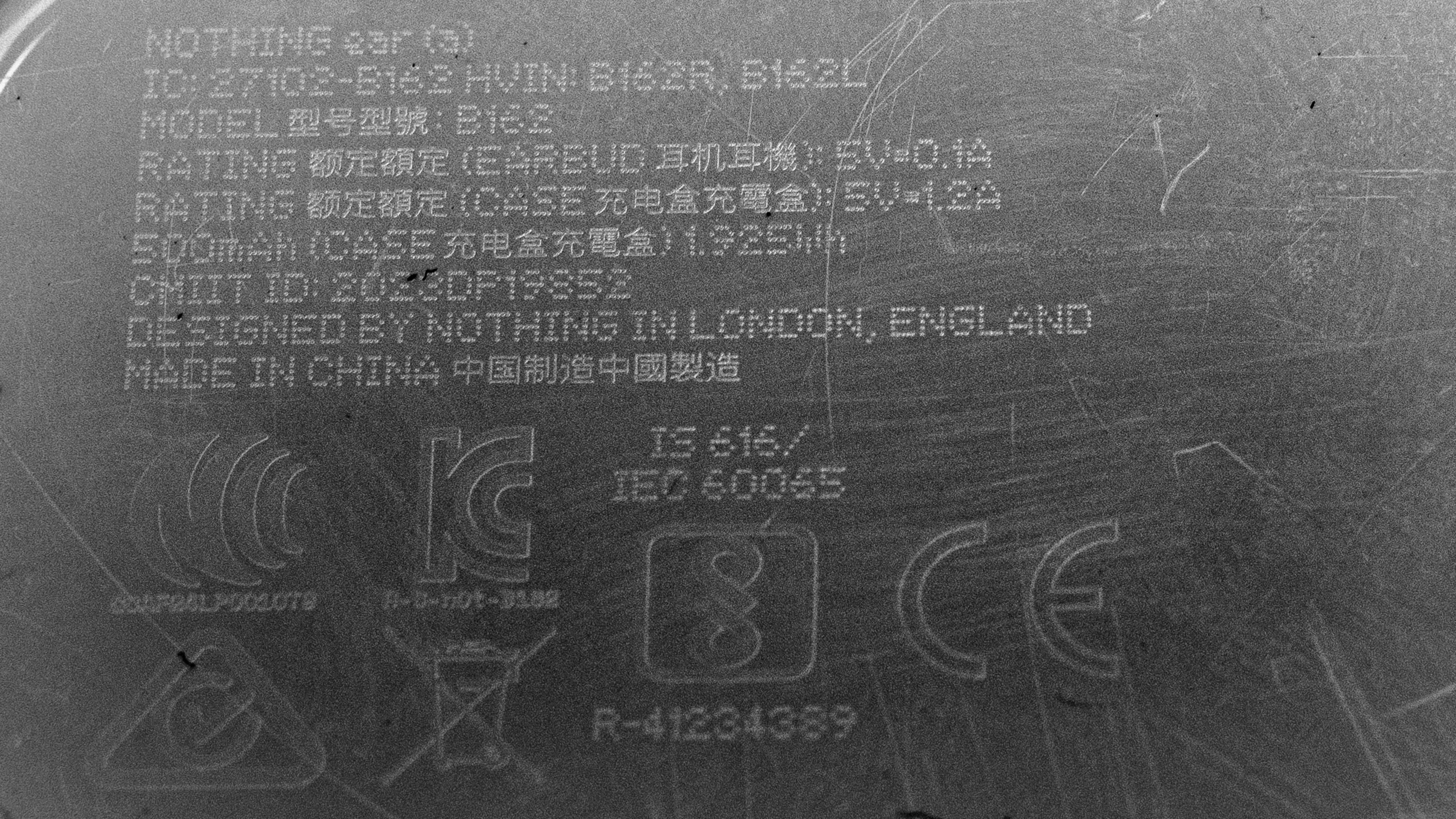
    The Nothing Ear (a) earbuds come in three colors: 'Black,' 'White,' and 'Yellow.' You can see the label for our unit in 'White.' We expect all of these to perform similarly. If you come across a different variant, let us know in the comments, and we'll add it to our review.

    Popular Headphones Comparisons

    If microphone quality isn't your priority, the Nothing Ear (a) earbuds are a value-driven alternative to their big brother, the Nothing Ear Truly Wireless. In an otherwise similar design and sounding set of buds, minor differences include a pared-back codec suite, no customized sound profiles based on your hearing, and the case's lesser IP rating against water and dust for the Nothing Ear (a) earbuds. If you need more battery juice and a bit more ANC coverage with a better mic, the Samsung Galaxy Buds FE Truly Wireless are a solid alternative, though, unlike the Nothing Ear (a) earbuds, these have more Android and Samsung-exclusive features like high-quality codecs.

    For more options, check out the best sounding wireless earbuds, the best noise cancelling earbuds, and the best wireless earbuds for Android.

    Nothing Ear

    Overall, the Nothing Ear are better than the Nothing Ear (a) but only incrementally. These have more in common than they have differences, but the Ear have a greater IP rating, custom sound based on your hearing, a longer battery life, LHDC codec support, and a slightly better mic. On the other hand, the Ear (a) boast similar ANC performance and sound, which is appealing if you don't use the mic or need a long battery. Still, it's clear that minor omissions to the feature set in the app and codec selection make the Ear (a) the budget-oriented alternative, but if you have no plans to take advantage of those, they're possibly a better buy.

    CMF Buds Pro 2

    The CMF Buds Pro 2 and the Nothing Ear (a) share many commonalities, including the same companion app and LDAC Bluetooth codec. The CMF are bassier by default and have a slightly longer continuous battery life. The Nothing pinch controls are a bit more predictable to use with fewer misfires, though. Plus, the Nothing are slightly more stable and comfortable fitting with less pressure on your ears. Still, the CMF's ANC is more effective, so your choice depends on priorities and fit preferences. In any case, you can EQ both pairs to sound fairly alike.

    Anker Soundcore Liberty 4 NC Truly Wireless

    Depending on your use preferences, there are good reasons to choose either the Anker Soundcore Liberty 4 NC Truly Wireless or the Nothing Ear (a). The Anker have a longer battery life, use touch controls, and block our noise much better. However, the Nothing have a less bassy sound by default, which you may prefer, alongside greater overall dust and water resistance. If you accidentally trigger commands frequently, the pinch controls can help, too. However, their battery life is shorter.

    Nothing Ear (2)

    The Nothing Ear (a) and the Nothing Ear (2) are so similar that you may prefer whichever you can find at a better price. That said, the Ear (2) have a better mic and a higher IP-rated case, and the Ear (a) may receive updates for longer because they're a newer model, but that's not necessarily a reason to buy one over the other.

    Show more 
    Overhauling Our Audio Measurements And A New Multi-Curve Graphing Tool
    Overhauling Our Audio Measurements And A New Multi-Curve Graphing Tool

    We've upgraded our Headphones Test Bench to 2.0! This update brings several key changes to our tests and usages, making it easier than ever to interpret our sound results based on your personal preferences. You'll also find a brand-new interactive graph tool featuring multiple targets (including our own!) for you to explore and compare.

    For a full breakdown, check out our changelog, which includes detailed commentary from our test designer explaining the rationale behind our update.

    We'd also love to hear your thoughts: your feedback helps us keep improving, so join us in the comments!

    Test Results

    perceptual testing image
    Sort:
    RATINGS
    Category:
    All
    Sound
    Sound Profile
    See details on graph tool
    Normalization Frequency
    1,150 Hz
    Bass Amount
    Emphasized (3 dB)
    Treble Amount
    Balanced (-1 dB)
    Sound Signature
    Warm

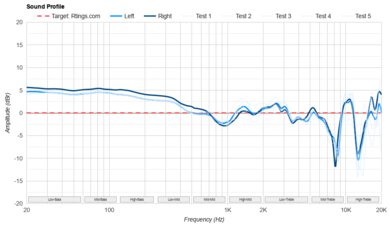
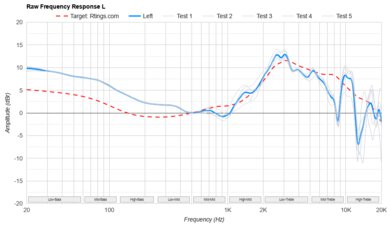
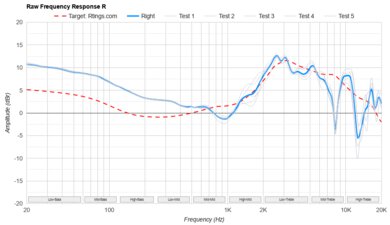
    The Nothing Ear (a) earbuds output a generally warm and balanced sound profile with a little extra thump when using the 'Balanced' preset compared to our target curve. The tuning is also bassier and darker than the Harman IEM target, and like a more V-shaped version of the SoundGuys.com Headphone Preference Curve. Generally, this frequency response is well-suited for genres such as rock, jazz, and pop.

    That said, if you want even more low-end thump or prefer to hear more breathy details in the vocals of your favorite chanteuse, you can use their custom EQ or try out their EQ presets. In addition to EQ, they have an UltraBass mode, which elevates the entire low-end response in five incremental strengths. The earbuds sound very slightly different with ANC turned on or off.

    8.8
    Frequency Response Consistency
    See details on graph tool
    See details on graph tool
    Std. Deviation
    0.52 dB

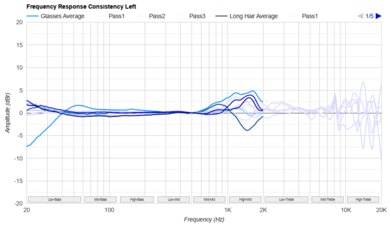
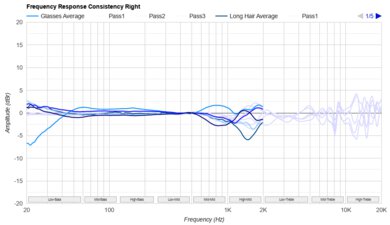
    Their frequency response consistency is amazing. Your audio is delivered with bass through the low-treble range, sounding virtually the same between wearings. A small amount of variation in the higher treble region can happen between wears and different people, but once you've selected the right ear tip size, it shouldn't pose an issue.

    Raw Frequency Response
    See details on graph tool
    See details on graph tool
    9.0
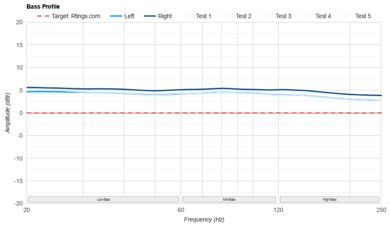
    Bass Profile: Target Compliance
    See details on graph tool
    RMS Deviation From Target
    2.9 dB
    Low-Frequency Extension
    20 Hz
    Low Bass
    2.74 dB
    Mid Bass
    3.45 dB
    High Bass
    2.3 dB

    Their bass target compliance is superb. The whole region is somewhat inflated but still adheres well to our target, so the added thump and punch is well-balanced and doesn't make your mix sound muddy. If you prefer a bassier sound, the EQ can be adjusted to suit your taste.

    9.2
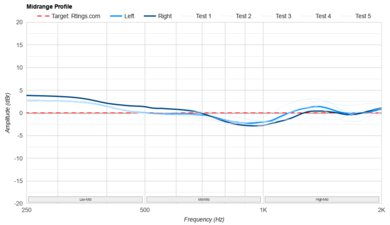
    Mid-Range Profile: Target Compliance
    See details on graph tool
    RMS Deviation From Target
    1.21 dB
    Low Mid
    1.35 dB
    Mid-Mid
    -1.22 dB
    High Mid
    0.24 dB

    The mid-range target compliance is fantastic. These buds adhere closely to our target, so lead instruments and speech come across as present, full, and clear. The busy mix of guitar, samples, and vocals in songs like Groove Is in the Heart by Deee-Lite comes across with presence and body.

    8.4
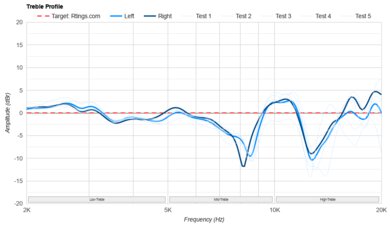
    Treble Profile: Target Compliance
    See details on graph tool
    RMS Deviation From Target
    2.98 dB
    Low Treble
    -0.17 dB
    Mid Treble
    -2.65 dB
    High Treble
    -9.26 dB

    Their treble target compliance is impressive. It tightly follows our target from the low treble through about 7.5kHz in the mid-treble before tapering off. As a result, harmonics from vocals and cymbals come across as sounding natural and clear, albeit a bit warm and lacking sparkle and air in the high treble. If you want a brighter sound, the app's EQ can adjust the treble frequencies to your taste.

    8.0
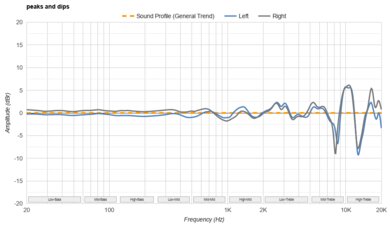
    Peaks/Dips
    See details on graph tool
    Peaks
    1.12 dB
    Dips
    1.5 dB

    The Nothing Ear (a) earbuds have great peaks and dips performance. Their sound profile delivers a very even bass that provides a balance of thump and punch. Most of the mids are fairly even, with very minor peaks and dips that would be hard to notice with real-world content. The treble has three peaks that exaggerate detail somewhat, with the tallest one causing cymbal hits to sound relatively piercing, while a dip in the mid-treble can diminish the upper harmonics of cymbal hits somewhat.

    7.7
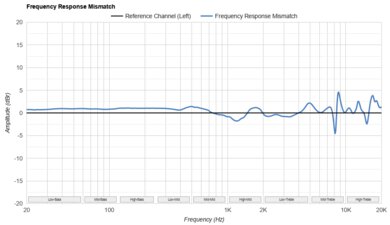
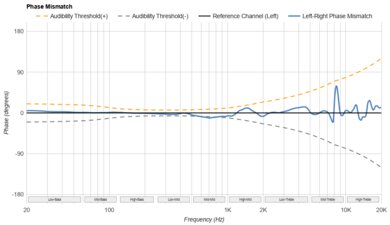
    Stereo Mismatch
    See details on graph tool
    See details on graph tool
    Weighted Amplitude Mismatch
    0.42 dB
    Weighted Frequency Response Mismatch
    0.77 dB
    Weighted Phase Mismatch
    1.8°

    Their stereo mismatch performance is good. These earbuds are tightly matched in frequency response and amplitude for a balanced L/R listening experience. Their phase response doesn't cause noticeable holes in the stereo image either. In all, they reproduce your content sounding the same in each earbud.

    8.1
    Group Delay
    See details on graph tool
    Weighted Group Delay
    0.8 ms

    Their group delay performance is great. While there are small timing differences in the sub-bass, they're so low that they don't affect the bass' definition. Meanwhile, the rest of the frequency response plays back sounding transparent.

    0.0
    PRTF
    PRTF Accuracy (RMS Deviation)
    N/A
    PRTF Size (Avg.)
    N/A
    PRTF Distance
    N/A
    9.1
    Harmonic Distortion
    See details on graph tool
    See details on graph tool
    WHD @ 94 dB SPL
    0.07%
    WHD @ 104 dB SPL
    0.20%

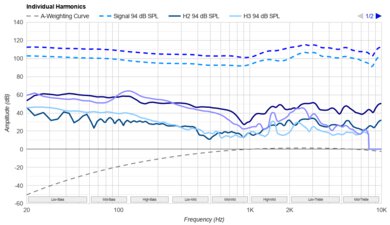
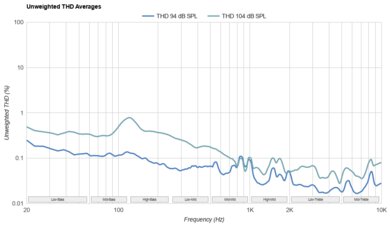
    These buds exhibit remarkably low harmonic distortion. Even at high output volumes, each tested frequency retains the purity of your audio without adding significant or noticeable artifacts.

    Electrical Aspects
    Sensitivity @1kHz-1V
    N/A
    Bluetooth Max SPL
    103.9 dB

    These are battery-powered Bluetooth earbuds, so they don't need an amp.

    0.0
    Virtual Soundstage
    Head Modeling
    No
    Speaker Modeling
    No
    Room Ambience
    No
    Head Tracking
    No
    Virtual Surround
    No
    Test Settings
    Firmware
    1.0.1.46
    Power
    On
    Connection
    Bluetooth
    Codec
    SBC, 16-bit, 48kHz
    Test InstrumentAudio Precision APx517B
    EQ
    Balanced
    ANC
    High
    Tip/Pad
    Silicone (small)
    Microphone
    Integrated

    These are the settings used to test these earbuds, except for medium ear tips, which were used for the noise isolation tests. The 'Balanced' EQ preset was used, which includes UltraBass set to +3 by default. Our results are only valid when using them in this configuration.

    Design
    Style
    TypeIn-ear
    EnclosureClosed-Back
    WirelessTruly Wireless
    TransducerDynamic

    The Nothing Ear (a) earbuds look extremely similar to the rest of the line-up. The clear-plastic housing and stem of our 'White' unit is also white, unlike the Nothing Ear Truly Wireless's white unit, which retains a contrasting stem. This varies depending on which colorway you choose; the 'Yellow' model, for example, has a contrasting black stem. The 'Black' variant is the most under-the-radar visually, with translucent plastic covering the mostly dark mode buds. Each bud has a colored dot to help you differentiate them: white for the left and red for the right. Otherwise, they retain the signature shape and pinch controls we've come to expect and the dot matrix style branding running down the stems.

    7.5
    Comfort
    Weight0.02 lbs
    Clamping Force
    0 lbs

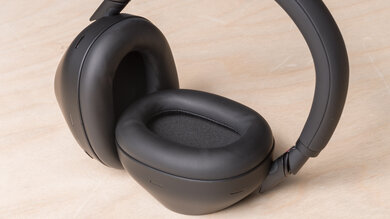
    The Nothing Ear (a) earbuds feel comfortable. They're oblong-shaped, so they sit securely without additional stabilizers, and like other buds by the manufacturer, the fit isn't too deep. The included suite of oblong silicone ear tips is similar to the flagship model Nothing Ear Truly Wireless'. You get three sizes to pick from.

    7.7
    Controls
    OS Compatibility
    Not OS specific
    Ease Of UseGood
    FeedbackGood
    Call/Music ControlYes
    Volume ControlYes
    Microphone ControlNo
    Channel Mixing
    No
    Noise Cancelling ControlOn/Off
    Talk-Through
    On/Off
    Additional ControlsVoice Assistant

    The Nothing Ear (a) earbuds have good controls. They use pinch controls, like those found across the Nothing range, requiring you to hold the stem between two fingers and squeeze. The sensor is located on the stem at the front-facing edge, which you can find by feeling for the indent. Like conventional touch controls, you rely on the buds emitting a sound to know the command registers. These emit a chimey-sounding click for most commands and a subtle breathy sound for ANC listening mode. The pinch controls are helpful for mitigating accidental misfires, but by the same token, they require a little more effort, especially if you're performing gestures like a double pinch and hold. That's totally fine unless you're running, then it's a bit more distracting.

    Speaking of double pinch and hold, that gesture is left unassigned by default. Since there's no volume control out of the box, that would be a reasonable reassignment. You can check out a video of the default control scheme and the options you can reassign within the companion app. The only gesture you can't alter is a single pinch for pause and play audio or accept/end a call.

    9.4
    Portability
    L1.4" (3.5 cm)
    W1.2" (3.0 cm)
    H1.0" (2.5 cm)
    Volume1.60 in³ (26.25 cm³)
    Transmitter RequiredNo

    These are superbly portable. You can pop them into virtually any pocket, and they take up very little space.

    8.0
    Case
    TypeHard case
    L2.5" (6.3 cm)
    W1.9" (4.7 cm)
    H0.9" (2.3 cm)
    Volume4.18 in³ (68.43 cm³)

    The Nothing Ear (a)'s case is great. Its rectangular footprint is the most obvious difference from the squared cases of the Nothing Ear (2) Truly Wireless and the Nothing Ear Truly Wireless. It's marginally longer and narrower than the cases of both of those models. The top and bottom are domed, see-through plastic, with solid color accents. Inside, color dots help you match the L/R buds to their spot in the case. The Bluetooth pairing button is on the inside, and the case only charges via USB-C. A small light indicates the pairing and charging statuses. The case has an IPX2 against light water exposure, which isn't as robust as the Nothing Ear Truly Wireless' IP55 rating. However, it's not unusual, considering many cases don't have an IP rating.

    8.0
    Build Quality

    The Nothing Ear (a) earbuds have great build quality. The buds' housings are made of solid-quality plastic without rough edges and seams. They're certified as IP54 against dust and water splashes, so you don't need to shield them from the rain either. The case's clear plastic design looks a bit cheap, but its hinge and magnetic lid are decent and functional. The case has an IPX2 rating against light water exposure.

    7.5
    Stability

    These earbuds have good stability. Once you've picked the correct ear tip size, they'll stay in your ears for daily activities like doing errands and desk work. They're not strictly sports-oriented, so if you're doing dynamic movements like box jumps, they might fall out.

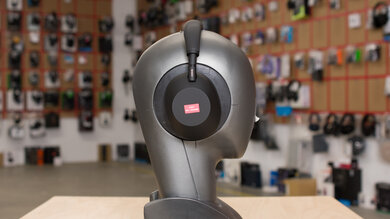
    Headshots 1
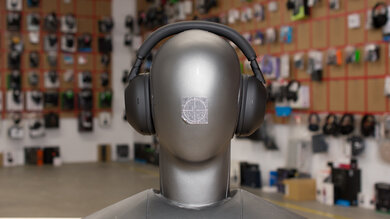
    Headshots 2
    Top
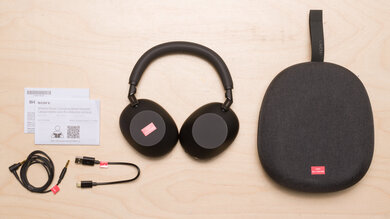
    In The Box

    • Nothing Ear (a) earbuds
    • Charging case
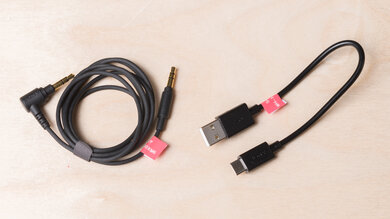
    • USB-C to USB-C charging cable (11.2 in / 28.5 cm)
    • 3x ear tips (S, M, L)
    • User guide
    • Safety and warranty paper
    Isolation
    7.0
    Noise Isolation - Full Range
    See details on graph tool
    Noise CancellingYes
    Overall Attenuation
    -18.00 dB
    Bass
    -14.31 dB
    Mid
    -19.28 dB
    Treble
    -21.07 dB

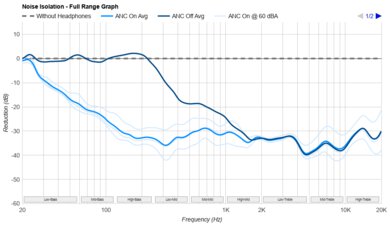
    Their full-range noise isolation performance is satisfactory. The ANC significantly filters out lower-pitched noise, like the engines on lawnmowers or rumbling bus engines. However, it's a bit uneven when handling mid-range sounds like conversation nearby. So, although it still filters out sounds like chit-chat, the ANC isn't as effective as it is with lower mid-range sounds like ambient din, which are tackled more effectively. Shrill and piercing sounds aren't blocked as strongly as earbuds with a more passive isolating design.

    7.3
    Noise Isolation - Common Scenarios
    See details on graph tool
    Airplane Noise Attenuation
    -18.01 dB
    Airplane Noise Isolation Audio
    Office Noise Attenuation
    -16.57 dB
    Office Noise Isolation Audio
    Street Noise Attenuation
    -18.91 dB
    Street Noise Isolation Audio

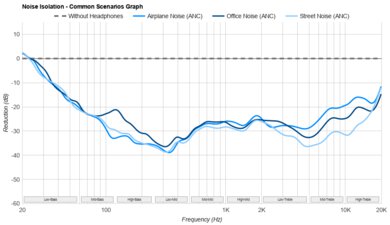
    The Nothing Ear (a) earbuds are decent at noise isolation in common scenarios. They reduce ambient din in airplane cabins and traffic on the street well. They're slightly less effective at filtering the lower-range frequencies in offices. However, their isolation and ANC are outpaced by the affordable tiered CMF Buds Pro 2.

    Noise Isolation - Voice Handling
    Female Voice 1
    Male Voice 1
    Female Voice 2
    Male Voice 2
    ANC Wind Handling
    See details on graph tool
    ANC Wind Noise

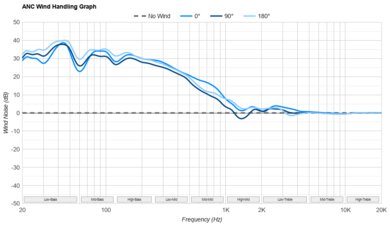
    The Nothing Ear (a) earbuds don't include a wind reduction mode. The ANC system creates 'Anti-noise' sounds when gusts of wind make contact with the mic, and without a wind reduction mode, this makes a bothersome 'popping' sound. That said, these handle wind noise a bit better than the Nothing Ear Truly Wireless, though they're both sensitive to the angle of the wind.

    7.7
    Leakage
    See details on graph tool
    Leakage Audio
    Overall Leakage @ 1ft
    35.5 dB

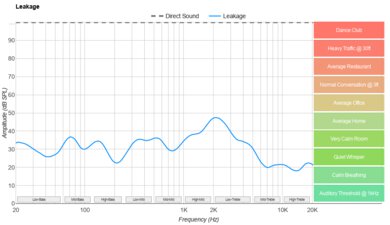
    Their leakage performance is good. The bulk of bass and mid-range sounds don't escape into your space. A portion of trebly content is audible at close proximity if you're in a rather quiet space, producing a thin and bright version of your audio. That said, it's not enough to even register for most people in a hushed library unless they're seated next to you.

    Microphone
    Microphone Style
    Integrated
    Yes
    In-Line
    No
    Boom
    No
    Detachable Boom
    No
    MicYes
    4.6
    Recording Quality
    See details on graph tool
    Recorded Speech
    LFE
    931.62 Hz
    FR Std. Dev.
    6.81 dB
    HFE
    4,431.55 Hz
    Weighted THD
    N/A
    Gain
    19.46 dB

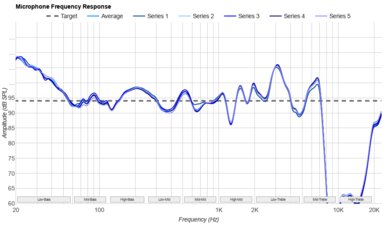
    The mic system's recording quality is poor. Captured speech sounds brighter than in real life and lacks full body. Your voice is intelligible, but the mic isn't a strength of these earbuds. That said, the total harmonic distortion wasn't calculated because the file's recorded output from the mic was too low in quality for the testing rig to calculate. Subjectively, though, the distortion is relatively mild.

    7.0
    Noise Handling
    See details on graph tool
    SpNR
    33.33 dB
    Noise Gate
    Always On
    Speech + Pink Noise Handling
    7.0
    Speech + Pink Noise Audio Sample
    Speech + Subway Noise Handling
    7.0
    Speech + Subway Noise Audio Sample

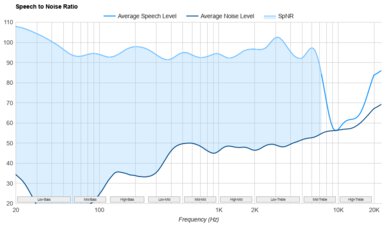
    Their mic system's noise handling is satisfactory. It manages to remove constant background noise but at the cost of your voice's clarity. With intermittent and sudden background noises like people talking, the mic struggles to differentiate your voice from the background chatter. It can filter out background noise like subway trains with decent success, but your voice is harder to make out.

    Active Features
    6.1
    Battery
    Battery Type
    Rechargable
    Continuous Battery Life
    ≈ 5.5 hrs
    Additional Charges
    ≈ 3.5
    Total Battery Life
    ≈ 24.5 hrs
    Charge Time
    ≈ 1 hrs
    Power-Saving Feature
    No
    Audio While Charging
    Yes
    Passive Playback
    No
    Charging PortUSB-C

    Their battery performance is passable. The manufacturer advertises they last 5.5 hours with ANC on, with an extra 3.5 charges in the case. Unfortunately, they're not compatible with our battery testing rig and prematurely shut off, even though we can confirm that when worn, they last longer than the period after which they shut off on our rig. However, the advertised battery life aligns well with the battery results we've obtained from the rest of the line, such as the Nothing Ear (2). It's long enough for most commutes and trips to the gym, but if you need all-day audio without breaks to recharge the battery, it falls short.

    7.5
    App Support
    App NameNothing X
    iOSYes
    AndroidYes
    macOSNo
    WindowsNo
    Equalizer
    Graphic + Presets
    ANC Control
    Presets
    Mic ControlNo
    Room Effects
    No
    Playback Control
    No
    Button MappingYes
    Surround Support
    No

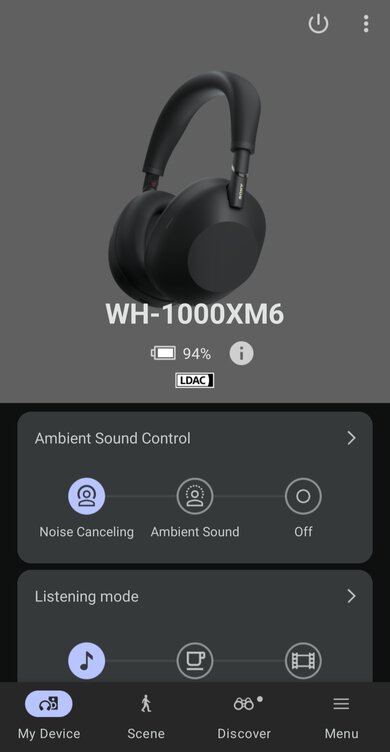
    The Nothing X companion app is good, and you can check out a preview of it. It supplies you with EQ presets and a custom EQ alongside an UltraBass mode that slightly elevates the whole low-end. With the Nothing Ear (a) earbuds, the app doesn't include customized EQ based on your unique hearing, which is available on the Nothing Ear Truly Wireless, though you can still check if the ear tips fit using the Fit Test. You can change preset listening modes like ANC. You get options for connectivity, too, like a Low Lag mode for streaming video, dual device pairing, and codec selection. Besides that, you can track your earbuds with the Find My feature and remap the controls to your preferences. A novel addition is its integration with ChatGPT, letting you directly use the AI by asking questions aloud.

    Connectivity
    0.0
    Wired Connection
    Analog Audio
    No
    USB Audio
    No
    Detachable
    No
    Length
    N/A
    Connector
    No Wired Option
    Latency - Analog
    N/A
    Latency - USB
    N/A
    Recorded Latency
    N/A
    Recorded Latency ConnectionNo Wired Audio

    These are Bluetooth-only earbuds, and their USB-C to USB-C cable is meant for charging the case.

    8.9
    Bluetooth Connection
    Bluetooth Version
    5.3
    Multi-Device Pairing
    2 Devices
    Quick Pair (Android)
    Yes
    Quick Pair (iOS)
    No
    Line Of Sight Range
    334.65 ft (102.00 m)
    Latency - SBC
    188 ms
    Latency - aptX
    N/A
    Latency - aptX Adaptive (High Quality)
    N/A
    Latency - aptX Adaptive (Low Latency)
    N/A
    Latency - LDAC
    286 ms
    Recorded Latency
    Recorded Latency CodecSBC
    AAC Support
    Yes

    The Nothing Ear (a) earbuds have amazing Bluetooth connectivity. They have multi-device pairing with up to two devices, which is enabled through their app's Dual Connection option. The figures shown are their latency with the Low Lag mode on, which significantly cuts down on latency. That said, you may still experience lip-sync mismatch, although different devices and apps compensate for latency differently. They include support for the high-quality LDAC codec, but unlike the step-up Nothing Ear Truly Wireless model, they lack the lower latency LHDC codec support. While they lack quick pairing for iOS, they have it for Android and Microsoft's Swift Pair for compatible devices.

    0.0
    Wireless Connection (Dongle)
    Line Of Sight Range
    N/A
    Latency - Dongle
    N/A
    Recorded Latency
    N/A
    PC Compatibility
    Analog
    No
    Wired USB
    No
    Non-BT Wireless
    No

    These earbuds can only connect wirelessly via Bluetooth to compatible PCs.

    PlayStation Compatibility
    PS4 Analog
    No
    PS4 Wired USB
    No
    PS4 Non-BT Wireless
    No
    PS5 Analog
    No
    PS5 Wired USB
    No
    PS5 Non-BT Wireless
    No
    Xbox Compatibility
    Xbox One Analog
    No
    Xbox One Wired USB
    No
    Xbox One Non-BT Wireless
    No
    Xbox Series X|S Analog
    No
    Xbox Series X|S Wired USB
    No
    Xbox Series X|S Non-BT Wireless
    No
    2.2
    Base/Dock
    Type
    Charging Case
    USB Input
    No
    Line In
    No
    Line Out
    No
    Optical Input
    No
    RCA Input
    No
    Dock Charging
    Yes
    Power Supply
    USB-C

    You can charge the case via USB-C. It has an IPX2 rating against light water exposure.