Adesso Tru-Form 150  Keyboard Review

Reviewed Feb 28, 2020 at 08:29am
Test bench update Oct 28, 2021 at 12:02pm
Tested using Methodology v1.0 
Adesso Tru-Form 150
6.0
Gaming 
2.9
Mobile/Tablet 
6.8
Office 
5.2
Programming 
3.5
Entertainment / HTPC 
 0
The Adesso Tru-Form 150 is a passable keyboard for office use, but it doesn't perform well for any other type of use. It has a split keyboard design with a built-in wrist rest, aimed at better ergonomics, but with a disappointing build quality, it feels cheap and not very ergonomical. There are a number of media keys on top, but not all of them are compatible on macOS and Linux systems. The rubber dome switches are quiet for an office environment, the typing quality is rather poor, and it's easy to make typos with it. Although there's a multi-color backlighting with three different colors, gamers will be unhappy with the lack of individually-lit keys.

Our Verdict

6.0
Gaming 

Bad keyboard for gaming. There aren't any macro programmable keys on the Adesso Tru-Form 150, and the overall build feels cheap. Although there isn't much actuation force needed on the rubber dome switches, the pre-travel distance might be too high for most gamers. In addition, the keys aren't individually backlit, and you can only choose one color to display at the same time.

Pros
  • A ton of pre-set shortcut keys.
  • Split keyboard design.
Cons
  • Disappointing build quality.
  • Poor typing experience.
  • Multi-color backlighting has limited options.
2.9
Mobile/Tablet 

There's no mobile connectivity on the Adesso Tru-Form 150.

6.8
Office 

Not a bad keyboard for office use. The Adesso Tru-Form 150 has an ergonomic, split keyboard design with a built-in wrist rest. There are a ton of media and shortcut keys, such as email, browser, or music, that are useful for when you're working. However, the keys don't register immediately and need to be pressed heavily in order to register, so typing on this keyboard can get tiring. The switches are quiet for an office environment, but the keycaps feel cheap and they wobble. On the upside, this keyboard is fully compatible with Windows, and only certain media keys don't work on macOS and Linux.

Pros
  • A ton of pre-set shortcut keys.
  • Split keyboard design.
Cons
  • Disappointing build quality.
  • Poor typing experience.
  • Multi-color backlighting has limited options.
5.2
Programming 

The Adesso Tru-Form 150 is poor for programming. The typing quality is bad and often results in typos when typing fast. The entire keyboard isn't well-built and it slightly bends as well. It's decent for ergonomics, but because of the high pre-travel distance, some people might find it uncomfortable to use for long periods of programming. There are no macro programmable keys, and the multi-color backlighting only has three static options. However, if you program with a Linux or macOS, some shortcuts don't work on these platforms.

Pros
  • A ton of pre-set shortcut keys.
  • Split keyboard design.
Cons
  • Disappointing build quality.
  • Poor typing experience.
  • Multi-color backlighting has limited options.
3.5
Entertainment / HTPC 

Pros
  • A ton of pre-set shortcut keys.
  • Split keyboard design.
Cons
  • Disappointing build quality.
  • Poor typing experience.
  • Multi-color backlighting has limited options.
  • 6.0
    Gaming
  • 2.9
    Mobile/Tablet
  • 6.8
    Office
  • 5.2
    Programming
  • 3.5
    Entertainment / HTPC
  • Changelog

    1.  Updated Oct 28, 2021: Converted to Test Bench 1.0.
    2.  Updated Feb 28, 2020: Review published.
    3.  Updated Feb 25, 2020: Early access published.
    4.  Updated Feb 23, 2020: The product has arrived in our lab, and our testers will start evaluating it soon.

    Check Price

    BlackTru-Form 150
    SEE PRICE
    Amazon.com
    BlackTru-Form 150
    SEE PRICE
    B&H
    BlackTru-Form 150
    SEE PRICE
    Walmart.com
    BlackTru-Form 150
    BestBuy.com

    Popular Keyboard Comparisons

    Other ergonomic keyboards, such as the Microsoft Sculpt Ergonomic Keyboard and Logitech ERGO K860, have a much better typing experience and a better ergonomic design. See our recommendations for the best keyboards, the best keyboards for programming, and the best keyboards for writers.

    Kinesis Freestyle Pro

    The Kinesis Freestyle Pro is a much better keyboard than the Adesso Tru-Form 150. It's smaller, so it takes up less space on your desk, but the typing quality is far superior. The Kinesis also has a dedicated software with macro programmable keys. However, it doesn't have any backlighting, unlike the Adesso, if you need to use it in a dark environment.

    Logitech K350

    The Logitech K350 is a better keyboard than the Adesso Tru-Form 150. It's better built and offers a marginally better typing experience, although it's still sub-par. It also offers better ergonomics since it has incline settings and it's also wireless. On the other hand, the Adesso has backlighting, which the Logitech lacks.

    Microsoft Sculpt Ergonomic Keyboard

    The Microsoft Sculpt Ergonomic Keyboard is much better than the Adesso Tru-Form 150. The two have a curved keyboard design, but the Microsoft has a significantly better typing experience, with a lower pre-travel distance, and the keycaps have a better feel. The numeric pad is detached from the keyboard, unlike the Adesso, which has all the keys attached to the keyboard.

    Logitech ERGO K860

    The Logitech ERGO K860 and the Adesso Tru-Form 150 look similar but perform quite differently. The Logitech is far superior in almost all aspects, with amazing ergonomics, fantastic wireless versatility, and great typing quality. Even though the actuation force needed on both keyboards is similar, the lower pre-travel distance on the Logitech gives a much smoother experience. However, the Adesso has multi-color illumination.

    Matias Ergo Pro

    The Matias Ergo Pro is better than the Adesso Tru-Form 150. It has multiple incline settings and a comfortable wrist rest, plus the typing quality is very good. It has a better build quality than the Adesso, but the keycaps still feel cheap and wobble like the Adesso. Neither keyboard has a dedicated software, but the Adesso has a multi-color backlighting and dedicated media keys.

    Microsoft Surface Ergonomic Keyboard

    The Microsoft Surface Ergonomic Keyboard is much better than the Adesso Tru-Form 150. The Microsoft has a much better build quality, typing quality, and compatibility with different operating systems. The Microsoft's Bluetooth connection also makes it more versatile, but it doesn't have backlighting, which the Adesso has.

    Test Results

    perceptual testing image
    Sort:
    RATINGS
    Category:
    All
    Design
    Dimensions
    Size
    Full-size (100%)
    Height
    1.7" (4.2 cm)
    Width19.9" (50.5 cm)
    Depth
    9.2" (23.4 cm)
    Depth With Wrist Rest
    9.2" (23.4 cm)
    Weight
    1.76 lbs (0.800 kg)

    The Adesso Tru-Form 150 is a full-sized keyboard with a built-in wrist rest. It takes up a decent amount of desk space, but feels light to carry.

    5.5
    Build Quality
    Keycap MaterialABS

    Inadequate build quality. It's made entirely out of a matte plastic, except for a glossy finish around the top of the keyboard. Overall it feels very cheap, the keycaps don't feel nice and are wobbly, plus there's a bit of flex to the keyboard.

    8.5
    Ergonomics
    Board Design
    Ergonomical
    Minimum Incline
    3.6°
    Medium Incline
    N/A
    Maximum Incline
    N/A
    Wrist RestFixed

    It's an okay keyboard for ergonomics. Its split keyboard design is supposed to be ergonomic, but it doesn't feel like that when typing. There are no incline settings and it's difficult to type on. On the upside, the built-in wrist rest is somewhat comfortable. If you prefer a split keyboard with separated halves, check out the Matias Ergo Pro.

    4.6
    Backlighting
    BacklightingYes
    Color
    Multi-color
    Individually Backlit Keys
    No
    Color Mixing
    Multi-Color (No RGB)
    Effects
    No
    Programmable
    No

    There's backlighting on this keyboard, but the keys aren't individually lit. Instead, you can set one lighting color (red, green, or blue) at once for the entire keyboard, and you can adjust its brightness on the keyboard. Some keys don't look like they're fully lit when the multi-color lighting is enabled.

    Cable & Connector
    ConnectivityWired
    Detachable
    No
    Length5.9 ft (1.8 m)
    Connector (Keyboard side)
    Not Detachable

    The USB cable has a standard length. It's not detachable either.

    0.0
    Wireless Versatility
    Bluetooth
    No
    Bluetooth Multi-Device Pairing
    No
    Proprietary Receiver
    No
    Battery Type
    No Batteries

    The Tru-Form 150 can't be used wireless.

    Extra Features
    Media Keys
    Dedicated
    Macro Programmable Keys
    No
    Trackpad / TrackballNo
    WheelNo
    USB Passthrough
    No
    NumpadYes
    Windows Key Lock
    No
    Lock IndicatorCaps, Scroll & Num lock

    There are a bunch of dedicated media keys on top, plus extra controls such as browser, email, or music.

    In The Box

    • Adesso Tru-Form 150
    • Manual
    Typing Experience
    Keystrokes
    See details on graph tool
    Mechanical
    No
    Key Switches
    Rubber Dome
    Feel
    Tactile
    Operating Force
    58 gf
    Actuation Force
    35 gf
    Pre-Travel
    2.5 mm
    Total Travel
    3.9 mm

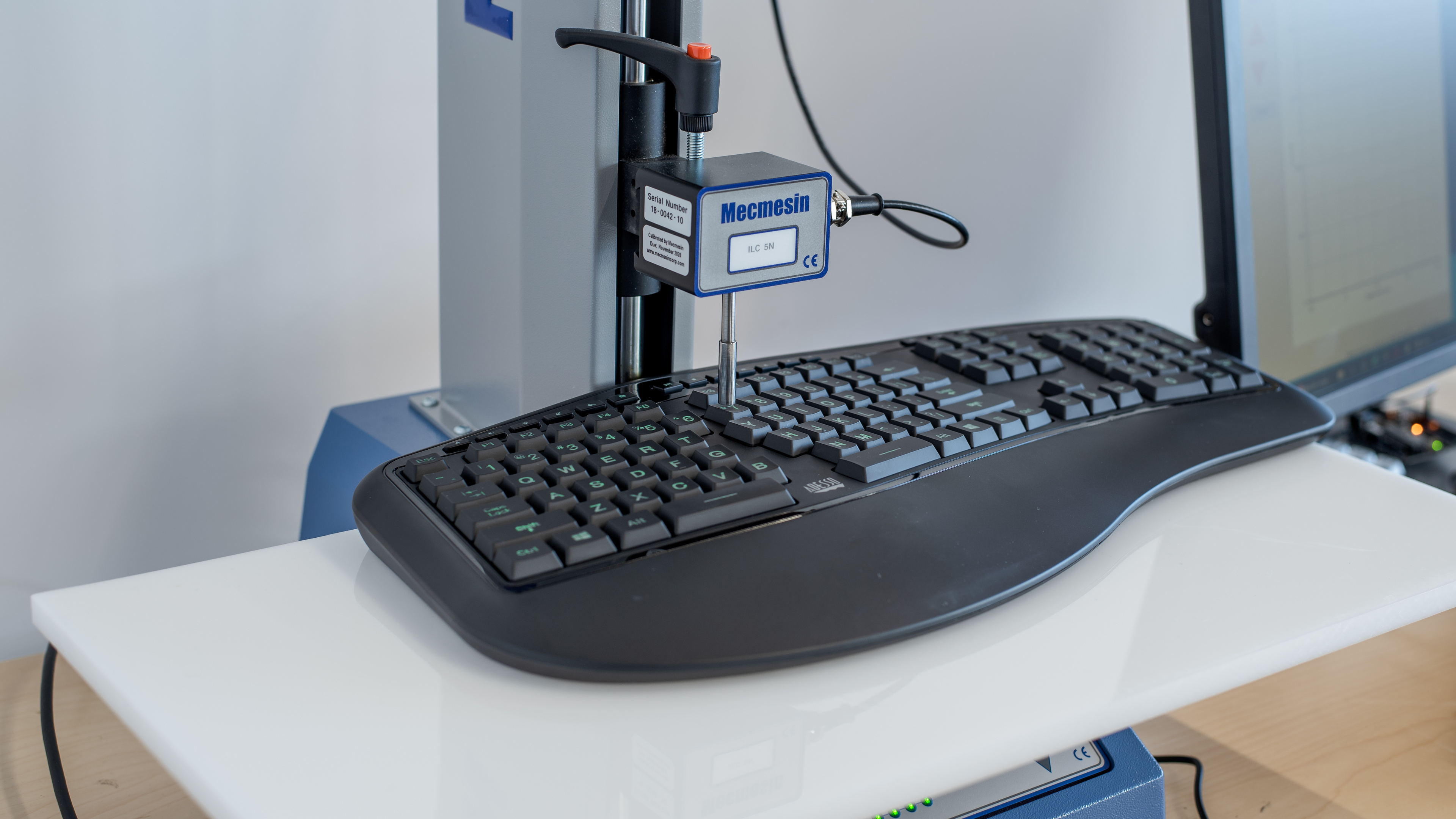
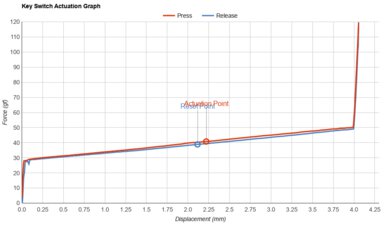
    The Tru-Form 150 uses basic rubber dome switches with a tactile feel. They have a high pre-travel distance, and you can feel some wobbly feedback before it reaches the actuation point, as shown in the graph.

    4.5
    Typing Quality

    Poor typing quality on the Adesso Tru-Form 150. The keys aren't very responsive and need to be pressed harder, so there's a higher chance of making typos. When you want to correct those errors, the backspace key doesn't register properly and really needs to be pressed. The space bars have the same issues, and overall there's just no fluidity when typing on this keyboard. The enter key on our unit feels stuck, but other units might not have this problem.

    Typing Noise
    Noise
    Quiet

    This is a quiet keyboard, and it shouldn't distract people around you.

    5.3
    Latency
    Latency Wired
    33.2 ms
    Latency Receiver
    N/A
    Latency Bluetooth
    N/A
    Software and Operating System
    0.0
    Software & Programming
    Software NameNo Software
    Account Required
    No Software
    Profiles
    No Profile
    Onboard Memory
    No
    Cloud Sync
    No
    Macro Programming
    No
    Ease Of Use
    No Software
    Software Windows Compatible
    No
    Software macOS Compatible
    No

    There's no dedicated software for the Adesso Tru-Form 150.

    7.2
    Keyboard Compatibility
    WindowsFull
    macOSPartial
    LinuxPartial
    AndroidNo
    iOSNo
    iPadOSNo

    This keyboard only has full compatibility on Windows. The shortcuts, such as email or browser, don't work on macOS, plus the refresh page button doesn't work on Linux.