ASUS ROG Strix Scope TKL  Keyboard Review

Reviewed Mar 30, 2021 at 09:46am
Writing modified Oct 12, 2022 at 03:05pm
Tested using Methodology v1.0 
ASUS ROG Strix Scope TKL
8.7
Gaming 
3.4
Mobile/Tablet 
7.6
Office 
7.8
Programming 
4.9
Entertainment / HTPC 
 1

The ASUS ROG Strix Scope TKL is an excellent mechanical gaming keyboard. It's a TenKeyLess keyboard without a numpad, and it's available in various Cherry MX switches. It has excellent build quality and is reasonably comfortable to type on, even without a wrist rest, though there's a Deluxe variant that comes with one. It has full RGB backlighting with individually-lit keys, as well as LEDs at the bottom of the keyboard to create an underglow effect. Unfortunately, its latency is a bit high and might not be ideal for serious, competitive gamers. Also, while its companion software offers plenty of customization options, it isn't available for macOS or Linux.

Our Verdict

8.7
Gaming 

The ASUS ROG Strix Scope TKL is an excellent gaming keyboard. It has excellent build quality, RGB backlighting, and macro-programmable keys. The Cherry MX Browns on our unit are light and responsive, and there are multiple Cherry MX switch options available to suit your needs. Unfortunately, its latency is a bit high for a wired keyboard and might not be ideal for competitive gamers.

Pros
  • Macro-programmable keys.
  • Excellent build quality.
  • Great typing experience.
  • Comfortable to type on without a wrist rest.
Cons
  • Latency may be too high for competitive gamers.
3.4
Mobile/Tablet 

The ASUS ROG Strix Scope TKL is a wired-only keyboard and isn't suitable for use with mobile devices.

7.6
Office 

The ASUS ROG Strix Scope TKL is good for office use. It's well-built and comfortable to type on without a wrist rest, although there's a Deluxe version that comes with one if you need it. The Cherry MX Brown switches on our unit provide a great typing experience, and you can also get the keyboard in various Cherry MX switches to suit your preference. It's fully compatible with Windows, but a few keys don't work on macOS, and there's no customization software either.

Pros
  • Excellent build quality.
  • Great typing experience.
  • Comfortable to type on without a wrist rest.
Cons
  • No customization software for macOS.
7.8
Programming 

The ASUS ROG Strix Scope TKL is good for programmers. It's a well-built keyboard that provides a great typing experience. It has macro-programmable keys, and its full RGB backlighting is great for those who like to work in the dark. The version that we tested doesn't come with a wrist rest, but most people should be comfortable without one. Unfortunately, there's no customization software for Linux.

Pros
  • Macro-programmable keys.
  • Excellent build quality.
  • Great typing experience.
  • Comfortable to type on without a wrist rest.
Cons
  • No customization software for Linux.
4.9
Entertainment / HTPC 

The ASUS ROG Strix Scope TKL is bad for use with a home theater PC. It's a wired-only keyboard with no trackpad, which isn't ideal if you have kids who might trip over wires, and you need a dedicated mouse for navigation. On the bright side, it has full RGB backlighting for dark room viewing, and you can set the media controls as the default for easier access.

Pros
  • Great typing experience.
Cons
  • Wired-only.
  • No trackpad.
  • 8.7
    Gaming
  • 3.4
    Mobile/Tablet
  • 7.6
    Office
  • 7.8
    Programming
  • 4.9
    Entertainment / HTPC
  • Changelog

    1.  Updated Oct 12, 2022: Added in a comparison to the recently reviewed ASUS ROG Strix Flare II Animate.
    2.  Updated Mar 30, 2021: Review published.
    3.  Updated Mar 25, 2021: Early access published.
    4.  Updated Mar 15, 2021: Our testers have started testing this product.

    Check Price

    BlackROG Strix Scope
    Amazon.com
    BlackROG Strix Scope Deluxe
    Amazon.com
    BlackROG Strix Scope RX TKL
    SEE PRICE
    Amazon.com
    BlackROG Strix Scope RX
    Amazon.com
    BlackROG Strix Scope NX
    Amazon.com
    BlackROG Strix Scope NX TKL
    SEE PRICE
    Amazon.com
    BlackROG Strix Scope NX Deluxe
    Amazon.com
    BlackROG Strix Scope NX TKL Deluxe
    Amazon.com
    Black/GrayROG Strix Scope TKL
    SEE PRICE
    Amazon.com
    Gundam EditionROG Strix Scope TKL
    Amazon.com
    Moonlight WhiteROG Strix Scope NX TKL
    SEE PRICE
    Amazon.com

    Differences Between Sizes And Variants

    We tested the ASUS ROG Strix Scope TKL with Cherry MX Brown switches, but it's available in various Cherry MX switches, including Red, Blue, Speed Silver, and Silent Red. There's an Electro Punk variant with a black and pink color scheme, but it's only available with Cherry MX Red switches. Also, while our unit doesn't come with a wrist rest, there's a Deluxe version that does.

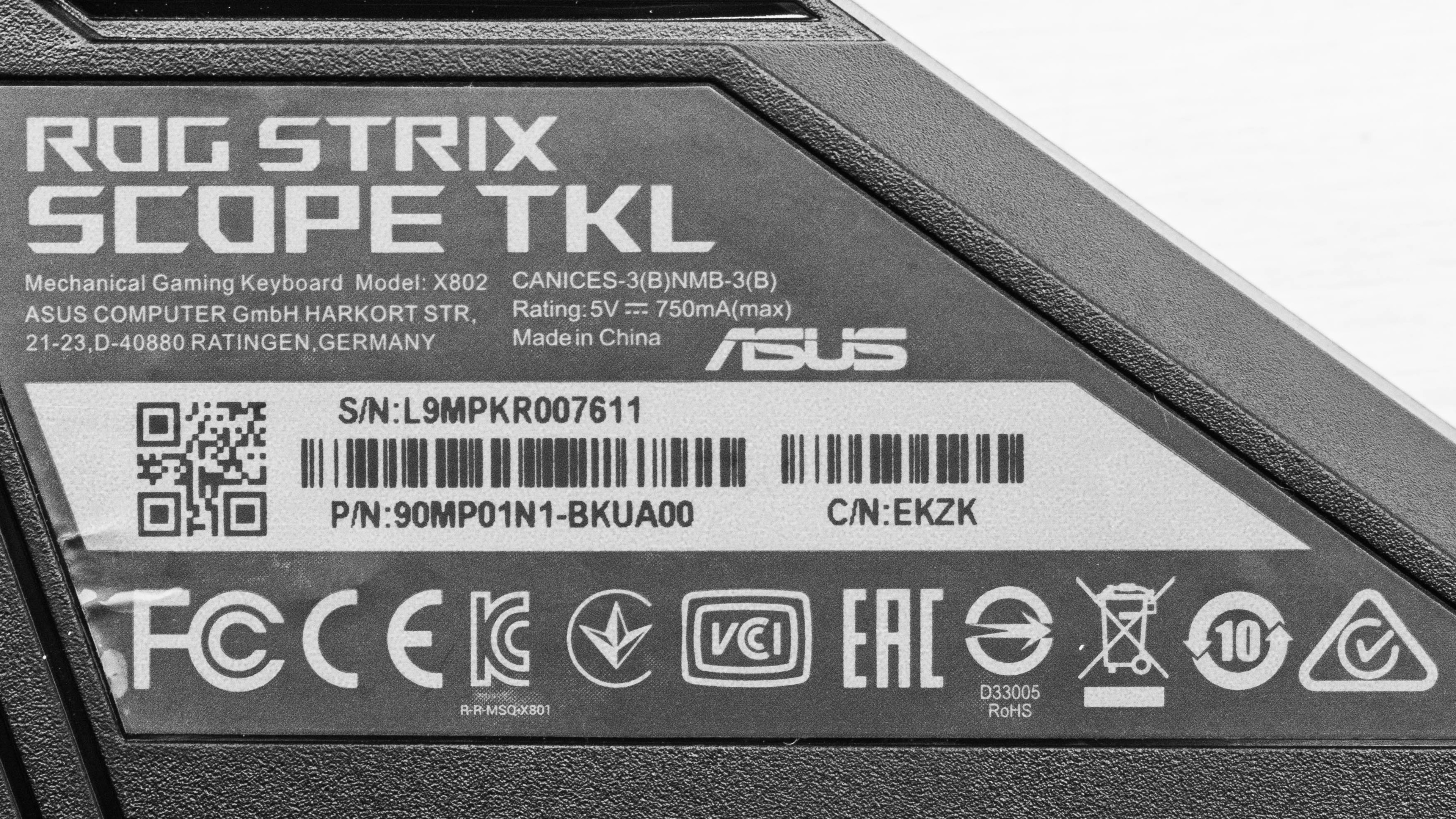
    You can see our unit's label here.

    Popular Keyboard Comparisons

    The ASUS ROG Strix Scope TKL is an excellent gaming keyboard that provides a great typing experience. However, its latency is a bit high for a wired keyboard and might be disappointing for competitive gamers looking for the lowest input lag.

    For more options, check out our recommendations for the best gaming keyboards, the best mechanical keyboards, and the best RGB keyboards.

    ASUS ROG Strix Scope II 96 Wireless

    The ASUS ROG Strix Scope TKL and the ASUS ROG Strix Scope II 96 Wireless are gaming keyboards in the same lineup. The Strix Scope TKL is an older wired-only model with a smaller TenKeyLess form factor. On the other hand, the Strix Scope II 96 Wireless is a newer wireless model with a compact (96%) form factor. It has significantly better latency performance, higher-quality PBT keycaps, and includes a wrist rest, which the Strix Scope TKL lacks.

    ASUS ROG Strix Flare II Animate

    The ASUS ROG Strix Scope TKL and the ASUS ROG Strix Flare II Animate are both wired-only gaming keyboards. However, the Strix Flare II performs much better overall thanks to its exceptionally low latency, higher maximum polling rate, and included wrist rest for better ergonomics.

    ASUS ROG Falchion

    The ASUS ROG Falchion is a slightly better gaming keyboard than the ASUS ROG Strix Scope TKL thanks to its significantly lower latency. Also, you can use the Falchion both wired and wirelessly, and it has a touch panel on its left side that you can reprogram or set macros to. On the other hand, you can only use the Strix Scope TKL wirelessly, but its larger size gives it space for a dedicated F-row. Both boards are available with Cherry MX Red, Brown, Blue, and Speed Silver switches, but the Strix Scope TKL is also available with Silent Red switches.

    SteelSeries Apex 7 TKL

    The ASUS ROG Strix Scope TKL and the SteelSeries Apex 7 TKL are both wired TenKeyLess gaming keyboards. The SteelSeries is better for the most part because it has more features, like an OLED screen, dedicated media controls, a USB passthrough, and it comes with a wrist rest. Also, it has lower latency and customization software for macOS. Both keyboards are available in multiple switch options.

    Show more 

    Test Results

    perceptual testing image
    Sort:
    RATINGS
    Category:
    All
    Design
    Dimensions
    Size
    TenKeyLess (80%)
    Height
    1.6" (4.0 cm)
    Width14.0" (35.6 cm)
    Depth
    5.4" (13.6 cm)
    Depth With Wrist Rest
    N/A
    Weight
    1.98 lbs (0.900 kg)

    The ASUS ROG Strix Scope TKL is an 80% keyboard that lacks a numpad. It doesn't take up much space, which is great for gamers who need more space to move the mouse. If you want an even more compact board, check out the ASUS ROG Falchion, which is a wireless 65% model.

    8.5
    Build Quality
    Keycap MaterialABS

    The ASUS ROG Strix Scope TKL's build quality is excellent. It has a plastic frame with an aluminum plate on top, and it feels very rigid, showing no signs of flex. The keycaps are ABS plastic, but they're high-quality and doubleshot, so the key legends shouldn't fade over time. The keys are stable and don't wobble much, although there's a slight rattle when shaking the keyboard. The rubber feet are very grippy and prevent the keyboard from sliding around, and the incline feet feel very sturdy.

    6.5
    Ergonomics
    Board Design
    Straight
    Minimum Incline
    Medium Incline
    N/A
    Maximum Incline
    Wrist RestNo

    The ergonomics are okay. It's a straight board that naturally sits at a 4-degree incline and offers one additional incline setting. It doesn't come with a wrist rest, but it's comfortable to type on without one and shouldn't cause fatigue over time. That said, there's a Deluxe version that includes one if you need it.

    9.7
    Backlighting
    BacklightingYes
    Color
    RGB
    Individually Backlit Keys
    Yes
    Color Mixing
    Ok
    Effects
    Yes
    Programmable
    Yes

    The ASUS ROG Strix Scope TKL has full RGB backlighting with individually-lit keys, and there are also LEDs at the bottom of the keyboard to produce an underglow effect. You can customize the lighting through software. Unfortunately, the white backlighting has a pinkish hue.

    Cable & Connector
    ConnectivityWired
    Detachable
    Yes (Wired Only Keyboard)
    Length6.0 ft (1.8 m)
    Connector (Keyboard side)
    USB type-C

    The USB-A to USB-C cable is braided and should be long enough for most people's setup. It's also detachable, so you can replace it with a custom one.

    0.0
    Wireless Versatility
    Bluetooth
    No
    Bluetooth Multi-Device Pairing
    No
    Proprietary Receiver
    No
    Battery Type
    No Batteries

    The ASUS ROG Strix Scope TKL is a wired-only keyboard.

    Extra Features
    Media Keys
    Hot Keys
    Macro Programmable Keys
    All
    Trackpad / TrackballNo
    WheelNo
    USB Passthrough
    No
    NumpadNo
    Windows Key Lock
    Yes
    Lock IndicatorCaps & Scroll Lock

    The ASUS ROG Strix Scope TKL has a few extra features. You can program a macro onto any key except for the Fn key, and you can do so through software or on-the-fly. The top row is set to media controls by default; you can access the function keys by pressing and holding Fn first or make the function keys the default by pressing Fn+Ins (Fn-Lock). There's a privacy button (F12) that minimizes all programs and mutes all sounds when pressed, and you can lock the Windows key by pressing Fn+Windows, preventing you from accidentally minimizing your game. If you'd like a wireless board with a modular numpad, check out the ASUS ROG Claymore II.

    In The Box

    • ASUS ROG Strix Scope TKL keyboard
    • USB-C to USB-A cable
    • User guide
    • ROG stickers
    Typing Experience
    Keystrokes
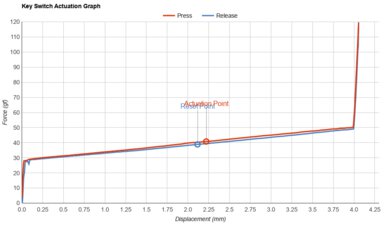
    See details on graph tool
    Mechanical
    Yes
    Key Switches
    Cherry MX Brown
    Feel
    Tactile
    Operating Force
    58 gf
    Actuation Force
    47 gf
    Pre-Travel
    2.2 mm
    Total Travel
    4.0 mm

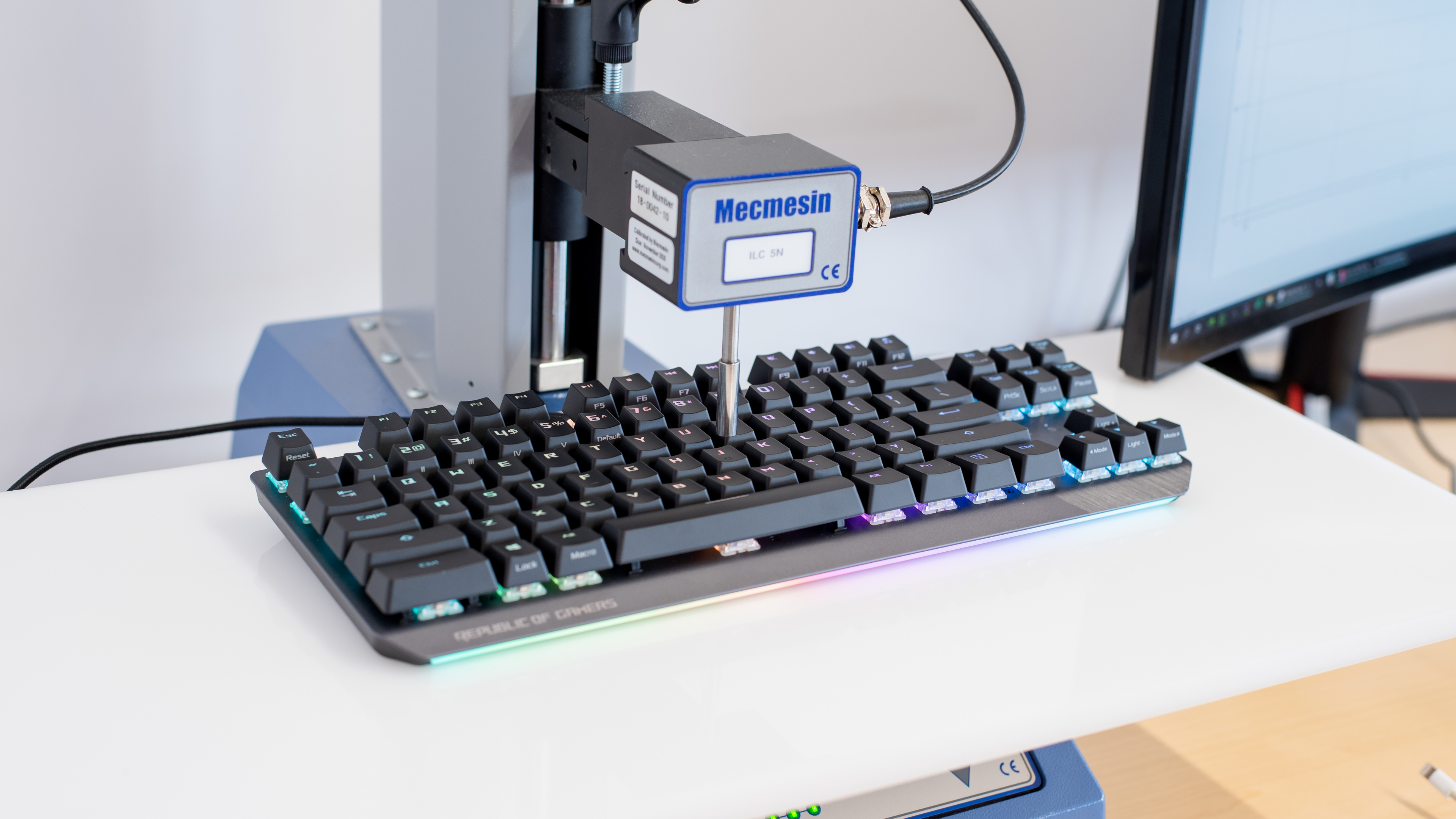
    Our unit has Cherry MX Brown switches, but it's also available in Red, Blue, Silver Speed, and Silent Red. The Browns have a short pre-travel distance and light operating force, making them feel responsive and light. They provide tactile feedback so that you know when a key has been actuated.

    8.0
    Typing Quality

    The typing experience is great. The ABS keycaps feel high-quality and nice to type on. The keys are stable, except for the spacebar, Shift, and Enter keys, which rattle a bit. Key spacing is fairly standard, so it shouldn't take long to get used to typing on it. The Cherry MX Brown switches on our unit are easy to actuate and provide good tactile feedback. It's comfortable to type on without a wrist rest and shouldn't cause fatigue after extended use. If you need a wrist rest, there's a Deluxe version that comes with one.

    Typing Noise
    Noise
    Quiet

    Typing is quiet with the Cherry MX Brown switches, great for noise-sensitive environments. However, it may be louder if you use Cherry MX Blues.

    7.1
    Latency
    Latency Wired
    13.9 ms
    Latency Receiver
    N/A
    Latency Bluetooth
    N/A

    The ASUS ROG Strix Scope TKL has decent latency, though a bit high for a wired keyboard. It shouldn't be noticeable to most people, but it isn't ideal for competitive gamers looking for the lowest input lag. For a TKL board with lower latency, check out the Fnatic miniSTREAK. The upgraded version of this keyboard, the ASUS ROG Strix Flare II Animate, has significantly better latency.

    Software and Operating System
    9.6
    Software & Programming
    Software NameArmoury Crate
    Account Required
    No
    Profiles
    5
    Onboard Memory
    Yes
    Cloud Sync
    Yes
    Macro Programming
    Software and Onboard
    Ease Of Use
    Easy
    Software Windows Compatible
    Yes
    Software macOS Compatible
    No

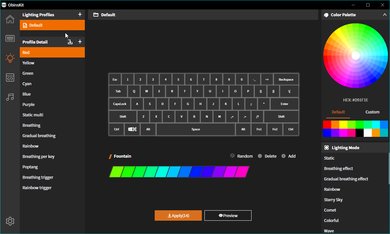
    ASUS' Armoury Crate software offers an exceptional number of customization options. You can program macros, reassign keys, and customize the RGB backlighting. You can create up to five profiles and save them on the onboard memory, allowing you to access them on a computer that doesn't have the software installed. Unfortunately, it's only available for Windows.

    7.2
    Keyboard Compatibility
    WindowsFull
    macOSPartial
    LinuxPartial
    AndroidNo
    iOSNo
    iPadOSNo

    The ASUS ROG Strix Scope TKL has decent compatibility. It's fully compatible with Windows. Every key works as intended on Linux, but on macOS, Print Screen and Scroll Lock don't work. There's no customization software for macOS and Linux.