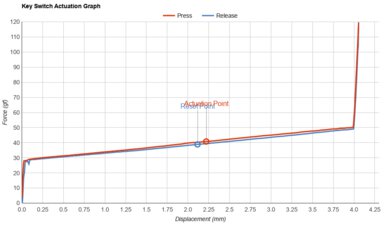
The Brydge Pro is a mobile keyboard designed to be used with a third or fourth-generation iPad Pro, and it's available in either an 11 inch or 12.9 inch size. It comes with a cover for the back of your iPad, while the keyboard itself protects the screen. It's really well-built with an aluminum frame and it has white backlighting, which is ideal for use in dark environments. The typing experience is good because the keys have a low travel distance and are light to press, and the low profile makes it comfortable to type on without a wrist rest. Sadly, it's not a very versatile keyboard as it doesn't have any macro-programmable keys and it's only fully compatible with iPadOS. On the upside, it has a few extra buttons that help with your workflow, including dedicated media keys, a voice control button, and a screen brightness button.
Our Verdict
The Brydge Pro isn't designed for gaming. It still offers an okay gaming performance because the keys have a low pre-travel distance and there's white backlighting.
- White backlighting.
- Excellent build quality.
- No macro-programmable keys.
- No incline settings.
The Brydge Pro is very good for mobile use. It connects to any device via Bluetooth and most keys work on common mobile operating systems. Sadly, it doesn't support multi-device pairing. It's a compact, well-built keyboard that has white backlighting, great to use in dark environments.
- Good typing quality.
- Excellent build quality.
- Doesn't have multi-device pairing.
The Brydge Pro is good for office use. It has a good typing quality because the keys have a low pre-travel distance and are light to press. It doesn't offer much in terms of ergonomics, but because it's a low-profile keyboard, it doesn't get tiring typing on the keyboard.
- Good typing quality.
- Excellent build quality.
- No incline settings.
Disappointing for programming. The Brydge Pro keyboard connects to any device via Bluetooth, but it doesn't support multi-device pairing. It offers a good typing experience that doesn't get tiring as the keys feel light to press. Sadly, it doesn't have any macro-programmable keys and it isn't compatible with Linux.
- Good typing quality.
- Excellent build quality.
- No macro-programmable keys.
- No incline settings.
- Excellent build quality.
Changelog
- Updated Oct 25, 2021: Converted to Test Bench 1.0.
- Updated Aug 18, 2020: Review published.
- Updated Aug 07, 2020: Early access published.
- Updated Jul 30, 2020: Our testers have started testing this product.
Check Price
Differences Between Sizes And Variants
We tested the 12.9 inch Brydge Pro keyboard in silver, and it's also available in space gray. This is designed for the third and fourth-generation 12.9 inch iPad Pro, and the keyboard is also available in an 11 inch size. Also, you can get the keyboard with a trackpad, known as the Brydge Pro Plus, and the different variants are listed below.
| Name | Size | Color | Trackpad |
| Brydge Pro | 11.0" | Silver, Space Gray | No |
| Brydge Pro | 12.9" | Silver, Space Gray | No |
| Brydge Pro Plus | 11.0" | Space Gray | Yes |
| Brydge Pro Plus | 12.9" | Space Gray | Yes |
If someone comes across a different type of keyboard or if yours doesn't correspond to our review, let us know and we'll update the review.
Popular Keyboard Comparisons
The Brydge Pro 12.9 inch keyboard is a very good mobile keyboard that offers a much better typing experience than other keyboards designed for use with iPads, such as the Logitech Slim Folio Pro. It also has white backlighting, which is a nice touch. However, if you want a lighter, more versatile keyboard that you can use with your mobile devices, there are better options, such as the Logitech K380. Also see our recommendations for the best keyboards for iPad, the best keyboards for Mac, and the best cheap keyboards.
The Brydge Pro is a bit better overall than the Brydge 10.2 Keyboard for Apple iPad. The Pro is designed to be used with a third or fourth-generation iPad Pro, while the 10.2 is designed for a seventh-generation iPad, and they're very similar. The Pro is better because it's bigger, so there's more spacing between keys, offering a better typing experience.
The Brydge Pro is much better than the Fintie Soft TPU Keyboard Case For iPad 7th Gen. The Brydge is better-built, it has white backlighting, and the overall typing quality is much better. However, the Fintie is much lighter, making it easier to carry around, and it's fully compatible with iOS.
The Apple Magic Keyboard 2017 is better overall than the Brydge Pro. The Apple is fully compatible with iPadOS, macOS, and iOS, while some buttons on the Brydge don't work on iOS and macOS. The Apple is also better-built, lighter, and it offers a better typing quality. However, the Brydge has white backlighting, which is a feature the Apple keyboard lacks.
The Brydge Pro is better overall than the Logitech Slim Folio Pro. Both keyboards are designed for a third-generation iPad Pro, they're both available in 11 and 12.9-inch sizes, and they both have white backlighting. However, the Brydge is better built and offers a much better typing quality because the keys are more spaced-out.
Test Results



for pictures & test results





for pictures & test results


for pictures & test results