Framework Laptop 13 (2021)  Laptop Review

Reviewed Feb 14, 2022 at 10:34am
Writing modified May 10, 2024 at 10:24am
Tested using Methodology v0.8 
Framework Laptop 13 (2021)
8.3
School 
6.5
Gaming 
7.4
Multimedia 
7.8
Workstation 
8.3
Business 
 0
Notice: This laptops was replaced by Framework Laptop 13 (2022)

The Framework Laptop 13 (2021) is a 13.5 inch ultraportable laptop that focuses on repairability, upgradeability, and modularity. It's a thin and light device that's easy to carry around, and it feels very well-built, sporting an all-metal chassis. It has a sharp 3:2 display, a comfortable keyboard, a large touchpad, and an excellent webcam. Its modular I/O system lets you swap out the ports on the fly, and you can also use it to increase storage space. You can purchase a pre-configured model or go the DIY route, allowing you to choose each component individually to suit your needs. The internals are easy to access if you want to upgrade later on, and there are even guides online to walk you through the process. It's available with Intel 11th Gen processors that perform well in light to moderately intensive workloads but aren't ideal for demanding tasks like gaming or video editing. Unfortunately, there aren't any dedicated GPU options to boost graphical performance. Neither the CPU nor the integrated GPU throttle under load; however, the fans are loud and can be annoying in a quiet room. Battery life is excellent as it lasts over 11 hours of light productivity and 8 hours of video playback.

You can see our unit's specifications and the available configuration options in the Differences Between Variants section.

Note: You can only purchase the Framework Laptop through Framework's website.

Our Verdict

8.3
School 

The Framework Laptop 13 2021 is great for school use. It's well-built and very portable, and its battery lasts over 11 hours of light productivity, enough to comfortably get you through a typical school day. The display is sharp, the keyboard doesn't cause fatigue, and the touchpad is large and responsive. Its Intel 11th Gen processor and integrated graphics can handle tasks like web browsing and text formatting. However, it isn't ideal for demanding workloads like graphic design or 3D animation.

Pros
  • Easy to carry around thanks to thin and light design.
  • Battery lasts easily through a typical day of light productivity.
  • Large touchpad tracks well and keyboard feels good to type on.
  • Excellent webcam video quality.
  • Feels well-built.
Cons
  • Loud fans.
6.5
Gaming 

The Framework Laptop 13 2021 is okay for gaming. Its Intel 11th Gen CPU performs well; however, its integrated graphics can't handle demanding games. You can run some older or lighter titles, but you'll have to play at low graphical settings to achieve playable frame rates in most instances. Also, it has a 60Hz display with a slow response time and no VRR support to reduce screen tearing.

Pros
  • Easy to access internals for repairs and upgrades.
  • Modular port system lets you change the port configuration on the fly.
  • CPU and GPU don't throttle under load.
Cons
  • CPU and integrated graphics can't handle demanding tasks like gaming and video editing.
  • 60Hz display with slow response time and no VRR support.
  • Loud fans.
7.4
Multimedia 

The Framework Laptop 13 2021 is decent for media consumption. It's a very portable laptop, thanks to its thin and light design, and its battery life is excellent, lasting over 8 hours of video playback. The display is very sharp, but because it has a 3:2 aspect ratio, you'll almost always have black bars at the top and bottom of the screen. It's also an IPS panel with a relatively low contrast ratio, so it isn't the best option for dark room viewing. The speakers sound good as far as laptops go, but they don't get very loud.

Pros
  • Easy to carry around thanks to thin and light design.
  • Sharp display with full sRGB coverage.
  • Decent-sounding speakers are well suited for spoken content.
  • Battery lasts over 8 hours of video playback.
Cons
  • Speakers don't get very loud.
  • Blacks look gray in dim settings.
  • No touch input.
7.8
Workstation 

The Framework Laptop 13 2021 is good as a workstation. Its Intel 11th Gen processor has exceptional single-thread performance, but it can't match the multi-thread performance of H-series mobile workstation CPUs with more cores and threads. Also, its integrated graphics' performance is limited, so it isn't ideal for graphically demanding tasks like video editing or 3D animation. On the upside, it's easy to access the internals for repairs and upgrades, and its port selection is excellent as you can swap out the expansion cards as needed.

Pros
  • Easy to access internals for repairs and upgrades.
  • Modular port system lets you change the port configuration on the fly.
  • Large touchpad tracks well and keyboard feels good to type on.
  • CPU and GPU don't throttle under load.
  • Fast storage drive.
Cons
  • CPU and integrated graphics can't handle demanding tasks like gaming and video editing.
  • Loud fans.
8.3
Business 

The Framework Laptop 13 2021 is great for business use. It's a thin and light laptop that's easy to carry around, with a battery that lasts easily through a typical 8-hour workday of light productivity. The screen displays sharp images and text, the keyboard is comfortable to type on, and the touchpad tracks well. The webcam's video quality is excellent, but the microphone is too loud and picks up some background noise. Its port selection is excellent, as you can swap out the expansion cards on the fly to suit your needs. Its Intel 11th Gen processor can handle most productivity tasks like web browsing, text formatting, spreadsheets, and presentations. Unfortunately, the fans are pretty loud under load, which might bother some people in a quiet office.

Pros
  • Easy to carry around thanks to thin and light design.
  • Battery lasts easily through a typical day of light productivity.
  • Easy to access internals for repairs and upgrades.
  • Modular port system lets you change the port configuration on the fly.
  • Large touchpad tracks well and keyboard feels good to type on.
  • Excellent webcam video quality.
  • Feels well-built.
Cons
  • Loud fans.
  • 8.3
    School
  • 6.5
    Gaming
  • 7.4
    Multimedia
  • 7.8
    Workstation
  • 8.3
    Business
  • Changelog

    1.  Updated May 10, 2024: We've updated the review to provide information regarding a battery issue some users have experienced in the Battery section.
    2.  Updated Sep 27, 2023: We've changed the name of the laptop to include the size, as Framework now makes models in various sizes.
    3.  Updated Oct 11, 2022: We've uploaded a new thermal photo in the Thermals and Noise section as the previous image didn't show the correct temperature bounds. It should be 22°C to 52°C instead of 21.5°C to 43.8°C. This change doesn't affect the score.
    4.  Updated Feb 23, 2022: The material type has been changed, as it was mistakenly indicated that the touchpad is plastic instead of glass.

    Differences Between Sizes And Variants

    We tested the Framework Laptop 13 2021 (pre-configured Performance model) with an Intel Core i7-1165G7 CPU, integrated Intel Iris Xe graphics, 16GB of memory, and 512GB of storage. You can get the Framework Laptop as a pre-configured model or go the DIY route, allowing you to choose each component individually. Regardless of the configuration you choose, you have the option to add expansion cards (modular ports and storage drives) before checking out. You can see the configuration options in the tables below.

    Pre-configured Models  Specifications
    Base
    • 13.5" IPS 2256 x 1504 60Hz display
    • Intel Core i5-1135G7 (4 cores/8 threads, up to 4.20GHz)
    • Intel Iris Xe Graphics (integrated, 80 execution units)
    • 8GB DDR4 3200MHz memory
    • 256GB PCIe NVMe SSD
    • Windows 10 Home
    Performance
    • 13.5" IPS 2256 x 1504 60Hz display
    • Intel Core i7-1165G7 (4 cores/8 threads, up to 4.70GHz)
    • Intel Iris Xe Graphics (integrated, 96 execution units)
    • 16GB DDR4 3200MHz memory
    • 512GB PCIe NVMe SSD
    • Windows 10 Home

    Professional

    • 13.5" IPS 2256 x 1504 60Hz display
    • Intel Core i7-1185G7 (4 cores/8 threads, up to 4.80GHz)
    • Intel Iris Xe Graphics (integrated, 96 execution units)
    • 32GB DDR4 3200MHz memory
    • 1TB PCIe NVMe SSD
    • Windows 10 Pro


    DIY Edition Options 
    Screen
    • 13.5" IPS 2256 x 1504 60Hz display
    CPU
    • Intel Core i5-1135G7 (4 cores/8 threads, up to 4.20GHz)
    • Intel Core i7-1165G7 (4 cores/8 threads, up to 4.70GHz)
    • Intel Core i7-1185G7 (4 cores/8 threads, up to 4.80GHz)
    GPU
    • Intel Iris Xe Graphics (integrated, Core i5, 80 execution units)
    • Intel Iris Xe Graphics (integrated, Core i7, 96 execution units)
    Memory
    • 8GB DDR4 3200MHz (1 x 8GB)
    • 16GB DDR4 3200MHz (1 x 16GB)
    • 16GB DDR4 3200MHz (2 x 8GB)
    • 32GB DDR4 3200MHz (1 x 32GB)
    • 32GB DDR4 3200MHz (2 x 16GB)
    • 64GB DDR4 3200MHz (2 x 32GB)
    • None (Bring your own)
    Storage
    • 500GB WD Black SN850 NVMe PCIe SSD
    • 1TB WB Black SN850 PCIe NVMe SSD
    • 2TB WD Black SN850 PCIe NVMe SSD
    • 250GB WD Black SN750 PCIe NVMe SSD
    • 500GB WD Black SN750 PCIe NVMe SSD
    • 1TB WD Black SN750 PCIe NVMe SSD
    • 2TB WD Black SN750 PCIe NVMe SSD
    • 4TB WD Black SN750 PCIe NVMe SSD
    • None (Bring your own)
    Wireless Adapter
    • Intel Wi-Fi 6E AX201 vPro (requires i7-1185G7 for vPro functionality)
    • Intel Wi-Fi 6e AX201 (no vPro)
    • None (Bring your own)
    Operating System
    • Windows 10 Home
    • Windows 10 Pro
    • None (Bring your own)


    Expansion cards
    • DisplayPort (1.4)
    • MicroSD (UHS-I)
    • USB-A (USB 3.2 Gen 2)
    • USB-C (USB 4, charging, DisplayPort Alt Mode)
    • HDMI (2.0b)
    • 250GB Storage
    • 1TB Storage

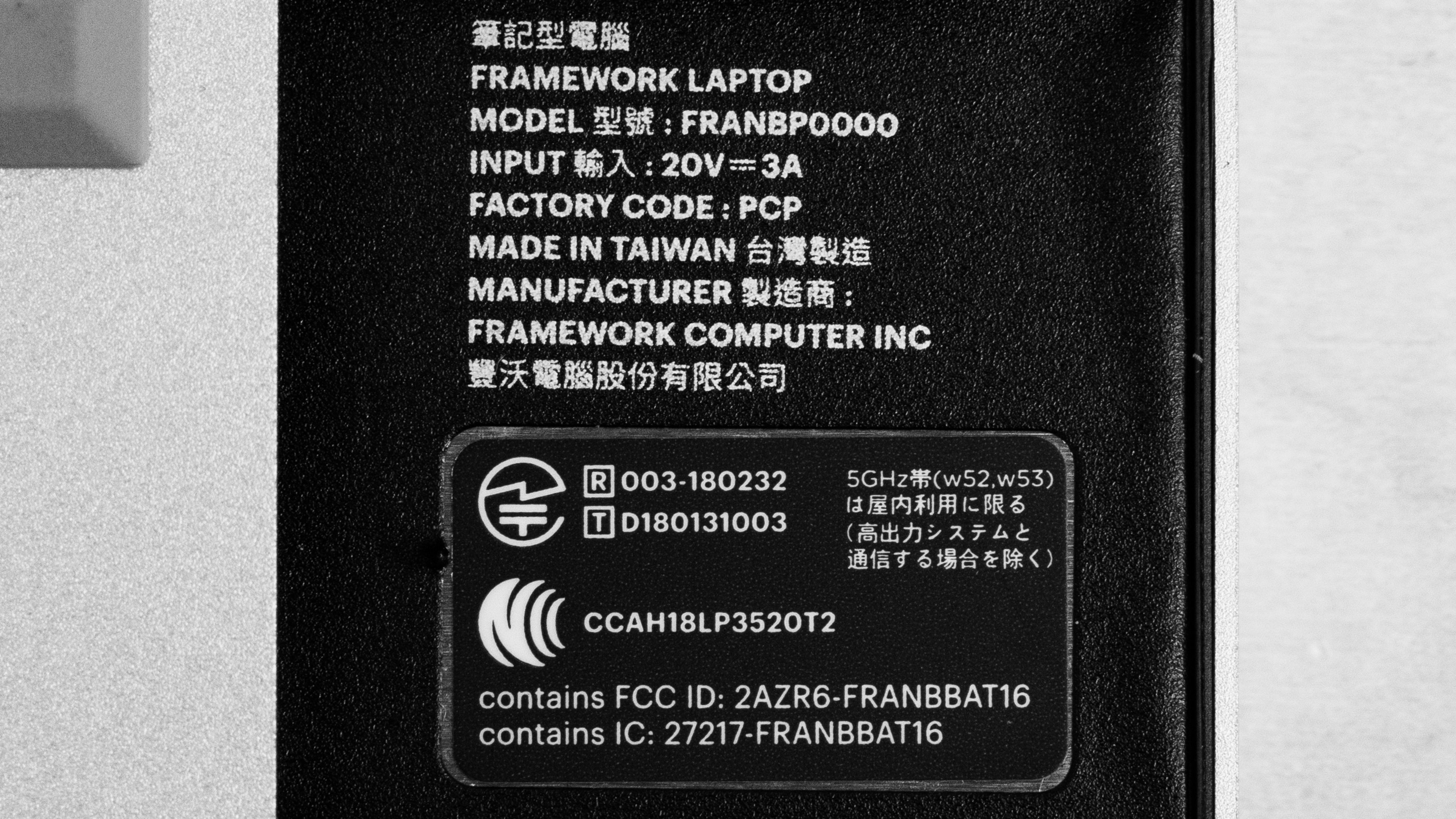
    You can see our unit's label here.

    Popular Laptop Comparisons

    Compared to other laptops, the Framework Laptop 13 2021 stands out for its unique modular design and excellent repairability. As it's available in a DIY Edition, it's also easier to customize the laptop the way you want instead of being limited to pre-configured models. For more options, check out our recommendations for the best business laptops, the best laptops for programming, and the best laptops for graphic design.

    Framework Laptop 13 (2022)

    The Framework Laptop 13 (2022) is a newer version of the Framework Laptop 13 (2021). They're identical in design and features, as the newer model is only an internal spec upgrade to Intel 12th Gen. platform. Intel 12th Gen. processors perform significantly better than the 11th Gen., particularly in multi-threaded workloads; however, they consume more power, leading to a much shorter battery life on the 2022 model. The 2022 Framework Laptop also adds Wi-Fi 6E, which provides faster speeds, lower latency, and less signal interference, but you need a Wi-Fi 6E-capable router to benefit from these features.

    HP ENVY x360 13 (2020)

    The Framework Laptop 13 (2021) is better than the HP ENVY x360 13 (2020) for most uses. The Framework Laptop has a sharper display, better-sounding speakers, a larger and more responsive touchpad, and a much better webcam. The Framework Laptop's build feels sturdier, it's easier to repair and upgrade, and its modular port system lets you change the port configuration on the fly to suit your needs. On the other hand, the Envy x360 is a 2-in-1 convertible you can use as a tablet; its keyboard feels more comfortable to type on, and it's available with a 1000 cd/m² display and AMD Ryzen 5000-series CPUs.

    Microsoft Surface Laptop 3 15 (2019)

    The Framework Laptop 13 (2021) and the Microsoft Surface Laptop 3 15 (2019) are both ultraportable laptops. The Surface Laptop 3's display is larger and brighter, its keyboard is more comfortable to type on for long periods, and its touchpad is more responsive. However, the Framework Laptop has a modular port system that lets you swap out the ports for whatever you need, and it's much easier to repair or upgrade the components. The Framework Laptop's Intel 11th Gen processors perform much better than the AMD Ryzen 3000-series CPUs on the Surface Laptop 3, and the Framework also has a much longer battery.

    Dell Alienware m15 R3 (2020)

    The Framework Laptop 13 (2021) and the Dell Alienware m15 R3 (2020) are very different. The Framework Laptop is an ultraportable productivity laptop designed for light to moderately demanding tasks, while the Alienware m15 R3 is a thick and bulky gaming laptop. The Alienware m15 R3 can handle much heavier workloads as it's available with significantly more powerful GPUs; however, its battery lasts only a little over three hours of light productivity, whereas the Framework Laptop lasts well over 11 hours. The Alienware has a wider port selection and a more comfortable keyboard, but the Framework Laptop has a higher-quality webcam and a brighter display.

    Show more 

    Test Results

    perceptual testing image
    Sort:
    RATINGS
    Category:
    All
    Design
    Style
    Form Factor
    Traditional (Clamshell)

    The Framework Laptop 13 2021's design is simple and understated. It has a full aluminum chassis with relatively thin bezels on three sides and a thicker bottom chin. The speakers are on the bottom near the front, while the exhaust vents are near the back. There's a rather large Framework logo on the back of the display, but it isn't overly distracting. It features a unique modular port system that lets you swap out the ports on the fly to whatever you need. You can also use these 'expansion cards' to increase storage space.

    8.5
    Build Quality

    The build quality is excellent. Its all-metal chassis feels sturdy, exhibiting only a small amount of flex in the display. The finish seems fairly scratch-resistant, and the device as a whole is evenly balanced. There are tiny gaps around the display and the expansion slots, but that's part of the design as it makes it easier to replace the display panel or swap out the ports on the fly.

    9.4
    Hinge
    Range
    180°
    Stability
    Good
    One Finger Lift
    Yes

    The hinge is outstanding. It has a wide range so that you can share the screen with someone opposite of you, and it's very sturdy, with almost no play at all. The screen doesn't wobble even when typing aggressively.

    8.8
    Portability
    Size
    13.5"
    Thickness
    0.7" (1.7 cm)
    Width
    11.7" (29.8 cm)
    Depth
    9.1" (23.0 cm)
    Volume
    71.1 in³ (1,165.2 cm³)
    Weight
    2.9 lbs (1.3 kg)
    Charger Size
    5.9 in³ (97.2 cm³)
    Charger Weight
    0.7 lbs (0.3 kg)

    The Framework Laptop 2021 and its included power adapter are compact and light, so they're easy to fit into most bags and carry around.

    8.9
    Serviceability
    Ease Of Access
    9.5
    RAM Slots
    2
    Storage Slots
    1
    Replaceable Battery
    Yes
    Replaceable Wireless Adapter
    Yes

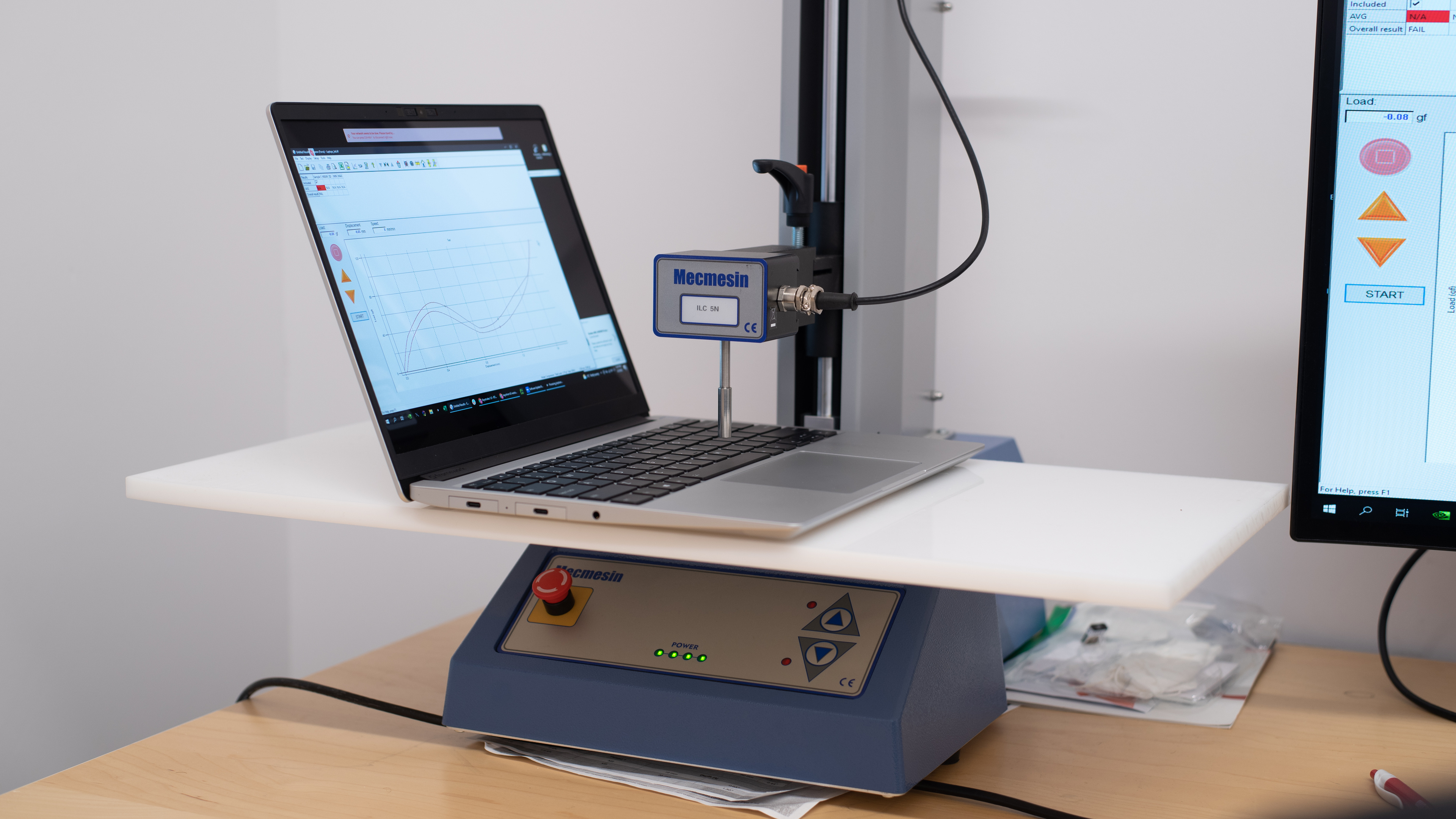
    The Framework Laptop 2021's serviceability is excellent. To access the internals, you only have to remove five P5 screws, pull the keyboard up and unclip it from the motherboard. It uses captive screws, meaning they don't come out completely, so you don't have to worry about losing them. Also, you can remove all the screws used in the assembly with the included screwdriver. All the replaceable components are easily accessible, and the components are standard parts available to the general public. The display's bezels attach magnetically, making them easier to remove should you need to replace the panel. You can't replace the CPU, but you can replace the entire motherboard. You can see the repair guides here.

    In The Box

    • Framework Laptop 2021
    • 60W power adapter (optional)
    • USB-C to USB-C charging cable (optional)
    • 4x USB-C Expansion cards (optional and configurable)
    • Screwdriver
    • Documentation
    • Stickers
    Display
    Screen Specs
    Resolution
    2256 x 1504
    Aspect Ratio
    3:2
    Pixel Density
    200 PPI
    Panel Type
    IPS
    Touch Screen
    No
    Screen-To-Body Ratio
    83%

    The Framework Laptop 2021 has a high-resolution screen that displays sharp images and text. Its tall 3:2 aspect ratio gives you more vertical space so that you don't have to scroll as much when reading documents and websites, but you get black bars at the top and bottom when viewing standard 16:9 videos.

    5.9
    Refresh Rate
    Refresh Rate
    60 Hz
    Variable Refresh Rate
    No

    The Framework Laptop 2021 has a basic refresh rate typical of most productivity laptops. The response time is slow, causing visible blur trails behind moving objects; this means it isn't the best option for viewing fast-moving content or gaming.

    7.7
    Contrast
    Native Contrast
    1,546 : 1

    The Framework Laptop has a good contrast ratio for an IPS panel; however, blacks still look gray, which isn't ideal for dark room viewing.

    7.7
    Brightness
    Maximum Brightness
    362 cd/m²
    Minimum Brightness
    11 cd/m²

    The Framework Laptop 2021's display gets decently bright; enough for use in most indoor settings, but not outdoors in broad daylight. It also gets very dim at the lowest brightness setting to provide a more comfortable viewing in the dark as it causes less eye strain.

    7.0
    Reflections
    Screen Finish
    Glossy
    Total Reflections
    4.67%
    Indirect Reflections
    0.37%
    Calculated Direct Reflections
    4.3%

    The Framework Laptop 2021 has decent reflection handling. Its glossy finish struggles most with direct reflections, so it's best to avoid having bright lights shining at the screen. The finish also distorts reflections slightly, making them appear closer and stretched out.

    7.6
    Black Uniformity
    Uniformity (Std. Dev.)
    0.946%

    The Framework Laptop 2021's black uniformity is good. The whole screen looks grayish, but it's very uniform except for a tiny amount of backlight bleed at the bottom left corner.

    7.5
    Horizontal Viewing Angle
    Color Washout From Left
    29°
    Color Washout From Right
    32°
    Color Shift From Left
    60°
    Color Shift From Right
    60°
    Brightness Loss From Left
    29°
    Brightness Loss From Right
    34°
    Black Level Raise From Left
    60°
    Black Level Raise From Right
    60°
    Gamma Shift From Left
    34°
    Gamma Shift From Right
    38°

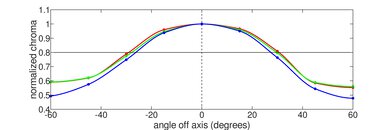
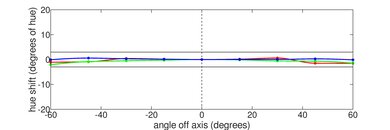
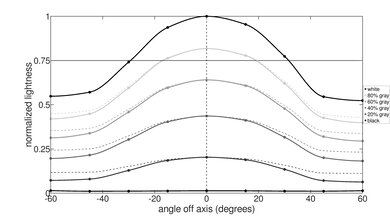
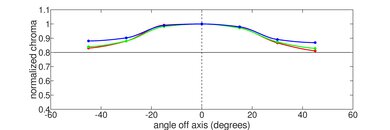
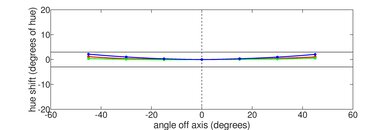
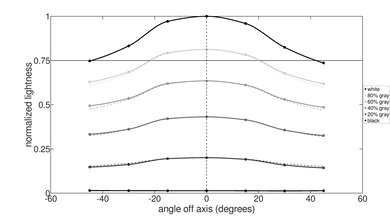
    The Framework Laptop 2021 has good horizontal viewing angles. The image remains accurate until you reach a moderately steep angle to the left or right. You can share color-critical work with someone else as long as the other person isn't too far off to the side.

    7.1
    Vertical Viewing Angle
    Color Washout From Below
    23°
    Color Washout From Above
    27°
    Color Shift From Below
    45°
    Color Shift From Above
    45°
    Brightness Loss From Below
    27°
    Brightness Loss From Above
    34°
    Black Level Raise From Below
    45°
    Black Level Raise From Above
    45°
    Gamma Shift From Below
    23°
    Gamma Shift From Above
    29°

    The Framework Laptop 2021 has decent vertical viewing angles. The image looks inaccurate from above and below, but you still have a fair amount of leeway to tilt the screen before image accuracy degrades, which can be helpful when using the laptop in tight spaces like on an airplane with small tray tables.

    6.1
    Out-Of-The-Box Color Accuracy
    Avg. White Balance dE
    5.18
    Avg. Gamma
    2.24
    Avg. Color dE
    3.04
    Avg. Color Temperature
    6,262 K

    The out-of-the-box color accuracy is mediocre. Most color inaccuracies are minor and hard to spot, but the white balance is noticeably off, especially at higher brightness levels. The color temperature is a little warmer than the standard 6500K target, giving the image a slight reddish tint. The gamma follows the sRGB curve for the most part, but dark scenes are over-darkened.

    8.5
    Color Gamut
    sRGB xy
    99.73%
    sRGB uv
    99.44%
    Adobe RGB xy
    76.47%
    Adobe RGB uv
    86.31%
    DCI P3 xy
    78.63%
    DCI P3 uv
    85.3%
    Rec. 2020 xy
    56.45%
    Rec. 2020 uv
    62.3%

    The Framework Laptop 2021 has an excellent color gamut. It's mainly an sRGB panel as it's the only color space it covers fully. It has great coverage of the wider Adobe RGB and DCI P3 color spaces, but its Rec. 2020 coverage is sub-par. Essentially, it's suitable for content creators working in sRGB, but it isn't ideal for producing and viewing HDR content or for photo editing.

    10
    Flicker
    Flicker-Free
    Yes
    Flicker Frequency
    No Flicker
    Flicker Active Below
    0%

    The backlight is entirely flicker-free, which helps reduce eye strain for people sensitive to flickering.

    Interface
    7.8
    Keyboard
    Typing Quality
    7.5
    Numpad
    No
    Backlighting
    Adjustable
    See details on graph tool
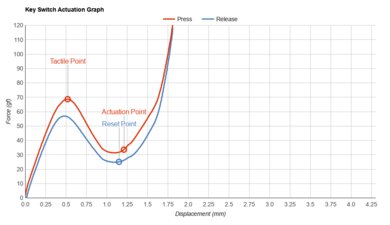
    Operating Force
    66 gf
    Actuation Force
    37 gf
    Pre-Travel
    1.07 mm
    Total Travel
    1.73 mm

    The Framework Laptop 13 2021 has a good keyboard. The keys are well-spaced and stable, and they have a good amount of travel. It doesn't feel tiring to type on for an extended period, but it may take some time to get used to the layout, especially if you aren't used to the size and location of the Delete/Insert key. You can toggle through three backlight brightness levels using FN and the spacebar or turn the backlight off completely.

    8.0
    Touchpad
    Tracking Quality
    8.0
    Size
    13.5 in² (87.0 cm²)
    Material
    Glass
    Dedicated Buttons
    No

    The touchpad is great. It's decently large, and it tracks all movements and gestures well. Palm rejection works as intended. The buttons don't feel very satisfying, though, and you can't click towards the top of the touchpad.

    7.5
    Speakers
    See details on graph tool
    Max Volume
    74 dB SPL
    Standard Error @ Normal Vol. (65 dB)
    4.3 dB
    Slope @ Normal Vol. (65 dB)
    -0.7
    Bass Extension (Low-Frequency Ext.)
    325 Hz
    Treble Extension (High-Frequency Ext.)
    8 kHz
    Dynamic Range Compression @ Max Vol.
    0.6 dB

    The Framework Laptop 2021 has good speakers. They're best suited for spoken content as they have a mid-centric frequency response with very little bass or treble extension. Unfortunately, they don't get very loud.

    8.7
    Webcam & Microphone
    Video Quality
    8.5
    Resolution
    1080p
    Position
    Top Center
    Privacy Cover
    Yes
    Face Unlock
    No

    The webcam's video quality is excellent. The image is well-exposed, has a good amount of fine details, and the colors look natural. The microphone sounds clear, but it's very loud and picks up some background noise. There are privacy covers for both the camera and microphone.

    Connectivity
    8.5
    Ports
    USB-A Ports
    0
    USB-C Ports
    4
    Thunderbolt
    Thunderbolt 4
    USB-C Charging
    Yes
    USB-C Display Out
    Yes
    HDMI
    No
    DisplayPort
    No
    3.5mm Jack
    Combo mic/headphone
    Card Reader
    No
    Ethernet
    No
    Proprietary Port
    No
    Security Lock
    No

    The port selection is excellent. It has a modular port system that allows you to change the type of ports you have on the fly. Each port is a small cartridge called an 'expansion card,' and you can install up to four at a time. However, one of the ports has to be a USB-C port; otherwise, you wouldn't be able to charge the laptop. You can get an expansion card with the following port or storage drive:

    • DisplayPort 1.4
    • MicroSD UHS-I
    • USB-A (USB 3.2 Gen 2, up to 10Gbps)
    • USB-C (USB 4, charging, DisplayPort Alt Mode)
    • HDMI 2.0b
    • 250GB SSD
    • 1TB SSD

    Note: The USB-C port doesn't officially support Thunderbolt 4; however, it works with most Thunderbolt 4 docks, and it can output up to two 4k displays at 60Hz.

    Wireless Communication
    Wi-Fi
    Wi-Fi 6 (802.11ax)
    Bluetooth
    5.2

    The wireless adapter is an Intel Wi-Fi AX201. The pre-configured Intel Core i7-1185G7 model has an Intel Wi-Fi 6 AX201 with vPro. If you choose a DIY Edition, you can skip the wireless adapter altogether.

    Configuration
    CPU
    Brand
    Intel
    Model
    Core i7-1165G7
    Core Count
    4
    Thread Count
    8

    Whether you choose a pre-configured model or a DIY Edition of the Framework Laptop 13 2021, there are essentially three CPU options: an Intel Core i5-1135G7, an Intel Core i7-1165G7, or an Intel Core i7-1185G7. All three are power-efficient processors designed for thin and light laptops with 4 cores and 8 threads. However, the Core i7s run at higher clock speeds and have a larger L3 cache than the Core i5. The Core i7s will be faster than the Core i5 overall, but the performance difference isn't huge and is only noticeable if you push the CPUs to their maximum capacity. It's unlikely that you'll see much difference in performance if you have a light workload that consists of tasks like web browsing, text formatting, and video playback, the types of workloads these processors are designed for. The Core i7-1185G7 is the fastest CPU option, but the performance gain over the i7-1165G7 is minimal as it only has a small clock speed bump. That said, the i7-1185G7 has extra vPro features that some businesses may require. Intel's vPro platform ensures that you get the highest performing chips, and it also includes additional security and remote manageability features.

    GPU
    Brand
    Intel
    Model
    Iris Xe Graphics G7
    Dedicated/Integrated
    Integrated
    VRAM Size
    N/A

    The Framework Laptop 2021 is only available with integrated graphics. All three CPUs have Intel Iris Xe graphics; however, the Core i5's GPU has 80 execution units, while the Core i7s have 96 execution units. The Core i7s will perform better than the Core i5, but the difference is small and only noticeable when performing demanding tasks that push the GPU to its maximum capacity.

    RAM
    Capacity
    16 GB
    Modules
    2
    Type
    DDR4
    Speed
    3,200 MHz

    The pre-configured Base model of the Framework Laptop 2021 has 8GB of memory, the Performance model has 16GB, and the Professional model has 32GB. If you choose a DIY Edition, you can configure it with 8, 16, or 32GB in single-channel or dual-channel mode, or skip it altogether if you want to add your own memory modules. Unless you plan on adding upgrading yourself, it's best to avoid the single-channel configurations as running in single-channel mode can hamper performance in some applications.

    Storage
    Advertised Capacity
    512 GB
    Usable Capacity
    477 GB
    Drive 1
    Western Digital Black SN750
    Drive 1 TypeSSD
    Drive 2
    No 2nd Drive
    Drive 2 TypeNo 2nd Drive

    The pre-configured Base model of the Framework Laptop 2021 has 256GB of storage, the Performance model has 512GB, and the Professional has 1TB. If you go the DIY route, you can choose between a PCIe 3.0 Western Digital Black SN750 SSD or a faster PCIe 4.0 Western Digital Black SN850 SSD. The SN750 is available in various sizes ranging from 250GB to 4TB, while the SN850 is available from 500GB to 2TB. These are all M.2 PCIe NVMe SSDs that go inside the laptop, not the expansion cards. You can skip the storage configuration if you want to add your own custom storage drive.

    Performance
    8.2
    Geekbench 5 (Synthetics)
    CPU Single-Thread
    1,584 points
    CPU Multi-Thread
    5,013 points
    GPU Compute
    17,166 points

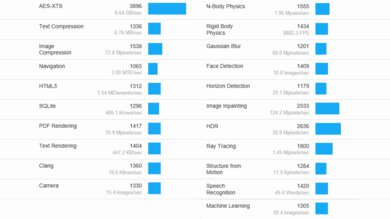
    The Framework Laptop 2021's overall score in Geekbench 5 is great. Its single-thread performance is outstanding and better than many laptops with a power-hungry H-series processor, but it isn't as good as Apple's M1 SoC. Its multi-thread performance is good; however, if you regularly use heavily multi-threaded applications, it's best to get a laptop with a processor that has more cores and threads. Likewise, while its GPU compute score is good for integrated graphics, it's significantly behind dedicated GPUs.

    For the most part, the Intel Core i7-1165G7 is powerful enough for general productivity tasks like web browsing, text formatting, spreadsheets, and video playback. It can also handle some moderately intensive workloads like photo editing as long as the material isn't overly complex and there aren't too many layers and effects. However, it isn't ideal for demanding tasks like 3D animation or video editing. The Intel Core i7-1185G7's overall performance will be a little better, but the Core i5-1135G7 will be slightly worse.

    8.7
    Cinebench R23 (CPU Rendering)
    Single-Thread
    1,525 points
    Multi-Thread
    5,620 points

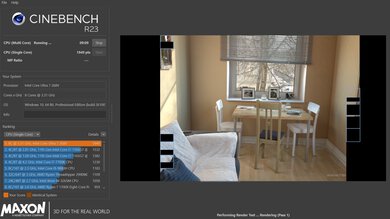
    The Framework Laptop 2021's overall score in Cinebench R23 is excellent. Its single-thread performance is outstanding, matching the Apple MacBook Pro 16 (2021)'s M1 Max SoC. Its multi-thread performance is good for a 4-core, 8-thread CPU, but it lags behind other processors with more cores and threads.

    6.4
    Blender (3D Rendering)
    CPU Render Time
    6.9 min
    GPU Render Time
    N/A
    GPU Render Time (Optix)
    N/A

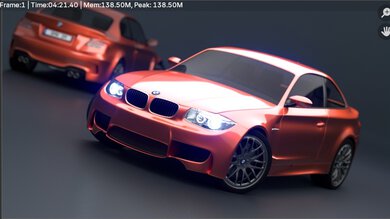
    The performance in Blender is mediocre. It has one of the best CPU rendering times for a power-efficient U-series processor, but it's too slow for professionals working on a deadline. It's best to do this type of rendering work on a laptop with a more powerful H-series CPU or an Apple MacBook Pro with Apple silicon, like the Apple MacBook Pro 16 (2021). Blender doesn't support the integrated GPU; however, it'll likely take longer than the CPU to render the same scene. The Core i5-1135G7 will be slower, likely in the same ballpark as the Acer Swift 3 14 (2020). The Intel Core i7-1185G7 will be slightly faster, but it still won't be good enough for professional use.

    5.1
    Basemark GPU (Game Scene)
    Overall Score
    16,658

    The Framework Laptop 13 2021 performs poorly in the Basemark GPU benchmark. It's among the better scores for integrated graphics, but it's still much lower than even an entry-level dedicated GPU like the NVIDIA GeForce GTX 1650 in the HP Pavilion Gaming Laptop 15 (2021). Essentially, you can run some lighter or older titles, but you almost certainly have to lower the graphical settings to near minimum to get smooth frame rates.

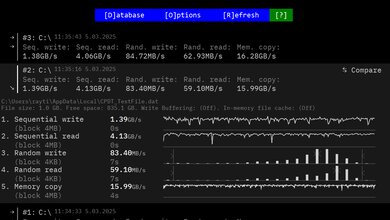
    9.3
    Storage Drive Performance
    Sequential Write Speed
    1,424.5 MB/s
    Sequential Read Speed
    2,562.7 MB/s
    Random Write Speed
    111.5 MB/s
    Random Read Speed
    48.9 MB/s

    The 512GB Western Digital Black SN750 SSD performs exceptionally well. It has fast read and write speeds, so the system boots up, launches apps, and transfers files quickly. The Western Digital Black SN850 SSDs will be even faster as they're PCIe Gen 4 drives. The speed of the SSD may vary depending on the size, as larger SSDs tend to perform better.

    Framework advertises that the expansion card storage drives support USB 3.2 Gen 2 standards. The 250GB drive has up to 1000 MB/s read and 375 MB/s write speeds, while the 1TB drive has 1000 MB/s read and 1000 MB/s write speeds.

    8.7
    Battery
    Capacity
    55 Wh
    Battery Life (Web Browsing)
    11.4 hrs
    Battery Life (Video Playback)
    8.1 hrs
    Battery Life (Gaming)
    1.7 hrs
    Charge Time
    2.7 hrs

    The Framework Laptop 2021 has excellent battery life. You can easily get through a typical 8-hour day of light productivity with plenty of charge to spare. Video playback consumes more power, but the laptop still lasts long enough to get through a couple of full-length movies and TV show episodes. The battery life is extremely short when performing CPU- and GPU-intensive tasks like gaming and video editing, though it's better than most laptops with a dedicated GPU.

    Note: Some users have reported issues with the laptop not turning on after the battery drains to 0% while sleeping. Framework has provided a detailed guide workaround while they investigate the issue further. If you can't resolve this issue, Framework has also offered to replace the battery free of charge.

    2.2
    Borderlands 3
    See details on graph tool
    Avg. FPS
    14 fps
    1% Low
    10 fps
    0.1% Low
    7 fps
    1% Low Delta
    31 ms
    0.1% Low Delta
    79 ms
    Avg. FPS On Very Low
    31 fps

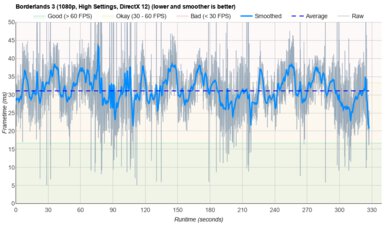
    The Framework Laptop 13 2021 performs badly in Borderlands 3. It can barely reach playable frame rates at the lowest graphical settings, and even then, it's still very choppy due to frame drops. Neither the Intel Core i5-1135G7 nor the Core i7-1185G7 will provide a satisfactory gaming experience.

    4.8
    Civilization VI
    See details on graph tool
    Avg. FPS
    23 fps
    1% Low
    16 fps
    0.1% Low
    16 fps
    1% Low Delta
    19 ms
    0.1% Low Delta
    21 ms
    Avg. FPS On Minimum
    91 fps
    Avg. Turn Time
    7.71 s

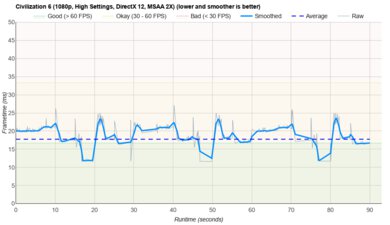
    Civilization VI runs poorly on the Framework Laptop 2021 with an Intel Core i7-1165G7. The average frame rate at high settings is low; however, the frame times are very consistent, so gameplay feels relatively smooth. It isn't the smoothest experience, but it's somewhat playable because Civilization VI is a turn-based game that doesn't require fast reaction times. The turn time is reasonably fast, and it'll be slightly shorter on the i7-1185G7 but longer on the i5-1135G7.

    6.1
    Counter-Strike: Global Offensive
    See details on graph tool
    Avg. FPS
    78 fps
    1% Low
    31 fps
    0.1% Low
    25 fps
    1% Low Delta
    20 ms
    0.1% Low Delta
    27 ms
    Avg. FPS On Low
    109 fps

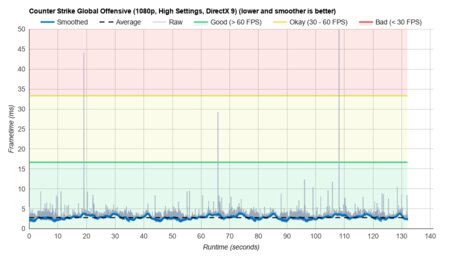
    The Framework Laptop 2021 with an Intel Core i7-1165G7 has mediocre performance in CS:GO. Its average frame rate at high settings is over 60fps, but there are lots of stutters as the frame rate drops into the 20s regularly. It'll be much smoother if you turn the graphical settings down to minimum. The i7-1185G7 will perform similarly, while the i5-1135G7 will be slightly worse.

    3.5
    Shadow Of The Tomb Raider
    See details on graph tool
    Avg. FPS
    18 fps
    1% Low
    14 fps
    0.1% Low
    9 fps
    1% Low Delta
    18 ms
    0.1% Low Delta
    58 ms
    Avg. FPS On Lowest
    30 fps

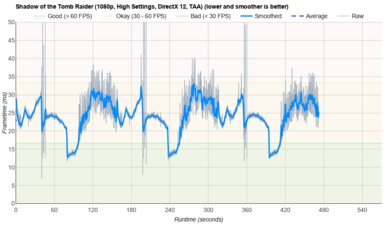
    The Framework Laptop 2021 performs poorly in Shadow of the Tomb Raider at 1080p with high settings. It can reach playable frame rates at the lowest graphical settings, but there are still some stutters here and there. None of the CPU options can provide a smooth gaming experience.

    7.2
    Thermals And Noise
    Keyboard Temp While Idle
    28 °C (83 °F)
    Keyboard Temp Under Load
    42 °C (108 °F)
    Fan Noise While Idle
    25.0 dBA
    Fan Noise Under Load
    51.5 dBA
    Power & Fan Control App
    No

    The Framework Laptop 2021 has decent thermal and noise performance. The keyboard deck is cool when idle, and although it gets slightly toasty under load, it doesn't cause discomfort. Unfortunately, the fans are loud under load. It isn't as bad as powerful gaming laptops with lots of fans, but it can be annoying if you're in a quiet room.

    9.9
    Performance Over Time
    CPU Temp (Cinebench)
    81 °C
    CPU Perf. Loss (Cinebench)
    0% loss
    GPU Temp (Heaven)
    66 °C
    GPU Perf. Loss (Heaven)
    0% loss

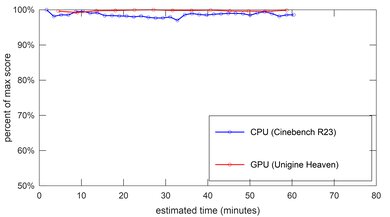
    The Framework Laptop 2021's performance over time is superb as there isn't any thermal throttling on the CPU or GPU. The CPU gets hot under load, but there's still plenty of thermal headroom, so it's unlikely that the higher-clocked Core i7-1185G7 will throttle.

    Additional Features And Software
    Software
    Operating System
    Windows 10
    Additional Software
    None

    The Base and Performance pre-configured models come with Windows 10 Home, while the Professional model comes with Windows 10 Pro. If you get a DIY Edition, you can choose between Home and Pro, or skip the operating system altogether. There aren't any pre-installed applications aside from those that typically come with Windows 10.

    Extra Features
    RGB Illumination
    No
    Touch Pen
    No
    Secondary Display
    No
    Biometrics
    Fingerprint Sensor

    The Framework Laptop 13 2021 has a fingerprint sensor at the top right corner of the keyboard deck, above the Delete key. It lets you log into Windows quickly and make purchases on the Windows Store.