Lenovo Yoga 6 13 (2023)  Laptop Review

Reviewed Jul 23, 2024 at 08:34am
Writing modified Sep 27, 2024 at 01:41pm
Tested using Methodology v0.8.2 
Lenovo Yoga 6 13 (2023)
7.9
School 
5.8
Gaming 
7.7
Multimedia 
7.3
Workstation 
7.7
Business 
 0

The Lenovo Yoga 6 13 (2023) is a budget Windows 2-in-1 convertible laptop. It replaces the Yoga 6 (model 13ALC7) from 2022. This 2023 version is available with an AMD Ryzen 5 7530U or Ryzen 7 7730U CPU, up to 16GB of RAM, and up to 1TB of storage. It has a 60Hz FHD+ IPS display, a 1080p webcam, Wi-Fi 6E wireless connectivity, a fingerprint sensor, and a facial recognition IR camera. Ports include two USB-As, two USB-Cs, an HDMI 2.0, a MicroSD card reader, and a 3.5mm headphone jack. It's only available in the Dark Teal colorway, though you can choose between a model with an aluminum lid or one covered with a textured fabric.

See our unit's specifications and the available configuration options in the Differences Between Variants section.

Our Verdict

7.9
School 

The Lenovo Yoga 6 is good for school use. It's easy to carry around, thanks to its thin and light design, and its battery lasts easily through a typical school day. It also provides a great user experience with its sharp display, comfortable keyboard, and responsive touchpad. You get a wide port selection for peripherals and external displays, as well as a fingerprint sensor for quick logins. Performance-wise, its AMD CPU and integrated graphics can handle light workloads like text processing and web browsing; however, they aren't powerful enough to handle demanding tasks, so it isn't ideal for students in more technical fields requiring lots of processing power, like 3D graphics or animation.

Pros
  • Easy to carry around.
  • Battery lasts around ten hours of light use.
  • Sharp, colorful display.
  • Comfortable keyboard, responsive touchpad.
  • Wide port selection.
Cons
  • CPU and integrated GPU can't handle demanding workloads.
  • Webcam image looks soft, underexposed, with an unnatural tint.
  • Display visibility may be an issue in well-lit rooms.
5.8
Gaming 

The Lenovo Yoga 6 is inadequate for gaming. Its low-power CPU and integrated graphics aren't powerful enough to handle demanding AAA titles. You can play some lighter, older games, but you'll have to play at a lower resolution and with low graphical settings to get smooth gameplay. Also, it has a 60Hz display with a slow response time, resulting in a blurry image with visible ghosting in fast-moving scenes.

Pros
  • Doesn't get hot or loud under load.
Cons
  • CPU and integrated GPU can't handle demanding workloads.
  • 60Hz display with slow response time.
  • No VRR support to reduce screen tearing.
7.7
Multimedia 

The Lenovo Yoga 6 is good for media consumption. It's very portable, and since it's a 2-in-1 convertible, you can set up the laptop in tent mode to view content and navigate using touch input. The battery lasts around nine hours of video playback, giving you plenty of time to get through a couple of movies and TV shows. Its 1080p display looks sharp and colorful, though it's on the dimmer side, so visibility can be an issue in well-lit environments. Unfortunately, while the speakers get very loud with minimal compression at higher volume levels, they sound boxy, with almost no bass.

Pros
  • Easy to carry around.
  • Sharp, colorful display.
  • Loud speakers.
  • Touch input.
  • Battery lasts around nine hours of video playback.
Cons
  • Speakers sound boxy, with very little bass.
  • Display visibility may be an issue in well-lit rooms.
  • Blacks look gray in dim settings.
7.3
Workstation 

The Lenovo Yoga 6 13ABR8 isn't designed for use as a workstation, as it doesn't have the CPU or GPU processing power to handle highly demanding tasks. Also, you can only get up to 16GB of soldered RAM. It's possible to do some light color correction work like photo editing, but only if the content is in sRGB, and you'll have to calibrate the display first, as the factory calibration is bad.

Pros
  • Doesn't get hot or loud under load.
  • Wide port selection.
Cons
  • CPU and integrated GPU can't handle demanding workloads.
  • Only available with up to 16GB of soldered RAM.
  • No Thunderbolt 4 or USB4 ports.
  • Can only get up to 16GB of soldered RAM.
7.7
Business 

The Lenovo Yoga 6 is good for business use. It's a well-built and portable laptop with a battery that lasts easily through a typical 8-hour workday. Overall, it provides a great user experience, sporting a sharp display, a comfortable keyboard, and a responsive touchpad. Performance-wise, although its AMD Ryzen CPU isn't exactly top of the line, it's fast enough to handle light productivity tasks like text processing, spreadsheets, presentations, and web browsing. You get a wide port selection for peripherals and external displays, as well as a fingerprint sensor for quick logins. Unfortunately, the webcam's video quality is sub-par, as the image looks soft and underexposed, with an unnatural tint.

Pros
  • Easy to carry around.
  • Battery lasts around ten hours of light use.
  • Sharp, colorful display.
  • Comfortable keyboard, responsive touchpad.
  • Wide port selection.
Cons
  • Webcam image looks soft, underexposed, with an unnatural tint.
  • Display visibility may be an issue in well-lit rooms.
  • 7.9
    School
  • 5.8
    Gaming
  • 7.7
    Multimedia
  • 7.3
    Workstation
  • 7.7
    Business
  • Changelog

    1.  Updated Sep 27, 2024: Added link to the 'Best Budget And Cheap Laptops For Students' article in the Compared to Other Laptops section.
    2.  Updated Jul 23, 2024: Review published.
    3.  Updated Jul 17, 2024: Early access published.
    4.  Updated Jul 09, 2024: Our testers have started testing this product.

    Differences Between Sizes And Variants

    We tested the Lenovo Yoga 6 (model 83B2001UUS) with an AMD Ryzen 5 7530U CPU, 8GB of RAM, and 256GB of storage. The CPU, memory, and storage are configurable; the available options are in the table below. Our review applies only to variants with a model number starting with '83B2'.

    Screen
    • 13.1" IPS 1920 x 1200 60Hz (touchscreen, glossy, 100% sRGB)

    CPU

    • AMD Ryzen 5 7530U (6 cores/12 threads, up to 4.5GHz, 16MB L3 cache)
    • AMD Ryzen 7 7730U (8 cores/16 threads, up to 4.5GHz, 16MB L3 cache)
    GPU
    • AMD Radeon Graphics (integrated)
    Memory
    • 8GB LP-DDR4X 4266MHz
    • 16GB LP-DDR4X 4266MHz
    Storage
    • 256GB M.2 2242 PCIe Gen 4 NVMe SSD
    • 512GB M.2 2242 PCIe Gen 4 NVMe SSD
    • 1TB M.2 2242 PCIe Gen 4 NVMe SSD
    Color
    • Dark Teal

    See our unit's label here.

    Popular Laptop Comparisons

    The Lenovo Yoga 6 13ABR8 is one of the best budget Windows laptops we've tested. It feels very well-built compared to other models in its class, and it provides a good user experience overall. While there isn't anything special about the display, it's still a step above most budget laptops, sporting full sRGB coverage.

    For more options, check out our recommendations for the best business laptops, the best laptops for college, and the best budget and cheap laptops for students.

    ASUS Zenbook 14 Flip OLED (2023)

    The Lenovo Yoga 6 13 (2023) and the ASUS Zenbook 14 Flip OLED (2023) are both 2-in-1 convertible Windows laptops. The ASUS is a more premium model and provides a better user experience overall. It has a sturdier all-aluminum build, a sharper, brighter 90Hz OLED display, a larger and more responsive touchpad, a better webcam, and Thunderbolt 4 support. You can get more performance out of the ASUS, though the difference isn't immediately noticeable if you only perform light productivity tasks.

    Lenovo IdeaPad Flex 5i 14 (2022)

    The Lenovo Yoga 6 13 (2023) and the Lenovo IdeaPad Flex 5i 14 (2022) are both budget 2-in-1 convertible laptops. Each has its pros and cons. The Yoga 6's build feels slightly sturdier, and its battery lasts almost two hours longer in light uses. However, the IdeaPad Flex 5i has a better webcam, Thunderbolt 4 support, and more processing power. Its FHD+ display isn't as good as the Yoga 6's, as it has a narrow color gamut that makes it look washed out, but unlike the Yoga 6, you can get the IdeaPad with a nicer 2.2k IPS or a 2.8k OLED panel.

    Lenovo Yoga 7i 16 (2023)

    The Lenovo Yoga 6 13 (2023) and the Lenovo Yoga 7i 16 (2023) are both 2-in-1 convertible laptops; however, the Yoga 7i 16 is a higher-end mid-range model, while the Yoga 6 is more of a budget-friendly option. The Yoga 7i 16 is better overall, sporting a larger and brighter display, a better webcam, Thunderbolt 4 support, and more processing power. That said, the Yoga 6 is a more compact device, making it a better option if you need to travel a lot.

    Acer Aspire 3 Spin 14 (2023)

    The Lenovo Yoga 6 13 (2023) and the Acer Aspire 3 Spin 14 (2023) are both budget 2-in-1 convertible laptops. The Yoga 6 feels more premium and provides a better user experience overall, sporting a sturdier build, a brighter and more colorful display, a more comfortable keyboard, and a larger, more responsive glass touchpad. It also has more processing power and longer battery life.

    Show more 

    Test Results

    perceptual testing image
    Sort:
    RATINGS
    Category:
    All
    Design
    Style
    Form Factor
    2 in 1

    The Lenovo Yoga 6 2-in-1 is only available in the Dark Teal color. Some models have a textured fabric covering the lid. See the bottom of the laptop here.

    8.0
    Build Quality

    The Lenovo Yoga 6 feels well-built. The lid and keyboard deck are aluminum, while the bottom is plastic. There's some flex on the lid and keyboard deck, and the touchpad feels a little loose; however, these issues aren't severe enough to be of concern. As for the finish, although it doesn't scratch easily, it picks up a fair amount of fingerprints and smudges, which is typical for a dark color finish. Some models have a textured fabric covering the lid. Unfortunately, we don't have that model, so it's hard to say how durable it feels and whether it'll fray or stain over time. There are no complaints with the feet; they feel solid and stick firmly to the bottom.

    7.5
    Hinge
    Range
    360°
    Stability
    Good
    One Finger Lift
    No

    The Lenovo Yoga 6 2-in-1 has good hinges. It feels smooth when opening and closing the lid, and it's very stable, exhibiting only a small amount of wobble when moving the laptop or typing heavily. Unfortunately, there's too much resistance for a one-handed lift.

    8.7
    Portability
    Size
    13"
    Thickness
    0.7" (1.8 cm)
    Width
    12.0" (30.4 cm)
    Depth
    8.6" (21.8 cm)
    Volume
    72.8 in³ (1,192.8 cm³)
    Weight
    3.1 lbs (1.4 kg)
    Charger Size
    7.4 in³ (122.0 cm³)
    Charger Weight
    0.5 lbs (0.2 kg)
    6.3
    Serviceability
    Ease Of Access
    7.5
    RAM Slots
    0
    Storage Slots
    1
    Replaceable Battery
    Yes
    Replaceable Wireless Adapter
    Yes

    Accessing the internals is straightforward; you only need to remove six T5 screws and undo the clips holding the bottom panel with a prying tool. The included drive is an M.2 2242 PCIe Gen 4 NVMe SSD, though the slot also supports the larger M.2 2280 format.

    Get the hardware maintenance manual here.

    In The Box

    • 45W USB-C power adapter and cord
    • Documentation
    Display
    Screen Specs
    Resolution
    1920 x 1200
    Aspect Ratio
    16:10
    Pixel Density
    173 PPI
    Panel Type
    IPS
    Touch Screen
    Yes
    Screen-To-Body Ratio
    85%

    The Lenovo Yoga 6 is only available with an FHD+ display. While this resolution may seem low, it isn't really an issue on a 13-inch screen. The display looks sharp and provides just enough real estate for split-screen multitasking. Its 16:10 aspect ratio is great for productivity, as it gives you slightly more vertical space than a standard 16:9 display, allowing you to see more information at once when reading a document or website.

    5.9
    Refresh Rate
    Refresh Rate
    60 Hz
    Variable Refresh Rate
    No

    You can only get this laptop with a 60Hz display. This panel has a slow response time, resulting in visible ghosting in fast-moving scenes.

    6.9
    Contrast
    Native Contrast
    1,059 : 1

    The display's contrast ratio is okay and within the typical range for most IPS panels; however, it's still relatively low compared to other display technologies like VA and OLED. This contrast level makes blacks look gray in dim settings.

    6.8
    Brightness
    Maximum Brightness
    280 cd/m²
    Minimum Brightness
    3 cd/m²

    The display's maximum brightness is acceptable. It's fine for most indoor settings but isn't ideal for sunny rooms or outdoors in broad daylight. It gets very dim at the lowest brightness setting, which is great for dark room viewing as it causes less eye strain.

    7.6
    Reflections
    Screen Finish
    Glossy
    Total Reflections
    4.14%
    Indirect Reflections
    1.73%
    Calculated Direct Reflections
    2.41%

    The display handles reflections relatively well. Its glossy coating mainly struggles with bright light sources, like a lamp or open window during the day. These reflections are visible, even with the screen at maximum brightness.

    7.4
    Black Uniformity
    Uniformity (Std. Dev.)
    1.053%
    6.4
    Horizontal Viewing Angle
    Color Washout From Left
    21°
    Color Washout From Right
    23°
    Color Shift From Left
    47°
    Color Shift From Right
    45°
    Brightness Loss From Left
    22°
    Brightness Loss From Right
    25°
    Black Level Raise From Left
    60°
    Black Level Raise From Right
    60°
    Gamma Shift From Left
    22°
    Gamma Shift From Right
    24°

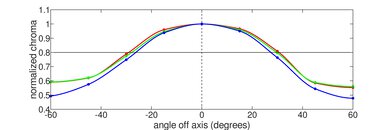
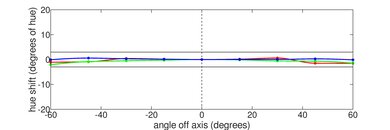
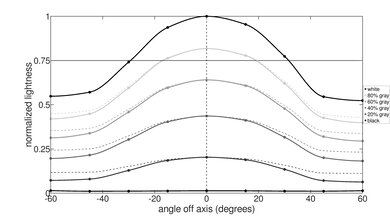
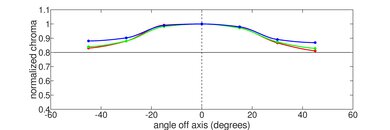
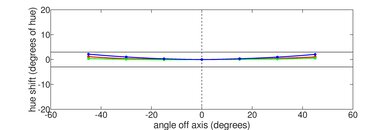
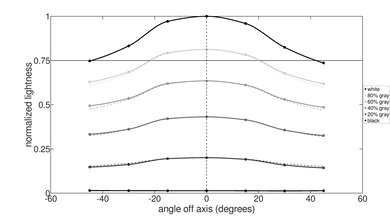
    The display's horizontal viewing angle is passable. The image dims and washes out quickly as you move to the side. It's best to be directly in front of the screen if you need perfect accuracy for color-critical work.

    6.4
    Vertical Viewing Angle
    Color Washout From Below
    25°
    Color Washout From Above
    24°
    Color Shift From Below
    31°
    Color Shift From Above
    40°
    Brightness Loss From Below
    25°
    Brightness Loss From Above
    26°
    Black Level Raise From Below
    45°
    Black Level Raise From Above
    45°
    Gamma Shift From Below
    23°
    Gamma Shift From Above
    24°

    The display's vertical viewing angle is passable. Like the horizontal viewing angle, the image dims and washes when viewing from above and below, so you need to look at the screen more or less straight on to see an accurate image, which can be challenging in tight places where you have little room to tilt the screen, like on a bus or airplane.

    3.9
    Out-Of-The-Box Color Accuracy
    Avg. White Balance dE
    6.74
    Avg. Gamma
    2.37
    Avg. Color dE
    4.73
    Avg. Color Temperature
    5,743.8 K

    The display's accuracy is bad out of the box. The white balance is visibly inaccurate, especially at higher brightness levels where it's overly warm, and the gamma is too high throughout, over-darkening everything. As for color accuracy, the greens and blues are fine; it's mainly the reds and purples that are off. The color temperature is quite warm, giving the image a noticeable reddish tint.

    8.6
    Color Gamut
    sRGB xy
    99.81%
    sRGB uv
    99.48%
    Adobe RGB xy
    75.38%
    Adobe RGB uv
    85.84%
    DCI P3 xy
    79.95%
    DCI P3 uv
    89.32%
    Rec. 2020 xy
    57.94%
    Rec. 2020 uv
    67.05%

    The Lenovo Yoga 6 has an sRGB display, meaning it only has full coverage of the commonly used sRGB color space. It doesn't have enough coverage of the wider Adobe RGB or DCI P3 color spaces for professional photo editing and HDR video production.

    10
    Flicker
    Flicker-Free
    Yes
    Flicker Frequency
    No Flicker
    Flicker Active Below
    0%
    Interface
    8.1
    Keyboard
    Typing Quality
    8.0
    Numpad
    No
    Backlighting
    Adjustable
    See details on graph tool
    Operating Force
    64 gf
    Actuation Force
    31 gf
    Pre-Travel
    0.96 mm
    Total Travel
    1.37 mm

    The Lenovo Yoga 6 has a great keyboard. Its layout feels spacious and is easy to get used to. The keys are mostly stable and require little force to actuate; however, they could use a bit more travel and tactility. You can adjust between two backlight brightness levels or turn it off completely.

    7.7
    Touchpad
    Tracking Quality
    7.5
    Size
    14.0 in² (90.0 cm²)
    Material
    Glass
    Dedicated Buttons
    No

    The touchpad is good. It tracks all movements and gestures well, and palm rejection works as intended. It's relatively large for a 13-inch laptop, though it could be a tad wider, as it would make some actions easier, like dragging and dropping over a long distance and manipulating maps. This is a diving board touchpad, so you can only click in the bottom half. Unfortunately, the buttons feel cheap, and they push deeply into the chassis, which might be an issue later, as debris can fall into the crack.

    8.6
    Speakers
    See details on graph tool
    Max Volume
    80 dB SPL
    Standard Error @ Normal Vol. (65 dB)
    5.3 dB
    Slope @ Normal Vol. (65 dB)
    -0.1
    Bass Extension (Low-Frequency Ext.)
    354 Hz
    Treble Extension (High-Frequency Ext.)
    19 kHz
    Dynamic Range Compression @ Max Vol.
    0.7 dB

    The speakers get very loud with minimal compression at higher volume levels; however, they sound muffled and slightly unnatural, with almost no bass.

    6.2
    Webcam & Microphone
    Video Quality
    5.5
    Resolution
    1080p
    Position
    Top Center
    Privacy Cover
    Yes
    Face Unlock
    Yes

    The webcam's video quality is sub-par. The image looks soft and underexposed, with an unnatural tint and colors. Thankfully, the audio is much better—voices sound loud and clear, with no static background noise. The privacy cover is only a physical barrier, so it doesn't disable the camera or the microphone at the software level. You can manually turn off the microphone via the F4 shortcut.

    Connectivity
    8.0
    Ports
    USB-A Ports
    2
    USB-C Ports
    2
    Thunderbolt
    No
    USB-C Charging
    Yes
    USB-C Display Out
    Yes
    HDMI
    2.0
    DisplayPort
    No
    3.5mm Jack
    Combo mic/headphone
    Card Reader
    MicroSD UHS 2
    Ethernet
    No
    Proprietary Port
    No
    Security Lock
    No

    The Lenovo Yoga 6 has a great port selection. All USB ports (type A and C) support USB 3.2 Gen 1 data transfer speed of up to 5Gbps. The USB-A next to the MicroSD card slot is always on, meaning you can use it to charge an external device even when the computer is off. The HDMI's maximum output resolution is 4k @ 60Hz.

    Wireless Communication
    Wi-Fi
    Wi-Fi 6E (802.11ax)
    Bluetooth
    5.1

    The wireless adapter is a MediaTek MT7921. Wi-Fi 6E gives access to the 6GHz band, providing faster speeds, lower latency, and less signal interference than previous Wi-Fi standards. However, you need a router that supports Wi-Fi 6E to benefit from these features.

    Configuration
    CPU
    Brand
    AMD
    Model
    Ryzen 5 7530U
    Core Count
    6
    Thread Count
    12

    The Lenovo Yoga 6 is available with the following CPUs:

    • AMD Ryzen 5 7530U (6 cores/12 threads, up to 4.5GHz, 16MB L3 cache)
    • AMD Ryzen 7 7730U (8 cores/16 threads, up to 4.5GHz, 16MB L3 cache)

    Based on AMD's older Zen 3 architecture, the Ryzen 5 7530U and Ryzen 7 7730U are low-power processors typically found in ultraportable laptops. They can only handle light to moderately intensive productivity tasks like text processing, web browsing, spreadsheets, and video playback. Most people with such a workload can likely get by with the 6-core Ryzen 5. The Ryzen 7 7730U has more cores and threads, making it a better option for heavy multitaskers or more intensive applications.

    GPU
    Brand
    AMD
    Model
    Radeon Graphics
    Dedicated/Integrated
    Integrated
    VRAM Size
    N/A

    The Lenovo Yoga 6 is only available with integrated Radeon graphics. This GPU can only handle light tasks like text processing, web browsing, and video playback. It isn't powerful enough to run graphically intensive games; some older or lighter titles will run, but you'll have to play with the lowest graphical settings to get playable frame rates.

    RAM
    Capacity
    8 GB
    Modules
    2 (Soldered)
    Type
    LP-DDR4X
    Speed
    4,266 MHz

    You can configure this laptop with 8GB or 16GB of RAM. The memory isn't user-replaceable.

    Storage
    Advertised Capacity
    256 GB
    Usable Capacity
    189 GB
    Drive 1
    WD PC SN740 SDDPNQD
    Drive 1 TypeSSD
    Drive 2
    No 2nd Drive
    Drive 2 TypeNo 2nd Drive

    You can get this laptop with 256GB, 512GB, or 1TB of storage. The SSD is user-replaceable; the slot supports M.2 2242 and 2280 PCIe Gen 4 NVMe SSDs.

    Performance
    8.2
    Geekbench 5 (Synthetics)
    CPU Single-Thread
    1,408 points
    CPU Multi-Thread
    5,920 points
    GPU Compute
    14,576 points

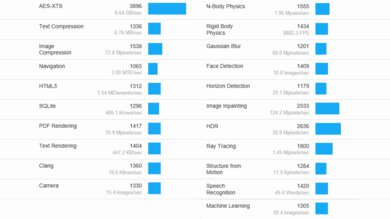
    The Lenovo Yoga 6's AMD Ryzen 5 7530U is fast enough to provide a relatively smooth desktop experience in light, general productivity workloads like text processing and web browsing; however, don't expect to do anything remotely intensive, as its multi-thread performance is lacking. If you're a heavy multitasker, it's best to get a model with a Ryzen 7 7730U, as its two additional cores will give you more headroom. Like most integrated GPUs, the Radeon Graphics processor performs poorly and isn't suitable for demanding workloads.

    9.0
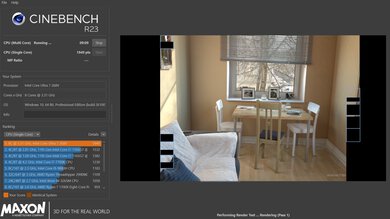
    Cinebench R23 (CPU Rendering)
    Single-Thread
    1,433 points
    Multi-Thread
    6,824 points

    The AMD Ryzen 5 7530U's single-thread performance is pretty good for a low-power CPU based on AMD's older Zen 3 architecture; however, its multi-thread performance is lacking. As for the Ryzen 7 7730U, it has better multi-thread performance because it has two additional cores, but bear in mind that there'll be some thermal throttling, as this is a thin and light, general productivity laptop with limited cooling.

    5.4
    Blender (3D Rendering)
    CPU Render Time
    8.6 min
    GPU Render Time
    N/A
    GPU Render Time (Optix)
    N/A

    While you can render 3D images in Blender using the CPU, getting a laptop with a discrete GPU is best, as even an entry-level GPU, like the NVIDIA GeForce GTX 1650, can render images much faster.

    4.6
    Basemark GPU (Game Scene)
    Overall Score
    12,992

    The AMD Radeon Graphics perform poorly in the Basemark GPU benchmark. This integrated GPU is far too slow for graphically intensive games. You can play some simple, puzzle-like games or older titles at 1080p, but you'll have to play at a lower resolution or with low graphics settings to get playable frame rates.

    9.1
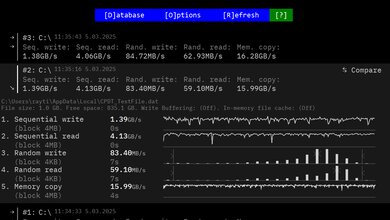
    Storage Drive Performance
    Sequential Write Speed
    1,174.0 MB/s
    Sequential Read Speed
    2,906.2 MB/s
    Random Write Speed
    71.8 MB/s
    Random Read Speed
    44.4 MB/s
    8.3
    Battery
    Capacity
    59 Wh
    Battery Life (Web Browsing)
    10.1 hrs
    Battery Life (Video Playback)
    9.1 hrs
    Battery Life (Gaming)
    3.0 hrs
    Charge Time
    2.1 hrs
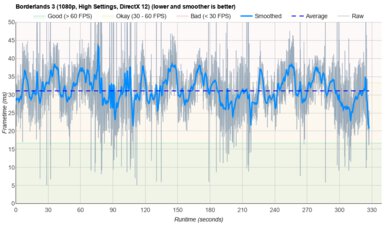
    1.7
    Borderlands 3
    See details on graph tool
    Avg. FPS
    10 fps
    1% Low
    4 fps
    0.1% Low
    2 fps
    1% Low Delta
    157 ms
    0.1% Low Delta
    463 ms
    Avg. FPS On Very Low
    35 fps

    Borderlands 3 isn't playable on the Lenovo Yoga 6. The CPU and integrated GPU can't handle such demanding titles. You can get over 30 fps with the lowest graphical settings, but the gameplay is still very choppy due to frame drops.

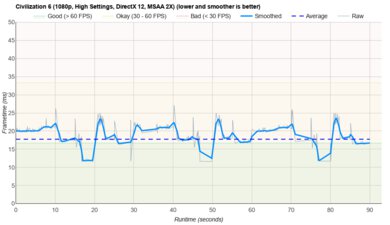
    4.5
    Civilization VI
    See details on graph tool
    Avg. FPS
    21 fps
    1% Low
    15 fps
    0.1% Low
    15 fps
    1% Low Delta
    21 ms
    0.1% Low Delta
    22 ms
    Avg. FPS On Minimum
    79 fps
    Avg. Turn Time
    8.42 s

    Civilization VI is playable at 1080p if you turn down the graphical settings a bit; however, the average turn time is pretty long.

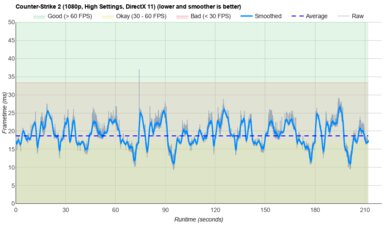
    4.0
    Counter-Strike 2
    See details on graph tool
    Avg. FPS
    27fps
    1% Low
    10fps
    0.1% Low
    5fps
    1% Low Delta
    58 ms
    0.1% Low Delta
    161 ms
    Avg. FPS On Low
    73fps

    Counter-Strike 2 isn't playable. Although you can get over 60 fps at 1080p with low graphical settings, the gameplay is very choppy due to frequent frame drops.

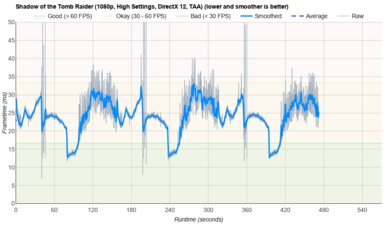
    2.2
    Shadow Of The Tomb Raider
    See details on graph tool
    Avg. FPS
    14 fps
    1% Low
    1 fps
    0.1% Low
    1 fps
    1% Low Delta
    625 ms
    0.1% Low Delta
    1,503 ms
    Avg. FPS On Lowest
    27 fps

    Shadow of the Tomb Raider isn't playable on the Lenovo Yoga 6 at 1080p. Even with low graphical settings, the gameplay is extremely choppy, sometimes freezing completely. The CPU and integrated GPU aren't powerful enough to handle this and other similarly demanding games.

    8.2
    Thermals And Noise
    Keyboard Temp While Idle
    29 °C (85 °F)
    Keyboard Temp Under Load
    42 °C (108 °F)
    Fan Noise While Idle
    25.0 dBA
    Fan Noise Under Load
    39.5 dBA
    Power & Fan Control App
    No

    The keyboard only gets mildly warm under load, and the hot spot is at the top of the keyboard deck, away from where most people rest their hands. The fan is very quiet and isn't bothersome at all. Unlike higher-end Lenovo devices, the Lenovo Vantage app on this machine is more barebones and doesn't include fan control settings.

    7.8
    Performance Over Time
    See details on graph tool
    CPU Temp (Cinebench)
    65 °C
    CPU Perf. Loss (Cinebench)
    0% loss
    GPU Temp (Heaven)
    57 °C
    GPU Perf. Loss (Heaven)
    14% loss

    Although we report the CPU performance loss as 0%, there's clearly some throttling when looking at the graph. This is because we calculate the performance loss based on the initial runs, which score lower than the subsequent runs, resulting in a performance increase. The throttling is fairly minimal and isn't noticeable if you only perform light productivity tasks.

    Additional Features And Software
    Software
    Operating System
    Windows 11
    Additional Software
    Yes

    The Lenovo Yoga 6 has a few pre-installed apps, including:

    • Lenovo Pen Settings: This lets you change the pen's settings.
    • Lenovo Smart Appearance: Improves your appearance and applies a background on video calls.
    • Lenovo Vantage: Contains warranty information and ads for Lenovo products.
    • McAfee: Antivirus software. Requires subscription.
    Extra Features
    RGB Illumination
    No
    Touch Pen
    No
    Secondary Display
    No
    Biometrics
    Face Recognition and Fingerprint Sensor

    There's a fingerprint sensor and a facial recognition IR camera. You can use either one to log in quickly, authorize purchases in the Windows Store, and auto-fill saved passwords on supported websites.

    The display supports pen input, but not all models include a pen in the box, as it depends on the region and retailer. The included stylus is a Lenovo Digital Pen; you can buy it separately if there isn't one included in the box. This stylus uses Wacom AES technology, so any Wacom AES stylus will work.