Samsung Galaxy Book4 (2024)  Laptop Review

Reviewed Nov 28, 2024 at 03:04pm
Test bench update May 02, 2025 at 01:25pm
Tested using Methodology v0.8.3 
Samsung Galaxy Book4 (2024)
8.0
School 
6.2
Gaming 
6.7
Multimedia 
7.9
Workstation 
7.8
Business 
 0

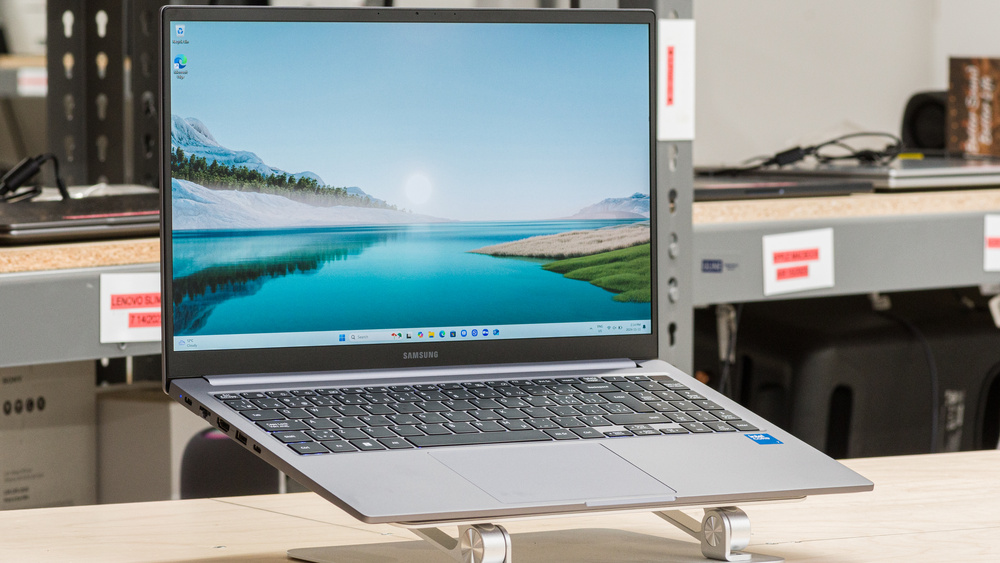
The Samsung Galaxy Book4 (2024) is a 15.6-inch Windows ultraportable laptop. It's configurable with an Intel Core 5 120U or Core 7 150U CPU, paired with integrated graphics only or an NVIDIA GeForce MX570 Laptop GPU, up to 16GB of memory, and up to 1TB of storage. It has an FHD (1920 x 1080) IPS display, a full-size keyboard with a numpad, Wi-Fi 6 wireless connectivity, a 720p webcam, and a fingerprint sensor built into the power button. Ports comprise two USB-As, two USB-Cs, an HDMI 1.4, an Ethernet, a MicroSD card reader, and a headphone jack.

See our unit's specifications and the available configuration options in the Differences Between Variants section.

Note: We've performed the productivity benchmarks, gaming benchmarks, thermals and noise, and performance over time tests using the High Performance mode instead of the default Balanced mode. This change makes the results more representative of the laptop's maximum potential and brings them closer to user expectations. However, this also means that the results are only comparable with reviews containing this disclaimer, as we previously tested laptops in their default mode, which usually throttles performance to prolong battery life.

Our Verdict

8.0
School 

The Samsung Galaxy Book4 is good for school use. It's quite portable, thanks to its thin and lightweight design, and its battery lasts easily through a full school day. Its 15.6-inch display looks reasonably sharp, provides enough room for split-screen multitasking, and gets bright enough to combat glare in most indoor settings. The touchpad tracks well, but the keyboard feels mushy and might cause fatigue when typing for an extended period. Performance-wise, its Intel CPU can handle general productivity tasks like text processing, web browsing, and video playback. Students in more technical programs, like 3D graphics or engineering, will want to look elsewhere, though, as the CPU, integrated graphics, and the optional NVIDIA discrete GPU aren't powerful enough for such workloads.

Pros
  • Easy to carry around.

  • Battery lasts around 10 hours of light use.

  • Large screen for multitasking.

  • Responsive touchpad.

  • Wide port selection.

Cons
  • CPU and GPU can't handle demanding workloads.

  • Sub-par webcam.

  • Keyboard feels slightly tiring to type on for extended periods.

6.2
Gaming 

The Samsung Galaxy Book4 isn't designed for gaming. It's only available with power-efficient Intel U-series processors paired with integrated graphics or an entry-level discrete GPU, which aren't powerful enough to handle demanding AAA titles. You can play some older or well-optimized games on models with the NVIDIA GeForce MX570, but you'll still have to play with low graphical settings to get playable frame rates. There's only a 60Hz display option; its response time is decent, but there's no VRR support to reduce screen tearing.

Pros
  • Wide port selection.

  • Minimal throttling under load.

  • User-replaceable storage.

Cons
  • CPU and GPU can't handle demanding workloads.

  • 60Hz display with no VRR support.

  • Can only get up to 16GB of soldered RAM.

6.7
Multimedia 

The Samsung Galaxy Book4 is okay for media consumption. Its FHD display looks reasonably sharp and gets bright enough to combat glare in most indoor environments; however, its narrow color gamut makes most content look washed out, and its low contrast makes blacks look gray in dim settings. As for the speakers, they sound clear and airy but very quiet with almost no bass whatsoever, so they're best suited for speech-heavy content. On the upside, the laptop is easy to carry around, thanks to its thin and lightweight design, and its battery lasts over seven hours of video playback, which is plenty of time to get through a couple of movies and TV show episodes.

Pros
  • Easy to carry around.

  • Battery lasts over seven hours of video playback.

  • Speakers sound clear and airy.

Cons
  • Display looks washed out.

  • Display's low contrast makes blacks look gray in dim settings.

  • Quiet speakers with almost no bass.

7.9
Workstation 

The Samsung Galaxy Book4 isn't designed for use as a workstation laptop. It isn't powerful enough to handle demanding tasks like 3D rendering or physics simulations, as it's only available with low-power Intel CPUs, an integrated or entry-level discrete GPU, and up to 16GB of soldered memory. Work involving color correction, like photo and video editing, is also a no-go because its FHD display doesn't even have full sRGB coverage. Its port selection is great, though there's no Thunderbolt 4 or USB4 support for fast file transfer.

Pros
  • Wide port selection.

  • Minimal throttling under load.

  • User-replaceable storage.

Cons
  • CPU and GPU can't handle demanding workloads.

  • No Thunderbolt 4 or USB4 support.

  • Can only get up to 16GB of soldered RAM.

  • Display isn't suitable for color-critical work.

7.8
Business 

The Samsung Galaxy Book4 is good for business use. It feels well-built, and its thin and lightweight design makes it easy to carry around for business trips. You likely won't need to bring a charger, as the battery lasts comfortably through a typical eight-hour workday. It has a 15.6-inch screen that gives you plenty of room for split-screen multitasking, a responsive touchpad, and a full-size keyboard with a numpad, which is great for those working with lots of numbers. The keyboard feels pretty mushy, though, so it might cause some fatigue when typing for an extended period. Performance isn't a problem; its Intel CPU can handle most productivity tasks like web browsing, text formatting, spreadsheets, and presentations. However, this laptop isn't suitable for photo or video editing, so small business owners needing to produce their own ads will have to look elsewhere. Unfortunately, the webcam is sub-par—the image looks soft, noisy, and underexposed.

Pros
  • Easy to carry around.

  • Battery lasts around 10 hours of light use.

  • Large screen for multitasking.

  • Responsive touchpad.

  • Wide port selection.

Cons
  • Sub-par webcam.

  • Keyboard feels slightly tiring to type on for extended periods.

  • 8.0
    School
  • 6.2
    Gaming
  • 6.7
    Multimedia
  • 7.9
    Workstation
  • 7.8
    Business
  • Changelog

    1.  Updated May 07, 2025: We've updated this review to Test Bench 0.8.3, which removes the viewing angle tests and adds a GPU Total Graphics Power comparison in the GPU section. The Pen Input test in the Extra Features section has also changed, as it now shows whether the laptop supports pen input rather than the inclusion of a stylus in the box. See the changelog for more details.
    2.  Updated Mar 07, 2025: 

      Added mention of the Acer Aspire 15 (2024) as an alternative available with a higher resolution QHD display in the Screen Specs section.

    3.  Updated Nov 28, 2024: Review published.
    4.  Updated Nov 26, 2024: Early access published.

    Differences Between Sizes And Variants

    We tested the Samsung Galaxy Book4 (model NP750XGK-KG1CA) with an Intel Core 7 Processor 150U CPU, 16GB of RAM, and 512GB of storage. The CPU, memory, and storage are configurable; see the table below for all available options.

    SCREEN

    • 15.6" IPS 1920 x 1080 60Hz (matte)

    CPU

    • Intel Core 5 Processor 120U (10 cores/12 threads, up to 5GHz, 12MB cache)
    • Intel Core 7 Processor 150U (10 cores/12 threads, up to 5.4GHz, 12MB cache)

    GPU

    • Intel Graphics (integrated)
    • NVIDIA GeForce MX570 Laptop GPU 2GB GDDR6 (discrete)

    RAM

    • 8GB LP-DDR4x 4267MHz
    • 16GB LP-DDR4x 4267MHz

    STORAGE

    • 256GB M.2 PCIe Gen 4 NVMe SSD
    • 512GB M.2 PCIe Gen 4 NVMe SSD
    • 1TB M.2 PCIe Gen 4 NVMe SSD

    COLOR

    • Silver
    • Gray

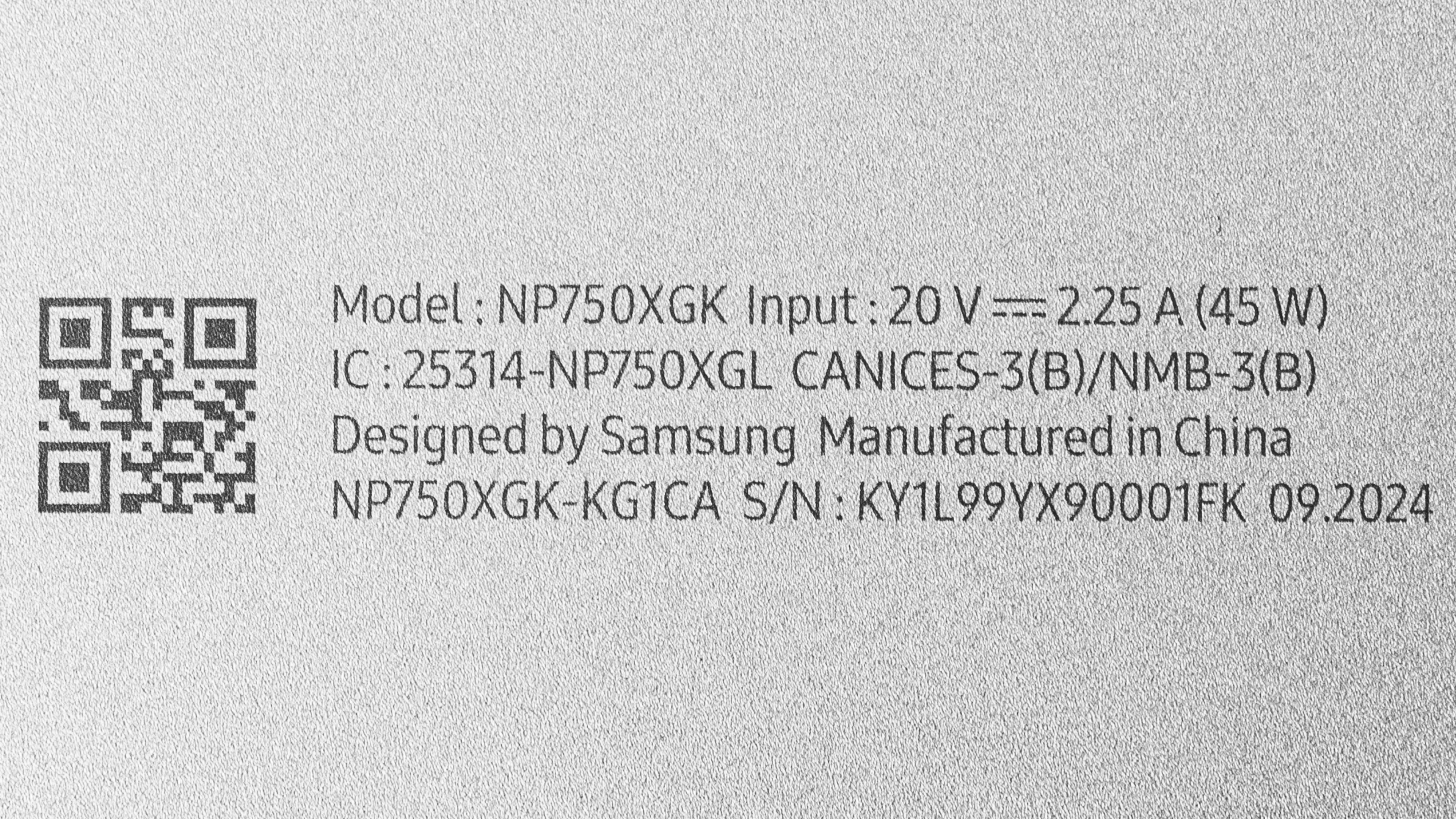
    See our unit's label.

    Popular Laptop Comparisons

    The Samsung Galaxy Book4 is a good budget laptop. It has enough processing power to handle most general productivity tasks, like web browsing, text processing, and media consumption. It also provides a decent user experience overall, sporting a sturdier build and brighter screen than most laptops in its class. Its keyboard and webcam are its main weaknesses; the former feels mushy and tiring to type on for extended periods, and the latter produces a soft, noisy, and underexposed image.

    For more options, check out our recommendations for the best budget and cheap laptops, the best budget and cheap laptops for students, and the best 15-16 inch laptops.

    Lenovo IdeaPad Slim 3i 15 (2023)

    The Samsung Galaxy Book4 (2024) is better than the Lenovo IdeaPad Slim 3i 15 (2023) mainly because it has better CPU performance and a longer battery life. In terms of the user experience, they trade blows, so choosing the right laptop will depend on what you care about most. The Samsung has brighter display, so it's a better choice if you regularly work in brightly lit environments. Also, its touchpad is larger and more responsive, making it easier to use. On the other hand, the Lenovo has a more tactile keyboard—the Samsung's keyboard feels mushy, so it's hard to know when you've actuated a key.

    ASUS Vivobook 16 M1605 (2023)

    The Samsung Galaxy Book4 (2024) is better than the ASUS Vivobook 16 M1605 (2023) for most uses. The Samsung provides a better user experience overall, as it has a sturdier build, a brighter display, a wider port selection, and a longer battery life. However, it isn't as good as the ASUS when it comes to the keyboard and webcam—the former feels mushy, and the latter produces a soft, noisy, and underexposed image. Performance-wise, the Samsung feels snappier in most general productivity tasks, though the ASUS will have a slight edge in multi-threaded workloads if you get a model with an AMD Ryzen 7 CPU.

    Acer Aspire 3 15 (2023)

    The Samsung Galaxy Book4 (2024) is much better than the Acer Aspire 3 15 (2023) for most uses. The Samsung provides a superior user experience overall, and its Intel CPU can handle much heavier workloads. Display quality and battery life are the two main issues with the Acer. Its TN panel has a low contrast ratio, bad viewing angles, and terrible color accuracy. It's also very dim, so it's only suitable for dark to moderately lit rooms. The battery lasts only six to seven hours of light use, so you'll have to plug it in to get through a typical school or workday.

    Acer Aspire 5 15 (2023)

    The Samsung Galaxy Book4 (2024) and the Acer Aspire 5 15 (2023) are both budget productivity laptops. The Samsung is better when it comes to the overall user experience; it has a brighter display with superior reflection handling, a larger and more responsive touchpad, a wider port selection, and a longer battery life. Performance will depend on the configuration—you can get more processing power out of the Acer if you go with one of the H-series CPUs, like the Core i7-13620H or the Core i9-13900H, which are high-performance CPUs typically found in gaming and workstation laptops. That said, you can only get the Acer with up to 16GB of soldered RAM, so if you have an extremely demanding workload, it's best to get a laptop with more memory configurations or one that has user-replaceable RAM.

    Test Results
    perceptual testing image
    Sort:
    RATINGS
    Category:
    All
    Design
    Style
    Form Factor
    Traditional (Clamshell)

    The Samsung Galaxy Book4 is available in a Silver or Gray colorway. See the bottom of the laptop.

    8.0
    Build Quality

    The Samsung Galaxy Book4's build quality is great. Its full-aluminum chassis feels pretty sturdy, with no obvious gaps in the construction. There's only a small amount of flex on the lid, and while there's more on the keyboard deck, it isn't severe enough to be of concern. The only thing that's somewhat of an annoyance is that the laptop wakes from sleep just from moving it. Though fairly scratch-resistant, the finish picks up a fair amount of fingerprints and smudges—the Silver model is likely better in this regard. There are no complaints about the feet; they feel solid and firmly wedged in their sockets.

    9.4
    Hinge
    Range
    180°
    Stability
    Good
    One Finger Lift
    Yes

    The hinge is excellent. It feels smooth when opening and closing the lid. It's also very stable, exhibiting almost no wobble when moving the laptop or typing heavily. You can open the laptop with one hand, but you need to go slowly; otherwise, the base will lift with the lid.

    8.4
    Portability
    Size
    15.6"
    Thickness
    0.8" (2.1 cm)
    Width
    14.1" (35.7 cm)
    Depth
    9.1" (23.0 cm)
    Volume
    104.2 in³ (1,707.9 cm³)
    Weight
    3.2 lbs (1.5 kg)
    Charger Size
    5.1 in³ (82.8 cm³)
    Charger Weight
    0.3 lbs (0.1 kg)
    6.8
    Serviceability
    Ease Of Access
    8.5
    RAM Slots
    0
    Storage Slots
    2
    Replaceable Battery
    Yes
    Replaceable Wireless Adapter
    No

    The Samsung Book4's serviceability is okay. Accessing the internals is straightforward; you only need to remove four Philips screws hidden beneath the feet and release the bottom panel's clips with a prying tool. The feet come off easily, as there's no use of adhesive. There are two storage slots; both support M.2 2280 PCIe Gen 4 NVMe SSDs.

    Download the user manual from Samsung's support page.

    In The Box

    • 45W USB-C power adapter and cord
    • Documentation

    Note: Models with an NVIDIA GeForce MX570 discrete GPU come with a 65W power adapter.

    Display
    Screen Specs
    Resolution
    1920 x 1080
    Aspect Ratio
    16:9
    Pixel Density
    141 PPI
    Panel Type
    IPS
    Touch Screen
    No
    Screen-To-Body Ratio
    82%

    The Samsung Galaxy Book4 is only available with a 1080p IPS display. An FHD resolution looks reasonably sharp on a 15.6-inch screen; you can see individual pixels up close, but this isn't an issue at typical viewing distances. The 16:9 aspect ratio is well suited for media consumption, as most videos are in that format; however, a taller 16:10 or even 3:2 aspect ratio would have been preferable for productivity, as the increased vertical space lets you see more information at once when reading a document. Check out the Acer Aspire 15 (2024) if you want a similar laptop available with a sharper QHD display.

    5.9
    Refresh Rate
    Refresh Rate
    60 Hz
    Variable Refresh Rate
    No

    You can only get the Samsung Galaxy Book4 with a 60Hz display. The response time is decent, resulting in only a small amount of ghosting behind fast-moving objects.

    7.9
    Contrast
    Native Contrast
    1,738 : 1

    The display has a pretty good contrast ratio for an IPS panel. That said, it's still relatively low compared to other display technologies like VA and OLED. This contrast level makes blacks look gray in dim settings.

    7.3
    Brightness
    Maximum Brightness
    323 cd/m²
    Minimum Brightness
    7 cd/m²

    The Samsung Book4's display gets bright enough to combat glare in most indoor environments, but not outdoors in broad daylight. It gets very dim at the lowest brightness setting, which is great for dark room viewing, as it causes less eye strain.

    8.6
    Reflections
    Screen Finish
    Matte
    Total Reflections
    2.98%
    Indirect Reflections
    2.72%
    Calculated Direct Reflections
    0.27%

    The display's matte coating handles reflections well. For the most part, you'll only have trouble with reflections when viewing dark-color content. Intense light sources are barely visible when viewing light-color content with the screen at max brightness.

    1.4
    Black Uniformity
    Uniformity (Std. Dev.)
    4.806%
    6.4
    Out-Of-The-Box Color Accuracy
    Avg. White Balance dE
    3.85
    Avg. Gamma
    2.16
    Avg. Color dE
    3.89
    Avg. Color Temperature
    7,398.4 K

    The display accuracy is mediocre out of the box. The white balance is visibly off at higher brightness levels—there's too much blue, in part due to the overly cool color temperature. Color accuracy isn't bad, considering the panel's narrow color gamut. It's mainly the highly saturated tones that are inaccurate because the panel can't display them. The gamma doesn't follow the curve very well; most scenes look too bright, while dark scenes look too dark.

    You can change the color profile in the Display Profile app. We've taken additional measurements in the Dynamic, Reading, and Photo Editing profiles. Here are the results:

    Dynamic

    • Avg. White Balance dE: 5.1724
    • Avg. Gamma: 2.1818
    • Avg. Color dE: 4.6382
    • Avg. Color temperature: 8150.6K

    Reading

    • Avg. White Balance dE: 3.0294
    • Avg. Gamma: 2.2322
    • Avg. Color dE: 3.2315
    • Avg. Color temperature: 6965.3K

    Photo Editing

    • Avg. White Balance dE: 3.0076
    • Avg. Gamma: 2.1918
    • Avg. Color dE: 3.2326
    • Avg. Color temperature: 7146.7K

    It's worth noting that even though there's a Photo Editing color profile, this display isn't suitable for photo editing (due to its narrow color gamut), at least not for color correction.

    4.1
    Color Gamut
    sRGB xy
    64.83%
    sRGB uv
    55.55%
    Adobe RGB xy
    48.06%
    Adobe RGB uv
    47.61%
    DCI P3 xy
    47.79%
    DCI P3 uv
    44.24%
    Rec. 2020 xy
    34.29%
    Rec. 2020 uv
    32.24%

    The Samsung Galaxy Book4's display has a poor color gamut. It doesn't even have full coverage of the commonly used sRGB color space, meaning most videos and web content will look washed out. This display isn't suitable for color-critical work like photo and video editing.

    10
    Flicker
    Flicker-Free
    Yes
    Flicker Frequency
    No Flicker
    Flicker Active Below
    0%
    Interface
    7.3
    Keyboard
    Typing Quality
    7.0
    Numpad
    Yes
    Backlighting
    Adjustable
    See details on graph tool
    Operating Force
    62 gf
    Actuation Force
    36 gf
    Pre-Travel
    0.97 mm
    Total Travel
    1.28 mm

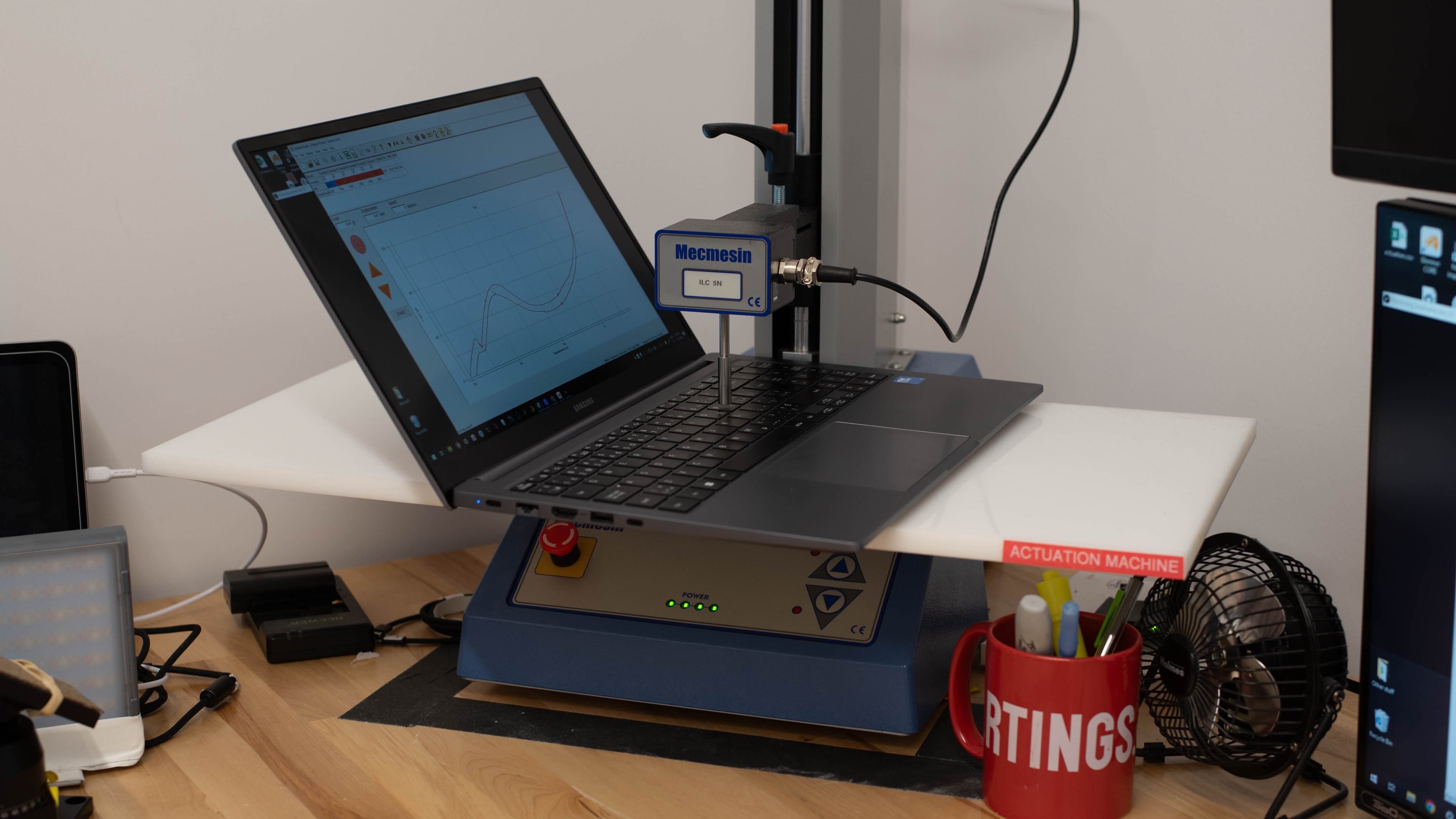
    The Samsung Galaxy Book4 has a decent keyboard. While its layout is fairly standard, it feels a tad cramped, which you might not like if you have medium or large hands. The keys are stable and don't require much force to actuate—the downside is that they have very little tactility, so it's sometimes hard to know whether you've actuated a key. The mushiness of the keys can also make you press harder, causing fatigue when typing for an extended period. Key travel is on the short side, which you may or may not like, so it's best to try it out first if you can. There are three backlight brightness levels; the light shines well through the legends but could be slightly brighter.

    8.5
    Touchpad
    Tracking Quality
    8.5
    Size
    15.5 in² (99.8 cm²)
    Material
    Glass
    Dedicated Buttons
    No

    The Samsung Galaxy Book4 has an excellent touchpad. Though it could be bigger, the touchpad is large enough to perform most actions and gestures. Its left, off-center position is typical for a laptop with a numpad; it just doesn't leave much room to rest the left hand when typing. It tracks all movements and gestures well, and there's no issue with palm rejection. This is a diving board touchpad, so you can only click in the bottom half, and unfortunately, the buttons feel mushy.

    7.0
    Speakers
    See details on graph tool
    Max Volume
    61 dB SPL
    Standard Error @ Normal Vol. (65 dB)
    4.1 dB
    Slope @ Normal Vol. (65 dB)
    -0.6
    Bass Extension (Low-Frequency Ext.)
    359 Hz
    Treble Extension (High-Frequency Ext.)
    19 kHz
    Dynamic Range Compression @ Max Vol.
    0.7 dB

    The speakers sound relatively natural, clear, and airy, but with almost no bass whatsoever. They're also very quiet; thankfully, there's very little compression or distortion at high volume levels.

    5.7
    Webcam & Microphone
    Video Quality
    5.5
    Resolution
    720p
    Position
    Top Center
    Privacy Cover
    No
    Face Unlock
    No

    The Samsung Galaxy Book4's webcam is sub-par. The image looks soft, noisy, and underexposed. Thankfully, the microphone is pretty good—voices sound loud and clear, with almost no background noise. There's no physical privacy cover, though you can disable the camera and microphone at the software level using the F10 shortcut.

    Connectivity
    8.0
    Ports
    USB-A Ports
    2
    USB-C Ports
    2
    Thunderbolt
    No
    USB-C Charging
    Yes
    USB-C Display Out
    Yes
    HDMI
    1.4
    DisplayPort
    No
    3.5mm Jack
    Combo mic/headphone
    Card Reader
    MicroSD UHS 1
    Ethernet
    Yes
    Proprietary Port
    No
    Security Lock
    Yes

    The Samsung Galaxy Book4 has a great port selection. Both USB-As support USB 3.2 Gen 1 data transfer speeds of up to 5Gbps. The USB-Cs also support USB 3.2 Gen 1 data transfer speeds, as well as DisplayPort and charging.

    Wireless Communication
    Wi-Fi
    Wi-Fi 6 (802.11ax)
    Bluetooth
    5.2

    Samsung advertises Wi-Fi 6E support; however, our unit has an Intel AX201 adapter, which only supports Wi-Fi 6.

    Configuration
    CPU
    Brand
    Intel
    Model
    Core 7 150U
    Core Count
    10
    Thread Count
    12

    The Samsung Galaxy Book4 is available with the following CPUs:

    • Intel Core 5 Processor 120U (10 cores/12 threads, up to 5GHz, 12MB cache)
    • Intel Core 7 Processor 150U (10 cores/12 threads, up to 5.4GHz, 12MB cache)

    Both are low-power CPUs designed for general productivity tasks like text processing, web browsing, spreadsheets, and media consumption. You can do slightly more demanding tasks like programming and such, but for highly intensive workloads like machine learning or simulations, it's best to get a more powerful content creation, gaming, or workstation laptop. Both CPUs have the same core count and composition, comprising two performance and eight efficiency cores. The Core 7 is faster than the Core 5, but the difference is relatively small and only noticeable when performing very demanding tasks.

    See more information about these CPUs in Intel's product brief.

    GPU
    Brand
    Intel
    Model
    Graphics
    Dedicated/Integrated
    Integrated
    VRAM Size
    N/A
    GPU Total Graphics Power (TGP)
    N/A

    The Samsung Galaxy Book4 is available with the following GPUs:

    • Intel Graphics (integrated)
    • NVIDIA GeForce MX570 Laptop GPU 2GB GDDR6 (discrete)

    All models have Intel Graphics since it's an integrated GPU that's on the same die as the CPU. This iGPU is a low-power graphics processor that can only handle general productivity tasks and some very light, puzzle-like games. The NVIDIA GeForce MX570 is an entry-level dedicated GPU (based on the Ampere architecture) with performance comparable to an NVIDIA GeForce GTX 1650 Ti (mobile) or RTX 2050 (mobile). It performs better than the Intel integrated graphics and will generally make the system feel faster, like when loading images and videos on websites, but it's nonetheless a low-power discrete GPU with only 2GB of VRAM. This means it can handle some light gaming (older and well-optimized titles), but don't expect to play AAA games with high settings. Also, remember that it'll consume more power, so the performance increase might not be worth the reduction in battery life.

    RAM
    Capacity
    16 GB
    Modules
    8 (Soldered)
    Type
    LP-DDR4X
    Speed
    4,267 MHz

    You can get this laptop with 8GB or 16GB of RAM. The memory isn't user-replaceable.

    Storage
    Advertised Capacity
    512 GB
    Usable Capacity
    430 GB
    Drive 1
    SSSTC CL4-8D512
    Drive 1 TypeSSD
    Drive 2
    No 2nd Drive
    Drive 2 TypeNo 2nd Drive

    You can get this laptop with 256GB, 512GB, or 1TB of storage. The storage is user-replaceable. There are two SSD slots; both support M.2 2280 PCIe Gen 4 NVMe SSDs.

    Performance
    8.9
    Geekbench 5 (Synthetics)
    CPU Single-Thread
    1,892 points
    CPU Multi-Thread
    8,025 points
    GPU Compute
    18,258 points

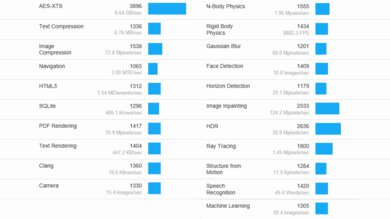
    The Samsung Galaxy Book4's Intel Core 7 150U scores well in the Geekbench 5 CPU benchmarks. Though not as fast as Intel's Meteor Lake and Lunar Lake CPUs, its performance level is more than adequate to handle everyday, general productivity tasks like web browsing, text processing, spreadsheets, and presentations. The integrated GPU performs poorly, though, so don't expect to do anything GPU-intensive. The NVIDIA GeForce MX570 performs slightly better, but again, remember that it's an entry-level GPU with only 2GB of VRAM. Its main purpose is to provide a smoother overall experience when performing lighter tasks, not to handle highly intensive workloads.

    Note: We've performed all benchmarks using the High Performance instead of the default Balanced mode, as the latter typically throttles the performance to prolong battery life. This is more representative of the laptop's maximum potential (you can always turn it down if you prioritize battery life and/or lower fan noise and thermals), whereas the Balanced mode would only show the manufacturer's tuning of that mode.

    9.7
    Cinebench R23 (CPU Rendering)
    Single-Thread
    1,978 points
    Multi-Thread
    8,855 points

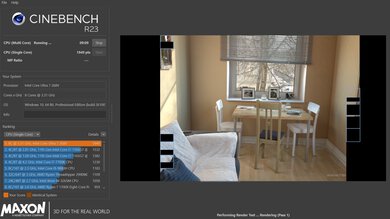
    The Samsung Galaxy Book4 performs well in the Cinebench R23 benchmarks. Its Intel Core 7 150U's multi-thread performance is within the expected range for a low-power U-series CPU, suitable for some heavy multitasking and moderately intensive applications.

    7.3
    Blender (3D Rendering)
    CPU Render Time
    5.3 min
    GPU Render Time
    N/A
    GPU Render Time (Optix)
    N/A

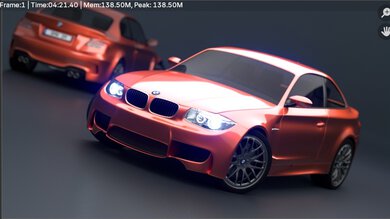
    You can use the Samsung Galaxy Book4 for some light 3D rendering in Blender, but it's best to get a model with the NVIDIA GeForce MX570 Laptop GPU, which will render images much faster than the CPU and Intel's integrated graphics.

    5.4
    Basemark GPU (Game Scene)
    Overall Score
    19,098

    The Samsung Galaxy Book4's integrated GPU performs poorly in the Basemark GPU benchmark, as it's primarily designed for productivity. It can only handle simple, puzzle-like games, as well as older or extremely well-optimized titles; however, you'll have to play at a lower resolution or with low graphics settings to get playable frame rates. The NVIDIA GeForce MX570 can handle slightly more demanding games, but you'll still have to lower the graphical settings to achieve smooth gameplay.

    9.3
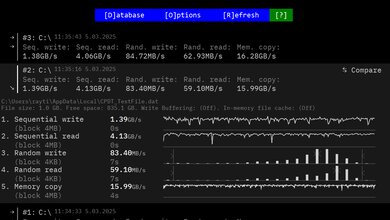
    Storage Drive Performance
    Sequential Write Speed
    921.0 MB/s
    Sequential Read Speed
    3,063.7 MB/s
    Random Write Speed
    152.7 MB/s
    Random Read Speed
    47.8 MB/s
    8.0
    Battery
    Capacity
    54 Wh
    Battery Life (Web Browsing)
    9.7 hrs
    Battery Life (Video Playback)
    7.6 hrs
    Battery Life (Gaming)
    2.0 hrs
    Charge Time
    2.2 hrs

    Models with the NVIDIA GeForce MX570 discrete GPU will have a shorter battery life. It's worth noting that the included charger's 45W output (on models with integrated graphics only) is lower than the system's total power draw, so the battery will likely drain if you perform intensive tasks while plugged in.

    To better simulate typical usage, we've conducted the web browsing and video playback tests using the Balanced mode and the gaming test using the High Performance mode.

    2.2
    Borderlands 3
    See details on graph tool
    Avg. FPS
    14 fps
    1% Low
    8 fps
    0.1% Low
    4 fps
    1% Low Delta
    56 ms
    0.1% Low Delta
    184 ms
    Avg. FPS On Very Low
    32 fps

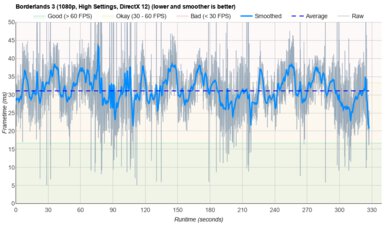
    Borderlands 3 isn't playable at 1080p on the Samsung Galaxy Book4 laptop. Its low-power CPU and integrated graphics can't handle this and other similarly demanding games, resulting in extremely choppy gameplay, even when using the lowest graphical settings. Models with an NVIDIA GeForce MX570 discrete GPU will perform better, but not enough to maintain smooth gameplay.

    4.9
    Civilization VI
    See details on graph tool
    Avg. FPS
    23 fps
    1% Low
    16 fps
    0.1% Low
    16 fps
    1% Low Delta
    18 ms
    0.1% Low Delta
    20 ms
    Avg. FPS On Minimum
    80 fps
    Avg. Turn Time
    7.38 s

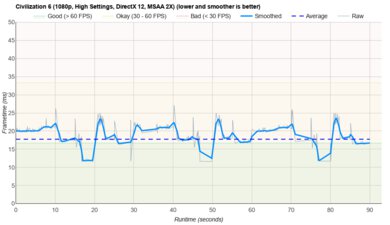
    Civilization VI and other similar strategy games aren't overly taxing on the GPU, so they're playable if you lower a couple of graphical settings, even with this laptop's integrated graphics. Also, you don't really need high frame rates to play this type of games. The average turn time is decent and within the expected range for a low-power U-series CPU.

    4.9
    Counter-Strike 2
    See details on graph tool
    Avg. FPS
    35fps
    1% Low
    21fps
    0.1% Low
    19fps
    1% Low Delta
    20 ms
    0.1% Low Delta
    23 ms
    Avg. FPS On Low
    80fps

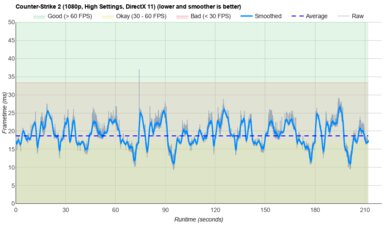
    Counter-Strike 2 runs poorly on the Samsung Galaxy Book4 with integrated graphics. You can get over 60 fps with the lowest graphical settings, but the gameplay is still far too choppy to be playable, especially for a competitive FPS game. Models with an NVIDIA GeForce MX570 Laptop GPU will deliver a smoother experience, though you'll still have to lower many graphical settings to achieve it.

    3.7
    Shadow Of The Tomb Raider
    See details on graph tool
    Avg. FPS
    21 fps
    1% Low
    15 fps
    0.1% Low
    8 fps
    1% Low Delta
    21 ms
    0.1% Low Delta
    76 ms
    Avg. FPS On Lowest
    38 fps

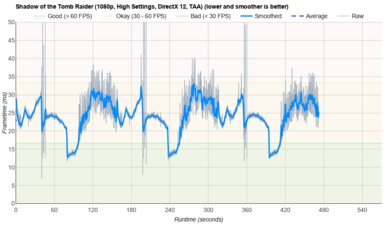
    Shadow of the Tomb Raider runs poorly on the Samsung Galaxy Book4 with integrated graphics. You can get over 30 fps with the lowest graphical settings, but the gameplay is very choppy due to inconsistent frame rates. Models with an NVIDIA GeForce MX570 will deliver smoother gameplay, but only with relatively low graphical settings.

    6.9
    Thermals And Noise
    Keyboard Temp While Idle
    28 °C (82 °F)
    Keyboard Temp Under Load
    47 °C (116 °F)
    Fan Noise While Idle
    25.0 dBA
    Fan Noise Under Load
    49.0 dBA
    Power & Fan Control App
    Yes

    The keyboard gets pretty toasty under load and can cause some discomfort, as the hot spot is around the letter E, where most people rest their left hand. The bottom of the laptop doesn't get as hot, reaching 42.2 °C (107.96 °F) under load, but you might still want to be mindful if you place the laptop on your legs when wearing shorts. The fan noise is not too bad—it's audible but not overly distracting.

    The posted results are measurements taken in the High Performance mode with the fan speed set to max. We've taken measurements using other profiles as well, including the Optimized, Quiet, and Silent profiles. Here are the results:

    Optimized

    • Keyboard temperature: 43.9 °C (111.02 °F)
    • Fan Noise: 44.5 dBA

    Quiet

    • Keyboard temperature: 41.7 °C (107.06 °F)
    • Fan Noise: 43.1 dBA

    Silent

    • Keyboard temperature: 43.6 °C (110.48 °F)
    • Fan Noise: 41.9 dBA
    9.1
    Performance Over Time
    See details on graph tool
    CPU Temp (Cinebench)
    76 °C
    CPU Perf. Loss (Cinebench)
    5% loss
    GPU Temp (Heaven)
    76 °C
    GPU Perf. Loss (Heaven)
    0% loss

    We've conducted this test using the High Performance mode with the fan speed at max instead of the default Balanced mode we've used in previous laptop reviews.

    Additional Features And Software
    Software
    Operating System
    Windows 11
    Additional Software
    Yes

    The Samsung Book4 has many pre-installed applications, including:

    • Bixby: Samsung’s digital assistant.
    • ColorEngine: Photo editing app.
    • Display Profile: Lets you change the display's color profile.
    • Dolby Access: Adds Dolby Atmos support. Requires in-app purchase for headphone functionality.
    • Galaxy Book Experience: Lets you quickly access all Samsung apps installed on the system.
    • Galaxy Book Smart Switch: Lets you move data from your old computer to the Galaxy Book.
    • Goodnotes for GalaxyBook: Note-taking app.
    • Live Wallpaper: App that automatically changes your wallpaper image based on your interests.
    • McAfee: Antivirus software. Requires subscription.
    • Multi Control: Virtual KVM. Lets you use your mouse and keyboard to control other Galaxy devices.
    • Online Support Service: Contains Samsung support contact information. You can also request a repair or check the status of a repair.
    • Quick Search: Lets you quickly find files and text in saved documents.
    • Quick Share: Lets you share images, videos, and files with your friends.
    • Samsung Account: Lets you access your Samsung account, see all your Samsung devices and recent activities, and access device location function.
    • Samsung Cloud Assistant: Lets you access Samsung's cloud services, like cloud storage, notes and settings synchronization across multiple devices, and headphone auto-switching.
    • Samsung Continuity: Lets you control and share content across Samsung devices.
    • Samsung Device Care: Lets you monitor the computer's health (malware detection, battery usage and health), check for software updates, optimize performance, and change battery settings.
    • Samsung Flow: Lets you transition your activities across your Samsung devices.
    • Samsung Gallery: Lets you see and edit photos taken with your smartphone or PC.
    • Samsung Notes: Note-taking app.
    • Samsung Pass: Lets you sign into various apps using your biometrics.
    • Samsung Recovery: Lets you backup your data and restore your PC's drive in case of data loss.
    • Samsung Settings: Lets you access network, power, display, audio, and keyboard backlighting settings.
    • Samsung Studio: Video editing app.
    • Samsung Update: Helps keep drivers, firmware, and BIOS up to date.
    • SamsungPhone: Lets you receive and make calls, answer messages, and view alerts from your Samsung phone.
    • Screen Recorder: Lets you record your screen.
    • Second Screen: Lets you use your Samsung tablet as a second screen.
    • SmartThings: Lets you control and manage other Samsung SmartThings-compatible devices from your computer.
    • Studio Mode: App to improve your appearance on video calls. It also lets you apply effects and filters.
    Extra Features
    Biometrics
    Fingerprint Sensor
    RGB Illumination
    No
    Touch Pen Support
    No Stylus Support
    Secondary Display
    No

    There's a fingerprint sensor built into the power button. You can use it to log into Windows, authorize purchases on the Windows Store, or auto-fill saved passwords on supported websites.