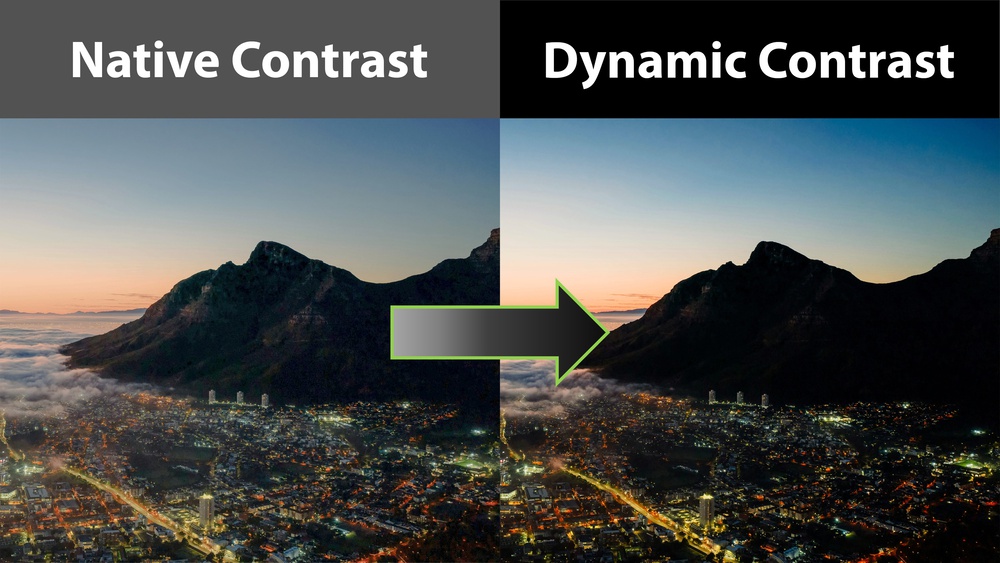
Dynamic contrast is one of the most persuasive numbers in projector marketing and, at the same time, one of the least reliable indicators of how good the projector's contrast will be when watching content at home.
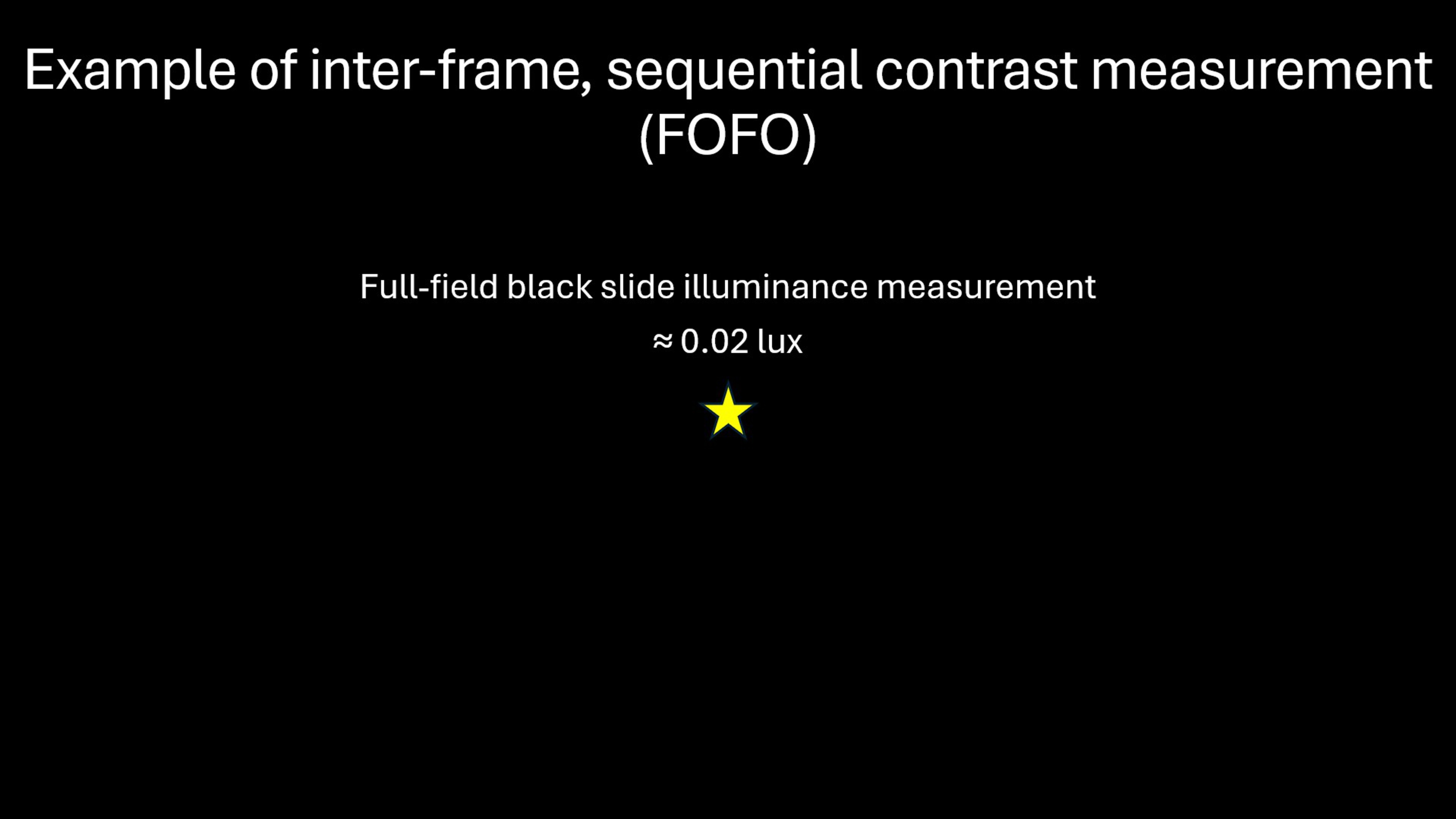
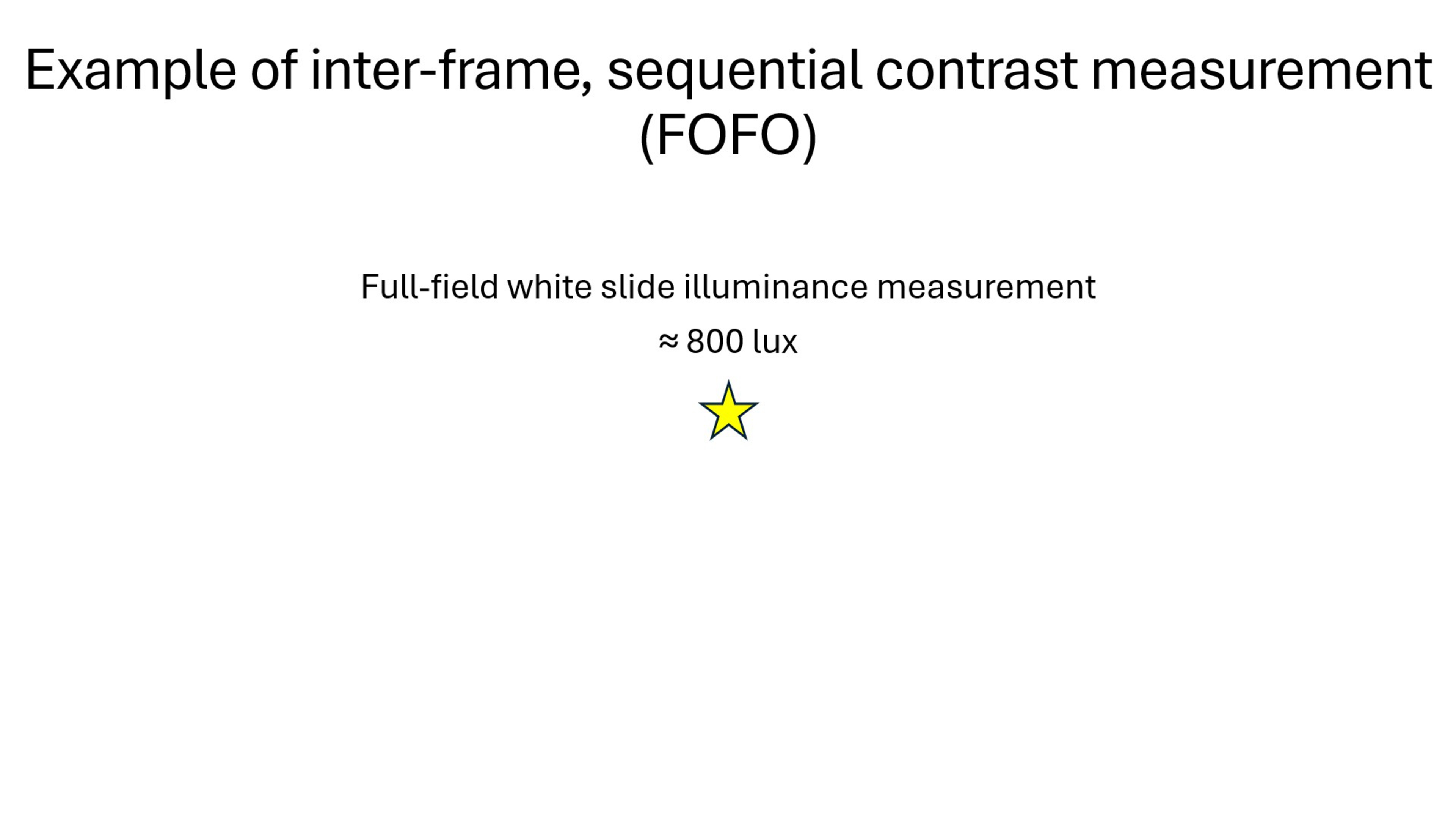
Advertised dynamic contrast ratios can climb into hundreds of thousands or even millions to one, suggesting near-OLED black levels, but this is most often measured sequentially, by dividing the illuminance of a white frame by that of a black frame. This is also known as full-on/full-off contrast (FOFO). These figures tell us the maximum possible inter-frame contrast, not the maximum contrast within a single frame. In the example below, the projector would have a FOFO contrast of 40,000:1. This isn't a contrast ratio you'll ever experience in real content, except if there's a transition from a full white to a full black field, or the other way around.
 |
 |
Because of this, whether looking at native or dynamic contrast, the best way to know how well a projector will perform with real content is to look at intra-frame contrast, which is measured at two points within the same frame. This is how we currently measure native contrast, and how we want to measure dynamic contrast to ensure we provide results that reflect real-world performance.
Even if we put aside the numbers and associated marketing, there's no denying that dynamic contrast features have the potential to dramatically improve a projector's contrast. The word potential is key here, as how it performs can range from highly impactful to barely noticeable to actively distracting, depending on the projector.
While developing our Projector Test Bench 0.11, we set out on developing a test to evaluate dynamic contrast using test patterns, the same way we test native contrast. Our goal was to obtain clear, repeatable measurements to accurately rank the performance of projectors. That approach failed, since dynamic contrast actively adapts to the displayed content.
This is what really made it hard to evaluate objectively: its performance will vary from scene to scene on any given projector. The more we tried to pin it down with traditional measurements, the clearer it became that our numbers were telling an incomplete, often misleading story.
This article is a summary of what we learned along the way. We'll explain what dynamic contrast is, how different implementations, from mechanical irises to laser dimming and frame-by-frame tone mapping, produce different results, and why real-world performance matters far more than any advertised contrast ratio.
What is Dynamic Contrast and How Does It Work on Projectors
There's no single definition for "dynamic contrast" on projectors, or how it is achieved. It's best to think of it as a group of techniques that adjust a projector's light output in real time based on what is being displayed, with the goal of improving black levels and perceived contrast.
Manufacturers implement dynamic contrast because improving native contrast is both difficult and expensive due to the physics of projection. Native contrast is limited by the projector's light engine, imaging technology (DLP/LCD), and optical setup. Increasing it usually requires more complex designs, which exponentially increases the cost of a projector. Dynamic contrast provides a way to improve black levels more affordably through processing and light modulation, rather than purely optical improvements.
Fundamentally, the difference between native and dynamic contrast is that native contrast is a projector's true, inherent ability to display bright whites and deep blacks at the same time, measured with no adaptive features enabled. Conversely, dynamic contrast is a way to remap the light output of the projector to improve black levels and perceived contrast that requires some adaptation based on one or a combination of the techniques described below.
Iris Control
One of the earliest means to achieve dynamic contrast that hit the market is the use of a mechanical iris to control the light output of the projector. In darker scenes, the iris partially closes, reducing the amount of light reaching the screen and improving black levels and perceived contrast.
 |
 |
We tested this feature on the Epson Home Cinema 5050UB and measured the following black floor on a full-field black slide.
| Auto-Iris Off | Auto-Iris High Speed |
|---|---|
| 0.09 lx | < 0.01 lx |
It's a very noticeable improvement, though some light remains visible. While the black floor is more useful to know, the following sequential contrast ratios (FOFO) were achieved, considering an illuminance of 320 lx on a full-field white slide:
| Auto-Iris Off | Auto-Iris High Speed |
|---|---|
| 3 555:1 | > 32 000:1 |
Mechanical irises tend to produce stable and predictable results, but they're limited in speed. When scenes change quickly, the delay of the iris' adjustment can become visible as brightness shifts or lag. Because this approach relies on moving parts, it adds cost and complexity and is less common in newer compact projectors. Below is a video showcasing the Epson Home Cinema 5050UB's auto-iris feature being turned on while displaying a black field, with a mouse hovering on and off the screen. The video shows the lag between the black frame being displayed and the iris fully adapting (note that the video is overexposed on purpose to showcase the effect).
Light Source Dimming
Unlike lamp-based projection systems that typically operate at set brightness levels, modern laser and LED projectors with dynamic contrast can rely on the direct modulation of their light source instead of an iris. By lowering the laser or LED output in darker scenes, the projector can reduce its black levels and thus improve its contrast.
This method is faster and more flexible than a mechanical iris, but an improper implementation can be jarring. Poorly tuned systems can cause brightness pumping, unstable tone gradation, or crushed shadow detail. The noticeable impact of these artifacts depends heavily on the manufacturer's tuning.
Tone Mapping
Good dynamic contrast should involve tone mapping, which is done in real time and is typically done in conjunction with light output modulation from light source dimming or iris control.
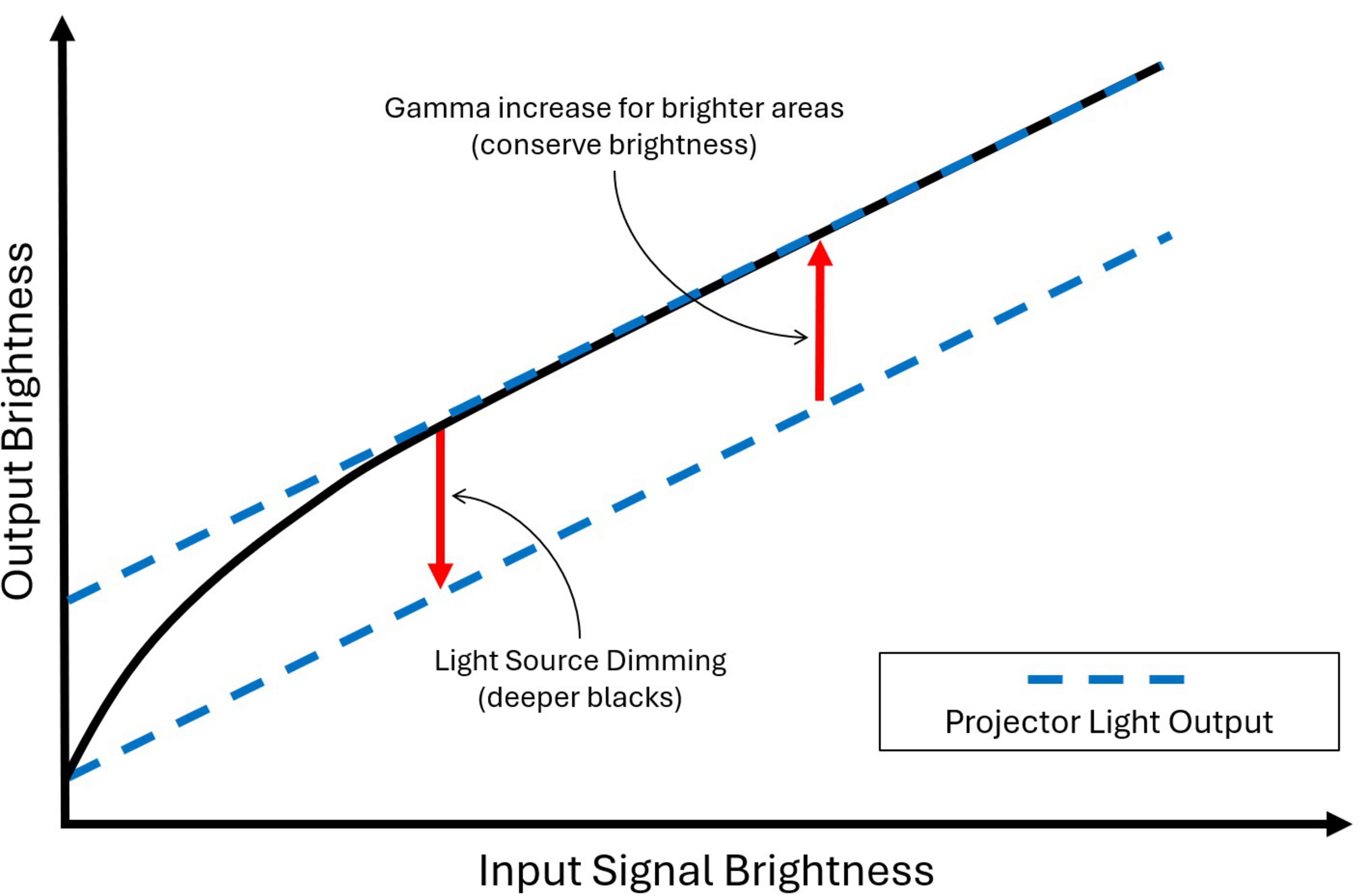
A projector with such capabilities can analyze each scene to determine its overall luminance and shadow gradation. It can then adjust how brightness is allocated across the image by changing its gamma locally. For example, in darker scenes, it can be beneficial to reduce the projector's light output (thus lowering the black floor of the scene) while raising the gamma of brighter areas in the image to retain as much brightness as possible, while simultaneously boosting the contrast.
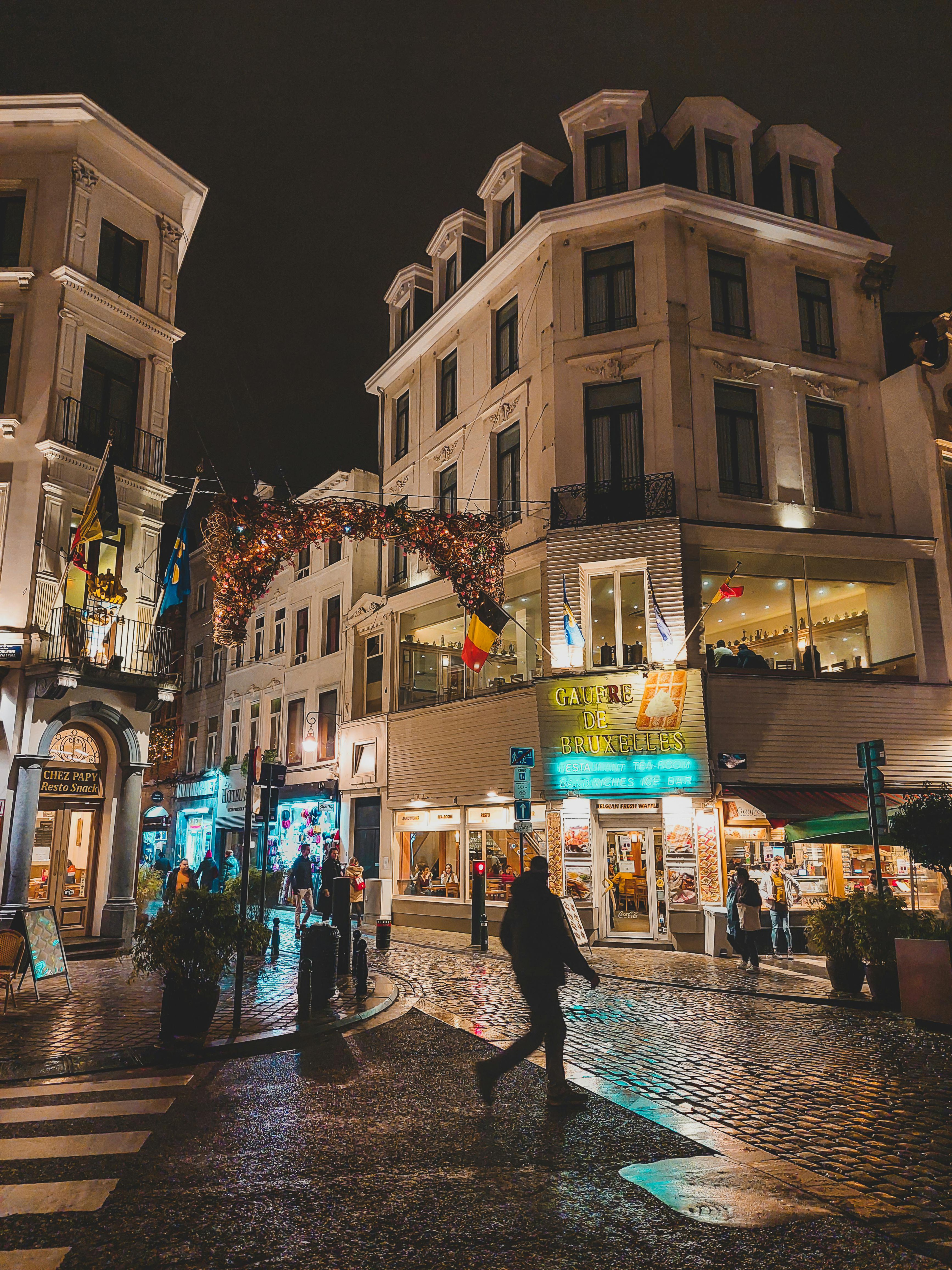
The images below show a simulated example of what a good implementation would look like, as it's hard to capture with cameras due to their dynamic range. A good algorithm would allow the night sky to be black, while retaining highlights in bright areas of the image.
| Without tone mapping / light source dimming | With tone mapping / light source dimming |
|---|---|
 |
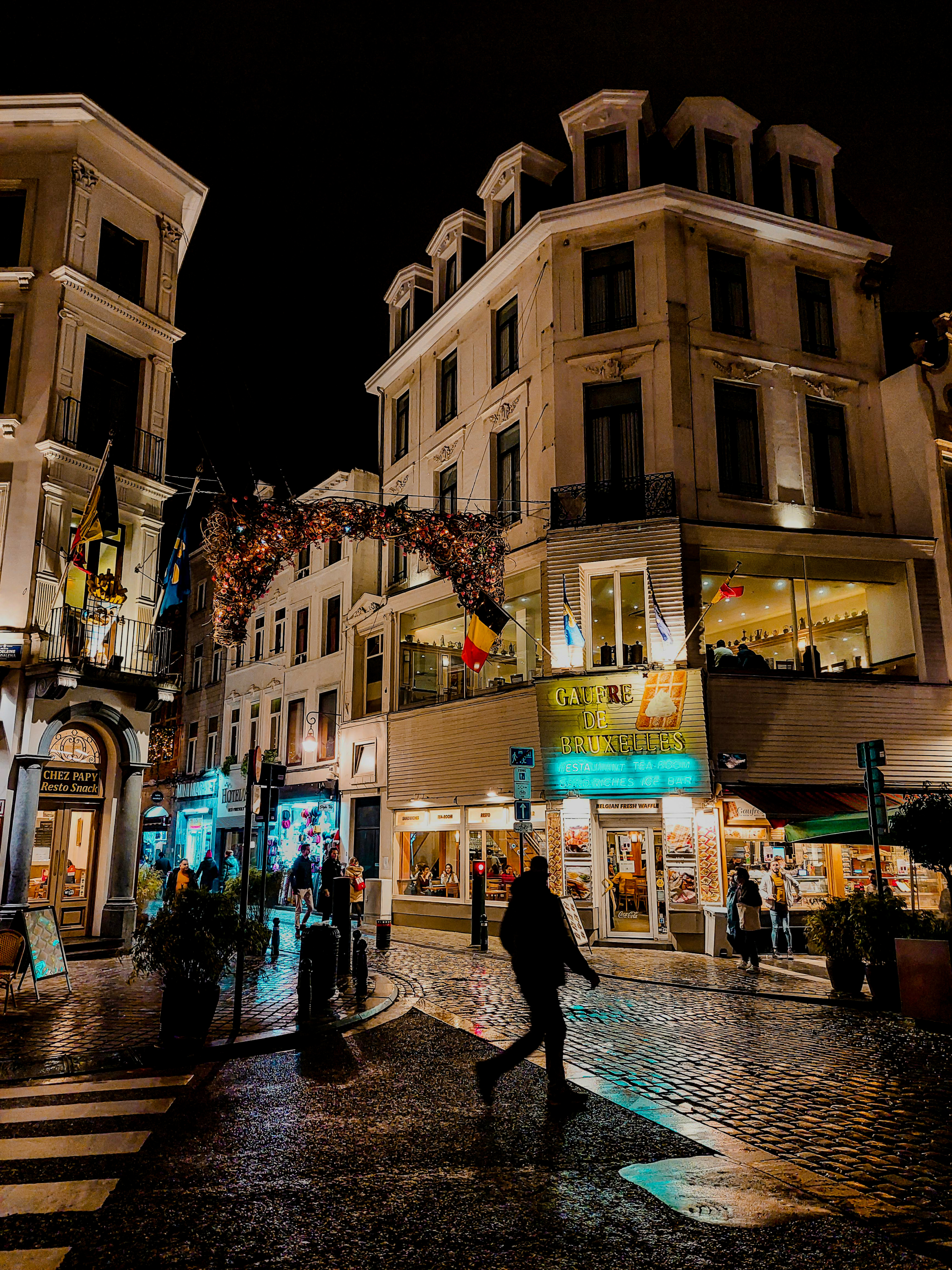 |
This processing can significantly improve perceived contrast when it’s well implemented, but it's not always consistent. Two scenes with similar average luminance levels can be processed differently depending on how highlights and shadows are distributed within the frame. This is why it's very important to evaluate using a wide array of content, not just one pattern or scene.
Different tuning philosophies between manufacturers are a major reason why dynamic contrast behavior can vary so dramatically between projectors. In practice, the dynamic contrast improvements that come with tone mapping are only as good as the algorithms implemented by each manufacturer.
When using tone mapping, especially when combined with light source dimming, it's possible that brightness pumping may arise. They are unintended shifts in gamma/brightness which can be distracting. It's hard to capture brightness pumping effectively with a camera, but we did see it happen on the Hisense C2 Ultra in Netflix's Stranger Things S3E2's opening sequence (dynamic contrast settings active). It's visible in the upper right section of the video.
Dynamic Contrast performance varies dramatically between models
There's no industry standard for how dynamic contrast is implemented. Different hardware and software techniques may work independently or collaboratively to increase perceived contrast on projectors. Manufacturers must make tradeoffs between stability, aggressiveness, and responsiveness when developing their dynamic contrast algorithms.
As a result, two projectors can claim similar dynamic contrast ratios on paper yet deliver very different real-world results. In the same scene, one may improve black levels subtly with minimal side effects, while another may pursue deeper blacks through heavy dimming and processing that becomes obvious during normal viewing. Comparing models side by side reveals far more than any spec sheet can. A good comparison is the Anker Nebula X1 and Valerion VisionMaster Max.
On paper, the Anker claims a native contrast of 5,000:1 and a dynamic contrast of 56,000:1, while the Valerion claims 5,000:1 and 50,000:1, respectively. Below is a short comparison of both projectors running a clip from Netflix's Stranger Things S3E3, via a computer, with dynamic contrast settings enabled. Note that this was purposefully run off a computer to use both the Nebula and the Valerion in their recommended non-Dolby Vision picture mode, as Dolby Vision seemed to either disable dynamic contrast settings or remove the artifacts.
As shown in the videos, the Anker Nebula X1's implementation yields considerable brightness and color shifts, which are distracting. In this case, the tradeoffs aren't worth it. The Valerion VisionMaster Max's implementation yields a solid experience with no discernible artifacts from the contrast enhancement.
Our First Attempt, and Failure, at Objectively Evaluating Dynamic Contrast
When we began developing a test for dynamic contrast, we assumed it could be evaluated using an extension of our native contrast methodology. With our upgraded velvet-covered test room and embedded sensor array setup, our native contrast measurements were now dialed in and repeatable. The expectation was that dynamic contrast could be measured the same way, using white-on-black static average picture level (APL) patterns from 50% down to 0.1% APL.
That assumption didn't hold.
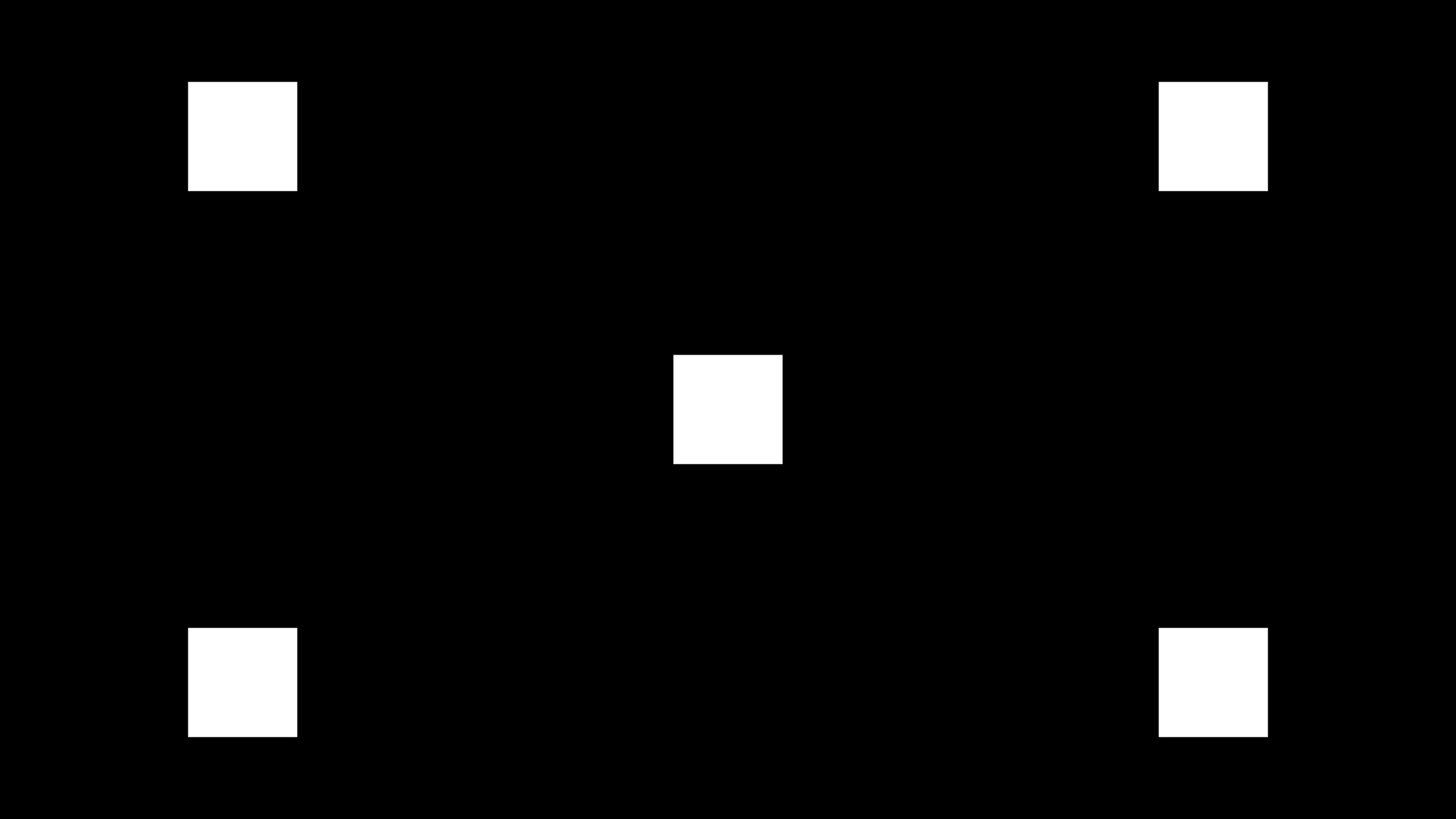
Using the same patterns we used to test native contrast, we noticed that any available dynamic contrast setting either had no impact at all or had a marginal one at best on the measured contrast values. Black levels within the frame barely changed, even at extremely low APL values.
| 5% APL Native Contrast Pattern | Inverted 5% APL Native Contrast Pattern |
|---|---|
 |
 |
At the same time, sequential (FOFO) contrast measurements improved significantly through using available dynamic contrast settings on full-field white and black patterns, confirming that the dynamic contrast systems could, in fact, improve contrast. This was clearly visible on models like the Valerion VisionMaster Pro 2 and the Epson Home Cinema 5050UB. Below are the results of both projectors for both our 50 to 0.1% APL test patterns and for FOFO contrast.
| Valerion VisionMaster Pro 2 | ||
|---|---|---|
| APL | Native Contrast | Dynamic Contrast |
| 50% | 534:1 | 537:1 |
| 25% | 846:1 | 839:1 |
| 15% | 1,064:1 | 1,072:1 |
| 10% | 1,222:1 | 1,232:1 |
| 5% | 1,443:1 | 1,459:1 |
| 1% | 1,670:1 | 1,680:1 |
| 0.5% | 1,703:1 | 1,911:1 |
| 0.1% | 1,714:1 | 2,063:1 |
| FOFO | 1,766:1 | 15,330:1 |
| Epson Home Cinema 5050UB | ||
|---|---|---|
| APL | Native Contrast | Dynamic Contrast |
| 50% | 556:1 | 554:1 |
| 25% | 915:1 | 913:1 |
| 15% | 1,218:1 | 1,212:1 |
| 10% | 1,425:1 | 1,427:1 |
| 5% | 1,722:1 | 1,721:1 |
| 1% | 2,063:1 | 2,111:1 |
| 0.5% | 2,126:1 | 2,135:1 |
| 0.1% | 2,155:1 | 2,150:1 |
| FOFO | 2,232:1 | 7,049:1 |
The lack of improvement to intra-frame contrast at low APLs (e.g., 1% and below) didn't match real-world viewing. We found that any test pattern with a full white spot (RGB 255) larger than just a few pixels would completely disable or heavily constrain any dynamic contrast algorithm on a projector. Even at 0.1% APL, dynamic contrast wouldn't engage.
We've tested this on the Epson Home Cinema 5050UB using our TV contrast "cave" pattern (APL ≈ 8.6%). Using the auto-iris had no impact since the cave entrance clips to RGB 255 white. The dynamic and native contrast for this pattern were the same at ≈ 1,720:1 on the Epson. Note that the image has been overexposed to showcase the difference between the projector screen's black levels and those of our velvet-covered testing room.
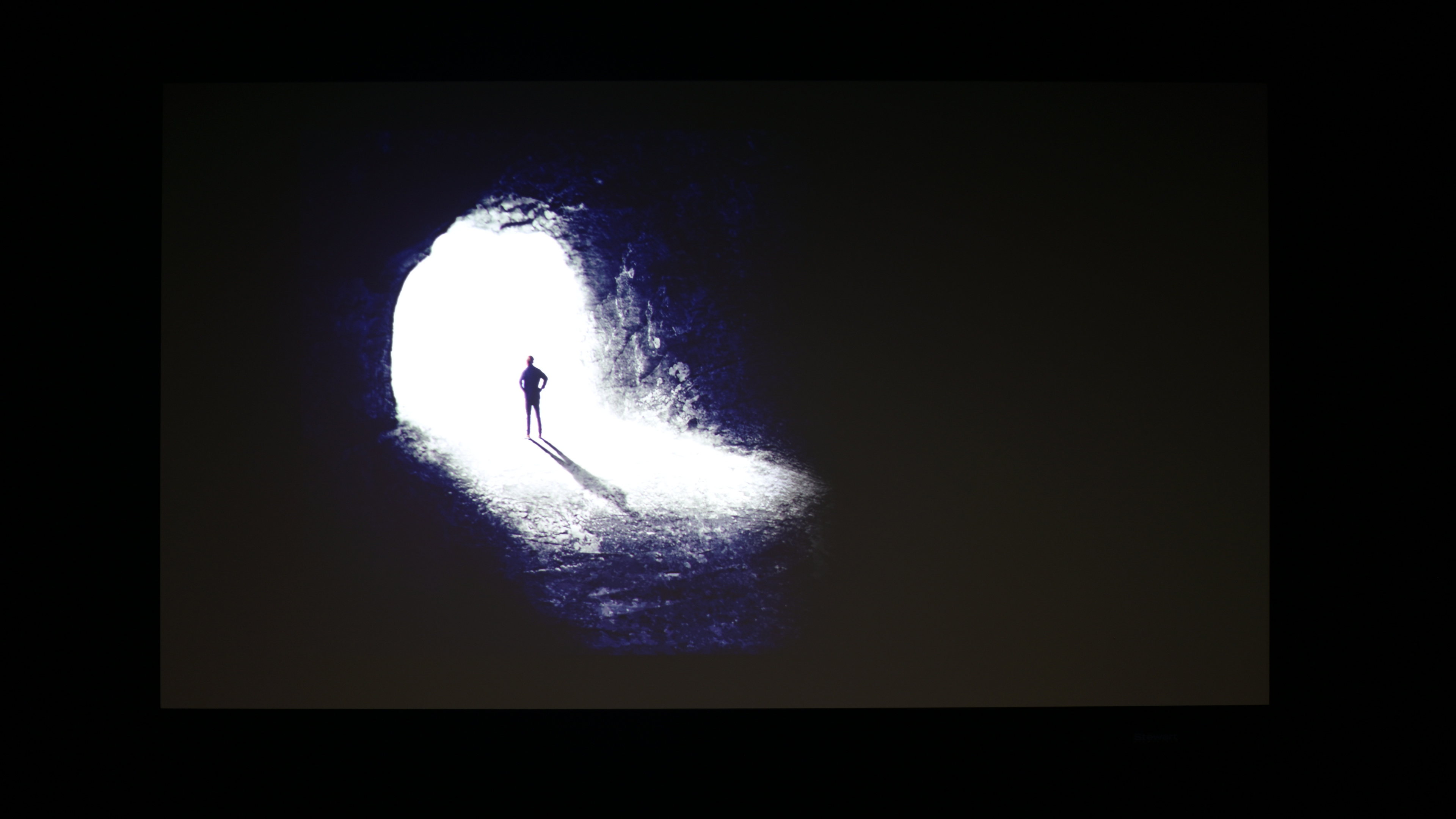
It, unfortunately, demonstrates all too well how test patterns fail to represent how dynamic contrast behaves in real video content. Since test patterns didn't work, we sought to see what would happen if we overlaid small, static 0.1% patches over real content so that our illuminance sensors could measure how their brightness varies throughout the content playback.
For our investigation, we used a dark, high-contrast forest fire sequence from the film Civil War and overlayed measurement patches on the image while dynamic contrast was active. When the overlay patch was fully white, dynamic contrast on the Epson Home Cinema 5050UB had effectively no impact on the overall contrast.
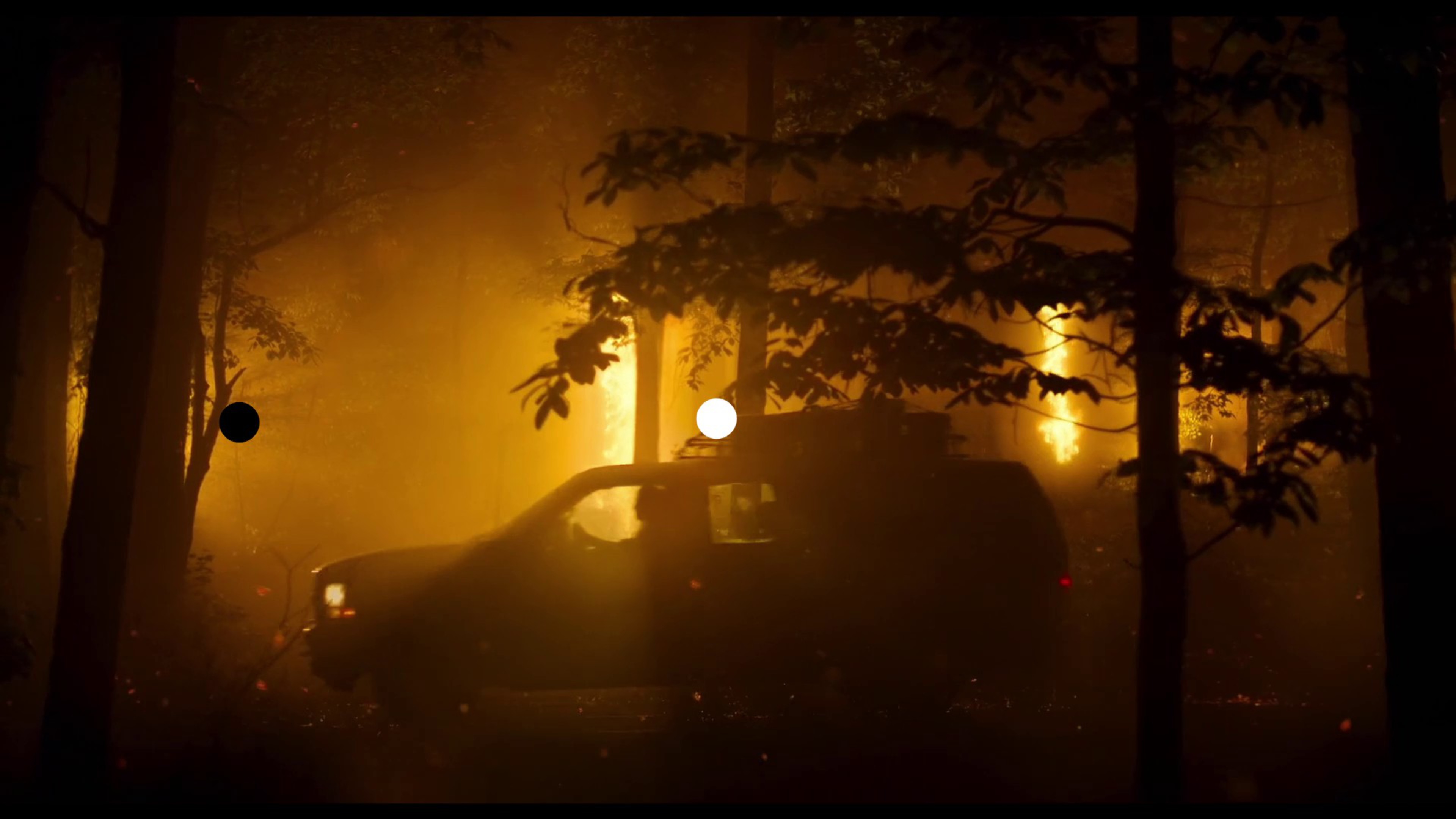
| Civil War Scene - Contrast Measurements via 0.1% sized APL White & Black Patches | |||
| Native Contrast | Dynamic Contrast | Variation | |
| Average Contrast Throughout the Scene | 1,463:1 | 1,430:1 | 2% |
| Maximum Contrast Achieved in the Scene | 2,044:1 | 2,181:1 | 7% |
| Minimum Contrast Achieved in the Scene | 286:1 | 284:1 | 1% |
Replacing that patch with a 50% grayscale patch produced momentary contrast gains of roughly 40% to 50% in very dark frames, which is a great improvement. However, when averaged across the entire scene, the improvement dropped to only a few percent, since the flames are bright and disable a lot of the algorithms. Nonetheless, the improvement was visible in darker frames and improved the viewing experience.
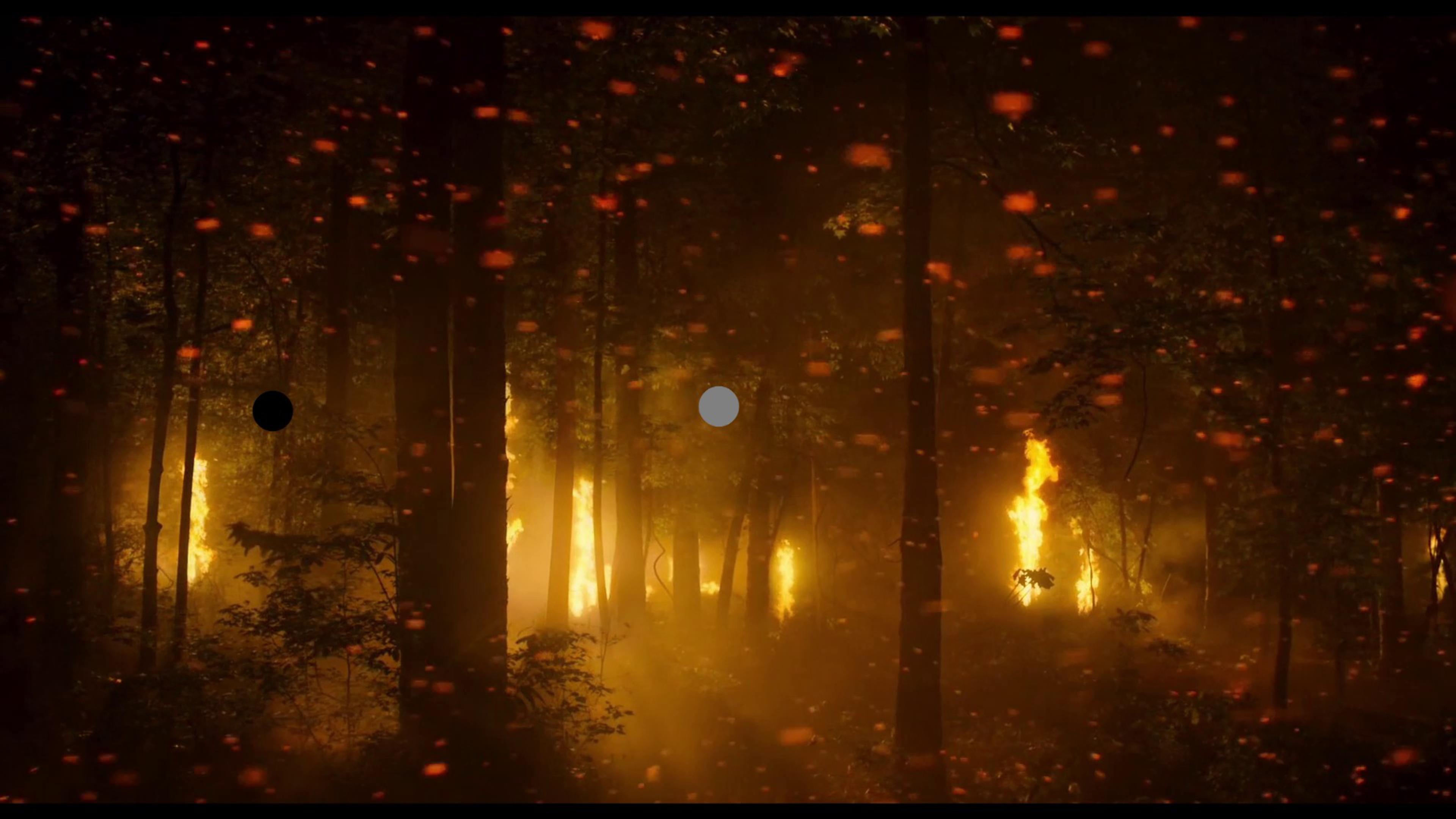
| Civil War Scene - Contrast Measurements via 0.1% sized APL 50% Gray & Black Patches | |||
| Native Contrast | Dynamic Contrast | Variation | |
| Average Contrast Throughout the Scene | 284:1 | 291:1 | 3% |
| Maximum Contrast Achieved in the Scene | 395:1 | 592:1 | 50% |
| Minimum Contrast Achieved in the Scene | 57:1 | 56:1 | 1% |
We also uncovered another problem during this investigation. When dynamic contrast behavior was successfully triggered using grayscale patches over a real scene, the resulting measured contrast was always lower than the white-on-black native contrast measurement. If we have measured dynamic contrast using grayscale patterns, the results would be lower values than native contrast and would risk being misinterpreted.
Further experiments with a customizable "1%-sized" grayscale patch (RGB 255 to 0) placed at the center of the screen over a black background revealed more complex behavior.
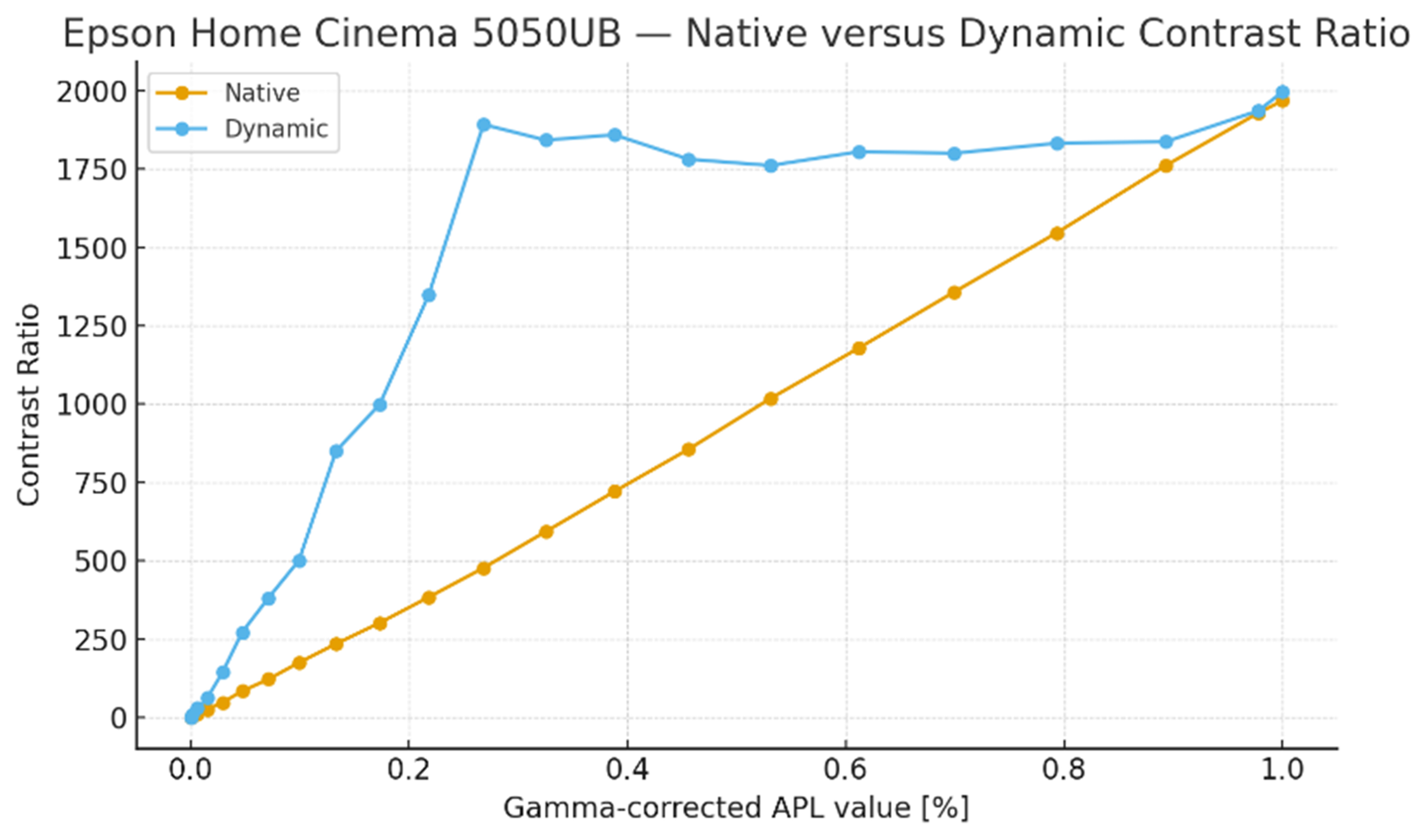
On the Epson Home Cinema 5050UB, we could see that the iris began closing at around 95% grayscale, as indicated by a measurable drop in black level. At the same time, when the patch was roughly between 95% and 60% grayscale, the projector appeared to remap the brightness of the signal, boosting the luminance of the grayscale patch even though the input signal requested lower brightness (Dynamic Max Lumens > Native Max Lumens). This resulted in a higher measured peak luminance with dynamic contrast enabled than with native contrast alone.
| Native Contrast | Dynamic Contrast | |||||
|---|---|---|---|---|---|---|
| Grayscale Level | Grayscale Patch Illuminance | Black Background Illuminance | Native Contrast Ratio | Grayscale Patch Illuminance | Black Background Illuminance | Dynamic Contrast Ratio |
| 100% | 551 | 0.28 | 1,968 | 559 | 0.28 | 1,996 |
| 99% | 540 | 0.28 | 1,929 | 542 | 0.28 | 1,936 |
| 95% | 493 | 0.28 | 1,761 | 496 | 0.27 | 1,837 |
| 90% | 433 | 0.28 | 1,546 | 458 | 0.25 | 1,832 |
| 85% | 380 | 0.28 | 1,357 | 432 | 0.24 | 1,800 |
| 80% | 330 | 0.28 | 1,179 | 379 | 0.21 | 1,805 |
| 75% | 285 | 0.28 | 1,018 | 317 | 0.18 | 1,761 |
| 70% | 240 | 0.28 | 857 | 267 | 0.15 | 1,780 |
| 65% | 202 | 0.28 | 721 | 223 | 0.12 | 1,858 |
| 60% | 166 | 0.28 | 593 | 184 | 0.10 | 1,840 |
| 55% | 134 | 0.28 | 479 | 114 | 0.06 | 1,900 |
| 50% | 108 | 0.28 | 386 | 94.4 | 0.07 | 1,349 |
| 45% | 84.5 | 0.28 | 302 | 69.9 | 0.07 | 999 |
| 40% | 65.7 | 0.28 | 235 | 51.0 | 0.06 | 850 |
| 35% | 49.0 | 0.28 | 175 | 35.1 | 0.07 | 501 |
| 30% | 34.2 | 0.28 | 122 | 22.8 | 0.06 | 380 |
| 25% | 22.8 | 0.27 | 84.4 | 13.6 | 0.05 | 272 |
| 20% | 13.4 | 0.28 | 47.9 | 8.6 | 0.06 | 143 |
| 15% | 7.10 | 0.27 | 26.3 | 4.4 | 0.07 | 62.9 |
| 10% | 3.30 | 0.28 | 11.8 | 1.8 | 0.06 | 30.0 |
| 5% | 0.8 | 0.27 | 2.96 | 0.49 | 0.07 | 7.00 |
| 1% | 0.26 | 0.27 | 0.96 | 0.28 | 0.26 | 1.08 |
| 0.1% | 0.22 | 0.28 | 0.79 | 0.02 | 0.02 | 1.00 |
In practice, this means the projector used a combination of iris control and tone mapping to preserve perceived contrast for the smallest possible APL values, only changing strategy once the scene dropped below roughly 0.27% APL. We can see this by plotting the native and dynamic contrast ratios measured in the table above, as shown in the graph below.
These interactions between light output modulation and signal processing make dynamic contrast more challenging to measure objectively, as performance at a specific APL level or in a scene doesn’t mean it will perform similarly in another one.
Furthermore, we haven't found a way yet to objectively test and report the artifacts that may arise when dynamic contrast is engaged in a fair way. While we can certainly trigger things such as brightness pumping intentionally by watching specific scenes or running custom test pattern videos, it just shows that it can occur. It's hard to find a way that accurately shows how much of an issue it would be in real content, and this is the same thing for other artifacts. such as crushed shadows or washed-out highlights.
For these reasons, we decided not to publish an incomplete dynamic contrast test as part of TBU 0.11. Instead, we're going back to the drawing board.
We're continuing this investigation and plan to explore additional approaches, including real-scene comparisons that show native and dynamic contrast side by side, as well as ways to document artifacts like brightness pumping, flickering, and loss of shadow detail.
Conclusion
Dynamic contrast can meaningfully improve a projector's perceived contrast, particularly by lowering black levels in darker scenes. When it works well, it yields black levels that cannot be achieved natively at a similar price point. The improvement is real, but all forms of dynamic contrast may introduce tradeoffs. Depending on the implementation, they can include brightness pumping, crushed shadow detail, reduced highlight detail, and visible transitions when going from bright to dark scenes, such as iris lag. These noticeable side effects depend entirely on how aggressively the system is tuned and the stability of its processing. Evaluating them objectively is challenging.
In some projectors, those compromises are well controlled. Models like the Valerion VisionMaster Max show that dynamic contrast can substantially improve perceived contrast with little to no noticeable artifacts. In other cases, the pursuit of deeper blacks comes at the cost of distractions to the viewing experience.
There's currently no reliable, standardized way to test dynamic contrast objectively. Its behavior depends heavily on both the content and the projectors themselves. For now, evaluating dynamic contrast remains a largely subjective exercise, and we're open to feedback and suggestions, including specific scenes or test patterns that may help expose dynamic contrast behavior more reliably, and how you would like to see it implemented as part of our projector reviews. You can reach out to us by emailing us at feedback@rtings.com, connecting with us on Discord, or leaving a comment below.
One thing to note is that while dynamic contrast is important, it's not a replacement for good native contrast. It’s good to think about it as an enhancement to a strong foundation. A projector with a high native contrast and a good dynamic contrast implementation will almost always deliver a more consistent and satisfying image than one that relies on aggressive dynamic processing to compensate for poor native contrast.