
A Hall effect keyboard uses switches with embedded magnets, paired with sensors built into the keyboard's PCB, to detect changes in key position. These switches allow for precise customization of actuation and reset points through software, which has driven their surge in popularity among gamers in recent years. They also offer exceptionally smooth travel and greater durability than most mechanical switches.
Our findings and conclusions in this article are based on several years of standardized testing in our lab and hands-on experience with hundreds of keyboards, including over 25 Hall effect models. For more details about this process, learn how we test keyboards.
Test results
How Hall Effect Switches Work
On the outside, Hall effect switches look very similar to MX-style mechanical switches, with comparable housings and cross-shaped stems. But inside, each switch contains a small magnet embedded in the stem.
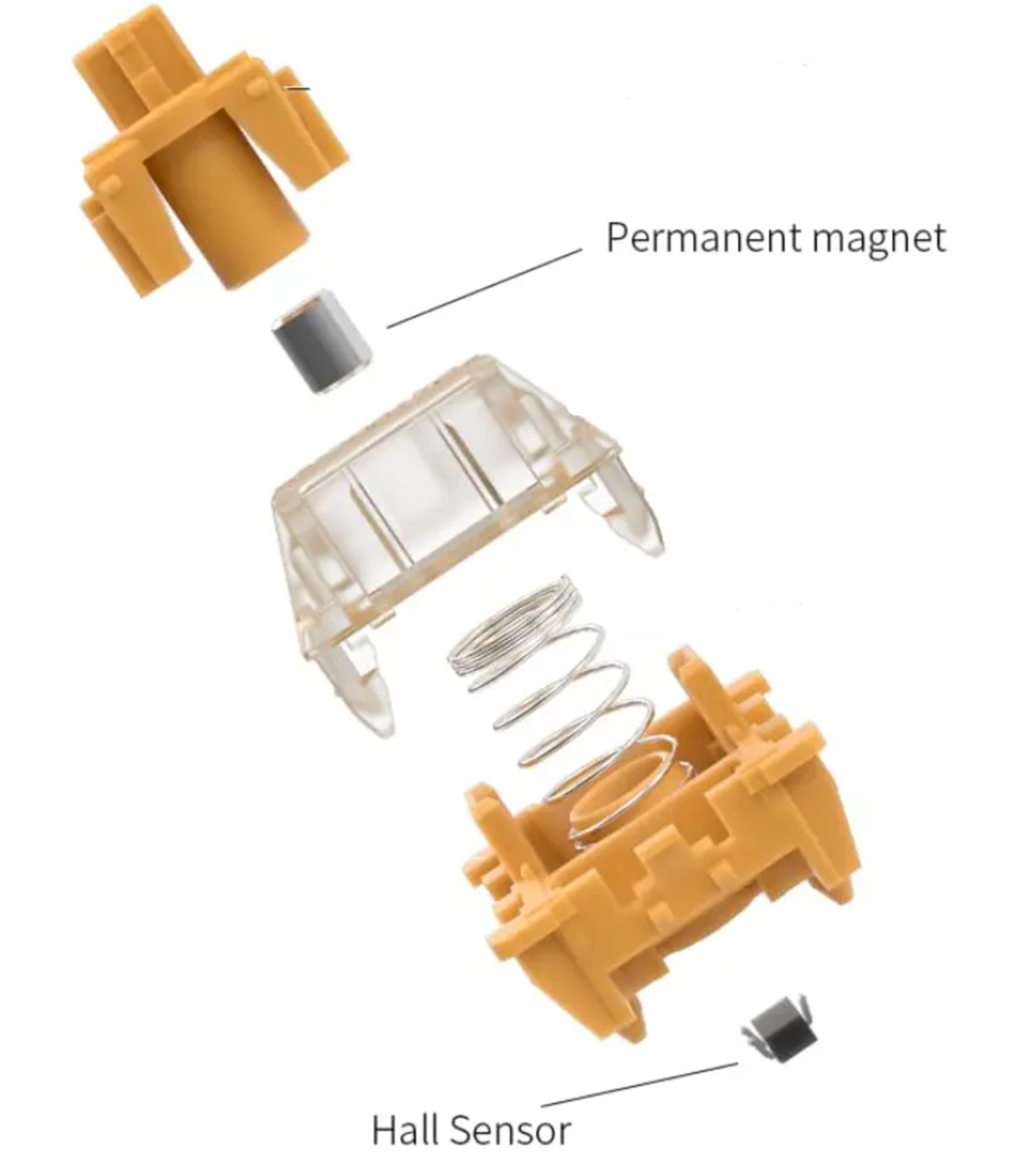
Beneath each switch, a sensor embedded in the PCB detects changes in the magnetic field as the switch moves. These changes generate an electrical signal that's sent to the keyboard's microcontroller. Since the system relies on magnetic sensing rather than metal contacts, keystrokes are registered contactlessly.
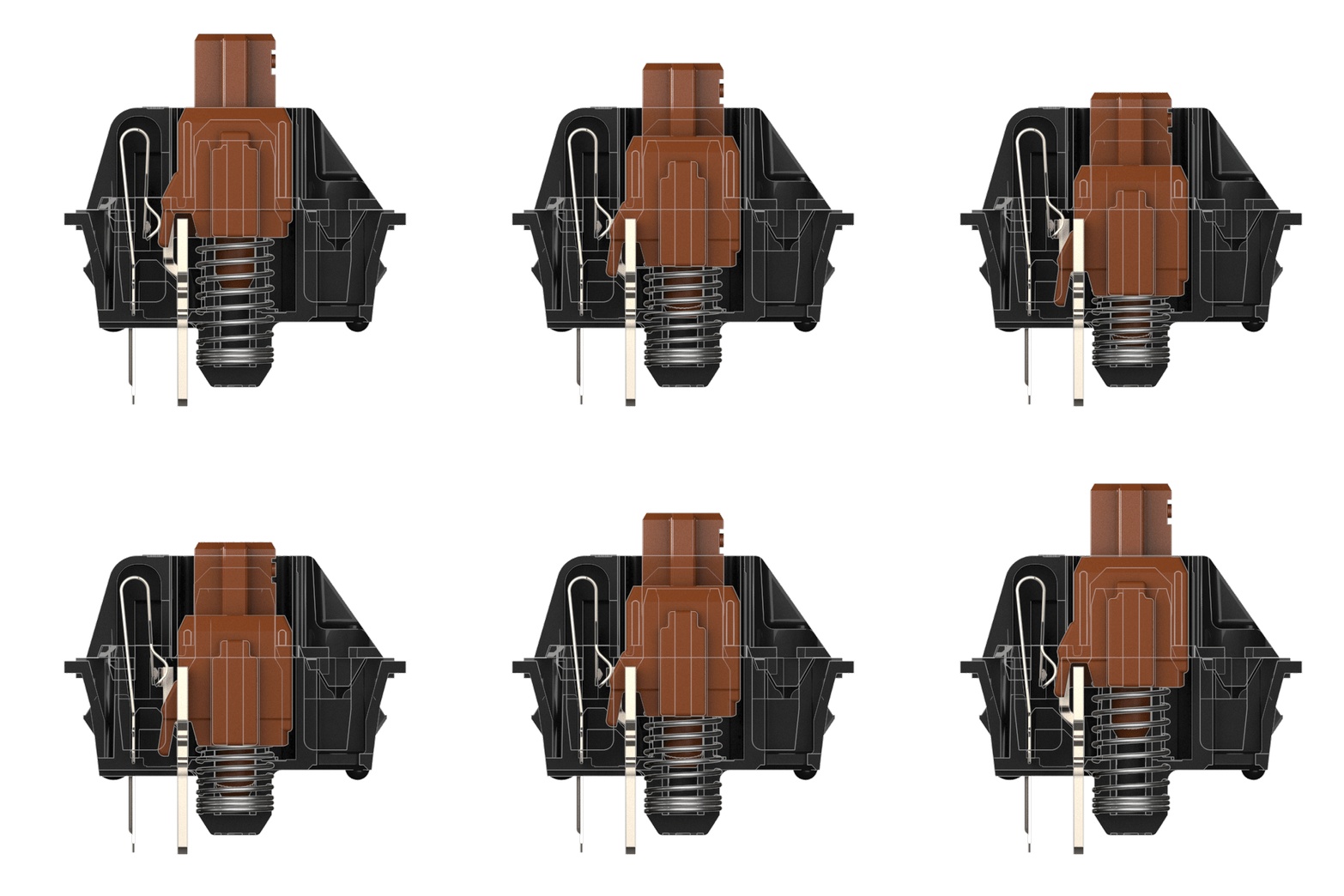
In contrast, conventional mechanical switches rely on physical contact to register a keypress. When you press a key, a pair of metal leaves inside the switch (the silver-colored pieces on the left in the animation below) are pushed together. This closes the circuit and sends a signal to the keyboard's microcontroller.
A Brief History of Hall effect Switches
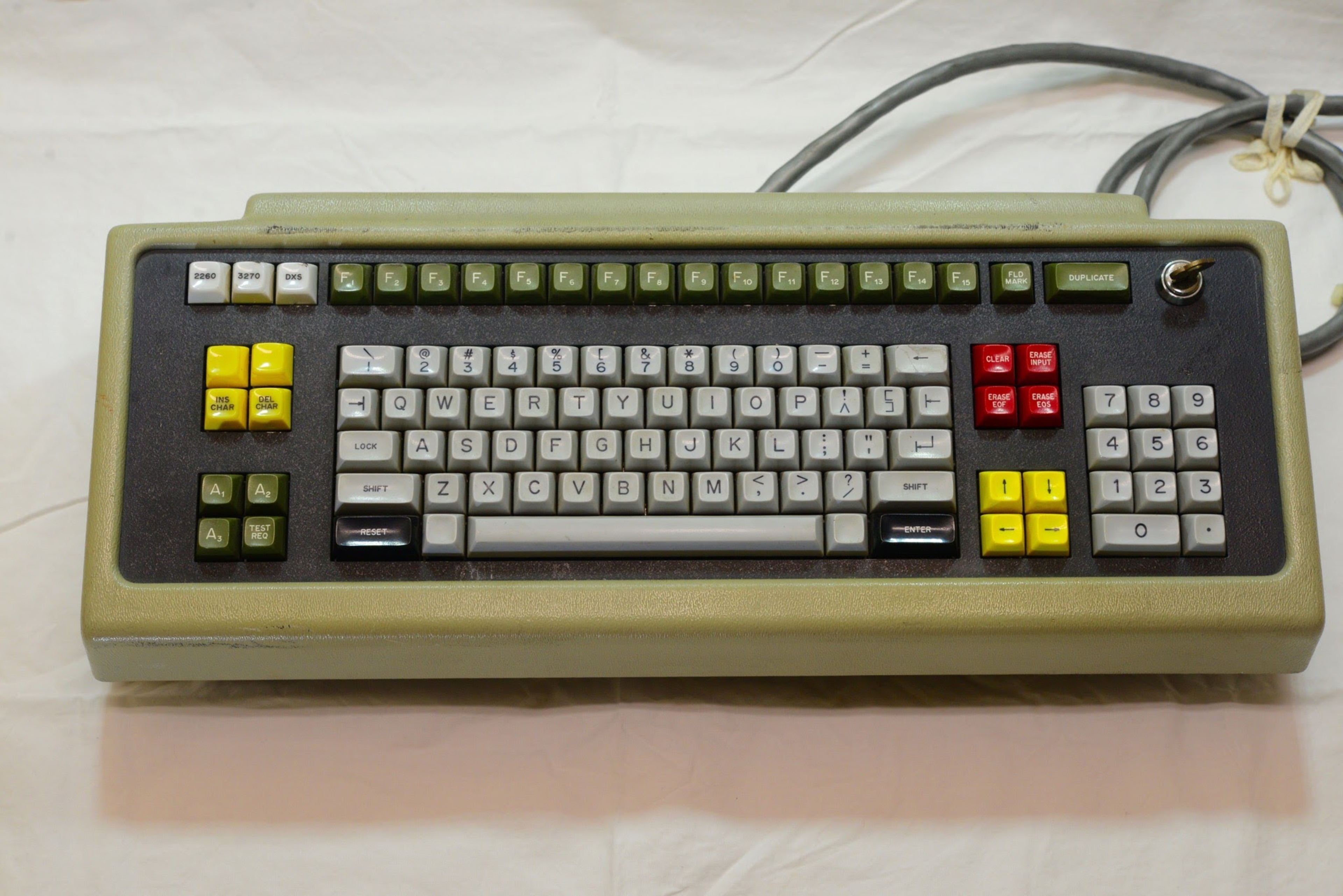
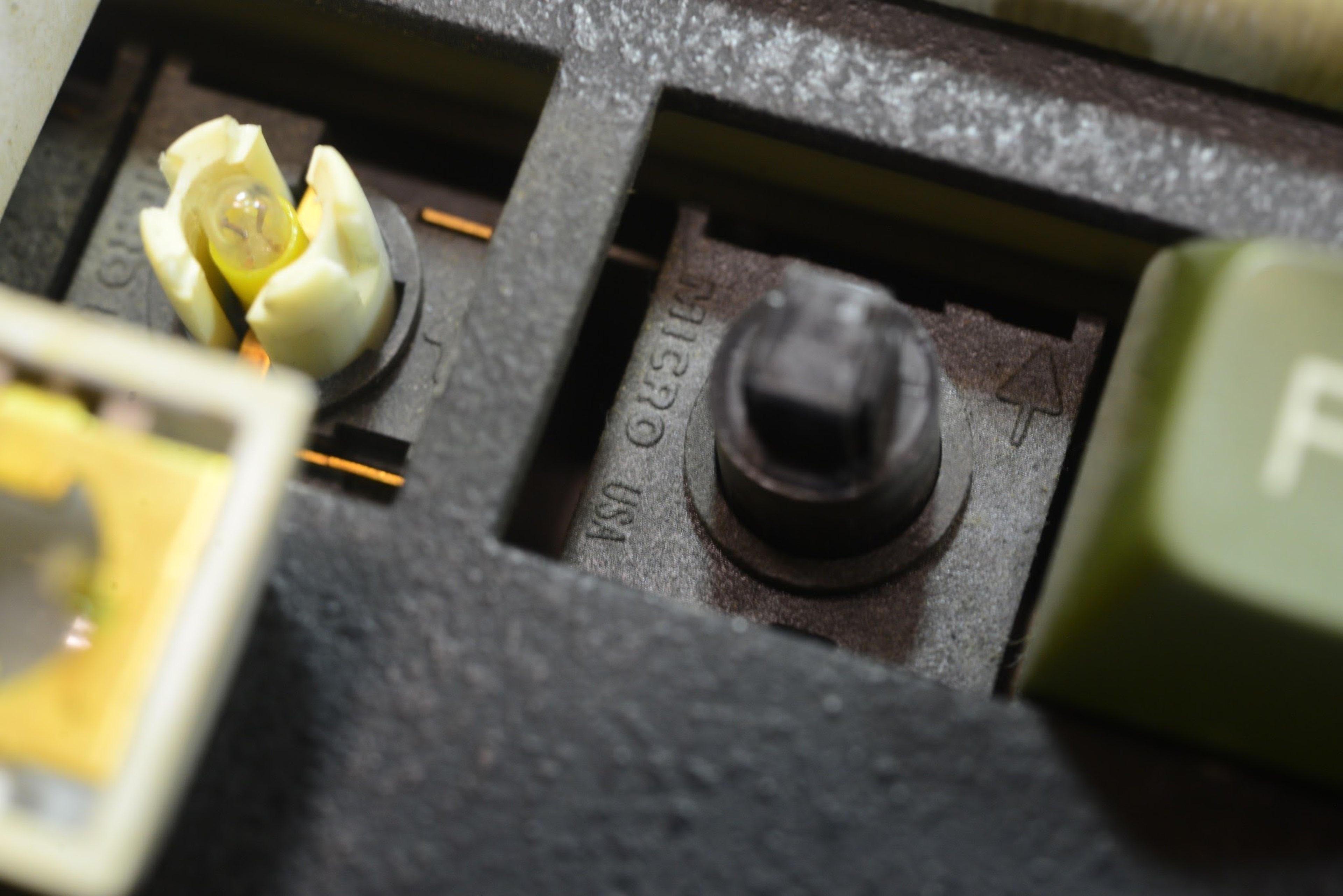
While they may seem like a modern invention, Hall effect switches were first introduced in the 1960s. They're named after Edwin Hall, the physicist who discovered the electromagnetic principle that makes them work (known as the Hall effect) in 1879. Early Hall effect keyboards were used in environments where reliability was critical, including industrial, aerospace, and military applications. Because they operate without physical contact, they're highly resistant to wear and environmental contaminants. Companies like Honeywell and Micro Switch (later acquired and operated as a Honeywell division) were among the pioneers of this technology.
In the consumer space, Hall effect keyboards remained rare and largely disappeared for several decades. In recent years, however, they've seen a major resurgence. Companies like Wooting and SteelSeries have helped reintroduce the technology, targeting the competitive gaming community, and more manufacturers are entering the space as demand continues to grow.
 |
 |
Gaming Advantage of Hall effect Switches
So why have Hall effect switches made such a strong comeback among gamers? The answer lies in their distinct advantages over traditional mechanical gaming keyboards, which, until recently, were considered the gold standard.
Adjustable Actuation Points
With Hall effect switches, you can use software to define exactly where in the key's travel it actuates. For fast-paced competitive games like FPS titles, this usually means setting actuation as low as possible to minimize response time and improve input speed. However, users often need to experiment to find a comfortable setting. While an extremely low actuation point can offer a slight latency advantage, it also makes keys much easier to trigger accidentally. Even light pressure from simply resting your fingers on the keys can be enough to register an input.
Rapid Trigger
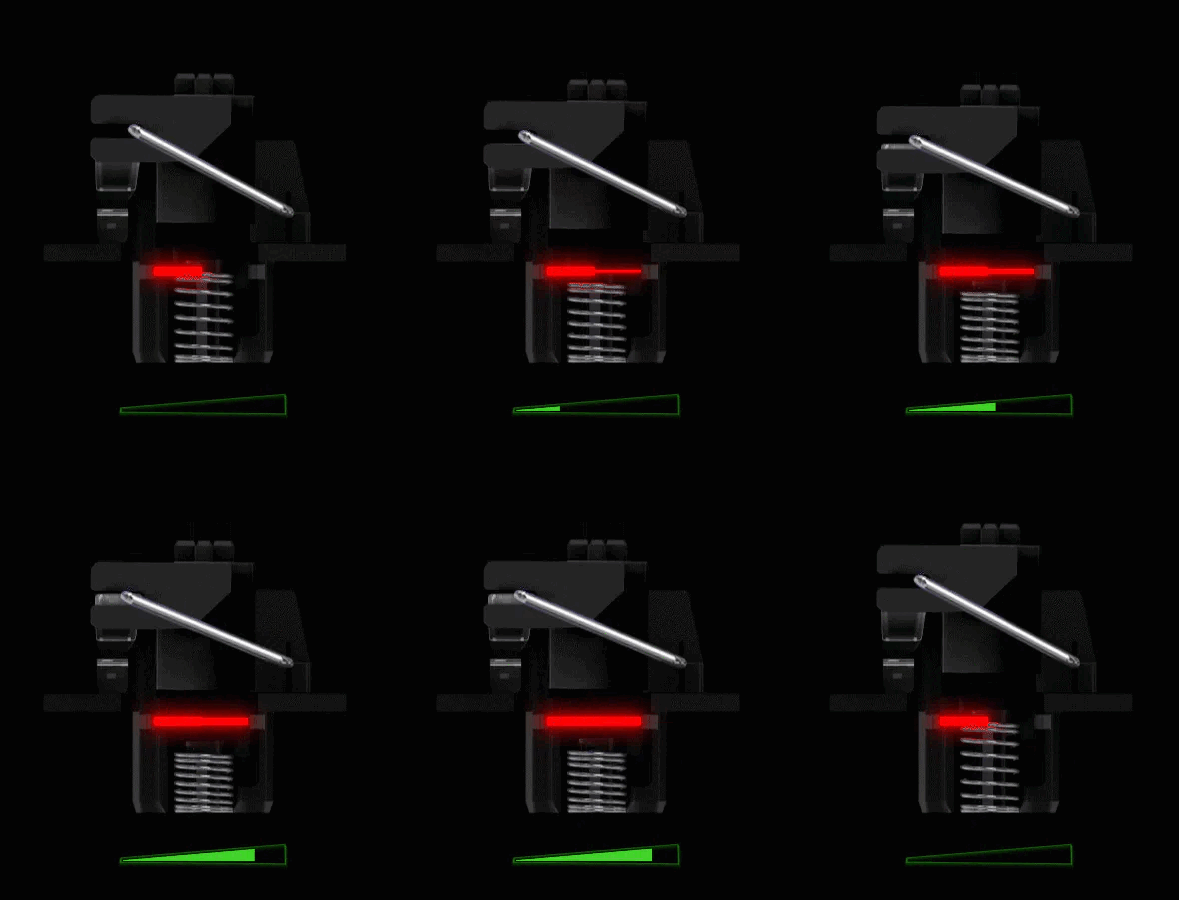
Hall effect switches allow for lower actuation distances than mechanical switches, even those designed specifically for gaming, such as Cherry MX Speed Silver switches. While lower actuation points help reduce input latency, Rapid Trigger is arguably the more impactful feature. Although the name may vary between manufacturers, the core idea remains the same: it lets you customize the reset distance of each switch. Many implementations support a dynamic reset point, often called Continuous Rapid Trigger, where the switch resets as soon as it travels upward by a specified amount. You don't need to release the key fully to register another input. While this may seem like a subtle difference, it can dramatically increase how quickly you can perform repeat inputs. This is especially useful for movement mechanics like tap strafing, where responsiveness and timing are critical.
If you're interested in the benefits and implementations of Rapid Trigger, we've published a research article that dives much deeper.
This animation visualizes the benefits of a Hall effect switch with an adjustable actuation point and continuous Rapid Trigger enabled. Note how the actuation and reset point are dynamic, reducing the latency introduced by the switch's physical travel.
Greater Durability
Because Hall effect switches don't rely on physical contacts, they're more durable than conventional mechanical switches, whose metal contacts can wear down or corrode over time. Mechanical switches are typically rated for around 30 to 100 million keystrokes, while Hall effect switches are often rated for 100 to 150 million. These ratings aren't guarantees, but they provide a general estimate of expected lifespan under normal use conditions.
Zero Debounce Delay
With mechanical switches, the closing of the metal leaves causes them to "bounce," which introduces signal noise and can result in unintentional keypresses if the keyboard interprets those signals as valid input. To prevent this, keyboards apply a debounce delay, which is a short period during which additional input is ignored to filter out the noise. Most gaming keyboards handle this extremely efficiently, often using proprietary eager debounce algorithms that add as little latency as possible.
Hall effect switches, on the other hand, operate without physical contact, so they don't produce bounce and don't require any debounce delay. This can provide a small but measurable latency advantage. However, it's important to note that this doesn't mean every Hall effect keyboard is faster than every mechanical one. For example, the Corsair K65 PRO MINI, which uses mechanical switches, remains one of the fastest keyboards we've tested and is quicker than many Hall effect models, despite the added debounce delay. In fact, there are several mechanical gaming keyboards among the fastest keyboards we've tested to date. To see for yourself, you can compare in this table.
Additional Features
Some Hall effect keyboards are able to support several more advanced features, dependent on their firmware implementation and firmware:
True analog input
This feature allows the keyboard to detect changes in key travel in real time. It enables analog-style control similar to a gamepad joystick, where the pressure you apply affects speed, direction, or intensity. This can be useful for steering, throttle control, or gradual character movement. While it isn't helpful in most competitive games, such as FPS titles that rely on rapid binary inputs, it can be beneficial in racing games, flight simulators, or stealth games that support gradual movement.
Dual-Stage Or Multi-Stage Actuation
This feature lets you assign different actions to different depths of a single keystroke. For example, a light press might trigger walking, while a deeper press initiates running. This allows for more nuanced control and can simplify complex actions in games or workflows that benefit from layered input.
SOCD (simultaneous opposing cardinal directions)
SOCD goes by many different names depending on the manufacturer. Examples include Snap Tap, Rappy Snappy, and Flash Tap. While it can be confusing at first, the core idea is simple: it allows you to define how the keyboard should handle situations where two keys are pressed at the same time, typically using custom parameters or rules.
This feature is most commonly used with the A and D keys for directional inputs in movement tech, especially in competitive shooters. Depending on the manufacturer, you may be able to choose from several behavior types:
- Last input priority: The most recently pressed key takes priority if both exceed the actuation point.
- No priority: Neither key triggers if both exceed the actuation point.
- Absolute priority: One key always overrides the other when both exceed the actuation point, regardless of input order.
These options can provide a competitive edge in games where simultaneous opposing inputs (like A and D) would normally cancel each other out and stop movement. With this setting enabled, you can achieve faster and more consistent tap strafing, which can be a significant advantage in some games. However, its usefulness depends heavily on how the game handles movement input. For example, it has a much greater effect in Overwatch 2 than in Valorant.
This feature has also stirred controversy. Some players feel it offers too much of a hardware-based advantage. Valve notably banned its use in CS2, where it provided a substantial movement advantage before the ban.
Many of these Hall effect keyboard features are hard to fully grasp through written descriptions alone. If you're curious to see how they work in practice, Wooting has uploaded several helpful YouTube videos that break down these features with real gameplay examples. We recommend checking them out if you'd like a clearer look at what they do and how they can be used in-game.
|
Rapid Trigger. |
Dynamic Keystroke. |
True Analog Input. |
Are There Any Downsides?
No technology is perfect, and while Hall effect keyboards offer tangible benefits, there are some drawbacks compared to traditional mechanical boards worth keeping in mind:
Higher cost
Hall effect keyboards typically cost more due to the added sensors and software development involved. However, this is changing quickly. Several brands have begun releasing budget-friendly models that rival or even outperform more expensive premium boards. Prices have come down significantly, and options like the MCHOSE Ace 60 Pro are a great example of a budget model that delivers extremely high performance.
Limited switch feel options
Nearly all Hall effect switches available today are linear, and many feel quite similar. Differences tend to come from small variations in housing materials, total travel distance, and spring weights. That said, one standout advantage of contactless actuation is that these switches feel extremely smooth. If switch smoothness is a top priority for you, this may be a major selling point.
Tactile or clicky Hall effect switches are rare or unavailable. This is partly because they conflict with one of the main selling points of the technology: customizable actuation and reset points. While tactile switches with adjustable actuation are technically possible, the tactile bump can feel disconnected from the actuation event if the actuation point is set earlier or later in the travel. This can create a disorienting experience and defeat the tactile bump's purpose as a reliable indicator of when a key has been actuated.
Software Reliance
The quality of this software can vary widely between brands. Industry leaders like Wooting and NuPhy offer well-designed desktop and web-based clients that are intuitive and lightweight. On the other hand, some of the more established gaming brands like Razer, Logitech, Corsair, and SteelSeries ship keyboards with bloated software that is frequently criticized for hogging system resources, requiring constant updates, or needing to remain open in the background for basic functions like custom RGB lighting to work correctly.
A software tour from our review of the NuPhy Air60 HE, showing the breadth of features and level of software complexity typical for a Hall effect keyboard.
Smaller Hardware Ecosystem
While the number of Hall effect keyboards on the market has grown rapidly, they still make up a small portion of the overall keyboard landscape, including within the gaming segment. Switch variety remains limited, and there are ongoing compatibility concerns between different keyboards and third-party switches. Community modding support is also more limited at this stage, especially compared to the broader mechanical keyboard scene.
Competing and Emerging Switch Technologies
Hall effect keyboards aren't the only game in town. Several other switch technologies provide many of the same benefits, including contactless actuation, no debounce delay, adjustable input, and true analog input if the board supports it.
Analog Optical Switches
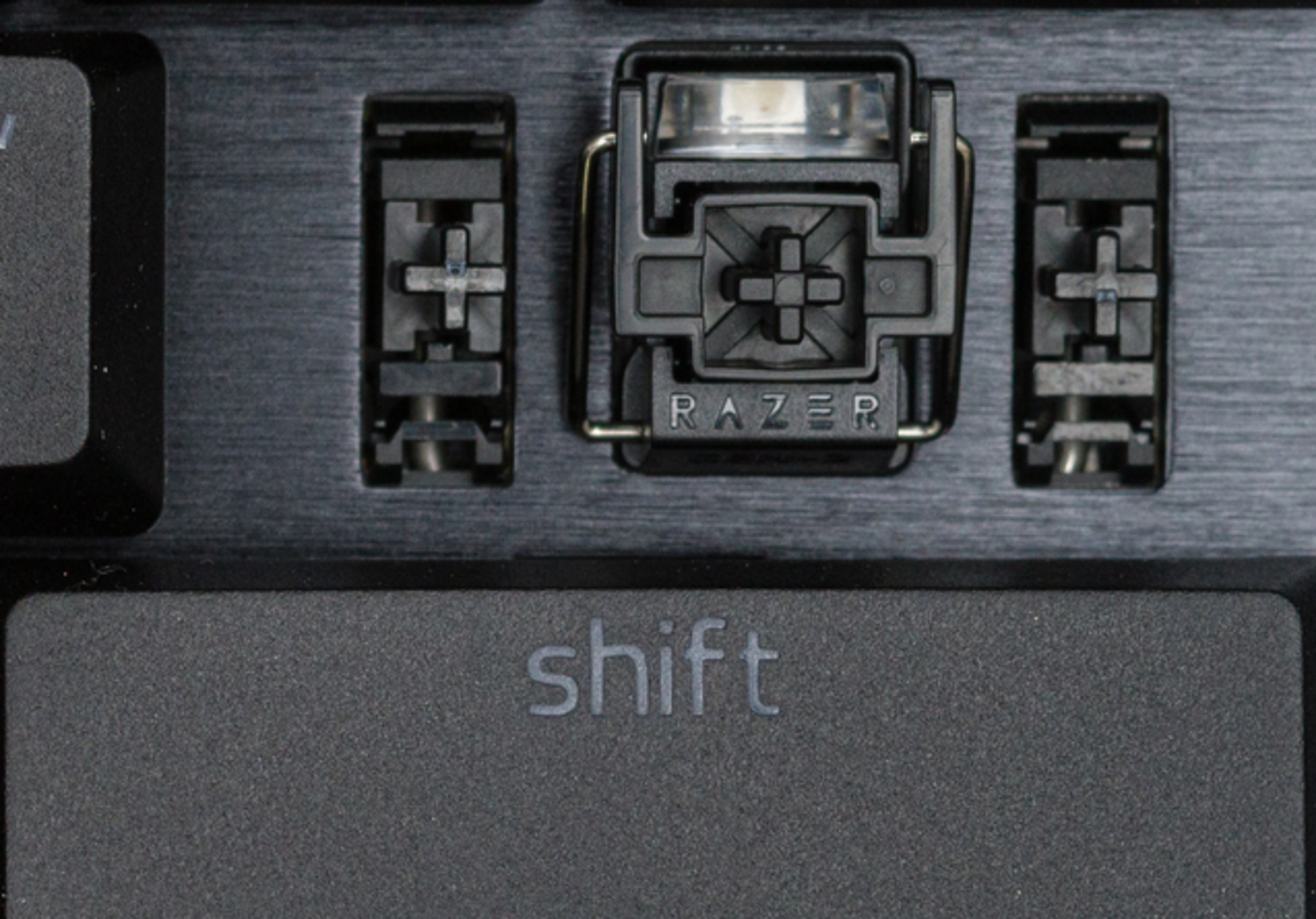
Analog optical switches use infrared light to track the position of the key stem. Pioneered by Razer, they've been available for several years, with each new generation showing clear improvements in performance, accuracy, and consistency. In recent models, like the Razer Huntsman V3 Pro, we've found the switches deliver some of the best input granularity we've tested. The Huntsman V3 Pro also supports true analog input, a feature that remains rare even among top-tier Hall effect keyboards. In terms of the overall functionality they can offer, Hall effect and analog optical switches are effectively equivalent.
 |
 |
TMR (Tunnel Magnetoresistance) Switches
Similar to Hall sensors but marketed as more accurate and power-efficient, TMR sensors are just beginning to appear in enthusiast keyboards. These keyboards use the same magnetic switch design found in Hall effect models, and in many cases, the exact same switches are physically compatible. However, the underlying sensors used to detect key presses are different. Instead of relying on the Hall effect, they use a quantum mechanical phenomenon known as tunneling magnetoresistance (TMR).
In a TMR sensor, two ferromagnetic layers are separated by an ultra-thin insulating barrier. When a magnet embedded in the switch stem alters the magnetic field, it changes the relative alignment of the layers' magnetizations. This shift affects the probability of electrons quantum tunneling through the barrier, resulting in a measurable change in electrical resistance.
Do we at RTINGS.com understand exactly how this works? On a quantum level? Absolutely not! But our test results confirm that it works and early examples like the MonsGeek FUN60 Ultra have nearly matched the performance of many high-end Hall effect models in terms of input accuracy and offer comparable or better battery life from the implementations we've seen to date. That said, it remains to be seen whether more manufacturers will adopt TMR and whether it can ultimately surpass Hall effect technology in keyboards in the long run.
Inductive switches
Inductive switches also detect key presses through changes in electromagnetic fields, but they do so using inductive coils embedded in the PCB. As with TMR-based switches, manufacturers claim improved accuracy and power efficiency over Hall effect designs, but this remains a very new technology in the keyboard space.
We've tested the Ducky One X, which was one of the first inductive keyboards to be widely available, and found its accuracy is impressive but not better than some of the highest-performing Hall effect keyboards to date. The potential for improved power efficiency is notable, since inductive boards don't require powering individual sensors beneath each key.
That said, battery life is difficult to evaluate in the case of the Ducky. User reports suggest it's underwhelming, but this may largely be due to its relatively small battery rather than the sensor design itself. Without similar battery capacity, it's hard to draw meaningful, apples-to-apples comparisons. In any case, it remains to be seen if future releases may be able to implement these advantages in a more significant way and with increased accuracy.
Frequently Asked Questions
Are Hall effect keyboards good for gaming?
Yes. They allow you to customize actuation and set dynamic reset points, which can significantly increase input speed and reduce total latency for competitive gaming.
Do Hall effect switches last longer?
Generally, yes. Since there is no contact between metal components, these switches are less prone to wear. Many are rated for over 100 million actuations.
Can I use Hall effect switches in a hot-swap board?
The answer to this is complicated. Most Hall effect keyboards have hot-swappable PCBs, so you can easily pop out the switches and replace them without soldering. However, switch compatibility is still a growing concern for Hall effect keyboards as the magnet and sensor orientation need to be compatible, and to this point, there's very poor communication from switch and keyboard manufacturers about exact compatibility between boards. The magnets within the switches need to have a certain polarity to interact with the sensors below them. Increasingly, the number of third-party switches is expanding rapidly, and more often with polarity and magnetic flux range specifications identified, but there are yet to be established standards about how this is communicated. The switches, once installed, also need proper calibration to account for small differences in total travel and actuation range. Companies have been fairly quick to add automatic and manual calibration utilities to their software to make this possible, so we're seeing it much more frequently at this point, but again, adoption remains somewhat uneven at the moment, so it's largely a new frontier.
Hall effect vs Mechanical: Real-World Differences
The reality is that keyboard latency has been excellent for years. A keyboard with 10 ms of input delay feels identical to one with 1 ms, and latency is only a small part of the total input chain.
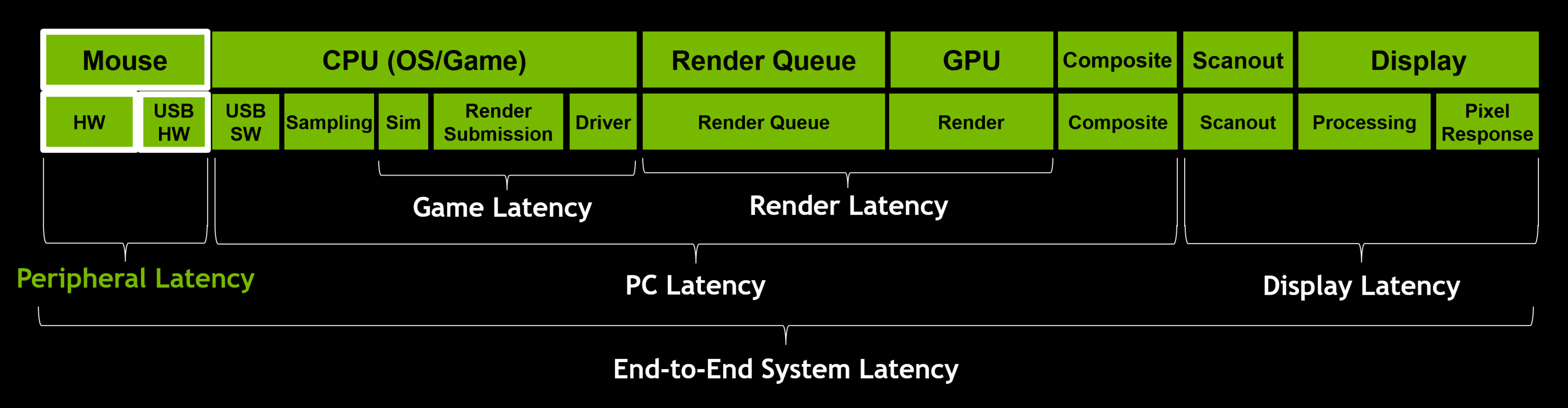
If you've been using a quality gaming keyboard released in the past five years, you probably won't notice any change in responsiveness. The main exception is in games where features like Rapid Trigger offer a clear advantage by enabling faster, more consistent repeated inputs, such as tap-strafing in certain FPS titles. Even then, the benefit is niche unless you're a dedicated competitive FPS player, so it's worth questioning whether the upgrade is truly worthwhile. If you already own a mechanical gaming keyboard you enjoy and it meets your needs, a Hall effect model is unlikely to deliver a dramatic improvement you'll actually notice in use.
See the tables below for a quick side-by-side look at how Hall effect keyboards compare with mechanical and analog optical models. We've left out comparisons with TMR and inductive switch keyboards for now, as these technologies are still emerging and key factors like durability and availability aren't yet clear. We'll revisit these once the market matures enough to provide meaningful insights.
Hall effect vs Mechanical Keyboard
The table below examines various aspects of a Hall effect vs a mechanical keyboard.
| Aspect | Hall Effect Switch | Mechanical Switch |
|---|---|---|
| Input Detection | Magnetic | Physical contact |
| Actuation Customization | Fully adjustable actuation and reset points; supports rapid trigger | Fixed actuation and reset points; varies by switch type and model |
| Feel & Feedback | Very smooth linear feel; may feel flat or unresponsive to some users | Wide variety or linear, tactile, and clicky options |
| Latency | Zero debounce; analog sensing enables fast and precise input | Varies; high-end models can be extremely fast, but require debounce delay to prevent chatter |
| Durability | Typically rated for 100–150 million actuations | Typically rated for 50–100 million actuations |
| Environmental Sensitivity | Immune to dust and debris | Susceptible to dust buildup and long-term oxidation of metal contacts |
| Cost & Availability | Typically more expensive; fewer models on the market | Broad price range and widespread availability |
| Hardware Customizability | Often hot-swappable, but third-party switch compatibility is poorly documented and uncertain | Hot-swap support is common and well-documented; easier to mod and replace switches |
| Software Requirements | Software needed for analog input, actuation customization, and advanced features like SOCD | Often plug-and-play; software used mostly for macros and lighting |
Hall effect vs Optical Analog Keyboard
The table below examines various aspects of a Hall effect vs an analog optical keyboard.
| Aspect | Hall Effect Switch | Analog Optical Switch |
|---|---|---|
| Input Detection | Magnetic | Infrared light interruption |
| Actuation Customization | Fully adjustable actuation and reset points; supports rapid trigger | Adjustable actuation and reset points; supports rapid trigger |
| Feel & Feedback | Very smooth linear feel; may feel flat or unresponsive to some users | Very smooth linear feel; may feel flat or unresponsive to some users |
| Latency | Zero debounce; analog sensing enables fast and precise input | Zero debounce; analog sensing enables fast and precise input |
| Durability | Typically rated for 100–150 million actuations | No widely advertised figure, but industry estimates for optical switches are typically rated 100+ million actuations |
| Environmental Sensitivity | Immune to dust and debris | Optical sensors can be disrupted by dust or debris |
| Cost & Availability | Typically more expensive; fewer models on the market | More expensive than standard mechanical keyboards; Razer is the only manufacturer currently producing analog optical keyboards |
| Hardware Customizability | Often hot-swappable, but third-party switch compatibility is poorly documented and uncertain | No currently available designs are hot-swappable |
| Software Requirements | Software needed for analog input, actuation customization, and advanced features like SOCD | Software needed for analog input, actuation customization, and advanced features like SOCD; Razer's Synapse software is widely criticized for being bloated and consuming system resources |
Should you buy a Hall effect keyboard?
Hall effect switches offer a fundamentally different approach to input detection compared to traditional mechanical switches. They enable features like adjustable actuation and rapid trigger, which can provide real advantages for competitive gamers, particularly in fast-paced FPS titles. While mechanical keyboards still dominate the enthusiast space thanks to their wide range of tactile feels and sound profiles, a growing number of typists and everyday users appreciate the smooth, consistent feel of Hall effect switches. For many, their smoothness rivals or even surpasses that of the best linear mechanical switches. They're also praised for their durability and the ability to fine-tune actuation settings to match personal preferences. If you're looking for an exceptionally smooth linear typing experience with a customizable feel, Hall effect keyboards are a compelling option.
If you're interested in exploring your options, you can view a custom table with all the magnetic and analog optical switch keyboards we've tested to date. And if you're looking for recommendations, see our picks for the best gaming keyboards and the best keyboards for typing.