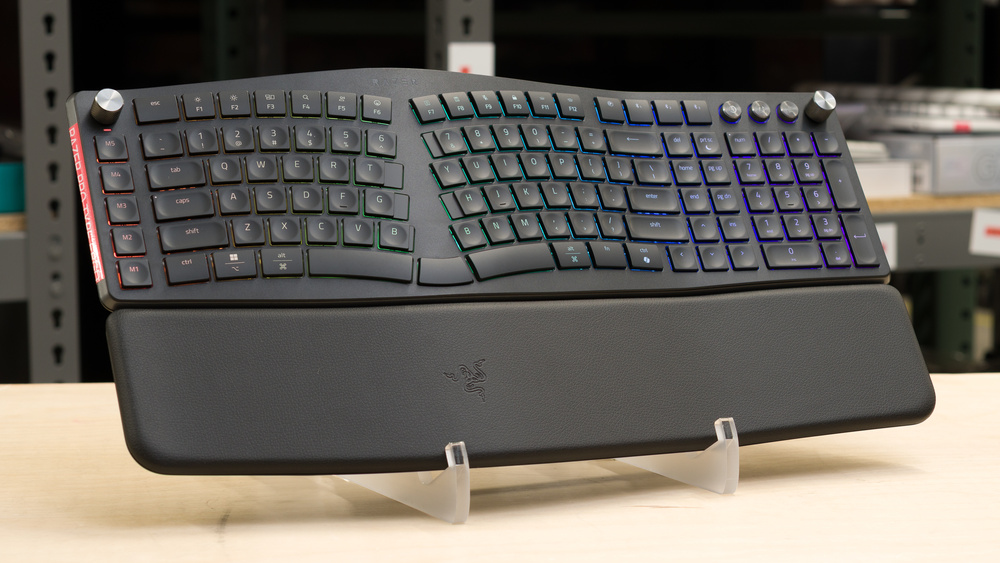
The Razer Pro Type Ergo is a wireless keyboard with a unibody split design that continues Razer's Pro Type lineup. Designed for mixed productivity and gaming use, this keyboard has a low-profile design with scissor switches and an integrated wrist rest. It also has flip-out feet on both the front and back edges, letting you set either a positive incline or a less common negative incline. Other features include a column of dedicated macro keys, a pair of control knobs, and RGB zone backlighting with shine-through keycaps. You can also customize key assignments, macros, profiles, lighting, and other settings using Razer's software suite.
Our Verdict
The Razer Pro Type Ergo is an excellent gaming keyboard with very low, consistent latency suitable for casual and competitive gaming. It also has several ergonomic features, including a low-profile, split-key cluster design, an integrated wrist rest, and both positive and negative tilt options. These features can help minimize strain and keep your shoulders, arms, and wrists in a more neutral position. The keycaps have very clear shine-through legends. Unfortunately, the RGB lighting is zone-based rather than true per-key backlighting, so you can't change the color behind individual keys. Additionally, the build quality is only adequate, as some of the plastics feel a bit cheap. This is particularly true of the ABS keycaps, which are prone to developing a shiny, slightly slippery finish with long-term use.
Ergonomic features include split key clusters, wave-shaped tenting, positive and negative tilt options, and an integrated wrist rest.
Superb single-key and excellent multi-key latency performance.
Very clear shine-through legends.
Only adequate build quality, with ABS keycaps that tend to develop a shiny, slippery texture over time.
Some divisive split key cluster choices, including the '6' key placement.
The Razer Pro Type Ergo is an excellent office keyboard. It uses very quiet scissor switches, providing a typing experience similar to a laptop keyboard, and the keycaps have shallow indents that help guide your fingers to the center of each key. It also has several ergonomic features, including a low-profile, split-key cluster design that encourages a more neutral typing position. The integrated wrist rest and positive and negative tilt options can also help limit wrist extension. Unfortunately, the build quality is only adequate, as some of the materials feel a bit lower quality. The ABS keycaps in particular are more likely to develop a shiny, slightly slippery finish over time than PBT keycaps.
Ergonomic features include split key clusters, wave-shaped tenting, positive and negative tilt options, and an integrated wrist rest.
Extremely quiet.
Great typing quality.
2.4GHz wireless connectivity and multi-device Bluetooth support.
Only adequate build quality, with ABS keycaps that tend to develop a shiny, slippery texture over time.
Some divisive split key cluster choices, including the '6' key placement.
The Razer Pro Type Ergo is passable for mobile or tablet use, but it's quite large due to its full-size layout and integrated wrist rest, so it's best suited for a stationary desk setup rather than portable use. That said, it supports multi-device Bluetooth pairing and offers a great, extremely quiet typing experience. Unfortunately, some of the plastics feel a bit cheap, particularly the ABS keycaps.
2.4GHz wireless connectivity and multi-device Bluetooth support.
Only adequate build quality, with ABS keycaps that tend to develop a shiny, slippery texture over time.
Very large, with a non-detachable wrist rest.
The Razer Pro Type Ergo is great for programming. Its scissor switches are extremely quiet to type on, providing a typing experience similar to a laptop keyboard. It also has several ergonomic features, including a low-profile design, an integrated wrist rest, split key clusters, and both positive and negative tilt options, which can help keep your shoulders, arms, and wrists in a more neutral position. You can assign macros to any key, but there's also a dedicated column of macro keys on the left. It also supports 2.4GHz wireless connectivity and Bluetooth pairing, which is useful if you regularly switch between devices. Unfortunately, the overall build quality is only adequate. Some plastics feel a bit cheap, particularly the ABS keycaps, which are more prone to developing a shiny, slightly slippery finish with long-term use.
Ergonomic features include split key clusters, wave-shaped tenting, positive and negative tilt options, and an integrated wrist rest.
Very clear shine-through legends.
Great typing quality.
2.4GHz wireless connectivity and multi-device Bluetooth support.
Only adequate build quality, with ABS keycaps that tend to develop a shiny, slippery texture over time.
Some divisive split key cluster choices, including the '6' key placement.
The Razer Pro Type Ergo is satisfactory for use in an entertainment or home theater setup, but it's very large and unwieldy, so it isn't ideal for use from a couch unless you have a desk surface nearby. That said, it supports multi-device Bluetooth pairing and has dedicated media controls, as well as very clear shine-through legends. Unfortunately, its build quality is only adequate, and its ergonomic shape makes it less convenient to move around than a more compact keyboard.
Very clear shine-through legends.
2.4GHz wireless connectivity and multi-device Bluetooth support.
Only adequate build quality, with ABS keycaps that tend to develop a shiny, slippery texture over time.
Very large, with a non-detachable wrist rest.
The Razer Pro Type Ergo has excellent raw performance, with low and consistent single-key and multi-key latency that's more than suitable for competitive gaming. It supports full N-key rollover, which is helpful for very fast typists or anyone who uses complex multi-key binds. It also supports a 1000Hz polling rate over both wired and 2.4GHz connections, which is uncommon among more productivity-focused keyboards.
Superb single-key and excellent multi-key latency performance.
1000Hz polling rate over wired and 2.4GHz connections, uncommon for productivity-focused keyboards.
Check Price
Differences Between Sizes And Variants
The Razer Pro Type Ergo is available in a single configuration and a Black colorway, with no variants. See the photo of our unit's label.
Popular Keyboard Comparisons
The Razer Pro Type Ergo occupies an interesting niche, combining several ergonomic elements with the features and performance of a hybrid work and gaming keyboard. It has scissor switches that provide a laptop-like typing feel, and its overall design resembles productivity-focused boards like the Logitech ERGO K860 or the Kensington Pro Fit Ergo Wireless Keyboard. However, the Pro Type Ergo has significantly better gaming performance, macro and media controls, RGB backlighting with shine-through keycaps, and more robust customization software.
This keyboard will likely appeal most to users new to ergonomic keyboards who are moving from a more conventional office or gaming keyboard with a straight design. However, it's less likely to stand out for enthusiasts, who may expect features this keyboard lacks, such as an ortholinear key layout, thumb clusters, a true split design, or adjustable tenting. These features are found on higher-priced alternatives like the MoErgo Glove80, the Dygma Raise 2, or the ZSA Moonlander, all of which have more developed ergonomic designs and roughly equivalent gaming performance.
For more recommendations, see our picks for the best ergonomic keyboards, the best gaming keyboards, and the best low-profile keyboards.
The Logitech ERGO K860 and the Razer Pro Type Ergo are wireless keyboards with similar ergonomic designs and very quiet scissor switches. The Logitech is purely designed with productivity use in mind, while the Razer is designed for both productivity and gaming, with much better latency performance, making it suitable for competitive gaming, RGB backlighting, and shine-through keycaps. The Razer also has an additional row of dedicated media keys, two control knobs, and a set of dedicated media controls, features which the Logitech lacks.
The ZSA Moonlander and Razer Pro Type Ergo are ergonomic keyboards designed for gaming and productivity. The ZSA is a wired-only model with mechanical switches. It has fewer keys but a true split design with individual wrist rests, thumb clusters, and adjustable tenting. The Razer, on the other hand, uses much quieter scissor switches and has a comparatively more conventional unibody split design with wave-shaped fixed tenting, and an integrated wrist rest with positive and negative tilt options. It also has slightly better performance, making it a bit better option for competitive gaming. Both keyboards have quite robust software, but the Razer software is significantly more user-friendly.
The MoErgo Glove80 and the Razer Pro Type Ergo are wireless keyboards for productivity and gaming. They have roughly equivalent gaming performance but differ in their ergonomic designs. The MoErgo has fewer total keys, mechanical switches, two separate halves, concave key wells, thumb clusters, and a columnar key layout, making it more involved and potentially harder to get used to. It also uses robust but more technical ZMK open-source software. The Razer has much quieter scissor switches, a more conventional unibody split design, an integrated wrist rest, fixed wave-shaped tenting, and a more user-friendly software suite.
The Dygma Raise 2 and the Razer Pro Type Ergo are wireless keyboards with ergonomic designs made for productivity and gaming, with similar raw performance and similarly robust software. The biggest differences are that the Dygma uses mechanical switches and has a true split design with thumb clusters. The base model lacks tilt options altogether, but you can buy a highly adjustable tenting kit separately. On the other hand, the Razer uses quieter scissor switches that provide a typing experience similar to a laptop keyboard. It has a unibody split design with an integrated wrist rest, fixed wave-shaped tenting, and positive and negative tilt options.
Test Results



for pictures & test results

for pictures & test results





for pictures & test results



for pictures & test results

for pictures & test results


for pictures & test results


for pictures & test results



for videos & test results
