
Finding a good laptop under $300 is difficult right now. The memory shortage has pushed up prices, making Windows and macOS laptops especially hard to recommend at this budget. All of our picks are Chromebooks: ChromeOS runs well on modest hardware, so you can still browse the web, write documents, make video calls, and stream shows without spending much. Chromebooks mainly use web and Android apps, though, and can't install many programs made for Windows or macOS. For under $300, we're talking mostly about laptops designed for general productivity and media consumption, like text processing, web browsing, and video playback.
We've tested over 180 laptops to make these recommendations. Below are our recommendations for the best laptops under $300. You can also check out our recommendations for the best laptops under $400, the best laptops under $500, and the best student Chromebooks.
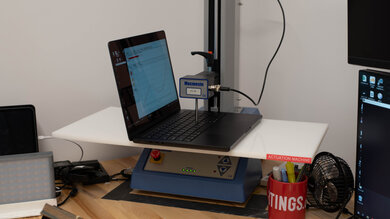
Since 2021, we've tested dozens of laptops every year. We buy our laptops to avoid bias and, following a rigorous methodology, test nearly every part of the laptop so we can deliver results you can rely on. We use a wide range of equipment to perform our tests, including a colorimeter, a Mecmesin MultiTest-i System Test Stand, and various performance benchmarking suites.
Want to know more? Check out our How We Test Laptops article, where we give you a broader overview of our review process, from the moment we purchase the product to the final review.
-
Best Laptop Under $300
 General ProductivityMultimediaGamingWorkstationPortability:Brightness:Typing Quality:Touchpad:See all our test resultsBattery Life (Web Browsing):hrs
If you want a traditional clamshell laptop while spending as little as possible, the ASUS Chromebook CX15 (2026) is the best laptop under $300 that we've tested. Its 15.6-inch screen has room for a document beside your browser, and the comfortable keyboard, complete with a numpad, is pleasant to use. You also get ports for your accessories and can connect an external monitor through HDMI or USB-C. It gives you much of the familiar laptop experience for very little money.
ChromeOS lets you browse, stream, make video calls, write documents, and use web and Android apps. It won't run every program made for Windows or macOS, but it covers the things most people need from a basic laptop. The 4GB version is workable if you keep to a few tabs and apps; when memory fills up, ChromeOS can unload background tabs and reload them when you return. You can also find an 8GB model for less than $300 during sales, and that would give you a bit more breathing room when it comes to multitasking. The main annoyances are its washed-out display, touchpad that sometimes misses movements, and battery life that may fall short of a full workday.
-
Best Multimedia Tablet Under $300
SchoolGamingMultimediaWorkstationBusinessPortability:Brightness :Typing Quality:Touchpad:See all our test resultsBattery Life (Web Browsing):hrsIf you mainly want a device for movies and shows, consider the Lenovo Chromebook Duet 5 (2021). It's a large ChromeOS tablet with a kickstand and a detachable keyboard, so it can double as a laptop when you need to type. That makes it quite different from the traditional ASUS Chromebook CX15 (2026) above; while that laptop is more comfortable for everyday work, the Duet 5 is easier to hold or prop up for watching something.
Its 13.3-inch OLED screen is the main attraction, with rich colors and deep blacks that make dark scenes look much better than they do on the ASUS. It also lasts around eight hours during video playback, so you can watch movies for most of the day without thinking about recharging the device. Still, the tablet design has its trade-offs. The keyboard feels cramped for longer writing sessions, and the touchpad isn't very reliable. The speakers get reasonably loud but lack bass, and there's no headphone jack, so you'll need wireless headphones or a USB-C adapter.
-
Best 2-In-1 Tablet Under $300
SchoolGamingMultimediaWorkstationBusinessPortability:Brightness :Typing Quality:Touchpad:See all our test resultsBattery Life (Web Browsing):hrsThe best 2-in-1 tablet under $300 is another Lenovo, the Lenovo Chromebook Duet 3 (2022). It's essentially a smaller, easier-to-carry version of the Lenovo Chromebook Duet 5 (2021) above, with an included detachable keyboard and a sharp 10.9-inch screen. The Duet 3's display gets brighter, making it easier to see in a well-lit room, but its IPS panel can't produce the Duet 5's deep OLED blacks. It also has a great 1080p webcam for video calls.
There are a few compromises. The speakers don't get very loud and have almost no bass, and there's no headphone jack, so you'll need an adapter or wireless headphones. The keyboard is cramped, making it better for short messages than long stretches of typing. You can get around 14 hours of battery life while browsing the web, but video playback cuts that to less than five hours, so the Duet 5 lasts much longer for movies. The Duet 3 is also hard to find new for around $300 now, though refurbished units can cost less.






Notable Mentions
-
Lenovo IdeaPad Slim 3i Chromebook 14 (2023):
The Lenovo IdeaPad Slim 3i Chromebook 14 (2023) is a better choice than the ASUS Chromebook CX15 (2026) if you can find one new at a reasonable price. In its Core i3 configuration with an IPS screen, it offers better performance, a nicer display, and much longer battery life. The trouble is finding that configuration new; the CX15 is way easier to find.
See our review -
Lenovo Chromebook Duet Gen 9 11 (2024):
If you can spend more than the Lenovo Chromebook Duet 3 (2022) typically costs, consider the newer Lenovo Chromebook Duet Gen 9 11 (2024). It performs a little better, has a more comfortable keyboard and a headphone jack, and its screen has better contrast. However, the Duet 3 gets brighter and lasts considerably longer on a charge during regular use.
See our review
Recent Updates
Sep 30, 2026:
The ASUS Chromebook CX15 (2026) is now the 'Best Laptop Under $300' due to its availability and functional form factor. The venerable Lenovo Chromebook Duet 5 (2021) is the 'Best Multimedia Tablet Under $300' for those who just want to watch videos. Otherwise, we also updated the intro and Notable Mentions.
May 12, 2025:
We've verified that all picks are still valid and available. We made minor text changes to provide information about the newer Lenovo Chromebook Duet Gen 9 11 (2024).
Mar 18, 2025:
Replaced the Lenovo IdeaPad Flex 5 14 (2020) with the Acer Aspire 3 Spin 14 (2023) because the Acer is cheaper and has more RAM.
Jan 21, 2025:
All picks are still valid and available. No change in recommendations.
Nov 26, 2024:
Removed the Acer Chromebook 315 (2020) from the Notable Mentions because it's near the end of its OS support. Added the Acer Chromebook Plus 514 (2023) and the Acer Chromebook Plus 514 (2023) as Notable Mentions. No change in recommendations.
All Reviews
Our recommendations above are what we think are currently the best laptops you can get for under $300. We factor in the price (a cheaper laptop wins over a pricier one if the difference isn't worth it), feedback from our visitors, and availability (no laptops that are difficult to find or almost out of stock everywhere).
If you prefer to make your own decision, here's the list of all of our laptop reviews, sorted by price from low to high. Most laptops are available in various configurations, and the table only shows the results of the model we tested, so it's best to see the full review for information about other variants.