
Laptops with 13- and 14-inch screens are very similar and are among the most popular options on the market. Most 13-inch models actually have 13.3- to 13.6-inch displays, so they're only a bit smaller than 14-inch models. Narrow bezels also allow manufacturers to make modern 14-inch laptops that are more compact than 13-inch models from just a few years ago.
Models in both sizes are generally thin and lightweight, making them easy to carry without feeling overly cramped during use. When choosing what laptop is best for you, consider your workload and budget rather than screen size alone. A 13-inch model can be best if you value portability above all else, while 14-inch models offer a bit more screen space and typically a wider range of configurations, including options with powerful components and more capable cooling for more demanding work. You should also consider your preferred operating system and whether you need any specific ports or features like touchscreen input or tablet functionality.
We've tested over 180 laptops, and below you'll find our recommendations for the best 13-inch laptops and the best 14-inch laptops. For a wider market overview with more picks, you can also check out our picks for the best laptops, or if you're interested in more specific options, see our picks for the best business laptops and the best college laptops.
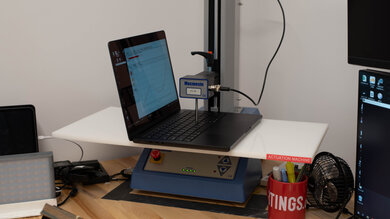
Since 2021, we've tested dozens of laptops every year. We buy our laptops to avoid bias and, following a rigorous methodology, test nearly every part of the laptop so we can deliver results you can rely on. We use a wide range of equipment to perform our tests, including a colorimeter, a Mecmesin MultiTest-i System Test Stand, and various performance benchmarking suites.
Want to know more? Check out our How We Test Laptops article, where we give you a broader overview of our review process, from the moment we purchase the product to the final review.
-
Best 13-14 Inch Laptop
 General ProductivityMultimediaGamingWorkstationBuild Quality:Brightness:Typing Quality:Touchpad:Webcam & Microphone:Ports:See all our test resultsBattery Life (Web Browsing):hrs
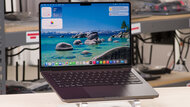
The best 13-14 inch laptop we've tested is the Apple MacBook Pro 14 (M5, 2025), a premium 14-inch model designed for general productivity as well as more demanding workloads like programming, video editing, and local AI tasks. It's great for taking around with you, as it sports all-day battery life and an exceptionally well-built aluminum chassis that weighs only 3.5 lbs, impressive for something with this kind of processing power and capabilities. It has a sharp and vibrant 120Hz Mini LED display, a fantastic haptic touchpad, and some of the best speakers on the market. It even has a wide port selection for peripherals and external displays, including three USB-C/Thunderbolt 4 ports, an HDMI 2.1 port, a headphone jack, and a full-size SD card reader. It can drive up to two external displays, making it a great choice if you regularly work docked at a desk, and you can get an optional nano-texture finish for the display that can further cut down on glare, which is helpful if you work in very bright spaces or occasionally outside.
The only major drawback is its price, as the base model is already quite expensive, and memory and storage upgrades can drive that price even higher. However, this laptop can be worth the premium if you need its processing power for specialized workloads or want a highly polished overall experience for everyday productivity. Alternatively, if you need a Windows laptop instead, we recommend the Dell XPS 14 (2026) in this price range. It offers similarly premium build quality and a polished overall user experience, along with a wider range of configurations. That said, it performs worse than the MacBook Pro in most demanding creative workloads, particularly under sustained loads.
-
Best Upper Mid-Range 13-14 Inch Laptop
General ProductivityMultimediaGamingWorkstationBuild Quality:Brightness:Typing Quality:Touchpad:Webcam & Microphone:Ports:See all our test resultsBattery Life (Web Browsing):hrsIf your workload doesn't require as much processing power, and you're looking for a less expensive option, we recommend the Apple MacBook Air 13 (M5, 2026). It's much lighter and thinner than the Apple MacBook Pro 14 (M5, 2025) at only 2.6 lbs, but feels just as premium and sturdy. It also provides a similarly excellent user experience, with a tactile keyboard, a haptic touchpad, and the same excellent webcam as the MacBook Pro. Additionally, unlike the top pick, which uses active cooling, the MacBook Air has a fanless design that makes it completely silent, making it ideal for noise-sensitive settings like shared offices or classrooms.
Performance aside, there are a few other trade-offs compared with the MacBook Pro, particularly its port selection and display. You only get two USB-C/Thunderbolt 4 ports alongside the charging port and headphone jack, so you might need a separate dongle or a dock if you want to connect multiple peripherals. Additionally, although the display looks sharp and colorful, it doesn't get nearly as bright as the MacBook Pro's Mini LED display, and it has a lower contrast ratio and lower refresh rate, so blacks can look somewhat gray in dim settings, and motion doesn't appear quite as smooth.
-
Best Mid-Range 13-14 Inch Laptop
General ProductivityMultimediaGamingWorkstationBuild Quality:Brightness:Typing Quality:Touchpad:Webcam & Microphone:Ports:See all our test resultsBattery Life (Web Browsing):hrsFor a mid-range 13-14 inch laptop, we recommend the Dell XPS 13 (2026). It offers a premium Windows experience for less than our top pick, the Apple MacBook Pro 14 (M5, 2025), though it's designed primarily for everyday productivity rather than specialized workloads. We also strongly recommend getting a configuration with 16GB of memory, as the 8GB model we tested can struggle with heavier multitasking in Windows.
This laptop also has a premium, sturdy aluminum chassis but is smaller and considerably lighter than the MacBook Pro, making it exceptionally easy to carry. Its bright 2.5k touchscreen looks sharp and supports refresh rates up to 120Hz, making motion appear smooth. Its battery lasts around 15 hours during light use, comfortably getting through a typical work or school day. Its keyboard is comfortable to type on, though its trackpad doesn't feel as good as our upper mid-range recommendation, the Apple MacBook Air 13 (M5, 2026)'s. Its webcam is also somewhat underwhelming, which may matter if you frequently use your laptop for remote meetings. The MacBook Air provides more processing power and runs silently thanks to its fanless design. However, the Dell is lighter and has a smoother 120Hz touchscreen, making it a better fit if you prefer Windows or value touch input.
The main trade-off is performance. While it's great for web browsing, word processing, and general multitasking, it isn't suitable for demanding workloads like 3D rendering and complex simulations. Port selection is also very limited, with only two USB-C ports and no headphone jack, so you'll likely need an adapter or dock if you use many peripherals.
-
Best Budget 13-14 Inch Laptop
General ProductivityMultimediaGamingWorkstationBuild Quality:Brightness:Typing Quality:Touchpad:Webcam & Microphone:Ports:See all our test resultsBattery Life (Web Browsing):hrsFor a budget option, we strongly recommend the Apple MacBook Neo (A18 Pro, 2026). It offers the same exceptional build quality as our more expensive recommendations on this list, though it doesn't feel quite as premium as our top pick, the Apple MacBook Pro 14 (M5, 2025). Its battery lasts through a typical day of light work, and its performance is more than suitable for web browsing and productivity apps. It also boasts a sharp, bright display, a fairly large touchpad, good speakers, and an excellent webcam for a model of this size. It easily handles everyday tasks like working in word processors or spreadsheets, browsing with multiple tabs, giving presentations, or video conferencing. However, it isn't suitable for more demanding workloads like editing high-resolution video, 3D work, or simulations.
As far as trade-offs, the Neo is limited to 8GB of non-upgradeable memory, but we should note that this amount is much less restrictive in macOS than it is in Windows 11, and it still feels very smooth and responsive during everyday use. Compared to the more expensive recommendations above, the MacBook Neo also has slightly shorter battery life, though it remains impressive and should last through a typical day. The Neo also lacks a backlit keyboard, which can make the key legends difficult to read in darker environments.
-
Best Cheap 13-14 Inch Laptop
General ProductivityMultimediaGamingWorkstationBuild Quality:Brightness:Typing Quality:Touchpad:Webcam & Microphone:Ports:See all our test resultsBattery Life (Web Browsing):hrsIf you're working with a tighter budget and need a Windows laptop, we recommend the HP OmniBook 3 14 (2025). This 14-inch model is available in many substantially different configurations and is best understood as a family of laptops, which can make it confusing to shop for. At this price point, we tested and recommend an entry-level version with an AMD Ryzen 5 40 processor and 8GB of memory. While we typically recommend at least 16GB of memory for a Windows laptop, the tested configuration still provides a workable experience for very light, single-purpose use. However, you'll need to limit the number of browser tabs and applications you have open to avoid significant slowdowns.
Its battery lasts around 11 hours during light use and should get most people through a typical day. It also has a comfortable keyboard, a responsive touchpad, a solid webcam, and a wider port selection than our somewhat more expensive budget pick, the Apple MacBook Neo (A18 Pro, 2026), including two USB-A ports, two USB-C ports, an HDMI 2.0 port, and a headphone jack. This makes it easier to connect common peripherals or an external display without an adapter or dock. Unfortunately, its display is fairly dim and has a narrow color gamut. The Apple MacBook Neo above is also significantly faster and provides much better build quality, a better display and speakers, and a more polished user experience overall. As a result, we only recommend the OmniBook 3 14 if you need Windows or can't stretch your budget to the Neo.
-
Best 2-in-1 13-14 Inch Laptop
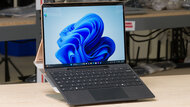
General ProductivityMultimediaGamingWorkstationBuild Quality:Brightness:Typing Quality:Touchpad:Webcam & Microphone:Ports:See all our test resultsBattery Life (Web Browsing):hrsIf you need a 2-in-1 laptop, we recommend the Microsoft Surface Pro 13 12th Edition (2026). Unlike conventional convertibles with 360-degree hinges, the Surface is a tablet that supports an optional detachable keyboard, making it much easier to use as a standalone tablet. Its built-in kickstand provides a wide range of viewing angles, and the touchscreen supports pen input for taking handwritten notes or drawing. The tablet itself is quite light, although the keyboard adds some weight and bulk when attached. Its display is bright and sharp, and its tall 3:2 aspect ratio provides plenty of vertical space for productivity. It also has a 120Hz refresh rate that makes motion look smooth.
You can choose between an LCD and an OLED panel, with the OLED option delivering deeper blacks for a better viewing experience in dark rooms. Its Snapdragon processor options can easily handle everyday productivity and multitasking, though their ARM architecture can cause compatibility issues with some applications and peripherals. We recommend checking that any specialized software you regularly use works properly before buying. You can configure the Surface with up to 64GB of memory, providing additional headroom for heavy multitasking and memory-intensive applications, though current memory prices make these higher-capacity configurations especially expensive.
As for downsides, Microsoft sells the keyboard and stylus separately, substantially increasing the total price. The kickstand design also doesn't feel as comfortable or stable on your lap as a conventional laptop. Lastly, for peripheral connectivity, you're limited to two USB-C/USB4 ports, and there's no headphone jack, so you may need a dock or adapter if you regularly connect several devices.







Notable Mentions
-
Lenovo ThinkPad X1 Carbon Gen 14 Aura Edition (2026):
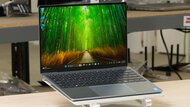
The Lenovo ThinkPad X1 Carbon Gen 14 Aura Edition (2026) is a great alternative to the Dell XPS 13 (2026) if you need a slightly larger display, a much wider port selection, and more powerful configuration options. However, despite being quite lightweight, it has a noticeably larger footprint, and some configurations are considerably more expensive than the Dell.
See our review
Recent Updates
Sep 14, 2026:
We've overhauled this article with a new category structure and an entirely new set of picks to better reflect the current 13- and 14-inch laptop market. Several of our previous recommendations are no longer widely available, so we've replaced them with newer models that span a wider range of budgets and usages.
Jun 03, 2025:
We've replaced the HP OmniBook Ultra 14 (2024) with the Lenovo Yoga 9i 2-in-1 Aura Edition (2025) because the Yoga has a longer battery life and a wider port selection. We've also removed the Lenovo Chromebook Duet 5 (2021) from the Notable Mentions and replaced it with the Microsoft Surface Pro 11th Edition (2024) because the Surface is a better device overall.
Apr 04, 2025:
Replaced the Apple MacBook Air 13 (2024) with the Apple MacBook Air 13 (M4, 2025) because the M3 MacBook Air was discontinued. Removed the Apple MacBook Air 13 (2022) from the Notable Mentions because it's no longer available.
Dec 17, 2024:
Replaced the Apple MacBook Pro 14 (M3, 2023) with the Apple MacBook Pro 14 (2024) since the M3 model was discontinued. Replaced the HP Pavilion Aero 13 (2024) with the Acer Swift Go 14 (2024) because the Acer has better performance and provides a superior user experience overall. Removed the Lenovo ThinkPad X1 Carbon Gen 11 (2023) and the Lenovo Yoga 6 13 (2023), as better options exist. Added the Apple MacBook Air 13 (2022) and the Lenovo Yoga 7 2-in-1 14 (2024) as Notable Mentions.
Oct 24, 2024:
Removed the Framework Laptop 13 (2023) because there are better options. Added the Acer Chromebook Plus Spin 714 (2024) as a Notable Mention. Small text changes to add the Microsoft Surface Pro 11th Edition (2024) as an alternative to the HP Spectre x360 14 (2024).
All Reviews
Our recommendations above are what we think are currently the best 13-inch laptops and the best 14-inch laptops you can get. We factor in the price (a cheaper laptop wins over a pricier one if the difference isn't worth it), feedback from our visitors, and availability (no laptops that are difficult to find or almost out of stock everywhere).
If you prefer to make your own decision, here's a list of all of our 13- and 14-inch laptop reviews, sorted by price from low to high. Keep in mind that most laptops are available in various configurations, and the table only shows the results of the model we tested, so it's best to see the full review for information about other variants.