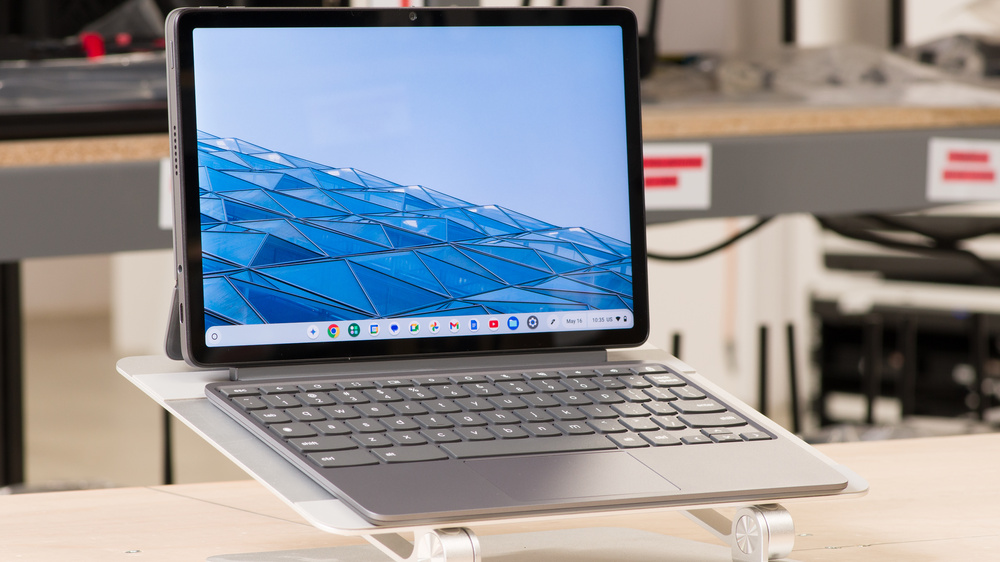
The Lenovo Chromebook Duet Gen 9 11 (2024) is a budget ChromeOS tablet with a detachable keyboard and a newer version of the Lenovo Chromebook Duet 3 (2022). While it's the same size as its predecessor at 10.95 inches, the Gen 9 model has a slightly narrower 16:10 IPS display with a resolution of 1920 x 1200. It's only available with a MediaTek Kompanio 838 SoC paired with up to 8GB of RAM and 128GB of eMMC storage. The device comes with a folio keyboard cover that has a built-in kickstand, and depending on the region and retailer, you may also get a Lenovo USI stylus included in the box. Ports comprise two USB-Cs and a 3.5 mm headphone jack.
See our unit's specifications and the available configuration options in the Differences Between Variants section.
Our Verdict
The Lenovo Chromebook Duet 11 is a decent laptop for younger students. It doesn't have a lot of processing power, and because many third-party programs don't run on ChromeOS, you must ensure you can access your schoolwork via a web browser or Android app. As for older high school or college students, you may get by if your workload is also mostly web-based and extremely light; just know that its small 10.95-inch screen doesn't give you a lot of space to work, and its compact keyboard can be uncomfortable to type on for long periods. Its small size makes it very comfortable to use as a tablet, though, and thanks to pen input support, you can easily take handwritten notes or draw when needed. The battery lasts around 8 to 9 hours in light use, so you may need to plug it in to get through a typical day, depending on your workload.
Easy to carry.
Versatile form factor.
Pen input support.
Excellent 1080p webcam.
Battery lasts only 8-9 hours in light uses.
Small screen.
Low-power SoC can only handle light tasks.
Limited port selection.
The Lenovo Chromebook Duet 11 isn't designed for gaming. Its low-power SoC can't handle demanding tasks, and most popular AAA games don't run on ChromeOS. Google Play Store titles will likely run just fine, though you may come across some that behave unexpectedly since they're primarily mobile games made for Android smartphones and tablets. Unfortunately, the display is limited to a 60Hz refresh rate, and its response time is quite slow, resulting in a blurry image with visible ghosting in fast-moving scenes.
Low-power SoC can only handle light tasks.
60Hz display with slow response time.
Most AAA games don't run on ChromeOS.
Can only get up to 8GB of RAM and 128GB of storage.
The Lenovo Chromebook Duet 11 is decent for media consumption. It's very easy to carry thanks to its compact size, and its battery lasts well over seven hours of local video playback, plenty of time to binge-watch your favorite shows. Plus, since it's a tablet with a detachable keyboard, you can take the keyboard off to save space, which is handy in tight spaces like on an airplane or bus. The display looks sharp and gets bright enough for use in most indoor settings; however, its glossy finish doesn't handle reflections all that well, and its low contrast makes blacks look gray in dim settings. As for the speakers, they get decently loud but have very little bass.
Easy to carry.
Battery lasts around 7 hours of local video playback on a full charge.
Sharp, colorful screen.
Speakers get decently loud.
Blacks look gray in dim settings.
Speakers lack bass.
Glossy display struggles with bright reflections.
The Lenovo Chromebook Duet 11 isn't designed for workstation use. Its low-power SoC isn't powerful enough to handle demanding workloads, and you can only get up to 8GB of memory and 128GB of storage. Plus, most professional apps don't run on ChromeOS. You only get two USB-C ports with meager data transfer speeds of up to 5Gbps, which isn't ideal if you need to transfer large files regularly.
Low-power SoC can only handle light tasks.
Limited port selection.
Most professional apps lack ChromeOS support.
Can only get up to 8GB of RAM and 128GB of storage.
The Lenovo Chromebook Duet 11 is only suitable for business use if you have an extremely light workload you can access via a Chrome browser or Android/Linux app, so those needing to run third-party Windows/macOS applications should look elsewhere. If you can make it work on the software side, know that this is a pretty small device with a 10.95-inch screen, which means you won't have much screen real estate to multitask, and the keyboard can be uncomfortable to type on for long periods. The battery lasts around 8 to 9 hours, so depending on your use, you may need to plug it in for a quick charge to get through a typical workday.
Easy to carry.
Versatile form factor.
Pen input support.
Excellent 1080p webcam.
Battery lasts only 8-9 hours in light uses.
Small screen.
Low-power SoC can only handle light tasks.
Limited port selection.
Check Price
Differences Between Sizes And Variants
We tested the Lenovo Chromebook Duet 11 (83HH0001US) with a MediaTek Kompanio 838 SoC, 8GB of RAM, and 128GB of storage. Only the memory and storage are configurable; see below for the available options.
SCREEN
- 10.95" IPS 1920 x 1200 60Hz (glossy, touch and pen input support, 72%NTSC, 400 cd/m²)
SoC
- MediaTek Kompanio 838 (8 cores/8 threads, up to 2.60GHz, integrated ARM Mali-G57 MC3 GPU)
MEMORY
- 4GB LP-DDR4x 3733MHz
- 8GB LP-DDR4x 3733MHz
STORAGE
- 64GB eMMC 5.1
- 128GB eMMC 5.1
COLOR
- Luna Gray
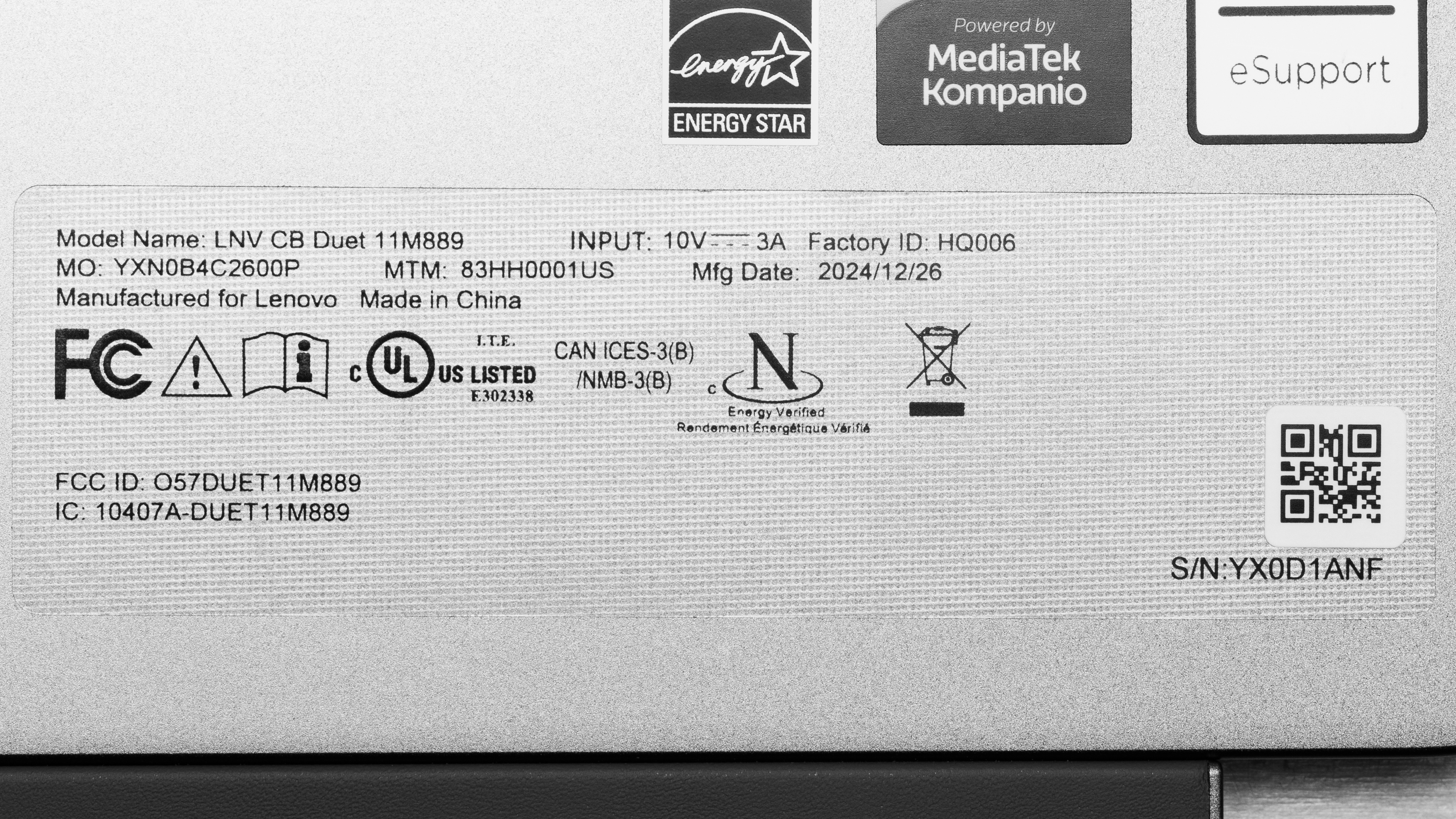
See our unit's label.
Popular Laptop Comparisons
While we reviewed this device as a laptop, it's important to understand that the Lenovo Duet 11 Chromebook is primarily a media consumption tablet with a rudimentary detachable keyboard. You can get some light work done, like responding to emails or browsing the web, but media consumption is where this 2-in-1 shines, largely thanks to the quality of its IPS display, which is a step above what you would normally find in the same price range. Compared to its predecessor, the Lenovo Chromebook Duet 3 (2022), the Gen 9 is a fairly minor upgrade with a slightly more comfortable keyboard and the addition of a 3.5 mm headphone jack. There's also a small improvement in CPU performance, though the battery life takes a massive step back, lasting only around 8 to 9 hours in light uses.
For more options, check out our recommendations for the best Chromebooks, the best 2-in-1 laptops, and the best laptops for college.
The Lenovo Chromebook Duet Gen 9 11 (2024) and the Lenovo Chromebook Duet 5 (2021) are very similar, as they're both 2-in-1 tablets with a detachable keyboard. The main difference is that the Duet 5 is a slightly higher-end model with a larger, nicer 13.3-inch OLED screen. Working on the Duet 5 feels more comfortable because of the larger display, but remember it has the same limitations when it comes to app compatibility since both devices run Chrome OS.
The Lenovo Chromebook Duet Gen 9 11 (2024) is the successor to the Lenovo Chromebook Duet 3 (2022). The newer Gen 9 model is a relatively minor upgrade, sporting a brighter 16:10 display and slightly better performance. However, its battery life takes a massive hit, lasting only 8 to 9 hours compared to the Duet 3's nearly 14 hours.
While the Lenovo Chromebook Duet Gen 9 11 (2024) and the ASUS Chromebook Vibe CX34 Flip (2023) are both 2-in-1 Chrome OS devices, the former is a tablet with a detachable keyboard, while the latter is a clamshell model with 360-degree hinges. The Lenovo is a better choice if you primarily use the device as a media consumption tablet because you can detach the keyboard to make the device easier to hold. However, the ASUS is more ideal for productivity because its larger screen, more spacious keyboard, and larger touchpad make it feel much more comfortable to work on. You also get more ports and better performance on the ASUS.
The Lenovo Chromebook Duet Gen 9 11 (2024) and the Acer Chromebook Plus 514 (2023) are both budget Chrome OS devices. However, the Duet Gen 9 is a tablet with a detachable keyboard, while the 514 is a more traditional clamshell model. If you mostly use the device as a media consumption device, the Duet is the better choice because it has a much nicer screen, and the ability to detach the keyboard comes in handy when you don't have a lot of desk space. The 514 has a better keyboard and touchpad, making it more pleasant to work on. Its 14-inch display also gives you more screen real estate to multitask, but the quality of the display isn't nearly as good as that of the Duet.
Test Results
The Lenovo Chromebook Duet Gen 9 is only available in the Luna Gray colorway. See the back of the device without the folio's back cover and the bottom of the folio cover.
The Lenovo Chromebook Duet 11 feels well-built, at least when it comes to the tablet itself, which sports a sturdy aluminum chassis. The folio keyboard cover, on the other hand, feels flimsier, almost cheap, as it's primarily plastic with a metallic finish on the keyboard deck. A potential point of weakness is the leather-like extension housing the keyboard's connector pins, which feels like it could get damaged pretty easily. That said, the magnetically attached folio keyboard cover does help protect the device from scratches during transport.
This tablet doesn't have a built-in kickstand like the Microsoft's Surface Pros; instead, the kickstand is part of the magnetically attached, removable folio cover. The kickstand works in landscape and portrait mode, and it feels surprisingly sturdy; just remember that you can't set the tablet up at 90 degrees or less because it would simply tip over and slam shut.
The posted thickness measurement doesn't include the pen. The thickness increases to 0.96 inches (2.43 cm) with the pen attached to the back.
Like smartphones and other similar tablets, accessing the internals is very difficult, as you would need to melt the adhesive holding the screen and pry it open. There's nothing user-replaceable anyway since everything is soldered.
See the hardware maintenance manual here.
- 30W power adapter (45W in some regions)
- USB-C to USB-C charging cable
- Lenovo USI Pen 2
- Documentation
Not shown: Folio keyboard and back cover with built-in kickstand. These pieces come with the device. See photo here.
While a FHD+ resolution isn't particularly impressive, it looks pretty sharp on the Lenovo Chromebook Duet Gen 9's relatively small 10.9-inch screen, with a pixel density close to that of an Apple MacBook Air 13 (M4, 2025). Its 16:10 aspect ratio is great for productivity, as the increased vertical space in landscape mode (compared to a 16:9 display) lets you see more information at once when reading a document. However, you may find 16:10 a little too narrow when using the device as a tablet in portrait mode, especially if you're more accustomed to the Apple iPad's 4:3 or Microsoft Surface Pro's 3:2 aspect ratios.
The display's contrast ratio is very good, measuring a little higher than the typical 1000-1500:1 contrast of most IPS panels. That said, it's still low compared to other display technologies like OLEDs and Mini LEDs. This contrast level makes blacks look gray in dim settings.
The main display gets bright enough for use in most indoor settings. However, visibility may still be an issue in well-lit environments because the screen's glossy finish struggles with bright reflections.
The display's accuracy is bad out of the box. The color temperature is quite cool, impacting the white balance accuracy and giving the entire image a bluish tint. On the upside, most color inaccuracies are fairly minor and hard to spot. The gamma is too high throughout, making most scenes look too dark.
The Lenovo Duet 11 Chromebook's IPS display is essentially an sRGB panel with only full coverage of the commonly used sRGB color space, which is perfectly fine for general media consumption. You can do some color-critical work like photo editing if the material is also in sRGB, but keep in mind that you can't calibrate the display like you can on a Windows laptop or MacBook, so some colors might not look exactly how you would like them.
The Lenovo Chromebook Duet Gen 9's folio keyboard provides a decent typing experience. The keys have a fair amount of travel and are easy to actuate; however, they aren't the most stable keys (especially the larger ones) and feel rather mushy. This is a pretty small keyboard with a tight layout, which is fine if you only use it to write short documents or emails here and there but not ideal for long typing sessions, especially if you have large hands.
The touchpad is passable. While it tracks movements and gestures well, it's quite small, making it somewhat uncomfortable and annoying to use for long periods. You can click pretty far up on the touchpad; it just takes a lot more force to press down near the top. The actuation feels tactile but a tad clunky.
This tablet's side-firing speakers (in landscape mode) sound pretty basic: vocals come across clearly, but there's very little instrument separation and almost no bass whatsoever. Unfortunately, while they get decently loud, they exhibit a fair amount of compression at higher volume levels that results in a more tinny sound.
The Lenovo Duet 11 Chromebook has an excellent webcam. The image looks fairly sharp and detailed, though some smaller elements look blurry. Colors look slightly oversaturated, and the exposure is a smidge too high. Voices sound relatively clear over the microphone, with only a small amount of static noise in the background. The privacy cover is only a physical barrier. It doesn't disable the camera at the software level, meaning the device can still record audio when enabled.
There's a second 8MP camera on the back of the device you can use to take pictures or 'scan' documents. Here's a sample taken with that camera.
The Lenovo Duet 11 Chromebook has a very limited port selection. With only two USB-Cs, you'll likely need a dongle or a dock if you want to plug in multiple peripherals, especially if you want to charge the device at the same time. Both USB-Cs support USB 3.2 Gen 1 data transfer speeds of up to 5Gbps, DisplayPort 1.4, and Power Delivery 3.0.
The wireless adapter is a MediaTek Wi-Fi 6 MT7921.
The Lenovo Chromebook Duet is only available with a MediaTek Kompanio 838, a mobile SoC with two A78 cores running at 2.6GHz and six A55 cores running at 2.0GHz. This low-power processor can only handle relatively light tasks, like web browsing, text processing, and video playback. You can play mobile games from the Google Play Store, but some titles might not run properly, as they're mobile games designed for Android smartphones and tablets.
See more information about the Kompanio 838 on MediaTek's site.
The MediaTek Kompanio 838's Mali-G57 MC3 is a fairly weak GPU designed for simple tasks, so don't expect to do anything remotely intensive.
You can get this laptop with 4GB or 8GB of RAM. 8GB is best because 4GB runs out very quickly, significantly impacting performance. The memory isn't user-replaceable. This laptop uses an LP-DDR4x 4266MHz memory module, but it runs at 3733MHz due to the SoC's limitations.
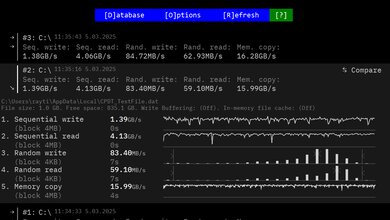
You can get this laptop with 64GB or 128GB of eMMC storage. The storage isn't user-replaceable.
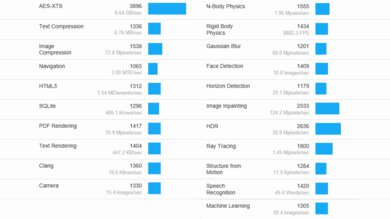
The Lenovo Chromebook Duet scores poorly in the Geekbench 5 benchmarks. This is fairly typical for a low-power processor designed specifically for Chromebooks, such as the MediaTek Kompanio 838. The system still feels pretty responsive because ChromeOS is a lightweight operating system that doesn't require a lot of horsepower to run; just don't expect to do anything CPU or GPU intensive.
Cinebench R23 doesn't support ChromeOS.
Blender doesn't run on this Chromebook.
The Lenovo Duet 11 Chromebook's Basemark GPU score is typical of most Chromebooks with a low-power SoC and in the same ballpark as many premium Android smartphones. This performance level is good enough for most games from the Google Play Store. Game performance will largely depend on how well the (Google Play Store) Android version of the game runs on a ChromeOS device with a tablet-size screen. You may also encounter games with no keyboard/mouse support or bugs like UI glitches when trying to resize the window.
Borderlands 3 doesn't run on ChromeOS.
Civilization VI doesn't run on ChromeOS.
Counter-Strike 2 doesn't run on ChromeOS.
Shadow of the Tomb Raider doesn't run on ChromeOS.
Heat isn't a problem on the Lenovo Duet 11 Chromebook since all the components are on the screen side, leaving the keyboard relatively cool to the touch. The screen and the back of the tablet are only mildly warm under load, with the former reaching 34.8 °C (94.64 °F) and the latter reaching 32.5 °C (90.5 °F), so you shouldn't experience any discomfort when holding the tablet (without the folio back cover) or when using touch or pen input. You won't hear any fan noise since this is a fanless device.
We can't test the performance over time because UNIGINE Heaven and Cinebench R23 aren't compatible with ChromeOS. Like most thin and light laptops, there's likely some CPU and GPU throttling. The performance loss isn't noticeable if you only perform light tasks like web browsing and video playback; it's only noticeable when you push the system to near maximum capacity, like when gaming.
This Chromebook runs on the 64-bit version of ChromeOS. Every Chromebook has an 'expiration date' at which it stops receiving software updates, and according to Google's official document, the Duet 11's end-of-life is June 2034. Google may extend this date as they have for other Chromebooks; it's best to check their official document for any changes.
The Lenovo Duet 11 Chromebook supports pen input. However, you may have to purchase the pen separately, depending on the region and retailer. Models that include the pen come with a Lenovo USI Pen 2 that uses a replaceable AAAA battery. If you buy the pen separately, you can also get the Lenovo USI Pen 2 with a built-in rechargeable battery. Both support 4096 levels of pressure sensitivity and tilt. The groove and magnets on the back of the device hold the stylus securely during transport. See more information about the included stylus on Lenovo's site.
The inking experience is good; drawn lines appear straight with little jitter, and the latency is pretty low for a device with a 60Hz display. It feels very much like writing or drawing on glass, though, so you'll want to apply a third-party screen protector if you prefer a more paper-like feel.