Anker High Precision Gaming Mouse  Mouse Review

Reviewed Jan 06, 2020 at 08:41am
Test bench update Oct 21, 2020 at 03:11pm
Tested using Methodology v1.0 
Anker High Precision Gaming Mouse
6.7
Office/Multimedia 
7.7
Video Games (FPS) 
7.5
Video Games (MMO) 
7.3
Ultra-Light Gaming 
4.8
Travel 
 0
The Anker High Precision Gaming Mouse is a good budget gaming mouse that performs fairly well for its price point. It has a very wide body and offers both a thumb and a pinky rest. It features a unique 5-button layout in an arch on the left side of the mouse. Although this isn't common, it works surprisingly well and needs minimal thumb movement. Its click latency is very low, but unfortunately, its cable is quite stiff and due to its large body, it may not be well-suited for people with small hands.

Our Verdict

6.7
Office/Multimedia 

Decent for the office. This mouse has a good ergonomic design with a thumb and pinky rest, making it comfortable for a palm and claw grip. It's wired-only, so some people may not like its stiff cable and would prefer going with a wireless option.

Pros
  • Well-built design.
  • Low wired click latency.
  • Customizable performance settings.
Cons
  • Stiff cable.
  • Awkward lighting combination.
7.7
Video Games (FPS) 

Very good for FPS games. Its click latency is low and responsive, but it isn't the most lightweight mouse, even when taking out all the available weights. The mouse is very well-built and feels comfortable when using a claw or palm grip, although it's a bit big for small hands.

Pros
  • Well-built design.
  • Low wired click latency.
  • Customizable performance settings.
Cons
  • Stiff cable.
  • Awkward lighting combination.
7.5
Video Games (MMO) 

Great for MMO games. It has a few programmable buttons, although not as many as some dedicated MMO mice with side panels filled with buttons. On the upside, it's well built and its design is comfortable to use for long gaming sessions.

Pros
  • Well-built design.
  • Low wired click latency.
  • Customizable performance settings.
Cons
  • Stiff cable.
  • Awkward lighting combination.
7.3
Ultra-Light Gaming 

Decent for ultra-light gaming. Although its click latency is very low and responsive, there are lighter options when it comes to ultra-light gaming. You can easily reduce this mouse's weight, but nowhere near close to some other mice.

Pros
  • Well-built design.
  • Low wired click latency.
  • Customizable performance settings.
Cons
  • Stiff cable.
  • Awkward lighting combination.
4.8
Travel 

Not designed for travel. This mouse is wired-only and has a wide body. It won't be suitable to use in small places like on a plane.

Pros
  • Well-built design.
  • Low wired click latency.
  • Customizable performance settings.
Cons
  • Stiff cable.
  • Awkward lighting combination.
  • 6.7
    Office/Multimedia
  • 7.7
    Video Games (FPS)
  • 7.5
    Video Games (MMO)
  • 7.3
    Ultra-Light Gaming
  • 4.8
    Travel
  • Changelog

    1.  Updated Oct 21, 2020: Converted to Test Bench 1.0.
    2.  Updated Jan 06, 2020: Review published.
    3.  Updated Jan 01, 2020: Our testers have started testing this product.
    4.  Updated Dec 30, 2019: The product has arrived in our lab, and our testers will start evaluating it soon.

    Check Price

    High Precision Gaming Mouse
    SEE PRICE
    Amazon.com
    High Precision Gaming Mouse
    SEE PRICE
    Walmart.com
    High Precision Gaming Mouse
    B&H
    High Precision Gaming Mouse
    BestBuy.com
    High Precision Gaming Mouse
    Anker

    Popular Mouse Comparisons

    The Anker High Precision Gaming Mouse is a good mouse, although it's a bit big for some people. It has a very low click latency, which is surprisingly good for a budget, affordable gaming mouse. It stands out by its unique 5-button arch layout on the left side of its body. See our recommendations for the best mice, the best gaming mice, and the best wireless gaming mice.

    Anker Gaming Mouse

    The Anker High Precision Gaming Mouse is better than the Anker Gaming Mouse. The High Precision offers more side buttons, feels better built, and has a more comfortable grip because of the thumb and pinky rests. Both are good gaming mice at an affordable price.

    Havit HV-MS760

    The Anker High Precision Gaming Mouse is better than the Havit HV-MS760. The Havit has an unstable sensor that's significantly more inconsistent than the Anker's sensor. The Havit does offer side panel options that you can easily swap out depending on the game you play.

    Redragon M908

    The Anker High Precision Gaming Mouse is slightly different than the Redragon M908. The Redragon has many more side buttons, which is better for MMO games. On the other hand, the Anker mouse has a better feel to it and is noticeably less wide.

    Dell Alienware AW610M

    The Anker High Precision Gaming Mouse is better than the Dell Alienware AW610M. The Anker mouse offers more programmable buttons and is also lighter. However, you can use the Alienware wirelessly while the Anker is wired-only. There are also more customization options available in the Anker software.

    Vegcoo C18

    The Anker High Precision Gaming Mouse is noticeably better than the Vegcoo C18. The Anker mouse has better performance, is well-built, and feels better in hand. Although the Vegcoo is wireless, it has poor performance and unreliable connection. The Anker mouse is a better option.

    VicTsing Wireless Gaming Mouse

    The Anker High Precision Gaming Mouse is a significantly better gaming mouse than the VicTsing Wireless Gaming Mouse. The Anker has programmable buttons, while the VicTsing has no software to customize anything, including the buttons. The Anker also feels much better built, is more comfortable for larger hands, and has a wide, customizable CPI range and higher polling rate. On the other hand, the VicTsing is wireless, while the Anker is wired.

    Test Results

    perceptual testing image
    Sort:
    RATINGS
    Category:
    All
    Design
    Style
    Type
    Standard
    Lighting ColorRGB

    The Anker High Precision Gaming Mouse, like its name suggests, has a very gaming-oriented look. It has a matte finish around the body, with a strip of glossy plastic on each side of the mouse. It also has RGB lighting on the mouse wheel and on the manufacturer logo, which is on its back. The four CPI lights are orange by default, just like the side buttons, which looks weird since the intensity of the lights are different, and it doesn't fit the RGB lighting.

    Shape
    Length4.8" (123 mm)
    Height1.7" (42 mm)
    Width3.2" (81 mm)
    Grip Width
    65 mm
    5.4
    Portability
    Volume
    25.63 in³ (420 cm³)
    Cable/Receiver Storing
    No

    Like most gaming mice, the Anker High Precision Gaming Mouse isn't the most portable option if you're looking for a mouse to bring around with you often. On the other hand, this shouldn't be an issue if you're looking for a mouse for your home desk setup.

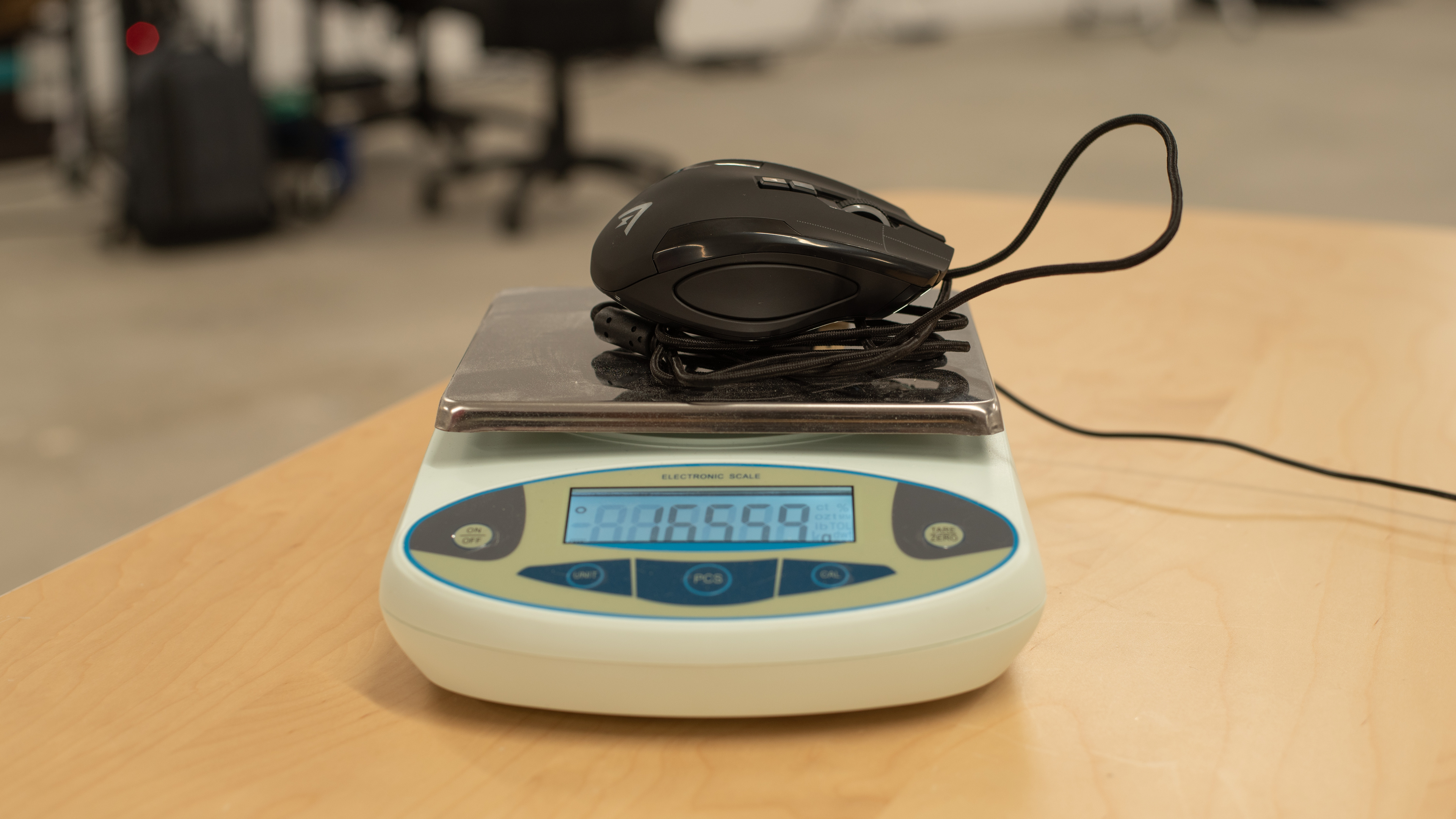
    Weight
    Maximum Weight With Wire
    166 g
    Maximum Weight Without Wire
    131 g
    Minimum Weight Without Wire
    100 g
    Weight Distribution
    Centered
    Extra Weights
    Yes

    You can make the Anker High Precision Gaming Mouse a bit lighter by taking off six 4g weights. However, it's still fairly heavy and big, which won't be ideal for ultra-light gaming.

    7.5
    Build Quality

    While being relatively cheap and affordable, the build quality of the Anker High Precision Gaming Mouse is surprisingly very good. The clicks of the buttons feel satisfying and the mouse feels sturdy. There's a bit of wobbling around the weight compartment, but this is probably due to the fact that it's removable. However, the weak link could be the cable connection to the mouse, which feels loose and is prone to wear and tear.

    7.5
    Comfort Of Use
    Right-handed
    Yes
    Left-handed
    No
    Ambidextrous
    No
    Coating
    Matte
    Finger Rest
    Thumb and Pinky

    The ergonomics of this mouse are very good. It has nice curves, with both a thumb and pinky rest. The Anker High Precision Gaming Mouse's shape is slanted to the right, making it comfortable to grip. There are also five side buttons in an arch-form on the left side, which isn't typical of gaming mice, but it actually works very well and doesn't require much thumb movement.

    Palm Grip: Hand Size Recommendation
    Small Hand
    No
    Medium Hand
    Yes
    Large Hand
    Yes
    X.Large Hand
    Yes

    Due to its long design and uncommon side button layout, people with smaller hands might have trouble controlling the mouse fluidly and reaching all buttons. If you have a small hand and you use a palm grip, check out the Logitech G300s.

    Claw Grip: Hand Size Recommendation
    Small Hand
    No
    Medium Hand
    Yes
    Large Hand
    Yes
    X.Large Hand
    Yes

    Same as with the palm grip, people with smaller hands might have a bit of trouble using the Anker High Precision Gaming Mouse and reaching all the buttons.

    Fingertip Grip: Hand Size Recommendation
    Small Hand
    No
    Medium Hand
    No
    Large Hand
    No
    X.Large Hand
    Yes

    Due to its very wide body, the Anker High Precision Gaming Mouse isn't designed for a fingertip grip, although people with very large hands might be able to have a decent control. However, hitting the side buttons might alter your grip over the mouse.

    0.0
    Wireless Versatility
    Bluetooth
    No
    Receiver
    No
    Battery Type
    No Batteries
    Use When Charging
    No
    On/Off Activation
    None
    Receiver Extender
    No
    Battery IndicatorNo

    This mouse is wired-only and can't be used wirelessly.

    6.0
    Cable
    ConnectivityWired
    Cable Length5.8 ft (1.8 m)
    Cable Type
    Braided
    Permanent Kink
    Yes
    Port Type: Mouse End
    No Port
    Port Type: PC End
    USB

    The cable of the Anker High Precision Gaming Mouse is mediocre. It resembles Razer cables, as it's stiff and keeps a lot of kinks from the packing. It creates drag when using it and catches on desk supplies.

    7.0
    Mouse Feet
    Gliding Experience
    Ok
    Material
    PTFE
    Extra Included
    Yes
    In The Box

    Control
    Sensor Specifications
    Sensor Technology
    Optical (LED)
    Sensor Model
    Not Specified
    Works On Glass
    No
    Minimum CPI (DPI)
    200 CPI
    Maximum CPI (DPI)
    10,000 CPI
    CPI (DPI) Adjustment Steps
    100 CPI
    CPI (DPI) Variation
    -4%
    Minimum Lift Off Distance
    1.2 mm
    Maximum Polling Rate
    1000 Hz

    The sensor is a bit lower than the center of the mouse's body. This shouldn't affect performance too much, but some people might take some time to get used to it.

    7.9
    Buttons
    Buttons Activation
    Mechanical
    Total Number Of Buttons
    12
    Number Of Side Buttons
    5
    Number Of Programmable Inputs
    12
    Profile Switching Button
    No
    CPI (DPI) Switching Button
    Yes
    Gesture Support
    No

    All the buttons on the Anker High Precision Gaming Mouse are programmable. This mouse has a unique 5-button layout on the side that feels nice to use. Buttons are clicky and you can save up to six profiles, but can only switch between them inside the software, which is disappointing.

    Mouse Wheel
    Scroll Wheel
    Notched Wheel
    Scroll Wheel Steps
    24 Steps
    Scroll Wheel Tilt
    Yes
    Thumb Wheel
    No
    Thumb Wheel Steps
    No Thumb Wheel

    The scroll wheel of the Anker High Precision Gaming Mouse is decent. It has about average scroll increments that provide good feedback. It also features tilt clicks. If you're interested in a similar gaming mouse with a scroll wheel that has L/R tilt buttons but also unlocks for free scrolling, check out the Logitech G502 Proteus Spectrum. Or, if you're interested in a similar mouse with a scroll wheel that lets you change between a 12 or 24-step incremental mode, check out the Dell Alienware AW510M.

    Noise
    Click Noise
    Loud
    8.0
    Click Latency
    Click Latency: Receiver
    N/A
    Click Latency: Bluetooth
    N/A
    Click Latency: Wired
    14 ms

    The click latency of the Anker High Precision Gaming mouse is very low. Gamers won't notice any delay when clicking and the mouse feels responsive.

    Operating System And Software
    7.8
    Compatible Software Option
    Software NameAnker A7815 Driver
    Software Windows Compatibility
    Yes
    Software macOS Compatibility
    No
    Account Needed
    No
    On-Board Memory
    Yes
    CPI (DPI) Adjustment
    Yes
    Polling Rate Adjustment
    Yes
    Profile Configuration
    Yes
    RGB On/Off
    No

    The Anker A7815 Driver software is pretty good, but a bit awkward to use at times. The CPI adjustments are a bit odd to use, and although it seems like you can type in your desired sensitivity, you have to manually adjust it. You can also edit the scrolling and the double-click speeds. Although you can set the CPI settings to what you want in the software, the mouse features CPI setting engravings on its side, which become inaccurate as soon as you change the CPI. The software also needs to be used to switch between profiles, and isn't available on macOS.

    8.3
    Mouse Compatibility
    Windows CompatibilityFully
    macOS CompatibilityPartially

    The mouse is fully compatible on Windows, but unfortunately, since the side buttons aren't bound to anything and the software is unavailable on macOS, this mouse won't be fully compatible unless you program it on a PC beforehand.