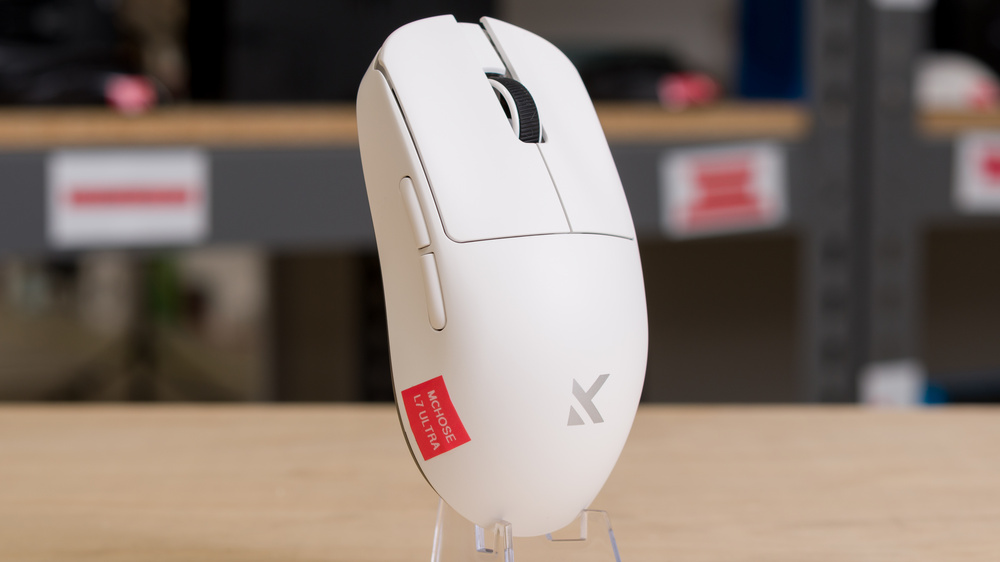
The MCHOSE L7 Ultra is a lightweight wireless gaming mouse positioned as the highest-performing model in their wider L7 series. It has a small, symmetrical shape with relatively flat sides, and a medium-sized hump towards the rear, making it well-suited for a claw or fingertip grip. This mouse uses Omron optical switches and a flagship PixArt PAW3950 sensor. You can also adjust various preferences and performance settings using MCHOSE's web-based software.
Our Verdict
The MCHOSE L7 Ultra is a decent mouse for work, despite being primarily designed as a gaming mouse. It has good overall build quality, despite some minor issues, and it connects wirelessly with either its 2.4GHz receiver or Bluetooth. You can also remap buttons, program macros, and adjust performance settings to optimize battery usage using the web-based or downloadable companion software. Unfortunately, it lacks useful productivity features like a free scrolling mode and L/R scroll wheel inputs.
Connects wirelessly with 2.4GHz receiver or Bluetooth.
Minor build quality issues: some mushy post-travel in the switches, and noticeable flex in the shell when pressed from the top.
Scroll wheel lacks productivity features like free-scrolling and L/R tilt inputs.
The MCHOSE L7 Ultra is outstanding for playing FPS games. It's extremely lightweight, making it easy to move around quickly and accurately. Its small symmetrical shape is well-suited for claw and fingertip grips if you have small or medium-sized hands. Performance-wise, it supports a wired or wireless polling rate of 8000Hz and offers exceptionally low click and sensor latency, ideally suited for competitive play. That said, while the overall build quality is solid, it does suffer from some minor issues, including slightly mushy-feeling post-travel in the switches and a noticeably thin plastic shell that flexes under moderate pressure on the top of the mouse.
Extremely lightweight.
Exceptional raw performance.
Minor build quality issues: some mushy post-travel in the switches, and noticeable flex in the shell when pressed from the top.
The MCHOSE L7 Ultra is good for MMO and MOBA gaming. It has good build quality overall, despite some minor flexibility in the thin plastic shell, and it has exceptionally good raw performance. That said, its major weakness is that it doesn't have nearly as many side buttons as dedicated MMO mice, though you can remap buttons and create macros using the downloadable or web-based configuration software.
Exceptional raw performance.
Minor build quality issues: some mushy post-travel in the switches, and noticeable flex in the shell when pressed from the top.
Fewer additional buttons than dedicated MMO mice.
The MCHOSE L7 Ultra has exceptionally good raw performance. It produces extremely low and consistent click latency and outstanding overall sensor performance, more than suitable for competitive gaming at any level. It also supports a maximum polling rate of 8000Hz both in wired or wireless modes, which is noteworthy as many wireless 8k-capable mice only support 8k wireless.
Extraordinarily low and consistent click latency.
Outstanding sensor performance.
Changelog
-
Updated Jun 05, 2026:
We've added a link to the newly reviewed Keychron G3 in the Mouse Feet section of the review.
-
Updated May 08, 2026:
We've removed notes in the introduction and the Differences Between Variants sections regarding availability since MCHOSE has put this mouse back into production.
- Updated Mar 10, 2026: We've converted this review to Test Bench 1.5.2. This update removes the Delay To Start Of Movement and Delay To End Of Movement measurements from the Sensor Latency test. See our full 1.5.2 changelog for details.
-
Updated Feb 03, 2026:
We've added new information to the Introduction and the Differences Between Variants section to outline a component change MCHOSE has made to the L7 lineup since we published our review, along with the discontinuation of some variants, including the one we tested.
Check Price
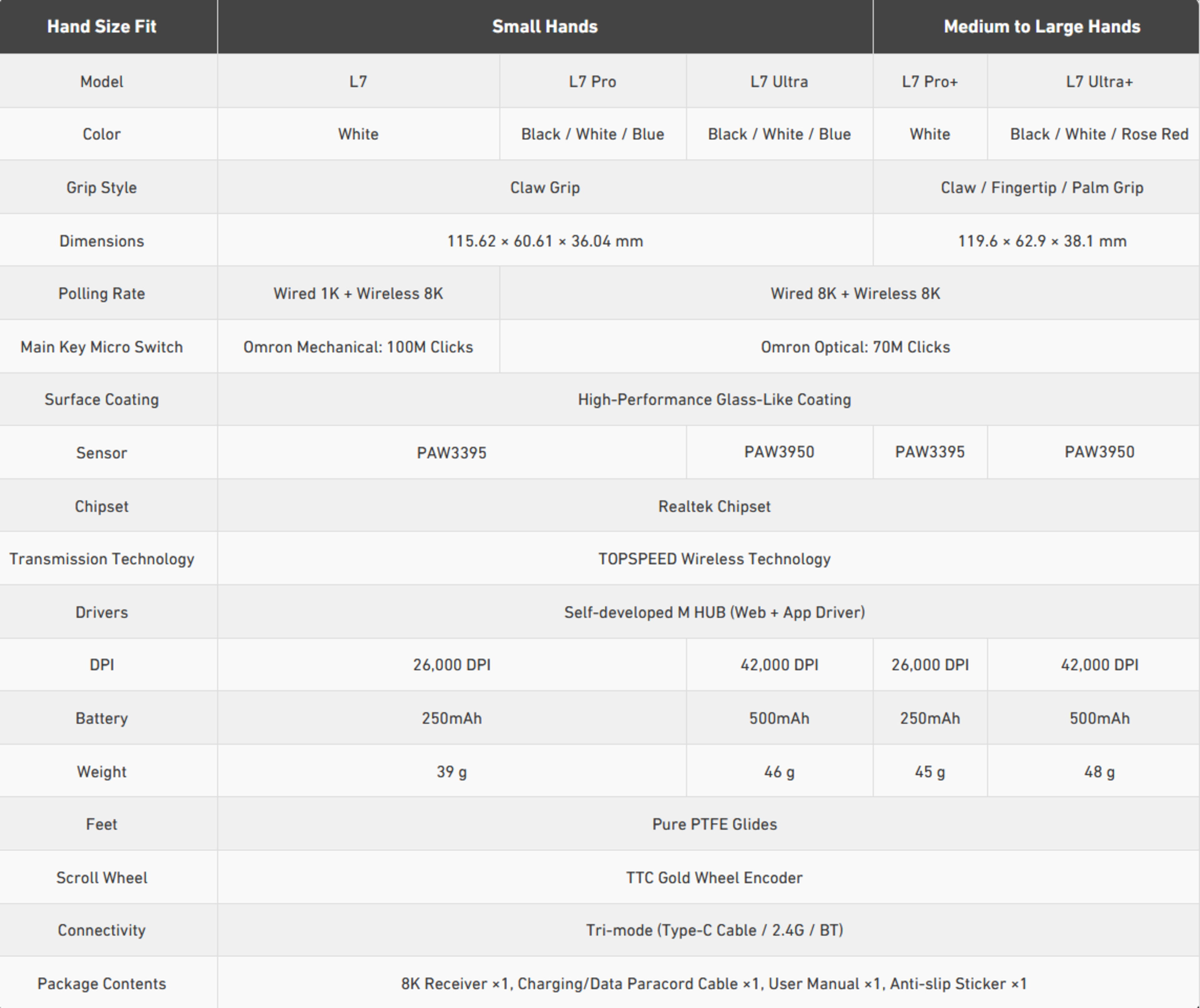
Differences Between Sizes And Variants
The MCHOSE L7 Ultra is part of the broader MCHOSE L7 lineup. The L7 Ultra is positioned as the highest-performing model, featuring the newest sensor and the largest battery capacity. We've also reviewed the MCHOSE L7 Pro separately. The Ultra is available in White, Black, and Blue colorways. We bought the White version. We typically include a photo of the unit label, but this mouse doesn't have one.
There are larger versions of both the L7 Pro and L7 Ultra called the L7 Pro+ and L7 Ultra+, which use the same internals as their smaller counterparts. Aside from their size and weight differences, our reviews of the L7 Pro and L7 Ultra also apply to these larger models. The L7 Ultra+ is also available in a Rose Red colorway that appears to be exclusive to that model.
MCHOSE's website has a table comparing the differences between each model in the L7 series, including dimensions for the larger models.
| Model | Colors | Switches | Sensor | Battery Size | Advertised Weight |
|---|---|---|---|---|---|
| L7 | White | Omron Mechanical | PixArt PAW3395 | 250mAh | 39g (± 2g) |
| L7 Pro | White, Black, Blue | Omron Optical/Kailh Black Green Dot optical switches* | PixArt PAW3395 | 250mAh | 39g (± 2g) |
| L7 Ultra | White, Black, Blue | Omron Optical/Kailh Black Green Dot optical switches* | PixArt PAW3950 | 500mAh | 46g (± 2g) |
* Since we first tested this product, MCHOSE has changed the switch model used in the L7 Pro and L7 Ultra+ models with newer production units using Kailh Black Green Dot optical switches. We'll update the review if we receive reports indicating these switches perform significantly differently from the Omron optical switches we tested.
Popular Mouse Comparisons
The MCHOSE L7 Ultra is a lightweight wireless gaming mouse with a small, symmetrical body and a rearward hump. Its shape is somewhat similar to the Pulsar X2V2 and LAMZU Atlantis Mini 4K, and it's best suited for claw or fingertip grips with medium or smaller-sized hands. As the top-performing model in the MCHOSE L7 series, the L7 Ultra offers exceptional raw performance for its price and slightly edges out the MCHOSE L7 Pro, which we've already reviewed and found impressive in its own right. Ultimately, it's an outstanding budget pick if you're after top-tier performance specs for competitive gaming. However, it falls short in build quality, features lower-grade mouse feet that don't glide as smoothly, and comes with a relatively short 1-year warranty compared to pricier flagships from more established brands like the Razer Viper V3 Pro or Logitech G PRO X SUPERLIGHT 2.
For more recommendations, see our picks for the best FPS mouse, the best claw grip mouse, and the best lightweight mouse.
Both the MCHOSE L7 Ultra and the Scyrox V8 are lightweight, wireless gaming mice with exceptional gaming performance for competitive gaming. The Scyrox has a hump that's a bit higher and more centered. It's generally a versatile shape suitable for all grip types, compared to the MCHOSE which has a smaller hump closer to the rear, which makes it best-suited for a claw or fingertip grip. The Scyrox also has better build quality and mouse feet. Conversely, the MCHOSE has marginally better raw gaming performance and has added Bluetooth connectivity, which the Scyrox doesn't support.
The Pulsar X2 CrazyLight and MCHOSE L7 Ultra are lightweight wireless mice with virtually the same shape. Both perform exceptionally well, but the Pulsar is slightly smaller, with sturdier build quality and higher-grade pure PTFE feet that glide more smoothly on pads and desks. Its main drawback is the open baseplate, which helps reduce weight but leaves the interior exposed to dust and debris. By comparison, the MCHOSE is larger and slightly heavier. Unfortunately, it has lower-quality dyed PTFE feet that glide less smoothly and minor build issues, including slightly mushy primary clicks and some shell flex.
The MCHOSE L7 Pro and the MCHOSE L7 Ultra are lightweight gaming mouse in the same lineup. They share the same size and shape but have some minor hardware and performance differences. The L7 Ultra has a larger batttery capacity and uses a slightly newer PAW3950 sensor which helps contribute to its slightly better raw performance.
The MCHOSE L7 Ultra and the Endgame Gear OP1 8k v2 are gaming mice with very similar symmetrical shapes and exceptionally good click and sensor latency performance. The MCHOSE is a wireless model, while the Endgame Gear is a wired-only model. The Endgame is also noteworthy for its Kailh GX switches, which have a unique single-pole double-throw design that produces slightly lower latency. It also has better build quality and supports hot-swappable switch packs sold separately by Endgame Gear.
Test Results

for pictures & test results


for pictures & test results








for pictures & test results







for videos & test results