Dell Alienware AW610M  Mouse Review

Reviewed Dec 11, 2019 at 08:55am
Tested using Methodology v1.0 
Dell Alienware AW610M
7.4
Office/Multimedia 
7.2
Video Games (FPS) 
7.1
Video Games (MMO) 
5.9
Ultra-Light Gaming 
7.4
Travel 
 0

The Dell Alienware AW610M is a decent gaming mouse. It has a solid, ambidextrous design that feels quite comfortable and should be suitable for all hand sizes when using a palm grip. While it has a good, customizable CPI, unfortunately, it's quite heavy, which may not be ideal for everyone. Its unique wingtip design gives you a slight palm rest which is comfortable, though unfortunately, it means this mouse may be difficult to use with a fingertip grip.

Our Verdict

7.4
Office/Multimedia 

The Dell Alienware AW610M is a good office mouse. Despite being marketed as a gaming mouse, it works best as an office mouse due to its comfortable and ergonomic design. It also feels quite well-built and should be able to withstand constant use. Unfortunately, its unique shape means it isn't recommended if you like to use fingertip grip.

Pros
  • Ergonomic and ambidextrous design.
  • Feels well-built and solid.
  • Adjustable CPI.
  • Can be used wired or wireless.
Cons
  • Software lacks many customization options.
  • Can't be used with fingertip grip except for extra-large hands.
7.2
Video Games (FPS) 

The Dell Alienware AW610M is alright for FPS games. While it has a wide customizable CPI range and a fairly low click latency, unfortunately, it's quite heavy, which may not be great for FPS games. It also may not be the best choice for gamers who prefer fingertip grip, due to its unique wingtip design.

Pros
  • Ergonomic and ambidextrous design.
  • Feels well-built and solid.
  • Adjustable CPI.
  • Can be used wired or wireless.
Cons
  • Software lacks many customization options.
  • Can't be used with fingertip grip except for extra-large hands.
7.1
Video Games (MMO) 

The Dell Alienware AW610M might be alright for MMOs, though there are better mice out there. Unlike dedicated MMO mice, it only has two additional side buttons, though they are both programmable, which is good. Its ambidextrous design should be quite comfortable for most people, though unfortunately, it can't be used with fingertip grip, unless you have very large hands.

Pros
  • Ergonomic and ambidextrous design.
  • Feels well-built and solid.
  • Adjustable CPI.
  • Can be used wired or wireless.
Cons
  • Software lacks many customization options.
  • Can't be used with fingertip grip except for extra-large hands.
5.9
Ultra-Light Gaming 

The Dell Alienware AW610M is quite heavy and not recommended for ultra-light gaming. It's much heavier than mice designed for this, and its weight isn't customizable.

Pros
  • Ergonomic and ambidextrous design.
  • Feels well-built and solid.
  • Adjustable CPI.
  • Can be used wired or wireless.
Cons
  • Software lacks many customization options.
  • Can't be used with fingertip grip except for extra-large hands.
7.4
Travel 

The Dell Alienware AW610M is decent for travel. Even though this mouse is quite bulky, it doesn't require a wire, and its USB receiver can be stored in the bottom of the mouse, making it easy to toss in a larger bag. It also feels quite well-built and should be able to withstand being bumped around in a bag without sustaining damage.

Pros
  • Ergonomic and ambidextrous design.
  • Feels well-built and solid.
  • Adjustable CPI.
  • Can be used wired or wireless.
Cons
  • Software lacks many customization options.
  • Can't be used with fingertip grip except for extra-large hands.
  • 7.4
    Office/Multimedia
  • 7.2
    Video Games (FPS)
  • 7.1
    Video Games (MMO)
  • 5.9
    Ultra-Light Gaming
  • 7.4
    Travel
  • Changelog

    1.  Updated Oct 19, 2020: Converted to Test Bench 1.0.
    2.  Updated Dec 20, 2019: Converted to Test Bench 0.8.1.
    3.  Updated Dec 11, 2019: Review published.

    Check Price

    Dark Side of the Moon
    SEE PRICE
    Amazon.com
    Lunar Light
    SEE PRICE
    Amazon.com

    Popular Mouse Comparisons

    The Dell Alienware AW610M stands out because of its body shape. It has two large wingtips. It's a very big and heavy mouse that's better suited for larger hands. Although it's a gaming mouse, its dedicated software doesn't allow for much customization, which is disappointing. See our recommendations for the best mouse, the best wireless mouse, and the best wireless gaming mouse.

    Dell Alienware AW310M

    The Dell Alienware AW610M shares the same shape as the Dell Alienware AW310M, but the AW610M performs slightly better overall. The AW610M has a rechargeable internal battery and connects either with its charging cable or wirelessly with a USB receiver. Performance-wise, it has a higher maximum CPI and a lower lift-off distance. It also has a switch on the underside that changes the scroll wheel between a 12 and 24-step mode. On the other hand, the AW310M uses an AA battery and only connects wirelessly with its USB receiver. It includes a cable, but it's only a wireless receiver extender. It also has a slightly lower click latency.

    ASUS ROG Chakram

    The ASUS ROG Chakram is a better FPS gaming mouse than the Dell Alienware AW610M, but the Alienware is likely a better option if you have small hands and use a palm grip. The ASUS has smoother-gliding feet, more programmable buttons, and its software lets you set multiple profiles. It also has a unique, programmable joystick on its left side. It offers more customization, letting you swap out the click switches and customize the RGB logo with your own design.

    Razer DeathAdder Elite

    The Razer DeathAdder Elite is a slightly better gaming mouse than the Dell Alienware AW610M. It feels better built, can be used in all grip types with all but small hands, and has much lower latency. On the other hand, the AW610M can be used wired or wireless and has more RGB lighting.

    Logitech G Pro Wireless

    The Logitech G Pro Wireless is a much better gaming mouse than the Dell Alienware AW610M. The Logitech feels better-built, can be used by more hand sizes with more grip types, has significantly lower latency, and has more programmable buttons. On the other hand, the Alienware is more ergonomic and has more RGB lighting.

    Logitech G502 HERO

    The Logitech G502 HERO is a better gaming mouse than the Dell Alienware AW610M. The Logitech feels better-built, has a better cable, lower click latency, a better mouse wheel, way more programmable buttons, and a more adjustable CPI range. The Logitech G HUB software is also fully compatible with Windows and macOS, while Alienware's Command Center is only compatible with Windows. On the other hand, the Alienware is a wireless mouse while the Logitech is wired. The Logitech isn't for people with small hands.

    Razer Viper Ultimate

    The Razer Viper Ultimate is a much better wireless gaming mouse than the Dell Alienware AW610M. The Razer is lighter, has a much better cable, a much lower click latency, better sensor performance, and more programmable buttons. While the Alienware is suitable for all hand sizes with a palm grip and larger hands for claw grip, the Razer is only usable with a fingertip grip if you have extra-large hands.

    Anker High Precision Gaming Mouse

    The Anker High Precision Gaming Mouse is better than the Dell Alienware AW610M. The Anker mouse offers more programmable buttons and is also lighter. However, you can use the Alienware wirelessly while the Anker is wired-only. There are also more customization options available in the Anker software.

    Logitech MX Anywhere 3

    The Logitech MX Anywhere 3 is better for most uses than the Dell Alienware AW610M. The Logitech is lighter, has Bluetooth support, has an extra programmable button, and you can unlock the scroll wheel for infinite scrolling. However, the Alienware has a slot to store its USB receiver, comes with a better, braided cable, and it feels more comfortable overall.

    Dell Alienware AW510M

    The Dell Alienware AW610M and the Dell Alienware AW510M share a distinctive body and wingtip palm rest. However, you can connect the AW610M wirelessly with its USB receiver. It also has a more consistent sensor. On the other hand, the AW510M is a wired-only mouse, but it's lighter and feels sturdier. It also has lower click latency and three additional buttons, including one more side button than the AW610M. Both mice are well-suited for nearly all hand sizes using a palm or claw grip and a fingertip grip for extra-large hands.

    Test Results

    perceptual testing image
    Sort:
    RATINGS
    Category:
    All
    Design
    Style
    Type
    Standard
    Lighting ColorRGB

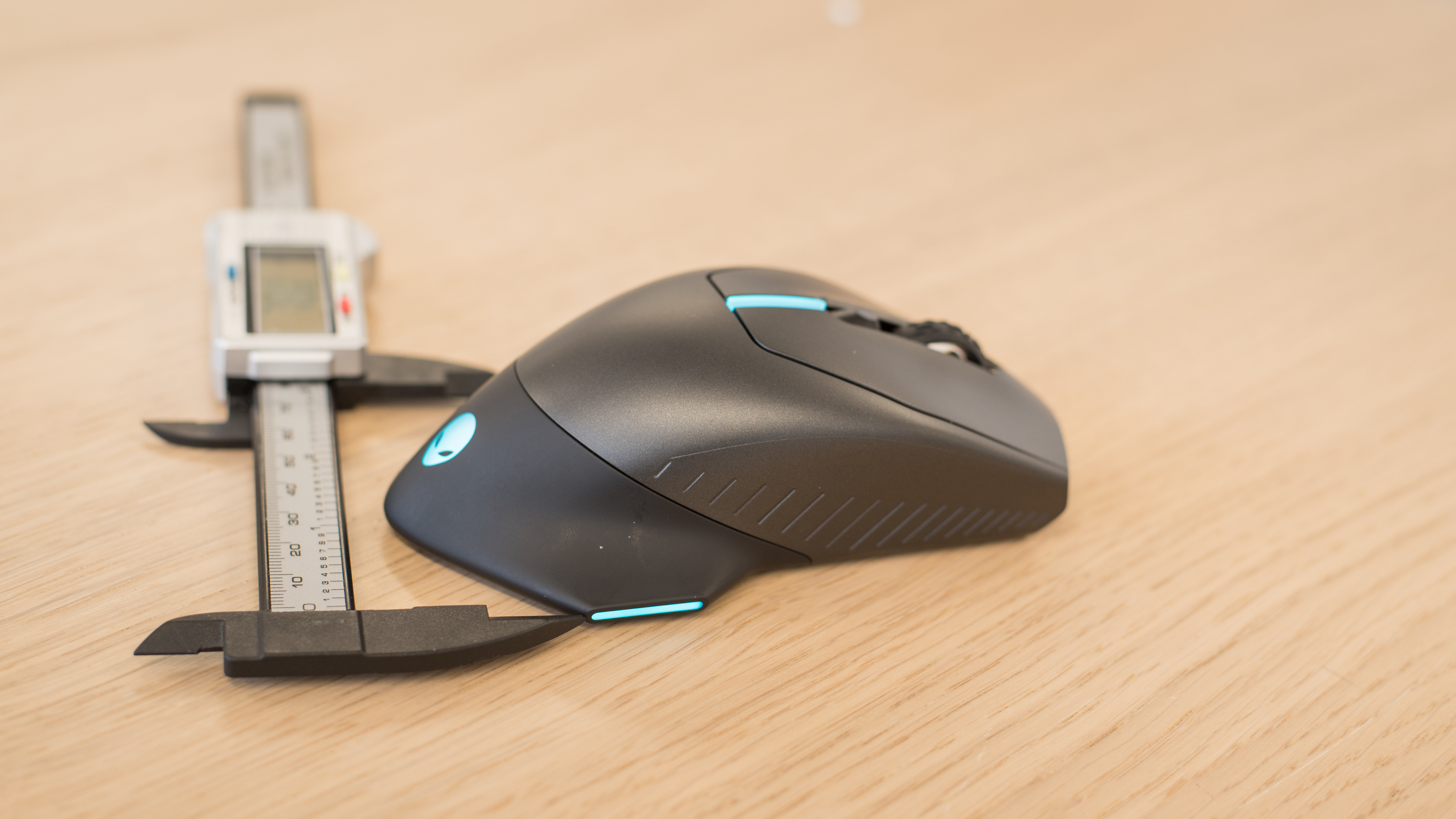
    The Dell Alienware AW610M is a fairly unique looking gaming mouse. It isn't too flashy-looking and has four RGB lights, though they're all controlled as the same zone. The mouse has a symmetrical design and has silicone wingtips on either side to rest your hand on.

    Shape
    Length5.2" (133 mm)
    Height1.7" (44 mm)
    Width3.1" (78 mm)
    Grip Width
    61 mm
    7.3
    Portability
    Volume
    27.83 in³ (456 cm³)
    Cable/Receiver Storing
    Yes

    The Dell Alienware AW610M is a decently portable mouse. While the mouse itself is a bit on the larger side, it doesn't require a wire, and the USB receiver can be stored in the bottom of the mouse, making it easier to toss into a bag.

    Weight
    Maximum Weight With Wire
    162 g
    Maximum Weight Without Wire
    120 g
    Minimum Weight Without Wire
    120 g
    Weight Distribution
    Centered
    Extra Weights
    No

    The Dell Alienware AW610M is a fairly heavy mouse with no weight customization options. If you want a similar mouse that's lighter, check out the Logitech G703 LIGHTSPEED with HERO Sensor.

    8.0
    Build Quality

    The Dell Alienware AW610M is a sturdy mouse that feels quite well-built. The dense plastic of the mouse feels solid in the hand, and there are no creaks or squeaks while using the mouse. The mouse wheel wobbles a bit from side-to-side, and you can hear it when you shake the mouse, though we don't know if this will be an issue.

    8.0
    Comfort Of Use
    Right-handed
    No
    Left-handed
    No
    Ambidextrous
    Yes
    Coating
    Matte
    Finger Rest
    Thumb and Pinky

    This mouse's ergonomics are very good. It has an ambidextrous design, though the side buttons are positioned on the left side. Due to its unique wingtip design, it's not the best choice for fingertip grip and lends itself best to the palm grip, which is recommended for all hand sizes. If you're interested in a similar mouse but with modular pieces that you can use to transform the mouse between a right or left-handed configuration, check out the HP OMEN Photon.

    Palm Grip: Hand Size Recommendation
    Small Hand
    Yes
    Medium Hand
    Yes
    Large Hand
    Yes
    X.Large Hand
    Yes

    The Dell Alienware AW610M is great for palm grip due to its comfortable wingtip design. Even though the mouse looks quite large, it's comfortable in this grip for all hand sizes, and even those with smaller hands should have no problem reaching all the buttons.

    Claw Grip: Hand Size Recommendation
    Small Hand
    No
    Medium Hand
    Yes
    Large Hand
    Yes
    X.Large Hand
    Yes

    The Dell Alienware AW610M can be used with claw grip for everyone except those with small hands, as it may be difficult to comfortably reach the buttons.

    Fingertip Grip: Hand Size Recommendation
    Small Hand
    No
    Medium Hand
    No
    Large Hand
    No
    X.Large Hand
    Yes

    Due to its unique design, the Dell Alienware AW610M isn't recommended for fingertip grip except for those with very large hands. The rear wingtips will likely get in the way when trying to use this grip.

    7.0
    Wireless Versatility
    Bluetooth
    No
    Receiver
    Yes
    Battery Type
    Rechargeable
    Use When Charging
    Yes
    On/Off Activation
    Auto Off And On/Off Switch
    Receiver Extender
    Yes
    Battery IndicatorNo

    The Dell Alienware AW610M is a wireless mouse that comes with a USB dongle to connect the mouse wirelessly to the PC. It also comes with an adapter to attach to the included micro-USB cable to act as an extension cable for the dongle. For a wireless mouse that also supports Bluetooth, check out the ASUS ROG Gladius II Wireless. Or, for a mouse that supports Bluetooth and wireless charging with Qi standard devices, check out the HyperX Pulsefire Dart.

    8.0
    Cable
    ConnectivityWireless
    Cable Length6.5 ft (2.0 m)
    Cable Type
    Braided
    Permanent Kink
    No
    Port Type: Mouse End
    Micro USB
    Port Type: PC End
    USB

    The included micro-USB cable is decent quality, though it feels slightly rigid and tends to curl up. The mouse can be used via a wired connection when plugged into your PC with the USB cable, or you can also use the USB cable as an extension by attaching the included adapter, great if your desktop is far away and you need to place your USB dongle closer to your mouse.

    7.0
    Mouse Feet
    Gliding Experience
    Ok
    Material
    PTFE
    Extra Included
    No
    In The Box

    • Dell Alienware AW610M mouse
    • Micro-USB cable
    • USB receiver
    • Micro-USB to USB adapter
    • Manuals
    Control
    Sensor Specifications
    Sensor Technology
    Optical (LED)
    Sensor Model
    Not Specified
    Works On Glass
    No
    Minimum CPI (DPI)
    100 CPI
    Maximum CPI (DPI)
    16,000 CPI
    CPI (DPI) Adjustment Steps
    100 CPI
    CPI (DPI) Variation
    -4%
    Minimum Lift Off Distance
    1.2 mm
    Maximum Polling Rate
    1000 Hz
    6.3
    Buttons
    Buttons Activation
    Mechanical
    Total Number Of Buttons
    7
    Number Of Side Buttons
    2
    Number Of Programmable Inputs
    3
    Profile Switching Button
    No
    CPI (DPI) Switching Button
    Yes
    Gesture Support
    No

    The Dell Alienware AW610M has two additional side buttons which, along with the wheel button click, are programmable via Alienware's software. Unfortunately, the side buttons can be a bit difficult to press as they sit almost flush to the mouse.

    Mouse Wheel
    Scroll Wheel
    Notched Wheel
    Scroll Wheel Steps
    24 Steps
    Scroll Wheel Tilt
    No
    Thumb Wheel
    No
    Thumb Wheel Steps
    No Thumb Wheel

    The mouse wheel is an incremented scroll wheel, which feels quite typical for a gaming mouse. While there's no way to unlock the wheel for infinite scroll, there's a button on the bottom of the mouse to change your scroll speed between low and high.

    Noise
    Click Noise
    Quiet
    7.5
    Click Latency
    Click Latency: Receiver
    19 ms
    Click Latency: Bluetooth
    N/A
    Click Latency: Wired
    17 ms

    The Dell Alienware AW610M's click latency is quite good, both wired and wireless, and it's unlikely that there will be noticeable lag for most people.

    Operating System And Software
    6.8
    Compatible Software Option
    Software NameAlienware Command Center
    Software Windows Compatibility
    Yes
    Software macOS Compatibility
    No
    Account Needed
    No
    On-Board Memory
    Yes
    CPI (DPI) Adjustment
    Yes
    Polling Rate Adjustment
    No
    Profile Configuration
    No
    RGB On/Off
    Yes

    The Dell Alienware Command Center is a decent software that can only be installed on Windows PCs. While it gives some basic customization options, unfortunately, it isn't quite as robust as some of the competition's companion utilities. It's worth noting that Command Center is the same software Alienware offers to customize their PCs and doesn't seem to have as much focus on accessory control.

    8.3
    Mouse Compatibility
    Windows CompatibilityFully
    macOS CompatibilityPartially

    This mouse is compatible with both Windows and macOS, though you have no customization options on macOS as the software isn't compatible. The additional buttons work on their default setting out-of-the-box, but if you customize the buttons on Windows and move the mouse to Mac, the buttons will no longer function.