- 40.0%White Balance dE 2000
- 40.0%Color dE 2000
- 20.0%Color Temperature
Whether you're a TV enthusiast who wants the best picture quality possible or you're just looking to watch the latest game show on cable TV, color accuracy is important for the overall picture quality. Most people won't notice when there are minor inaccuracies in most colors, but it becomes distracting when the entire screen looks off and your favorite sports team's jersey doesn't look right. Most TVs have pretty good accuracy out of the box, but if you have a well-trained eye, getting one with excellent accuracy is important.
We evaluate each TV's accuracy in SDR before and after a full calibration, and we measure the white balance, color accuracy, gamma, and color temperature. We choose the picture mode that's the most accurate out of the box to get a fair representation of the color accuracy. This test specifically looks at accuracy in SDR, and our testing for HDR color accuracy is slightly different.
Test Methodology Coverage
Our SDR Pre-Calibration and Post-Calibration color accuracy tests were first added in test bench 1.0, but the methodology has changed a few times since then. The scoring curves have been adjusted a few times, as well, most recently during our 2.0 update. Due to the numerous changes over the years, it's best to only compare test results when comparing reviews that have been tested with different methodologies; don't compare the scores. Learn more about how our test benches and scoring system work.
| 2.0+ | |
|---|---|
| SDR Pre-Calibration Color Accuracy | ✅ |
| SDR Post-Calibration Color Accuracy | ✅ |
When It Matters
Having an accurate image matters for watching any content, but you'll only notice minor inaccuracies if you're a professional calibrator or a TV enthusiast. Most TVs have accurate enough colors out of the box that most people won't see any difference. If you care about accurate color reproduction, you'll want a TV with excellent out-of-the-box accuracy so you don't have to spend too much time calibrating it. Since most TVs have near-perfect accuracy after calibration, it's important to look at the pre-calibration results.
The white balance and color accuracy measurements are recorded in dE, or Delta E, which is the average difference between each color target and the measurement. Most people won't notice a dE under 5, but if you're an enthusiast or professional calibrator, then smaller differences can be noticeable. All of the reported measurements in the review are averages, so if you care about accuracy, it's important to look at the individual graphs and charts, as there are often individual outliers within each test that are more noticeable than the average dE.
| Imperfections unnoticeable | Noticeable to professionals | Noticeable to enthusiasts | Noticeable to everyone | |
|---|---|---|---|---|
| White Balance and Color dE | <1 | 1-3 | 3-5 | 5+ |
| Gamma Difference | 0.05 | 0.1 | 0.2 | 0.2+ |
| Color Temperature | <100K | 200K | 400K | 500K |
Our Tests
We use a few different pieces of equipment to measure a TV's accuracy, including a Konica Minolta LS-100 Luminance Meter, a Colorimetry Research CR-100 colorimeter, and a CR-250 Spectroradiometer. We also use the CalMAN software to generate test images and record our measurements. The goal of this test is to first determine how accurate a TV is in SDR before calibration, and then measure how accurate it is after a full calibration. Nearly all TVs on the market have nearly perfect accuracy in SDR after calibration, so the post-calibration test is more about how easily the TV can be calibrated and whether or not the calibration process introduces any unwanted artifacts.
Before testing, we set the backlight to 100 nits, and we use the luminance meter to verify the brightness. We calibrate the colorimeter and spectroradiometer to make sure they work properly. Both devices are connected to a PC via USB and are placed in front of the TV, and the CalMan software measures the different tests and generates the results automatically. We set the TV in its most accurate default mode, usually FILMMAKER or the Movie picture mode.
White Balance dE
The white balance Delta E, or dE, determines how accurately a TV can display shades of gray from white to black. You'll notice inaccuracies with the white balance the most with large areas of white or gray colors, like if you're using it as a PC monitor or if you're watching sports like hockey and basketball. White balance is extremely important, as the human eye is actually far more sensitive to grayscale than it is to colors.
We measure the white balance from 5% gray (nearly black) to 100% gray (pure white) in increments of either 5% or 10%, depending on what the TV supports in its white balance settings. We calculate the average of the inaccuracy for all the shades.
 |
 |
In the above grayscale gradient examples, you can see a fairly dramatic example of how an imbalance affects a particular shade of gray. The 70% and 80% shades on the left both have a good deal more red than they should, and this throws off not only their appearance but also the way they interact with close shades. The grayscale image on the right shows the same TV after a full calibration. The red tint is gone, and the image looks much better.
 |
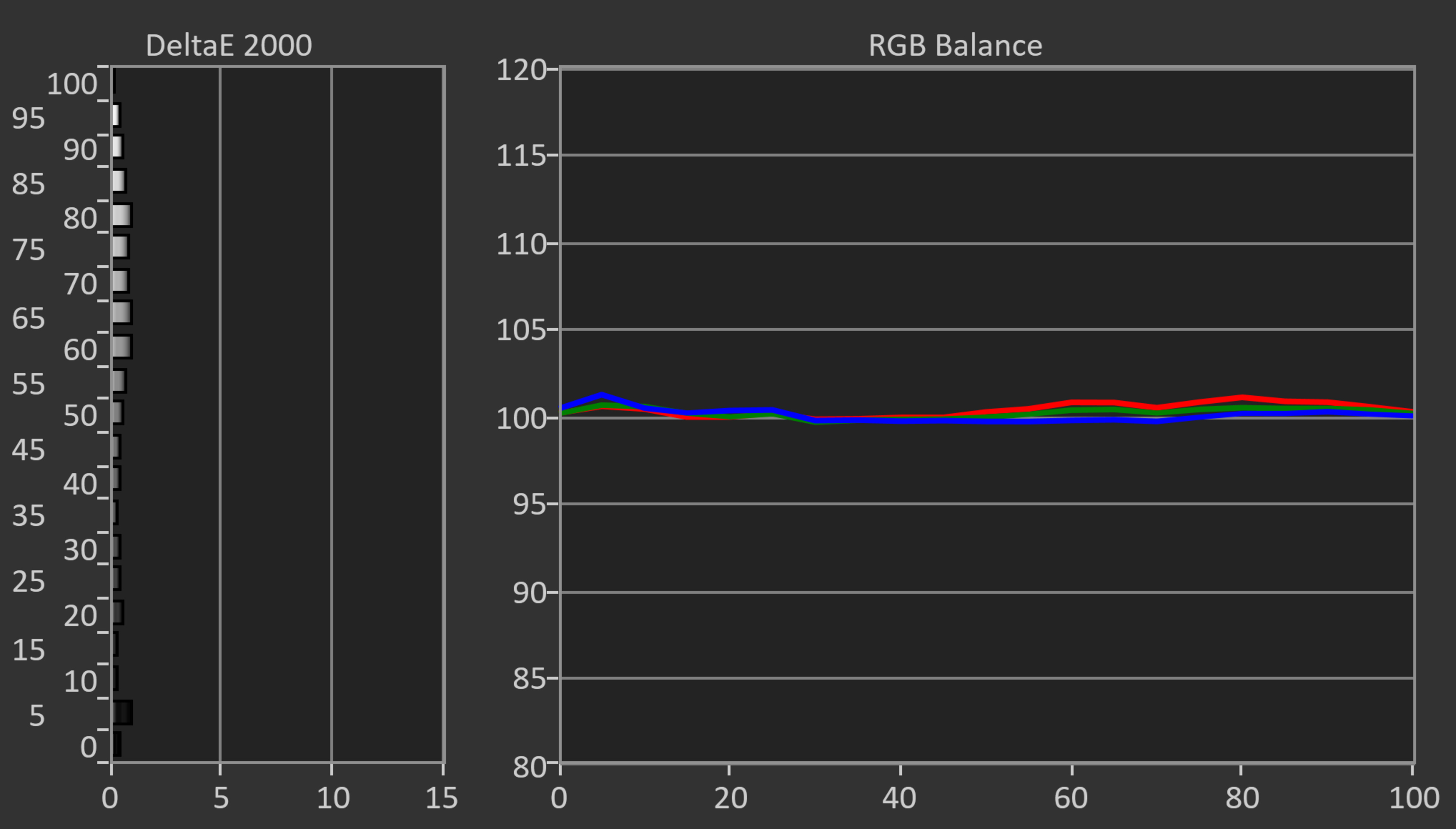 |
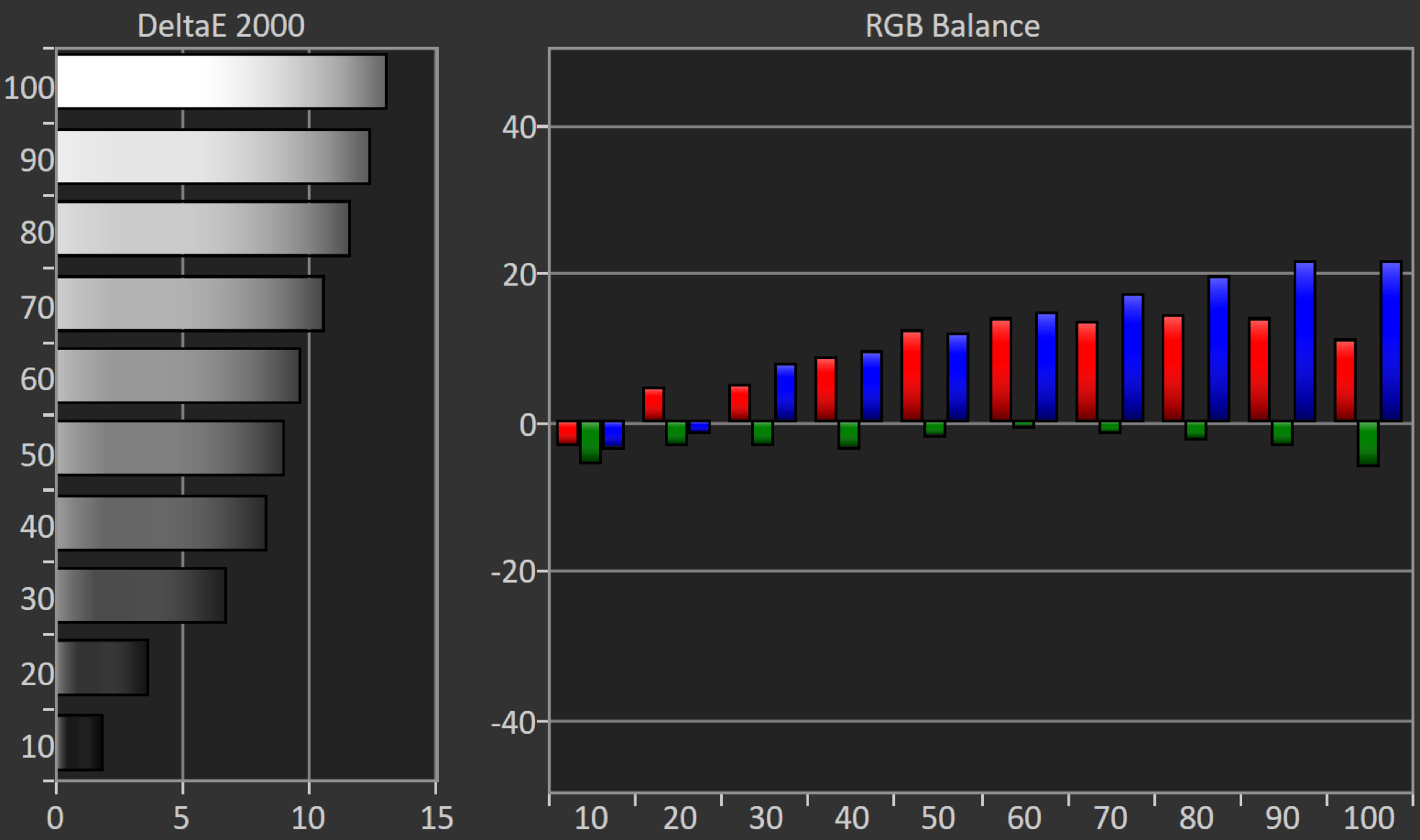
Interpreting the results is fairly straightforward, as there's a chart on the left that shows the dE for each shade of white from 0 to 100%. The longer the bar, the more error there is. Most TVs will have the most error with shades closer to white because they require the most color (pure white is a combination of red, green, and blue), while error with darker shades is less common. The graph on the right represents which colors are the most inaccurate for each shade of white. You may notice that some TVs have more bars than others. This is because some TVs only allow us to calibrate the white balance in steps of 10%, while others support 5% steps. The number of measurements we take is determined by the number of steps supported by the TV.
Color dE
The color dE measurement expresses how accurately a TV can reproduce the following colors: Red, Blue, Green, Yellow, Magenta, and Cyan. Generally, if a TV can reproduce these six colors accurately, the overall color accuracy for the rest of the color tones will also be good, so this is relatively consequential.
To evaluate color dE, each color is displayed on a window in the center of the screen and displayed at points of 25%, 50%, 75%, 95%, and 100% saturation, with a 75% stimulus, and we also measure pure white. The different levels of saturation show how well the TV displays the color at different shades; a 100% saturated red is different from a 25% saturated red, which is closer to pure white.
 |
 |
The resulting measurements are then displayed on a CIE 1931 xy chromaticity diagram. These plots aren't perfect, as they only look at a single slice at a fixed luminance, so some TVs could perform better at lower luminance levels. This is why we've moved towards gamut rings for SDR color volume measurements instead. For the purposes of measuring color dE in SDR, though, this approach is still acceptable.
Gamma
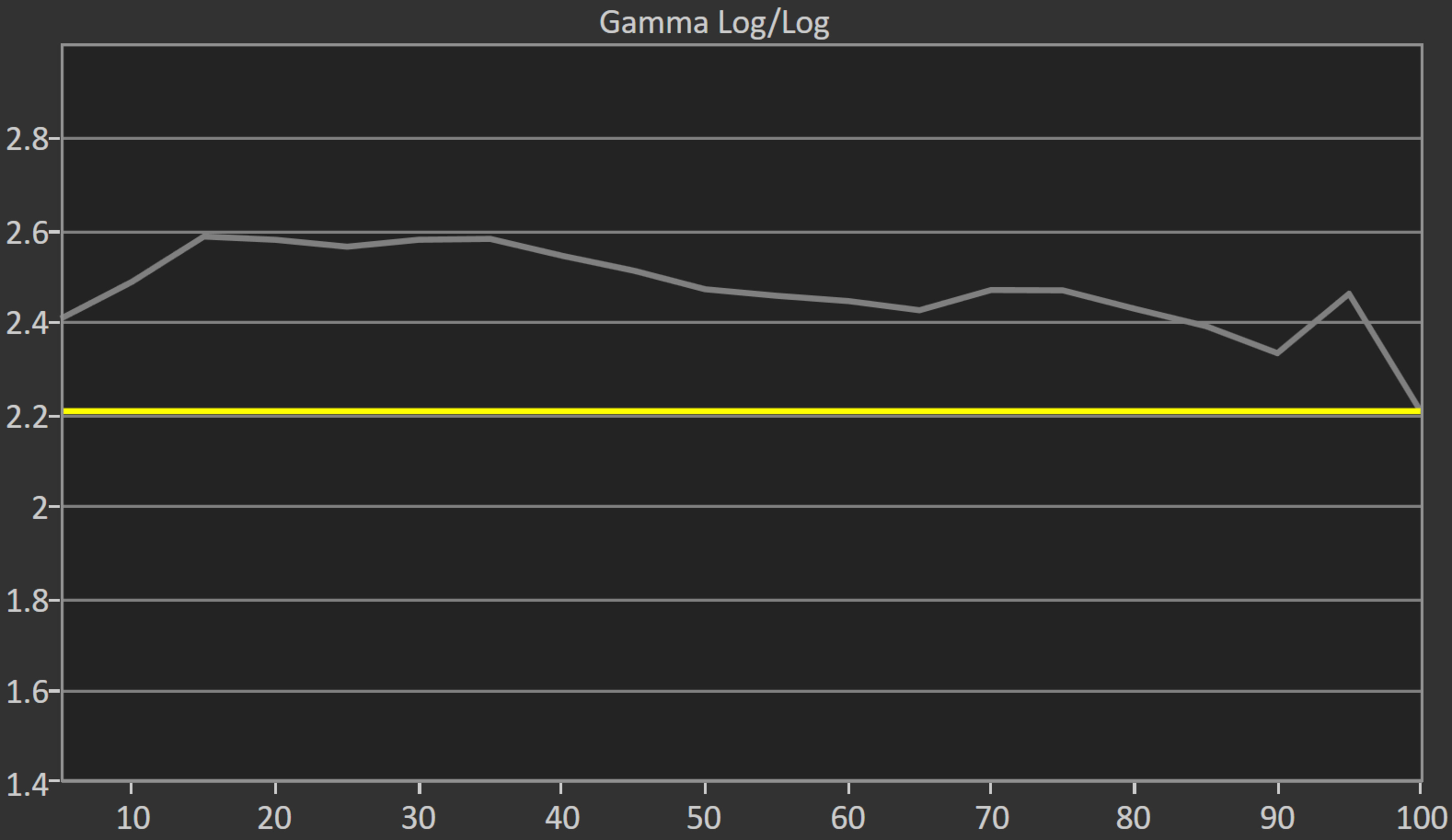
Gamma is the ratio between the light and dark areas on your screen. In other words, if the gamma is off, the image either looks too bright or too dark. Unlike the white balance and color dE, a gamma that's a bit off is easier to notice. We measure the gamma using a series of gray levels from 0 to 100% gray, so it's measured at the same time as the white balance. We measure the gamma for each shade of gray, and we get a resulting graph for all the different shades.
 |
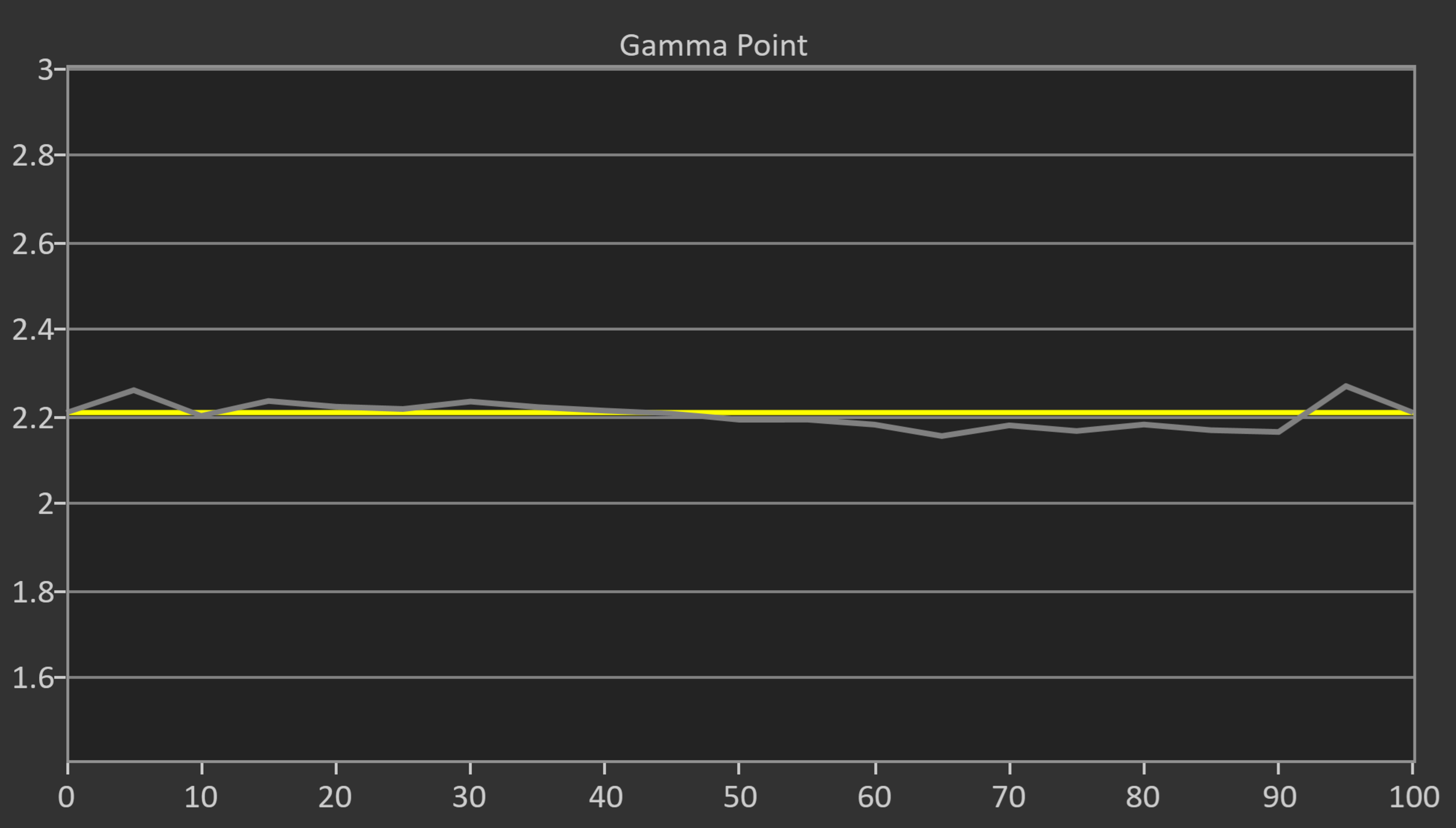 |
The target gamma is 2.2 across all scenes, represented by the yellow line in the graphs above. The gray line is the TV's measured gamma; if it follows the yellow line, it has a perfect gamma. If it's above the yellow line, scenes are too dark, and if it's below it, scenes are too bright. Again, the final result in the review is the average, so even if a TV tracks well on average, it could still be too bright or too dark in certain shades. It's quite common for TVs to push bright parts of the scene a bit brighter than they should be, for example, as it delivers a slightly punchier image.
You should also note that our gamma target of 2.2 isn't the only correct gamma. TVs typically have several gamma options available, usually ranging from 1.8 to 2.6. Our target of 2.2 is about in the middle and is targeted for darker rooms. Apart from 2.2, a gamma of 2.4 is also appropriate for very dark rooms, and a gamma of 2.0 works pretty well for brighter ones. Most TVs also offer BT.1886, which is a variable gamma standard that's designed to better preserve dark scene details on LCD TVs. Below you can see examples that showcase the impact gamma has on the image. Unlike the white balance, color dE, and color temperature, gamma isn't currently scored as part of the overall color accuracy score.
 |
 |
 |
 |
Color Temperature
The color temperature of a TV has to do with color accuracy. A warm color tone means that the colors are shifted more towards red than blue, and a cool color tone has colors that are closer to blue. Like the other tests, this test is measured automatically using the CalMan software.
Color temperature is one aspect of picture quality that almost anyone can notice, even if it's slightly off, and this makes it one of the few settings that you can usually adjust manually with no specialized equipment. Most TVs have a fairly accurate color temperature out of the box, but it's not uncommon for TVs to be a bit warm by default.
The current industry-standard 6500K represents the most accurate white point and was designed to match midday daylight. While it's designed to deliver a very neutral image, if you're used to something colder (or warmer), you may want to change this setting to something that looks better to you. The lighting in your room can also have an impact on how you perceive color temperature.
 |
 |
Above, you can see a clear example of how the color temperature directly impacts picture quality. Most people will find the one on the right to deliver a more natural-looking image, even if it is a bit on the warm side.
Post-Calibration
- 40.0%White Balance dE 2000
- 40.0%Color dE 2000
- 20.0%Color Temperature
Our post-calibration evaluation is an overall score for the quality of a TV's picture quality after a full-color calibration has been done. This score will give you an idea of what to expect from your TV if you do plan on getting a calibration done. That said, most TVs end up having about equally accurate color once calibration is done, so these scores aren't quite so important. This test is more about the process itself and determining how well the TV can be calibrated.
We calibrate the TV using the 2 and 10 or 20-point white balance settings, depending on what's available. Some TVs don't have as many calibration settings, so it's harder to calibrate for the most accurate image possible. Other TVs can't be calibrated too aggressively, as fixing one issue might introduce another, so in that case, we try to calibrate it as best as possible without causing other problems. Also, we avoid extreme adjustments whenever possible. Ideally, the closer each adjustment is to zero, the better. Very aggressive calibrations can result in color banding.
In the post-calibration tests, we once again measure the white balance dE, color dE, gamma, and color temperature. In the settings page for each review, you can see which settings were used for the full calibration. Because each panel performs slightly differently, we don't suggest using our calibration values for your unit.
Getting The Best Results
A full professional calibration (or buying the necessary equipment and doing one yourself) is the only way to ensure your TV’s color is as accurate as possible. Unfortunately, both professional assistance and an entry-level kit for doing your own calibration are expensive. For cheaper TVs, this would represent a very large portion of the cost of the TV itself, and higher-end models tend to have pretty accurate colors anyway, meaning a calibration wouldn't be beneficial. You can usually get a fairly accurate picture just by adjusting a few settings. It's also worth keeping in mind that not everyone enjoys an accurate image; some people find it bland and boring, so you should adjust your TV to whatever looks best to you.
Conclusion
Accuracy tells us how well a TV can display an image with the correct color, white balance, gamma, and color temperature values. It can be particularly distracting when you get a new TV, only for it to display a horribly inaccurate image the moment you plug it in. You'll want to get something that has good out-of-the-box accuracy, as calibration can be expensive. Our accuracy tests look at the color and white balance accuracy as well as the gamma and color temperature, as they all affect the overall picture quality. While most TVs are good enough for most people, if you're an enthusiast or a professional calibrator, you'll notice inaccuracies more easily; in this case, go for a TV with high accuracy before any calibration.