
Chromebooks are a solid choice if you want to do basic work or attend classes remotely. Although they aren't powerful computers, which means they can't handle demanding workloads like video editing or 3D rendering, they're more than adequate for those who can access their work or class material online through a web browser. Because ChromeOS is a lightweight operating system designed to run on lower-end hardware, Chromebooks also tend to be more affordable than Windows and macOS laptops, making them a great option for students or those on a tight budget.
We've tested more than 180 laptops. Below, you'll find our recommendations for the best Chromebooks. You can also see our picks for the best laptops for battery life, the best student Chromebooks, and the best travel laptops. Or, if you're interested in shopping for some Chromebook-compatible peripherals, check out our recommendations for the best printers for Chromebook.
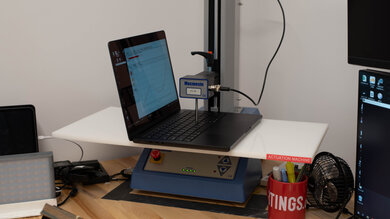
Since 2021, we've tested dozens of laptops every year. We buy our laptops to avoid bias and, following a rigorous methodology, test nearly every part of the laptop so we can deliver results you can rely on. We use a wide range of equipment to perform our tests, including a colorimeter, a Mecmesin MultiTest-i System Test Stand, and various performance benchmarking suites.
Want to know more? Check out our How We Test Laptops article, where we give you a broader overview of our review process, from the moment we purchase the product to the final review.
-
Best Chromebook
 General ProductivityMultimediaGamingWorkstationSize:14"See all our test resultsOperating System:Chrome OS
The best Chromebook we've tested is the Acer Chromebook Plus Spin 714 (2024). This 2-in-1 convertible feels surprisingly well-built compared to most Chromebooks, and its compact design makes it easy to carry. The user experience is great; it has a nice FHD+ display, a comfortable keyboard, and an excellent 1440p webcam. Its display is bright enough for good visibility in well-lit settings, and it supports pen input for handwritten notes or drawing. The downside is that it doesn't come with a stylus, and there's no place to dock the pen for transport. You get a decent selection of ports with two USB-C/Thunderbolt 4s, a USB-A, and an HDMI.
This laptop is available with Intel Meteor Lake CPUs up to a Core Ultra 7 165U. These Intel processors can easily handle anything you'd need to do on a Chromebook, like text processing, web browsing, and video playback. Most people can likely get by with the base Core Ultra 5 model, though we recommend that heavy multitaskers opt for a model with 16GB of RAM to avoid slowdowns. The battery easily lasts through a typical eight-hour day, and the laptop charges over USB-C, so you don't have to carry a proprietary charger. If you're new to Chromebooks, know that most applications that run on Windows and macOS don't work on ChromeOS, so make sure you can do everything through the Chrome browser or Android apps.
-
Best Budget Chromebook
SchoolGamingMultimediaWorkstationBusinessSize:16"See all our test resultsOperating System:Chrome OSThe Acer Chromebook Plus 516 GE (2024) is the best budget Chromebook you can get. Although it's designed for cloud gaming, it's also a great choice if you want a roomy Chromebook for everyday work. Its bright 16-inch display is larger and sharper than the screen on the Acer Chromebook Plus Spin 714 (2024) above, giving you more working space. The 120Hz refresh rate makes scrolling look smoother, too. What you give up is the Spin 714's portability and flexibility: the 516 GE is bulkier, and you can't fold it into tablet or tent modes.
Still, the 516 GE feels solid, has a comfortable keyboard, and handles browsing and other everyday tasks with ease. Its battery lasts just under 10 hours of light use, though the touchpad can be finicky when dragging files. If you want to play games, its high-refresh-rate screen is well-suited to streaming games over the internet, although the 516 GE isn't meant to run demanding PC games locally; you'd have to look into a Windows machine if that's your primary interest. Overall, even if you don't care about gaming, the Acer Chromebook Plus 516 GE (2024) also serves as a functional traditional clamshell.
-
Best Cheap Chromebook
General ProductivityMultimediaGamingWorkstationSize:15.6"See all our test resultsOperating System:Chrome OSIf you want a traditional laptop while spending as little as possible, get the ASUS Chromebook CX15 (2026). Its 15.6-inch screen gives you room to work, the keyboard is comfortable, and you can connect an external monitor through HDMI or USB-C. It covers everyday tasks like browsing and writing documents for much less than the Acer Chromebook Plus 516 GE (2024) above. The Acer earns its higher price with a much better screen, faster performance, and longer battery life, so it's the one to go for if your needs are more demanding.
That's not to say that you can't do more with the CX15. Sure, the CX15's basic configuration is best for light use. Its 4GB of memory is workable for a few tabs and apps, since ChromeOS can unload unused tabs and reload them when you return. But there are versions with 8GB of memory. Faster processor options are available, too, so you can certainly ramp up the laptop's performance. The bigger compromises are the washed-out display, the touchpad that sometimes misses movements, and the battery life that may fall short of a full day. Still, for browsing and other simple tasks, it offers a familiar laptop experience at a low price.
-
Best Chromebook For Multimedia
SchoolGamingMultimediaWorkstationBusinessSize:13.3"See all our test resultsOperating System:Chrome OSFor media consumption, we recommend the Lenovo Chromebook Duet 5 (2021), a 13-inch ChromeOS tablet with a kickstand and detachable keyboard. This form factor lets you take the keyboard off when viewing content, which is convenient in tight spaces like an airplane, and it also makes the device easier to hold and use as a tablet. You can pop the keyboard back on when you need to type something out; however, it feels cramped, so there are better options for typing long essays, like the ASUS Chromebook CX15 (2026) above.
The feature that makes this device amazing for viewing media is its OLED display. It's sharp, bright, and colorful, and like all OLEDs, it displays deep, inky blacks. The speakers get reasonably loud. However, they don't have much bass and sound slightly unnatural. The battery lasts around eight hours of video playback or 10 hours of light use, and it charges over USB-C, so you don't have to deal with a proprietary charger. The display supports pen input if you want to take notes or draw, but you must buy the stylus separately.
-
Best Compact Chromebook
SchoolGamingMultimediaWorkstationBusinessSize:11"See all our test resultsOperating System:Chrome OSIf the Lenovo Chromebook Duet 5 (2021) above feels too large to use as a tablet, consider the Lenovo Chromebook Duet Gen 9 11 (2024). It has the same detachable keyboard and kickstand in a smaller, lighter package that's easier to hold or fit in a bag. Its 11-inch touchscreen looks sharp and colorful, though movies lose the deep blacks of the Duet 5's larger OLED display. The smaller screen also gives you less room to work.
The Gen 9 is well-suited to browsing, streaming, and taking handwritten notes, with pen support and a keyboard included when you need to type. The keyboard feels cramped during longer sessions, however, and its processor is best kept to light tasks. Expect around eight to nine hours of browsing on a charge, less than the Duet 5, though video playback lasts about as long. Unlike the Duet 5, it also has a headphone jack for wired headphones.





Notable Mentions
-
Acer Chromebook 315 (2020):
Consider the Acer Chromebook 315 (2020) if you want a large, inexpensive Chromebook with longer battery life than the ASUS Chromebook CX15 (2026). Its older processors are best for very light tasks, though, and its display is dim, so the newer CX15 is the better choice at a similar price.
See our review -
Lenovo IdeaPad Slim 3i Chromebook 14 (2023):
The Lenovo IdeaPad Slim 3i Chromebook 14 (2023) is a more portable alternative to the ASUS Chromebook CX15 (2026) and offers much longer battery life. If you can find the Core i3 version with an IPS touchscreen, you also get a more colorful display and more room for multitasking. Unfortunately, that configuration is hard to find new.
See our review
Recent Updates
Oct 01, 2026:
The Acer Chromebook Plus 516 GE (2024) is now the 'Best Budget Chromebook' due to its versatility. The new ASUS Chromebook CX15 (2026) replaces the outdated Acer Chromebook 315 (2020) as the 'Best Cheap Chromebook'. Finally, the Lenovo Chromebook Duet Gen 9 11 (2024) is now the 'Best Compact Chromebook' if you're looking for a very portable option. We also updated our Notable Mentions.
Nov 27, 2025:
Replaced the Lenovo Chromebook Duet 3 (2022) with the Lenovo Chromebook Duet Gen 9 11 (2024) as a Notable Mention because the Gen 9 is easier to find and cheaper. It also has superior build quality, a headphone jack, and better performance.
May 09, 2025:
We've made minor text changes for clarity and conciseness. The picks remain the same.
Jan 29, 2025:
No change in recommendations, as all picks are still valid and available. Small text changes for conciseness.
Dec 11, 2024:
We've verified that all our picks are available and represent the best options. We've also made small edits for clarity.
All Reviews
Our recommendations above are what we think are currently the best Chromebooks you can get. We factor in the price (a cheaper laptop wins over a pricier one if the difference isn't worth it), feedback from our visitors, and availability (no laptops that are difficult to find or almost out of stock everywhere).
If you prefer to make your own decision, here's the list of all of our Chromebook reviews, sorted by price from low to high. Most laptops are available in various configurations, and the table only shows the results of the model we tested, so it's best to see the full review for information about other variants.


