Dell Precision 5690 (2024)  Laptop Review

Reviewed Sep 16, 2024 at 09:21am
Test bench update May 02, 2025 at 01:25pm
Tested using Methodology v0.8.3 
Dell Precision 5690 (2024)
8.4
School 
7.4
Gaming 
7.6
Multimedia 
8.8
Workstation 
8.1
Business 
 0
  1. Recommended in:
  2. Dell
  3. Workstation

The Dell Precision 5690 (2024) is a Windows workstation laptop. It's the successor of the Dell Precision 5680 from 2023 (13th Gen Intel). You can configure the 5690 with Intel Meteor Lake CPUs paired with integrated graphics or an NVIDIA RTX Ada Generation Laptop GPU. It has both a non-touch FHD+ IPS display or touchscreen UHD+ OLED display option, a full-size keyboard with a numpad, and a 1080p webcam. This laptop has three USB-C/Thunderbolt 4s, an HDMI 2.1, an SD card reader, and a 3.5mm headphone jack.

See our unit's specifications and the available configuration options in the Differences Between Variants section.

Our Verdict

8.4
School 

The Dell Precision 5690 is very good for school use. Although it might not fit into some smaller bags since it's a 16-inch device, you won't have to worry about bringing the charger, as its battery lasts comfortably through a full school day. The overall user experience is great, as it has a nice big screen for multitasking and a responsive haptic touchpad. The keys feel a bit heavy, though, so some users may find the keyboard tiring to use over long periods. Its Intel CPUs and NVIDIA GPUs can handle general productivity tasks and demanding workloads, making this laptop a great choice for students in fields like engineering and graphic design. You can also get this laptop with integrated graphics if you don't need a lot of GPU processing power.

Pros
  • Displays have wide color gamut.
  • Outstanding battery life.
  • Large screen for multitasking.
  • Responsive and big touchpad.
Cons
  • FHD+ resolution is underwhelming for class of device.
  • Keys feel heavy and may be fatiguing to use for long periods.
7.4
Gaming 

The Dell Precision 5690 is decent for gaming. It's available with Intel Meteor Lake CPUs and NVIDIA discrete GPUs, which are fast enough to provide smooth gameplay in demanding AAA games. However, the RTX Ada Generation GPUs are mainly designed for professional workloads, so they don't have the best game drivers and lack features like DLSS and Frame Generation. Also, the available displays are all 60Hz panels; the IPS display has a slow response time, resulting in a blurry image in fast-moving scenes, although the OLED will perform better. None of them support VRR to reduce screen tearing. Finally, the CPU tends to throttle a bit under load, so you may be leaving some performance on the table.

Pros
  • Displays have wide color gamut.
  • Wide selection of CPU and GPUs for demanding workloads.
  • Bright and colorful displays.
Cons
  • CPU throttles under load.
  • Visible ghosting due to slow response rate.
  • GPUs lack gaming features to boost framerates.
7.6
Multimedia 

The Dell Precision 5690 is good for media consumption. It isn't the most portable laptop, as it's a little bulky and heavy. Battery life is fantastic overall, as even configurations with discrete graphics will last nearly 14 hours for video playback—it'll likely outlast even the longest binge sessions! The FHD+ IPS panel gets bright and looks great, although its minimum brightness is quite high. It may be fatiguing to use in dark environments. The OLED display sports a UHD+ resolution and will produce deep, inky blacks. As for the speakers, they get pretty loud with minimal compression and have a good amount of bass, but sound slightly shouty and rattle at high volumes.

Pros
  • Displays have wide color gamut.
  • Outstanding battery life.
  • Speakers get pretty loud.
Cons
  • High minimum brightness can be fatiguing in dark environments.
  • FHD+ resolution is underwhelming for class of device.
8.8
Workstation 

The Dell Precision 5690 is an excellent workstation laptop. It's available with Intel Meteor Lake CPUs and NVIDIA RTX Ada Generation Laptop GPUs, which are powerful enough to handle demanding workloads like 3D graphics and simulations. Unfortunately, there's some thermal throttling under load. Storage is user-replaceable, but it can be difficult to open the laptop up to service it without breaking the retention clips on the bottom lid. Its port selection is decent and includes Thunderbolt 4s and an HDMI 2.1, allowing you to transfer files quickly and connect multiple external displays. Finally, all displays are suitable for color-critical work as they offer full coverage of the DCI P3 and sRGB color spaces and near full coverage of the Adobe RGB color space.

Pros
  • Displays have wide color gamut.
  • Wide selection of CPU and GPUs for demanding workloads.
  • Thunderbolt 4 support.
  • User-replaceable storage.
Cons
  • CPU throttles under load.
  • Poor color accuracy for sRGB color space.
  • Difficult to open laptop without breaking clips.
8.1
Business 

The Dell Precision 5690 is great for business use. Its Meteor Lake CPUs can easily handle general productivity tasks like text processing, spreadsheets, and presentations. There are FHD+ and UHD+ display options, and both get bright; the FHD+ looks reasonably sharp, though it would've been better to see a higher resolution offered by default, given the class of the laptop. The UHD+ OLED panel is much sharper and offers touchscreen support if you need it for your workflow. It has a good 1080p webcam and a decent port selection. Battery life is fantastic, regardless of the configuration. Finally, the haptic touchpad is large and easy to use, and while the keyboard is good, the keys feel somewhat heavy and may be fatiguing to use for long periods.

Pros
  • Displays have wide color gamut.
  • Outstanding battery life.
  • Large screen for multitasking.
  • Thunderbolt 4 support.
  • Responsive and big touchpad.
Cons
  • FHD+ resolution is underwhelming for class of device.
  • Difficult to open laptop without breaking clips.
  • 8.4
    School
  • 7.4
    Gaming
  • 7.6
    Multimedia
  • 8.8
    Workstation
  • 8.1
    Business
  • Changelog

    1.  Updated May 07, 2025: We've updated this review to Test Bench 0.8.3, which removes the viewing angle tests and adds a GPU Total Graphics Power comparison in the GPU section. The Pen Input test in the Extra Features section has also changed, as it now shows whether the laptop supports pen input rather than the inclusion of a stylus in the box. See the changelog for more details.
    2.  Updated Sep 16, 2024: Review published.
    3.  Updated Sep 04, 2024: Early access published.
    4.  Updated Aug 26, 2024: Our testers have started testing this product.

    Differences Between Sizes And Variants

    We tested the Dell Precision 5690 with an FHD+ IPS display, an Intel Core Ultra 7 165H, an NVIDIA RTX 1000 Ada Generation Laptop GPU, 32GB of RAM, and 512GB of storage. The display, CPU, GPU, memory, and storage are configurable; the available options are in the table below: 

    Display 
    • 16" IPS 1920 x 1200 60Hz (matte, 500 cd/m², 100% DCI P3)
    • 16" OLED 3840 x 2400 60Hz (touchscreen, glossy, 400 cd/m², 100% DCI P3) 
     CPU
    • Intel Core Ultra 5 135H (14 cores/18 threads, up to 4.60GHz, 18MB cache)
    • Intel Core Ultra 7 155H (16 cores/22 threads, up to 4.80GHz, 24MB cache)
    • Intel Core Ultra 7 165H (16 cores/22 threads, up to 5.00GHz, 24MB cache)
    • Intel Core Ultra 9 185H (16 cores/22 threads, up to 5.10GHz, 24MB cache)
    GPU
    • Intel Arc Graphics (integrated)
    • NVIDIA RTX 1000 Ada Generation Laptop GPU 6GB GDDR6 (discrete, 95W TGP)
    • NVIDIA RTX 2000 Ada Generation Laptop GPU 8GB GDDR6 (discrete, 95W TGP)
    • NVIDIA RTX 3500 Ada Generation Laptop GPU 12GB GDDR6 (discrete, 95W TGP)
    • NVIDIA RTX 4000 Ada Generation Laptop GPU 12GB GDDR6 (discrete, 95W TGP)
    • NVIDIA RTX 5000 Ada Generation Laptop GPU 16GB GDDR6 (discrete, 95W TGP)
    RAM
    • 16 GB, LPDDR5x, 7467 Mhz, dual-channel (soldered)
    • 32 GB, LPDDR5x, 7467 Mhz, dual-channel (soldered)
    • 64 GB, LPDDR5x, 7467 Mhz, dual-channel (soldered)
     Storage
    • 256GB M.2 2230 PCIe Gen 4 NVMe SSD
    • 512GB M.2 2280 PCIe Gen 4 NVMe SSD
    • 512GB M.2 2280 PCIe Gen 4 NVMe SSD Self-encrypting Opal 2.0
    • 1TB M.2 2280 PCIe Gen 4 NVMe SSD
    • 1TB M.2 2280 PCIe Gen 4 NVMe SSD Self-encrypting Opal 2.0
    • 2TB M.2 2280 PCIe Gen 4 NVMe SSD
    • 4TB M.2 2280 PCIe Gen 4 NVMe SSD
     Color
    • Anodized Titan Gray

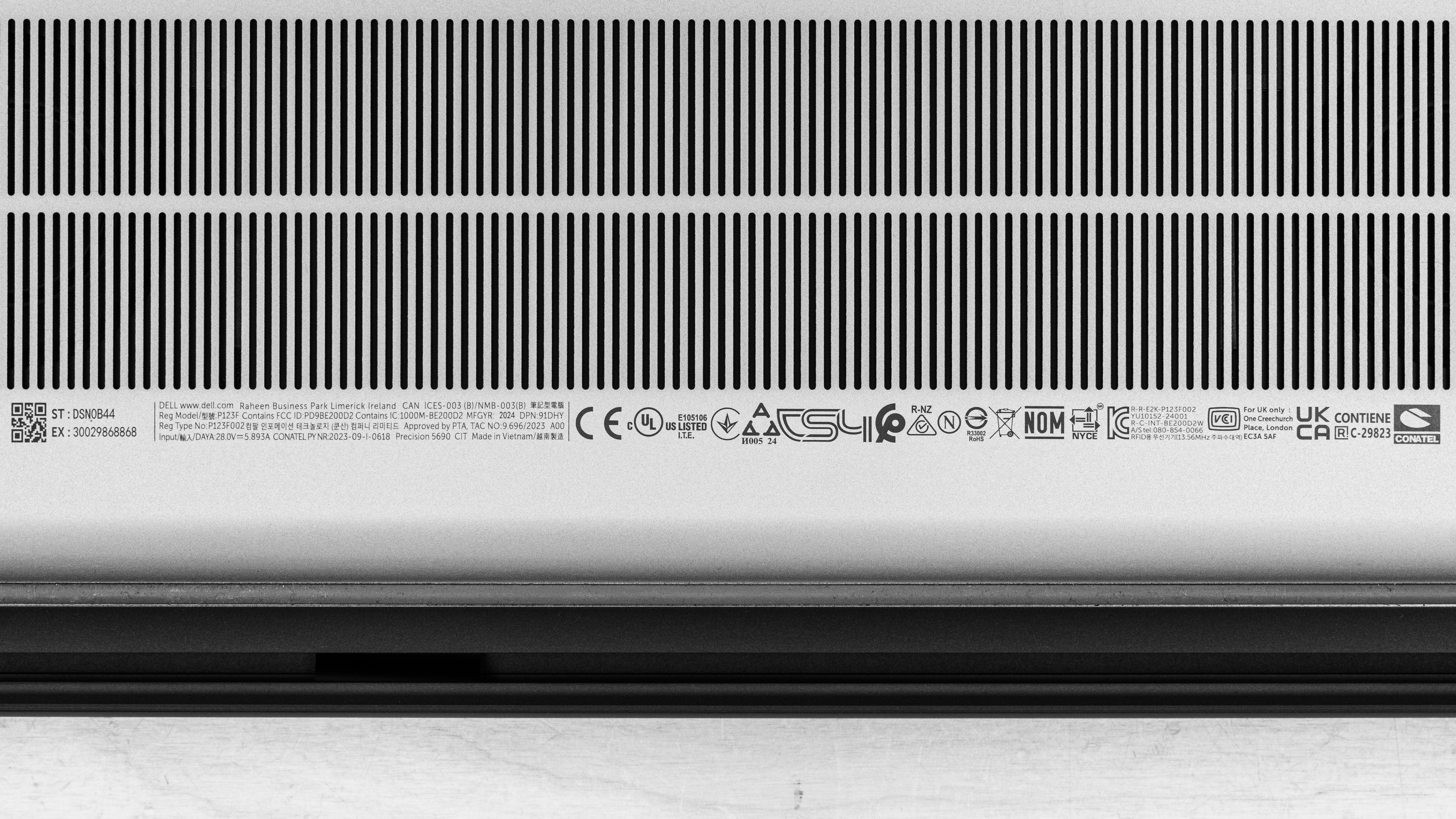
    You can check out our unit's label for more.

    Popular Laptop Comparisons

    The Dell Precision 5690 is an excellent workstation laptop that can handle complex and demanding tasks. That being said, there are more powerful options in its price range that offer a comparable or even better user experience. The basic FHD+ display is bright and clear but somewhat lackluster for this price point; it would've been better to see at least a QHD+ option. Also, configuring the laptop on Dell's website can be quite challenging due to the sheer number of configurations and restrictions. Nevertheless, this laptop is well-built and generally easy to use, and it has lots of horsepower to get the job done.

    See our recommendations for the best laptops for programming, the best Dell laptops, and the best laptops for video editing.

    HP ZBook Power G11 A (2024)

    The Dell Precision 5690 (2024) is a better Windows workstation than the HP ZBook Power G11 A (2024). It offers a better user experience overall with a larger haptic touchpad, better-sounding speakers, and a more premium-feeling chassis. Also, it offers a wider range of CPU and GPU configurations, so it'll scale up or down well depending on your needs. One place the HP has the edge over the Dell is in displays. There are a lot of options, and while most are FHD+ displays, there is a high-refresh-rate QHD+ panel that gets significantly brighter than any of the Dell's options. There are also options for cellar connectivity, so if you need to use your laptop in remote locations for work, the HP may be the better choice.

    Lenovo ThinkPad P1 Gen 7 (2024)

    If you're looking for a premium Windows workstation device, the Lenovo ThinkPad P1 Gen 7 (2024) and Dell Precision 5690 (2024) are both great choices. The user experience is similar across both laptops; they have large haptic touchpads, high-quality webcams, and significantly longer battery life than previous-generation workstations. There are options for a 4k+ OLED panel on both models as well. The keyboard is slightly better on the Lenovo, though. While both laptops are configurable with Intel Meteor Lake CPUs and NVIDIA GPUs, the hardware is the main point of difference. If you only perform workstation applications, the Dell is the better choice. It has a wider range of  RTX Ada Generation Laptop GPUs than the Lenovo, up to the powerhouse RTX 5000 Ada Generation Laptop GPU. But if you want a device that can pull double duty for content creation or gaming as well, then the Lenovo is the way to go. It offers GeForce GPUs with better driver support for these applications.

    Dell Precision 3591 (2024)

    The Dell Precision 5690 (2024) is a higher-end and much better workstation laptop than the Dell Precision 3591 (2024). The 5690 is a more premium laptop that provides a better user experience. It has a larger haptic touchpad, much better-sounding up-firing speakers, and significantly longer battery life. Also, it's available with sharper, brighter displays, including a 4k+ OLED panel. While both laptops are configurable with Intel Meteor Lake CPUs and NVIDIA GPUs, the 5690 gives you more options; you can get it with up to an NVIDIA RTX 5000 Ada Generation Laptop GPU. One niche use case the 3591 presents over the 5690 is its compatibility with cellular networks. If you need a laptop with mobile connectivity for remote or on-the-go use, then the 3591 is the better option.

    Apple MacBook Pro 16 (M3, 2023)

    The Apple MacBook Pro 16 (M3, 2023) is better than the Dell Precision 5690 (2024) overall. While both are premium workstations, the Apple edges out the Dell in terms of user experience overall. It has a nicer Mini LED display by default (the Dell has a great UHD+ OLED option, but you have to pay more for it) and a more tactile keyboard. It also gives you significantly more CPU processing power to tackle highly intensive workloads. On the other hand, although the M3 Max's GPU is no slouch, the Dell has options for much more powerful discrete GPUs, up to NVIDIA RTX 5000 Ada Generation Laptop GPU. If your workflow requires this extra graphical horsepower, the Dell is the better choice.

    Test Results

    perceptual testing image
    Sort:
    RATINGS
    Category:
    All
    Design
    Style
    Form Factor
    Traditional (Clamshell)

    The Dell Precision 5690 only comes in Anodized Titan Gray. See the bottom of the laptop.

    8.5
    Build Quality

    The Dell Precision 5690's build quality feels great. Its aluminum and plastic chassis feels durable and premium. In general, the laptop feels sturdy and exhibits little to no flex when the lid is open and closed or through the keyboard deck. The weight is well-balanced. That being said, the finish is a fingerprint magnet and is prone to accumulating smudges with every use. Finally, the feet are well attached to the laptop.

    9.1
    Hinge
    Range
    135°
    Stability
    Good
    One Finger Lift
    Yes

    The Dell Precision 5690 has an excellent hinge. It's smooth and quiet with a good amount of resistance. There's almost no wobble when typing aggressively, and the hinge itself has no play or wobble. You can open the lid with one finger, but if you try to open it up further than 100 degrees, it will lift the bottom.

    6.9
    Portability
    Size
    16"
    Thickness
    0.9" (2.4 cm)
    Width
    14.0" (35.6 cm)
    Depth
    9.5" (24.2 cm)
    Volume
    126.2 in³ (2,067.6 cm³)
    Weight
    4.9 lbs (2.2 kg)
    Charger Size
    11.1 in³ (182.2 cm³)
    Charger Weight
    1.0 lbs (0.5 kg)
    5.0
    Serviceability
    Ease Of Access
    5.0
    RAM Slots
    0
    Storage Slots
    2
    Replaceable Battery
    Yes
    Replaceable Wireless Adapter
    No

    The Dell Precision 5690's serviceability is poor. While you only need to remove eight T5 screws, it's difficult to release the bottom panel's clips without breaking them. A prying tool or pick is essential for this job. Both M.2 storage slots support 2230 and 2280 PCIe Gen 4 NVMe SSDs. You need to remove shields over the SSDs to replace the drives.

    See the Owner's Manual for more information.

    In The Box

    • 165W USB-C power adapter and cord
    • USB-A to USB-C adapter
    • Documentation

    Note: Models with integrated graphics only come with a 100W power adapter.

    Display
    Screen Specs
    Resolution
    1920 x 1200
    Aspect Ratio
    16:10
    Pixel Density
    143 PPI
    Panel Type
    IPS
    Touch Screen
    No
    Screen-To-Body Ratio
    90%

    The Dell Precision 5690 is available with the following displays:

    • 16" IPS 1920 x 1200 60Hz (matte, 500 cd/m², 100% DCI P3)
    • 16" OLED 3840 x 2400 60Hz (touchscreen, glossy, 400 cd/m², 100% DCI P3) 

    A FHD+ resolution looks reasonably sharp on a 16-inch display. Thanks to the display's matte coating, you can't see individual pixels up close. Nevertheless, for this class of laptop, a QHD+ display option would be better to see than the FHD+ resolution. The OLED is much sharper, and its UHD+ resolution makes sense for the size.

    5.9
    Refresh Rate
    Refresh Rate
    60 Hz
    Variable Refresh Rate
    No

    The Dell Precision 5690 is only available with 60Hz displays. Our unit's FHD+ IPS panel has a slow response time, resulting in visible ghosting behind fast-moving objects. The OLED panel has an advertised response time of 1 ms, so although its refresh rate is the same, it should have better motion handling. None of the available displays support variable refresh rate.

    8.0
    Contrast
    Native Contrast
    1,791 : 1

    The FHD+ display's contrast is great and at the upper end for IPS panels. However, it's still relatively low compared to the OLED display's near-infinite contrast ratio. As a result, this contrast level makes blacks look gray in dim settings.

    8.5
    Brightness
    Maximum Brightness
    511 cd/m²
    Minimum Brightness
    55 cd/m²

    The FHD+ display gets bright enough for use in most indoor settings. It works in some outdoor settings as well, but you may have trouble seeing some content in direct sunlight. Unfortunately, it remains quite bright at the lowest brightness setting, which may cause eye strain when viewing content in a dark environment. The OLED display has a lower advertised brightness of 400 cd/m².

    7.3
    Reflections
    Screen Finish
    Matte
    Total Reflections
    5.24%
    Indirect Reflections
    3.55%
    Calculated Direct Reflections
    1.69%

    The FHD+ display's matte coating is able to handle direct, mirror like reflections. Reflections are diffused across the matte coating of the display so they're barely noticeable at maximum brightness. The OLED display has worse reflection handling since it's a glossy touch-sensitive panel.

    8.0
    Black Uniformity
    Uniformity (Std. Dev.)
    0.863%

    The black uniformity of the OLED display will be vastly superior, as OLEDs are able to turn individual pixels off, effectively resulting in perfect black uniformity.

    5.0
    Out-Of-The-Box Color Accuracy
    Avg. White Balance dE
    5.13
    Avg. Gamma
    2.22
    Avg. Color dE
    4.72
    Avg. Color Temperature
    6,778.7 K

    The FHD+ display has very poor color accuracy using the default settings. The panel is in DCI P3 by default; there's no clamping of the color space for SDR content. As a result, it has a high color dE, which is mainly due to oversaturation. Some people may like this oversaturated look; it just isn't accurate. There are many different color profiles that change the display's performance. Some of them just shift the color temperature (in a negative way), like the Reader mode, which results in a warmer color temperature than default, which is slightly cool. However, the sRGB mode clamps the color space and is the most accurate. The gamma is too high in most settings, making everything look darker, except in dark scenes where it's too low, resulting in a brighter-than-expected image.

    9.5
    Color Gamut
    sRGB xy
    99.98%
    sRGB uv
    99.91%
    Adobe RGB xy
    90.11%
    Adobe RGB uv
    95.76%
    DCI P3 xy
    99.85%
    DCI P3 uv
    99.7%
    Rec. 2020 xy
    74.79%
    Rec. 2020 uv
    77.6%

    The FHD+ display has a very wide color gamut. It has full coverage of the sRGB and DCI P3 color spaces and near-full coverage of the Adobe RGB color space. It's suitable for media consumption, professional photo editing, as well as for viewing and producing SDR and HDR content. The OLED display advertises the same color gamut coverage and should perform similarly.

    10
    Flicker
    Flicker-Free
    Yes
    Flicker Frequency
    No Flicker
    Flicker Active Below
    0%

    The Dell Precision 5690's OLED panel likely has some flicker; this may bother people who are sensitive to panel flicker.

    Interface
    8.5
    Keyboard
    Typing Quality
    8.5
    Numpad
    No
    Backlighting
    Adjustable
    See details on graph tool
    Operating Force
    68 gf
    Actuation Force
    33 gf
    Pre-Travel
    1.05 mm
    Total Travel
    1.48 mm

    The Dell Precision 5690 provides a great typing experience. Its keyboard layout is fairly standard, and the keys are a good size; it should be easy to get used to. There's a good amount of key travel, but the keys feel heavy. As a result, it may be tiring to use for long periods of time.

    9.4
    Touchpad
    Tracking Quality
    9.5
    Size
    18.8 in² (121.5 cm²)
    Material
    Glass
    Dedicated Buttons
    No

    The touchpad is outstanding. It's large and easy to use; thanks to its size, actions like dragging and dropping over a long distance are a piece of cake. Palm rejection works as intended. This touchpad uses a haptic engine that does a fantastic job simulating clicks; you can click anywhere as a result.

    9.1
    Speakers
    See details on graph tool
    Max Volume
    82 dB SPL
    Standard Error @ Normal Vol. (65 dB)
    3.7 dB
    Slope @ Normal Vol. (65 dB)
    0.2
    Bass Extension (Low-Frequency Ext.)
    258 Hz
    Treble Extension (High-Frequency Ext.)
    20 kHz
    Dynamic Range Compression @ Max Vol.
    1.3 dB

    At high volume levels, the speakers get loud with minimal compression. They sound full with a good amount of bass. However, at higher volumes, the speakers become harsh and shouty and start to rattle a bit.

    7.4
    Webcam & Microphone
    Video Quality
    7.5
    Resolution
    1080p
    Position
    Top Center
    Privacy Cover
    No
    Face Unlock
    Yes

    The Dell Precision 5690 has a decent webcam. Colors look great, although the exposure is a bit high. Fine details are generally clear, albeit a bit soft at times, and there's visible noise in darker areas of the image. The microphone is great; voices sound clear and natural, and there's no perceptible background or static noise.

    Connectivity
    7.0
    Ports
    USB-A Ports
    0
    USB-C Ports
    3
    Thunderbolt
    Thunderbolt 4
    USB-C Charging
    Yes
    USB-C Display Out
    Yes
    HDMI
    2.1
    DisplayPort
    No
    3.5mm Jack
    Combo mic/headphone
    Card Reader
    SD UHS 1
    Ethernet
    No
    Proprietary Port
    No
    Security Lock
    Yes

    The Dell Precision 5690 has a decent port selection. There are three USB Type-C Ports: two Thunderbolt 4 ports with Power Delivery that support up to 40Gbps data transfer speed and two 4k @60Hz displays. The other USB-C port is a USB 3.2 Gen 2 that supports DisplayPort and up to 10Gbps data transfer speeds. The SD card reader is optional.

    Wireless Communication
    Wi-Fi
    Wi-Fi 7 (802.11be)
    Bluetooth
    5.4

    The Dell Precision 5690's wireless adapter is an Intel Wi-Fi 7 BE200. Like Wi-Fi 6e, Wi-Fi 7 gives you access to the 6GHz band but with even faster speeds and lower latency. However, you need a router that supports Wi-Fi 7 to benefit from these features.

    Configuration
    CPU
    Brand
    Intel
    Model
    Core Ultra 7 165H
    Core Count
    16
    Thread Count
    22

    The Dell Precision 5690 is available with the following CPUs:

    • Intel Core Ultra 5 135H (14 cores/18 threads, up to 4.60GHz, 18MB cache)
    • Intel Core Ultra 7 155H (16 cores/22 threads, up to 4.80GHz, 24MB cache)
    • Intel Core Ultra 7 165H (16 cores/22 threads, up to 5.00GHz, 24MB cache)
    • Intel Core Ultra 9 185H (16 cores/22 threads, up to 5.10GHz, 24MB cache)

    All four CPUs are high-performance, 45W processors from Intel's Meteor Lake family. Like Intel's 14th Gen CPUs, they have a hybrid architecture comprising performance and efficiency cores. However, they have two additional low-power E-cores (LP-E) to further improve efficiency, as well as an NPU (Neural Processing Units) to speed up A.I. tasks, like background-blurring on video calls and image generation in photo editing apps. These CPUs can handle general productivity tasks and more intensive workloads, like programming, video editing, and 3D graphics. That said, they aren't the fastest Intel has to offer, as they still lag behind the 14th Gen HX CPUs, like the Dell Alienware m18 R2 (2024)'s Intel Core i9-14900HX. Regarding core composition, the Core Ultra 5 has four performance cores, eight efficiency cores, and two low-power efficiency cores (4P+8E+2LP-E), while the Core Ultra 7s and 9 have six performance cores, eight efficiency cores, and two low-power efficiency cores (6P+8E+2LP-E). All four CPUs have the same Neural Processing Units (NPU).

    For more information, see Intel's product brief on their Meteor Lake CPUs.

    GPU
    Brand
    NVIDIA
    Model
    RTX 1000 Ada Generation Laptop GPU
    Dedicated/Integrated
    Dedicated
    VRAM Size
    6 GB
    GPU Total Graphics Power (TGP)
    95W

    The Dell Precision 5690 is available with the following GPUs:

    • Intel Arc Graphics (integrated)
    • NVIDIA RTX 1000 Ada Generation Laptop GPU 6GB GDDR6 (discrete)
    • NVIDIA RTX 2000 Ada Generation Laptop GPU 8GB GDDR6 (discrete)
    • NVIDIA RTX 3500 Ada Generation Laptop GPU 12GB GDDR6 (discrete)
    • NVIDIA RTX 4000 Ada Generation Laptop GPU 12GB GDDR6 (discrete)
    • NVIDIA RTX 5000 Ada Generation Laptop GPU 16GB GDDR6 (discrete)

    The RTX Ada Generation GPUs are designed mainly for professional workloads like design and simulation. The available options range from low to high-end models. Considering solely the number of CUDA cores, the RTX 1000 is akin to the gaming-oriented GeForce RTX 4050 Laptop GPU with 2,560 CUDA cores; the RTX 2000 has the same number as the RTX 4060, with 3,072 CUDA cores; the RTX 3500 actually has about 11% more CUDA cores than the RTX 4070 with 5,120 (compared to 4608); finally, the RTX 4000 and 5000 line up with the RTX 4080 and 4090 with 7424 and 9728 CUDA cores, respectively. Ultimately, the choice of the GPU depends on your workload, its complexity, and the speed at which you expect to complete tasks. You can play games on models with an RTX Ada Generation GPU; just know that the performance won’t be as good as on models with a GeForce GPU, as their Quadro drivers aren't optimized for gaming. You can also get this laptop with Intel-integrated graphics only if you don’t need a lot of GPU processing power. All GPUs run at a TGP (Total Graphics Power) of 95W by default.

    For more information about the NVIDIA RTX Ada Generation Laptop GPUs, see their website's configuration table.

    RAM
    Capacity
    32 GB
    Modules
    1 (Soldered)
    Type
    LP-DDR5x
    Speed
    7,467 MHz

    You can configure the Dell Precision 5690 with 16GB, 32GB, or 64GB of soldered dual-channel LPDDR5x RAM.

    Storage
    Advertised Capacity
    512 GB
    Usable Capacity
    420 GB
    Drive 1
    Samsung PM9A1 NVMe 512GB
    Drive 1 TypeSSD
    Drive 2
    No 2nd Drive
    Drive 2 TypeNo 2nd Drive

    You can configure the Dell Precision 5690 with 256GB, 512GB, 1TB, 2TB, or 4TB of storage. You can add a second drive in a RAID 0 or RAID 1 array. RAID 0 will give you the best speeds, but know that the failure of one drive can cause data loss across both drives.

    Performance
    9.8
    Geekbench 5 (Synthetics)
    CPU Single-Thread
    1,729 points
    CPU Multi-Thread
    13,777 points
    GPU Compute
    83,137 points

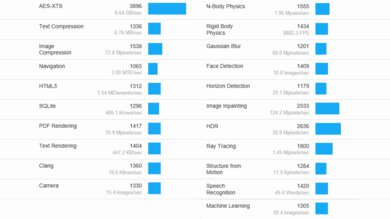
    The Dell Precision 5690's Intel Core Ultra 7 165H CPU scores well in the Geekbench 5 benchmarks. It's suitable for heavy multitasking tasks. If performance is important to you, upgrading to the Core Ultra 9 CPU will net marginally better performance in multi-threaded applications. That said, there are significantly faster CPUs on the market, like the Dell Alienware m18 R2 (2024)'s Intel Core i9-14900HX. All five discrete GPUs can handle heavy computing tasks, so you can simply choose depending on the complexity of your work and the speed at which you expect to complete tasks. Intel's integrated graphics perform poorly and aren't suitable for such workloads.

    The posted results are scores obtained in the default Optimized setting. Switching to the Ultra Performance mode has very little effect. We also ran benchmarks using the newer Geekbench 6, and again found no notable differences between the different modes. Here are the scores using the Optimized mode, with performance differences of the Ultra Performance mode noted in parentheses:

    • Single-thread: 2459 (less than 1% difference)
    • Multi-thread: 14130 (less than 1% difference)
    • GPU Compute: 75015 (less than 1% difference)
    10
    Cinebench R23 (CPU Rendering)
    Single-Thread
    1,869 points
    Multi-Thread
    15,130 points

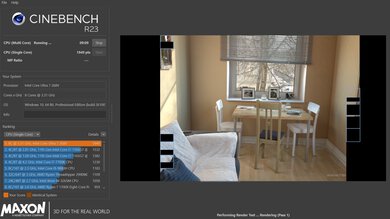
    The Dell Precision 5690's Intel Core Ultra 7 165H performs very well in the Cinebench R23 benchmark. It's suitable for heavily multi-threaded, sustained workloads. You can expect the Core Ultra 9 185H to provide marginally better performance and the Core Ultra 7 155H to perform marginally worse. This is due to differences in clock speed between the various processors. The Core Ultra 5 135H will be substantially slower, as it has two fewer performance cores and lower clock speeds. Despite the strong performance, these CPUs are still significantly slower for multithreaded applications than the Dell Alienware m18 R2 (2024)'s Intel 14th Gen HX CPUs and the Apple MacBook Pro 16 (M3, 2023)'s M3 Max SoC.

    The posted results are scores obtained in the Optimized mode. We also ran benchmarks in the newer Cinebench 2024 using both the Optimized and Ultra Performance modes; again, switching modes results in almost no performance changes. The following results are of the Optimized mode, with changes using the Ultra Performance mode noted in parentheses:

    Cinebench 2024:

    • Single Thread: 109 (same score)
    • Multi Thread: 935 (+2.5%)
    • GPU: 6811 (less than 1% difference)

    9.3
    Blender (3D Rendering)
    CPU Render Time
    2.6 min
    GPU Render Time
    0.5 min
    GPU Render Time (Optix)
    15 s

    The Dell Precision 5690 is excellent for Blender work. Just make sure you get a model with a discrete GPU—even the lower-end NVIDIA RTX 1000 Ada Generation Laptop GPU will render images exponentially faster than the CPU and integrated graphics.

    8.9
    Basemark GPU (Game Scene)
    Overall Score
    75,968

    The Dell Precision 5690's NVIDIA RTX 1000 Ada Generation Laptop GPU is a low-end discrete GPU designed for professional workloads. It can handle demanding AAA games at 1080p, but you may need to play with some settings to get smooth gameplay, as the 6GB of VRAM can be limiting. Based on the score, its performance is in the same ballpark as an NVIDIA GeForce RTX 4050; however, remember that these Ada Generation GPUs lack support for gaming features like DLSS and Frame Generation to boost the frame rate. Also, their Quadro drivers aren't optimized for gaming, so they don't always provide the best gaming experience. All other discrete GPUs will fare better. The highest-end RTX 5000 is capable of providing a high refresh rate experience at 1440p, but again, the performance will vary depending on the title.

    9.6
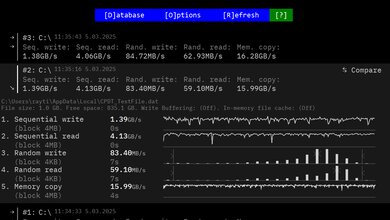
    Storage Drive Performance
    Sequential Write Speed
    2,090.2 MB/s
    Sequential Read Speed
    2,426.7 MB/s
    Random Write Speed
    118.0 MB/s
    Random Read Speed
    73.1 MB/s
    9.5
    Battery
    Capacity
    100 Wh
    Battery Life (Web Browsing)
    16.2 hrs
    Battery Life (Video Playback)
    13.8 hrs
    Battery Life (Gaming)
    1.7 hrs
    Charge Time
    2.5 hrs

    Models with integrated graphics only will have longer battery life, while models using the OLED display will have shorter battery life. As all the CPUs and discrete GPUs have the same 45W TDP and 95W TGP, battery life will be similar across all these configurations (all other choices being equal).

    6.4
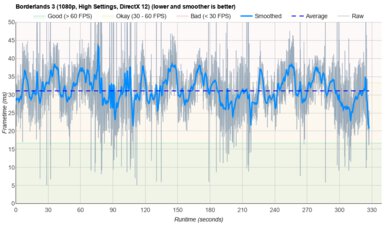
    Borderlands 3
    See details on graph tool
    Avg. FPS
    65 fps
    1% Low
    36 fps
    0.1% Low
    18 fps
    1% Low Delta
    12 ms
    0.1% Low Delta
    41 ms
    Avg. FPS On Very Low
    137 fps

    You can get over 60 fps in Borderlands 3 and other similarly demanding games on models with a discrete GPU, but the gameplay isn't very smooth, as there are frequent stutters. Models with RTX 3500 or above will be able to achieve higher frame rates, but again, you might still experience frequent stutters. This game isn't playable with Intel's Arc iGPU.

    8.1
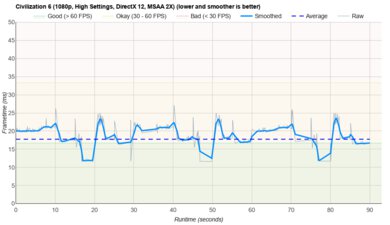
    Civilization VI
    See details on graph tool
    Avg. FPS
    105 fps
    1% Low
    67 fps
    0.1% Low
    59 fps
    1% Low Delta
    5 ms
    0.1% Low Delta
    7 ms
    Avg. FPS On Minimum
    296 fps
    Avg. Turn Time
    7.55 s

    Civilization VI and other similarly demanding games perform great on models with a discrete GPU and are even playable using the Intel Arc iGPU if you turn down the settings.

    8.1
    Counter-Strike 2
    See details on graph tool
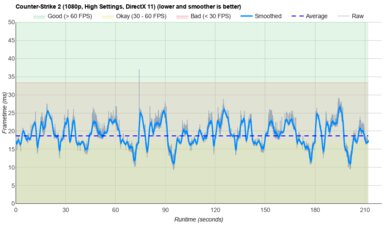
    Avg. FPS
    149fps
    1% Low
    59fps
    0.1% Low
    43fps
    1% Low Delta
    10 ms
    0.1% Low Delta
    16 ms
    Avg. FPS On Low
    295fps

    You can achieve high framerates in Counter-Strike 2 and other comparable esports titles on models with a discrete GPU. However, the lower-end discrete GPUs have the occasional stutter, so the gameplay isn't the smoothest. Because these GPUs don't receive the best drivers for gaming, there may also be stutters on the higher-end configurations as well. This game isn't playable with Intel's Arc iGPU.

    7.3
    Shadow Of The Tomb Raider
    See details on graph tool
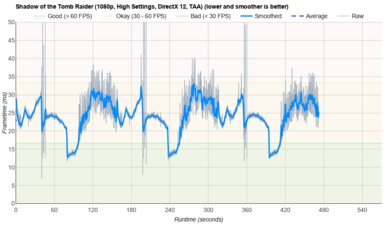
    Avg. FPS
    87 fps
    1% Low
    55 fps
    0.1% Low
    26 fps
    1% Low Delta
    7 ms
    0.1% Low Delta
    27 ms
    Avg. FPS On Lowest
    126 fps

    Shadow of the Tomb Raider and other similarly demanding games perform decently on the Dell Precision 5690 with low to mid-range discrete GPUs, but you might experience occasional stutters. Higher-end discrete GPUs will provide higher framerates, while Intel's Arc iGPU can't handle such a graphically intensive game.

    7.8
    Thermals And Noise
    Keyboard Temp While Idle
    29 °C (85 °F)
    Keyboard Temp Under Load
    44 °C (111 °F)
    Fan Noise While Idle
    27.5 dBA
    Fan Noise Under Load
    42.0 dBA
    Power & Fan Control App
    Yes

    Using the Dell Optimizer app, you can select different thermal management modes for the Dell Precision 5690. By default, it uses the Optimized setting, but there are also Cool, Quiet, and Ultra Performance options. The posted results are measurements taken in the default Optimized setting. Users report the laptop being loud, but this seems limited to workstations with the Core Ultra Ultra 9 185H CPU configuration.

    7.8
    Performance Over Time
    See details on graph tool
    CPU Temp (Cinebench)
    83 °C
    CPU Perf. Loss (Cinebench)
    14% loss
    GPU Temp (Heaven)
    54 °C
    GPU Perf. Loss (Heaven)
    0% loss
    Additional Features And Software
    Software
    Operating System
    Windows 11
    Additional Software
    Yes

    The Dell Precision 5690 has many pre-installed software applications, including:

    • Dell Command: Checks for BIOS, driver, or firmware updates.
    • Dell Digital Delivery: Lets you download software applications purchased from Dell.
    • Dell Display Manager: Lets you organize your screen when using multiple windows and customize your display settings.
    • Dell Optimizer: Lets you monitor the laptop's battery health, storage, CPU status, and network usage. It also allows you to change performance and fan settings and can automatically optimize the system to extend battery life or improve performance.
    • Dell Pair: Helps detect and pair peripherals via Bluetooth.
    • Dell Peripheral Manager: Lets you control video calls, share your screen, customize and update Dell accessories, and apply noise cancelation during video calls.
    • Dell SupportAssist: Lets you scan for drivers and hardware issues, clean files, optimize performance, and access system activity history.
    • Dell Trusted Device Agent: Detects BIOS tampering.
    Extra Features
    Biometrics
    Face Recognition and Fingerprint Sensor
    RGB Illumination
    No
    Touch Pen Support
    No Stylus Support
    Secondary Display
    No

    You can use the Dell Precision 5690's fingerprint sensor (on the power button) and IR facial recognition camera to log in quickly, authorize purchases in the Windows Store, and auto-fill saved passwords on supported websites. You can also add a Smart Card Reader and/or NFC support.