
Our Verdict
The picture quality of the Samsung H6400 is exactly the same as the cheaper H6350. It is worth the small premium if you plan on using the web browser a lot, simply for the better remote. The 3D is just a bonus.
- Great picture quality, both in dark and bright rooms.
- Handles motion very well and has low input lag. This great for playing video games.
- The frame has a clear plastic around it which feels a bit flimsy and increases the thickness of the borders.
- Limited viewing angle. The colors change when viewed from the side.
- Slight gray uniformity issues.
Check Price

We buy and test dozens of TVs yearly, taking an objective, data-driven approach to deliver results you can trust. Our testing process is complex, with hundreds of individual tests that take over a week to complete. Most of our tests use specially designed test patterns that mimic real content, but we also use the same sources you have at home to ensure our results match the real-world experience. We use two main tools for our testing: a Colorimetry Research CR-100 colorimeter and a CR-250 spectroradiometer.
Test Results
Older Test Bench: We tested this product using an older TV test methodology before a major update. Some of the test results below aren't directly comparable with other TVs. Learn more


for pictures & test results
As expected for a Samsung LED TV, the contrast ratio is great. The colors out of the box were also very good (see the next page for our full calibration settings).
for pictures & test results

The backlight uniformity is great, but there was one clouding spot in the top left corner.

for videos & test results

The colors lose saturation when you view it off-axis. It isn't a deal breaker, but something to keep in mind if you have a really wide room.

for pictures & test results

The Samsung H6400 can get very bright. You will have no problem with the screen, even if your room has a lot of windows.

for pictures & test results

The motion blur is very limited. The trail is short and the strobed backlight is effective.

for pictures & test results
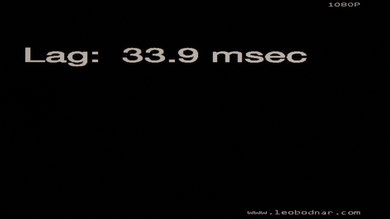
Pretty much all Samsung TVs have the same input lag when you set the input type to PC or turn on Game mode. 44ms is not noticeable even for fast games.

for pictures & test results

1 HDMI
1 Audio Out
1 Ethernet
1 Component In
1 Composite In
1 Digital Out
1 IR Out
for pictures & test results

Samsung's smart TV interface is great, with tons of apps and features. It is a lot faster than Sony's, especially for big USB drives. Check out our full review of Samsung's 2014 Smart TV platform.


