Logitech G935 Wireless  Headphones Review

Reviewed Apr 19, 2019 at 10:37am
Retest May 23, 2025 at 09:33am
Tested using Methodology v1.5 
Logitech G935 Wireless
7.7
Neutral Sound 
5.4
Commute/Travel 
5.9
Sports/Fitness 
6.6
Office 
7.4
Wireless Gaming 
7.7
Wired Gaming 
6.4
Phone Calls 
 2
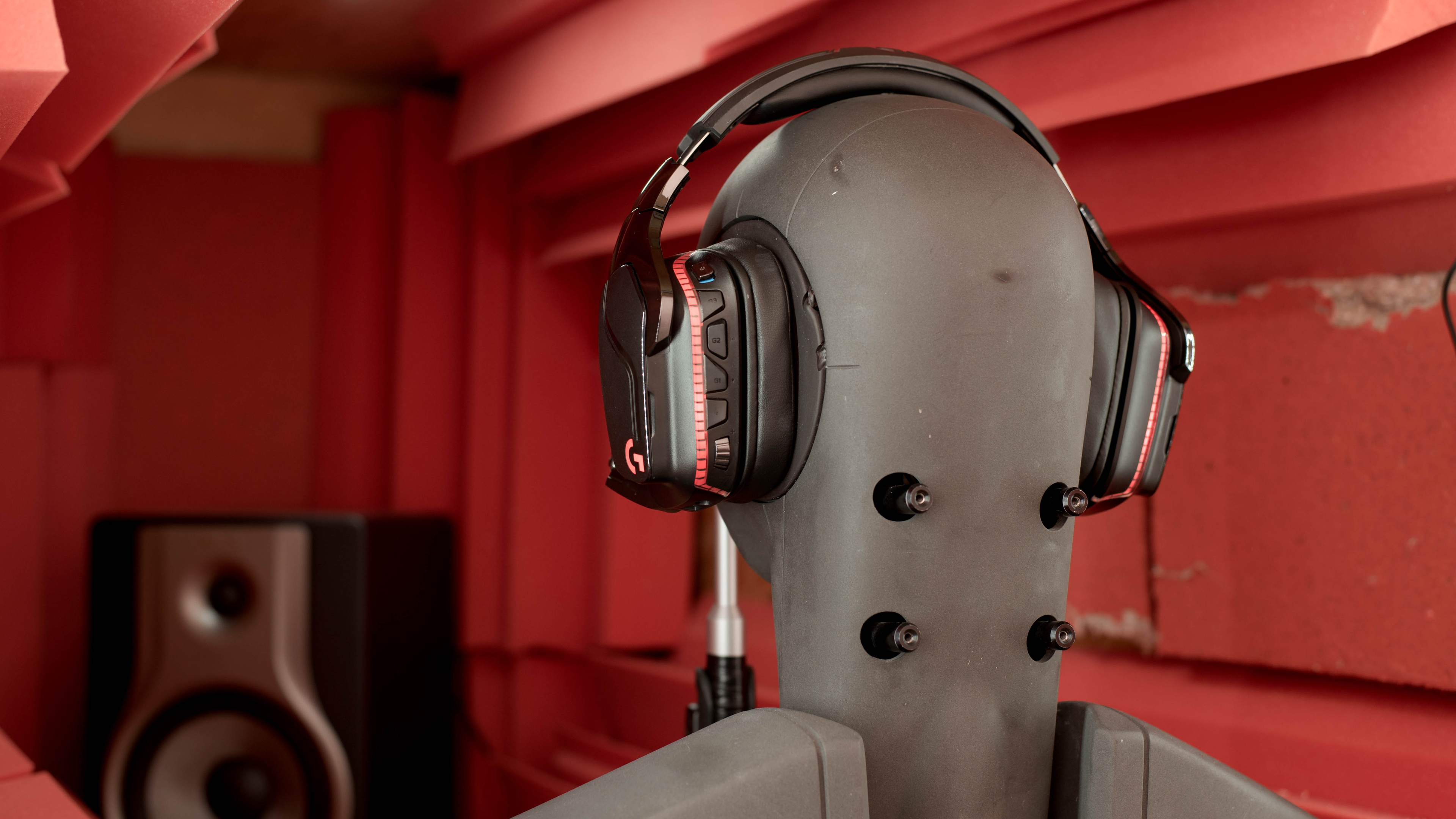
The Logitech G935 are good wireless gaming headphones that have great sound quality. They are the wireless variant of the Logitech G635 and they are very similar in design. The G935 are comfortable but can feel a bit tight on some heads. Their bulky design also isn't ideal for outdoor use, and they don't isolate much noise. Their boom microphone is decent for gaming but doesn’t sound as clear as the G635’s. On the upside, they're compatible with the Logitech G HUB software, which is one of the best and most complete apps we’ve tested so far. Their wireless component offers more freedom to move around than the G635, which some may prefer.

Our Verdict

7.7
Neutral Sound 

Very good for neutral listening. Their bass is extended and accurate, their mid-range is well-balanced and flat, and their treble is virtually flawless. However, their frequency response consistency is sub-par, which means they’ll perform differently on different users and their bass is slightly overemphasized, but you can easily EQ them inside their great app. These headphones are very versatile and will be suited for all music genres and will be great to reproduce video game effects as well.

Pros
  • Great audio reproduction.
  • Amazing app support.
  • Comfortable and durable build.
Cons
  • Very bulky design.
  • Poor isolation performance.
  • Sound delivery varies significantly across different users. Sensitive to glasses.
5.4
Commute/Travel 

Okay for commuting. These headphones are very bulky, which won’t be ideal to travel around with. They also don’t isolate against engine rumbles, which isn’t great for this use case. Also, you won’t be able to use this headset wirelessly, unless you travel with a laptop that you can connect the dongle to. Overall, these headphones won’t be the best option for this use case.

Pros
  • Great audio reproduction.
  • Amazing app support.
  • Comfortable and durable build.
Cons
  • Very bulky design.
  • Poor isolation performance.
  • Sound delivery varies significantly across different users. Sensitive to glasses.
5.9
Sports/Fitness 

Mediocre for sports. Their design is quite massive and very tight on the head. While this means they are fairly stable, they shouldn’t be used for sports. They will make you sweat more than usual and you won’t be able to use them wirelessly during workouts unless you train at home near your PC.

Pros
  • Great audio reproduction.
  • Amazing app support.
  • Comfortable and durable build.
Cons
  • Very bulky design.
  • Poor isolation performance.
  • Sound delivery varies significantly across different users. Sensitive to glasses.
6.6
Office 

Passable for the office. They don’t isolate too much low-end noise but are quite decent against A/C systems. However, you won’t be able to blast your music as they can get a bit leaky at high volumes, which would disturb your surrounding colleagues. On the upside, their battery life should be long enough for a normal workday and you can also use them while charging, which is convenient.

Pros
  • Great audio reproduction.
  • Amazing app support.
  • Comfortable and durable build.
Cons
  • Very bulky design.
  • Poor isolation performance.
  • Sound delivery varies significantly across different users. Sensitive to glasses.
7.4
Wireless Gaming 

Good for gaming. These headphones have great sound and very low latency, even with the USB dongle. They are comfortable to wear for a while but can feel a bit tight for some. Also, their microphone is decent for online games and these headphones are compatible with the G HUB app, which offers tons of customization and controls. They are intended and designed to be gaming headphones and are quite versatile as they can be used with every console and PC.

Pros
  • Great audio reproduction.
  • Amazing app support.
  • Comfortable and durable build.
Cons
  • Very bulky design.
  • Poor isolation performance.
  • Sound delivery varies significantly across different users. Sensitive to glasses.
7.7
Wired Gaming 

Pros
  • Great audio reproduction.
  • Amazing app support.
  • Comfortable and durable build.
Cons
  • Very bulky design.
  • Poor isolation performance.
  • Sound delivery varies significantly across different users. Sensitive to glasses.
6.4
Phone Calls 

Pros
  • Great audio reproduction.
  • Amazing app support.
  • Comfortable and durable build.
Cons
  • Very bulky design.
  • Poor isolation performance.
  • Sound delivery varies significantly across different users. Sensitive to glasses.
  • 7.7
    Neutral Sound
  • 5.4
    Commute/Travel
  • 5.9
    Sports/Fitness
  • 6.6
    Office
  • 7.4
    Wireless Gaming
  • 7.7
    Wired Gaming
  • 6.4
    Phone Calls
  • Changelog

    1.  Updated May 23, 2025: 

      This review has been corrected to clarify that the mic is disabled when the headset is connected via its analog cable, as described in the Wired, PC Compatibility, PlayStation Compatibility, and Xbox Compatibility sections.

    2.  Updated Dec 26, 2022: We've renamed these headphones from Logitech G935 Wireless Gaming Headset to Logitech G935 Wireless across the site.
    3.  Updated Sep 09, 2022: We've added a small disclaimer to the App Support test which highlights some of the most commonly reported issues users online have encountered with Logitech's G HUB companion software.
    4.  Updated Oct 14, 2021: Converted to Test Bench 1.5.

    Check Price

    Popular Headphones Comparisons

    The Logitech G935 are good gaming headphones that set themselves apart by their great audio reproduction, mappable buttons, and their amazing companion software that offers tons of controls and customization options. However, their microphone is slightly bright when compared to other gaming headsets.

    See our recommendations for the best gaming headsets and the best wireless gaming headsets.

    Logitech G535 LIGHTSPEED Wireless

    The Logitech G935 Wireless and the Logitech G535 LIGHTSPEED Wireless are very comparable gaming headphones. While both sets are comfortable, the G935 are better built, and you can use them wired via their 1/8" TRRS audio cable as well as wirelessly. On the other hand, the G935 deliver audio more inconsistently and have a much shorter battery life. Both headphones have decent microphones and offer a low-latency performance that's suitable for gaming. The G535 are a better bet if future-proofing is important to you because they use newer wireless technology, though they both require a dedicated dongle.

    Logitech G733 LIGHTSPEED Wireless

    The Logitech G935 Wireless and Logitech G733 LIGHTSPEED Wireless are somewhat evenly-matched gaming headphones. The G935 hold the advantage in overall versatility, as they offer wired audio and microphone support with their 1/8" TRRS cable. They're also more sturdily built and block out ambient noise. That said, the G733 have longer continuous battery life and a better boom mic.

    Logitech G Pro X Gaming Headset

    The Logitech G935 Wireless are slightly better gaming headphones than the Logitech G Pro X Gaming Headset thanks to their wireless design. Both headphones are compatible with the G HUB software that allows you to EQ their sound profile to your liking. However, if you don’t mind having a wired connection to your gaming platform, the G Pro X have a noticeably better microphone recording quality and are more comfortable. They also feel very durable and come with multiple cables. However, the G935 have mappable buttons, which is a nice feature in their app that the G Pro X don’t have.
    Logitech G933 Wireless

    The Logitech G935 Wireless and the Logitech G933 Wireless are very similar in design, but the G935 isn't necessarily an upgrade over the G933, especially if you already have the first model. Some features like the in-line remote controls or the inputs on the dongle are now gone on the newer model. On the other hand, the G935 have better sound quality, but you can EQ both headsets inside the G HUB app. The G935 have better wireless range and very minimal latency. The G933 also has a slightly better-sounding microphone, which is better for online games.

    Logitech G533 Wireless

    The Logitech G533 Wireless and the Logitech G935 Wireless each have their own pros and cons. The G533 have a longer battery life, but can’t be used wired. The G935 have more customization options with the Logitech G HUB software, but worse wireless range and latency.

    Logitech G PRO X WIRELESS LIGHTSPEED Gaming Headset

    The Logitech G935 Wireless and the Logitech G PRO X WIRELESS LIGHTSPEED Gaming Headset are similar headphones, but you may prefer one over the other. The LIGHTSPEED are more comfortable and leak less sound. Their microphone also performs better out of the box, and they have longer battery life. However, some listeners may prefer the G935's more bass-heavy default sound profile. Unlike the LIGHTSPEED, the G935 also support wired gaming and are compatible with the Xbox One.

    HyperX Cloud 2/Cloud II

    The Logitech G935 Wireless are more versatile gaming headphones than the HyperX Cloud 2/Cloud II. Although the HyperX are more comfortable, have slightly better build quality, and have a boom microphone that outperforms the Logitech, the Logitech can be used wired and wirelessly, giving users more connectivity options. The Logitech also have dedicated companion software which is nice if you like to customize your audio experience.

    SteelSeries Arctis Pro Wireless

    The SteelSeries Arctis Pro Wireless are better wireless gaming headphones than the Logitech G935 Wireless. The SteelSeries have much better controls, feel a lot more stable, have a much better microphone, and have a longer battery life. They also have many more connectivity options including Bluetooth, line in/out, optical in, and more. On the other hand, the Logitech have a better build quality with a more sturdy headband and hinges.

    Astro A50 Gen 3

    The Astro A50 Gen 3 are slightly better gaming headphones than the Logitech G935 Wireless. They feel more comfortable and are slightly better built than the Logitech. The Astro microphone is also better, especially in louder environments. On the other hand, you can use the Logitech wired with any platform while the Astro only connect to the dock wirelessly, although it offers dock charging and more inputs. Also, the Logitech G HUB is a more complete software and offers more options than the Astro Command Center.

    Logitech G635

    The Logitech G935 Wireless and Logitech G635 are practically the same headphones, but the G935 are wireless while the G635 are wired. You get the same design and fit on both headsets, but the G935 have faux leather cup padding and the G635 have a mesh-like fabric. If you want the freedom of a wireless headset, go with the G935, but if you don’t want to manage battery life, the G635 will be a better option. There’s also a difference in the microphone recording quality and by listening to playback, we hear the G635 microphone as better even if it scores lower.

    HyperX Cloud Flight

    The HyperX Cloud Flight and the Logitech G935 Wireless are good gaming headphones that can be used wired or wirelessly, though the HyperX are audio only when used with an audio cable. The Logitech look a bit more durable and well-built and have a better-balanced default sound profile. They also have much better companion software that gives you access to a graphic EQ and presets, while the software for the HyperX doesn't give you many customization settings. That being said, the HyperX have a much better microphone and block a tiny bit more background noise, though they still aren't great in this aspect.

    SteelSeries Arctis 7 2019 Edition Wireless

    The SteelSeries Arctis 7 2019 Edition Wireless are better gaming headphones than the Logitech G935 Wireless. The SteelSeries are better-built headphones and don’t feel as plasticky. Their microphone performance is significantly better, so your voice sounds better even in noisy environments. The SteelSeries also have about twice the battery life of the Logitech. On the other hand, the Logitech headphones have a better app that offers more controls and RGB lighting, which is a plus if you like those aesthetics. The G935 also has a more neutral sound profile, although you can EQ both headsets in their respective apps.

    JBL Quantum ONE

    The Logitech G935 Wireless are better gaming headphones than the JBL Quantum ONE. Thanks to the remarkably feature-rich Logitech G HUB companion software, you can do everything from adjusting the Logitech’s sound profile to remapping their controls, not to mention setting up different room effects. You can also use the Logitech wirelessly via a USB dongle. However, the JBL have a better balanced out-the-box sound profile and block out more ambient noise thanks to their ANC system.

    Overhauling Our Audio Measurements And A New Multi-Curve Graphing Tool

    We've upgraded our Headphones Test Bench to 2.0! This update brings several key changes to our tests and usages, making it easier than ever to interpret our sound results based on your personal preferences. You'll also find a brand-new interactive graph tool featuring multiple targets (including our own!) for you to explore and compare.

    For a full breakdown, check out our changelog, which includes detailed commentary from our test designer explaining the rationale behind our update.

    We'd also love to hear your thoughts: your feedback helps us keep improving, so join us in the comments!

    Test Results

    perceptual testing image
    Sort:
    RATINGS
    Category:
    All
    Design
    Style
    TypeOver-ear
    EnclosureClosed-Back
    WirelessYes
    TransducerDynamic

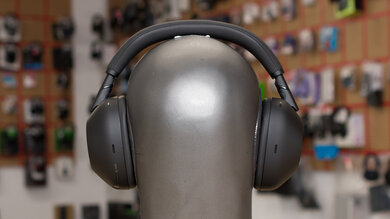
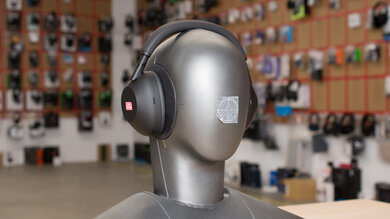
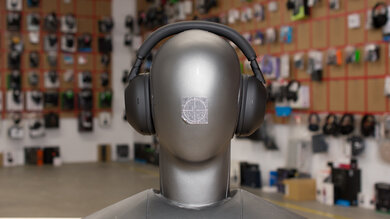
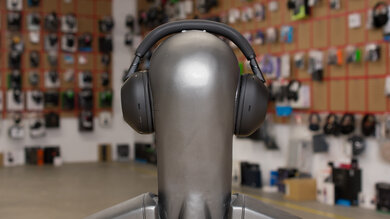
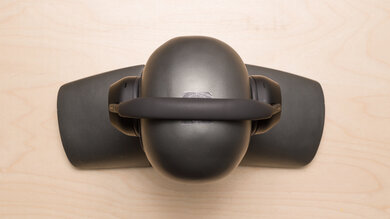
    The Logitech G935 are very similar in design to the wired Logitech G635, except they're wireless. Both are similar models to the Logitech G633 and Logitech G933 Wireless. Their overall look is still the same, with a bulky design that shows without a doubt that they're gaming headphones. They are not very outdoor-friendly, and when powered by their USB cable, you get RGB lighting on the logo and a strip at the back of the ear cups. Their cups are large and more squared than most other gaming brands. You can also fold the microphone in to hide it, but they still won’t be great to use outside, even if you can use them with your phone.

    7.5
    Comfort
    Weight0.85 lbs
    Clamping Force
    1.4 lbs

    These headphones are as comfortable as the Logitech G635 and are as tight as well. However, the padding is slightly different. Instead of mesh fabric, the Logitech G935 cups' padding is covered by pleather, which gives them a more high-end feel. The cups are large and spacious and should fit most ear sizes and shapes. They are comfortable to wear for a while, but if you have a larger-sized head, these could become uncomfortable rather quickly.

    5.7
    Controls
    OS Compatibility
    Not OS specific
    Ease Of UseDecent
    FeedbackGreat
    Call/Music ControlNo
    Volume ControlYes
    Microphone ControlMute/Unmute
    Channel Mixing
    No
    Noise Cancelling ControlNo
    Talk-Through
    No
    Additional ControlsMulti function

    The Logitech G935 have a great control scheme for gamers. You have access to a volume wheel, a mic-mute button, and three mappable buttons that you can set to practically whatever you want inside their app. The top button isn’t an audio selector like the Logitech G635, but is rather a power switch to easily turn your headset on or off. The buttons offer great feedback and the ridges make it easier to distinguish different buttons, but it might take you a second to feel the surrounding buttons to be sure which one you're about to press.

    4.9
    Breathability
    Avg.Temp.Difference9.2 °C

    These headphones are quite tight on the head and create a good seal around your ears, which means they trap a lot of heat inside the ear cups and won't allow much airflow. They won’t be suitable for sports as you’d sweat more than usual, and they weren't designed for this use case. You will feel a noticeable difference in temperature.

    5.5
    Portability
    L8.0" (20.3 cm)
    W7.4" (18.8 cm)
    H3.1" (7.9 cm)
    Volume184.00 in³ (3,015.21 cm³)
    Transmitter RequiredNo

    Like most gaming headphones, the Logitech G935 aren’t very portable. They take up a lot of space and don’t fold into a more compact format. On the upside, the cups swivel to lay flat, which makes it easier to slide them inside a bag, but that’s about it. Overall, these gaming headphones should stay around your gaming setup and won’t be ideal to use on the go.

    0.0
    Case
    TypeNo case
    LN/A
    WN/A
    HN/A
    VolumeN/A

    They don’t come with a case or traveling pouch to protect them.

    7.5
    Build Quality

    The Logitech G935 are built the same way the Logitech G635 are, which means that they also don’t seem to offer any major improvement over the previous Logitech G633 and Logitech G933 Wireless models when it comes to build quality. They're still well-built, but they're slightly plasticky and don't feel as premium as other gaming headsets like the Logitech G PRO X WIRELESS LIGHTSPEED Gaming Headset. They also squeak a bit when manipulating the headphones. On the upside, the headband is flexible, yet sturdy thanks to a reinforcing metal frame. The cups are quite dense, and the backplates are magnetic and easily removable. On the G935, you have room inside the ear cups to store the USB dongle, which is useful.

    6.5
    Stability

    These headphones are fairly tight on the head but still sway quite a bit with head movements. They won’t be ideal for sports activities, but this shouldn’t be a problem during a casual gaming session. On the upside, they are wireless, meaning you don’t have to worry about a cable getting stuck or hooked on something, which could yank the headphones off your head.

    Headshots 1
    Headshots 2
    Top
    In The Box

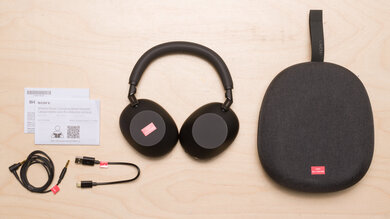
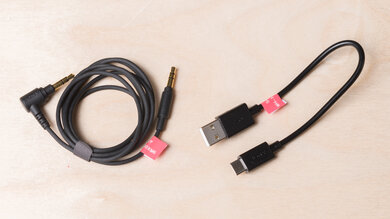
    • Logitech G935 headphones
    • USB dongle
    • USB to micro-USB charging cable
    • 1/8” TRRS cable
    • Manuals
    Sound
    Sound Profile
    See details on graph tool
    Bass Amount
    1.81 dB
    Treble Amount
    -2.1 dB
    5.6
    Frequency Response Consistency
    See details on graph tool
    See details on graph tool
    Avg. Std. Deviation
    1.12 dB

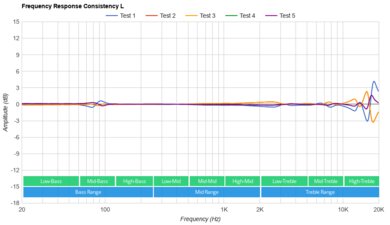
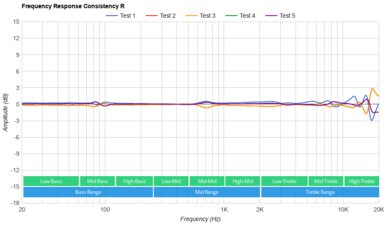
    The Logitech G935 have sub-par frequency response consistency. In the bass range, we measured about 12dB of maximum deviation at 20Hz, which is very noticeable. These headphones were performing consistently across most test subjects but people with glasses may experience a drop in bass if they create a break in the seal of the headphones around your ears. Their treble consistency is also sub-par, with more than 10dB of deviation measured around 7kHz, which may be due to the design of the cups.

    Raw Frequency Response
    See details on graph tool
    See details on graph tool
    7.2
    Bass Accuracy
    See details on graph tool
    Std. Err.
    4.15 dB
    Low-Frequency Extension
    10 Hz
    Low-Bass
    2.48 dB
    Mid-Bass
    5.39 dB
    High-Bass
    4.94 dB

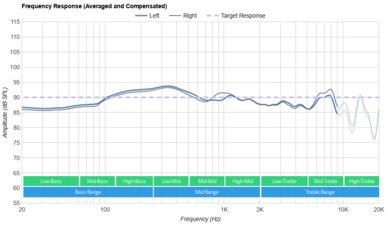
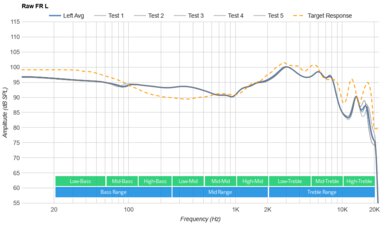
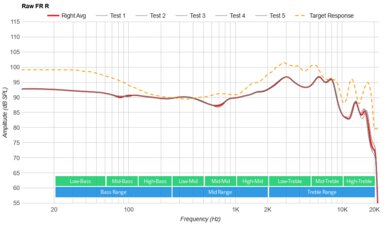
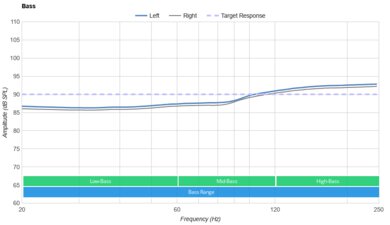
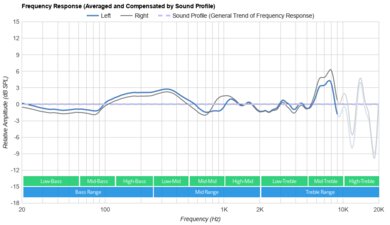
    The Logitch G935 have a very good bass range performance. LFE is extended down to 10Hz, which is great. The entire range's response is virtually flat but slightly overemphasized. The 3.5dB bump in mid-bass will add a bit of excess on the punch of bass guitars and kick of drums. Also, their bass delivery varies significantly across users, and is sensitive to the quality of the fit, seal, and whether you wear glasses. The response here represents the average bass response and your experience may vary.

    8.7
    Mid Accuracy
    See details on graph tool
    Std. Err.
    1.79 dB
    Low-Mid
    1.74 dB
    Mid-Mid
    0.46 dB
    High-Mid
    0.39 dB

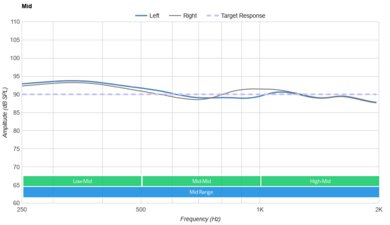
    The mid-range of the Logitech G935 is very good. The response throughout the range is well-balanced and flat, which means vocals and leads will be accurately reproduced. The response is slightly underemphasized, but this won’t be noticeable for most people.

    8.3
    Treble Accuracy
    See details on graph tool
    Std. Err.
    2.59 dB
    Low-Treble
    1.67 dB
    Mid-Treble
    1.79 dB
    High-Treble
    -8.65 dB

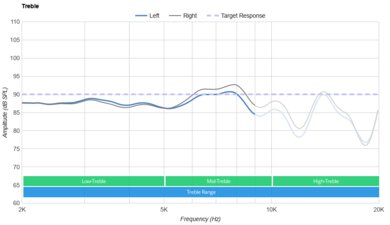
    Their treble performance is also very good. The response is nearly flawless up to 10kHz but slightly uneven. Also, their treble delivery varies noticeably across users. The response here represents the average response and your experience may vary.

    7.5
    Peaks/Dips
    See details on graph tool
    Peaks
    1.76 dB
    Dips
    0.88 dB
    8.5
    Imaging
    See details on graph tool
    See details on graph tool
    Weighted Group Delay
    0.34
    Weighted Phase Mismatch
    5.12
    Weighted Amplitude Mismatch
    0.81
    Weighted Frequency Mismatch
    1.69

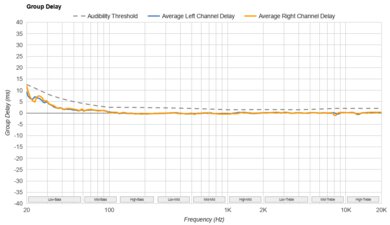
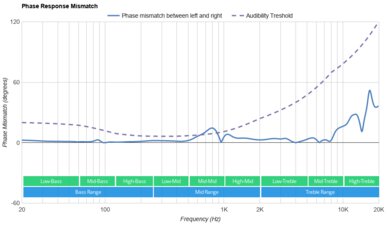
    The imaging performance is great. Weighted group delay is at 0.34, which is very good, but the GD graph shows that the response crosses the audibility threshold around 50-60Hz. This could result in a bass that is a tad slow, but it's subtle enough that most people won't notice it. Additionally, the L/R drivers of our test unit were very well-matched in amplitude, frequency, and phase response. This is important for the accurate localization and placement of objects (like voice, instruments, and video game effects) in the stereo field. However, these results are only valid for our unit and yours may perform differently.

    6.5
    Passive Soundstage
    See details on graph tool
    PRTF Accuracy (Std. Dev.)
    2.25 dB
    PRTF Size (Avg.)
    5.87 dB
    PRTF Distance
    13.47 dB
    Openness
    5.6
    Acoustic Space Excitation
    4.2

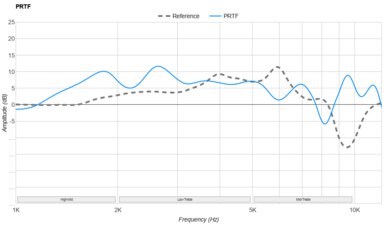
    The soundstage of the Logitech G935 is decent. The PRTF graph shows a good amount of pinna interaction and activation, which is good, but its accuracy isn’t great. There is also not a notch present around the 10kHz region either. Therefore, their soundstage may be perceived as relatively large, but unnatural and located inside the head. Their closed-back design also means they won’t be open-sounding as open-back headphones.

    2.0
    Virtual Soundstage
    Head Modeling
    No
    Speaker Modeling
    On/Off
    Room Ambience
    No
    Head Tracking
    No
    Virtual Surround
    DTS 7.1
    7.9
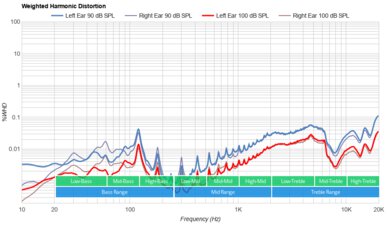
    Weighted Harmonic Distortion
    See details on graph tool
    WHD @ 90
    0.287
    WHD @ 100
    0.101
    Test Settings
    Firmware
    Unknown
    Power
    On
    Connection
    Wireless (Proprietary)
    Codec
    PCM, 24-bit, 48kHz
    EQ
    Default
    ANC
    No ANC
    Tip/Pad
    Default
    Microphone
    Boom
    Isolation
    3.7
    Noise Isolation
    See details on graph tool
    Isolation Audio
    Overall Attenuation
    -11.09 dB
    Noise CancellingNo
    Bass
    0.62 dB
    Mid
    -5.7 dB
    Treble
    -28.55 dB

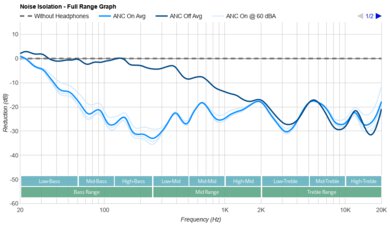
    Like most Logitech gaming headphones, the Logitech G935's isolation performance is poor. They don’t have a noise cancelling feature and only passively isolate. In the bass range, occupied by the rumble of airplane and bus engines, they achieve no isolation, which means they won’t be great for commuting. In the mid-range, important for blocking out speech, they achieve about 6dB of isolation, which is barely noticeable. In the treble range, responsible for sharp sounds like S and Ts and A/C system noises, they isolate by more than 28dB, which is good.

    6.3
    Leakage
    See details on graph tool
    Leakage Audio
    Overall Leakage @ 1ft
    43.28 dB

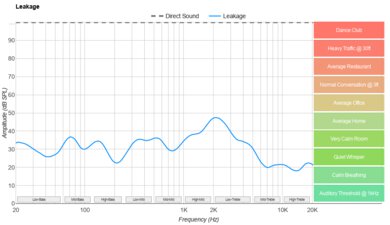
    The Logitech G935 have an okay leakage performance. The significant portion of their leakage sits between 400Hz and 2kHz, which is a relatively narrow range. The overall level of the leakage is a bit loud, too. With the music at 100dB SPL, the leakage at 1 foot away averages at 43dB and peaks at around 58dB, which is a bit above the noise floor of most offices.

    Microphone
    Microphone Style
    Integrated
    No
    In-Line
    No
    Boom
    Yes
    Detachable Boom
    No
    MicYes
    6.7
    Recording Quality
    See details on graph tool
    Recorded Speech
    LFE
    289.23 Hz
    FR Std. Dev.
    4.34 dB
    HFE
    6,639.82 Hz
    Weighted THD
    14.923
    Gain
    29.17 dB

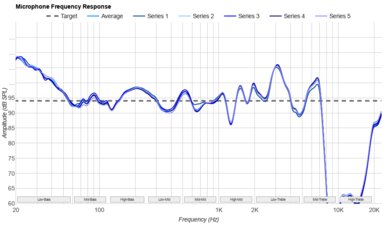
    The Logitech G935’s boom mic has a decent recording quality. The LFE (low-frequency extension) of 289Hz indicates a recorded/transmitted speech that sounds quite bright and thin. The HFE (high-frequency extension) is at 6.7kHz, which results in clear, detailed speech, but may lack a bit of air. The response between the LFE and HFE points gets elevated in the treble range, resulting in a quite sharp-sounding speech.

    This microphone performs better than what the score shows since LFE might not be as important for everyone. Overall, it definitely has better recording quality than most Bluetooth headphones microphones, which have a similar score but would sound less clear due to a lower HFE. However, although the wired Logitech G635's mic scores lower, it sounds a bit better than the G935's, which you can compare for yourself by listening to the audio files.

    7.2
    Noise Handling
    See details on graph tool
    SpNR
    25.13 dB
    Noise Gate
    Always On
    Speech + Pink Noise Handling
    7.0
    Speech + Pink Noise Audio Sample
    Speech + Subway Noise Handling
    7.5
    Speech + Subway Noise Audio Sample

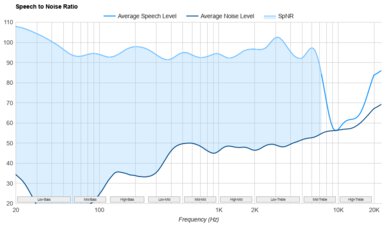
    The boom microphone of the Logitech G935 is decent at noise handling. It achieved a speech-to-noise ratio of 25dB in our SpNR test. This indicates that it can separate speech from ambient noise to a decent degree in most situations but may not be suited for the loudest situations. If you tend to game in very loud environments, take a look at the JBL Quantum ONE, which have a boom microphone that's even better at isolating speech from background noise.

    Active Features
    8.1
    Battery
    Battery Type
    Rechargable
    Continuous Battery Life
    12.8 hrs
    Additional Charges
    0.0
    Total Battery Life
    12.8 hrs
    Charge Time
    3.7 hrs
    Power-Saving Feature
    Auto-Off Timer
    Audio While Charging
    Yes
    Passive Playback
    Yes
    Charging Portmicro-USB

    The Logitech G935 have a decent 13-hour battery life that should be enough for long gaming sessions. We’ve measured the battery life with all the RGB lighting turned off, so if you do want the lights, you may experience shorter battery life, which is expected to be around 8 hours according to the specs sheet. They also need quite a bit of time to charge; about 4 hours. On the upside, you can still use them via the USB dongle while they are charging with their USB cable. They can also be used passively, even if the battery is dead, with the 1/8” TRRS cable, but you won’t have access to their app and active features. If you want a pair of wireless gaming headphones with much longer battery life, check out the Turtle Beach Elite Atlas Aero Wireless, though they don't perform quite as well overall.

    9.0
    App Support
    App NameLogitech G Hub
    iOSNo
    AndroidNo
    macOSYes
    WindowsYes
    Equalizer
    Graphic + Presets
    ANC Control
    N/A
    Mic ControlAdjustable Level
    Room Effects
    Yes
    Playback Control
    No
    Button MappingYes
    Surround Support
    Yes

    Like the wired Logitech G635, the wireless Logitech G935 are compatible with the Logitech G HUB app available on Windows and Mac. This software is one of the most complete ones we’ve ever tested. It offers tons of customization options like surround sound, a 10-band EQ, and control over your Lightsync RGB lighting. You also get tons of options and control for the sound and microphone of the headset. You can map the buttons of the headphones to different sound profiles, functions, and commands related to your PC system settings. You can also launch programs, your favorite games, set macros, or even manage your music, which is very convenient. However, you can only map one command to a button and only have three buttons to map, which isn't a lot considering all the available options. There have also been quite a few user reports regarding various problems using this software. This includes but isn't limited to startup issues, freezing, and connection issues with some devices. Although we didn't experience this issue, if you've had problems using it with your unit, please leave us a comment in the discussions.

    Connectivity
    0.0
    Bluetooth
    Bluetooth Version
    No Bluetooth
    Multi-Device Pairing
    No
    NFC Pairing
    No
    Line Of Sight Range
    N/A
    PC Latency (SBC)
    N/A
    PC Latency (aptX)
    N/A
    PC Latency (aptX HD)
    N/A
    PC Latency (aptX-LL)
    N/A
    iOS Latency
    N/A
    Android Latency
    N/A

    These headphones are not Bluetooth compatible. For a gaming headset with Bluetooth compatibility, check out the Turtle Beach Stealth 700, the Turtle Beach Elite 800 or the SteelSeries Arctis Pro Wireless.

    The Logitech G935 have amazingly low latency. With 9ms of delay when playing games with the USB dongle, most people won’t notice anything. This will also be great for watching video content without having sync issues.

    7.9
    Non-Bluetooth Wireless
    Non-BT Line Of Sight Range
    108.00 ft (32.92 m)
    Non-BT Latency
    56 ms
    9.5
    Wired
    Analog Audio
    Yes
    USB Audio
    No
    DetachableYes
    Length5.30 ft (1.62 m)
    Connection
    1/8" TRRS
    Analog/USB Audio Latency
    0 ms

    The headset supports a wired connection via its analog cable. However, you can't use the boom mic when the headset is used with its 3.5 mm (1/8" TRRS) analog cable, unless you get a four-pole 3.5 mm splitter, as described in the manual. You also don't have support for wired USB audio, just like the previous Logitech G933 Wireless model.

    PC Compatibility
    Analog
    Audio Only
    Wired USB
    No
    Non-BT Wireless
    Audio + Microphone

    The headset supports full mic and audio via the wireless USB dongle, but unless you use a four-pole splitter with your PC, mic support isn't available over analog connections.

    PlayStation Compatibility
    PS4 Analog
    Audio Only
    PS4 Wired USB
    No
    PS4 Non-BT Wireless
    Audio + Microphone
    PS5 Analog
    Audio Only
    PS5 Wired USB
    No
    PS5 Non-BT Wireless
    Audio + Microphone

    You get microphone and audio support with the wireless USB dongle with PS consoles. When used passively with the analog cable, the mic is disabled.

    Xbox Compatibility
    Xbox One Analog
    Audio Only
    Xbox One Wired USB
    No
    Xbox One Non-BT Wireless
    No
    Xbox Series X|S Analog
    Audio Only
    Xbox Series X|S Wired USB
    No
    Xbox Series X|S Non-BT Wireless
    No

    The headset delivers only audio when plugged into your Xbox controller via the analog cable. There's no wireless support, and the mic is disabled when used passively.

    3.4
    Base/Dock
    Type
    Wireless USB Dongle
    USB Input
    Yes
    Line In
    No
    Line Out
    No
    Optical Input
    No
    RCA Input
    No
    Dock Charging
    No
    Power Supply
    USB

    The Logitech G935 offer fewer connection options than the previous Logitech G933 Wireless. They don’t come with a TRRS to RCA cable and the dongle doesn’t have any inputs. The G935 can only be used wirelessly via their USB dongle on PC and PS4 for full audio and microphone support, and only support audio on Xbox One.