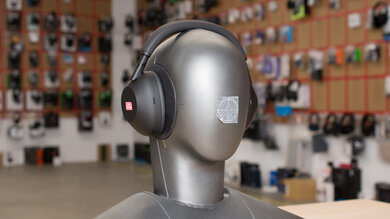
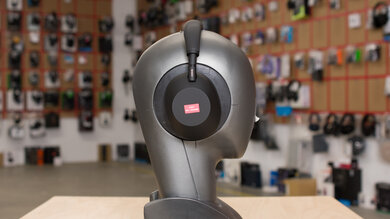
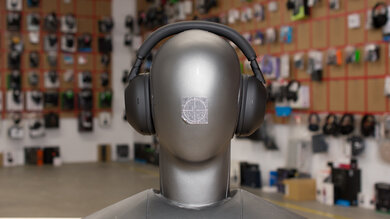
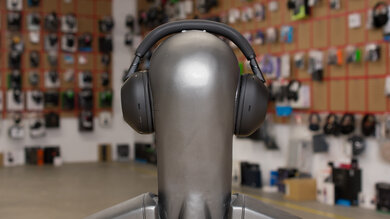
The Logitech G Pro X Gaming Headset are wired gaming headphones with a broad range of customization options. They're also very comfortable, well-built, and their boom mic offers a very good overall performance. Unfortunately, like most gaming headphones, they're quite bulky and don’t fare well in noisy environments. Their audio delivery can also vary drastically across different users, so your experience may vary.
Our Verdict
The Logitech G Pro X Gaming Headset is decent for neutral sound. These over-ears have a pretty well-balanced sound profile, with a slightly overemphasized bass range that should emphasize the thump and rumble of in-game sound effects as well as EDM and hip-hop music, but without overwhelming dialogue or vocals and lead instruments. Their companion app also features an EQ that lets you fine-tune your listening experience. However, your experience may vary across separate re-seats, as their audio delivery is heavily dependent on their fit, seal, and positioning on your head.
- Companion software features a broad range of configuration options.
- Inconsistent audio delivery.
The Logitech G Pro X Gaming Headset is poor for commuting, though this isn't its intended use case. These bulky over-ears don’t isolate against low-end noises like the rumble of bus engines. They are also very hard to carry around and don’t fold into a more compact format. On the upside, you can use their mobile-friendly cable to control your music with the in-line remote.
- Sturdy-feeling, comfortable design.
- Comes with a mobile-friendly audio cable.
- Sub-par noise isolation.
- Bulky construction.
- No wireless connectivity options.
The Logitech G Pro X Gaming Headset is inadequate for sports and fitness, though this isn't its intended use case. These gaming headphones are quite bulky and trap a lot of heat inside their ear cups, which can make you sweat more when working out. They also sway around during intense physical activity and can fall from your head. Additionally, their audio cable can get hooked or stuck on something and yank them from your head.
- Sturdy-feeling, comfortable design.
- Comes with a mobile-friendly audio cable.
- Bulky construction.
- No wireless connectivity options.
- Not stable enough for workouts.
- Not particularly breathable.
The Logitech G Pro X Gaming Headset is mediocre for office use. While these headphones don’t do much to isolate you from lower-end frequencies, they do a pretty decent job blocking out work environment noises like ambient chatter and A/C system noise. Their wired connection also means you don’t have to worry about battery life, but it doesn’t offer the freedom of movement that comes with a wireless pair of headphones. On the upside, they are quite comfortable to wear and don’t leak too much audio, so listening to higher volumes shouldn’t disturb nearby colleagues.
- Sturdy-feeling, comfortable design.
- Low levels of audio leakage.
- Sub-par noise isolation.
- No wireless connectivity options.
The Logitech G Pro X Gaming Headset is a wired-only headset and can't be used on a wireless connection.
The Logitech G Pro X Gaming Headset is good for wired gaming. These headphones are comfortable enough to wear throughout long gaming sessions. They have a well-balanced yet punchy sound profile and a microphone that delivers good recording quality while doing an amazing job of isolating speech from background noise. They are also compatible with the Logitech G HUB software which has multiple customization options, including the Blue Voice technology for their boom microphone.
- Sturdy-feeling, comfortable design.
- Companion software features a broad range of configuration options.
- Impressive overall microphone performance.
- Inconsistent audio delivery.
The Logitech G Pro X Gaming Headset is a satisfactory choice for phone calls. These headphones have a removable boom mic that makes your voice sound full-bodied and clear while doing an excellent job of filtering out background noise. However, their sub-par noise isolation capability can make it difficult to hear what's being said on a call if you're in a loud or crowded environment.
- Impressive overall microphone performance.
- Sub-par noise isolation.
Changelog
-
Updated Nov 26, 2024:
We added the Logitech G Pro X SE to the variants section of this review.
- Updated Mar 01, 2024: The microphone's Recording Quality has been updated with a comparison to the Beyerdynamic MMX 300 (2nd Generation).
- Updated Feb 20, 2024: We've updated the App Support section with information from a retest about saving EQ settings to use with PS4 and PS5 consoles.
- Updated Nov 23, 2023: The following test group's text has been updated following TB 1.6: Wired Connection. There have also been text changes made throughout the review, including to the product comparisons to match these results.
Check Price
Differences Between Sizes And Variants
The Logitech G Pro X Gaming Headset comes in one color variant: Black.
These headphones also come in two other variants. One is called the Logitech Pro VR Headset For Oculus Quest 2, which is designed for use with the Oculus Quest 2 VR headset. The Pro VR come with a much shorter 1/8" TRRS cable, which helps reduce the chances of something snagging the headphones and pulling them off your head. Otherwise, we expect it to perform similarly to our model.
The other variant is the Logitech G Pro X SE, which doesn't come with accessories like the carrying bag, mobile cable, or additional velour ear pads—you only get the standard leatherette ear pads. Since we ran our tests using the leatherette ear pads, we expect the SE variant to produce similar results to those listed in this review.
If you encounter another variant of these headphones, please let us know in the comments, and we'll update our review.
Popular Headphones Comparisons
The Logitech Pro X are premium wired gaming headphones. They have a good build quality, a comfortable fit, and a myriad of customization options, including their Blue Voice technology feature that lets you fine-tune a lot of microphone settings. However, they don't deliver audio very consistently and don’t block out a lot of ambient noise.
If you're looking for alternatives, see our recommendations for the best gaming headsets, or if you're looking for something wireless, the best wireless gaming headsets.
The Logitech G Pro X Gaming Headset and the Logitech G733 LIGHTSPEED Wireless have different strengths. The G733 LIGHTSPEED are better for wireless gaming as their boom mic has a better noise handling performance, support non-Bluetooth wireless, and have a slightly more immersive passive soundstage. However, the G Pro X are better for wired gaming. They're more comfortable and better built. Their boom microphone also does a better job of recording your voice, and they come with a wired USB connection.
The Logitech G Pro X Gaming Headset is better than the HyperX Cloud Alpha. While both headphones are comfortable and have similarly-performing microphones, the Logitech have a dedicated cable for mobile use, which is useful for controlling your music on the go, and you can connect them to PC and PlayStation via wired USB. Both headphones sound fairly neutral by default, but only the Logitech has an app for customizing the sound to your liking. On the other hand, the HyperX's passive soundstage seems a bit wider, and they leak less audio.
The Razer BlackShark V2 and the Logitech G Pro X Gaming Headset are very similar headphones, and depending on your listening habits, you may prefer one over the other. Both are gaming-oriented headphones that are compatible with software that lets you adjust the sound, the microphone settings, and access virtual surround sound mode. However, the Logitech have a better build quality and a more comfortable over-ear fit. Their microphone also has a better performance out-of-the-box. On the other hand, the Razer are better for neutral sound, and they have a more stable on-ear fit.
The Logitech G935 Wireless are slightly better gaming headphones than the Logitech G Pro X Gaming Headset thanks to their wireless design. Both headphones are compatible with the G HUB software that allows you to EQ their sound profile to your liking. However, if you don’t mind having a wired connection to your gaming platform, the G Pro X have a noticeably better microphone recording quality and are more comfortable. They also feel very durable and come with multiple cables. However, the G935 have mappable buttons, which is a nice feature in their app that the G Pro X don’t have.
Test Results
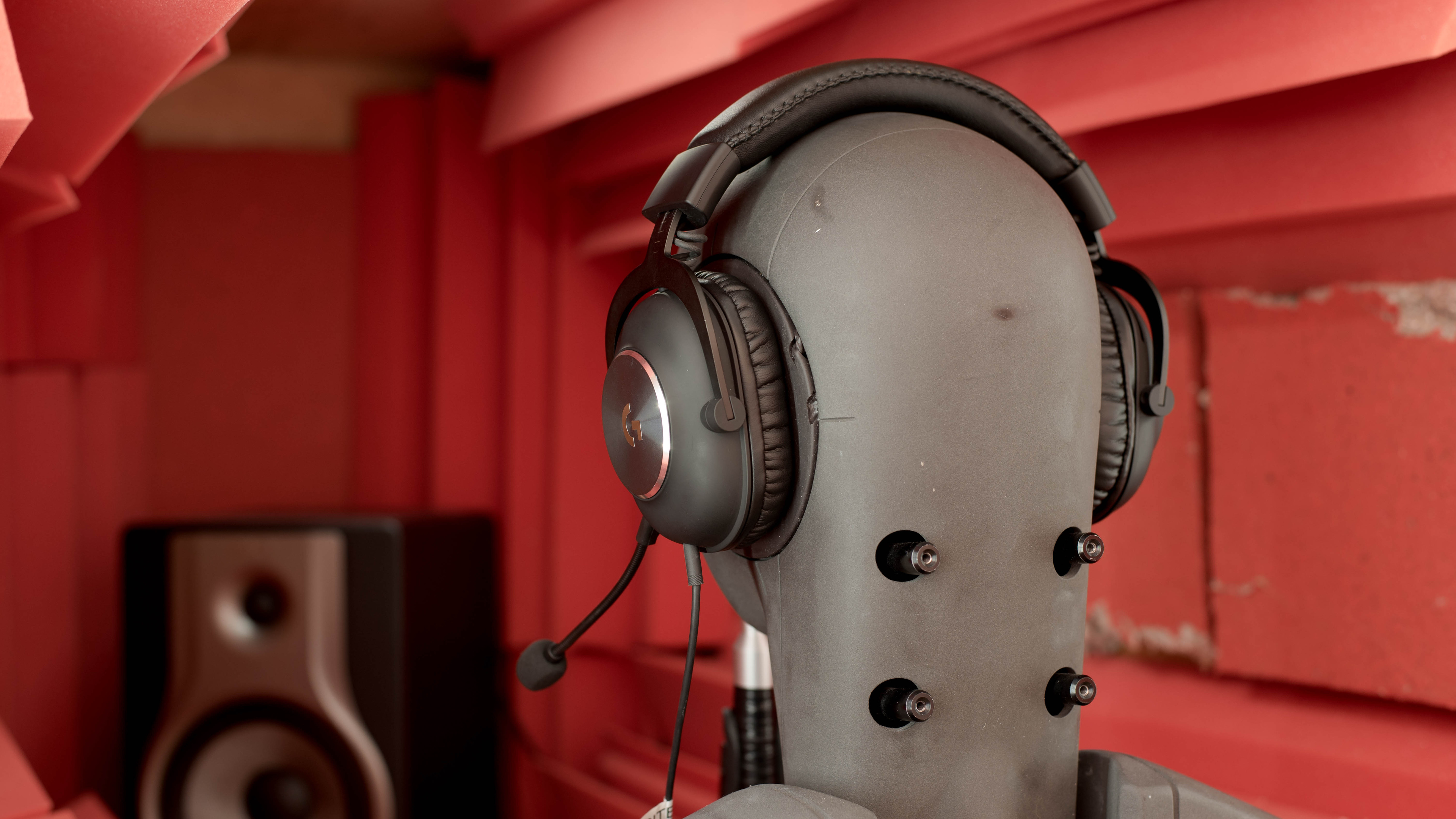
The Logitech Pro X are premium-looking gaming headphones. The frame is made of metal and the padding is thick and comfortable. The cups are big, deep, and feel very high-end thanks to the metal silver accent on the back of the cups. You can easily detach the microphone, which gives them a more casual appearance. However, they only come in one color scheme.
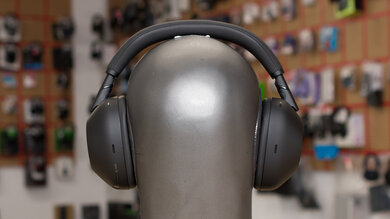
The Logitech Pro X Gaming Headset are very comfortable headphones. They come with two different sets of memory foam pads: one covered by leather and the other by cloth. Both are very comfortable and feel nice on the skin. The cups are big and deep, which should fit most ear sizes and shapes. However, the cups don’t have the best range of motion and can feel a bit tight for some people. On the upside, the headband is well padded and wide, which distributes the weight of the headphones well.
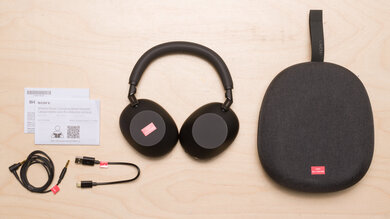
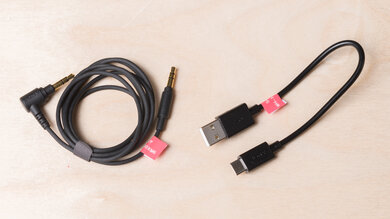
The Logitech G Pro X Gaming Headset's control scheme is decent. These over-ears come with two audio cables with different in-line remotes. The braided cable is better-suited for gaming since it has a mic-mute switch and a volume wheel. The normal audio cable is useful for mobile users, as there’s a multi-purpose button that lets you play and pause your music, but unfortunately, it doesn’t have a volume wheel.
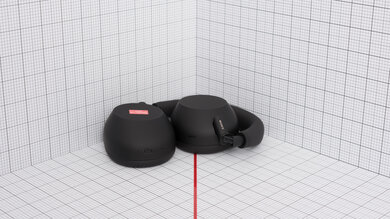
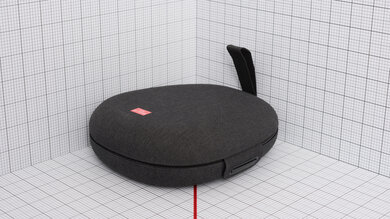
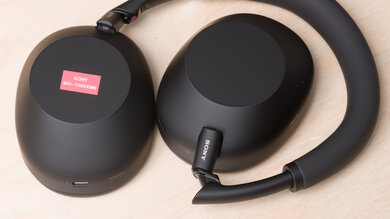
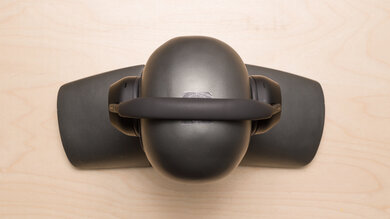
Like most gaming headphones, the Logitech G Pro X aren’t very portable. Their design is pretty bulky, and they can’t fold or swivel into a more portable and compact format, unlike the Cooler Master MH751.
Update 11/04/2021: There have been several user reports that the hinges on their units have broken over time. Some users have reported breakage while under warranty, and some users have experienced this once they were out of warranty. At the moment, we're unable to test for long-term use in our test bench, and your feedback helps us to provide more information. As a result, we have decided to lower the 'Build Quality' score from '8.5' to '7.5' to reflect this widespread issue. If you have experienced this issue and the headphones are outside the manufacturer's warranty, some users have suggested that super glue works well. One of our colleagues also experienced a similar issue with their Logitech G PRO X WIRELESS LIGHTSPEED Gaming Headset within the first year of owning this headset and their solution was to use zip ties to hold the hinge in place. We have updated our review to reflect these changes.
The Logitech G Pro X are well-built. For their price point, they're a lot more sturdy-feeling than the Sony INZONE H3, as the padding feels high-end regardless of the pads you’re using, and the boom mic and cable are fully detachable and replaceable. Overall, they have a fairly similar build to the HyperX Cloud 2/Cloud II with a metal headband frame and hinges.
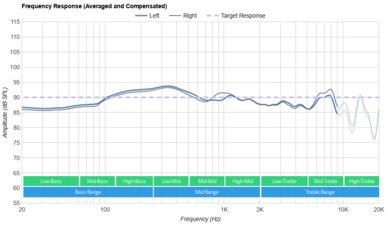
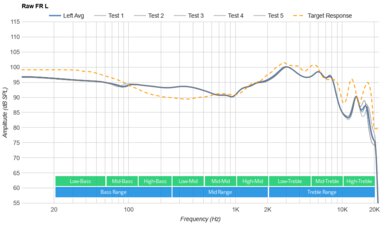
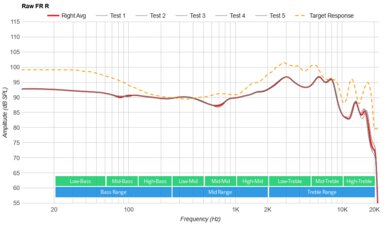
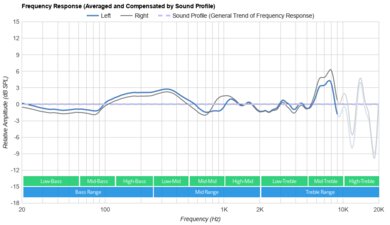
The Logitech Pro X have a reasonably well-balanced sound profile, though with a bit of added bass that emphasizes the boom and warmth of in-game sound effects. However, some users may find it a little too muddy. Still, dialogue and music shouldn't be completely overwhelmed or cluttered by this exaggerated low-end response. If that isn't to your liking, their companion software features a graphic EQ as well as a couple of EQ presets.
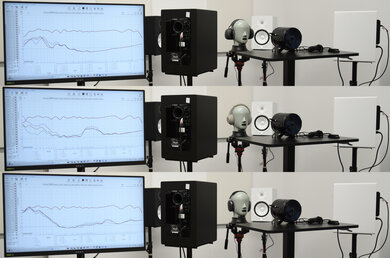
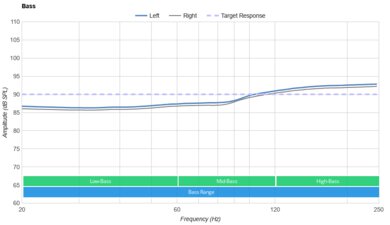
Some users have reported that their units' sound profile changed with a firmware update. We updated our headphones to the latest firmware but measured a similar response to our original result. You can see the human passes done on the bass range here and see the passes done on our test rig here. The new passes are labeled as 'FR Sanity Pass'. Our test rig is more sensitive to the headphones' padding, which results in slight deviations in treble delivery.
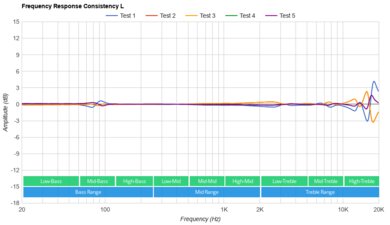
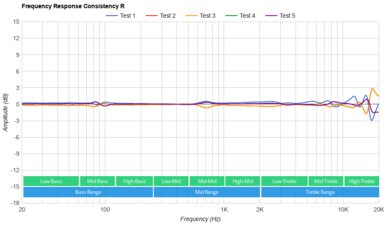
The Logitech G Pro X have sub-par frequency response consistency. In the bass range, they have a fairly inconsistent delivery across users, which could be a more pressing issue if you wear glasses, as that can break the seal between the headphones and your ears. Treble delivery is also highly sensitive to their position and fit on your head. If you're looking for wired gaming headphones with more consistent audio delivery, consider the Drop + Sennheiser/EPOS PC38X.
The Logitech G Pro X's bass accuracy is very good. Their low-bass is fairly even and neutral, resulting in an accurate amount of thump and rumble common to bass-heavy genres. Their exaggerated mid and high-bass response adds a bit of boominess and muddiness to some mixes. That said, your experience in the real world can vary, as their bass delivery depends on their seal against your ears. If you like to adjust the bass as you game, the HyperX Cloud Alpha S feature adjustable bass sliders.
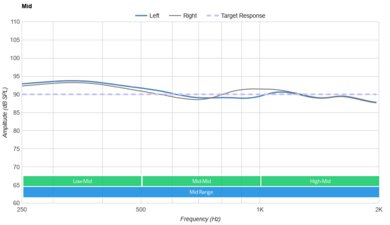
The Logitech G Pro X's mid accuracy is fantastic. The response throughout the range is well-balanced and even, resulting in full-bodied, clear vocals and lead instruments that are present within the mix. However, there is a small bump in low-mids that can muddy and clutter vocals and leads a bit.
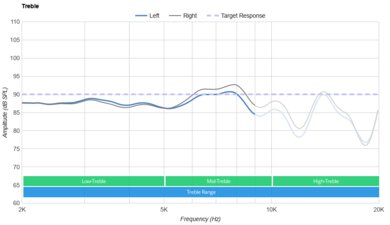
The Logitech G Pro X have decent treble accuracy. The response is fairly well-balanced but slightly underemphasized, slightly veiling dialogue as well as vocals and lead instruments and giving sibilants like S and T sounds a slightly lispy quality. That said, these results represent an average response, and since their treble delivery is heavily dependent on their positioning on your head, your experience can vary in the real-world.
The Logitech Pro X have satisfactory peaks and dips performance. A dip in the low-bass range results in a slight lack of thump and rumble, while the adjacent bump in the high-bass range adds a bit of excess boominess. The peak in the high-mid range can make dialogue, as well as vocals and lead instruments, somewhat honky and harsh. The following dip in the low-treble range can veil some details in the upper harmonics, while the steep peak in the mid-treble gives sibilants a somewhat piercing quality.
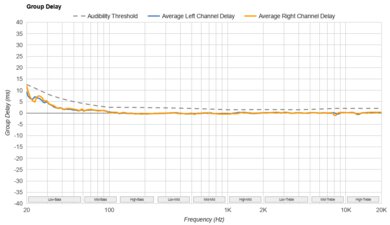
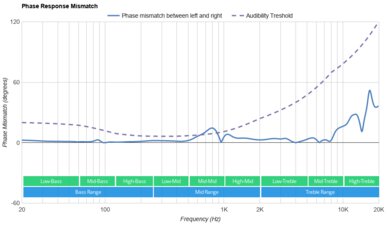
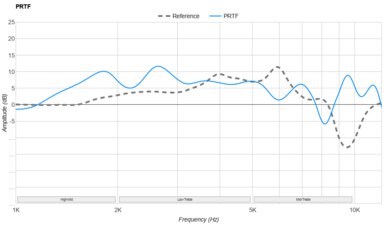
The Logitech G Pro X's stereo imaging performance is impressive. Their weighted group delay falls below the audibility threshold, resulting in a tight bass and a transparent treble. Additionally, the L/R drivers are quite well-matched in amplitude, frequency, and phase response, so objects like voices and footsteps should be accurately placed within the stereo image. Note that these results are only valid for our unit, and yours may perform differently.
The Logitech G Pro X have a poor passive soundstage. It should be perceived as fairly natural but also rather small and closed-off. Sound is likely to be perceived as though it's coming from the inside of your head rather than speakers placed in front of you.
These headphones have a DTS 7.1 virtual surround sound function, but we don't currently test its performance.
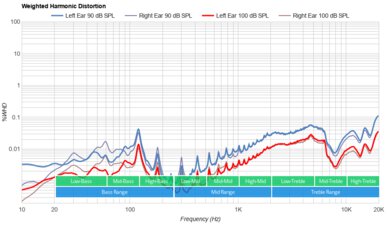
The Logitech Pro X have good weighted harmonic distortion performance. Aside from a bit of distortion in the treble range at moderate listening volumes, which shouldn't be too noticeable in the first place, the rest of the frequency spectrum falls within good limits. This results in a fairly clean and pure audio reproduction.
These are the settings used to test the Logitech G Pro X Gaming Headset. Our results are only valid in this configuration.
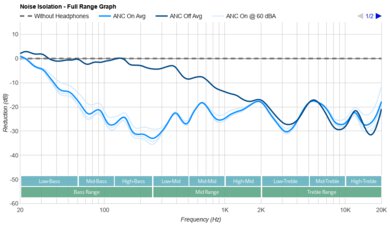
The Logitech G Pro X have middling noise isolation performance and like most other gaming headphones such as the SteelSeries Arctis Prime, they struggle to block out ambient noise around you. In the bass range, occupied by the rumble of airplane and bus engines, they achieve almost no isolation. They do an alright job of blocking out background chatter though, and deliver excellent isolation performance in regards to high-pitched ambient noise, like the hum of an AC unit. For headphones for better noise isolation, check out the EPOS Sennheiser GSP 600.
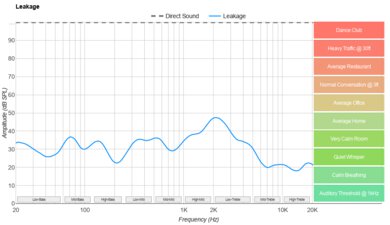
The Logitech G Pro X's leakage performance is good. The significant portion of leakage sits in the mid-range, which makes it sound rather full. Thankfully, the volume of the escaping audio isn't too loud and should be lost beneath the noise floor of most offices.
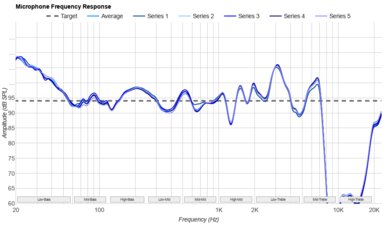
The boom mic has good recording quality. Recorded speech sounds full-bodied, clear, and reasonably natural. It's a little sharp sounding compared to the more subdued treble response of the Beyerdynamic MMX 300 (2nd Generation). Your voice sounds more natural than with the Logitech G PRO X 2 LIGHTSPEED Wireless.
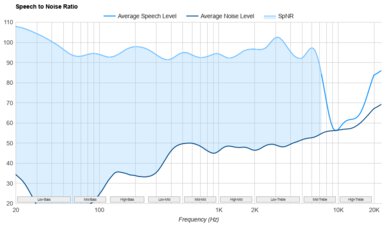
The boom mic has amazing noise handling capability. People on the other end of the line should be able to understand you clearly, even if you're calling from an especially noisy or crowded environment, like a moving subway car.
The Logitech G HUB companion software is superb. There's a graphic EQ and EQ presets to customize their sound profile, but you can also enable surround sound and room effects. You can also enable the proprietary BLUE VO!CE feature, which gives you customization options for your microphone as well. You can save EQ settings from the PC to your USB DAC so that your headphones sound the same when gaming with a PlayStation 4 or 5 as with your PC. Using the software, you'll save the EQ by selecting 'Update On-Board Memory (DAC).' This allows you to use the USB DAC plugged into your console with the same tuning.
That said, there have been many user reports, like startup issues, freezing, and connection issues with some devices. While we didn't experience these problems while testing, if you've had problems using the Logitech G HUB with these headphones, feel free to leave us a comment.
The Logitech Pro X's wired connection is outstanding. They have two 1/8" TRRS cables. You get full audio and microphone support with all devices that have an AUX port whether you use their gaming or mobile cable, though only the former has a volume wheel and a microphone mute switch. You can also use their analog to USB-A adapter on PC and PS4, but it doesn't work with Xbox One consoles. The adapter also stores the settings changes you make in G HUB on PC and keeps them when used on PS4. While using the adapter incurs a slight bit of added audio latency, it's incredibly minor, so you can expect your audio and visuals to stay in sync.
These over-ears offer full audio and microphone compatibility when you plug their 1/8" TRRS cable into the AUX port of an Xbox One or Xbox Series X console.